

Universal Memory (UMem)



A vendor-agnostic cognitive persistence layer for AI agents. Eliminate the "repetition tax" by transporting your context, preferences, guidelines, and history seamlessly across sessions, IDEs, and LLM models.
To see the core idea visually, check out the Excalidraw design or the proposal structure:
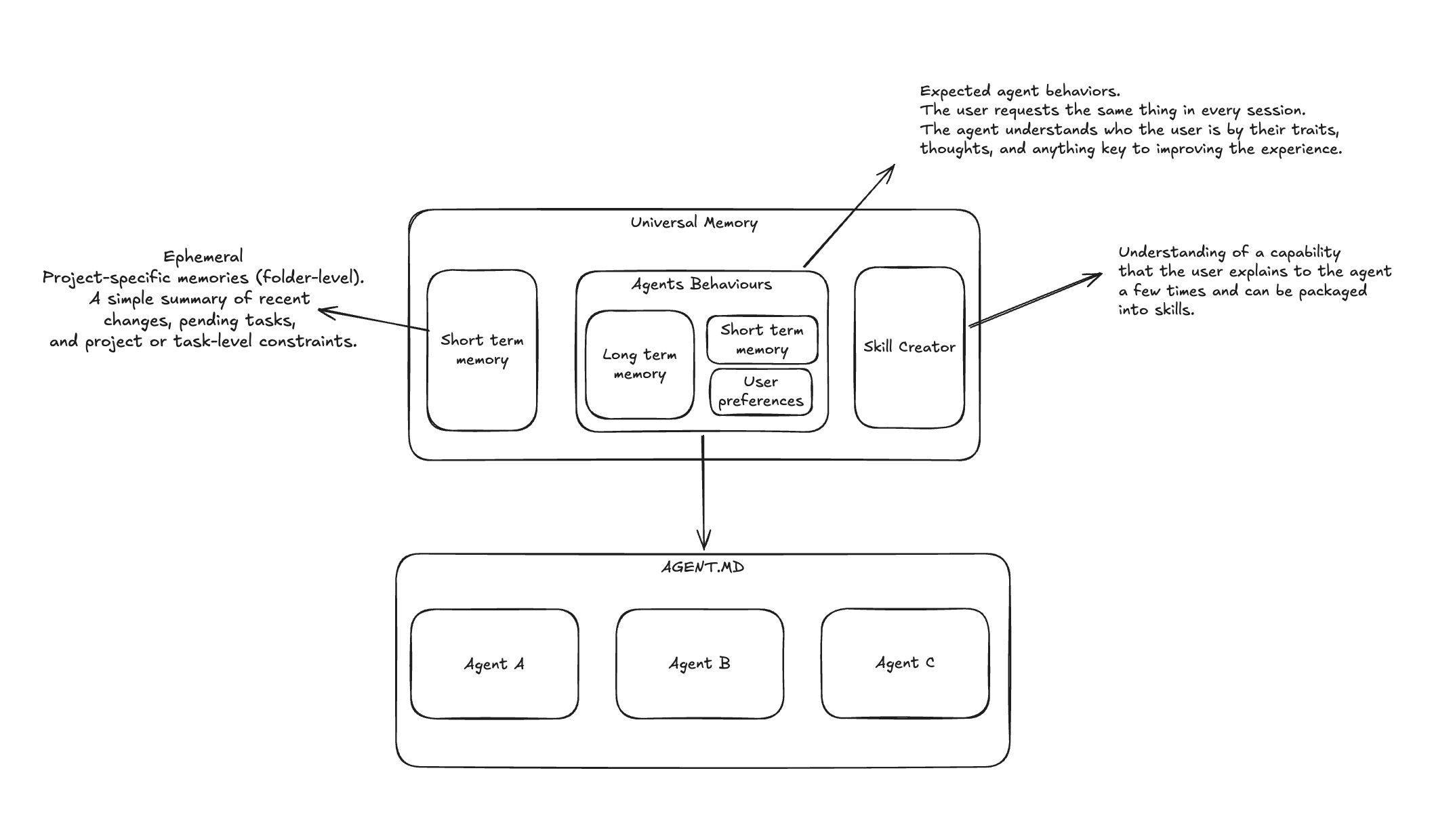
Diagram Breakdown
- Short-Term Memory (Ephemeral): Project-specific (folder-level) memories. A simple summary of recent changes, pending tasks, and project or task-level constraints.
- Agents Behaviours: Comports the user's expected agent behaviors. Instead of requesting the same settings in every session, the agent understands the user by their traits, thoughts, and any context key to enhancing the overall experience. This encompasses:
- Long-Term Memory
- Short-Term Memory
- User Preferences
- Skill Creator: Encapsulates understanding of specific workflows. When a user explains a task pattern multiple times, the system translates it into structured, reusable agent skills.
- Unified Instruction File (
AGENTS.md): The shared persistence endpoint consumed by compatible local agent instances (e.g., Agent A, Agent B, Agent C).
The Problem: The "Repetition Tax"
Every time you open a new session in Claude Code, start a new chat in Cursor, spin up a terminal with OpenCode, or invoke a local AI assistant, you pay a steep cognitive tax:
- Re-explaining your stack (e.g., "We use Python 3.12, Typer, and Ruff").
- Repeating coding style preferences (e.g., "Prefer functional design, do not write docstrings unless requested").
- Copy-pasting database connection schemas or module layouts.
- Explaining workflow methodologies (e.g., "We follow Spec-Driven Development (SDD)").
Universal Memory acts as a local persistence layer that automatically connects to your AI runtimes, aligning them to your exact workflow, context, and rules with zero friction.
Key Architectural Concepts
1. Dual-Memory Model
- Short-Term Memory (Project Scope): Ephemeral, directory-specific context. Tracks what you did 10 minutes ago, current active tasks, and immediate constraints.
- Universal Memory (Global Scope): Long-lived preferences, style guidelines, tool configurations, and identity.
2. Auto-Adaptation Engine
Instead of copy-pasting instructions, umem monitors your session context and automatically updates active project instruction manifests (AGENTS.md, CLAUDE.md, .cursor/rules/, etc.), enforcing operational consistency across all agents.
3. Model Context Protocol (MCP) Integration
Integrate umem natively with any client supporting the standard MCP (such as Claude Desktop or Cursor). AI agents can programmatically retrieve context, learn new facts, and suggest skills on the fly.
4. Agent Skills Standard
Encapsulates complex, repetitive procedural instructions into formal Agent Skills
(conforming to the agentskills.io standard), complete with
structured directories containing SKILL.md instructions, helper scripts/, and
documentation references/.
Universal Memory keeps one canonical source for each skill. Shared, user-facing project
skills live under umem/skills/<slug>/SKILL.md; private, operational, and legacy project
skills live under .umem/skills/<slug>/SKILL.md. Native runtime folders such as
.agents/skills/, .opencode/skills/, and .antigravity/rules/ receive complete
synchronized copies so each agent can consume the same skill in its expected layout.
Installation & Setup
Ensure you have Python 3.12+ installed. You can run or install umem using your preferred package manager.
Try instantly with uvx
You can run umem without installing it permanently:
uvx --from universal-memory umem --help
[!WARNING]
uvxis best for quick trials. For ongoing use, install Universal Memory as a persistent tool soumemis always available and can fully manage long-lived global memories and synced agent skills:uv tool install universal-memory
Install via PyPI
pip install universal-memory
Upgrade Universal Memory
umem update does not upgrade the Python package from PyPI. It performs local, offline
maintenance for the current .umem workspace, such as schema migrations, benchmark refreshes,
and skill synchronization.
To upgrade the installed umem executable, use the package manager that installed it:
# If installed with uv tool
uv tool upgrade universal-memory

# If installed with pipx
pipx upgrade universal-memory

# If installed with pip
python -m pip install --upgrade universal-memory

# If running temporarily with uvx
uvx --refresh --from universal-memory umem --version
Confirm the executable you are running:
umem --version
which umem
Upgrading the executable does not silently mutate existing projects. The next time you work in an initialized project, reconcile it locally:
umem update --check
umem update
umem update --skills
umem connect
umem doctor
You do not need to run umem init again. Local maintenance creates snapshots and audit
records before UMEM-owned writes. Existing .umem/skills/use-universal-memory/ trees and
customized managed files are preserved; if both legacy and canonical Universal Memory
skill roots exist, UMEM stops for an explicit migration decision instead of merging or
deleting either tree.
Quick Start Guide
1. Initialize your project
Open your project directory and run:
umem init
Universal Memory detects the agents already used in the workspace, presents one combined confirmation, configures the best available project integration, and verifies that the agent can read project context. You do not need to choose an integration mechanism or know which instruction files it uses.
When a compatible agent needs the portable Agent Skill, UMEM discloses any network use and external project-scoped copy before confirmation, disables anonymous installer telemetry, and treats a missing prerequisite or failed installation as recoverable instead of blocking initialization.
To connect another agent later, run:
umem connect
Explicit runtime selection remains available for automation and unusual setups, but it is not required for the normal path.
How the portable Tier 2 installation works
UMEM resolves the detected agent's project skill directory from a reviewed catalog
pinned to skills@1.5.20, runs one project-scoped installation, and validates the
complete installed skill tree plus a real umem context read. It does not install into
a second project and copy the result back.
The command orchestrated by UMEM in v0.5.1 is equivalent to:
DISABLE_TELEMETRY=1 npx --yes skills@1.5.20 add https://github.com/YanAmorelli/universal-memory/tree/v0.5.1/skills/universal-memory --skill universal-memory --agent pi --copy -y
Here pi is an example; UMEM supplies the detected agent ID. Node.js and npx are
optional prerequisites for this external bridge. When either is unavailable,
initialization remains usable and UMEM reports a managed or manual fallback. Unknown
agent IDs never execute npx.
2. Save your first preferences and facts
Tell umem what to keep in mind. You can target either the project scope (this folder) or the global scope (across all projects):
# Save a global preference
umem remember --scope global "Yan is a solutions architect specializing in AI applications"

# Save a project-specific constraint
umem remember --scope project "Always use Tomllib instead of PyYAML for configuration files" --tag config
3. Retrieve Context
Verify the consolidated context summary generated by combining short-term facts, rules, and global preferences:
umem context --scope project
4. Adopt or create an Agent Skill
If a skill already exists, choose the safest adoption path first. Use adopt for an
existing .umem/skills/<slug> directory; use import for native runtime directories
such as .agents/skills/<slug> and sync it back out to configured runtimes:
umem skills adopt .umem/skills/review-protocol --scope project
umem skills import .agents/skills/review-protocol --scope project --sync
umem skills detail review-protocol
If you are starting from scratch, draft and publish it without native side effects:
umem skills draft create \
  --name "Review Protocol" \
  --description "Reusable review workflow" \
  --trigger "when reviewing code"
umem skills draft validate review-protocol
umem skills publish review-protocol --format summary
For a one-step workflow, create the canonical skill. It is canonical-only by default; request sync explicitly when native runtime targets should be written:
umem skills create \
  --name "Review Protocol" \
  --description "Reusable review workflow" \
  --trigger "when reviewing code" \
  --format summary
umem skills sync review-protocol --check-gitignore --format summary
After editing .umem/skills/review-protocol/SKILL.md, refresh one runtime skill with:
umem skills sync review-protocol
5. Check status and health
umem status
Host Integration & Support Matrix
UMEM deliberately separates native ownership from portable compatibility:
| Tier | Contract | Guarantee |
|---|---|---|
| Tier 1 — Native/Managed | Maintained host adapter, native setup and repeatable validation | UMEM owns and tests the documented integration. |
| Tier 2 — Directed CLI | AGENTS.md or the official Agent Skill directs a shell-capable agent to the UMEM CLI |
UMEM validates portable instructions, CLI access, and context reading, but not every host-specific behavior. |
| Tier 3 — Unmanaged MCP | The user manually connects MCP to a host without a programmed workflow | UMEM validates MCP availability only; agent behavior is not guaranteed. |
The maintained and named integration surfaces are:
| Runtime / Host | Support Tier | Config / Instructions Target |
|---|---|---|
| Claude Code | Tier 1 — Native/Managed | CLAUDE.md, .claude/skills/, .claude/settings.json |
| OpenCode | Tier 1 — Native/Managed | AGENTS.md, .opencode/skills/, .opencode/opencode.jsonc |
| Codex (OpenAI) | Tier 1 — Native/Managed | AGENTS.md, .agents/skills/, .codex/config.toml |
| Cursor | Tier 2 — Directed CLI | .cursor/rules/universal-memory.mdc |
| Antigravity | Tier 2 — Directed CLI | .antigravity/rules/universal-memory.md |
| Pi, Gemini CLI, GitHub Copilot, Cline, Zed, and other reviewed Agent Skills hosts | Tier 2 — Directed CLI | Project skill directory pinned to the skills@1.5.20 catalog |
| Windsurf | Tier 2 — Frozen legacy adapter | .windsurf/skills/universal-memory/ |
| Unmodeled MCP host | Tier 3 — Unmanaged MCP | User-managed MCP configuration |
An agent appearing in the external skills catalog does not make it Tier 1. Tier 1 is
intentionally small and requires a maintained adapter, release evidence, and repeatable
host-specific validation. See the Getting Started guide
for legacy-project behavior and the portable installation flow.
Running as a Model Context Protocol (MCP) Server
AI agents can interact directly with your memory over the Model Context Protocol. Manual MCP configuration for a host without a programmed UMEM workflow is Tier 3: tool availability is validated, but instruction loading and agent behavior are not guaranteed.
One-off Launch Command
uvx --from universal-memory umem-mcp
Persistent Install Launch Command
umem-mcp
Example Config: Claude Desktop (claude_desktop_config.json)
Use the uvx form when Universal Memory is not installed as a persistent tool:
{
  "mcpServers": {
    "universal-memory": {
      "command": "uvx",
      "args": [
        "--from",
        "universal-memory",
        "umem-mcp"
      ]
    }
  }
}
If you installed Universal Memory with uv tool install universal-memory or pipx install universal-memory, use the stable entrypoint:
{
  "mcpServers": {
    "universal-memory": {
      "command": "umem-mcp",
      "args": []
    }
  }
}
Troubleshoot startup with:
uvx --from universal-memory umem doctor
uvx --from universal-memory umem-mcp --help
For GUI-launched MCP hosts, use the absolute path to uvx if the host does not inherit
your shell PATH.
Safety & Guardrails
- API Secret Scanner:
umempasses all incoming facts through a passive scanner to block API keys, tokens, or credentials from being stored in your persistent cognitive base. - Snapshots & Rollbacks: Every automated update to your config files (
AGENTS.md,CLAUDE.md) is preceded by a snapshot backup. You can rollback anytime:# View audit logs umem audit list --scope project # Revert last automated modification umem rollback --scope project
- Skill Drift Protection:
umem skills syncdetects managed native drift and keeps local changes by default. Use--drift-decision overwriteonly when you intentionally want canonical UMEM content to replace the managed native copy. - External Bridge Boundary: Tier 2 installation through
npx skillsis an explicitly confirmed external mutation. UMEM disables anonymous installer telemetry, constrains the target to the current project, and validates the complete result, but labels the write as externally executed rather than claiming UMEM snapshot ownership.
Managing Agent Skills
You can draft, create, adopt, import, validate, maintain, and sync specialized behaviors:
# List all active skills
umem skills list

# Inspect one skill
umem skills detail review-protocol

# Draft, validate, and publish without native runtime writes
umem skills draft create --name "Review Protocol" --description "Reusable review workflow"
umem skills draft validate review-protocol
umem skills publish review-protocol

# Create a new canonical skill and explicitly sync native targets
umem skills create --name "Review Protocol" --description "Reusable review workflow" --sync

# Adopt existing canonical work
umem skills adopt .umem/skills/review-protocol --scope project

# Import an existing native skill and distribute complete runtime copies
umem skills import .agents/skills/review-protocol --scope project --sync

# Validate and maintain canonical skills
umem skills validate review-protocol
umem skills canonical update review-protocol --file .umem/skills/review-protocol/SKILL.md
umem skills rename review-protocol --slug review-checklist
umem skills cleanup review-checklist --targets --format summary
umem skills cleanup review-checklist --targets --apply
umem skills repair --remove-orphan-targets --format summary

# Synchronize one canonical skill into active native runtime folders
umem skills sync review-protocol --check-gitignore --format summary

# Synchronize all active canonical skills during maintenance
umem update --skills

# Track and review recurring workflow candidates
umem skills track --name "Review Protocol" --description "Recurring review workflow"
umem skills recommend --scope project
umem skills propose <latent-skill-id> --decision yes
umem skills promote <recommendation-id> --yes
umem skills generate <latent-skill-id> --yes
License
Distributed under the Apache License 2.0. See LICENSE and NOTICE for more information.
1 maintainer

Download files
Download the file for your platform. If you're not sure which to choose, learn more about installing packages.
Source Distributions
Built Distribution
Filter files by name, interpreter, ABI, and platform.
If you're not sure about the file name format, learn more about wheel file names.
Copy a direct link to the current filters
File details
Details for the file universal_memory-0.5.1-py3-none-any.whl.
File metadata
- Download URL: universal_memory-0.5.1-py3-none-any.whl
- Upload date:
- Size: 282.7 kB
- Tags: Python 3
- Uploaded using Trusted Publishing? Yes
- Uploaded via:
uv/0.12.1 {"installer":{"name":"uv","version":"0.12.1","subcommand":["publish"]},"python":null,"implementation":{"name":null,"version":null},"distro":{"name":"Ubuntu","version":"24.04","id":"noble","libc":null},"system":{"name":null,"release":null},"cpu":null,"openssl_version":null,"setuptools_version":null,"rustc_version":null,"ci":true}
File hashes
| Algorithm | Hash digest | |
|---|---|---|
| SHA256 |
0e2eda240bc8f23c24d0d2e131ea55d467b74d24cd7ae08282cbc5e8506815ec
|
|
| MD5 |
e8e7ea06b3794369ee4b824a3fac113b
|
|
| BLAKE2b-256 |
9cb9ddf2d75448b759a758babff6c5ffc01ef6e35c77c6081c95fca730a7cb6b
|














