Univorm
A pydantic powered universal ORM wrapper for databases.
This is a python package I created to reuse some functionalities I have had to implement in multiple jobs. For some reason, there aren't any ORM wrappers we can just plug and play. This should help in that area to some extent. I am trying to make it as generalized as possible but data storage services that require paid access may never be part of this package.




Usage
Serialize a dataframe (Pandas/Polars)
now = datetime.now()
data1 = {
    "n": "xin",
    "id": 200,
    "f": ["a", "b", "c"],
    "c": now,
    "b": 20.0,
    "d": {"a": 1},
    "e": [[1]],
}
data2 = {
    "n": "xin",
    "id": 200,
    "f": ["d", "e", "f"],
    "c": now,
    "b": None,
    "d": {"a": 1},
    "e": [[2]],
}

pydantic_objects = await serialize_table(table_name="some_table", data=pd.DataFrame(data=[data1, data2]))
Deserialize a Pydantic Model
class DummyModel(BaseModel):
    x: int
    y: float

models = [DummyModel(x=1, y=2.0), DummyModel(x=10, y=-1.9)]
df = await deserialize_pydantic_objects(models=models)
Flatten NoSQL data to SQL (Pandas/Polars)
data = [
    {
        "id": 1,
        "name": "Cole Volk",
        "fitness": {"height": 130, "weight": 60},
    },
    {"name": "Mark Reg", "fitness": {"height": 130, "weight": 60}},
    {
        "id": 2,
        "name": "Faye Raker",
        "fitness": {"height": 130, "weight": 60},
    },
]

df_pandas = pd.DataFrame(data=data)
df_polars = pl.DataFrame(data=data)
flat_df = await flatten(data=df_pandas, depth=0)
flat_df = await flatten(data=df_polars, depth=0)
flat_df = await flatten(data=df_polars, depth=1)
Connect to a mongodb client
def mongo_client() -> Generator[MongoClient, None, None]:
    client = nosql_client(
        user=os.environ["MONGO_USER"],
        password=os.environ["MONGO_PASSWORD"],
        host=os.environ["MONGO_HOST"],
        dialect=NoSQLDatabaseDialect.MONGODB,
    )
    yield client
    client.close()
Run query on Mongo
documents = [{"name": "test1"}, {"name": "test2"}]
object_ids = insert_into_collection(
    documents=documents, client=mongo_client, dbname="test", collection_name="test"
)

df = find_in_collection(
    query={}, client=mongo_client, dbname="test", collection_name="test"
)
Query a MySQL engine
Create the engine:
async def mysql_engine() -> AsyncGenerator[AsyncEngine, None]:
    engine = await async_sql_engine(
        user=os.environ["MYSQL_USER"],
        password=os.environ["MYSQL_PASSWORD"],
        port=int(os.environ["MYSQL_PORT"]),
        dialect=SQLDatabaseDialect.MYSQL,
        host="localhost",
        dbname=os.environ["MYSQL_DBNAME"],
    )

    yield engine
    await engine.dispose()
Make query:
query = "SHOW DATABASES"
df = await async_query_with_result(query=query, engine=mysql_engine)
Query a PostgreSQL engine
Create the engine:
async def postgres_engine() -> AsyncGenerator[AsyncEngine, None]:
    engine = await async_sql_engine(
        user=os.environ["POSTGRESQL_USER"],
        password=os.environ["POSTGRESQL_PASSWORD"],
        port=int(os.environ["POSTGRESQL_PORT"]),
        dialect=SQLDatabaseDialect.POSTGRESQL,
        host="localhost",
        dbname="postgres",
    )

    yield engine
    await engine.dispose()
Make query:
query = "SELECT * FROM pg_database"
df = await async_query_with_result(query=query, engine=postgres_engine)
Create a SQL Server Engine
Create the engine:
async def sqlserver_engine() -> AsyncGenerator[Engine, None]:
    engine = sync_sql_engine(
        user=os.environ["SQLSERVER_USER"],
        password=os.environ["SQLSERVER_PASSWORD"],
        port=int(os.environ["SQLSERVER_PORT"]),
        dialect=SQLDatabaseDialect.SQLSERVER,
        host="localhost",
        dbname="master",
    )

    yield engine
    engine.dispose()
Make query:
query = "SELECT * FROM master.sys.databases"
df = sync_query_with_result(query=query, engine=sqlserver_engine)
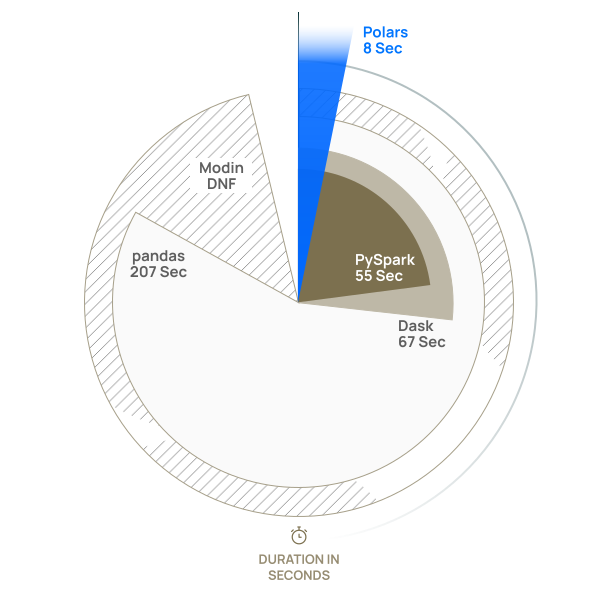
The primary backend for parsing dataframes is polars due to it's superior performance. univorm supports pandas dataframes as well, however, they are internally converted to polars dataframes first to not compromise performance.
The backend for interacting with SQL databases is sqlalchemy because it supports async features and is the de-facto standard for communicating with SQL databases.
Databases Supported
- MySQL
- PostgreSQL
- SQL Server
- Mongodb
Async Drivers Supported
univorm is async first. It means that if an async driver is available for a database dialect, it will leverage the async driver for better performance when applicable. SQL Server driver PyMSSQL does not have an async variation yet.
- PyMongo for Mongodb. Currently async support is in beta but since PyMongo is natively supporting async features, it's safer to use it rather than a third party package like Motor.
- Asyncpg for PostgreSQL.
- AioMySQL for MySQL.
Plan for Future Database Support
Test Locally
Have docker compose, tox and uv installed. Then run docker compose up -d. Create the environment
uv venv
uv sync --dev --extra formatting --extra docs
uv lock
Then run tox -p
1 maintainer

Release files for univorm 0.5.0
For a detailed explanation of source distributions (sdists) and built distributions (wheels), please see the package formats documentation.
Source distribution (sdist)
| File | Size | Uploaded | |
|---|---|---|---|
| univorm-0.5.0.tar.gz | 11.2 kB | Details |
Built distribution (wheel)
| File | Interpreter | ABI | Platform | Reset |
|---|---|---|---|---|
| univorm-0.5.0-py3-none-any.whl | Python 3 | none | any | Details |
Total release size: 24.0 kB
Release files / univorm-0.5.0.tar.gz
| Download URL | univorm-0.5.0.tar.gz |
|---|---|
| Size | 11.2 kB |
| Tags | Source |
|
SHA-256 checksum How to use checksums |
92953bbdd50bdc455d241f4c92d5b887ec2dda25ca88a69a9c21f430e5371221
|
|
BLAKE2b-256 checksum How to use checksums |
a4139092c46a3b46784638b868141508ea02f6e55f545bbea6539b8cc46be038
|
| Upload date | |
|
Uploaded using Trusted Publishing? What is trusted publishing? |
No |
| Uploaded via |
uv/0.8.22
|
Release files / univorm-0.5.0-py3-none-any.whl
| Download URL | univorm-0.5.0-py3-none-any.whl |
|---|---|
| Size | 12.8 kB |
| Tags | Python 3 |
|
SHA-256 checksum How to use checksums |
4d1bcb3a5fdf8ced46415d4001994514da3e1789217f724be66c16b78f7b982c
|
|
BLAKE2b-256 checksum How to use checksums |
8c96d3d1414b5b9a29986c5426c76879b8f330777c5d9c80cc8de21b11b4e2e3
|
| Upload date | |
|
Uploaded using Trusted Publishing? What is trusted publishing? |
No |
| Uploaded via |
uv/0.8.22
|