
Unlatch





"The action can't be completed because the file is open in another program." Unlatch tells you which program, and lets it go.
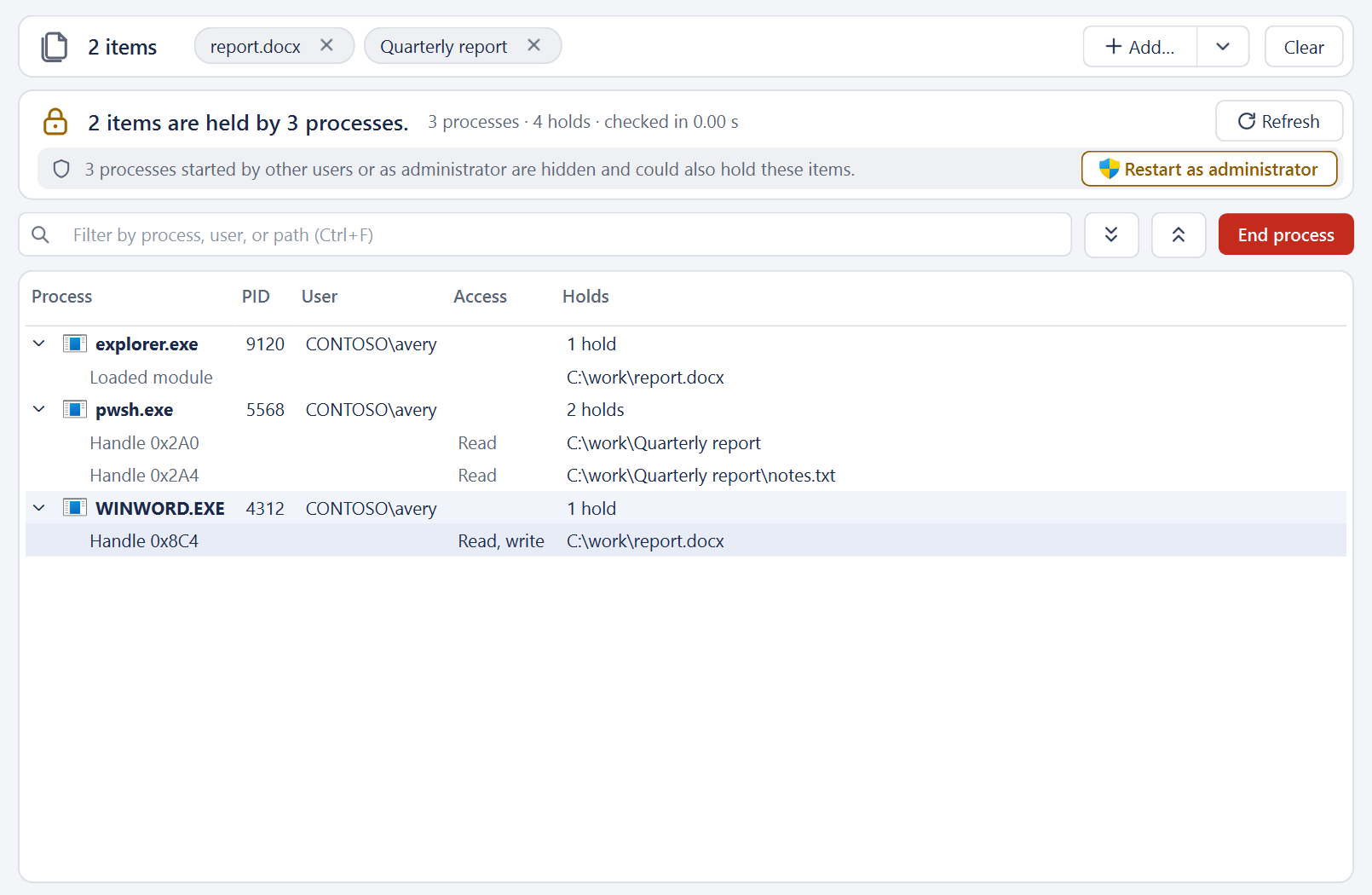
Right-click a file or folder, choose Check locks with Unlatch, and Unlatch lists every process that has it open, has a working directory inside it, or has it loaded as a program or DLL. End the process in one click, or, as an advanced step, close just the handle that blocks you.
Features
- Finds every kind of hold: open file and folder handles, working directories, loaded DLLs, and program files, for a file, a folder and everything inside it, or several items at once. Works on local drives, volumes mounted in folders, network shares, and WSL paths.
- Explorer integration: a per-user Check locks with Unlatch entry for files, folders, folder backgrounds, and drives. Selecting several items opens one window.
- Safe actions: before ending a process or closing a handle, Unlatch checks that the PID and handle still belong to what you saw, so a stale row never ends an unrelated program.
- Honest about blind spots: when not elevated it says how many processes it could not inspect and offers Restart as administrator.
- Scriptable:
unlatch scan --json,unlatch check(exit code 3 when held),unlatch kill, andunlatch release. - Fast: one read of the system handle table, filtered before any expensive call; a typical scan takes well under a second.
Unlatch fills the same need as Microsoft PowerToys File Locksmith. It is an independent Python implementation that installs on its own.
Install
Requires Windows 10 or later and Python 3.13 or later.
uv tool install unlatch
Or with pip: pip install unlatch. Wheels with build provenance are also
attached to each GitHub release.
Explorer Menu
Unlatch never changes the File Explorer menu on its own. Add Check locks with Unlatch for your account (no administrator rights needed) with:
unlatch shell install
On Windows 11 the entry is under Show more options (Shift+F10), like other classic menu entries.
| Do this | Run |
|---|---|
| Add or update the entry | unlatch shell install |
| See whether it is installed, current, or has leftovers | unlatch shell status |
| Remove it, including entries older versions added | unlatch shell uninstall |
After uv tool upgrade unlatch, run unlatch shell status; if it says the
entry is out of date, run unlatch shell install again. Python installers
cannot run code when a package is removed, so remove the entry first:
unlatch shell uninstall
uv tool uninstall unlatch
Unlatch records every registry location any version has used, so install and
uninstall always clear entries left behind by older versions.
Use
| Do this | Run |
|---|---|
| Open the window | unlatch or unlatch-gui (no console) |
| Open the window on paths | unlatch gui C:\path\file.txt C:\path\folder |
| List holders | unlatch scan C:\path\file.txt |
| List holders as JSON | unlatch scan --json C:\path\folder |
| Test in a script | unlatch check C:\path\file.txt (0 free, 3 held, 1 error) |
| End every holder | unlatch kill C:\path\file.txt (asks first; --yes to skip) |
| Close the blocking handles only | unlatch release C:\path\file.txt (asks first) |
In the window, Add… opens one picker for files or a folder (use Add this folder for the folder you are in), or drop files and folders onto the window. Select one or more rows (Ctrl or Shift) and press Delete to end the processes that hold them. F5 checks again, Ctrl+F filters, Ctrl+C copies the selected rows, and Ctrl+Plus or Ctrl+Minus expands or collapses every process. Right-click a row to copy a cell or its details, open the file location, or close a handle.
Each handle row shows its handle value (as in Process Explorer, so two handles on the same file are told apart) and what it may do with the item, such as Read, write. Hover a row, or use Copy details, for the full access mask and every right in it. Windows does not reveal the sharing mode a program chose, which is what decides whether a handle blocks a rename or delete.
Close this handle (advanced) closes the handle inside the program, as if the program had closed it, without telling the program. The item is then free unless something else holds it, but the program still thinks it is open: its next use of the handle fails, or reaches a different file if Windows reuses the number, so it may lose unsaved work, damage the file, or crash. Ending the process is the safer choice.
Limits
- Without administrator rights, processes of other users and elevated processes are not visible. Unlatch counts them and offers to restart elevated.
- Kernel-mode handles (including files opened by other computers over SMB, which belong to the System process) and memory-mapped files whose handle was closed are not reported.
Documentation
| Document | Contents |
|---|---|
| Philosophy and architecture | Purpose, principles, and how a hold is found |
| UX contract | Promises the window keeps, each proven by a test |
| Brand | Name, icon, and asset rules |
| Testing | Test suites, markers, and mutation testing |
| Releasing | How versions and releases are produced |
| Decisions | Why Unlatch is built the way it is |
| All documentation | Index of everything under docs/ |
| Contributing | Setup and the quality gate |
License
MIT. See LICENSE.
1 maintainer

Metadata
1 maintainer
Release files for unlatch 0.7.0
For a detailed explanation of source distributions (sdists) and built distributions (wheels), please see the package formats documentation.
Source distribution (sdist)
| File | Size | Uploaded | Provenance | Actions |
|---|---|---|---|---|
| unlatch-0.7.0.tar.gz | 87.6 kB | With provenance | Details for unlatch-0.7.0.tar.gz |
Built distribution (wheel)
| File | Interpreter | ABI | Platform | Actions Reset |
|---|---|---|---|---|
| unlatch-0.7.0-py3-none-any.whl | Python 3 | none | any | Details for unlatch-0.7.0-py3-none-any.whl |
Total release size: 183.1 kB
Release files / unlatch-0.7.0.tar.gz
| Download URL | unlatch-0.7.0.tar.gz |
|---|---|
| Size | 87.6 kB |
| Tags | Source |
|
SHA-256 checksum How to use checksums |
254151c76a3bcfaa7591f8818a1a774a68a84b6cd2683fc79fa5863fc34169a9
|
|
BLAKE2b-256 checksum How to use checksums |
89484f4a55e02f6398682955a58111072858e305b90b57acd16f427cb25a673a
|
| Upload date | |
|
Uploaded using Trusted Publishing? What is trusted publishing? |
Yes |
| Uploaded via |
twine/7.0.0 CPython/3.13.16
|
Provenance
Provenance describes where a file came from. On PyPI, provenance is shared via attestations, which provide a verifiable record of the build or publishing details. View details, limitations and caveats.


PyPI Publish Attestation
PyPI verified that this artifact, at this checksum, originated from the publisher listed below.
Signed by GitHub Actions, verified by PyPI on Nov 29, 2026.
Transparency logRelease files / unlatch-0.7.0-py3-none-any.whl
| Download URL | unlatch-0.7.0-py3-none-any.whl |
|---|---|
| Size | 95.5 kB |
| Tags | Python 3 |
|
SHA-256 checksum How to use checksums |
3f9812a05d65035ab745c2719f23f5bdc7420ee9b168dd202b1adcba728692dd
|
|
BLAKE2b-256 checksum How to use checksums |
b0ad9fc509a5fca1e6019b942028095e08cbe9d14ffa90bc9519a05dc07a27a7
|
| Upload date | |
|
Uploaded using Trusted Publishing? What is trusted publishing? |
Yes |
| Uploaded via |
twine/7.0.0 CPython/3.13.16
|
Provenance
Provenance describes where a file came from. On PyPI, provenance is shared via attestations, which provide a verifiable record of the build or publishing details. View details, limitations and caveats.
PyPI Publish Attestation
PyPI verified that this artifact, at this checksum, originated from the publisher listed below.
Signed by GitHub Actions, verified by PyPI on Nov 29, 2026.
Transparency logSecurity for unlatch 0.7.0
Provenance
Provenance describes where a file came from. On PyPI, provenance is shared via attestations, which provide a verifiable record of the build or publishing details. View details, limitations and caveats.
Full provenance
Both files in this release have been uploaded with provenance metadata.
Attestation for unlatch-0.7.0.tar.gz
PyPI Publish Attestation
PyPI verified that this artifact, at this checksum, originated from the publisher listed below.
Signed by GitHub Actions, verified by PyPI on Nov 29, 2026.
Transparency logA note on package security
PyPI is a repository for distributing packages, not a service for auditing them. While third-party security researchers and our staff do their best to detect and remove malicious packages, PyPI cannot guarantee the quality, security or suitability of any given package.
To learn more about protecting yourself from malicious actors, visit our package security documentation.














