
unlimited
How much of each AI subscription you have used, per window, and where each window is heading: Claude, Codex, Z.ai GLM, Kimi Code, OpenCode Go, Grok, Neuralwatt and Command Code, across every account on the machine.

It comes three ways, all from the same readings:
- In the menu bar: a macOS app, one tile per account.
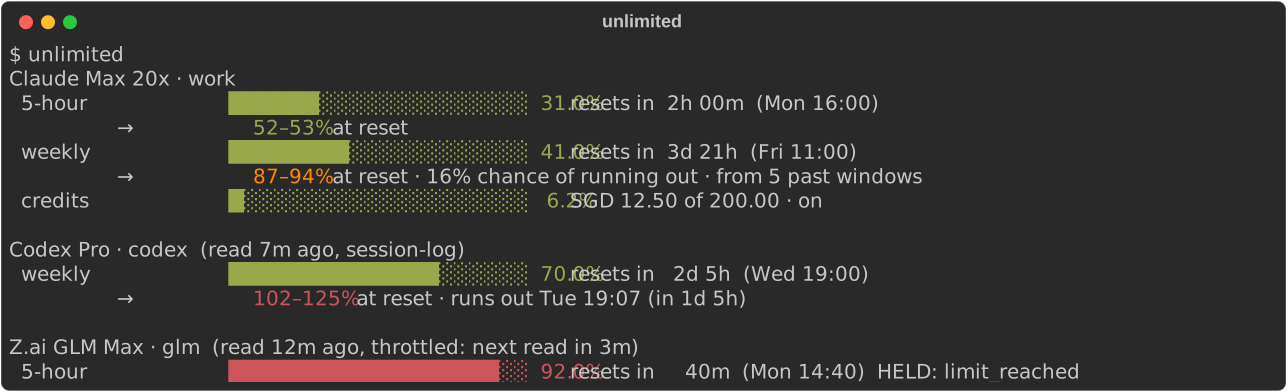
- In the terminal:
unlimited, a block per account. - For agents:
unlimited read --json, for load-balancing and pacing work across subscriptions.
uv tool install unlimited # or: pipx install unlimited
unlimited                                # usage per account, for people
unlimited read [--vendor V]... [--max-age SECONDS] --json
unlimited capture claude-statusline      # in a Claude Code statusline script
Each reading gives each limit's window length, the fraction used so far, and its reset time. It also gives whether the vendor says the limit is held, and why, and, where the vendor names it, the account's plan and, for Claude, its credits: what it may spend once the windows are used. unlimited reports what the vendor says, and projects it forward: a reading never picks an account or draws a threshold. Choosing what to do with a reading is up to the consumer.
In the menu bar
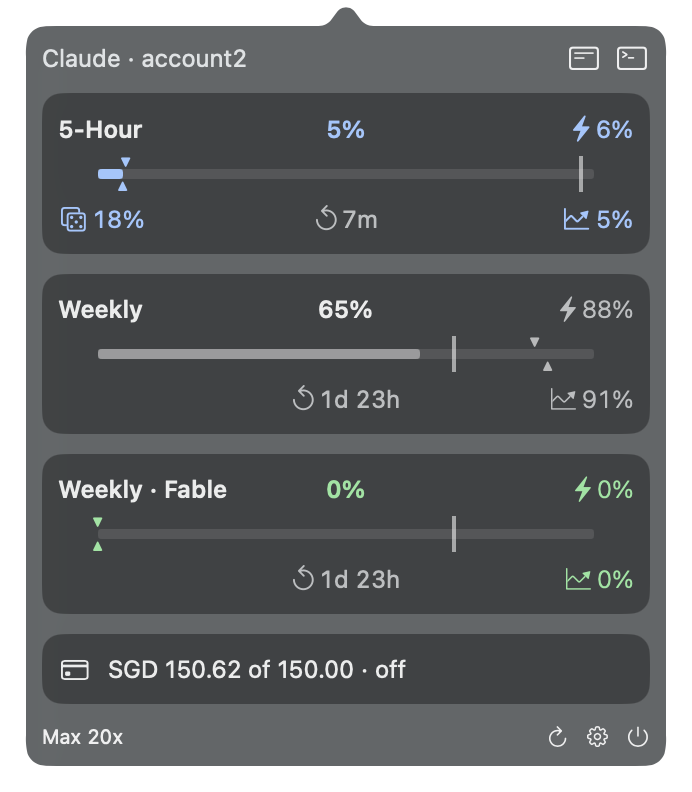
Each tile shows an account's weekly use. When another of its windows is in worse shape, the tile cross-fades to it now and then. The thin bar beside each figure is how much of the week has passed. Where a vendor has several accounts, the one to use next is underlined.
The colour says where the window is heading, once there is enough to go on:
- Blue: it resets soon with room to spare. Spend it.
- Green: it is heading well under the limit.
- Plain: carry on.
- Amber: it might run out before it resets.
- Red: it will, or it has.
Click a tile for its account's windows. On each bar, the line is where an even pace would be by now, ▼ is where today's pace reaches by the reset and ▲ is the forecast. Below it: 🔥 when it runs out, 🎲 the chance it does, ↻ when it resets and 📈 the forecast. A forecast in a thinner weight rests on this window alone, before past windows back it. Click another tile to switch accounts. Settings relabels, hides and reorders tiles.
The app reads no credential and calls no vendor: it runs unlimited read --json. To build it,
with Command Line Tools only:
cd macos && make app && open .build/Unlimited.app
In the terminal
For agents
unlimited read --json gives the same readings, one per account (one limit shown):
[
  {
    "schema": 1,
    "vendor": "anthropic",
    "account": "work",
    "taken_at": "2026-09-21T14:00:00+00:00",
    "source": "api",
    "plan": "default_claude_max_20x",
    "status": "ok",
    "why": null,
    "retry_until": null,
    "credits": {
      "taken_at": "2026-09-21T14:00:00+00:00",
      "enabled": true,
      "used": 12.5,
      "limit": 200.0,
      "balance": null,
      "currency": "SGD",
      "severity": "normal",
      "disabled_reason": null,
      "can_purchase": false
    },
    "names": ["work"],
    "limits": [
      {
        "name": "seven_day",
        "window_minutes": 10080,
        "used_at_least": 0.41,
        "resets_at": "2026-09-25T11:00:00+00:00",
        "held": false,
        "held_why": null,
        "severity": null,
        "active": null,
        "kind": null,
        "role": "weekly",
        "scope": null,
        "projection": {
          "at_reset": [0.873, 0.9436],
          "recent_at_reset": 0.9436,
          "exhausts_at": null,
          "run_out": 0.164,
          "samples": 2,
          "past_windows": 5,
          "since": "2026-09-20T14:00:00+00:00"
        }
      }
    ]
  }
]
Read projection.at_reset against used_at_least rather than either alone, and
past_windows/samples for how much the projection rests on.
role says what kind of window a limit is, whatever the vendor calls it: session, weekly,
weekly_model (one model's weekly limit, named in scope), month, extra (any other window,
named in scope where the vendor names it), or null for an entry that repeats another or is not
a window. names are this machine's names for the account: the config directories or wrappers
holding its credential.
Models
unlimited models [--tier standard|heavy] [--json] lists what each provider runs at a tier, with
promotions first; --provider P prints one model id; --catalog prints the whole merged catalog as JSON. The list ships in
catalog.toml. ~/.config/unlimited/catalog.toml overrides it on one
machine, with no release: provider keys one by one, promotions whole, and banned model ids added
to the shipped ones. A local file that does not parse, or states another schema, is an error.
Which model to run is still the consumer's choice.
Credits
A window at 100% is not always the end. Where the vendor reports it (Claude's spend), the reading's
credits says what the account may spend past its windows, in currency's major units:
used of limit this period, any prepaid balance, and whether spending is enabled now, with
the vendor's own disabled_reason when it is not (e.g. org_level_disabled_until, a cap the
organisation switched off). limit: null with enabled: false is an account that never turned
credits on. Whether more can be spent is enabled and used < limit; unlimited draws no line.
credits.taken_at is when the vendor said so: a fresh statusline capture carries the last
API read's credits forward, dated. credits is null for vendors without the concept, and is
not projected: the vendor reports no reset for it.
Sources
| Vendor | Local, no network | Network |
|---|---|---|
| Anthropic (Claude Code, claude.ai sign-in) | the rate_limits Claude Code hands its statusline, via capture |
oauth/usage on Claude Code's own token |
| OpenAI (Codex, ChatGPT sign-in) | rate_limits in Codex's session logs |
wham/usage on Codex's own token |
| Z.ai (GLM coding plan) | — | quota/limit on each claude-glm wrapper's API key |
| Moonshot Kimi (Kimi Code coding plan) | — | coding/v1/usages on each claude-kimi wrapper's API key |
| OpenCode Go | — | zen/go/v1/usage on the Go key in each opencode identity's auth.json: the default and every ~/.opencode-N (add another) |
| xAI Grok (SuperGrok, Grok CLI sign-in) | — | the Grok CLI's billing proxy on its own token |
| Neuralwatt Cloud | — | v1/quota on $NEURALWATT_API_KEY and each ~/.config/neuralwatt*.env |
| Command Code | — | alpha/billing/credits and alpha/billing/subscriptions on $COMMAND_CODE_API_KEY and each ~/.config/commandcode*.env |
The network endpoints are not officially documented and may change without notice. unlimited
reads each harness's credential where the harness keeps it and never writes it back. The one token
it refreshes is Grok's, whose sign-in lasts hours: the renewed token is kept, owner-only, in
~/.cache/unlimited/credentials/. No token appears in its output, readings or errors.
Projection
Each limit also carries a projection: where the window is heading, from the readings unlimited
has taken. Within the window, two paces are extended to the reset — the average since it opened,
and a recency-weighted pace with a half-life of a fourteenth of the window, which rises with a
burst and falls in a quiet spell. Past windows of the same limit, kept for
eight windows, add the shape of use (quiet nights, busy Mondays): each one's use from this point
to its end, shifted to today's. They take over from the paces between the third and eighth window.
at_reset is [low, high], unclamped, so 1.07 means use would pass the limit. recent_at_reset is the recent pace alone
extended to the reset: today's momentum, which past windows do not move. exhausts_at
is when the high end reaches it, if before the reset. run_out is how likely use passes it, from the past windows that did, or null
without them. samples, past_windows and since say what it rests on. A projection is only as good as how often something reads: a statusline
capture feeds it continuously.
Cache
There is one cache file and one flock per vendor under $XDG_CACHE_HOME/unlimited, mode
0600. Concurrent callers share one upstream request. A 429's Retry-After holds off every
caller until it passes, capped at 24 hours; a 429 or 5xx holds off at least five minutes, and the
account's last good reading stands in the meantime. On macOS the keychain is readable only from the
user's GUI session or launchd, not over plain ssh.
Status
Pre-release. The schema ("schema": 1) may still change.
Releasing
main takes changes only through a pull request that passes the tests and the identity check.
Bump version in pyproject.toml in one, merge it, then tag the merge commit vX.Y.Z and push
the tag: the Publish workflow puts it on PyPI by trusted publishing, with no stored token.
2mw2lt
unlimited is part of 2mw2lt — Too Much Work, Too Little Time — a steering partner that coordinates work across AI workers and trusted people. 2mw2lt reads its accounts through unlimited. Its sibling work-tempo tracks source-code momentum across Git workspaces.
1 maintainer

Release files for unlimited 0.0.34
For a detailed explanation of source distributions (sdists) and built distributions (wheels), please see the package formats documentation.
Source distribution (sdist)
| File | Size | Uploaded | |
|---|---|---|---|
| unlimited-0.0.34.tar.gz | 222.2 kB | Details |
Built distribution (wheel)
| File | Interpreter | ABI | Platform | Reset |
|---|---|---|---|---|
| unlimited-0.0.34-py3-none-any.whl | Python 3 | none | any | Details |
Total release size: 268.8 kB
Release files / unlimited-0.0.34.tar.gz
| Download URL | unlimited-0.0.34.tar.gz |
|---|---|
| Size | 222.2 kB |
| Tags | Source |
|
SHA-256 checksum How to use checksums |
40cf1991006ff0570ddbd95aa4a9a6738e35b2e63713031b9cadf3ea256aef0e
|
|
BLAKE2b-256 checksum How to use checksums |
ac1b2b24e58f568c67eab1ae71951c3951181f127ff2d51e73871ccdea680caf
|
| Upload date | |
|
Uploaded using Trusted Publishing? What is trusted publishing? |
Yes |
| Uploaded via |
twine/7.0.0 CPython/3.13.14
|
Provenance
Provenance describes where a file came from. On PyPI, provenance is shared via attestations, which provide a verifiable record of the build or publishing details. View details, limitations and caveats.


PyPI Publish Attestation
PyPI verified that this artifact, at this checksum, originated from the publisher listed below.
Signed by GitHub Actions, verified by PyPI on Sep 25, 2026.
Transparency logRelease files / unlimited-0.0.34-py3-none-any.whl
| Download URL | unlimited-0.0.34-py3-none-any.whl |
|---|---|
| Size | 46.6 kB |
| Tags | Python 3 |
|
SHA-256 checksum How to use checksums |
4c49542d338772fbbd5e343324994c5b561cb6a98b770851abcc86af721e0498
|
|
BLAKE2b-256 checksum How to use checksums |
de552f9828d1029b8b970eb2d5c478a8058c9f8c650878c48cea8d8b380a3b0f
|
| Upload date | |
|
Uploaded using Trusted Publishing? What is trusted publishing? |
Yes |
| Uploaded via |
twine/7.0.0 CPython/3.13.14
|
Provenance
Provenance describes where a file came from. On PyPI, provenance is shared via attestations, which provide a verifiable record of the build or publishing details. View details, limitations and caveats.
PyPI Publish Attestation
PyPI verified that this artifact, at this checksum, originated from the publisher listed below.
Signed by GitHub Actions, verified by PyPI on Sep 25, 2026.
Transparency log













