
This release is a pre-release and may not be stable for production use.
Unofficial Matic SDK



An async Python SDK and CLI for connecting directly to a Matic robot you own. Pair once over Bluetooth, then read and control the robot through its authenticated local-network service without a cloud relay.
Warning: This project is unofficial, unaffiliated with Matic Robots, and based on independent protocol research. It is alpha software for hardware you own. Commands can move the robot or change persistent settings.
- What you can do
- Quick start
- Read live robot data
- Capture maps, voxels, and media
- Use the Python API
- Control the robot
- Documentation and examples
- Known boundaries
What you can do
| Area | SDK capabilities |
|---|---|
| Enrollment | Pair a Linux computer over Bluetooth and retain a private per-client BotToken |
| Live data | Decode 43 collection targets covering pose, operating state, motors, missions, schedules, history, media, settings, and maps |
| Motion | Stop, pause, stay put, dock, drive with direct joystick velocities, or navigate to a mission pose |
| Cleaning | Run mapped-room coverage, reprioritize an active plan, or clean a drawn dry-stain/wet-spill area |
| Maps | Build partitions; edit rooms, no-go/drive-only/stair zones, semantics, and sink-summon locations |
| Schedules and settings | Create schedules and change supported preferences through typed methods |
| Exports | Assemble RGB/coverage/semantic maps, export sparse colored voxels as PLY, and recover retained WebP media |
All 65 documented command intents have registered protocol-25 codecs. The verification ledger distinguishes commands exercised on a real robot from formats proven only through offline native serialization.
Matic pairing mode ── Bluetooth once ──> private BotToken on this computer
this SDK           ── TLS + HTTP/2 over the LAN ──> robot Hermes service
Quick start
You need Python 3.11 or newer. Bluetooth enrollment currently requires Linux with BlueZ; Bluetooth is not needed after enrollment.
1. Install
python -m pip install --pre "unofficial-matic-sdk[all]"
matic --version
With uv:
uv tool install --python 3.13 --prerelease allow \
  "unofficial-matic-sdk[all]"
matic --version
2. Pair once over Bluetooth
In the Matic app, open Settings → Connectivity → Add another user, enable pairing mode, and keep the computer's Bluetooth adapter close to the robot. Then run:
matic enroll --device living-room
Complete the BlueZ passkey prompt with the six-digit code displayed by Matic.
living-room is only a local alias. The SDK creates its own client UUID and
saves the returned token in an owner-only credential directory without
overwriting an existing enrollment.
If you already have an owner-only serialized token:
matic credentials import-token \
  --device living-room \
  --source /secure/path/to/bot-token.pb
3. Identify the LAN endpoint and pin TLS
Find the robot's IP address or hostname in your router's DHCP/client list. The SDK intentionally does not sweep the LAN.
export MATIC_DEVICE=living-room
export MATIC_HOST=ROBOT_IP_OR_HOSTNAME
Confirm the unauthenticated identity before sending credentials:
matic probe --host "$MATIC_HOST" --insecure-read-only
Compare the returned serial number with a trusted record or physical device label. Then inspect and pin the certificate:
matic tls fingerprint --host "$MATIC_HOST"
export MATIC_CERT_SHA256=VERIFIED_64_CHARACTER_SHA256
matic status
The fingerprint is a trust-on-first-use observation. See Troubleshooting for the full verification boundary and certificate-change guidance.
4. Read the command protocol version
Reads work without selecting a command protocol. Decode the retained version model:
matic collections stream current_version \
  --count 1 \
  --duration 10 \
  --decode \
  --json
Use its protocol_version in programs that send commands:
export MATIC_PROTOCOL_VERSION=25
Version 25 is the verified baseline. Another positive version is accepted with
an UnverifiedProtocolVersionWarning instead of blocking the write.
Read live robot data
List all 43 accepted targets:
matic collections list
Stream privacy-preserving event metadata:
matic collections stream latest_pose --count 20 --duration 30
Include the registered friendly model as JSON Lines:
matic collections stream latest_pose \
  --count 20 \
  --duration 30 \
  --decode \
  --json
The decoded view omits raw protobuf and media bytes. Names, network/account
data, pairing codes, and stable media hashes are redacted unless
--include-sensitive is explicitly supplied.
Record synchronized raw responses into a new private directory:
matic collections record captures/telemetry \
  --target latest_pose \
  --target kabuki_state \
  --target motor_status \
  --duration 30
Decode the saved directory later; its manifest supplies each target:
matic collections decode captures/telemetry --json
For one response file, pass its target:
matic collections decode event.pb --target latest_pose --pretty
Capture maps, voxels, and media
Assemble map tiles
matic collections record captures/map \
  --target map_compressed_rgb \
  --duration 20

matic maps decode captures/map \
  --output decoded-map \
  --target map_compressed_rgb
The decoder supports RGB, integrated, combined-coverage, semantic, and semantic-override captures and assembles them in the canonical app orientation.
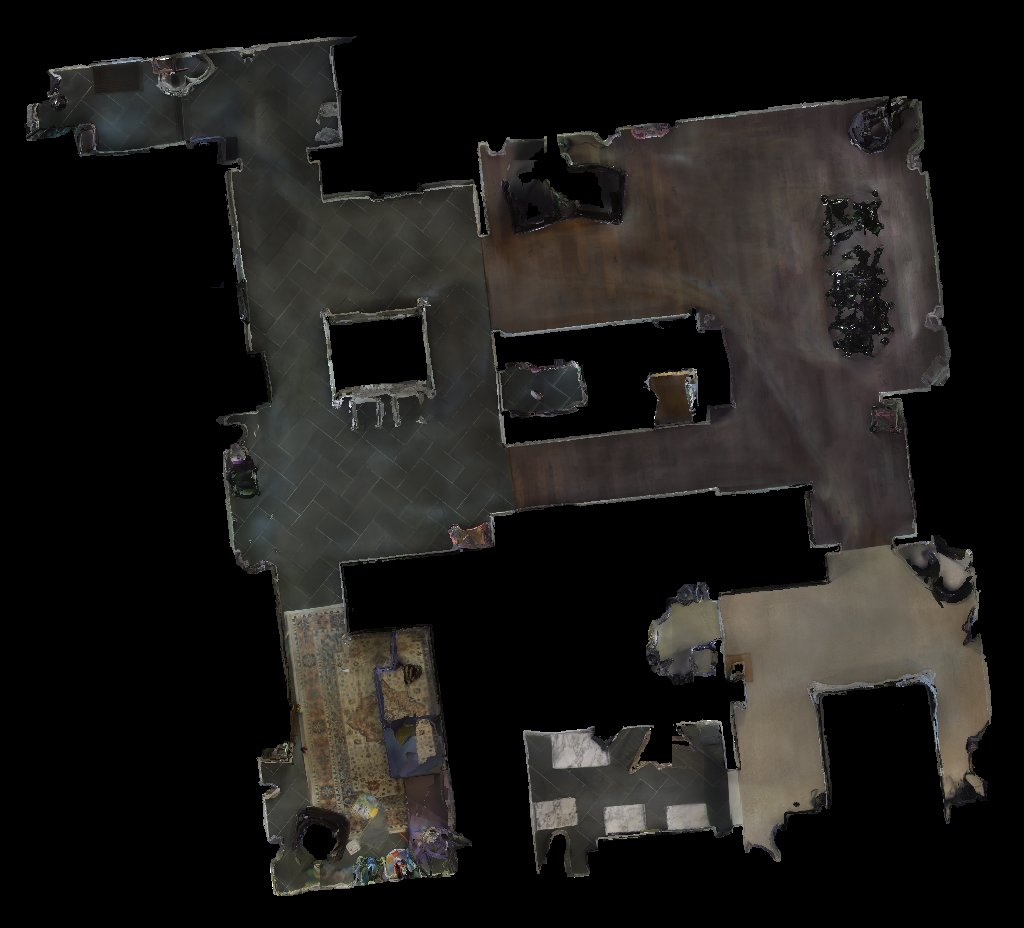
Decoded RGB map tiles assembled into one floor mosaic.
Export the sparse voxel surface
The compressed RGB collection also contains a 32 x 32 x 24 sparse colored
surface representation:
matic voxels export captures/map --output surface-map.ply
Use --all-depths for depths hidden by the app's normal surface rendering, or
--coordinate-mode app-native to preserve the native coordinate convention.
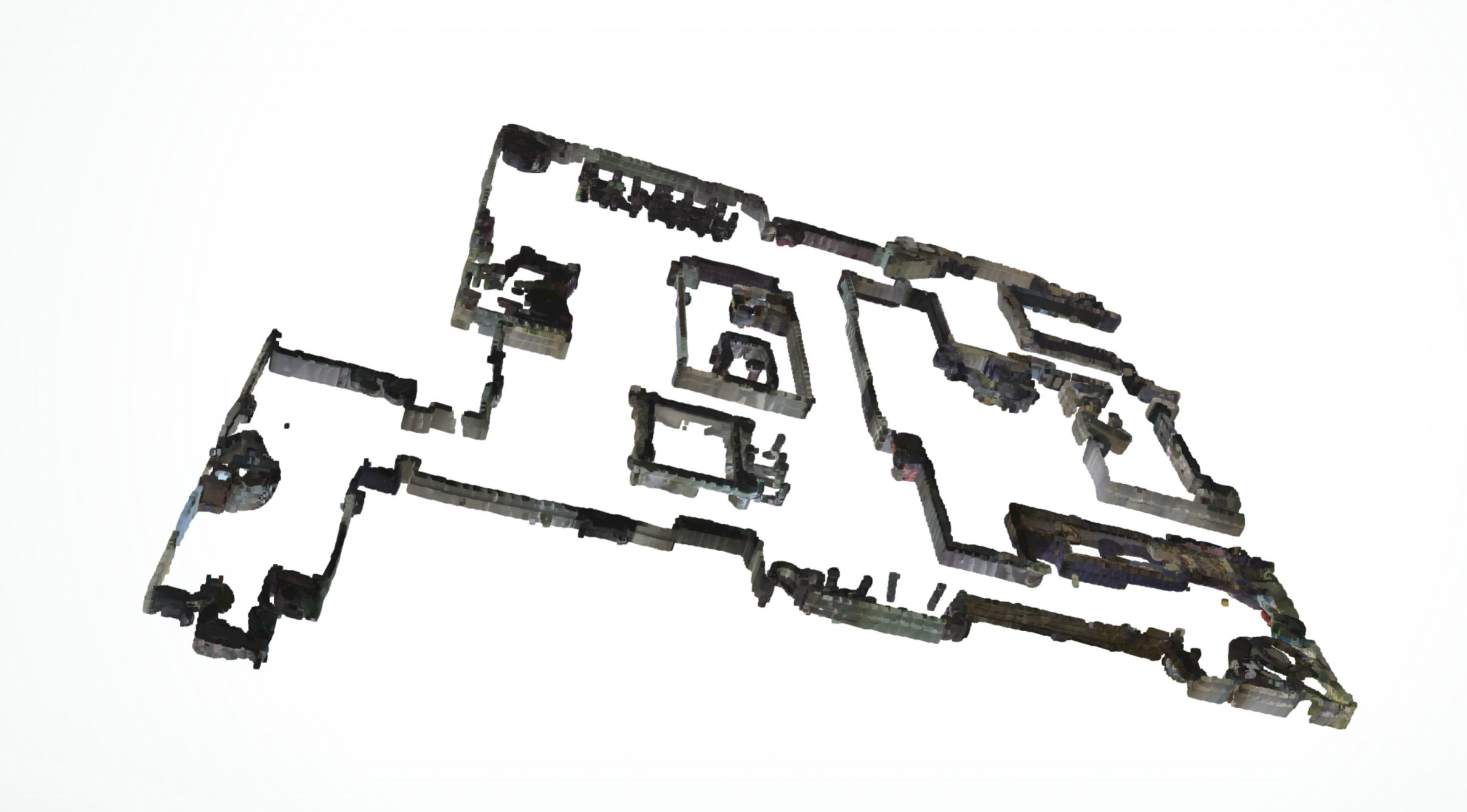
The same capture exported as a colored PLY point cloud.
Extract retained media
matic collections record captures/thumbnails \
  --target coverage_session_thumbnails \
  --duration 10

matic media extract captures/thumbnails --output extracted-images
This recovers validated WebP containers already present in retained responses. It does not start a recording or provide a live optical-camera stream.
Use the Python API
Every known collection target decodes to a named immutable model. The in-memory
model also retains raw_payload and parsed fields, so newer protobuf fields
are not discarded.
import asyncio
import os

from matic_sdk import MaticClient, MaticConfig, TlsConfig
from matic_sdk.models.collections import PoseCollectionModel


async def main() -> None:
    config = MaticConfig(
        host=os.environ["MATIC_HOST"],
        tls=TlsConfig.pinned(os.environ["MATIC_CERT_SHA256"]),
    )
    async with await MaticClient.connect_from_store(
        os.environ["MATIC_DEVICE"], config
    ) as robot:
        event = await robot.first("latest_pose")
        pose = event.decode()
        if isinstance(pose, PoseCollectionModel) and pose.pose is not None:
            print(pose.mission_id, pose.pose.translation, pose.observed_at)


asyncio.run(main())
For synchronized real-time control feedback:
async with robot.telemetry() as updates:
    async for update in updates:
        print(update.model)
        latest_pose = update.latest_models.get("latest_pose")
The default telemetry set is latest_pose, kabuki_state, and motor_status.
See the runnable
decoded_telemetry.py
example and the
collection model reference.
Control the robot
Writes are direct typed method calls. This complete example sends Dock:
import asyncio
import os

from matic_sdk import MaticClient, MaticConfig, TlsConfig


async def main() -> None:
    config = MaticConfig(
        host=os.environ["MATIC_HOST"],
        command_protocol_version=int(os.environ["MATIC_PROTOCOL_VERSION"]),
        tls=TlsConfig.pinned(os.environ["MATIC_CERT_SHA256"]),
    )
    async with await MaticClient.connect_from_store(
        os.environ["MATIC_DEVICE"], config
    ) as robot:
        receipt = await robot.commands.dock()
        print(receipt.transport.status.value)


asyncio.run(main())
Common methods include:
| Task | Methods |
|---|---|
| Stationary control | stop(), pause(), stay_put() |
| Motion | dock(), joystick(), navigate(), navigate_and_wait() |
| Cleaning | normal_coverage(), stain_mode(), reprioritize_coverage() |
| Maps | build_partition(), room edit methods, zone/semantic/sink-location methods |
| Schedules | add_or_modify_schedule(), toggle_schedule(), remove_schedule() |
| Settings | set_binary_setting() |
| Cleaning mechanisms | set_raw_motors() |
Each joystick() call sends one velocity command. The SDK does not repeat it,
expire it, send zero, or Stop automatically:
await robot.commands.joystick(linear_mps=0.05, angular_rad_s=0.0)
await asyncio.sleep(0.5)
await robot.commands.joystick(linear_mps=0.0, angular_rad_s=0.0)
Advanced navigation, coverage, reprioritization, map-editing, scheduling, settings, and raw-motor examples are in the SDK recipes.
Documentation and examples
- SDK recipes
- Troubleshooting first connection and captures
- Collection model reference
- Command verification ledger
- Control behavior and caller responsibility
- Protocol notes
- Research method
- Experimental remote transport
Runnable programs:
stream_pose.pydecoded_telemetry.pydock.pyjoystick.pystart_coverage.pycreate_schedule.pydecode_maps.py
Safety and privacy
- BotTokens remain in owner-only files and are never printed by the SDK.
- TLS identity must be verified before authenticated commands are available.
- Map, media, schedule, pose, and collection captures can disclose details about a home. Keep them out of source control and public bug reports.
- Capture/export tools create private outputs and refuse accidental overwrite.
- The documented API has no arbitrary-payload command escape hatch and never retries an ambiguous command outcome automatically.
Known boundaries
- Protocol 25 is the command-codec evidence baseline. Other positive versions warn and proceed with those codecs as a compatibility attempt.
- Bluetooth enrollment currently requires Linux and BlueZ.
- Some collection variants were observed only in an empty/default state, so
optional model values remain
Noneuntil that variant is emitted. - Maps and voxels are decoded from captures; this is not a live map dashboard.
- Raw-motor commands are direct and wire-verified, have no device-specific range limits, and have not been exercised live.
- Normal operation is LAN-only; the portal-backed remote transport remains experimental.
- The SDK does not provide firmware images, root access, a filesystem, an SSH shell, or internal SLAM database access.
Development
uv sync --all-extras --group dev
uv run ruff format --check .
uv run ruff check .
uv run mypy src/matic_sdk
PYTEST_DISABLE_PLUGIN_AUTOLOAD=1 uv run pytest -p pytest_asyncio.plugin
uv run python -m build
uv run python tools/scan_repository.py
Keep real household captures, application binaries, robot identifiers, tokens, maps, recordings, and packet captures out of Git.
License
No license is granted at this stage.
1 maintainer

Metadata
1 maintainer
Release files for unofficial-matic-sdk 0.1.0a3
For a detailed explanation of source distributions (sdists) and built distributions (wheels), please see the package formats documentation.
Source distribution (sdist)
| File | Size | Uploaded | |
|---|---|---|---|
| unofficial_matic_sdk-0.1.0a3.tar.gz | 214.2 kB | Details |
Built distribution (wheel)
| File | Interpreter | ABI | Platform | Reset |
|---|---|---|---|---|
| unofficial_matic_sdk-0.1.0a3-py3-none-any.whl | Python 3 | none | any | Details |
Total release size: 328.4 kB
Release files / unofficial_matic_sdk-0.1.0a3.tar.gz
| Download URL | unofficial_matic_sdk-0.1.0a3.tar.gz |
|---|---|
| Size | 214.2 kB |
| Tags | Source |
|
SHA-256 checksum How to use checksums |
ffbc1e133235ca5a2d8f9daf361896ccdb63a465ba04e25ec620d6b95661b463
|
|
BLAKE2b-256 checksum How to use checksums |
b2f370e86f9f82cebf9d1562769017e19495422d576998d2db1178bf62d31051
|
| Upload date | |
|
Uploaded using Trusted Publishing? What is trusted publishing? |
Yes |
| Uploaded via |
twine/6.1.0 CPython/3.13.14
|
Provenance
Provenance describes where a file came from. On PyPI, provenance is shared via attestations, which provide a verifiable record of the build or publishing details. View details, limitations and caveats.


PyPI Publish Attestation
PyPI verified that this artifact, at this checksum, originated from the publisher listed below.
Signed by GitHub Actions, verified by PyPI on Jul 28, 2026.
Transparency logRelease files / unofficial_matic_sdk-0.1.0a3-py3-none-any.whl
| Download URL | unofficial_matic_sdk-0.1.0a3-py3-none-any.whl |
|---|---|
| Size | 114.2 kB |
| Tags | Python 3 |
|
SHA-256 checksum How to use checksums |
e3b7c6e871f9b422cb626c601bed82d620f2ab4008a603708aa63a53c947a2fe
|
|
BLAKE2b-256 checksum How to use checksums |
754904d568675215212f7b51982c70e03046a3a772a0561556f7ec4ea43eb44a
|
| Upload date | |
|
Uploaded using Trusted Publishing? What is trusted publishing? |
Yes |
| Uploaded via |
twine/6.1.0 CPython/3.13.14
|
Provenance
Provenance describes where a file came from. On PyPI, provenance is shared via attestations, which provide a verifiable record of the build or publishing details. View details, limitations and caveats.
PyPI Publish Attestation
PyPI verified that this artifact, at this checksum, originated from the publisher listed below.
Signed by GitHub Actions, verified by PyPI on Jul 28, 2026.
Transparency log













