

Read your Telegram unread. Without reading it.



unread turns Telegram chats, YouTube videos, web pages, voice messages and files into short reports, with every claim linked back to the message, paragraph or timestamp it came from. It runs on your own machine or server, with whichever AI you have a key for: OpenAI, Anthropic, Google Gemini, OpenRouter or a local model.
Use it two ways:
- Command line:
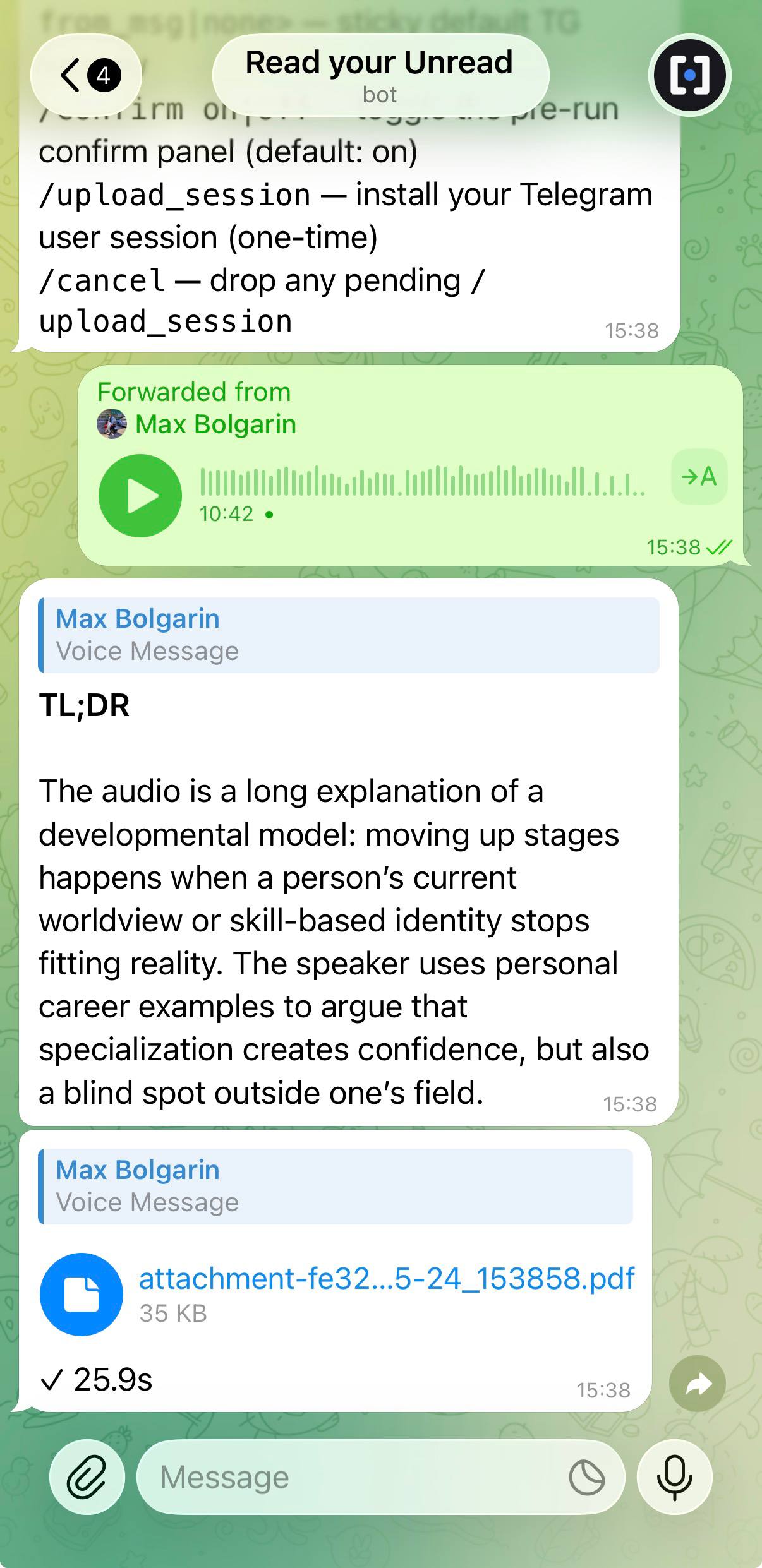
unread @somegroup --last-days 7gives you a report on the week. - Telegram bot: forward it a voice message, a PDF, a link or a YouTube video, and it replies with the summary.

Command line
curl -fsSL https://raw.githubusercontent.com/maxbolgarin/unread/main/scripts/install.sh | bash
unread init          # pick an AI provider and paste its key; Telegram is optional
unread @somegroup --last-days 7                  # a Telegram chat, channel or forum
unread "https://youtu.be/jmzoJCn8evU"            # a YouTube video
unread "https://paulgraham.com/greatwork.html"   # a web page
unread ./meeting.mp3                             # a file: audio, video, PDF, DOCX, image…
unread ask <any of the above> "your question"    # ask instead of summarize
unread dump <any of the above>                   # save the original text, no AI
Here is a real report: two weeks of
@thehackernews, 99 messages, $0.016.
More: install options · sources · every command
Telegram bot
One command on a server (a small VM is plenty). It installs Docker if needed, asks a few questions and starts the bot:
curl -fsSL https://raw.githubusercontent.com/maxbolgarin/unread/main/scripts/install-bot-docker.sh | bash
You need a bot token from @BotFather, an AI
key, and a Telegram API id + hash (free at
my.telegram.org). You don't need to log in
to your own Telegram account; do that later only if you want the bot to
read t.me/… chat links too. Afterwards, unread-bot status | logs | update | config
manages it.
Already use the CLI? Skip Docker and run the bot from it; it becomes a systemd service where the machine has one:
unread bot setup && unread bot start
More: what the bot does · other ways to deploy it (Compose by hand, systemd, your own computer)
Highlights
- Citations on every claim. Each point links to its Telegram message, web paragraph or video timestamp.
- Any language in, any language out. A Russian chat can become an English digest.
- Voice and video. Voice messages, video notes, podcasts and recorded meetings are transcribed, then summarized.
- Your data stays yours. Everything is kept in SQLite under
~/.unread/, and keys can be encrypted at rest. Only your AI provider sees the text you analyze, and--redactstrips phone numbers, emails and card numbers first. - Cheap to run. Results are cached, long inputs are split and summarized in parallel, and
--max-cost/--dry-runkeep the bill in check.
AI providers
| Provider | Notes |
|---|---|
| OpenAI | The default. Also transcribes voice and video. |
| Anthropic, Google Gemini | Analysis and images. Add an OpenAI key for voice and video. |
| OpenRouter | One key, many models. |
| Local (Ollama, LM Studio, vLLM) | Any OpenAI-compatible server; the AI runs on your own hardware. |
Switch any time with unread settings, or /settings in the bot.
Documentation
| Guide | What's in it |
|---|---|
| Install | Install options, first-run setup, where files live |
| Sources | Telegram, YouTube, web pages, files, presets, fact-checking |
| CLI reference | Every command and flag |
| Configuration | Languages, models, cost and caching, troubleshooting |
| Telegram bot | What it does, its commands and settings |
| Deploying the bot | Docker installer, Compose, systemd, Telegram session |
| Security | Threat model, encrypted secrets, PII redaction |
The same guides are on the website.
Contributing
Pull requests are welcome. CONTRIBUTING.md covers the dev setup, lint and tests; report vulnerabilities as described in SECURITY.md. Issues and ideas: https://github.com/maxbolgarin/unread/issues.
Built on Telethon, yt-dlp, trafilatura, Typer, Rich and uv.
License
Apache 2.0, see LICENSE.
1 maintainer

Metadata
1 maintainer
Release files for unread 1.11.0
For a detailed explanation of source distributions (sdists) and built distributions (wheels), please see the package formats documentation.
Source distribution (sdist)
| File | Size | Uploaded | Provenance | |
|---|---|---|---|---|
| unread-1.11.0.tar.gz | 5.1 MB | Without provenance | Details |
Built distribution (wheel)
| File | Interpreter | ABI | Platform | Reset |
|---|---|---|---|---|
| unread-1.11.0-py3-none-any.whl | Python 3 | none | any | Details |
Total release size: 6.0 MB
Release files / unread-1.11.0.tar.gz
| Download URL | unread-1.11.0.tar.gz |
|---|---|
| Size | 5.1 MB |
| Tags | Source |
|
SHA-256 checksum How to use checksums |
318272208304f678345284441fc25c55e6bb8c7da4842604b0dd004c2e2cfca2
|
|
BLAKE2b-256 checksum How to use checksums |
cf61f7b1639ee08d818cfda4c94ec41e133d2527750bfe9ea13c8abd7d4b00c3
|
| Upload date | |
|
Uploaded using Trusted Publishing? What is trusted publishing? |
No |
| Uploaded via |
uv/0.13.5 {"installer":{"name":"uv","version":"0.13.5","subcommand":["publish"]},"python":null,"implementation":{"name":null,"version":null},"distro":{"name":"Ubuntu","version":"26.04","id":"resolute","libc":null},"system":{"name":null,"release":null},"cpu":null,"openssl_version":null,"setuptools_version":null,"rustc_version":null,"ci":true}
|
Release files / unread-1.11.0-py3-none-any.whl
| Download URL | unread-1.11.0-py3-none-any.whl |
|---|---|
| Size | 876.2 kB |
| Tags | Python 3 |
|
SHA-256 checksum How to use checksums |
fa590bdc5400fa3a7e19a7105a6f6fa1457bd23dfe0230870e3af946d80648f5
|
|
BLAKE2b-256 checksum How to use checksums |
e6020d170ab3ce524e070fb7a10f2f43c19e78a04bd54baa1b31d4395f34b9b6
|
| Upload date | |
|
Uploaded using Trusted Publishing? What is trusted publishing? |
No |
| Uploaded via |
uv/0.13.5 {"installer":{"name":"uv","version":"0.13.5","subcommand":["publish"]},"python":null,"implementation":{"name":null,"version":null},"distro":{"name":"Ubuntu","version":"26.04","id":"resolute","libc":null},"system":{"name":null,"release":null},"cpu":null,"openssl_version":null,"setuptools_version":null,"rustc_version":null,"ci":true}
|
Security for unread 1.11.0
Provenance
Provenance describes where a file came from. On PyPI, provenance is shared via attestations, which provide a verifiable record of the build or publishing details. View details, limitations and caveats.
No provenance found
None of the files in this release were uploaded with provenance metadata.
A note on package security
PyPI is a repository for distributing packages, not a service for auditing them. While third-party security researchers and our staff do their best to detect and remove malicious packages, PyPI cannot guarantee the quality, security or suitability of any given package.
To learn more about protecting yourself from malicious actors, visit our package security documentation.














