
Deep learning method for removing specular reflections from RGB images.

Project description
UnReflectAnything








RGB-Only Highlight Removal by Rendering Synthetic Specular Supervision
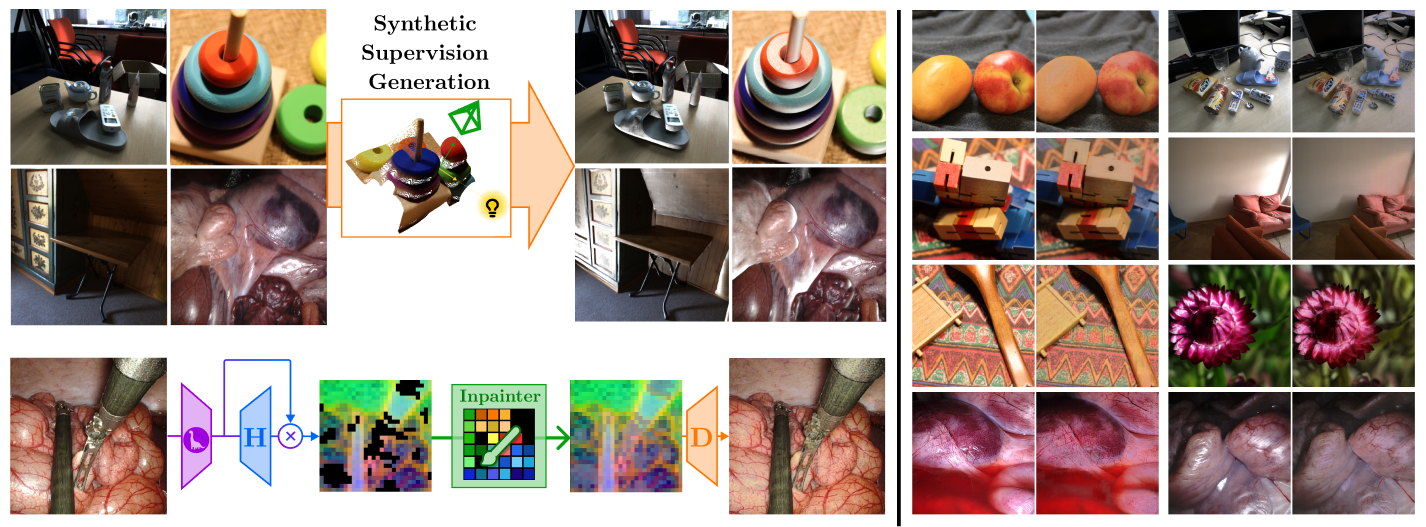
UnReflectAnything inputs any RGB image and removes specular highlights, returning a clean diffuse-only output. We trained UnReflectAnything by synthetizing specularities and supervising in DINOv3 feature space.
UnReflectAnything works on both natural indoor and surgical/endoscopic domain data.
[!IMPORTANT] The maintainers are still working on an official API and Weights release for UnReflectAnything. In v1.0.2 the model is available from the API with
pretrained=Falseby deafault, and forecefully setting itTruewill display a warning and weights will not be downloaded. Stay tuned for the official release!
Installation
pip install unreflectanything
Install UnReflectAnything as a Python Package.
The minimum required Python version is 3.11, but development and all experiments have been based on Python 3.12.
For GPU support, make sure PyTorch comes with CUDA version for your system (see PyTorch Get Started).
Setting up
After pip-installing, you can use the unreflectanything CLI command, which is also aliased to unreflect and ura. The three commands are equivalent.
With the CLI you can already download the model weights with
unreflectanything download --weights
and some sample images with
unreflectanything download --images
Weights are stored by default in ~/.cache/unreflectanything/weights (or $XDG_CACHE_HOME/unreflectanything/weights if set ; %LOCALAPPDATA%\unreflectanything for Windows). Use --output-dir to choose another location.
Both the weights and images are stored on the HuggingFace Model Repo.
Enable shell completion
Shell completion is available for the bash and zsh shells. Run
unreflectanything completion bash
and execute the echo ... command that gets printed.
Command Line Interface
Get an overview of the available CLI endpoints with
unreflectanything --help # alias 'unreflect --help' alias 'ura --help'
Refer to the Wiki to get detailed documentation about each endpoint. We report a summary of the available subcommands. Remember that ura is aliased to the unreflectanything command
| Subcommand | Description | Command |
|---|---|---|
inference |
Run inference on image(s) to remove reflections | ura inference /path/to/images -o /path/to/output |
download |
Download checkpoint weights, sample images, notebooks, configs | ura download --weights |
cache |
Print cache directory or clear cached assets | ura cache --dir or ura cache --clear |
verify |
Verify weights installation and compatibility, or dataset directory structure | ura verify --weights or ura verify --dataset --path /path/to/dataset |
cite |
Print citation (BibTeX, APA, MLA, IEEE, plain) | ura cite --bibtex |
completion |
Print or install shell completion (bash/zsh) | ura completion bash |
Training, testing, and evaluation are available via the Python API; see the Wiki for details.
Python API
The same endpoints above are exposed as a Python API. Refer to the Wiki to get detailed documentation about each endpoint. A few examples are reported below
import unreflectanything as unreflect
import torch

# Get the model class (e.g. for custom setup or training)
ModelClass = unreflect.model()

# Get a pretrained model (torch.nn.Module) and run on batched RGB
unreflectmodel = unreflect.model(pretrained=True)  # uses cached weights; run 'unreflect download --weights' first
images = torch.rand(2, 3, 448, 448, device="cuda")  # [B, 3, H, W], values in [0, 1]
model_out = unreflectmodel(images)  # [B, 3, H, W] diffuse tensor

# File-based or tensor-based inference (one-shot, no model handle)
unreflect.inference("input.png", output="output.png")
unreflect.inference(images, output="output.png")
result = unreflect.inference(images)

# Cache directory (where weights, images, etc. are stored)
weights_dir = unreflect.cache("weights")
Contributing & Development
If you want to contribute or develop UnReflectAnything:
- Clone the repository:
git clone https://github.com/alberto-rota/UnReflectAnything.git
cd UnReflectAnything
- Install dependencies (we recommend a virtual environment with Python 3.12):
pip install -r requirements.txt
Citation
If you include UnReflectAnything in your pipeline or research work, we encourage you cite our work. Get the citation entry with
unreflectanything cite --bibtex
or copy it directly from below
@misc{rota2025unreflectanything,
      title={UnReflectAnything: RGB-Only Highlight Removal by Rendering Synthetic Specular Supervision},
      author={Alberto Rota and Mert Kiray and Mert Asim Karaoglu and Patrick Ruhkamp and Elena De Momi and Nassir Navab and Benjamin Busam},
      year={2025},
      eprint={2512.09583},
      archivePrefix={arXiv},
      primaryClass={cs.CV},
      url={https://arxiv.org/abs/2512.09583},
}
Release history Release notifications | RSS feed


Download files
Download the file for your platform. If you're not sure which to choose, learn more about installing packages.
Source Distribution
Built Distribution
Filter files by name, interpreter, ABI, and platform.
If you're not sure about the file name format, learn more about wheel file names.
Copy a direct link to the current filters
File details
Details for the file unreflectanything-1.1.0.tar.gz.
File metadata
- Download URL: unreflectanything-1.1.0.tar.gz
- Upload date:
- Size: 267.8 kB
- Tags: Source
- Uploaded using Trusted Publishing? No
- Uploaded via: uv/0.8.14
File hashes
| Algorithm | Hash digest | |
|---|---|---|
| SHA256 |
c568567c8accdd1a5b6d7516ba399c194eda728987bad2acd763acdbc6879386
|
|
| MD5 |
9fe11369cbfa1f1ae11038842fe613fc
|
|
| BLAKE2b-256 |
e954622c64a19f47dc055ea0d4be403124b6380df6998420dfd6acbb3428d7b4
|
File details
Details for the file unreflectanything-1.1.0-py3-none-any.whl.
File metadata
- Download URL: unreflectanything-1.1.0-py3-none-any.whl
- Upload date:
- Size: 288.5 kB
- Tags: Python 3
- Uploaded using Trusted Publishing? No
- Uploaded via: uv/0.8.14
File hashes
| Algorithm | Hash digest | |
|---|---|---|
| SHA256 |
0556dc4db62a57dbd54122216dae21a9d60dd64c7161ca6bbdd8c76eac22b59f
|
|
| MD5 |
34e0f45ec702f8ef637b8430c5497376
|
|
| BLAKE2b-256 |
09f6782be3ae67464e5e95751319c048ba5da6fbdd798dedac89529328f4c6c9
|






