
Unstructured Document Viewer 

Unstructured Document Viewer is an open-source library that provides interactive answer references and source grounding for RAG applications that use Unstructured for file preprocessing.
It converts PDF files into a high-fidelity, HTML-based viewer. Using element coordinates provided by Unstructured, it delivers desktop-like document viewing capabilities:
- Preserves the exact look and feel of the original document, similar to a native file viewer
- Highlights and lets users navigate text chunks to support citations and references in your RAG application
The library generates an HTML component that can be easily embedded into web applications, desktop apps, or any system that supports HTML rendering.
Developed by Preprocess Team
Unstructured Document Viewer is an extension of RAG Document Viewer that provides native support for Unstructured.io element format.
How it works
- Pass in a PDF file, Unstructured elements and a destination path.
- An HTML bundle is created.
- You can now embed the viewer in your application, as simple as using an
<iframe>. Files are served directly from your backend under your auth logic, no external servers.
Viewer features:
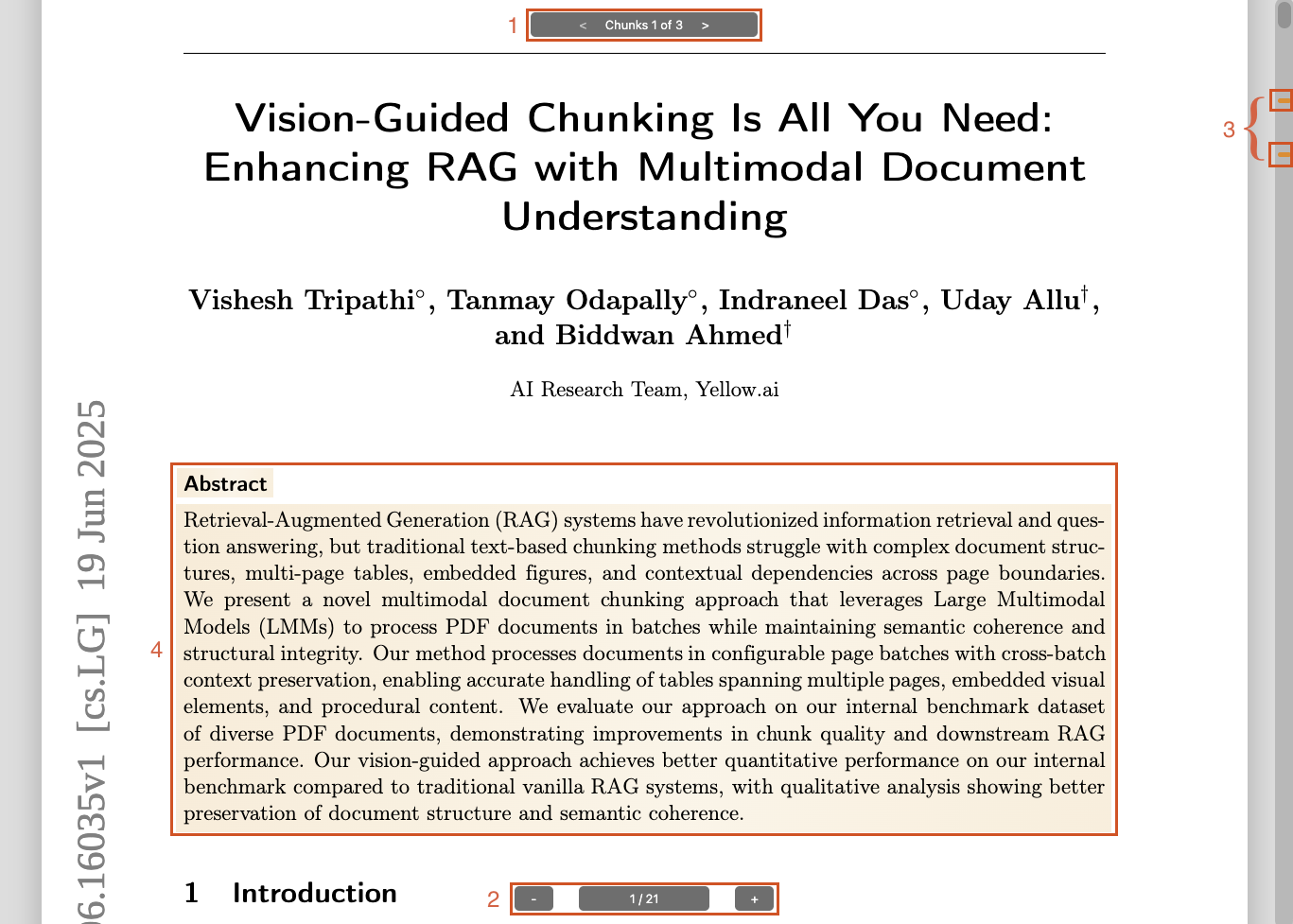
- Chunks Highlighting - Visual emphasis of the important content part you want to highlight.
- Chunk Navigator: Navigate between highlighted chunks with next/previous controls.
- Zoom Controls: Renders the document at the optimal zoom level, and users can zoom in/out as needed.
- Scrollbar Navigator: Visual indicators on the scrollbar show highlighted chunk positions; click to jump to a specific chunk.
Quick Start
1. Install System Dependencies
wget "https://raw.githubusercontent.com/preprocess-co/unstructured-document-viewer/refs/heads/main/install.sh"
chmod +x install.sh && ./install.sh
2. Install Python Library
pip install unstructured-document-viewer
3. Generate a Viewer
from unstructured.partition.auto import partition
from unstructured_document_viewer import Unstructured_DV

# Partition a PDF file
elements = partition("document.pdf", strategy="hi_res")

# Generate an HTML viewer - pass partition output directly
Unstructured_DV(
    file_path="document.pdf",
    store_path="/path/to/output",
    elements=elements
)
Or if you already have elements as dictionaries:
# From API response or pre-converted data
elements_data = [el.to_dict() for el in elements]

Unstructured_DV(
    file_path="document.pdf",
    store_path="/path/to/output",
    elements=elements_data
)
4. Serve in your application
<iframe
  src="/path/to/output/"
  width="100%"
  height="800"
  style="border:0"
></iframe>
Prerequisites
TL;DR – You only need system tools when building viewers on your server. Pre-built viewers are pure HTML/JS and have no dependencies.
Before you start, make sure the required system dependencies are installed. An install.sh convenience script is included for Ubuntu; support for additional operating systems is coming soon.
System Dependencies
For macOS, Windows, and other OSes, please refer to this guide.
Install the required libraries:
wget "https://raw.githubusercontent.com/preprocess-co/unstructured-document-viewer/refs/heads/main/install.sh"
chmod +x install.sh && ./install.sh
Python Library
Install from PyPI:
pip install unstructured-document-viewer
Note: This will automatically install
rag-document-vieweras a dependency.
Verify Installation
Confirm pdf2htmlEX is properly installed:
pdf2htmlEX --version
# Expected output:
# pdf2htmlEX version 0.18.8.rc1
# ...
Usage
Basic Chunking Highlight (element level)
Each element with valid coordinates becomes its own chunk. You can pass either partition() output directly or a list of element dictionaries:
from unstructured.partition.auto import partition
from unstructured_document_viewer import Unstructured_DV

elements = partition("document.pdf", strategy="hi_res")

Unstructured_DV(
    file_path="document.pdf",
    store_path="/path/to/output",
    elements=elements  # or [el.to_dict() for el in elements]
)
Advanced Chunking Highlight (group elements into chunks)
Group multiple elements into single chunks using element IDs:
from unstructured_document_viewer import Unstructured_DV

# Group elements by their element_ids
chunks = [
    ["33e49c0bd64d7e833d8564d8ca782e7d", "d931f460bc31732a0838a5b0b42db122"],  # Chunk 0
    ["e2acbe7602ede36bbec85ff1de7c3fae"],  # Chunk 1
]

Unstructured_DV(
    file_path="document.pdf",
    store_path="/path/to/output",
    elements=elements_data,
    chunks=chunks
)
Parameters
Unstructured_DV Function
| Parameter | Type | Default | Description |
|---|---|---|---|
file_path |
str |
Required | Path to the input PDF file (only PDF format is supported) |
store_path |
str |
None |
Output directory path (auto-generated if not provided) |
elements |
list |
Required | Unstructured elements - either partition() output directly or list of element dicts |
chunks |
list |
None |
Element ID groupings; if not provided, each element becomes its own chunk |
**kwargs |
Additional styling/configuration options (see below) |
Viewer Options
Customise the viewer's appearance and behaviour with these parameters during generation:
| Parameter | Type | Default | Description |
|---|---|---|---|
page_number |
bool |
True |
Display page numbers at the bottom |
chunks_navigator |
bool |
True |
Show chunk navigation controls (requires chunk data) |
scrollbar_navigator |
bool |
True |
Display chunk indicators on the scrollbar (requires chunk data) |
show_chunks_if_single |
bool |
False |
Show chunks navigator even with only one chunk |
chunk_navigator_text |
str |
"Chunk %d of %d" |
Text template for chunk counter (use %d placeholders) |
Example
Unstructured_DV(
    file_path="document.pdf",
    store_path="/path/to/viewer",
    elements=elements,
    chunk_navigator_text="Suggestion %d of %d",
    scrollbar_navigator=False
)
Colour Customisation
Customise the viewer's colours to match your branding.
If
main_colorandbackground_colorare set, all other colours are automatically derived. You can still override any specific colour individually.
| Parameter | Type | Default | Description |
|---|---|---|---|
main_color |
str |
#ff8000 |
Primary colour for interactive elements |
background_color |
str |
#dddddd |
Viewer background colour |
page_shadow |
str |
None |
CSS box-shadow for pages (auto-calculated if not set) |
text_selection_color |
str |
None |
Browser text selection colour (auto-calculated if not set) |
controls_text_color |
str |
None |
Text colour of viewer controls (auto-calculated if not set) |
controls_bg_color |
str |
None |
Background colour of viewer controls (auto-calculated if not set) |
scrollbar_color |
str |
None |
Scrollbar background colour (auto-calculated if not set) |
scroller_color |
str |
None |
Scrollbar thumb colour (auto-calculated if not set) |
bookmark_color |
str |
None |
Colour for chunk indicators in scrollbar (defaults to main_color) |
highlight_chunk_color |
str |
None |
CSS background-image for chunk highlight (auto-calculated if not set) |
highlight_page_color |
str |
None |
CSS background-image for page highlight (auto-calculated if not set) |
highlight_page_outline |
str |
None |
Page border colour for highlighted pages (auto-calculated if not set) |
Example
Unstructured_DV(
    file_path="document.pdf",
    store_path="/path/to/viewer",
    elements=elements,
    main_color="#0969da",
    background_color="#f6f8fa"
)
Displaying the Viewer
Add an <iframe> to your application to show the document.
Important: The content must be served via HTTP/S. Opening the
index.htmldirectly from the local filesystem (file://) is not fully supported and may cause issues.
<iframe
  src="/path/to/viewers/my_document"
  width="100%"
  height="800"
  style="border:0"
></iframe>
Note: Please see the Handling Authentication section for best practices on securely integrating the viewer.
Viewer Display Parameters
Control the viewer's initial state by passing parameters in the <iframe> URL:
| Parameter | Type | Default | Description |
|---|---|---|---|
chunks |
string |
[] |
An ordered JSON array of chunk indices to highlight and navigate |
goto_chunk |
int |
None |
Automatically scroll to this chunk index on load |
goto_page |
int |
None |
Automatically scroll to this page number on load |
Note: The
chunksandgoto_chunkparameters only work if chunk data was provided when the viewer was generated. Chunks and pages are 0-based indexes.
Behaviour Priority:
- If
goto_chunkis set, it scrolls to that chunk. - Else, if
chunksis set, it scrolls to the first chunk in the list. - Else, if
goto_pageis set, it scrolls to that page. - Otherwise, it defaults to the beginning of the document.
Examples:
Highlight chunks 0, 2, and 3, and jump directly to chunk 2 on load:
<iframe src="/viewer/doc1?chunks=[0,2,3]&goto_chunk=2"></iframe>
Go to a specific page on load:
<iframe src="/viewer/doc1?goto_page=4"></iframe>
Handling Authentication
We strongly recommend storing viewer bundles in a non-public path.
When generating a viewer, store the resulting bundle in a directory that is not publicly accessible via HTTP. When a user requests to see a document, your application backend should first verify their permissions and then serve the viewer bundle.
Flask Example
from flask import Flask, send_from_directory, abort
from pathlib import Path

BASE_DIR = Path("/var/secure_viewers").resolve()

@app.route("/view/<doc_id>/")
@app.route("/view/<doc_id>/<path:asset>")
def serve_document(doc_id, asset="index.html"):
    # 1. Add your authentication logic here
    if not user_is_allowed:
        abort(403)

    # 2. Securely resolve the path
    viewer_dir = (BASE_DIR / doc_id).resolve()

    # Security check: prevent path traversal
    if viewer_dir.parent != BASE_DIR:
        abort(404)

    # 3. Serve the requested asset
    return send_from_directory(viewer_dir, asset)
Note: Include a wildcard in your route (e.g.
<path:asset>) to handle all assets (CSS, JS, fonts).
Coordinate Transformation
Unstructured uses pixel-based coordinates with four corner points (counter-clockwise from top-left):
{
    "coordinates": {
        "points": [
            [x1, y1],  # top-left
            [x1, y2],  # bottom-left
            [x2, y2],  # bottom-right
            [x2, y1]   # top-right
        ],
        "layout_width": 1700,
        "layout_height": 2200
    }
}
This is automatically converted to ratio format:
{
    "page": 1,
    "top": y1 / layout_height,
    "left": x1 / layout_width,
    "height": (y2 - y1) / layout_height,
    "width": (x2 - x1) / layout_width
}
Requirements
- Python >= 3.8
- RAG Document Viewer >= 1.0.0 (pip dependency)
- System dependency: pdf2htmlEX
Support
Contact the Preprocess team at support@preprocess.co or join our Discord channel.
License
This project is licensed under the MIT License.
Credits
Unstructured Document Viewer relies on:
| Project | License |
|---|---|
| pdf2htmlEX https://github.com/pdf2htmlEX/pdf2htmlEX | GPL v3 |
This tool is not bundled with the package; it must be installed on the host system where viewers are generated.
1 maintainer

Metadata
1 maintainer
Release files for unstructured-document-viewer 1.0.0
For a detailed explanation of source distributions (sdists) and built distributions (wheels), please see the package formats documentation.
Source distribution (sdist)
| File | Size | Uploaded | |
|---|---|---|---|
| unstructured_document_viewer-1.0.0.tar.gz | 526.6 kB | Details |
Built distribution (wheel)
| File | Interpreter | ABI | Platform | Reset |
|---|---|---|---|---|
| unstructured_document_viewer-1.0.0-py3-none-any.whl | Python 3 | none | any | Details |
Total release size: 536.3 kB
Release files / unstructured_document_viewer-1.0.0.tar.gz
| Download URL | unstructured_document_viewer-1.0.0.tar.gz |
|---|---|
| Size | 526.6 kB |
| Tags | Source |
|
SHA-256 checksum How to use checksums |
91dc83e80165be68b6a30b7b70da37868bf613fdc7892a343a6d05724c2ae3b2
|
|
BLAKE2b-256 checksum How to use checksums |
34a5342cbaa44c10d686d89a1ea8953571258fab3b708b463d06424532cd25d0
|
| Upload date | |
|
Uploaded using Trusted Publishing? What is trusted publishing? |
No |
| Uploaded via |
twine/6.2.0 CPython/3.12.10
|
Release files / unstructured_document_viewer-1.0.0-py3-none-any.whl
| Download URL | unstructured_document_viewer-1.0.0-py3-none-any.whl |
|---|---|
| Size | 9.7 kB |
| Tags | Python 3 |
|
SHA-256 checksum How to use checksums |
a8a4ccdc99b12016e941b98955e4a30cbd9de52931bf07b72edb8d8adf336963
|
|
BLAKE2b-256 checksum How to use checksums |
6ea040a1a6573ce45380deb32d4994cf7bb28590332fedda75d06682a3a4c565
|
| Upload date | |
|
Uploaded using Trusted Publishing? What is trusted publishing? |
No |
| Uploaded via |
twine/6.2.0 CPython/3.12.10
|













