
Telegram bridge for AI coding agents.
Send tasks by voice or text, stream progress live, and approve changes — from your phone, anywhere.
🌐 untether.cc · 📖 Help guides





Quick start · Features · Engines · Docs · Contributing
Your AI coding agents need a terminal, but you don't need to sit at one. Untether runs on your machine (or server) and connects Claude Code, Codex, OpenCode, Pi and Antigravity CLI to a Telegram bot. Send a task from your phone, watch the agent work in real time, tap a button when it needs permission, and read the result when it's done — no desk, no SSH, no screen sharing. The agent keeps running if you close Telegram or lose signal.
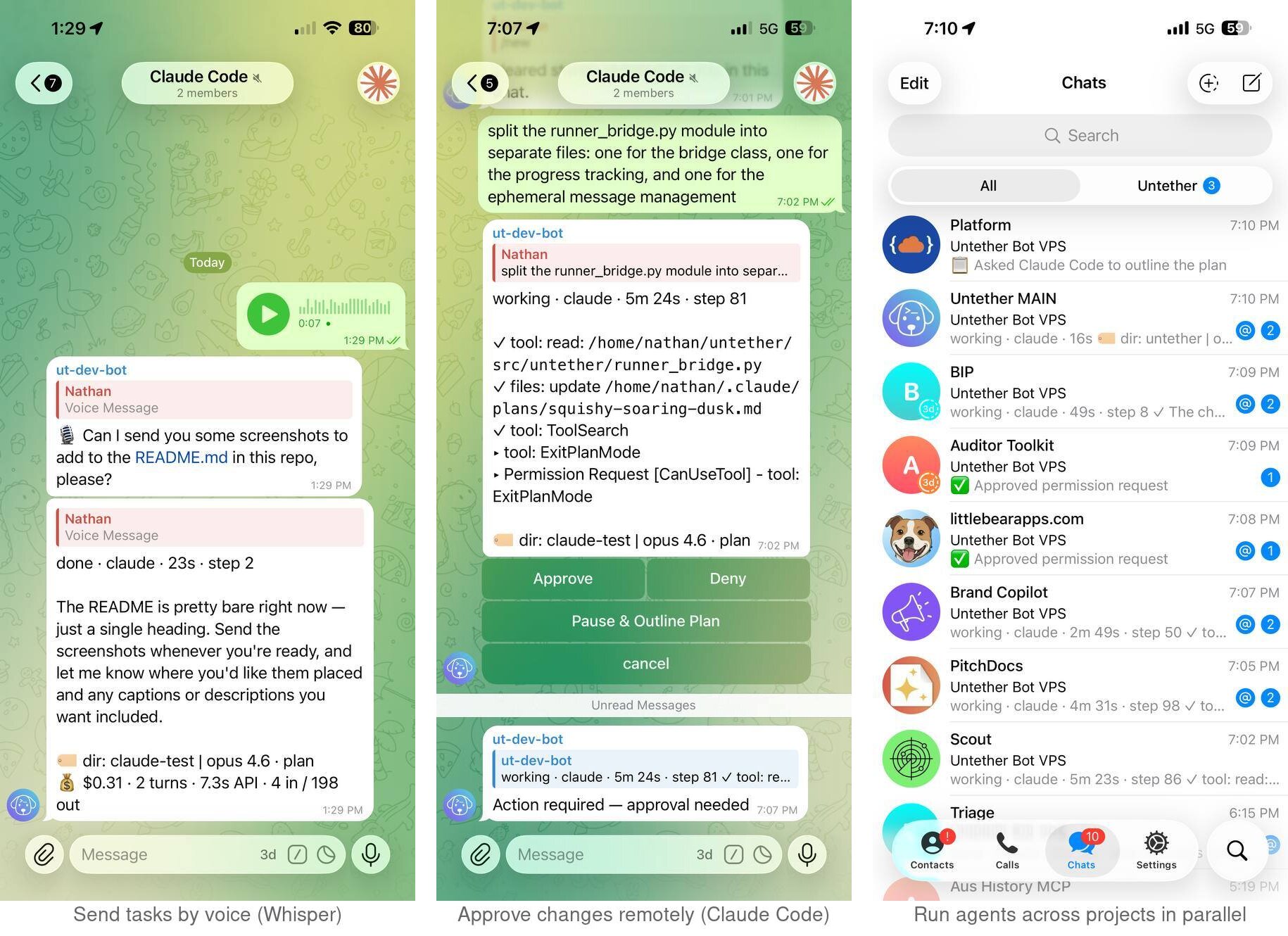
* Feature availability varies by engine — see engine compatibility
⚡ Quick start
You need Python 3.12+, uv (or pipx), and at least one agent CLI on your PATH (claude, codex, opencode, pi or agy).
uv tool install untether        # recommended
# or
pipx install untether

untether                        # first run starts the setup wizard
The wizard creates your Telegram bot (or takes an existing token), picks a workflow mode — assistant, workspace or handoff — and connects your chat. Then message your bot:
fix the failing tests in src/auth
Step-by-step: Install and onboard → First run. Update with uv tool upgrade untether (or pipx upgrade untether), then send /restart from Telegram — see Update Untether.
Upgrading from 0.35.x? v0.36.0 has breaking changes (the
autopermission mode is nowplan-auto, unattended crons deny approvals, Codex safe mode is a real read-only sandbox, and more). Read Upgrading to v0.36.0 first. Moving to v0.36.1? In a group, changing settings now needs a group admin, and scheduled Antigravity runs can be held once after the upgrade — see Upgrading to v0.36.1.
🎯 What you get
- 📡 Live progress — tool calls, file changes and elapsed time stream into one message as the agent works (verbose progress)
- 🔐 Approvals from your phone (Claude, Antigravity) — approve tool calls, plans and clarifying questions with inline buttons; four permission modes via
/planmodefor Claude, and Workspace / Plan first / Ask me / Full access for Antigravity (interactive approval, plan mode) - ↪️ Live sessions and steering (Claude, Antigravity) — background tasks stay visible, and
/steersends a follow-up into the running turn (Antigravity needs Untether's agy plugin for steering); Claude keeps its session live between turns (steer follow-ups) - 🎙️ Voice notes — dictate tasks; transcribed by any Whisper-compatible endpoint (voice notes)
- 📁 Projects, branches and worktrees —
/myproject @feat/thingtargets a repo and branch, with parallel runs in isolated worktrees (projects, worktrees) - 💬 Three workflow modes — ongoing chat, forum topics per project, or reply-to-continue handoff (choose a mode)
- 💰 Cost and usage tracking — per-run and daily budgets, outlier alerts, optional stop-at-limit,
/usagebreakdowns (cost budgets) - ⏰ Schedules and webhooks — cron triggers, webhook triggers, one-shot
/at 30m …runs and Claude Loop mode (schedule tasks, webhooks and cron) - 🔄 Terminal ↔ Telegram resume — start in your terminal, pick it up with
/continue(cross-environment resume) - ⚙️ Settings and files from chat —
/configbutton menu,/browse,/file put/getand agent-delivered files (inline settings, file transfer)
Every command is listed in the commands reference.
🔌 Supported engines
| Engine | Install | Good at |
|---|---|---|
| Claude Code | npm i -g @anthropic-ai/claude-code |
Complex refactors, architecture, long context — and the fullest set of interactive features |
| Codex | npm i -g @openai/codex |
Fast edits, shell commands, quick fixes |
| OpenCode | npm i -g opencode-ai@1 |
75+ providers via Models.dev, local models (1.x only — 2.x is refused before it starts) |
| Pi | npm i -g @mariozechner/pi-coding-agent |
Multi-provider auth, conversational |
| Antigravity CLI⁴ | curl -fsSL https://antigravity.google/cli/install.sh | bash |
Google's Gemini models, per-model effort, quota groups and credits in /usage (agy 1.3.1+) |
Use your existing Claude or ChatGPT subscription — no extra API keys needed unless you want API billing (for Antigravity CLI we recommend a Gemini API key; see the note below). Switch engines per message (/codex …) or per chat (/agent set claude) — see switch engines.
Engine compatibility
| Feature | Claude Code | Codex | OpenCode | Pi | Antigravity⁴ |
|---|---|---|---|---|---|
| Progress streaming, resume, voice input, model override | ✅ | ✅ | ✅ | ✅ | ✅ |
Terminal resume (/continue) |
✅ | ✅ | ✅ | ✅² | ✅ |
| Cost tracking | ✅ | ~¹ | ✅ | ~¹ | ~¹ |
| Reasoning / effort levels | ✅ | ✅ | — | — | ✅⁵ |
Pre-run approval policy (/config) |
✅ | ✅ | — | — | ✅⁴ |
| Interactive approvals, plan mode, ask mode, diff preview | ✅ | — | —³ | — | ✅⁴ |
Live sessions, background tasks, /steer |
✅ | — | — | — | ~⁷ |
| Context % in status line, subscription usage | ✅ | — | — | — | ~⁶ |
| Context compaction shown | ✅ | — | — | ✅ | ~⁸ |
Device re-auth (/auth codex) |
— | ✅ | — | — | — |
¹ Token counts only, no USD cost. ² Pi needs provider = "openai-codex" for OAuth subscriptions in headless mode. ³ opencode run rejects tools your OpenCode rules set to ask — set them to allow for unattended use. ⁴ Antigravity runs with a pre-run permission mode: Workspace (default — reads and edits files in the project; no shell, web or MCP tools, so no commands and no deleting or renaming files; not a sandbox), Plan first (a plan card with Approve / Deny / Let's discuss), Ask me (Approve / Deny cards with a command or diff preview; needs Untether's agy plugin, untether agy-gate install) or Full access. With the plugin installed, agy's questions also get option buttons in any mode. After switching a chat between Workspace or Plan first and Ask me or Full access, send /new — agy keeps a conversation on the tools it started with. Guide: Use Antigravity CLI. ⁵ The levels offered depend on the model. ⁶ /usage shows agy's quota groups and AI credits, and an optional quota line can follow each answer (built from your last /usage). Context % is an estimate (~N% ctx), shown only when the chat has a model set. ⁷ Background commands, timers and subagents are listed in the ⏳ background block while a run is going; /steer reaches a running turn when the agy plugin is installed; no live sessions (each message starts agy afresh). ⁸ /compact runs agy's own compaction (agy 1.3.5 or newer) and is confirmed as 🗜️ Context compacted (manual), with no token figure; agy's automatic compaction isn't reported.
⚠️ Antigravity and Google account sign-ins. Google's Antigravity terms say that using third-party software to access the service with an Antigravity sign-in is a breach that may lead to suspension of your Antigravity and/or Gemini CLI accounts. Untether runs Google's own
agybinary and never reads your Google credentials, but it is still third-party software driving the CLI. We recommend a Gemini API key or an Enterprise sign-in — see switch engines. If you use a Google account sign-in anyway, you accept that risk for that account.
Deprecated engines
Gemini CLI and Amp still ship and load, but are deprecated and no longer supported — no testing, no bug fixes, and they may be removed in a future release. Google retired Gemini CLI for individual accounts on 18 June 2026; its successor, Antigravity CLI, is supported as its own antigravity engine (above). Amp remotely refuses clients it considers out of date, so a working setup can stop without notice. Details: troubleshooting.
🔒 Privacy and security
Untether runs entirely on your machine: no telemetry, no analytics, no phone-home, no auto-updates. Its own outbound calls are the Telegram Bot API, Anthropic's subscription-usage endpoint for Claude (using Claude Code's existing login, only for /usage and the opt-in usage footer) and, only if you enable it, a voice-transcription endpoint; agent CLIs call their own vendors' APIs. Config lives in ~/.untether/untether.toml — it holds your bot token, so never commit it. Lock the bot to your Telegram user ID and read security hardening and where your data goes.
📖 Documentation
Full docs live in the help centre (mirrored from docs/).
- Tutorials — install, first run, conversation modes, projects and branches, multi-engine workflows
- How-to guides — all guides, including switch engines, use Antigravity CLI, group chats, forum topics, model and reasoning, session export and uninstall
- Reference — configuration, commands, engine runners, architecture
- Help — FAQ, troubleshooting, changelog, upgrading to v0.36.0 and v0.36.1
🤝 Contributing
Found a bug? Open an issue. Questions and ideas go to GitHub Discussions (Q&A, Ideas); follow Announcements for a plain-English summary of every release.
Want to contribute code? See CONTRIBUTING.md. To report a vulnerability privately, see SECURITY.md.
🙏 Acknowledgements
Untether is a fork of takopi by @banteg, which provided the original Telegram-to-Codex bridge. Untether extends it with interactive permission control, multi-engine support, plan mode, cost tracking and much more.
📄 Licence
MIT — made by Little Bear Apps 🐶
Metadata
Release files for untether 0.36.1
For a detailed explanation of source distributions (sdists) and built distributions (wheels), please see the package formats documentation.
Source distribution (sdist)
| File | Size | Uploaded | Provenance | Actions |
|---|---|---|---|---|
| untether-0.36.1.tar.gz | 1.0 MB | With provenance | Details for untether-0.36.1.tar.gz |
Built distribution (wheel)
| File | Interpreter | ABI | Platform | Actions Reset |
|---|---|---|---|---|
| untether-0.36.1-py3-none-any.whl | Python 3 | none | any | Details for untether-0.36.1-py3-none-any.whl |
Total release size: 2.1 MB
Release files / untether-0.36.1.tar.gz
| Download URL | untether-0.36.1.tar.gz |
|---|---|
| Size | 1.0 MB |
| Tags | Source |
|
SHA-256 checksum How to use checksums |
147a258670e2f24727cd4c92820e31b412b05fcbbcb958e09e7fb5cf6d58dc7a
|
|
BLAKE2b-256 checksum How to use checksums |
c7f8505cb4805c32d1c5b74d6e8e5d7d4ab03301030eb48cc0a31f9c55ccca8d
|
| Upload date | |
|
Uploaded using Trusted Publishing? What is trusted publishing? |
Yes |
| Uploaded via |
twine/7.0.0 CPython/3.13.16
|
Provenance
Provenance describes where a file came from. On PyPI, provenance is shared via attestations, which provide a verifiable record of the build or publishing details. View details, limitations and caveats.


PyPI Publish Attestation
PyPI verified that this artifact, at this checksum, originated from the publisher listed below.
Signed by GitHub Actions, verified by PyPI on Nov 16, 2026.
Transparency logRelease files / untether-0.36.1-py3-none-any.whl
| Download URL | untether-0.36.1-py3-none-any.whl |
|---|---|
| Size | 1.1 MB |
| Tags | Python 3 |
|
SHA-256 checksum How to use checksums |
285ea414a026a036e72cb3999777708add3f429d6d70947e4a822c62ae87fa7d
|
|
BLAKE2b-256 checksum How to use checksums |
1c7f6334383c73a4b88f2244310a0308d71e274f1b88bd857fb3033b463cff18
|
| Upload date | |
|
Uploaded using Trusted Publishing? What is trusted publishing? |
Yes |
| Uploaded via |
twine/7.0.0 CPython/3.13.16
|
Provenance
Provenance describes where a file came from. On PyPI, provenance is shared via attestations, which provide a verifiable record of the build or publishing details. View details, limitations and caveats.
PyPI Publish Attestation
PyPI verified that this artifact, at this checksum, originated from the publisher listed below.
Signed by GitHub Actions, verified by PyPI on Nov 16, 2026.
Transparency logSecurity for untether 0.36.1
Provenance
Provenance describes where a file came from. On PyPI, provenance is shared via attestations, which provide a verifiable record of the build or publishing details. View details, limitations and caveats.
Full provenance
Both files in this release have been uploaded with provenance metadata.
Attestation for untether-0.36.1.tar.gz
PyPI Publish Attestation
PyPI verified that this artifact, at this checksum, originated from the publisher listed below.
Signed by GitHub Actions, verified by PyPI on Nov 16, 2026.
Transparency logA note on package security
PyPI is a repository for distributing packages, not a service for auditing them. While third-party security researchers and our staff do their best to detect and remove malicious packages, PyPI cannot guarantee the quality, security or suitability of any given package.
To learn more about protecting yourself from malicious actors, visit our package security documentation.














