
UI-based Fine-Tuning Framework for Large Language Models (LLMs)

Project description
Upasak - UI-based Fine-Tuning for Large Language Models (LLMs)
Upasak is a flexible, privacy-aware, no-code/low-code framework for fine-tuning large language models, built around Hugging Face Transformers. It provides an intuitive Streamlit-based interface, multi-format dataset support, built-in PII and sensitive information sanitization, and a fully customizable training pipeline. Whether you're prototyping, researching, or running internal fine-tuning workflows, Upasak makes the process simple, accessible, and compliant.

✨ Key Features
LLM Fine-Tuning
- Developed on top of Hugging Face's Transformers library.
- Supports Text-only models of Gemma-3 LLM family for instruction-tuning or domain adaptation.
- Full-parameter fine-tuning or LoRA (Parameter-Efficient Fine-Tuning).
- Future support planned for image-text-to-text Gemma-3 models, LLaMA, Qwen, Phi, Mixtral.
Flexible Dataset Handling
Upload or import datasets in multiple file formats:
.json.jsonl.csv.zip(containing.txt)
Or select datasets directly from the Hugging Face Hub.
Auto-Detection of Dataset Schema
Upasak intelligently identifies and structures your dataset into training-ready format. Supported schemas:
| Schema | Format | Notes |
|---|---|---|
| DAPT | [{"text":"..."}] or text column |
Document Adaptation / continued pretraining |
| ALPACA | [{"instruction":"...", "output":"..."}] (+ optional "input") or instruction, output, input (optional) columns |
Converted to user → assistant turns |
| CHATML | [{"messages":[{"role":"...", "content":"..."}]}] or messages column |
Supports role/content pairs |
| SHARE_GPT | [{"conversations":[{"from":"...", "value":"..."}]}] or conversations column |
Converts human ↔ model to user ↔ assistant |
| PROMPT_RESPONSE | [{"prompt":"...", "response":"..."}] or prompt, response columns |
Simple instruction → answer |
| QA | [{"question":"", "answer":""}] or question, answer columns |
Q&A format |
| QLA | [{"question":"...", "long_answer":"..."}] or question, long_answer columns |
Long-form generation |
Built-In PII & Sensitive Information Sanitization
Upasak automatically detects and redacts:
- Personal names
- Emails / phone numbers
- IP addresses, IMEI
- Credit card / bank details
- National IDs (Aadhaar, PAN, Voter ID, etc.)
- API keys
- GitHub/GitLab tokens
- Database credentials
- Residential & workplace addresses
- And more…
Two sanitization modes:
-
Rule-Based (default)
-
Hybrid (Rule-Based + NER-based)
- Optional human review
- Configure HITL ratio & max samples for human review
- Accept/reject uncertain detections directly in the UI
- Preview sanitized sample before training
🖥️ Streamlit UI – No-Code Training Workflow
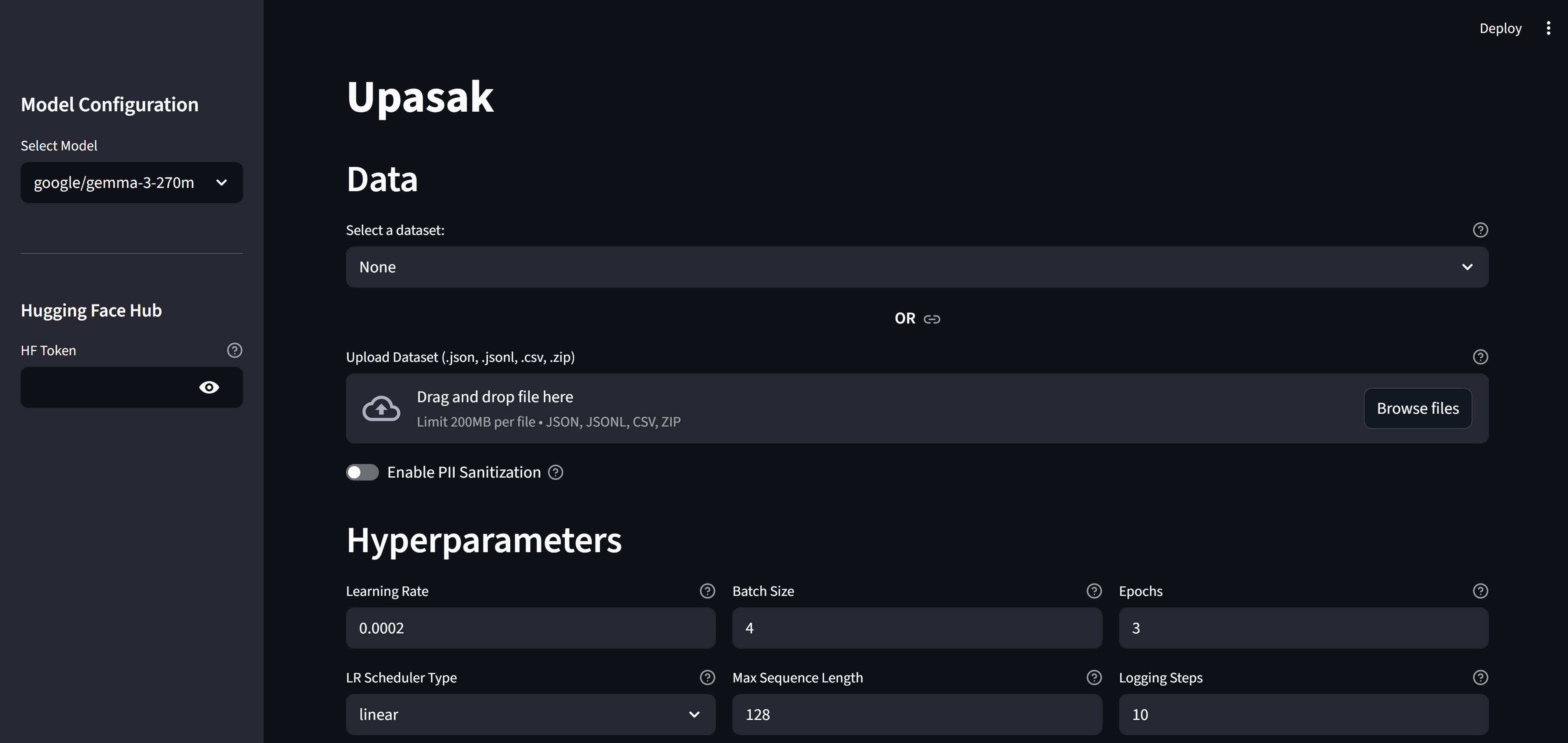
The visual interface provides fully interactive control:
1. Model Selection
Choose supported base models (currently Gemma-3 text-only). Future updates will include LLaMA, Mixtral, Phi, Qwen and multimodal variants.
2. HF Token Handling
- Read token for pulling models
- Write token for pushing fine-tuned models back to HF Hub
3. Dataset Input
- Upload dataset files
- Or load from Hugging Face dataset list
4. PII Sanitization Panel
- Enable/disable sanitization
- Select detection method (rule-based / hybrid)
- Enable Human Review & configure ratios
- View uncertain detections and choose actions
- Preview sanitized sample before training
5. Hyperparameter Controls
Basic Hyperparameters
- Learning rate
- Batch size
- Epochs
- Max sequence length
- Logging steps
- LR scheduler
Advanced Hyperparameters
- Gradient accumulation
- Gradient clipping
- LR warmup ratio
- Weight decay
- Checkpoint save strategy
- Evaluation strategy + steps
- Validation split
- Model tracker platform (Comet / WandB / none)
- Tracker API keys
6. LoRA Configuration
- LoRA rank
- LoRA alpha
- LoRA dropout
- Target modules
- Optional merging of LoRA adapters
7. Training Control
-
Start / Stop training
-
Live training metrics inside the app:
- Training loss
- Validation loss
- Token-level curves
-
Optional external tracking (Comet / WandB)
8. Inference Script Generation
After training completes, Upasak automatically generates a customized inference.py script tailored to your training configuration.
- LoRA support – Handles both scenarios:
- LoRA + merged adapters – Loads the fully merged model.
- LoRA + unmerged adapters – Loads base model + applies LoRA adapters at runtime.
- Full fine-tune – Standard model loading
- Ready to use - Access it in your output directory
Usage
cd path_to_output_dir
python inference.py
9. Export & Push
- Output directory for checkpoints, final model, and merged model
- Push to HF Hub (when write-enabled token is provided)
📦 Installation
Install from PyPI (recommended)
pip install upasak
Or install from source
# Clone this repo
git clone https://github.com/shrut2702/upasak
cd upasak
# optional

## For Windows
python -m venv vir_env
./vir_env/scripts/activate

## For macOS
python -m venv vir_env
source vir_env/bin/activate
# Install required dependencies
pip install -r requirements.txt
🚀 Usage
Upasak is used as a Python-triggered Streamlit app.
After installing the package:
1. Create a Python launcher file
For example: run_upasak.py
from upasak import main

if __name__ == "__main__":
    main()
2. Launch the Streamlit application
streamlit run run_upasak.py
or
streamlit run run_upasak.py --server.maxUploadSize=1024 # for configuring upload file size limit in MB
This opens the Upasak UI in your browser.
After installing from source
1. Launch app.py
streamlit run app.py
or
streamlit run app.py --server.maxUploadSize=1024 # for configuring upload file size limit in MB
📁 Repository Structure
research/
    can_be_used.ipynb
    dirs-pii.ipynb
    tokenization_wrapper.ipynb

src/Upasak/
    __init__.py
    data_sanitization/
        __init__.py
        pii-detection-patterns.yaml
        pii-generator-mapping.yaml
        pii.py
    fine_tune/
        __init__.py
        trainer_config.py
        training_engine.py
    preprocessing/
        __init__.py
        tokenizer_wrapper.py
    ui/
        __init__.py
        interface.py
    utils/
        __init__.py
        common.py

app.py
README.md
requirements.txt
.gitignore
Here’s a clean add-on paragraph you can place right after the main introduction without altering any of your existing content. (You can drop it anywhere — ideally after the first section or before “Key Features.”)
Reusability of Upasak Modules
Although Upasak provides a full end-to-end UI, every internal component is designed to be reusable in isolation. You can import and use modules such as:
TokenizerWrapper→ standalone tokenizationTrainingEngine+TrainerConfig→ run full or LoRA fine-tuning programmaticallyPIISanitizer→ rule-based or hybrid PII detection/sanitization
This allows you to integrate Upasak directly into custom pipelines, backend services, notebooks, or data-processing workflows — without launching the Streamlit UI.
🔒 PII & Sensitive Information Handling
Upasak ensures privacy compliance by:
- Automatically detecting and redacting/masking PII
- Using placeholder tokens to preserve dataset utility
- Offering AI-assisted detection with manual review loops, which uses GLiNER (Named Entity Recognition) model.
- Logging sanitization results for auditability
PII categories include:
- Personal identifiers
- Contact information
- Financial identifiers
- API credentials
- Device IDs
- Addresses (residential, office)
- Tokens, keys, connection strings
- IP, MAC, IMEI … and more
🧩 Use Cases
- Privacy-safe LLM fine-tuning
- Educational fine-tuning demonstrations
- Rapid prototyping for research teams
- Dataset preparation and anonymization workflows
- Internal LLM finetuning on sensitive or regulated data
📍 Roadmap
The following enhancements are actively planned:
Model Support
- Gemma-3 multimodal models
- LLaMA / Mixtral / Phi / Qwen
- QLoRA for efficient training on quantized weights
- DPO (Direct Preference Optimization) for preference alignment
Data Processing
- Profanity detection and handling
- Additional schema support
- Multimodal (image + text) tokenization
UI Enhancements
- More detailed training logs
🤝 Contributing
Contributions are welcome! Please open an issue or submit a pull request for bug fixes, features, documentation, or dataset schema support.
💬 Support
For issues, questions, or feature requests: Create a GitHub issue in this repository.
Release history Release notifications | RSS feed


Download files
Download the file for your platform. If you're not sure which to choose, learn more about installing packages.
Source Distribution
Built Distribution
Filter files by name, interpreter, ABI, and platform.
If you're not sure about the file name format, learn more about wheel file names.
Copy a direct link to the current filters
File details
Details for the file upasak-0.1.0.tar.gz.
File metadata
- Download URL: upasak-0.1.0.tar.gz
- Upload date:
- Size: 300.6 kB
- Tags: Source
- Uploaded using Trusted Publishing? No
- Uploaded via: twine/6.2.0 CPython/3.10.0
File hashes
| Algorithm | Hash digest | |
|---|---|---|
| SHA256 |
e27bcc977b8343b3a6f5b6667d8e5fbe5dc6757c1f9a6f36e89747d0490fe343
|
|
| MD5 |
38f48efc6e1294e585e8e577ea4274b7
|
|
| BLAKE2b-256 |
2867364816b5374a7a987a41aaca6fad493b657cb9f37326fce13c358d787a70
|
File details
Details for the file upasak-0.1.0-py3-none-any.whl.
File metadata
- Download URL: upasak-0.1.0-py3-none-any.whl
- Upload date:
- Size: 297.7 kB
- Tags: Python 3
- Uploaded using Trusted Publishing? No
- Uploaded via: twine/6.2.0 CPython/3.10.0
File hashes
| Algorithm | Hash digest | |
|---|---|---|
| SHA256 |
3c8e3f7c741516fce27572c047a101afd9932a7b8d68c7b4d5c12e5d71ff72f3
|
|
| MD5 |
7aafc04fecb5ee57cd43880393e842db
|
|
| BLAKE2b-256 |
16dd8a8fd352f2968b45a0b8fd0ccf85ec3a0e347a9248c64c9968d91483c751
|






