
Update-time - it's time to update your dependencies



Keeping dependencies up-to-date is an important aspect of software maintenance. Update-time is a command line tool that scans your repository for dependencies and updates them to their latest versions. Where possible, it pins references — no more latest — and adds hashes. To protect against supply chain attacks, it applies a cooldown period. And it warns you about stale dependencies, yanked versions, vulnerable dependencies, and archived dependencies.
Update-time rewrites the files in place and logs what it did:
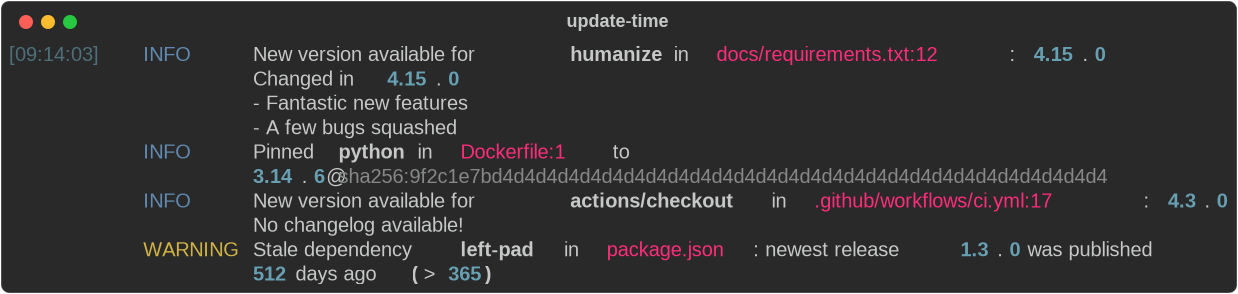
The same output as text
[09:14:03] INFO     New version available for humanize in docs/requirements.txt:12: 4.15.0
                    (new-version)
                    ╭──────────────────────────────────────────────────────────────────────────────╮
                    │ Changed in 4.15.0                                                            │
                    │                                                                              │
                    │  • ⚡ Fantastic new features                                                 │
                    │  • A few bugs squashed (#42)                                                 │
                    ╰──────────────────────────────────────────────────────────────────────────────╯
                    Changelog: https://github.com/python-humanize/humanize/releases/tag/4.15.0
           INFO     Pinned python in Dockerfile:1 to
                    3.14.6@sha256:9f2c1e7bd4d4d4d4d4d4d4d4d4d4d4d4d4d4d4d4d4d4d4d4d4d4d4d4d4d4d4d4
                    (pinned-to-hash)
           INFO     New version available for actions/checkout in .github/workflows/ci.yml:17: 4.3.0
                    (new-version)
                    No changelog available!
           WARNING  Stale dependency left-pad in package.json:24: newest release 1.3.0 was published
                    512 days ago (> 365) (stale-dependency)
           WARNING  Vulnerable dependency django in docs/requirements.txt:12: version 3.2.0 has a
                    critical vulnerability, "SQL Injection in Django" (GHSA-2gwj-7jmv-h26r,
                    https://osv.dev/GHSA-2gwj-7jmv-h26r) (vulnerable-dependency)
☰ Table of contents
- ⚡ Usage
- 🔄 Updating
- ⚠️ Warnings
- 🎛️ Controlling updates and warnings per reference
- 📖 Details per dependency type
- 📮 Point of contact
⚡ Usage
Getting started
Run Update-time without installing it using uvx:
uvx update-time
Or install it as a uv tool so it's always available on your PATH:
uv tool install update-time
update-time
Running update-time -h shows the full command-line interface
$ update-time -h
usage: update-time [-h] [-V] [--cooldown DAYS] [--stale-after DAYS]
                   [--vulnerability-level {low,moderate,high,critical}]
                   [--ignore-vulnerability IDS] [--exclude-path PATHS]
                   [--force] [--log-level {DEBUG,INFO,WARNING,ERROR}]
                   [PATH]

Scan the PATH for pinned dependencies and update them to their latest
versions, rewriting the pinned versions in place. Looks at pyproject.toml,
requirements.txt, PEP 723 inline script metadata, package.json, pnpm-
workspace.yaml, .yarnrc.yml, pom.xml, .python-version, Dockerfiles, CircleCI
configs, .gitlab-ci.yml, Docker Compose files, Helm charts, devcontainer
configs, YAML files under .github/, .pre-commit-config.yaml, and Sphinx
config. A cooldown period holds back releases that are too fresh to trust.

positional arguments:
  PATH                  the directory to scan recursively for dependencies to
                        update; paths in the log are reported relative to it
                        (default: the current directory)

options:
  -h, --help            show this help message and exit
  -V, --version         show program's version number and exit
  --cooldown DAYS       number of days to hold back a newly published version,
                        except for references that set a cooldown of their own
                        with an # update-time: set[cooldown=DAYS] marker
                        (default: 7)
  --stale-after DAYS    warn when a dependency's newest release is older than
                        this many days; 0 disables the check, except for
                        references that set a threshold of their own with an #
                        update-time: set[stale-after=DAYS] marker (default:
                        365)
  --vulnerability-level {low,moderate,high,critical}
                        warn about a known vulnerability in the version a
                        dependency is pinned to when the advisory's risk level
                        is at least this severe, except for references that
                        set a level of their own with an # update-time:
                        set[vulnerability-level=LEVEL] marker. A vulnerability
                        whose risk level cannot be read is warned about at
                        every level (default: low)
  --ignore-vulnerability IDS
                        comma-separated list of advisories to never warn
                        about, wherever in the run they turn up, for example
                        GHSA-2gwj-7jmv-h26r,CVE-2021-31542. An advisory can be
                        named by any of the identifiers it is known by. To
                        silence one for a single reference instead, mark that
                        reference with an # update-time: ignore[vulnerable=ID]
                        marker
  --exclude-path PATHS  comma-separated list of directories, relative to the
                        scan root, to exclude from the scan, for example
                        vendor,packages/legacy. Every file under an excluded
                        directory is skipped, on top of the always-ignored
                        directories build, target, node_modules, and
                        __pycache__. Hidden directories and files are skipped
                        too, except the ones Update-time looks for, such as
                        .github/ and .devcontainer/. Directories are matched
                        by relative path, not by name: --exclude-path vendor
                        excludes vendor/ at the root but not sub/vendor/.
                        Directories that don't exist are ignored and logged at
                        log-level WARNING. Absolute paths, or paths that
                        escape the scan root (../…), are rejected. Run with
                        --log-level DEBUG to see excluded directories
  --force               run even when not inside a git repository (changes are
                        made in place and cannot be reverted)
  --log-level {DEBUG,INFO,WARNING,ERROR}
                        the minimum severity of messages to log; available new
                        versions are logged at INFO (default: INFO)

Update-time exits with status 0 when it ran successfully, 1 when an error
prevented it from finishing, and 2 when any command-line argument was invalid,
including a PATH that is not inside a git repository (unless --force is
passed). When a signal stops the run, Update-time exits with status 128 plus
the signal's number, such as 130 for Ctrl-C. Exit status does not indicate
whether anything was updated. Inspect the diff or the INFO-level log for that.
Log levels
Update-time logs at four levels. --log-level sets the lowest one shown, which by default is INFO.
| Level | What is logged | |
|---|---|---|
| 🔍 | DEBUG |
what Update-time is doing: its version and command-line arguments, the environment it runs in, which credentials are set, the files it checks, the commands it runs, the markers it recognises, the updates it holds back, the warnings it silences, and more |
| ℹ️ | INFO |
what Update-time changed: a version updated, a hash pinned, a version a package manager moved back to honour the cooldown |
| ⚠️ | WARNING |
what needs your attention: a stale, yanked, vulnerable, or archived dependency, hash drift, a Python version outside the project's requires-python, a source it cannot reach or whose answer it cannot read, a file it cannot parse, an advisory it cannot read, a marker that is invalid or redundant |
| ❌ | ERROR |
failures that stop an update, such as a package manager that is not on the path or a GitHub rate limit that is used up, and a signal such as Ctrl-C that stops the run |
Update-time ends each message it logs in the message's name, such as (new-version). A message of several lines, such as a command's output, carries the name at the end of its first line. The index of the log messages explains each message under its name. In a terminal, the name links to the message's entry in the index.
Workflow
The recommended workflow is to run Update-time on a dedicated branch, push it, and let CI do the verification:
- Create a branch for the updates.
- Run
update-timein the root of your repository to update the dependencies in place. - Review the log and the changes.
- Commit the changes and open a pull request.
- Let your tests and checks run in CI to confirm nothing is broken before merging.
Update-time rewrites files in place, so it expects to run inside a git repository, where you can revert its changes. By default, Update-time refuses to run when the directory to scan sits outside a git repository. It then prints an error, exits with a non-zero status, and touches no files. Pass --force to override.
Stopping a run, for example with Ctrl-C, can leave some updates partly done. Revert the changes and run Update-time again.
Increasing rate limits
To raise API rate limits while updating, set the following environment variables before running Update-time:
GITHUB_TOKEN— increases the GitHub API rate limit when updating GitHub Actions and pre-commit hooks, and when checking whether a repository is archived. The token only needs to read public data about a repository, its releases, and its commits, so it does not need a specific scope. A classic token with no scopes selected works. So does a fine-grained token with default read-only access to public repositories.DOCKER_HUB_USERNAMEandDOCKER_HUB_TOKEN— authenticate to the Docker Hub API (both must be set) to increase its rate limit when updating Docker images.
Once GitHub's rate limit is used up, Update-time reports it, saying when the limit resets.
Run with --log-level DEBUG to see which of these variables are set. The log names each variable but not its value.
🔄 Updating
Update-time scans your repository for references. A reference is one occurrence of a dependency in a file, such as FROM python:3.12 in a Dockerfile or humanize==4.15.0 in a requirements.txt. Each reference has a dependency type, such as Docker images or Python dependencies. The dependency type decides which files Update-time looks in. It also decides the source that Update-time asks for versions, such as Docker Hub or PyPI.
Update-time updates each version pin to the newest version that its source offers. It waits until that version is older than the cooldown. It also adds a hash pin wherever the reference can hold one.
📦 What is updated
Update-time updates the following types of dependencies, found in the listed files, and using the listed sources. Where a package manager manages the dependencies, Update-time works through that package manager. Update-time updates the other dependency types itself:
| Dependency type | Files | Source | Updated by |
|---|---|---|---|
| Python dependencies | pyproject.toml, requirements.txt and the sources of a compiled one, and PEP 723 inline script metadata (# /// script blocks in *.py files) |
PyPI | Update-time, uv, or pip-compile |
| npm, pnpm, yarn, and bun dependencies | package.json, pnpm-workspace.yaml, .yarnrc.yml, and the lock files |
npm registry | delegated to npm, pnpm, yarn, or bun, whichever manages the package.json |
| Maven dependencies | pom.xml |
the repositories the project's Maven build resolves from | delegated to Maven's versions plugin |
| Node engine version | package.json |
the latest Node release on Docker Hub | Update-time |
| Python version | .python-version |
the latest Python release on Docker Hub | Update-time |
| Docker images | Dockerfiles, CircleCI configs, .gitlab-ci.yml, Docker Compose files, Helm charts, and devcontainer configs |
OCI registries (Docker Hub, ghcr.io, mcr.microsoft.com, …) |
Update-time |
| GitHub Actions | YAML files under .github/ |
GitHub API | Update-time |
| Pre-commit hooks | .pre-commit-config.yaml |
GitHub API | Update-time |
| jsDelivr npm URLs | Sphinx config | npm registry | Update-time |
Update-time updates the pins in a requirements.txt and in the sources of a compiled one, which uv or pip-compile then recompiles, whichever compiled it. In a pyproject.toml and in inline script metadata, uv resolves the versions and Update-time writes the pins, because uv does not have a command to upgrade dependencies. uv, npm, pnpm, yarn, and bun keep the project's lock files in step.
📌 Pinning
Pinning means specifying exactly what a reference should resolve to, rather than leaving that to whatever its source serves at the time. Two things can be pinned: the version a reference resolves to, and the artefact that the version resolves to.
A version pin names an exact version, such as python:3.14 or humanize==4.15.0. Its opposite is a floating pin, which leaves the version to the source: a floating image tag such as python:latest, a range such as humanize>=4 or npm's ^17.0.0, a branch such as the main in actions/checkout@main, or a tag such as stable-2024. Update-time updates version pins. It pins a floating image tag to the version and digest the tag serves, and a branch or a tag such as stable-2024 to the commit it points at (see Floating image tags and GitHub Actions and pre-commit hooks). It does not pin a range, because the range states which versions the project accepts. Where the project has a lock file, the package manager records there which version the range resolves to.
A hash pin adds a cryptographic hash of the artefact the version resolves to — an image digest, a commit SHA, or an integrity hash. The difference with a version pin is immutability. A version pin can be re-pointed under you, because a tag can be moved or re-pushed. A hash pin can only match the one thing it was computed from. That is what protects against a supply chain attack, and Update-time adds a hash pin wherever it can.
Floating image tags
A floating image tag does not pin a version: what the project pulls is whatever the registry serves under that tag at that moment. Update-time replaces it with the version and digest it serves at the time of the run, which is the image the project pulls today.
A reference without a tag floats the same way: FROM python and image: redis ask for whatever their registry serves under latest. Update-time pins such a reference to the version and digest that the tag resolves to, writing the tag after the image's name, so FROM python becomes FROM python:3.14.7@sha256:4fad23465a06cc5149a541fbec6f87e234a64dc0550f6bfdd2d290d8f03240df.
Registries may name one image under several tags, so a floating tag shares its digest with the version tags naming the same image. For example, python:latest names the same image as python:3.14.7, python:3.14, and python:3. Update-time picks the most precise version tag that keeps the floating tag's own labels, and drops a label naming a channel, such as latest or lts. So node:trixie lands on 26.7.0-trixie, node:lts-alpine on 24.19.0-alpine3.24, and node:latest on 26.7.0.
A bound does not prevent pinning, so allow[update<3.13] on python:latest still pins to 3.14.7, the version that tag serves. From the next run on, the reference is a version pin like any other, and Update-time updates, bounds, and checks it as one.
Update-time leaves a floating tag as it is where it does not find a version tag serving the same image, or cannot read the digest the tag serves. It reports why at DEBUG:
DEBUG Floating tag acme/api:dev in docker-compose.yml:7 was left as it is: no tag naming a version serves the same image (floating-tag-left-as-is)
DEBUG Floating tag ghcr.io/acme/api:edge in Dockerfile:1 was left as it is: the registry does not serve a manifest for edge, so what that tag serves is unknown (floating-tag-left-as-is)
Where Update-time reads the digest but does not find a version tag, and the reference records another digest, it warns about the hash drift instead. Where it cannot read the digest at all, it does not warn about drift, since it cannot tell whether the floating tag was re-pointed.
Version precision
When Update-time updates a version pin, and the source offers a more precise new version, it chooses that version. For example, Update-time applies python:3.13.0 when it updates python:3.12 and both python:3.13 and python:3.13.0 are available. Every kind of version pin gains precision this way. A .python-version entry of 3.12 becomes 3.13.2, and actions/checkout@v4 moves to the exact version that tag resolves to.
However, more precision is not guaranteed: Update-time still applies a newer version that is less precise. For example, if python:3.12.1 is the current version pin and python:3.13 is available, but no python:3.13.0, the version pin moves to python:3.13.
A pin only gains precision by updating, so Update-time does not rewrite a pin into a more precise spelling of the version it already names. python:3.12 stays as it is when the newest matching tag is 3.12.0. So does humanize==4.15 as long as 4.15.0 is the latest release.
Which dependencies get a hash pin
What Update-time adds depends on what the reference can hold:
| Dependency type | What Update-time adds |
|---|---|
| Python dependencies | nothing: a pin names a version, and Update-time writes no hash beside it |
| npm, pnpm, yarn, and bun dependencies | nothing: the integrity hashes live in the package manager's lock file |
| Maven dependencies | nothing: a pom names a version, and Maven records an artefact's checksum beside the artefact |
| Node engine version | nothing: it names a Node version, not an artefact that could be hashed |
| Python version | nothing: it names a Python version, not an artefact that could be hashed |
| Docker images | the @sha256:digest of the tag, appended to the reference |
| GitHub Actions | the commit SHA the version, branch, or tag points at, with a trailing comment naming the version, branch, or tag. A short commit SHA is replaced by the full one |
| Pre-commit hooks | the commit SHA the version, branch, or tag points at, with a # frozen: comment naming the version, branch, or tag. A short commit SHA is replaced by the full one |
| jsDelivr npm URLs | the SRI integrity hash of the file the URL points at |
Hash drift
Sometimes a reference already carries a hash pin, and only what it points at changed. Update-time warns about that and leaves the pin unchanged. It never silently adopts a changed target, which would defeat the immutability a pin exists to provide. Hash drift takes five forms:
WARNING Digest drift for python:3.14 in Dockerfile:1: pinned to sha256:… but the registry now serves sha256:…; the pin was left unchanged, verify the change is expected before updating the pin (digest-drift)
WARNING Tag drift for actions/checkout@4.1.1 in .github/workflows/ci.yml:17: pinned to commit … but the tag now points at …; the pin was left unchanged, verify the tag was moved deliberately before updating the pin (ref-drift)
WARNING Branch drift for actions/checkout@main in .github/workflows/ci.yml:17: pinned to commit … but the branch has moved on to …; the pin was left unchanged, verify the branch moved to a commit you trust before updating the pin (ref-drift)
WARNING Ref drift for actions/checkout@stable-2024 in .github/workflows/ci.yml:17: pinned to commit … but the ref now points at …; the pin was left unchanged, verify the ref moved to a commit you trust before updating the pin (ref-drift)
WARNING Integrity hash mismatch for clipboard@2.0.11 in docs/conf.py:4: declares sha256-… but jsDelivr serves sha256-…; the hash was left unchanged, and since npm does not republish a version it is probably the declared hash that is wrong (integrity-hash-mismatch)
Digest drift means an image tag was re-pushed (rebuilt) under the same name and version, so the registry now serves a different digest.
Tag drift means the tag of a GitHub Action or pre-commit hook now points at another commit than the one the reference pins. A git tag is mutable, so whoever controls the repository can move it. Update-time pins the reference to a commit SHA to catch that.
Branch drift means the branch has moved on from the commit the reference pins, to a commit further along the branch or on a history a force-push rewrote.
Ref drift is tag drift where GitHub refuses to say whether the repository has a tag of that name. Update-time then can't tell a tag from a branch, and treats the reference as a tag.
An integrity hash mismatch means the hash a jsDelivr URL declares is not the one jsDelivr serves for the version the URL sits on. Unlike the other forms this rarely means anything upstream changed, since npm does not allow a published version to be republished. More likely, the declared hash is wrong: mistyped, copied from another file, or tampered with. It is also the most urgent, because the browser silently refuses to load the script until the hash matches, which no build step catches. Update-time never adopts an integrity hash mismatch, whatever you opt in to, and leaves correcting the hash to you.
A floating image tag that carries a digest, and a branch pinned to a commit, can drift as well (see Floating image tags and GitHub Actions and pre-commit hooks). A reference without a hash pin has nothing that can drift (see Which dependencies get a hash pin).
Update-time warns about a moved tag or a re-pushed image right away, without waiting for the cooldown, since a pin exists to catch exactly that. A branch is meant to move, so Update-time warns about it only when a new commit on it is older than the cooldown. To have Update-time adopt drift instead of warning about it, mark the reference allow[hash-drift] (see Adopting hash drift). On a branch, do that only if you trust whoever moves the branch.
⏳ Cooldown
To avoid adopting releases that are too fresh to trust, Update-time honours a cooldown period. It does not yet adopt a version published inside that period. The cooldown defaults to 7 days. Change it with the --cooldown option, for example update-time --cooldown 14. A marker can set a cooldown of its own for a reference (see Setting a cooldown period). Who applies it depends on the dependency type:
| Dependency type | Applied by | Measured against |
|---|---|---|
| Python dependencies | Update-time for requirements.txt and the sources of a compiled one, pip-compile for a compiled file it recompiles, uv for the rest |
the release's publication date on PyPI |
| npm, pnpm, yarn, and bun dependencies | npm, pnpm, yarn, and bun | the release's age on the npm registry |
| Maven dependencies | Update-time, for the artefacts Maven Central serves | the version's publication date on Maven Central |
| Node engine version | Update-time | the Node image tag's push date |
| Python version | Update-time | the Python image tag's push date |
| Docker images | Update-time, on Docker Hub only | the image tag's push date |
| GitHub Actions | Update-time | the release's publication date, or the date of the commit a tag or branch points at |
| Pre-commit hooks | Update-time | the release's publication date, or the date of the commit a tag or branch points at |
| jsDelivr npm URLs | Update-time | the release's publication date on the npm registry |
Where Update-time applies the cooldown itself, it holds back every version published inside the cooldown. For every dependency type but Maven, it logs the newest version it holds back at DEBUG, with the date the cooldown ends for it. Where a marker sets the cooldown, the line names the marker's directive.
Where a package manager applies the cooldown, Update-time hands the value to uv, pip-compile, npm, pnpm, yarn, or bun. Each of them takes the value per run rather than per dependency, except uv when it recompiles a requirements file. Update-time does not hand the value over where the package manager's own settings already hold a cooldown. It names the setting that holds the cooldown instead, at DEBUG, so the log shows a --cooldown that does not reach a project.
Python dependencies and npm, pnpm, yarn, and bun dependencies describe what that means per dependency type.
A lock file or a compiled requirements file can hold a version younger than the cooldown. That happens, for example, on the first run that applies a cooldown, and on a run with a longer cooldown than the run before. uv, pip-compile, npm, yarn, and bun then move that version back to the newest version older than the cooldown, and pnpm refuses to update. Update-time reports a version moved back at INFO.
⚠️ Warnings
Update-time reports what an update cannot fix: a stale, yanked, vulnerable, or archived dependency. These warnings are informational, so they change no file and do not affect the exit status.
🕸️ Stale dependencies
Update-time warns when a dependency's newest release is older than a threshold. That may mean the project was abandoned or superseded. The threshold defaults to 365 days, and --stale-after DAYS sets it. Pass --stale-after 0 to disable the check. A marker can set a threshold of its own for a reference, or leave the check out (see Setting a staleness threshold). For example, Update-time reports a pin whose newest release is well over a year old as:
WARNING Stale dependency humanize in docs/requirements.txt:12: newest release 4.15.0 was published 512 days ago (> 365) (stale-dependency)
The date compared against the threshold is the publication date of the dependency's newest release. So Update-time never reports a project that just published a release as stale, not even when that release is still within the cooldown.
Update-time checks the dependencies it asks a source about for staleness, against the date that source reports:
| Dependency type | Measured against |
|---|---|
| Python dependencies | the newest release of the package on PyPI |
| npm, pnpm, yarn, and bun dependencies | the newest release on the npm registry, for the dependencies that resolve to one |
| Maven dependencies | the newest release on Maven Central, of each pom.xml dependency and plugin |
| Node engine version | the newest Node release on Docker Hub |
| Python version | the newest Python release on Docker Hub |
| Docker images | the image's newest release on Docker Hub. Other registries do not expose a publication date |
| GitHub Actions | the newest release of the action's repository |
| Pre-commit hooks | the newest release of the hook's repository |
| jsDelivr npm URLs | the newest release of the package on the npm registry |
🚫 Yanked dependencies
A yank means "stop using this": a release the maintainer withdrew because it was broken, botched, or insecure. An exact pin keeps installing one anyway, so Update-time warns when the version a dependency is pinned to was yanked. Update-time includes the maintainer's reason when they gave one:
WARNING Yanked dependency humanize in docs/requirements.txt:12: version 4.15.0 was yanked ("accidentally broke Python 3.10 support") (yanked-dependency)
When no reason was given, the message reports (reason not specified) instead.
Update-time gives the warning only when the run leaves the reference on the yanked version. That happens when the replacement is still within the cooldown, or when a marker holds the update back. It also happens when a package manager left the pin where it was, or when the yanked release is the newest one. To silence the warning itself, mark the reference # update-time: ignore[yanked] (see Controlling updates and warnings per reference).
Which dependencies are checked follows from where a yank can be observed. PyPI reports one as PEP 592 yank metadata. On npm there is no yank, but a per-version deprecation is the same signal, and Update-time reports it in the same wording as a yank. Where Update-time picks the new version itself, it also skips a withdrawn one:
| Dependency type | Yank check |
|---|---|
| Python dependencies | exact pins in requirements.txt, the sources of a compiled one, pyproject.toml, and inline script metadata, and the version a compiled file pins for a source's requirement without an exact pin, against PyPI's yank metadata |
| npm, pnpm, yarn, and bun dependencies | exact pins in a package.json and in a catalog, against the npm registry's deprecation of the pinned version |
| Maven dependencies | none: Maven Central does not report a withdrawal |
| Node engine version | none: its source does not record a yank |
| Python version | none: its source does not record a yank |
| Docker images | none: its source does not record a yank |
| GitHub Actions | none: its source does not record a yank |
| Pre-commit hooks | none: its source does not record a yank |
| jsDelivr npm URLs | against the npm registry's deprecation of the pinned version |
🛡️ Vulnerable dependencies
Update-time queries the OSV database about the pinned version. OSV aggregates GitHub's advisory database, PyPI's advisory database, and others. Update-time warns when an advisory names that version as affected. The warning names the risk level, what the advisory says, and where to read the advisory in full:
WARNING Vulnerable dependency django in docs/requirements.txt:12: version 3.2.0 has a critical vulnerability, "SQL Injection in Django" (GHSA-2gwj-7jmv-h26r, https://osv.dev/GHSA-2gwj-7jmv-h26r) (vulnerable-dependency)
OSV holds an advisory per database that carries a vulnerability, each under an identifier of its own. Update-time warns about each vulnerability once, at the most severe risk level any of those advisories gives it, and names that advisory.
The risk level is the one the advisory's reviewers gave it: low, moderate, high, or critical. Where they gave none, Update-time derives the level from the advisory's CVSS score. It reports an advisory whose risk level it cannot read as a vulnerability of unknown severity. Many advisories do not give a summary, and Update-time reports such an advisory without the quotation.
Update-time checks the version the run leaves the reference on. So it warns about a vulnerability the run updated into, and not about one the run updated away from. It does not check transitive dependencies. Auditing the transitive dependencies in a lock file is what uv audit, pip-audit, npm audit, and pnpm audit are for.
A reference that takes a marker can set a risk level of its own, silence one advisory, or leave the check out altogether (see Controlling updates and warnings per reference).
To silence one advisory across the whole run, rather than on the one reference that carries a marker, pass --ignore-vulnerability. The option takes a comma-separated list: --ignore-vulnerability GHSA-2gwj-7jmv-h26r,CVE-2021-31542. It names an advisory the way a marker does, so any identifier the vulnerability is known by will do. Update-time logs what the option silenced at DEBUG.
Update-time warns about every risk level by default. To hear only about the more severe ones, raise the threshold with --vulnerability-level, for example --vulnerability-level high. Update-time warns about a vulnerability whose risk level it cannot read, whatever the threshold is.
Which dependencies are checked follows from what OSV holds advisories for:
| Dependency type | Vulnerability check |
|---|---|
| Python dependencies | exact pins in requirements.txt, the sources of a compiled one, pyproject.toml, and inline script metadata, and the version a compiled file pins for a source's requirement without an exact pin, against OSV's PyPI advisories |
| npm, pnpm, yarn, and bun dependencies | exact pins in a package.json and in a catalog, against OSV's npm advisories |
| Maven dependencies | the version each pom.xml dependency and plugin is left on, against OSV's Maven advisories |
| Node engine version | none: it names a runtime version rather than a package release |
| Python version | none: it names a runtime version rather than a package release |
| Docker images | none: OSV has no ecosystem for container images |
| GitHub Actions | the version each uses: is left on, against OSV's GitHub Actions advisories |
| Pre-commit hooks | none: a hook repository is not an OSV package |
| jsDelivr npm URLs | the version in the URL, against OSV's npm advisories |
🗄️ Archived dependencies
An archived dependency is one its maintainer declared finished: expect no further release. Update-time warns when a dependency's source declares it archived. For example, Update-time reports an archived project and an archived repository as:
WARNING Archived dependency aioredis in docs/requirements.txt:12: the project was archived (archived-dependency)
WARNING Archived dependency actions/setup-ruby in .github/workflows/ci.yml:17: the repository was archived (archived-dependency)
The clause after the colon names what the source archived: PyPI archives a project, GitHub a repository. The warning quotes a reason if the source publishes one.
An archived dependency is still updated to its newest release, if one is available. To silence the warning for a dependency you decided to keep using, mark it # update-time: ignore[archived] (see Silencing a warning).
Which dependencies are checked follows from where an archival declaration can be read:
| Dependency type | Archival check |
|---|---|
| Python dependencies | the project status PyPI publishes for the package a Python file declares |
| npm, pnpm, yarn, and bun dependencies | none: the npm registry does not publish an archival signal |
| Maven dependencies | whether GitHub reports the source repository of each pom.xml dependency and plugin as archived |
| Node engine version | none: Docker Hub does not publish an archival signal |
| Python version | none: Docker Hub does not publish an archival signal |
| Docker images | none: no OCI registry publishes an archival signal |
| GitHub Actions | whether GitHub reports the action's repository as archived |
| Pre-commit hooks | whether GitHub reports the hook's repository as archived |
| jsDelivr npm URLs | none: the npm registry does not publish an archival signal |
🎛️ Controlling updates and warnings per reference
Markers of the form # update-time: <directive> let you steer what happens to an individual reference. You can hold a reference back with one, or set a value for it, such as its own cooldown. You can also bound how far it may move, or opt it into behaviour that is off by default. A marker is a comment wherever the file can hold one, and a field where it cannot (see Where to put a marker).
Update-time reports at WARNING what a marker gets wrong. A marker that decides nothing is redundant, and an item Update-time cannot read is invalid. The two sections closing this chapter cover them.
The anatomy of a marker
The rest of this chapter names the parts of a marker, so here is one taken apart:
humanize==4.15.0  # update-time: ignore[yanked, archived] set[stale-after=180] allow[update<5] (until 5.0)
                  └───────────────────────────────── marker ─────────────────────────────────┘ └ reason ─┘
                                 └───── directive ──────┘ └─── directive ────┘ └─ directive ─┘
                                 └verb┘└─── bracket ────┘ └─┘└─── bracket ───┘ └───┘└bracket─┘
Directives that use the same verb can be combined: ignore[yanked, archived] is equivalent to ignore[yanked] ignore[archived]. In a file that can hold no comment, the directives are the value of an update-time field instead. Everything below reads the same (see Where to put a marker).
Zooming in on brackets:
ignore[yanked, archived]
       └─┬──┘  └──┬───┘
         └────────┴─ item: a scope named alone, here silencing the yank and the archival warning

set[stale-after=180]
    └────┬────┘ └┬┘
         │       └─ value: what the item sets for this reference, here 180 days
         └─ key: the command-line option the item overrides, here --stale-after
A set item steers a scope too: stale-after=180 steers the stale scope.
| Term | What it is | Example |
|---|---|---|
| Marker | the directives steering one reference: a # update-time: comment, up to its last directive, or a field's value |
# update-time: ignore[yanked] allow[update<3.13] |
| Directive | a verb and the bracket it carries. A marker holds one or more directives | set[stale-after=180] |
| Verb | ignore drops what its items name, allow keeps it, and set sets a value |
ignore, allow, set |
| Bracket | what a directive's […] holds: its items, separated by commas |
[yanked, archived] |
| Item | one entry in a bracket: a scope, a bound, an advisory, or a key with a value | stale-after=180 |
| Key | in a set item, the command-line option the item overrides |
stale-after |
| Value | in a set item, what follows the =: what the item sets for this reference |
180 |
| Scope | what an item steers: update, cooldown, stale, yanked, vulnerable, archived, hash-drift, or floating-pin |
ignore[yanked] steers the yank warning |
| Reason | free text after the last directive, which Update-time ignores | (pinned until the 3.13 migration) |
Set a value or a bound once per reference. Setting one twice has an undefined result.
Holding a reference back
# update-time: ignore[update] keeps a deliberately pinned reference on its current version: Update-time does not update it. Use it for a known incompatibility or a deferred migration, or to keep something reproducible. Update-time still tells you when the project behind the reference went quiet, when its version was withdrawn, when an advisory names that version, or when the maintainer archived the project.
An ignore[update] wins over any directive beside it that would change the reference: a bound, an allow[hash-drift], or an allow[floating-pin]. Update-time leaves the reference untouched.
Silencing a warning
Each warning has a directive that silences it for one reference. The reference keeps updating, and the other warnings stay:
| Marker | Silences the warning about |
|---|---|
# update-time: set[stale-after=0] |
a ⚠️ stale dependency you acknowledged |
# update-time: ignore[yanked] |
a 🚫 yank you decided to live with |
# update-time: set[vulnerability-level=none] |
the 🛡️ vulnerabilities of a dependency you assessed |
# update-time: ignore[archived] |
an 🗄️ archived dependency you decided to keep using |
Combine directives to silence more, or to hold the update back as well, as in # update-time: ignore[update, yanked] set[stale-after=0].
Silencing specific vulnerabilities
set[vulnerability-level=none] silences every vulnerability warning a reference gets. To silence just one of them — a vulnerability you assessed and decided to live with — name the advisory after the vulnerable scope:
django==3.2.0 # update-time: ignore[vulnerable=GHSA-2gwj-7jmv-h26r] (assessed, we don't use the affected query API)
A marker can name the vulnerability by any of its identifiers (see Vulnerable dependencies). So a marker naming the CVE-… silences a warning reported under the GHSA-….
To silence a second advisory, add a second item: # update-time: ignore[vulnerable=GHSA-2gwj-7jmv-h26r, vulnerable=CVE-2021-31542]. The comma separates the bracket's items, so each identifier needs a vulnerable= of its own.
An allow[vulnerable=…] would keep that advisory's warning and drop the warnings about every other advisory. So only the ignore verb silences an advisory, and the warnings about advisories you have not assessed stay.
The reference keeps updating, and Update-time still warns about every other advisory affecting the version it lands on. So a vulnerability found after you wrote the marker still reaches you. Run with --log-level DEBUG to see what the marker silenced. To silence an advisory wherever it appears, pass --ignore-vulnerability (see Vulnerable dependencies).
Overriding a command-line option
A set directive overrides a command-line option for the reference carrying it, whatever the option is set to. Its key names the option, and its value replaces the option's value. Every other reference in the run keeps the run's value:
| Item | Sets | Overrides |
|---|---|---|
stale-after=DAYS |
the staleness threshold | --stale-after |
cooldown=DAYS |
the cooldown | --cooldown |
vulnerability-level=LEVEL |
the risk level to warn from | --vulnerability-level |
A marker can set several values in one bracket, as set[stale-after=90, cooldown=30] does. Update-time drops a set item it cannot read, as it drops every invalid item.
Setting a staleness threshold
# update-time: set[stale-after=90] warns as soon as the reference's newest release is more than 90 days old, and is a per-reference --stale-after 90. Use it for a critical dependency you want to hear about early, or for a low-churn library that shouldn't be flagged for years:
humanize==4.15.0 # update-time: set[stale-after=90] (critical, warn early)
# update-time: set[stale-after=1095]
FROM python:3.12
Under --stale-after 0, Update-time still checks a reference with a threshold of its own. set[stale-after=0] silences the staleness warning for one reference.
Setting a cooldown period
The cooldown holds back releases that are too fresh to trust. # update-time: set[cooldown=30] drops update candidates published less than 30 days ago, and is a per-reference --cooldown 30. Use it for a dependency that burned you before, or one you trust enough to adopt sooner than the rest:
some-flaky-lib==2.1.0 # update-time: set[cooldown=30] (burned by 2.0.0)
# update-time: set[cooldown=30]
FROM python:3.12
To adopt new releases for one reference as soon as they ship, write set[cooldown=0]. A zero-day cooldown holds nothing back, which is what --cooldown 0 means globally.
Run with --log-level DEBUG to see the version the cooldown holds back (see Cooldown).
The override reaches the dependencies whose cooldown Update-time enforces itself, and the packages of a requirements file uv recompiles (see Python dependencies). It does nothing for the other dependencies handed to uv, pip-compile, npm, pnpm, yarn, or bun, which take a cooldown per run rather than per dependency (see Cooldown).
Setting a risk level
# update-time: set[vulnerability-level=high] warns about that reference's high and critical vulnerabilities, and stays quiet about its low and moderate ones. It is a per-reference --vulnerability-level high. Use it for a dependency where you act on high and critical alone. The level keeps silencing mild advisories published later, so it states a policy rather than a judgement on the advisories the version has today:
django==3.2.0 # update-time: set[vulnerability-level=high] (we act on high and worse for this dependency)
set[vulnerability-level=none] silences every vulnerability warning for one reference, a vulnerability of unknown severity included.
Adopting hash drift
# update-time: allow[hash-drift] opts an already-pinned reference into adopting its drift, in this run and in every later one (see Hash drift). Update-time then re-pins the reference to the new digest or commit, instead of only warning about the drift, and logs that at INFO like any other change. As with an update, Update-time waits until the new digest or commit is older than the cooldown, and holds the drift back without a warning until then. For a branch, it takes the newest commit that is. A registry other than Docker Hub does not date an image, so there it re-pins at once. A marker that holds the reference back wins over allow[hash-drift], so a reference you deliberately held back is never re-pinned (see Holding a reference back).
ignore[hash-drift] is the opposite and the default, so a reference carrying it keeps its pin.
Keeping a pin floating
# update-time: allow[floating-pin] keeps a floating pin as it is: a floating image tag such as python:latest, a branch such as actions/checkout@main, or a tag such as stable-2024. Update-time would otherwise pin the image tag to the version and digest it serves, and the branch or tag to the commit it points at (see GitHub Actions and pre-commit hooks). Use the marker for a reference you want to follow a channel or a branch, such as an image you rebuild from latest on purpose. Run with --log-level DEBUG to see what the marker held back, and what dropping the marker would pin the reference to.
Update-time keeps a reference without a tag the same way.
Update-time still checks a reference kept floating for hash drift. It warns about the drift when the image tag now serves another digest than the reference records, or when the branch moved on from the commit the reference records. A reference opted into drift adopts the new digest or commit, while its tag or branch stays as it is.
ignore[floating-pin] is the opposite and the default, so Update-time pins a reference carrying it.
Bounding an update
A bound lets a reference keep updating, while it blocks the jump you are not ready for. Name the versions the reference may move to, or the level of update it may not make. A bound narrows updates and nothing else: staleness is still measured against the project's newest overall release, and a reference still gets the hash pin of the version it lands on, even when the bound excludes the version the reference is on.
Bounding how far a reference may update
To keep the python:3.12 patch releases, say, and avoid 3.13 until you migrate, add a PEP 440 version specifier directly after update inside the brackets. # update-time: allow[update<specifier>] keeps only the updates whose version satisfies the specifier. # update-time: ignore[update<specifier>] drops the updates whose version satisfies it, and the plain ignore[update] is the drop-everything case.
For example, allow[update<3.13] keeps a python base image on its newest 3.12 release and never crosses into 3.13:
# update-time: allow[update<3.13]
FROM python:3.12.1-bookworm-slim
The same works inline, for image and action references — here allow[update==7.*] keeps Redis on its 7.x line and ignore[update>=5] keeps checkout below v5:
image: redis:7.2  # update-time: allow[update==7.*]
uses: actions/checkout@v4  # update-time: ignore[update>=5]
A bounded reference still advances as far as the bound allows. On 3.12.8, allow[update<3.13] still adopts a freshly published 3.12.9. It just never crosses into 3.13.
allow and ignore are complements, which matters for ranges. For a one-sided bound the two are interchangeable — allow[update<3.13] and ignore[update>=3.13] express the same ceiling. For a range they are opposites. With versions 3.13 through 3.16 available, allow[update>=3.13,<3.15] keeps the reference within [3.13, 3.15) and picks 3.14. ignore[update>=3.13,<3.15] excludes that range and skips to 3.16.
Choose the operator deliberately. To keep 3.12 together with its patch releases while blocking 3.13, use <3.13, ==3.12.*, or ~=3.12.0. Don't use <=3.12 if you want to stay on 3.12. Since 3.12.1 > 3.12 in PEP 440, it also blocks 3.12.1, which is rarely what "stay on 3.12" means.
Bounding by update level
A specifier bound names the version it must not reach, so it goes stale. After you migrate to 3.13, an allow[update<3.13] blocks every update until you rewrite the comment. A level-based bound states the policy instead, holding back or keeping updates by how significant they are:
| Directive | Effect | Complement |
|---|---|---|
ignore[major-update] |
minor and patch updates only | allow[minor-update] |
ignore[minor-update] |
patch updates only | allow[patch-update] |
Pick whichever verb reads best in context. Unlike a specifier bound, a level-based bound anchors to the currently pinned version on every run. So it ratchets along as the reference advances. ignore[minor-update] on python:3.12.1 blocks 3.13 today, and blocks 3.14 as soon as you migrate the pin to 3.13. The comment never needs editing:
# update-time: ignore[minor-update]
FROM python:3.12.1-bookworm-slim
The levels are positional, not semantic: they refer to the component's position in the version, not to the project's compatibility promises. Projects may ship breaking changes in releases that bump the second component. So "stay on Python 3.12" is ignore[minor-update], although Python 3.13 shipped breaking changes: it removed 19 legacy modules from the standard library. The same caution applies to projects using calendar versioning.
A level bound anchors at the number of the current version, such as 9.4.53 for Jetty's 9.4.53.v20231009 and 3.12 for python3.12-slim. It does not affect a version embedded in a suffix, such as the 3.23 in alpine3.23. A component the current version doesn't have counts as zero, so ignore[minor-update] on node:22 blocks 22.1. A pyproject.toml or inline script metadata dependency without an exact pin does not name its current version. Where the file has a lock, its level bound anchors at the version uv locks for the file as written (see Python dependencies).
Writing a marker
Where a marker goes depends on the format of the file it sits in, and a run at --log-level DEBUG reports which markers Update-time read.
Where to put a marker
A marker is written in one of three places, and the file's format decides which:
-
Inline, on the reference's own line (in YAML files,
requirements.txt,pyproject.toml, PEP 723# /// scriptblocks,devcontainer.json,.python-version,pom.xml, and Sphinxconf.pyfiles):image: python:3.12 # update-time: ignore[update]
humanize==4.15.0 # update-time: ignore[update]
dependencies = ["humanize==4.15.0"] # update-time: ignore[update]
"ghcr.io/devcontainers/features/node:1": {} // update-time: ignore[update]"https://cdn.jsdelivr.net/npm/clipboard@2.0.11/dist/clipboard.min.js", # update-time: ignore[update]
<version>33.0.0-jre</version> <!-- update-time: ignore[update] -->
-
On the line directly above the reference. Dockerfiles need this form, since they don't allow inline comments, and a dependency array takes it as well:
# update-time: ignore[update]
FROM ghcr.io/astral-sh/uv:python3.12-bookworm-slim
dependencies = [
    # update-time: ignore[update]
    "humanize==4.15.0",
]
-
In an
update-timefield, for a reference in a file that can hold no comment. Apackage.jsonis strict JSON. So the marker of its Node engine, of one of its dependencies, or of an entry of its catalogs names the reference it steers instead of sitting beside it, in a field mirroring the file's own structure:"update-time": { "engines": { "node": "ignore[update]" }, "dependencies": { "left-pad": "set[stale-after=0]" } }
npm, pnpm, yarn, and bun keep a field they do not know, so the marker survives an
npm update, apnpm update, ayarn up, and abun update.
A reference in any other file takes its marker in a comment: a // comment in a devcontainer.json, a <!-- … --> comment in a pom.xml, and a # comment everywhere else. An inline marker steers only a reference on its own line, never on the line below it.
Inside a # /// script block, every line of the TOML is already commented out, so the marker needs a # of its own:
# /// script
# dependencies = [
#     "humanize==4.15.0",  # update-time: ignore[update]
# ]
# ///
A marker written with the block's own # alone uncomments to update-time: ignore[update], which is not TOML. uv then rejects the script, and Update-time reads no dependency from that block.
A dependency array can put several declarations on one line, or each on a line of its own, so two rules decide which declaration a marker steers. An inline marker steers every dependency declared on its line, so a marker beside dependencies = ["a==1", "b==2"] steers both. A marker on the line above steers whatever the line below it declares, wherever in the array that declaration sits. So a marker above the dependencies = [ line steers nothing, since that line declares no dependency.
A package.json dependency takes its marker under the section that declares it, and a catalog entry takes its marker under the path of its catalog (see npm, pnpm, yarn, and bun dependencies).
Confirming a marker was understood
Run with --log-level DEBUG to confirm a marker is recognised. Update-time reports a marker it recognised as:
DEBUG Recognised update-time marker ignore[yanked] for humanize in docs/requirements.txt:12 (marker-recognised)
That line says the marker was read. It quotes the marker as the file writes it, and in a package.json it quotes the whole update-time field as JSON. A Recognised line without an Invalid warning beside it says the marker was understood as well. No Recognised line at all means the marker was not read. The prefix and the verbs are case-sensitive, and a field marker is read by name. So a typo in any of them leaves the reference updated as usual. A typo inside the brackets does too, and Update-time warns about it at WARNING as an invalid item (see Invalid markers).
Seeing what a marker did
Run with --log-level DEBUG to see what a marker held back or silenced. Update-time logs every update held back, every pin kept floating, and every warning silenced, each on a line of its own. Each line names the directive it obeyed.
A line about a warning appears only when the marker actually silenced one, so an ignore[yanked] on a version that was never yanked produces none. A line about the update appears whenever the marker holds the update back, whether or not a newer version was available. An item Update-time cannot read does nothing, so it gets an invalid warning rather than a line. A bound produces a line only on a pom.xml dependency or plugin whose version Maven updates. That line names the versions the bound holds back.
Redundant markers
A directive is redundant when it decides nothing for the reference it sits on. A scope can silence a warning that reference never gets. A staleness threshold can judge the newest release as --stale-after does, and a risk level can report the vulnerabilities --vulnerability-level reports. A bound can narrow nothing, and a directive can ask for what Update-time does without it. Update-time reports each one at WARNING.
The warning scopes
The stale, yanked, vulnerable, and archived scopes each silence a warning. Update-time reports such a scope as redundant on a reference it does not check for that warning. Update-time never checks some dependency types for some warnings, such as a Docker image for a yank:
WARNING Redundant update-time directive ignore[yanked] for python in Dockerfile:2: this dependency's source does not record a yank (redundant-directive)
Update-time also leaves these references unchecked, although it checks other references of their dependency type:
- a dependency that its source does not serve a release for, such as a
pyproject.tomldependency pointing at a git repository or apackage.jsondependency given as a git URL - a
package.jsondependency that takes its version from a catalog, since Update-time checks that version at the catalog's entry, if it finds one (see npm, pnpm, yarn, and bun dependencies) - an image that the file does not pull, such as a CircleCI machine-executor image or an image a Docker Compose file builds, or a reference that goes through a variable or a template Update-time cannot substitute, such as
redis:7.2-${VARIANT}, since Update-time does not ask a registry about either - for the
stalescope, an image on a registry other than Docker Hub, since such a registry does not report a publication date - a
pom.xmldeclaration that leaves its version to the declaration managing it (see Maven dependencies) - for the
yankedandvulnerablescopes, which judge a version, a reference that does not name one, such as apom.xmldeclaration whose version Maven leaves unresolved, or a GitHub Action that names a full commit SHA without a comment - for the same two scopes, a
requirements.txtrequirement that does not pin an exact version, outside the source of a compiled file - for the
archivedscope, apom.xmlartefact whose poms do not name a GitHub repository (see Archived dependencies)
Update-time reports a scope on those references as:
WARNING Redundant update-time directive set[stale-after=90] for ghcr.io/astral-sh/uv in Dockerfile:2: this dependency's source does not report a publication date to measure staleness against (redundant-directive)
WARNING Redundant update-time directive set[stale-after=90] for redis in docker-compose.yml:7: it names its image or tag through a variable or a template, so its staleness is never checked (redundant-directive)
WARNING Redundant update-time directive ignore[yanked] for humanize in docs/requirements.txt:12: this requirement does not pin a version to check for a yank (redundant-directive)
WARNING Redundant update-time directive set[vulnerability-level=none] for humanize in docs/requirements.txt:12: this requirement does not pin a version to check for a vulnerability (redundant-directive)
WARNING Redundant update-time directive ignore[archived] for org.apache.commons:commons-lang3 in pom.xml:12: Update-time does not find a GitHub repository to check this dependency for archival (redundant-directive)
Update-time reports an ignore[yanked] or an ignore[archived] as redundant where its check finds nothing to silence. A suppression can outlive what it was written for, and the check is what tells you it did:
WARNING Redundant update-time directive ignore[yanked] for humanize in docs/requirements.txt:12: version 4.15.0 was not yanked (redundant-ignore-yanked)
WARNING Redundant update-time directive ignore[archived] for humanize in docs/requirements.txt:12: the project is not archived (redundant-ignore-archived)
WARNING Redundant update-time directive ignore[archived] for actions/checkout in .github/workflows/ci.yml:17: the repository is not archived (redundant-ignore-archived)
Update-time does not report such a directive as redundant when it cannot reach the dependency's source.
Update-time reports a staleness threshold such as set[stale-after=90] as redundant where it and --stale-after judge the newest release alike, so both warn about it or neither does:
WARNING Redundant update-time directive set[stale-after=90] for humanize in docs/requirements.txt:12: newest release 4.15.0 was published 30 days ago, which the threshold of 90 days and the default of 365 days judge alike (redundant-stale-after-as-default)
Under --stale-after 0, a threshold is redundant until the newest release is older than the threshold, since the run itself does not warn about any release. So set[stale-after=0] is always redundant there.
The vulnerable scope
Update-time reports an ignore[vulnerable=…] as redundant when none of the version's vulnerabilities answers to the identifier. An update fixed the vulnerability, or the identifier was mistyped:
WARNING Redundant update-time directive ignore[vulnerable=CVE-2022-28346] for django in docs/requirements.txt:12: version 4.2.0 has no such vulnerability (redundant-ignore-vulnerable)
Update-time judges a marker naming several advisories together. It warns only when none of them matches a vulnerability the version has.
Update-time reports a risk level such as set[vulnerability-level=high] as redundant where it and --vulnerability-level report the same vulnerabilities in the version. Such a level is one the reference no longer needs:
WARNING Redundant update-time directive set[vulnerability-level=high] for django in docs/requirements.txt:12: the risk level high and the default level low report the same vulnerabilities in version 4.2.0 (redundant-vulnerability-level-as-default)
Where a marker does not steer the update
An ignore[update], a bound, and a set[cooldown=…] each steer the update. Update-time reports each of them as redundant on a reference it does not update, or whose update ignores the marker:
- a
requirements.txtrequirement that does not pin an exact version, outside the source of a file Update-time recompiles (see Python dependencies) - a
pom.xmldependency or plugin whose version Maven does not update (see What dependencies are updated?), or whose pom's versions plugin configuration names rules of its own, which Maven follows instead of the marker (see Maven dependencies) - a dependency of a
pyproject.tomlthat uv does not manage, or of a workspace whose root lies outside the scan root - a dependency of a
package.jsonwhose project does not have a lock file, has a binarybun.lockbor a yarn that cannot apply a cooldown, or holds the files of more than one package manager - an image that the file does not pull, or a reference that goes through a variable or a template Update-time cannot substitute (see Docker images)
- a GitHub Action or pre-commit hook that names a full commit SHA without a comment (see GitHub Actions and pre-commit hooks)
Update-time reports a directive on those references as:
WARNING Redundant update-time directive allow[update<5] for humanize in docs/requirements.txt:12: this requirement does not pin a version to update (redundant-directive)
WARNING Redundant update-time directive set[cooldown=30] for commons-io:commons-io in child/pom.xml:5: this declaration does not hold its version, so Maven does not update that version here (redundant-directive)
WARNING Redundant update-time directive allow[update<4] for org.apache.maven.plugins:maven-surefire-plugin in pom.xml:30: Maven does not update this plugin's version (redundant-directive)
WARNING Redundant update-time directive ignore[update] for com.google.guava:guava in pom.xml:6: the versions plugin's configuration names rules of its own, which Maven follows instead of the marker (redundant-directive)
WARNING Redundant update-time directive ignore[update] for humanize in legacy/pyproject.toml:4: Update-time leaves the dependencies of a file uv does not manage as they are (redundant-directive)
WARNING Redundant update-time directive set[cooldown=30] for left-pad in web/package.json:4: Update-time leaves the dependencies of a project without a lock file as they are (redundant-directive)
WARNING Redundant update-time directive allow[update<5] for humanize in app/pyproject.toml:5: Update-time leaves the dependencies of a workspace whose root lies outside the scan root as they are, so a bound decides nothing (redundant-directive)
WARNING Redundant update-time directive allow[update<8] for redis in docker-compose.yml:7: it names its image or tag through a variable or a template, so it is never updated (redundant-directive)
WARNING Redundant update-time directive ignore[update] for actions/checkout in .github/workflows/ci.yml:17: this reference pins a commit rather than a version, so it is never updated (redundant-directive)
The cooldown scope
Update-time also reports a set[cooldown=…] as redundant on a reference whose cooldown holds nothing back. Besides the references under Where a marker does not steer the update, those are:
- a dependency that uv, pip-compile, npm, pnpm, yarn, or bun updates, since they take one cooldown per run rather than per dependency (see Cooldown)
- an image on a registry other than Docker Hub, or an artefact Maven Central does not serve, since their sources do not report a publication date
- a GitHub Action or pre-commit hook that names a commit SHA
Two references are exceptions. uv takes a cooldown per package where it recompiles a requirements file, so a set[cooldown=…] on such a package holds versions back. Update-time pins a short SHA that a version tag names as that version, so the cooldown governs its later updates.
Update-time reports a directive on those references as:
WARNING Redundant update-time directive set[cooldown=30] for ghcr.io/astral-sh/uv in Dockerfile:2: this dependency's source does not report a publication date to measure a cooldown against (redundant-directive)
WARNING Redundant update-time directive set[cooldown=30] for humanize in pyproject.toml:12: the package manager applies the cooldown per run rather than per dependency (redundant-directive)
WARNING Redundant update-time directive set[cooldown=30] for actions/checkout in .github/workflows/ci.yml:17: this reference pins a commit rather than a version, so a cooldown holds nothing back (redundant-directive)
The floating-pin scope
An allow[floating-pin] on a reference whose pin does not float keeps nothing floating, so Update-time reports it as redundant and updates the reference as usual:
WARNING Redundant update-time directive allow[floating-pin] for python in Dockerfile:2: this reference's pin does not float (redundant-directive)
Update-time never pins a range such as humanize>=4 or ^17.0.0, so an allow[floating-pin] on one is redundant as well:
WARNING Redundant update-time directive allow[floating-pin] for humanize in docs/requirements.txt:12: this reference names a range, which Update-time never pins (redundant-directive)
On a reference whose pin floats, an ignore[update] keeps nothing floating either, since Update-time never pins a reference whose update it holds back. Update-time reports the allow[floating-pin] directive as redundant there:
WARNING Redundant update-time directive allow[floating-pin] for python in Dockerfile:2: this reference's update is held back, so it is never pinned (redundant-directive)
Update-time never pins an image the file does not pull, or a reference through a variable or a template that it cannot substitute, so an allow[floating-pin] on one is redundant as well:
WARNING Redundant update-time directive allow[floating-pin] for acme/api in docker-compose.yml:4: the Compose file builds this image, so its tag is never pinned (redundant-directive)
The hash-drift scope
An allow[hash-drift] adopts what a drifted hash pin points at (see Adopting hash drift). Update-time reports it as redundant on a reference without a hash pin that can drift, or whose drift Update-time never adopts:
- a reference of a dependency type that does not get a hash pin (see Which dependencies get a hash pin)
- a jsDelivr URL, since Update-time never adopts an integrity hash mismatch
- a GitHub Action or pre-commit hook that names a commit SHA, since a commit cannot drift
- an image that the file does not pull, a reference that goes through a variable or a template Update-time cannot substitute, or a Dockerfile
FROMthat names build arguments, since none of them gets a digest
Update-time reports a directive on those references as:
WARNING Redundant update-time directive allow[hash-drift] for humanize in docs/requirements.txt:12: this reference does not carry a hash pin that could drift (redundant-directive)
WARNING Redundant update-time directive allow[hash-drift] for clipboard in docs/conf.py:4: Update-time never adopts an integrity hash mismatch (redundant-directive)
WARNING Redundant update-time directive allow[hash-drift] for acme/api in docker-compose.yml:4: the Compose file builds this image, so its digest is never checked for drift (redundant-directive)
WARNING Redundant update-time directive allow[hash-drift] for actions/checkout in .github/workflows/ci.yml:17: this reference pins a commit rather than a tag or branch, so it cannot drift (redundant-directive)
Update-time never rewrites a reference whose update it holds back. So on a reference carrying an ignore[update], it reports the allow[hash-drift] directive as redundant as well:
WARNING Redundant update-time directive allow[hash-drift] for python in Dockerfile:2: this reference's update is held back, so its drift is never adopted (redundant-directive)
A bound
A bound can be redundant in two ways:
- Either the bound never has an effect, so removing it would change nothing. Examples are
allow[update>=3.12]on a3.12pin, andallow[major-update]on any pin. - Or the bound blocks every update, so it is an
ignore[update]in disguise. Useignore[update]instead if you mean to hold every update back. Examples areignore[update>=3.12]on a3.12pin, andignore[patch-update]on any pin.
Update-time reports the two as:
WARNING Redundant update-time directive allow[update>=3.12] for python in Dockerfile:2: this bound never has an effect at version 3.12 (redundant-bound)
WARNING Redundant update-time directive ignore[update>=3.12] for python in Dockerfile:2: this bound blocks every update at version 3.12 (redundant-bound)
Update-time also reports a bound as redundant on a reference whose version the bound cannot narrow. Besides the references under Where a marker does not steer the update, those are:
- a
package.jsondependency, since npm, pnpm, yarn, and bun move it within the range the file declares, whatever its marker says - a dependency that does not pin an exact version, in a
pyproject.tomlor a script that does not have a lock before the run, since uv resolves it afresh on every run - a
pyproject.tomlbuild requirement, since uv does not lock it and Update-time leaves its pin as it is - a
pyproject.tomlor inline script metadata dependency given as a direct URL, since it names a URL rather than a version - a
pyproject.tomlor inline script metadata pin with an environment marker, since Update-time leaves it as it is - a
pyproject.tomlor inline script metadata dependency with anignore[update]beside the bound, since theignore[update]holds the dependency where it is - a GitHub Action or pre-commit hook that names a branch, a tag such as
stable-2024, or a commit SHA, since it does not name a version to bound
In the run that pins such a GitHub Action or pre-commit hook to a version tag, Update-time judges the bound at that version.
Update-time reports an ignore[update] on such a reference as redundant as well, except in two cases. Beside a bound on a pyproject.toml or inline script metadata dependency, the ignore[update] is what holds the dependency where it is. On a GitHub Action or pre-commit hook that names a branch, a tag, or a short commit SHA, the ignore[update] keeps the reference from being pinned.
Update-time reports those bounds as:
WARNING Redundant update-time directive allow[update<5] for humanize in tool.py:4: the package manager resolves this dependency's version, so a bound decides nothing (redundant-directive)
WARNING Redundant update-time directive allow[update<2] for hatchling in pyproject.toml:3: uv does not lock a build requirement, so a bound decides nothing (redundant-directive)
WARNING Redundant update-time directive allow[update<2] for internal-lib in pyproject.toml:9: this requirement names a URL rather than a version, so a bound decides nothing (redundant-directive)
WARNING Redundant update-time directive allow[update<5] for humanize in pyproject.toml:12: Update-time leaves a pin with an environment marker as it is, so a bound decides nothing (redundant-directive)
WARNING Redundant update-time directive allow[update<5] for humanize in pyproject.toml:12: this reference's update is held back, so a bound decides nothing (redundant-directive)
WARNING Redundant update-time directive allow[update<5] for actions/checkout in .github/workflows/ci.yml:17: this reference pins a commit rather than a version, so a bound decides nothing (redundant-directive)
WARNING Redundant update-time directive allow[update<6] for actions/setup-python in .github/workflows/ci.yml:18: this reference follows a branch or a floating tag rather than a version, so a bound decides nothing (redundant-directive)
A pyproject.toml or inline script metadata dependency without an exact pin takes its current version from the version uv locks for the files as written. Where the lock does not record a version for the dependency, or records more than one, a level bound does not have a version to anchor at. An ignore[update] does not have a version to hold the dependency on either. Update-time reports both as redundant:
WARNING Redundant update-time directive ignore[major-update] for humanize in pyproject.toml:12: the lock file does not record a version for this dependency (redundant-directive)
WARNING Redundant update-time directive ignore[update] for humanize in pyproject.toml:12: the lock file records more than one version of this dependency (redundant-directive)
A directive asking for the default
Three directives ask for what Update-time does by default: ignore[hash-drift], ignore[floating-pin], and a bare allow[update]. Update-time reports each of them as redundant on every reference, and updates the reference as usual:
WARNING Redundant update-time directive ignore[hash-drift] for python in Dockerfile:2: Update-time does this by default (redundant-directive)
WARNING Redundant update-time directive allow[update] for humanize in docs/requirements.txt:12: Update-time does this by default (redundant-directive)
Invalid markers
A scope Update-time does not recognise — a mistyped ignore[stlae], say — is logged at WARNING as an invalid item:
WARNING Invalid 'stlae' in the update-time marker for python in Dockerfile:2 (invalid-marker-item)
Update-time drops an item it cannot read, rather than guess what the item means. So a reference marked ignore[stlae] updates and is checked as usual. An item meant to hold the update back lets the update through when Update-time cannot read it, as an unclosed ignore[update<4 and a malformed allow[update<<3.13] do. So review the diff and the log before you merge (see Workflow).
Every item beside an unreadable one applies as written. So ignore[yanked, stlae] still silences the yank warning, and ignore[update, stlae] still holds the update back.
A set item names a key Update-time knows and a value for it. So Update-time reports set[stale=90] as invalid, since stale is a scope rather than an option. It reports set[cooldown] as invalid too, since that item does not set a value.
A day count must be a whole number of days. So Update-time reports set[stale-after=-5] and set[cooldown=1.5] as invalid.
A risk level must be one of low, moderate, high, critical, and none, spelled in lower case. So Update-time reports set[vulnerability-level=hgih] as invalid. An advisory is named by ignore alone, so allow[vulnerable=GHSA-…] is invalid as well. So is a second advisory written without a vulnerable= of its own, as in ignore[vulnerable=GHSA-…,CVE-…].
Update-time reports an update-time field it cannot read as an invalid item too. It reads the field whole, so an unreadable field drops every directive it carries. The warning names the field, since a field of the wrong shape does not hold a directive to quote:
WARNING Invalid 'update-time.engines.node' in the update-time marker for node in package.json:3 (invalid-marker-item)
📖 Details per dependency type
For each dependency type, this chapter answers the same questions: what files, dependencies, and versions Update-time updates. It also says how pinning, the cooldown, staleness, yanks, vulnerabilities, and archival are handled, and where a marker can go. GitHub Actions and pre-commit hooks behave alike, so they share a section. So do the Node engine version and the Python version.
Python dependencies
What files are updated?
Update-time discovers Python files containing requirements by name, case-sensitively. Those are pyproject.toml, requirements.txt, requirements-<purpose>.txt and <purpose>-requirements.txt (for example requirements-dev.txt and dev-requirements.txt), and any .txt file in a requirements/ directory. It leaves unrelated files alone, such as constraints.txt.
Update-time also updates any *.py file that carries a PEP 723 inline script metadata block. That is a # /// script … # /// comment block declaring the standalone script's dependencies. A *.py file without such a block stays untouched and never invokes uv. Update-time warns about a *.py file it cannot read, and goes on with the other files.
Update-time never rewrites a pin in a compiled or hash-pinned requirements file, such as a requirements.txt generated by pip-tools or uv pip compile. Bumping a single pin without recompiling its transitive dependencies and hashes would corrupt the file. Update-time recognises such a file by its contents, an autogenerated header or --hash= lines. It also recognises one by a sibling .in file.
Update-time updates the sources of a compiled file instead, such as its requirements.in. Update-time updates the exact pins in a source as it updates those in a requirements.txt.
Once Update-time has updated the sources, it has uv or pip-compile, whichever compiled the file, recompile it with the options the file's header records. The recompile updates the transitive dependencies as well.
Update-time recompiles a file only where the run reaches every source the file names, and the header records a command that writes the file or prints it. Recompile any other compiled file yourself to bring its pins in line with its sources. A source that is itself compiled is handled as a compiled file of its own, and Update-time skips the file that names it.
Where the tool fails to recompile the file, Update-time logs the tool's error at WARNING, and reports at ERROR which file it did not recompile. Where the tool is not on the path, Update-time does not run it, and says so in that report.
Update-time runs uv for a pyproject.toml that uv manages and that declares dependencies. It takes a pyproject.toml to be managed by uv where the root of its uv workspace has a uv.lock beside it or a [tool.uv] table, unless that table sets managed = false. A project outside a workspace is its own root. Update-time leaves every other pyproject.toml as it is, such as one that only configures tools, or one whose project pins its dependencies with pip-tools. uv locks a workspace as a whole, in a uv.lock beside its root. So Update-time also leaves a member as it is where its workspace root lies outside the scan root, as when the scan starts in that member. Update-time reports such a file at DEBUG.
To have Update-time update a project that uses uv but has neither a uv.lock nor a [tool.uv] table, run uv lock once. Update-time still checks the dependencies and the build requirements of a file it leaves as it is, and reports their markers.
Update-time keeps the lock of a script or of a uv workspace up to date with the new pins.
Where uv cannot resolve the dependencies of a pyproject.toml or a script, Update-time leaves the pins and the lock of its workspace, or of the script, as they were. A registry uv cannot reach is such a case, and so is a pin on a version younger than the cooldown. Update-time logs uv's error at WARNING, and reports at ERROR which file's dependencies it did not update. Where uv is not on the path, Update-time does not run it, and says so in that report.
Where Update-time cannot read the uv.lock of a workspace, or the lock of a script, it reports that at ERROR, and leaves the workspace or the script as it was. Where it cannot write a pyproject.toml or a script at all, it reports that at ERROR, and leaves the dependencies of the file's workspace, or of the script, as they were. Where it cannot give a file back the text it held before the run, or cannot remove a lock it created, it reports that at ERROR too, and goes on with the other files.
What dependencies are updated?
Update-time reads the dependency arrays a pyproject.toml declares. Those are the dependencies array under [project], one array per extra under optional-dependencies, and one per group under dependency-groups. It also reads uv's legacy [tool.uv] dev-dependencies, and the requires array under [build-system]. Update-time checks the build requirements under [build-system], but leaves their pins as they are, since uv does not lock them.
Update-time cannot update individual git, VCS, and URL dependencies, in a requirements.txt or a pyproject.toml. Examples are git+https://github.com/org/repo.git@v8.0.3.0, direct URLs, and -e/editable installs. Update them manually.
Update-time updates a dependency uv resolves through a [tool.uv] sources entry like any dependency in the file. Such an entry names a path, a workspace member, or another index. PyPI does not serve a release for such a dependency, nor for one pointing at a URL or a git repository. So none of the warnings applies to either. Where the lock moves the exact pin of such a dependency, Update-time reports the new version without a changelog.
In a PEP 723 inline script metadata block, Update-time updates only the pins in the dependencies array. It leaves the requires-python value and any other inline-metadata field untouched.
What versions are updated?
Update-time rewrites a dependency's declaration when it pins one exact version with ==, and keeps an extra as written, so it rewrites django[argon2]==3.2.0 to the new version. In a requirements.txt, it keeps an environment marker as written too, so it rewrites humanize==4.15.0; python_version < "3.13" as well.
In a pyproject.toml, the new version is the newest that installs together with the other dependencies of the project, of the uv workspace the project belongs to, and of the projects it sources by path. In inline script metadata, it is the newest that installs together with the script's other dependencies. uv can lock a package at one version for an older Python and at another for a newer one. The pin then takes the lower version, which installs on every Python the project or script supports. Update-time leaves a pin with an environment marker as it is, and reports that at INFO.
Update-time updates a project before each project that sources it by path, and projects that source each other by path together, so a pin they share moves to the same version. It reports the projects it updates together at DEBUG.
Where uv cannot lock one of them, Update-time gives each of them back the text it held before the run. It reports that at ERROR, next to the error of the project uv could not lock.
Update-time leaves every other specifier untouched, so you can pin a maximum version, such as humanize<5, to opt a dependency out of automatic updates. A == that names a range, such as humanize==4.15.*, does not pin an exact version either.
Update-time also reports a new version for a dependency that does not pin an exact version, where its lock or compiled file moves it to a newer release. So Update-time can report a new version of humanize>=4 while the file still declares humanize>=4. It does not report one for a dependency in a lock that PyPI does not serve, such as one uv resolves through a [tool.uv] sources entry.
For a requirements.txt pin, Update-time reads from PyPI whether each newer release was yanked and when it was published. When PyPI does not serve that for a release, Update-time stays on the version the pin names rather than trying the versions in between. It logs why at ERROR.
Pinning
Update-time adds no hash pin to a Python dependency. The hashes live in the uv.lock beside a pyproject.toml, and in the --hash= lines of a compiled requirements.txt.
Cooldown
For a requirements.txt pin, Update-time enforces the cooldown itself, against the release's publication date on PyPI.
For a compiled file Update-time recompiles, the tool that recompiles it applies the cooldown, and records it in the file's header: uv as an exclude-newer, pip-compile as an uploaded-prior-to. Update-time writes a line at the top of the first source the header names, saying that it manages that cooldown, and logs that at INFO.
For uv, the line reads:
# Update-time sets the exclude-newer in the compiled file's header; remove this line to set the exclude-newer yourself
For pip-compile, the line names the uploaded-prior-to instead.
While a source carries that line, Update-time keeps the header's cooldown in step with --cooldown. Where the sources lack the line, the header keeps the cooldown it records, since that cooldown is yours. Remove the line to take ownership of the cooldown.
Where the compiled file pins a version younger than the cooldown, uv and pip-compile move that pin back. Update-time reports the version moved back for a package a source declares without an exact pin (see Cooldown).
pip-compile takes a cooldown from pip-tools 7.6.0 on, and needs pip 26.1 or later to apply it. With an older pip-tools or pip, the recompile fails, and Update-time reports that at ERROR.
Update-time applies no cooldown of its own where uv's or pip's settings hold one already, in a config file or an environment variable. A setting outside the project, such as UV_EXCLUDE_NEWER or your own uv.toml, does not reach the compiled file's header. So a recompile on another machine, such as in CI, may give a different result. Where Update-time cannot read the tool's settings, it warns and applies the cooldown.
Where uv recompiles the file, a marker in a source sets the cooldown of its package, such as set[cooldown=30]. Update-time drops each package cooldown the header records, so set one you want to keep with a marker. pip-compile takes one cooldown for the whole file. So in its sources, a marker's cooldown reaches only an exact pin, which Update-time updates itself.
For the dependencies of a pyproject.toml that has a lock, Update-time applies the cooldown through uv's exclude-newer setting. It writes the setting into the workspace root's pyproject.toml under [tool.uv], since uv reads the cooldown of a workspace member from the root. It does so whether or not the root declares dependencies of its own. The value is a relative one such as exclude-newer = "7 days", tagged with a managed by Update-time comment. The setting then applies to every uv command in the project (uv lock, uv add, CI), not just to Update-time. Where the uv.lock holds a version younger than the cooldown, uv moves that version back. Update-time reports the version moved back for a dependency that does not pin an exact version.
Update-time keeps its own tagged value in step with --cooldown. An exclude-newer without the managed by Update-time comment stays as it is. Remove the comment to take ownership of the line. As for a compiled file, Update-time does not write an exclude-newer where uv's settings hold one already, and warns and writes one where it cannot read those settings.
A TOML inline table cannot hold a comment. So where the pyproject.toml writes [tool] or [tool.uv] as an inline table, Update-time rewrites that table as a normal one. Where tool or tool.uv is a value other than a table, Update-time leaves the file as it is and warns instead.
For inline script metadata, and for a pyproject.toml without a lock, Update-time also applies the cooldown through uv's exclude-newer. It passes the cutoff to uv on the command line, so the # /// script block, the pyproject.toml, and the lock do not record it. As for a compiled file, Update-time does not pass a cutoff where uv's settings hold an exclude-newer already. It does not pass one either where the [tool.uv] table of the # /// script block or of the workspace root holds one.
Stale dependencies
Update-time checks each pin a Python file declares against the newest release of its package on PyPI and reports the stale ones. It checks a requirement that pins no exact version as well, wherever the file declares it.
Yanked dependencies
Update-time checks each exact pin a Python file declares against PEP 592's yank metadata on PyPI. It skips a yanked release when picking a new version. The version checked is the one the file holds when the run ends.
For a requirement without an exact pin in the source of a compiled file, Update-time checks the version the compiled file pins.
Vulnerable dependencies
Update-time checks each exact pin a Python file declares against OSV's PyPI advisories. For a requirement without an exact pin in the source of a compiled file, it checks the version the compiled file pins.
Archived dependencies
PyPI publishes a project status. Update-time reads it for each dependency a Python file declares, whether or not the dependency pins an exact version.
Markers
Write a marker for a pin in a requirements.txt, or in the source of a compiled file such as requirements.in, inline, on the pin's own line. Write it in the source rather than in the compiled file, since recompiling drops every comment in the compiled file. A pyproject.toml dependency and an inline script metadata dependency take one in either placement. See Controlling updates and warnings per reference for the directives and where they go.
An ignore[update] holds the dependency's update back, so Update-time leaves that pin as the file wrote it and reports no new version for it. On a dependency that does not pin an exact version, in a pyproject.toml that uv manages or in inline script metadata, an ignore[update] keeps the version uv locks for the file as written. In a pyproject.toml or a script without a lock, it keeps nothing, since uv resolves the dependency afresh on every run. Update-time rewrites only the line a marker sits on, and leaves the text of the other declarations of that name alone.
In a pyproject.toml that uv manages and in inline script metadata, a bound narrows the versions uv locks, whether or not its dependency pins an exact version. So humanize>=4 # update-time: allow[update<5] keeps humanize below 5, and humanize==4.10.0 # update-time: ignore[major-update] moves the pin to the newest 4.x. A bound that leaves out the version, such as allow[update<4] on humanize==4.10.0, keeps the dependency on that version. A level bound on a dependency without an exact pin anchors at the version uv locks for the file as written.
In a pyproject.toml or a script without a lock, a bound on a dependency without an exact pin holds nothing back, since uv resolves the dependency afresh on every run. uv resolves a name together for the whole workspace or script, so a marker that holds one declaration of a name back holds every declaration of that name. The file does not hold the bound, so a uv lock --upgrade you run yourself moves a dependency without an exact pin past it.
A marker holds back the pins of its own workspace alone. Say app sources lib by path, and a marker in app holds back a pin that lib shares. Where lib moves that pin, uv cannot lock app. Update-time then leaves app as it was, and reports at ERROR that it could not update its dependencies (see What files are updated?).
Update-time checks a requirement that does not pin an exact version for staleness and archival, so such a requirement can carry a marker as well: humanize>=4 # update-time: set[stale-after=1095] warns as soon as the package's newest release is more than three years old. In the source of a compiled file, such a requirement is checked for yanks and vulnerabilities as well, at the version the compiled file pins, so the yanked and vulnerable scopes apply to it too.
In the source of a file Update-time recompiles, a marker steers the recompile as well, whether or not its requirement pins an exact version. An ignore[update] keeps the tool from upgrading the package. A bound narrows the versions the tool may upgrade the package to, so humanize>=4 # update-time: allow[update<5] keeps it below 5. Where uv recompiles, a set[cooldown=…] sets the package's cooldown. Where the sources declare a package more than once, the package moves only as far as each of their markers allows.
pip-compile takes one cooldown for the whole file, so Update-time reports a set[cooldown=…] as redundant on a requirement in its sources that does not pin an exact version.
Update-time reports every warning scope as redundant on a dependency PyPI does not serve a release for: one pointing at a URL or a git repository, or one uv resolves through a [tool.uv] sources entry.
npm, pnpm, yarn, and bun dependencies
What files are updated?
Update-time looks for package.json, pnpm-workspace.yaml, and .yarnrc.yml files recursively from the starting path. The accompanying lock file is updated as well: package-lock.json or npm-shrinkwrap.json for npm, pnpm-lock.yaml for pnpm, yarn.lock for yarn, and bun.lock for bun. Update-time finds the manager in the nearest directory that names one, from the package.json's own upwards. A directory names a manager in the packageManager field of its package.json, or else in the lock files and the pnpm-workspace.yaml it holds.
Update-time runs npm, pnpm, yarn, or bun only for a package.json that declares dependencies, under dependencies, devDependencies, optionalDependencies, or peerDependencies. It runs npm, yarn, and bun for the root of a workspace as well, whose workspaces field names the members. It runs pnpm for the root of a workspace whose pnpm-workspace.yaml names the members, whether or not that root holds a package.json. The managers would write a lock file beside any other package.json, so Update-time does not run them for such a file, and reports it at DEBUG.
Update-time also runs the managers only where a lock file sits beside the root of the project's workspace, or beside the package.json of a project outside a workspace, since otherwise they would write one. It still checks the dependencies, and reports the file at DEBUG.
To have Update-time update such a project, run npm install, pnpm install, yarn install, or bun install once.
bun wrote its lock as a binary bun.lockb before version 1.2, which Update-time cannot read. So Update-time does not run bun for a project locked in a bun.lockb either. It still checks the dependencies, and says how to convert the lock at WARNING.
yarn applies a cooldown from version 4.10 on. yarn classic, version 1, has none, and a yarn from 2.0 to 4.9 refuses to run where Update-time passes one. So Update-time does not run a yarn before 4.10 either. It asks the yarn that runs at the workspace root for its version. Where a .yarnrc.yml names a yarnPath, that yarn is the release the path names. It still checks the dependencies, and says how to switch at WARNING.
Where yarn does not report its version, Update-time does not run it either, and warns why.
Update-time gives the warning about a binary bun.lockb or about yarn's version once per workspace, at its root. It points each member at that warning, at DEBUG.
Where the files of a directory name more than one manager, as a pnpm-lock.yaml beside a bun.lockb does, Update-time cannot tell which one the project uses, so it runs none of them. It still checks the dependencies, and says how to choose at WARNING.
Update-time does not run the managers either where the root of the project's workspace lies outside the scan root, as when the scan starts in a member of the workspace. They would write the lock file beside that root, outside the scan. Update-time still checks the dependencies, and reports the file at DEBUG.
Where npm, pnpm, yarn, or bun is not on the path, Update-time still checks the dependencies, and reports the missing package manager at ERROR.
A workspace can name the versions of its dependencies once, in a catalog at its root. bun keeps its catalogs in the root's package.json: the unnamed catalog under workspaces.catalog and a named one under workspaces.catalogs.<name>, or else at the top level, as catalog and catalogs. pnpm keeps them in pnpm-workspace.yaml, under catalog and catalogs.<name>, and yarn keeps them in .yarnrc.yml, under the same keys. Update-time warns about a pnpm-workspace.yaml or a .yarnrc.yml that it cannot read.
What dependencies are updated?
Update-time delegates updating Node dependencies to the package manager that manages the package.json. If that is npm, it runs npm update --save --include=dev. If it is pnpm, it runs pnpm update -r. If it is yarn, it runs yarn up -R --mode=update-lockfile, naming each dependency the workspaces declare that resolves to the npm registry, since yarn updates only the packages a run names. If it is bun, it runs bun update -r.
pnpm, yarn, and bun update the entries of a workspace's catalogs as well. A member of a workspace declares a dependency as catalog: to take its version from the unnamed catalog, and as catalog:<name> to take it from a named one. pnpm and bun read catalog:default, and a catalog named default, as the unnamed catalog. yarn reads catalog:default as the catalog named default. npm has no catalogs, and refuses a catalog: dependency.
An alias, such as "baz": "npm:react-is@^18.0.0", stands for the package it names. Update-time reports a new version of react-is at the line declaring baz, and checks the alias as react-is.
What versions are updated?
Because Update-time delegates updating Node dependencies to a package manager, that package manager also chooses the version. npm, pnpm, yarn, and bun update a dependency to the newest version that satisfies the range declared in the package.json, or in the catalog that a catalog: dependency takes its version from. So a dependency declared as "react": "^17.0.0" receives 17.x updates, but never moves to 18, and one pinned to an exact version stays where it is. Update-time reports a new version for each dependency whose version in the lock file moved up.
npm, pnpm, and bun also write the version they resolve into the declared range, whether or not the version in the lock file moved. yarn leaves the range as it is. bun rewrites a ^ or a ~ range alone, and leaves a range such as >=1.0.0 or 1.x as written. Where the workspace root's bunfig.toml, or your global .bunfig.toml, sets exact = true under [install], bun replaces a ^ or a ~ range with the version it resolves, so ^7.6.0 becomes 7.8.6. From then on, bun leaves the dependency on that version, as it leaves any exact pin. Where the version in the lock file did not move, Update-time reports the rewritten range at INFO. Where the lock file did not record a version before the run, the line says so.
pnpm and bun rewrite the range of a catalog entry as they rewrite the range of a package.json. Update-time reports a version moved for a catalog: dependency once, however many members take their version from it, and a range rewritten in a catalog as well.
npm, pnpm, yarn, and bun move the dependencies of a workspace's members along with those of its root. So Update-time runs them for the root alone, and reports each member's new versions at the member's package.json. It reports at DEBUG which run updates a member.
Where Update-time cannot read a bun.lock, it warns, and does not report the versions bun moved.
Where yarn fails, Update-time reports at ERROR what yarn printed, since yarn reports its errors on stdout.
See the documentation of npm update, pnpm update, yarn up, and bun update for the finer points of how each manager resolves versions.
Pinning
Update-time does not add a hash pin to an npm, pnpm, yarn, or bun dependency. The integrity hash of each resolved package lives in the lock file, which the managers maintain themselves and Update-time updates by running them.
Cooldown
For npm, Update-time passes the cooldown via npm's min-release-age option, also measured in days, which npm added in 11.10.0. Older npm versions ignore the option, so updates still run but without a cooldown. If your project already configures a cooldown in its .npmrc (min-release-age or before), Update-time leaves that in place instead of overriding it.
For pnpm, Update-time passes the cooldown via pnpm's minimumReleaseAge setting. If your project already configures minimumReleaseAge (in pnpm-workspace.yaml), Update-time leaves that in place instead of overriding it.
For bun, Update-time passes the cooldown via bun's --minimum-release-age option, measured in seconds. If the bunfig.toml of the workspace root, or your global .bunfig.toml, sets minimumReleaseAge under [install], Update-time leaves that in place instead of overriding it. bun reads the global one in $XDG_CONFIG_HOME where that holds an absolute path, and in your home directory otherwise. Where Update-time cannot read a bunfig.toml, it warns, and does not take it to set a cooldown.
For yarn, Update-time passes the cooldown via yarn's npmMinimalAgeGate setting, in the YARN_NPM_MINIMAL_AGE_GATE environment variable, measured in minutes. If a .yarnrc.yml of the project or of your home directory sets npmMinimalAgeGate, or the environment does, Update-time leaves that in place instead of overriding it.
Where the lock file holds a version younger than the cooldown, npm, yarn, and bun move that version back. npm and bun rewrite the range in the package.json to it, as they rewrite it for an update. Update-time reports the version moved back (see Cooldown). bun leaves the version as it is where the declared range does not admit an older version. pnpm refuses to update instead, and Update-time logs pnpm's error at WARNING. The error names each version pnpm rejects.
Stale dependencies
Update-time checks each dependency and each entry of a catalog against its newest release on the npm registry, and reports the stale ones. It checks a catalog: dependency at the catalog's entry. It skips dependencies given as git, file, link, workspace, or GitHub-shorthand references, since they don't resolve to a registry release. A dependency's marker can set a threshold of its own, such as set[stale-after=90], or silence the warning with set[stale-after=0] (see Markers).
Yanked dependencies
Update-time checks a dependency or a catalog entry pinned to an exact version, such as "left-pad": "1.3.0" or "left-pad": "=1.3.0", against the npm registry's deprecation of that version. npm, pnpm, yarn, and bun leave such a dependency on the version it names, so they never move it off a deprecated one.
Vulnerable dependencies
Update-time checks a dependency or a catalog entry pinned to an exact version, such as "left-pad": "1.3.0", against OSV's npm advisories.
Archived dependencies
The npm registry does not publish an archival signal, so Update-time checks neither a package.json dependency nor a catalog entry.
Markers
A dependency's marker goes in the package.json's update-time field (see Where to put a marker). The marker sits under the section that declares the dependency, so it steers that one entry. A name that dependencies and devDependencies both declare takes a marker per section:
{
  "dependencies": { "left-pad": "^1.3.0" },
  "devDependencies": { "is-number": "^7.0.0" },
  "update-time": {
    "dependencies": { "left-pad": "set[stale-after=0]" },
    "devDependencies": { "is-number": "set[stale-after=90]" }
  }
}
An entry of a catalog takes a marker as well. In a package.json, the marker sits in the update-time field under the catalog's path, as in "update-time": { "workspaces": { "catalog": { "semver": "set[stale-after=0]" } } }. In a pnpm-workspace.yaml or a .yarnrc.yml, the marker is a comment on the entry's line or on the line above:
catalog:
  semver: ^7.0.0  # update-time: set[stale-after=0]
A marker steers the checks rather than the update, since npm, pnpm, yarn, and bun move a dependency within the range its package.json or its catalog declares. Declare an upper bound or an exact version to opt a dependency out of updates. The stale scope applies to every dependency that resolves to a registry release, and the yanked and vulnerable scopes apply to a dependency pinned to an exact version. Update-time reports every other scope as redundant.
Update-time reports every scope as redundant on a dependency that does not resolve to a registry release, such as a git URL:
WARNING Redundant update-time directive set[stale-after=0] for bats in package.json:4: the npm registry does not serve a release for this dependency (redundant-directive)
A marker naming a dependency that its section does not declare decides nothing, and Update-time reports it as redundant:
WARNING Redundant update-time directive set[stale-after=0] for lodash in package.json:9: this dependency is not declared in the section the update-time field names it under (redundant-directive)
A catalog: dependency takes its version from the catalog, and Update-time checks that version at the catalog's entry. So it reports every warning scope as redundant on the dependency itself. Where Update-time does not find the entry, it does not check the version, and the warning says so. That happens in an npm project, since npm has no catalogs. It happens where the scan starts in a member and leaves out the workspace root that holds the catalog. And it happens where the dependency names a catalog that the workspace does not hold:
WARNING Redundant update-time directive set[stale-after=0] for semver in packages/a/package.json:4: Update-time checks this dependency at the catalog that names its version (redundant-directive)
WARNING Redundant update-time directive set[stale-after=0] for semver in packages/a/package.json:4: Update-time does not find a catalog entry that names this dependency's version (redundant-directive)
Maven dependencies
What files are updated?
Update-time looks for pom.xml files recursively from the starting path.
Update-time delegates updating Maven dependencies to Maven. Maven runs over each pom in turn, as a module of its reactor: the poms that the topmost pom's <modules> reach. So Maven reads a BOM of the same project from the working tree, rather than a copy from a repository. The Maven it runs is the project's own ./mvnw wrapper when one sits beside the topmost pom, and the mvn on your path where the project ships none.
Where the project does not ship a wrapper and mvn is not on the path, Update-time still checks each pom, and reports the missing Maven at ERROR.
Once Maven cannot read a pom of the reactor, Update-time runs Maven over none of the reactor's poms, but still checks them. A module that declares a dependency without its version breaks the reactor, for example, when the BOM managing that version drops the dependency. The error names the cause where Update-time can tell it: a pom that Update-time updated, a pom that does not parse, or the reactor as the scan found it.
To keep the update, declare the version the module lacks. Otherwise, revert the pom and hold the update back with a marker.
What dependencies are updated?
Update-time reads every <dependency> element the pom declares, wherever it sits: under <dependencies>, under <dependencyManagement>, in a <profile>, and in a plugin's own <dependencies>. A pom can leave a dependency's <version> out, when a parent pom, an imported BOM, or its own <dependencyManagement> manages that version. Update-time does not update such a dependency, since the pom does not hold a version to advance.
Update-time also reads every <plugin> element the pom declares: under <plugins>, under <pluginManagement>, and in a <profile>. It checks each plugin as it checks a dependency.
Maven advances a dependency whose <version> element holds a version, and leaves a plugin whose <version> element holds a version alone. It advances a dependency or plugin whose <version> element names one of the pom's properties by advancing that property. Maven advances such a property only in a pom that both declares and names it, so a property that a parent pom declares for its modules alone stays where it is. Update-time reports the new version of each dependency and plugin that Maven moved.
Update-time tells the versions plugin not to adopt pre-releases, versions of another variant, versions inside the cooldown, or versions a marker holds back.
Where a scanned pom manages a version, Update-time checks that version once, at the managing declaration. Where a pom outside the scan manages the version, such as a released parent pom or an imported BOM, Update-time checks each declaration that leaves its <version> out.
What versions are updated?
Maven moves each dependency and plugin it advances to the newest release. It does not adopt a snapshot, and Update-time keeps it from adopting a pre-release, such as a release candidate.
Some projects publish a release in several variants, which a suffix after the version tells apart. Byte Buddy publishes 1.18.14-jdk5 beside 1.18.14, and Spock publishes 2.5-groovy-4.0 beside 2.5-groovy-5.0. Update-time keeps each dependency and plugin on its variant: 1.18.10 moves to 1.18.14, and 2.4-groovy-4.0 to 2.5-groovy-4.0. A suffix marking a release, such as .Final, -GA, or .RELEASE, does not name a variant. Neither does a date, such as the .v20250814 of Jetty's 9.4.58.v20250814.
Maven moves all declarations of an artefact in a pom to the same version: the newest on any of their variants. A pom declaring guava on both 33.0.0-jre and 33.0.0-android moves both declarations to a version such as 33.7.2-jre.
A pom can configure the versions plugin itself, and so can its parent. A setting such as a rulesUri or an ignoredVersions then wins over what Update-time tells the plugin, so Update-time leaves that decision to the pom. Update-time reports each such setting at DEBUG.
Pinning
Update-time adds no hash pin to a Maven dependency, since a pom has nowhere to hold one: a <version> element names a version. The checksum of an artefact lives beside that artefact, in the repository Maven downloads it from.
Cooldown
Update-time reads each artefact's publication dates from Maven Central. It holds back every version published inside the cooldown, for each dependency and plugin whose version Maven updates.
Maven Central does not serve an artefact that a project resolves from a mirror or a private repository, so Update-time holds nothing back for it.
Stale dependencies
Update-time checks each dependency and plugin against the newest release Maven Central lists for it. Maven Central does not list an artefact that a project resolves from a mirror or a private repository, so Update-time does not check such an artefact.
Yanked dependencies
Maven Central does not report a withdrawal, so Update-time never warns that a Maven dependency is yanked.
Vulnerable dependencies
Update-time checks the pom's dependencies and plugins against OSV's Maven advisories.
For a version the pom leaves to a parent pom, an imported BOM, or Maven, Update-time checks the version the dependency or plugin had before the run. So where the run moves that version, the next run checks the new one.
Archived dependencies
Maven Central does not publish an archival signal of its own. So Update-time looks up the repository of each dependency and plugin on GitHub, and warns when GitHub reports that repository as archived.
Update-time finds the repository in the <scm> or <url> of the newest release's pom on Maven Central, or else of its parent pom. Where those poms name a host other than GitHub, as org.apache.commons:commons-lang3 names gitbox.apache.org, Update-time does not check archival.
Where Maven Central lists a release, but Update-time cannot fetch or parse the pom beside it, Update-time warns that it could not read that pom.
Markers
A Maven dependency or plugin takes a marker in an XML comment at the end of its own line. Update-time does not read a marker on the line above. A dependency's or plugin's own line is:
-
The
<version>line, for a declaration whose<version>holds a version:<version>33.0.0-jre</version> <!-- update-time: ignore[update] -->
-
The property's line, for a declaration whose
<version>names one of the pom's own properties. Every dependency and plugin naming that property follows the marker:<guava.version>33.0.0-jre</guava.version> <!-- update-time: set[stale-after=0] -->
-
The line of the
<dependency>or<plugin>element, for a declaration without a<version>:<dependency> <!-- update-time: ignore[archived] -->
Where a scanned pom manages a declaration's version, Update-time checks that version at the managing declaration. So the stale, archived, and vulnerable scopes go on the managing declaration's line. Update-time reports them as redundant on a declaration that leaves its version to the managing declaration:
WARNING Redundant update-time directive set[stale-after=0] for commons-io:commons-io in child/pom.xml:5: Update-time checks this dependency at the declaration that manages its version (redundant-directive)
Update-time reports the cooldown, stale, and archived scopes as redundant for a dependency or plugin that Maven Central does not serve. The vulnerable scope still applies, since OSV holds the advisories:
WARNING Redundant update-time directive set[cooldown=30] for nl.example:internal-lib in pom.xml:12: Maven Central does not serve this dependency (redundant-directive)
Where Maven updates the version, and the pom's versions plugin configuration does not name rules of its own, an ignore[update] holds back every version of the artefact.
A bound holds back the versions it drops. Update-time reports those versions at DEBUG, as Maven ranges (see Seeing what a marker did). A bound compares the number of a version alone, so allow[update<=32.1.3] keeps guava's 32.1.3-jre. A bound that names a version other than a release, such as 34.1rc1, holds back every version. So does a level bound on a version that does not hold a number, such as RELEASE.
A pom can declare an artefact more than once, and Maven moves all those declarations to the same version (see What versions are updated?). So a marker on one of those declarations steers all of them. Update-time holds back the versions each declaration's bound drops, and the versions published inside the longest cooldown among the declarations. A declaration whose marker does not set a cooldown has the run's cooldown.
GitHub Actions and pre-commit hooks
Both resolve their versions from the same source: a GitHub repository's releases and tags. So they behave the same way, except where the file format differs and in the vulnerability check.
What files are updated?
For GitHub Actions, Update-time looks for *.yml and *.yaml files under the .github/ folder, recursively. That covers both workflow files (.github/workflows/*.yml) and composite action definitions.
For pre-commit hooks, it looks for .pre-commit-config.yaml files, recursively from the starting path.
What dependencies are updated?
In a workflow or action definition, the actions in the uses: references.
In a .pre-commit-config.yaml, the rev: of each hook repository hosted on GitHub.
A uses: or a rev: can also name a branch, such as @main or rev: main, a tag such as stable-2024, or a short commit SHA. Update-time pins such a reference rather than updating it.
What versions are updated?
Update-time moves a reference given as a version tag to the latest version. Such a tag is @v4 or @v4.1.1 for an action, and v4.5.0 for a rev:. It also moves a reference already pinned to a commit SHA with a version comment, such as @<sha> # v4.1.1 or rev: <sha> # frozen: v4.5.0.
The latest version is the newest version that is neither a draft nor a pre-release, whether the repository published it as a GitHub release or only tagged it.
A repository may also tag only drafts and pre-releases, or not tag a release at all. Update-time then leaves the reference as it is, and reports that at DEBUG.
Pinning
Update-time pins an action that names a version tag to the commit SHA of the latest version, and adds that version's tag as a trailing comment. So uses: actions/checkout@v4 becomes uses: actions/checkout@<sha> # v4.1.1. When the run keeps the reference on v4, and other version tags do not point at its commit, the comment names v4 itself.
Update-time pins a rev: that names a version tag the same way, writing the version's tag in pre-commit's own # frozen: comment, so rev: v4.5.0 becomes rev: <sha> # frozen: v4.5.0.
Where the latest version is newer than the version the tag names, the reference moves to the latest version. Update-time then reports the new version with its changelog, as for any update. Where the tag names the latest version, or points at the latest version's commit as v4 can, Update-time reports the pin.
Update-time pins an action referenced by a branch to the commit the branch points at. When a version tag points at that commit, the comment names it, so uses: actions/checkout@main becomes uses: actions/checkout@<sha> # v4.3.0. When several do, the comment names the most precise: v4.3.0 rather than v4.3 or v4. When no version tag points at the commit, the comment names the branch, so @main becomes @<sha> # main. Update-time pins a rev: that names a branch the same way, in a # frozen: comment. It pins a tag such as stable-2024 the way it pins a branch.
Update-time pins a short commit SHA to the full SHA, so rev: 3e8a870 becomes rev: 3e8a8703264a2f4a69428a0aa4dcb512790b2c8c. When a version tag points at the commit, the comment names that tag, as for a branch: rev: 3e8a8703264a2f4a69428a0aa4dcb512790b2c8c # frozen: v6.0.0. It leaves a full commit SHA without a comment alone, in a uses: and a rev: alike. So does a full commit SHA whose comment does not name a version, tag, or branch, such as # pinned by hand or # ratchet:actions/checkout@v4.
Update-time leaves a reference naming a branch, a tag such as stable-2024, or a short commit SHA as it is when it cannot fetch the commit the reference points at. It logs why at ERROR.
While the comment names the branch, later runs check the branch for drift. Where the branch has not moved on from the pinned commit, counting only commits older than the cooldown, Update-time leaves the pin as it is. @<sha> # main becomes @<sha> # v4.3.1 as soon as a version tag points at the pinned commit, provided the branch has not moved on from that commit. Where Update-time adopts a moved branch's new commit, the comment names the version tag pointing at that commit, or the branch where none does.
Update-time leaves the reference as it is when it cannot tell whether the branch moved on, and logs why at ERROR. GitHub may not answer, or the branch may have moved too far for Update-time to compare it.
Cooldown
The cooldown is measured against the release's publication date. A release whose tag was moved onto a commit made after its publication, as a v2 tag moves to each v2.x.y, takes the commit's date. A version that was only tagged takes the publication date of the first release of the same commit, or else the date of the commit itself. When Update-time cannot fetch a commit's date, it stays on the version the reference names rather than adopting a version with the cooldown unchecked. It logs why at ERROR.
GitHub does not report when a tag or branch was moved. So Update-time measures the cooldown of a moved tag's or branch's new commit against the commit's committer date. Whoever makes a commit sets that date, so a tag moved onto an old commit passes the cooldown at once, and so does an old commit pushed onto a branch. When Update-time cannot fetch the commit's date, it holds the drift back and logs why at ERROR.
Stale dependencies
Staleness is measured against the repository's newest release, whatever the reference names: a version, a branch, or a commit. A release whose tag was moved onto a commit made after its publication takes the commit's date, as it does for the cooldown.
Yanked dependencies
GitHub does not record a yank, so Update-time checks neither an action nor a hook rev: for one.
Vulnerable dependencies
Update-time checks an action against OSV's GitHub Actions advisories. It checks the version that the action is on when the run ends. It reads v4.1.1 as 4.1.1, and v4 as 4.0.0. So Update-time checks an action left on v4 against the advisories of 4.0.0, not of the 4.x release the tag points at. It looks an action up under its repository, so github/codeql-action/init counts as github/codeql-action, and a reusable workflow as the repository holding it.
Update-time does not check a reference that names a branch, a tag such as stable-2024, or a commit SHA rather than a version. A run that pins such a reference to a version tag checks it at that version.
Update-time reads what it can of an advisory, and warns about a value it cannot read.
The check matches the version alone. Take GHSA-mrrh-fwg8-r2c3: an attacker moved the tags of tj-actions/changed-files, and the advisory names the versions behind those tags. So a reference pinned to a commit from before the attack gets the warning too. Once you have verified the commit, silence the warning with an ignore[vulnerable=…] marker.
A hook repository is not an OSV package, so Update-time does not check a pre-commit hook.
Archived dependencies
Update-time checks both against the archived flag GitHub publishes for a repository. Archival is a fact about the repository rather than about one of its versions. So Update-time reads the flag whatever the reference names: a version, a branch, or a commit. GitHub publishes no reason beside the flag, so the warning gives none.
Markers
Both take an inline marker on the reference's own line. In a .pre-commit-config.yaml, the marker follows the # frozen: comment on the rev: line when both are present:
rev: <sha> # frozen: v4.5.0 # update-time: ignore[update]
Node engine version and Python version
Both name the runtime a project runs on, rather than a package it depends on. Both take their version from Docker Hub.
What files are updated?
For the Node engine version, Update-time looks for package.json files that specify a Node engine.
For the Python version, it looks for .python-version files recursively from the starting path.
What dependencies are updated?
The Node engine version in the package.json: the node entry its engines section declares.
In a .python-version file, each plain CPython version on a line of its own, such as 3.12 or 3.12.6. Update-time leaves other entries untouched, such as pypy3.10-7.3.12, 3.13t, or system.
Update-time leaves the requires-python of a pyproject.toml and of inline script metadata as it is.
What versions are updated?
Update-time takes the new version from the latest Node or Python release on Docker Hub. An entry or an engine gains precision as it updates, like any other version pin (see Version precision).
Update-time updates the Node engine version only when it contains a specific version, for example 26.4. It leaves a range or other non-numeric value untouched.
Update-time keeps a .python-version entry within the requires-python of its project, since uv refuses to run for a project whose entry falls outside it. So under requires-python = ">=3.10,<3.12", the entry 3.10 moves to the newest 3.11 release at most. Where that project belongs to a uv workspace, uv checks the entry against the requires-python of every member the workspace includes, so Update-time keeps the entry within each of them. A bound in the entry's marker applies as well. Run with --log-level DEBUG to see which entries the requires-python holds back.
Update-time never moves an entry to a lower version. So it warns about an entry that the run leaves outside the requires-python.
Where the requires-python is not a version specifier, Update-time warns, and updates the entry as if the project did not declare one.
Pinning
Update-time adds a hash pin to neither. Each names a version that covers every build published for it, rather than one artefact that could be hashed.
Cooldown
Update-time honours the cooldown through the push date of the Node or Python image tag on Docker Hub.
Stale dependencies
Update-time checks both against the newest Node or Python release on Docker Hub.
Yanked dependencies
Neither source has a yank concept, so Update-time checks neither for one.
Vulnerable dependencies
Update-time checks neither. Both name a version of a runtime rather than a release of a package, which is not something OSV matches an advisory against.
Archived dependencies
Update-time checks neither. Both take their version from Docker Hub, which does not publish an archival signal.
Markers
A .python-version entry takes a marker in either placement. But uv rejects an inline comment on a .python-version line: it ignores the entry and silently resolves a different Python. So the line-above form is the safer placement for a uv project:
# update-time: ignore[update]
3.12
The Node engine version takes its marker in the package.json's update-time field, under engines and node, like the engine itself (see Where to put a marker):
{
  "engines": { "node": "22" },
  "update-time": { "engines": { "node": "allow[update<23]" } }
}
A marker on a base image steers that image alone. To keep the Node engine version or the Python version in step with a base image you hold back, give that version the same marker. Say a Dockerfile's FROM node:24-alpine carries ignore[major-update]. The engine then stays on 24 only when its update-time field holds ignore[major-update] as well.
Docker images
What files are updated?
Update-time looks for these files, each with its own globs and in its own folder, searching recursively where the table says so:
| Files | Globs | Folder | Recursive |
|---|---|---|---|
| Dockerfiles | Dockerfile, *.Dockerfile, Dockerfile.*, .*.Dockerfile, Containerfile, *.Containerfile, Containerfile.*, .*.Containerfile, .devcontainer/Dockerfile, .devcontainer/*/Dockerfile |
the scan root | ✅ |
| CircleCI configs | *.yml, *.yaml |
.circleci/ |
✅ |
| .gitlab-ci.yml | .gitlab-ci.yml |
the scan root | |
| Docker Compose files | docker-compose*.yml |
the scan root | ✅ |
| Helm charts | *.yml, *.yaml |
helm/ |
✅ |
| devcontainer configs | .devcontainer.json, .devcontainer/devcontainer.json, .devcontainer/*/devcontainer.json |
the scan root | ✅ |
Update-time reads a Containerfile as a Dockerfile.
What dependencies are updated?
| Files | Dependencies |
|---|---|
| Dockerfiles | Base images (FROM references) |
| CircleCI configs | Docker images (machine-executor images are left unchanged) |
| .gitlab-ci.yml | Docker images (image: references) |
| Docker Compose files | Service images (image: references; an image the file builds is left unchanged) |
| Helm charts | Container images (image: references) |
| devcontainer configs | The base image and each feature |
A Dockerfile's FROM can name its image or its tag through build arguments, as FROM $IMAGE_NAME:$IMAGE_VERSION-$IMAGE_EDITION does. Update-time substitutes the defaults that the ARG lines above the first FROM declare, as Docker does, and updates the reference that gives. It reports at DEBUG which reference that is.
Update-time leaves a FROM alone where it cannot tell which line the new version goes on, such as where a build argument does not have a default. It leaves every other reference through a variable or a template alone as well, such as redis:7.2-${VARIANT} or {{ .Values.tag }}. It reports at DEBUG why it does not ask a registry about an image:
DEBUG Reference acme/api:1.2.3 in docker-compose.yml:4 was left as it is: the Compose file builds this image (image-not-looked-up)
DEBUG Reference redis:7.2-${VARIANT} in docker-compose.yml:7 was left as it is: it names its image or tag through a variable or a template (image-not-looked-up)
DEBUG Reference python:3.14 in Dockerfile:2 was left as it is: it writes its version across more than one line of the Dockerfile (image-not-looked-up)
DEBUG Reference python:3.14 in Dockerfile:2 was left as it is: it shares its build argument with a FROM line that names another image or tag, or carries another marker (image-not-looked-up)
DEBUG Reference python:$PY in Dockerfile:2 was left as it is: its digest overrules the build arguments it names (image-not-looked-up)
Update-time leaves a reference alone as well where the registry does not serve the image's repository. That happens for an image the project builds itself, a mistyped image name, and a private image Update-time cannot authenticate to. Update-time cannot tell these apart, so it reports the reference at DEBUG, whether its tag floats or not.
What versions are updated?
When updating an image tag, Update-time keeps the non-numeric parts of the tag and only advances its version numbers. A tag such as python:3.14.6-alpine3.23 has three parts: the label prefix python, the main version 3.14.6, and the suffix alpine3.23. Update-time preserves the label prefix and the suffix's label, so it never replaces a variant: python never becomes pypy, and alpine never becomes debian. It upgrades both the main version and a version embedded in the suffix, independently or together, for example 3.14.6-alpine3.23 → 3.15.0-alpine3.24. A suffix without an embedded version (bookworm-slim, windows) is never updated, since it carries no version to advance. Update-time never downgrades one axis to adopt a newer value on the other.
A main version can end in a build number after an underscore, as Eclipse Temurin's 26.0.2_10-jre does. Update-time reads that tag as version 26.0.2 with build 10, so it moves both 26.0.2_9-jre and 25-jre to 26.0.2_10-jre.
A floating tag such as latest or trixie, or a reference without a tag, is pinned rather than updated (see Floating image tags).
Update-time writes a new version where the Dockerfile writes the old one. That is the ARG line whose default holds it, quotes kept, or the FROM line itself. So ARG IMAGE_VERSION=2026.3.1 becomes ARG IMAGE_VERSION=2026.4.1, and FROM $IMAGE_NAME:$IMAGE_VERSION-$IMAGE_EDITION stays as it is.
A dated snapshot, such as debian:bookworm-20260803 or Alpine's 20260805, names the day its image was built. A snapshot can spell the date with dashes, as jupyter/base-notebook:2023-10-20 does, and add the time of the build. Update-time updates a snapshot to the newest snapshot under its labels that spells the date the same way. So trixie-20260803-slim moves to trixie-20261005-slim rather than to a snapshot without the slim label, and 2023-10-19 moves to 2023-10-20 rather than to a snapshot naming a time. A reference on a release keeps following releases, and a reference on a snapshot keeps following snapshots.
Pinning
Update-time appends the @sha256:digest of the (latest) tag to an image referenced by tag only, so the image is reproducible. This covers base images in Dockerfiles (FROM image:tag), CircleCI images, GitLab CI images, Docker Compose and Helm manifest images, and devcontainer base images and features. Update-time takes the image's registry from the reference, so it resolves images on Docker Hub and on other OCI registries (ghcr.io, mcr.microsoft.com, …) alike.
Update-time does not add a digest to a FROM that names build arguments. A build can override such a reference with --build-arg. Docker pulls a reference that carries a digest by that digest and ignores its tag, so a digest would overrule the override. A floating default, such as ARG VERSION=latest, is pinned to the version it serves alone.
Cooldown
Update-time adopts a newer tag, or a re-pushed digest, only when it is older than the cooldown, provided Docker Hub hosts the image. Other registries (ghcr.io, mcr.microsoft.com, …) do not expose a publication date, so Update-time updates images there, and adopts a re-pushed digest, without a cooldown.
When Docker Hub does not report the push date of a newer tag or a re-pushed digest, Update-time cannot verify the cooldown. It holds the drift back, or stays on the tag the reference names rather than trying the other newer tags, and logs why at ERROR.
Stale dependencies
Staleness is measured against the image's newest release, on Docker Hub only, since other registries do not expose a publication date.
Update-time does not check a reference for staleness where the registry does not serve its repository. Where the registry serves the repository but not the tag, as for an image a pipeline builds without pushing it, Update-time checks the reference only when its tag names a version.
Yanked dependencies
An OCI registry does not record a yank, so Update-time does not check an image for one.
Vulnerable dependencies
Update-time does not check an image, because OSV has no ecosystem for container images. Reporting the vulnerabilities of the packages inside an image is what an image scanner is for.
Archived dependencies
Update-time does not check an image, because no OCI registry publishes an archival signal.
Markers
In a Dockerfile the marker goes on the line above the FROM. In the YAML formats — CircleCI, GitLab CI, Docker Compose, and Helm — it can go inline on the image's own line. In a devcontainer.json it goes in a // comment.
jsDelivr npm URLs
What files are updated?
Update-time looks for Sphinx configuration files (conf.py) under the docs/ folder, recursively.
What dependencies are updated?
The jsDelivr npm URLs and their accompanying Subresource Integrity (integrity) hash. For example: https://cdn.jsdelivr.net/npm/clipboard@2.0.11/dist/clipboard.min.js.
What versions are updated?
Update-time updates the npm package version embedded in the URL to the latest version on the npm registry. It updates the SRI hash in step, so the two stay consistent.
Pinning
A URL whose attribute dictionary declares no integrity entry gains one, so the browser verifies the script the CDN serves before running it. Update-time reports it as a pin.
A URL declared as a bare string, without an attribute dictionary, has nowhere to hold an integrity hash, so it stays without one. Update-time logs it at INFO and leaves it alone. Declare the URL as a (url, {"integrity": …}) tuple to have it pinned.
Cooldown
Update-time adopts a newer version only when it is older than the cooldown, measured against its publication date on the npm registry.
Stale dependencies
Update-time checks the URL's package against its newest release on the npm registry.
Yanked dependencies
Update-time checks the version in the URL against the npm registry's deprecations. It warns about a URL the run leaves on a deprecated version.
Vulnerable dependencies
Update-time checks the version in the URL against OSV's npm advisories. It warns about a URL the run leaves on a version an advisory names.
Archived dependencies
Update-time does not check a jsDelivr URL, since the npm registry does not publish an archival signal.
Markers
A jsDelivr URL takes an inline marker in a # comment on its own line in conf.py.
📮 Point of contact
Point of contact for this repository is Frank Niessink.


Release files for update-time 0.0.61
For a detailed explanation of source distributions (sdists) and built distributions (wheels), please see the package formats documentation.
Source distribution (sdist)
| File | Size | Uploaded | Provenance | Actions |
|---|---|---|---|---|
| update_time-0.0.61.tar.gz | 306.7 kB | Without provenance | Details for update_time-0.0.61.tar.gz |
Built distribution (wheel)
| File | Interpreter | ABI | Platform | Actions Reset |
|---|---|---|---|---|
| update_time-0.0.61-py3-none-any.whl | Python 3 | none | any | Details for update_time-0.0.61-py3-none-any.whl |
Total release size: 633.0 kB
Release files / update_time-0.0.61.tar.gz
| Download URL | update_time-0.0.61.tar.gz |
|---|---|
| Size | 306.7 kB |
| Tags | Source |
|
SHA-256 checksum How to use checksums |
de3fc59c849ddaaa6a96118a19867d86c2e27a668d137d96a14894df2e78687f
|
|
BLAKE2b-256 checksum How to use checksums |
4b1124d4d145892c1a0e1e146b006e05891cc79f39c7f65988810fa7193ace21
|
| Upload date | |
|
Uploaded using Trusted Publishing? What is trusted publishing? |
No |
| Uploaded via |
uv/0.13.6 {"installer":{"name":"uv","version":"0.13.6","subcommand":["publish"]},"python":null,"implementation":{"name":null,"version":null},"distro":{"name":"macOS","version":null,"id":null,"libc":null},"system":{"name":null,"release":null},"cpu":null,"openssl_version":null,"setuptools_version":null,"rustc_version":null,"ci":null}
|
Release files / update_time-0.0.61-py3-none-any.whl
| Download URL | update_time-0.0.61-py3-none-any.whl |
|---|---|
| Size | 326.3 kB |
| Tags | Python 3 |
|
SHA-256 checksum How to use checksums |
93d89d97a15e446b5984bd25d3cad387f51d418618b5d4caa6e3f34aaf92e3ec
|
|
BLAKE2b-256 checksum How to use checksums |
5070f74ccce0df1d6d5990966f3bbb757e3a10828c0a372728b4433416bc5eb1
|
| Upload date | |
|
Uploaded using Trusted Publishing? What is trusted publishing? |
No |
| Uploaded via |
uv/0.13.6 {"installer":{"name":"uv","version":"0.13.6","subcommand":["publish"]},"python":null,"implementation":{"name":null,"version":null},"distro":{"name":"macOS","version":null,"id":null,"libc":null},"system":{"name":null,"release":null},"cpu":null,"openssl_version":null,"setuptools_version":null,"rustc_version":null,"ci":null}
|
Security for update-time 0.0.61
Provenance
Provenance describes where a file came from. On PyPI, provenance is shared via attestations, which provide a verifiable record of the build or publishing details. View details, limitations and caveats.
No provenance found
None of the files in this release were uploaded with provenance metadata.
A note on package security
PyPI is a repository for distributing packages, not a service for auditing them. While third-party security researchers and our staff do their best to detect and remove malicious packages, PyPI cannot guarantee the quality, security or suitability of any given package.
To learn more about protecting yourself from malicious actors, visit our package security documentation.














