

Upload-Assistant
Streamline media preparation and uploads across private trackers & usenet indexers.






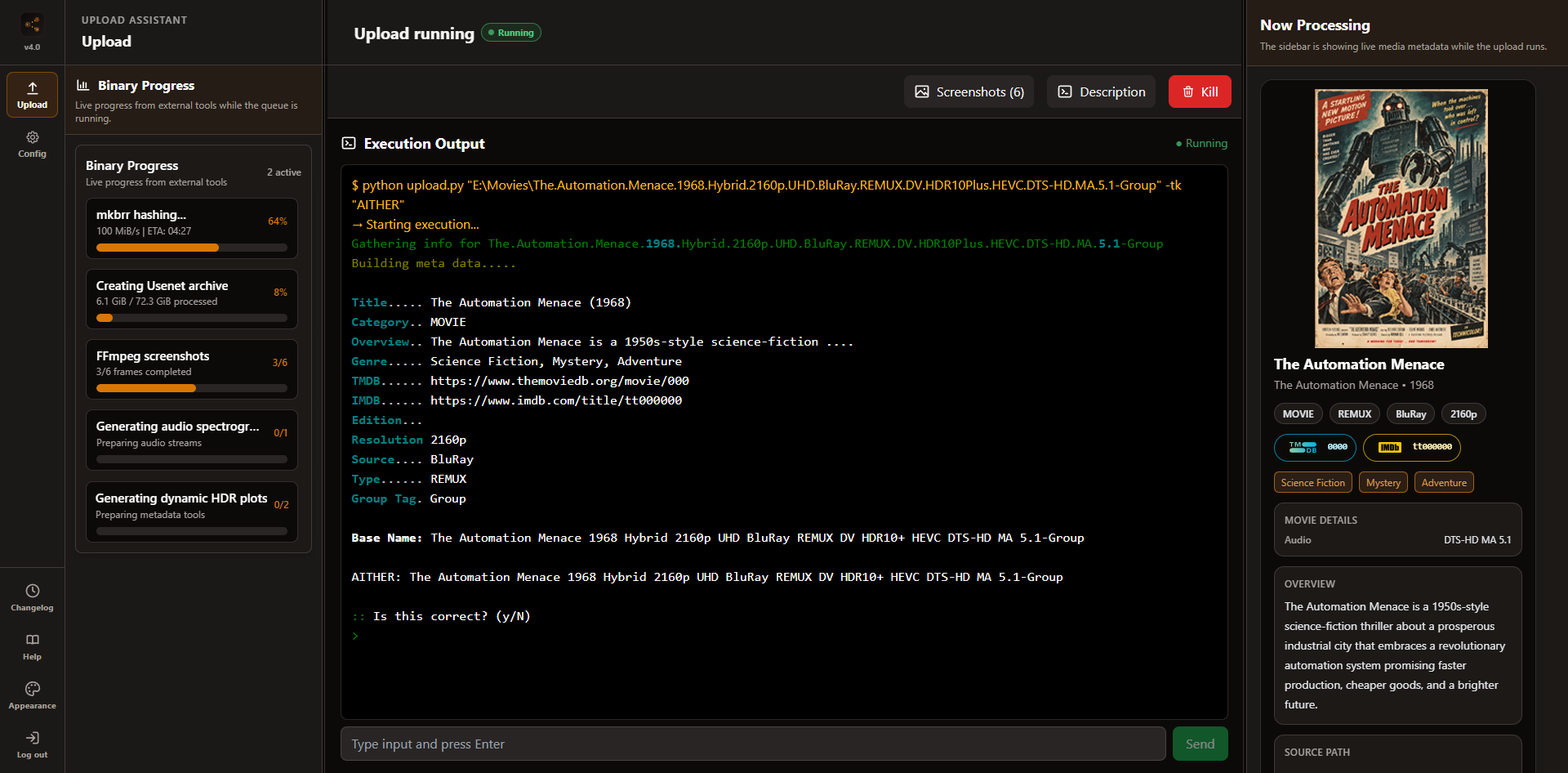
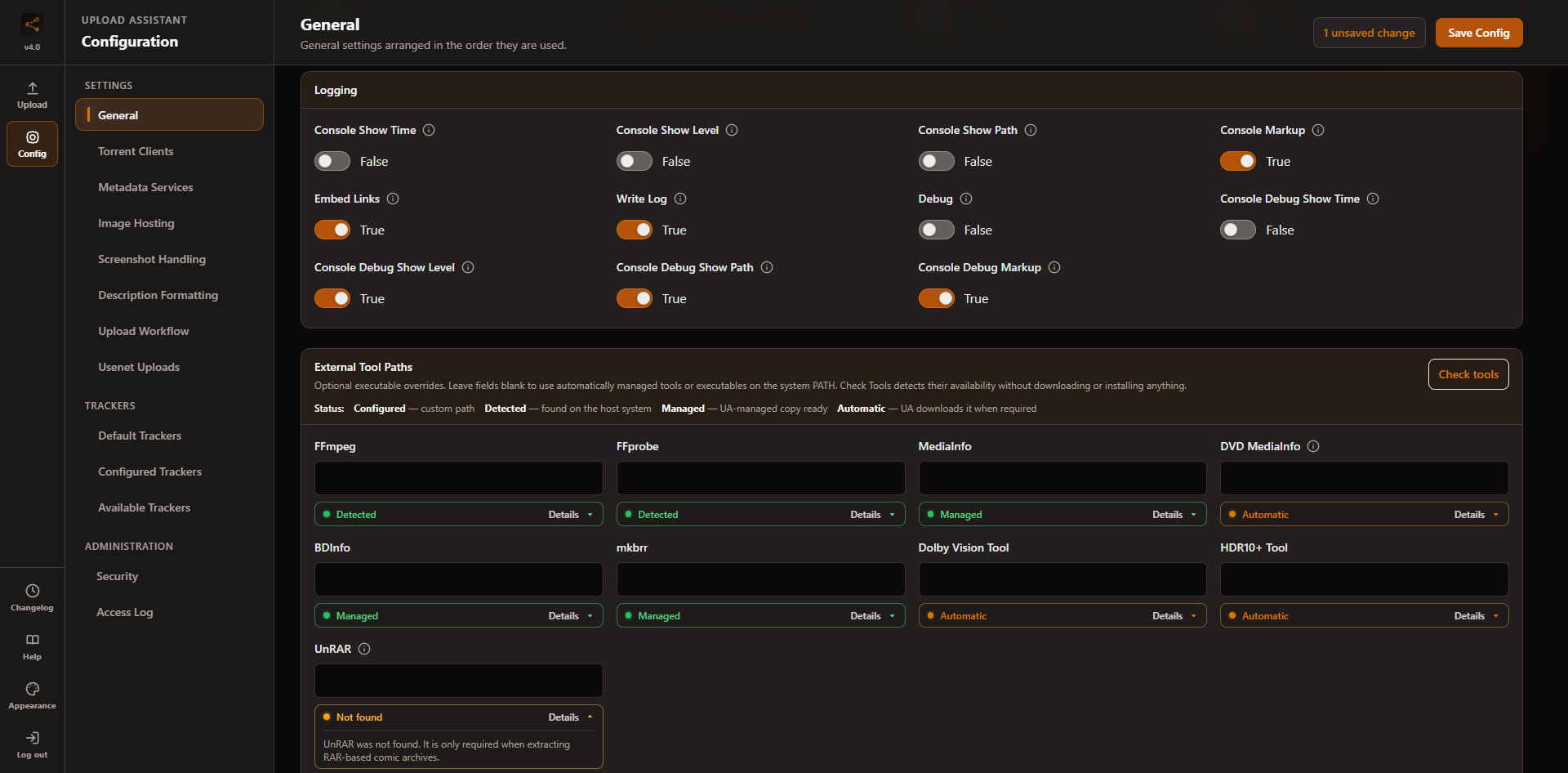
Table of Contents
- Fork Features & Differences from Upstream (Audionut/Upload-Assistant)
- Supported Sites
- Setup Guide
- Updating
- CLI Usage
- Shell Completions
- Docker Usage
- Seedbox / Linux Install
- Attributions
- Contributors
Fork Features & Differences from Upstream (Audionut/Upload-Assistant)
This branch introduces new media categories and automation features not present in the upstream Audionut repository:
1. New Media Category Support
- Ebook & Audiobook (
BOOKCategory):- Automatic Type Detection: Classifies uploads into Ebooks (PDF, EPUB, MOBI), Comics/Manga (CBR, CBZ), Newspapers, or Audiobooks.
- Local Metadata Extraction: Reads metadata from OPF files in EPUB/MOBI,
ComicInfo.xmlin CBR/CBZ, parses tags via Mutagen for audiobooks, and uses PyMuPDF (fitz) with checksum-validated regex to extract ISBNs from PDFs. - API Integrations: Queries MyAnonamouse (MAM) API, Google Books API, and OpenLibrary API for automated metadata lookup.
- Artwork & Screenshot Generation: Renders gallery screenshots from PDF/EPUB pages, extracts cover artwork, and auto-generates
POSTER.png. - Smart Duplicate Checking: Custom rules distinguishing formats (e.g., EPUB vs PDF) and audiobooks vs ebooks, with tracker-specific overrides.
- Video Game (
GAMECategory):- Game Directory Parsing: Priority scans for executables (
.exe), disc images (.iso), or archives (.rar,.zip, etc.) in the upload path. - GazelleGames, IGDB & Steam Metadata APIs: Uses exact GazelleGames torrent comments or a guarded title search for game metadata, then fills missing fields and artwork through Twitch/IGDB and Steam.
- Platform Detection: Identifies systems (PC, PS5, Switch, Xbox Series X|S, etc.) and enforces platform-group duplicate checks (so Switch uploads aren't blocked by PC dupes).
- Platform-specific Prompts: Attended prompts for console TV standard (NTSC/PAL) and region codes (USA/EUR/JPN) for trackers like BJSHARE.
- Game Directory Parsing: Priority scans for executables (
- Music (
MUSICCategory):- Local Tag & Metadata Extraction: Parses audio tags, cue sheets, and rip logs (EAC, XLD, etc.) using Mutagen to extract tracklists, artists, and audio metadata.
- Discogs & MusicBrainz APIs: Optionally queries external APIs (Discogs via release/master ID or URL, and MusicBrainz) for metadata enrichment.
- Artwork & Cover Extraction: Automatically searches for local cover images or extracts embedded artwork from FLAC/MP3/M4A tags to upload to image hosts.
- Preflight & Rule Validation: Enforces mechanical validation for audio formats, sample/bit rates, track counts, and hybrid setups before uploading.
- Adult Video (
XXXCategory):- Automatic Detection & Metadata: Recognizes supported adult-platform release names, extracts common title, studio, and date fields, and builds descriptive keywords.
- Contact Sheets & Artwork: Generates one configurable contact sheet per video and creates a fallback cover from the source when artwork is not supplied.
- Workflow Guide: See the dedicated XXX category upload guide for naming, overrides, WebUI usage, and supported destinations.
2. Audio Stream Spectrogram Generation
- Spectrogram Extraction & Plotting: Use
-as/--audio-spectrogramto automatically extract audio streams from MKVs, Blu-ray BDInfo, music tracks, or audiobook chapters using FFmpeg and plot frequency/time graphs (inferno theme) vialibrosaandmatplotlib. Music and audiobook processing is capped byaudio_spectrogram_max_files. - Dynamic HDR Metadata Plots: Use
--dynamic-hdr-plotto create and upload separate Dolby Vision and HDR10+ metadata plots. The requireddovi_toolandhdr10plus_toolbinaries are downloaded automatically for the current platform on first use. - Automated Upload: Automatically uploads generated spectrograms along with your screenshots for release verification.
- Stream Selection: Supports targeting specific tracks using
-ast/--audio-spectrogram-tracks(e.g., track indexes orall).
3. Upload Order & qBittorrent Bandwidth Control
Sequence Usenet and torrent tracker uploads while limiting contention with qBittorrent. See the dedicated upload order and bandwidth control guide for configuration and every supported workflow.
4. Argument-Embedded Text Queue
- Custom Parameter Queues: When running batch uploads with a
.txtqueue file, each line is treated as an independent execution command. - shlex-Split Parsing: Allows specifying unique CLI arguments (e.g., different IMDB IDs, tags, or tracker targets) for each file/folder on its respective line.
- Resume Capability: Logs processed lines to prevent reprocessing completed uploads if a queue run is interrupted.
5. Usenet & Indexer Posting
- Usenet Upload Support: Automatically archives and splits files/folders (via
7z), generates parity recovery blocks (viapar2), and uploads them to Usenet (vianyuu). - Anonymity & Privacy: Generates randomized poster details and obfuscates post subject lines to protect privacy.
- Indexer Integration: Automatically uploads the generated
.nzbfile to configured Usenet indexers.
6. Interactive Screenshot Review Workflow
- Manual Screenshot Review: Inspect, add, delete, or replace/recapture individual frames before uploading through the interactive Web UI.
7. Persistent TTL-Based Metadata Cache
- Provider-Scoped API Caching: Disk-cached metadata for TMDb, IMDb, TVDB, TVmaze, OpenLibrary, IGDB, GazelleGames, Discogs, and MusicBrainz.
- Performance & Rate Limit Protection: Configurable TTL and negative caching reuse fetched metadata across runs, avoiding redundant API calls and preventing rate-limiting bans.
8. Modern Web UI & Real-Time Engine
- Full Parity Web UI: Modern interface providing full feature parity with CLI options (
--webui). - Real-Time Execution & Presets: Live log streams, real-time preparation preview, preset saving, and interactive screenshot management.
Supported Sites
Click to view Supported Torrent Trackers
| Site | Usage | Supported Categories | |
|---|---|---|---|
 |
1PTBA | 1PTBA | MOVIE, TV |
 |
Aither | AITHER | MOVIE, TV |
 |
AlphaRatio | ALPHARATIO | MOVIE, TV |
 |
Amigos Share Club | AMIGOSSHARE | MOVIE, TV, BOOK, GAME |
 |
Anthelion | ANTHELION | MOVIE |
 |
AsianCinema | ASIANCINEMA | MOVIE, TV, MUSIC |
 |
AvistaZ | AVISTAZ | MOVIE, TV |
 |
BeyondHD | BEYONDHD | MOVIE, TV |
 |
BitHDTV | BITHDTV | MOVIE, TV |
 |
BitPorn | BITPORN | XXX |
 |
Blutopia | BLUTOPIA | MOVIE, TV |
 |
BJ-Share | BJSHARE | MOVIE, TV, BOOK, GAME, XXX |
 |
BrasilTracker | BRASILTRACKER | MOVIE, TV, BOOK, GAME |
 |
BroadcasTheNet | BROADCASTHENET | TV |
 |
CapybaraBR | CAPYBARABR | MOVIE, TV, BOOK, GAME |
 |
Cathode-Ray.Tube | CATHODERAYTUBE | MOVIE, TV, GAME |
 |
Cinematik | CINEMATIK | MOVIE, TV |
 |
CinemaZ | CINEMAZ | MOVIE, TV |
 |
DarkPeers | DARKPEERS | MOVIE, TV, BOOK, GAME, MUSIC |
 |
DesiTorrents | DESITORRENTS | MOVIE, TV |
 |
DigitalCore | DIGITALCORE | MOVIE, TV, BOOK, GAME, MUSIC |
 |
DreadVault | DREADVAULT | MOVIE, TV |
 |
eMuwarez | EMUWAREZ | MOVIE, TV |
 |
FileList | FILELIST | MOVIE, TV |
 |
Flood | FLOOD | MOVIE, TV |
 |
FunFile | FUNFILE | MOVIE, TV |
 |
Great Poster Wall | GREATPOSTERWALL | MOVIE |
 |
hawke-uno | HAWKEUNO | MOVIE, TV |
 |
HDBits | HDBITS | MOVIE, TV |
 |
HD-Space | HDSPACE | MOVIE, TV |
 |
HD-Torrents | HDTORRENTS | MOVIE, TV |
 |
HomieHelpDesk | HOMIEHELPDESK | MOVIE, TV, BOOK, GAME, MUSIC |
 |
ImmortalSeed | IMMORTALSEED | MOVIE, TV, BOOK, MUSIC, GAME |
 |
InfinityHD | INFINITYHD | MOVIE, TV |
 |
IPTorrents | IPTORRENTS | MOVIE, TV, BOOK, GAME, MUSIC |
 |
ItaTorrents | ITATORRENTS | MOVIE, TV |
 |
lajidui | LAJIDUI | MOVIE, TV |
 |
LemonHD | LEMONHD | MOVIE, TV |
 |
LastDigitalUnderground | LASTDIGITALUNDERGROUND | MOVIE, TV, BOOK |
 |
Lat-Team | LATTEAM | MOVIE, TV, BOOK |
 |
Locadora | LOCADORA | MOVIE, TV |
 |
LongPT | LONGPT | MOVIE, TV |
 |
LST | LST | MOVIE, TV, BOOK, MUSIC, XXX |
 |
Luminarr | LUMINARR | MOVIE, TV |
 |
MakingOff | MAKINGOFF | MOVIE |
 |
MidnightScene | MIDNIGHTSCENE | MOVIE, TV, GAME, MUSIC |
 |
M-Team | MTEAM | MOVIE, TV |
 |
Nebulance | NEBULANCE | TV |
 |
NordicQuality | NORDICQUALITY | MOVIE, TV, MUSIC, BOOK, GAME |
 |
OldToonsWorld | OLDTOONSWORLD | MOVIE, TV |
 |
OnlyEncodes+ | ONLYENCODES | MOVIE, TV |
 |
Orpheus | ORPHEUS | MUSIC |
 |
PassThePopcorn | PASSTHEPOPCORN | MOVIE |
 |
PeerGarden | PEERGARDEN | MOVIE, TV, GAME, BOOK, MUSIC |
 |
Polish Torrent | POLISHTORRENT | MOVIE, TV |
 |
Portugas | PORTUGAS | MOVIE, TV |
 |
PrivateHD | PRIVATEHD | MOVIE, TV |
 |
PT GTK | PTGTK | MOVIE, TV |
 |
PTZone | PTZONE | MOVIE, TV |
 |
PTCafe | PTCAFE | MOVIE, TV |
 |
PTerClub | PTERCLUB | MOVIE, TV |
 |
PTFans | PTFANS | MOVIE, TV |
 |
PTSKIT | PTSKIT | MOVIE, TV |
 |
Racing4Everyone | RACING4EVERYONE | MOVIE, TV |
 |
RailgunPT | RAILGUNPT | MOVIE, TV |
 |
Rastastugan | RASTASTUGAN | MOVIE, TV, BOOK, GAME, MUSIC |
 |
ReelFLiX | REELFLIX | MOVIE |
 |
RetroFlix | RETROFLIX | MOVIE, TV |
 |
Retro Movies Club | RETROMOVIESCLUB | MOVIE |
 |
RocketHD | ROCKETHD | MOVIE, TV |
 |
Samaritano | SAMARITANO | MOVIE, TV, BOOK, GAME |
 |
seedpool | SEEDPOOL | MOVIE, TV, BOOK, GAME, MUSIC |
 |
ShareIsland | SHAREISLAND | MOVIE, TV |
 |
SkipTheCommerials | SKIPTHECOMMERCIALS | MOVIE (Documentary only), TV |
 |
SpeedApp | SPEEDAPP | MOVIE, TV, BOOK, GAME, MUSIC |
 |
Swarmazon | SWARMAZON | MOVIE, TV |
 |
The Leach Zone | THELEACHZONE | MOVIE, TV |
 |
The Old School | THEOLDSCHOOL | MOVIE, TV |
 |
Torrenteros | TORRENTEROS | MOVIE, TV |
 |
TorrentHR | TORRENTHR | MOVIE, TV |
 |
TorrentLeech | TORRENTLEECH | MOVIE, TV, BOOK, GAME, MUSIC |
 |
ToTheGlory | TOTHEGLORY | MOVIE, TV |
 |
TV Chaos UK | TVCHAOSUK | MOVIE, TV |
 |
XingyungePT | XINGYUNGEPT | MOVIE, TV |
 |
ULCX | ULCX | MOVIE, TV |
 |
UTOPIA | UTOPIA | MOVIE, TV |
 |
YUSCENE | YUSCENE | MOVIE, TV, BOOK, GAME, MUSIC |
 |
Zenith | ZENITH | MOVIE, TV, BOOK, GAME, MUSIC |
Click to view Supported Usenet Indexers
| Site | Usage | Supported Categories | |
|---|---|---|---|
 |
Curupira | CURUPIRA | MOVIE, TV, BOOK, GAME |
 |
DrunkenSlug | DRUNKENSLUG | MOVIE, TV, BOOK, GAME |
 |
NZBGeek | NZBGEEK | MOVIE, TV, BOOK, GAME, MUSIC |
 |
NzbNest | NZBNEST | MOVIE, TV, BOOK, GAME, MUSIC |
Setup Guide
Setting up Upload Assistant is straightforward, even if you are not a developer. Follow these steps to get up and running:
Step 1: Install Required Tools
Windows users should install Upload Assistant with the Windows .exe installer. It includes everything needed to run the assistant.
For a manual Linux/macOS/Windows installation, Upload Assistant needs a few tools to process media and run:
- Python (version 3.14 or newer):
- Download and install it from the official Python website.
- MediaInfo & FFmpeg:
- These are helper tools used to scan files and generate screenshots/spectrograms.
- The official MediaInfo CLI is downloaded and checksum-verified automatically on supported Windows, Linux, and macOS systems. Android/Termux uses its native
mediainfopackage (pkg install mediainfo). - Install FFmpeg using your system's software manager:
- Debian/Ubuntu:
sudo apt install ffmpeg - Arch Linux:
sudo pacman -S ffmpeg - RedHat/Fedora:
sudo dnf install ffmpeg
- Debian/Ubuntu:
- Having issues with FFmpeg? Check out our FFmpeg troubleshooting guide.
Install from PyPI with uv (Windows, Linux, or macOS)
The recommended command-line installation uses the published PyPI package. It automatically manages the virtual environment and exposes the ua and ua-config commands on your system path:
uv tool install upload-assistant
If uv reports that its tool directory is not on your PATH, run uv tool update-shell, then open a new terminal.
Install the latest development version with uv
If you have uv installed, you can install Upload Assistant directly from the repository as a globally available standalone CLI tool. This automatically manages the virtual environment and exposes the ua and ua-config commands directly to your system path. This method resolves dependencies from pyproject.toml; skip Steps 2 and 3 below.
uv tool install git+https://github.com/wastaken7/Upload-Assistant.git
If uv reports that its tool directory is not on your PATH, run uv tool update-shell, then open a new terminal.
Step 2: Download Upload Assistant (Linux/macOS)
Choose one of the two options below to get the files onto your computer:
Option A: Clone using Git (Recommended)
Using Git is the recommended method because it makes updating the assistant in the future extremely easy.
-
Install Git (if you don't already have it):
- Linux: Install it via your package manager.
- macOS: Install it via Homebrew or Xcode Command Line Tools.
-
Clone the project: Open your command prompt or terminal, navigate to the folder where you want to keep the assistant, and run:
git clone https://github.com/wastaken7/Upload-Assistant.git
cd Upload-Assistant
Option B: Download as a ZIP file (Alternative)
If you do not want to install Git, you can download a copy of the files directly:
- Go to the GitHub Repository Page.
- Click the green Code button near the top right, and click Download ZIP.
- Extract the ZIP file to a folder of your choice on your computer.
Step 3: Install Python Packages (Linux/macOS)
On Linux/macOS, open a terminal, navigate to the folder where you downloaded Upload Assistant, and run:
pip3 install --user -U -r requirements.txt
Step 4: Configure the Assistant
You need to add your API keys (like TMDb) and tracker credentials so the tool knows where to upload.
Method A: Use the Web UI (Easiest)
If you plan to use the Web UI, your configuration file will be generated automatically when you launch and configure it for the first time.
Method B: Use the Interactive Generator
In your terminal, run the command for your operating system and follow the on-screen prompts:
-
Windows: Install with the
.exeinstaller, then runua-configin a new terminal. -
Linux / macOS (Standard):
python3 config-generator.py -
Linux / macOS (uv installation):
ua-config
Method C: Manual Configuration
- Create the user-state
datadirectory if it does not already exist:- Windows:
%LOCALAPPDATA%\Upload-Assistant\data - Linux / macOS:
$XDG_DATA_HOME/Upload-Assistant/data(normally~/.local/share/Upload-Assistant/data) - Custom location:
%UA_DATA_DIR%\data(Windows Command Prompt),$env:UA_DATA_DIR\data(PowerShell), or$UA_DATA_DIR/data(Linux/macOS) whenUA_DATA_DIRis set
- Windows:
- For source checkouts (git clone / ZIP download): Copy the bundled
data/example_config.pyfrom the project into that directory asconfig.py(leave the original file unchanged). For PyPI, uv, or Windows .exe installs: Runua-configto generate the config file first, which will createconfig.pyin the user-state directory. - Open the user-state
config.pyin a text editor (like Notepad, VS Code, or TextEdit) and fill in your information.- For detailed info on what each setting does, see Example Config Docs.
- Get a free TMDb API key from TheMovieDB API settings.
Additional Resources:
- Check out our Wiki Help Page.
- Windows installation and basic commands: see Windows Install.
- Need a no-root Linux or seedbox setup? See Seedbox / Linux Install.
- Found an issue or need help? Please open a GitHub Issue so we can track and resolve it. If you prefer not to create a GitHub account for privacy reasons, join our Signal group instead.
Updating:
-
To update a Git installation, navigate into the Upload-Assistant directory and pull the latest changes:
cd Upload-Assistant
git pull
-
Or, if you downloaded the ZIP file, download a fresh ZIP from GitHub and overwrite your existing files.
-
For the Windows installation, run
ua-update. -
For the
uvstandalone installation, run:uv tool upgrade upload-assistant -
Run the command to update dependencies:
- Linux / macOS:
python3 -m pip install --user -U -r requirements.txt
- Linux / macOS:
-
Run the configuration generator to fetch any new settings:
- Windows / uv installations: run
ua-configfrom any folder. - Linux / macOS (Standard):
python3 config-generator.py
- Windows / uv installations: run
CLI Usage:
To run the assistant, use the command for your system:
-
Windows / uv installations:
ua "/path/to/content" --args
-
Linux / macOS (Standard):
python3 upload.py "/path/to/content" --args
Arguments are optional and normally follow the path. Input modes such as --paths-from-stdin may omit the positional path. For a list of all available arguments, pass --help.
The file/folder path works best enclosed in double quotes.
- CLI arguments: docs/cli-args.md
- Usenet uploading: docs/usenet.md
- Upload order and bandwidth control: docs/upload-order-and-bandwidth-control.md
Docker Usage:
Visit our wonderful docker usage
Also see this excellent video put together by a community member https://videos.badkitty.zone/ua
Web UI setup (Docker GUI / Unraid): docs/docker-gui.md Web UI docs: docs/web-ui.md
Attributions:
Built with autobrr/go-bdinfo
Features automated binary managers for:








Contributors:
1 maintainer

Release files for upload-assistant 4.3
For a detailed explanation of source distributions (sdists) and built distributions (wheels), please see the package formats documentation.
Source distribution (sdist)
| File | Size | Uploaded | |
|---|---|---|---|
| upload_assistant-4.3.tar.gz | 1.9 MB | Details |
Built distribution (wheel)
| File | Interpreter | ABI | Platform | Reset |
|---|---|---|---|---|
| upload_assistant-4.3-py3-none-any.whl | Python 3 | none | any | Details |
Total release size: 3.8 MB
Release files / upload_assistant-4.3.tar.gz
| Download URL | upload_assistant-4.3.tar.gz |
|---|---|
| Size | 1.9 MB |
| Tags | Source |
|
SHA-256 checksum How to use checksums |
197c48b3cd4247591ad54cd67cf976e0e7828ecb60a5919bf4eebf16c9099465
|
|
BLAKE2b-256 checksum How to use checksums |
df9dee021f50fd83d0c95f897af47a118d1f79468892cc39c80d1d4548a74d01
|
| Upload date | |
|
Uploaded using Trusted Publishing? What is trusted publishing? |
Yes |
| Uploaded via |
twine/7.0.0 CPython/3.13.14
|
Provenance
Provenance describes where a file came from. On PyPI, provenance is shared via attestations, which provide a verifiable record of the build or publishing details. View details, limitations and caveats.


PyPI Publish Attestation
PyPI verified that this artifact, at this checksum, originated from the publisher listed below.
Signed by GitHub Actions, verified by PyPI on Sep 25, 2026.
Transparency logRelease files / upload_assistant-4.3-py3-none-any.whl
| Download URL | upload_assistant-4.3-py3-none-any.whl |
|---|---|
| Size | 1.9 MB |
| Tags | Python 3 |
|
SHA-256 checksum How to use checksums |
d481df64b490778f4b63e7fe20eab8b19122a0810875d0af617faf88edf6a6fe
|
|
BLAKE2b-256 checksum How to use checksums |
62e42ba13cd94aa45938823d21f31153948123346b7154f320a7f48ccc4e020e
|
| Upload date | |
|
Uploaded using Trusted Publishing? What is trusted publishing? |
Yes |
| Uploaded via |
twine/7.0.0 CPython/3.13.14
|
Provenance
Provenance describes where a file came from. On PyPI, provenance is shared via attestations, which provide a verifiable record of the build or publishing details. View details, limitations and caveats.
PyPI Publish Attestation
PyPI verified that this artifact, at this checksum, originated from the publisher listed below.
Signed by GitHub Actions, verified by PyPI on Sep 25, 2026.
Transparency log













