
Uppsala pyub
Use Uppsala University's library catalog from the command line or script searches by using this package as a module.
installation
Install with pip
pip install uppsala-pyub
Usage
CLI
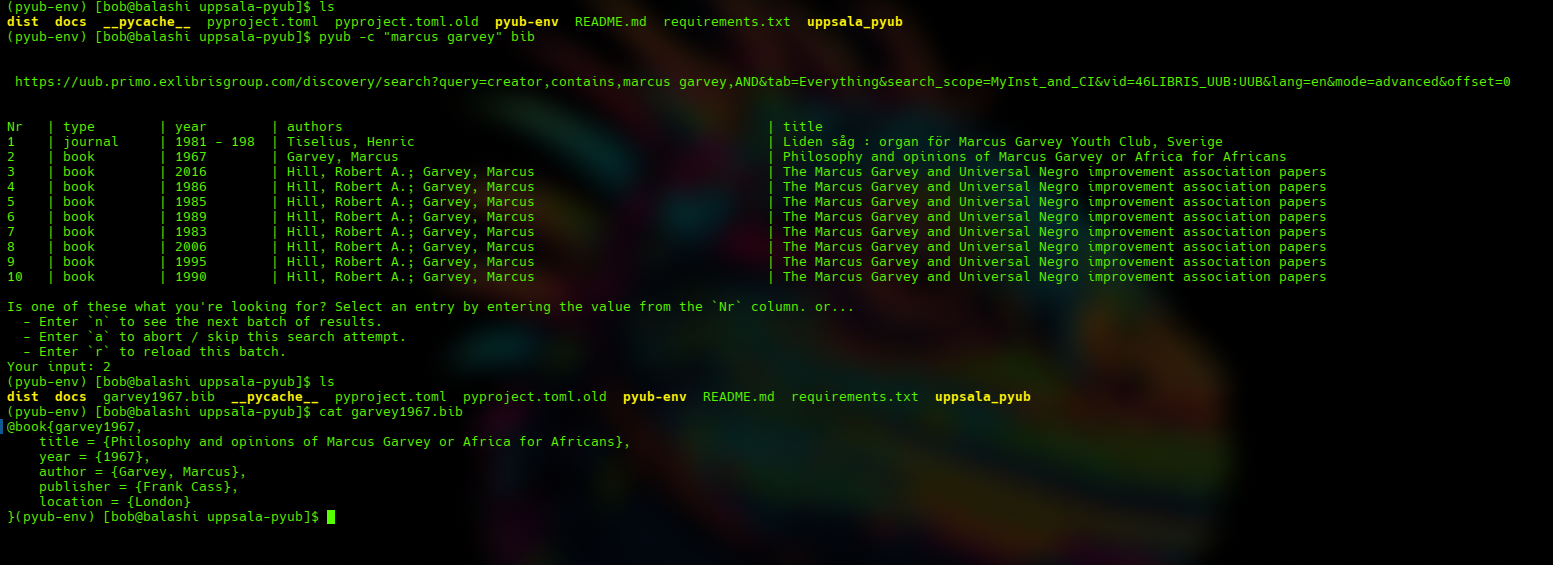
Call pyub from the command line with a specific instruction (currently only fetch_bibtext / bib is implemented).
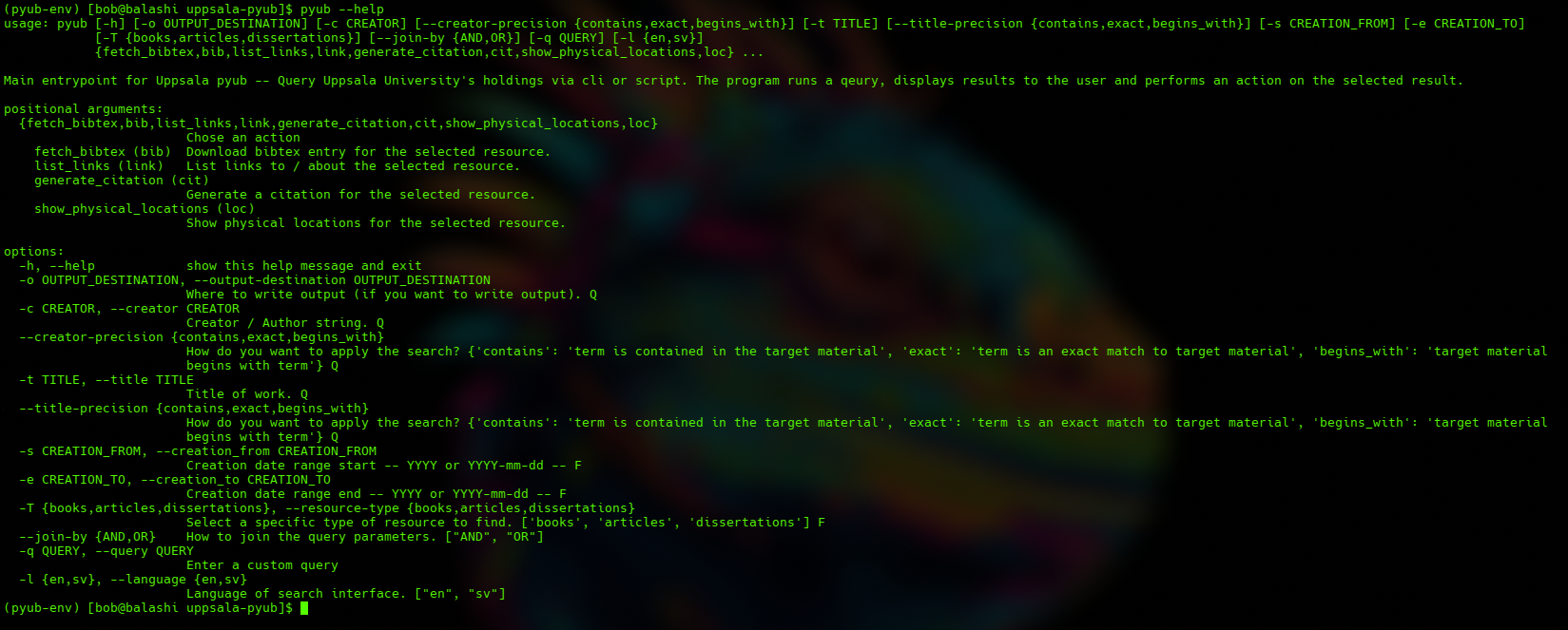
Check the available options with pyub --help
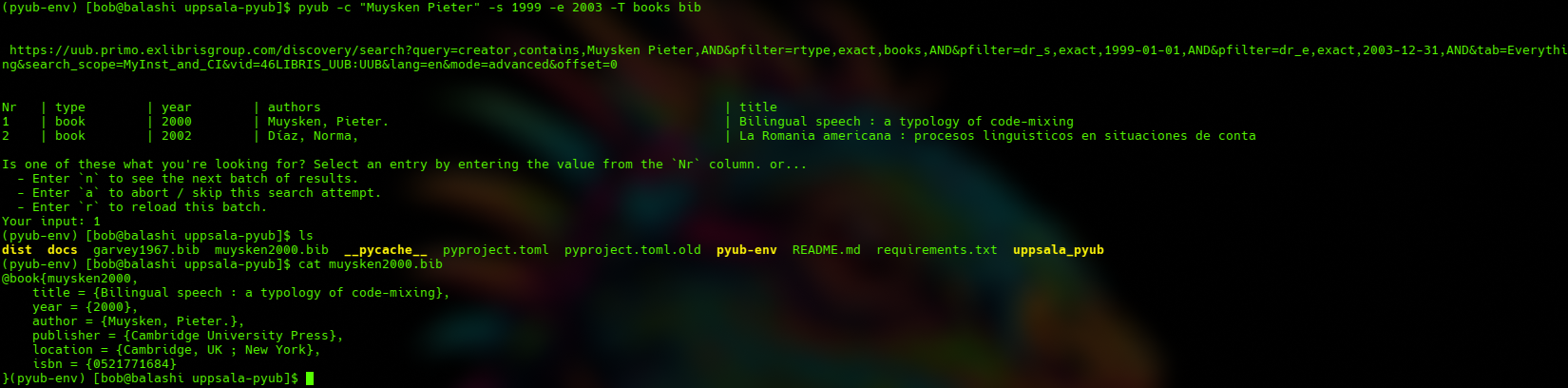
...and create advanced searches.
As a Module
Pyub can also be used in scripting. See the api documentation here. For example:
from uppsala_pyub.bibtex import make_bibtex
from uppsala_pyub.query import (
	cap_query,
	run_search,
)
from uppsala_pyub.handle_results import display_results


queries = [
	{
		"creator": "marcus garvey"
	},
	{
		"creator": "muysken pieter",
		"resource_type": "books",
		"creation_from": "1999"
		"creation_to": "2003"
	}
]
for q in queries:
	query = cap_query(q)
	result_soup, url = run_search(**query)
	selection = display_results(result_soup, url)
	if selection is not None:
		bibtex_key = make_bibtex(selection, output_location='./')
When used in a script, display_results() requires the same user interaction as cli usage.
Implemented "instructions"
fetch_bibtex
The fetch_bibtex instruction constructs a bibtex file from the data returned by the library's search url and saves it in the current working directory. The bibtex key is the same as the filename without the .bib extension. Keys are constructed to be human readable and recognizable by the resource creator and year.
N.b. There are currently no checks in place to prevent pyub from overwriting an existing entry, so take care to quarantine bibtex downloads and manually adjust the key/filename as necessary to disambiguate works by a single author in the same year.
Planned "instructions"
generate_citation
Generate a formatted citation for the selected resource in a given referencing style.
list_links
Get a list of urls to / about the selected resource.
show_physical_locations
List UU libraries that hold the selected resource.
1 maintainer

Metadata
1 maintainer
Release files for uppsala-pyub 0.3.0
For a detailed explanation of source distributions (sdists) and built distributions (wheels), please see the package formats documentation.
Source distribution (sdist)
| File | Size | Uploaded | Provenance | |
|---|---|---|---|---|
| uppsala_pyub-0.3.0.tar.gz | 8.5 kB | Without provenance | Details |
Built distribution (wheel)
| File | Interpreter | ABI | Platform | Reset |
|---|---|---|---|---|
| uppsala_pyub-0.3.0-py3-none-any.whl | Python 3 | none | any | Details |
Total release size: 18.2 kB
Release files / uppsala_pyub-0.3.0.tar.gz
| Download URL | uppsala_pyub-0.3.0.tar.gz |
|---|---|
| Size | 8.5 kB |
| Tags | Source |
|
SHA-256 checksum How to use checksums |
bcb431a0e73015a075bf3f9e6188b947d2b2f93944b6ca5e8522bb8af880e73f
|
|
BLAKE2b-256 checksum How to use checksums |
e4e05342123afbee130cc142ace5e0fcd21ae713b714390f9ef0e5e2e03dc334
|
| Upload date | |
|
Uploaded using Trusted Publishing? What is trusted publishing? |
No |
| Uploaded via |
poetry/1.8.4 CPython/3.12.7 Linux/6.5.0-1025-azure
|
Release files / uppsala_pyub-0.3.0-py3-none-any.whl
| Download URL | uppsala_pyub-0.3.0-py3-none-any.whl |
|---|---|
| Size | 9.7 kB |
| Tags | Python 3 |
|
SHA-256 checksum How to use checksums |
cf9b1ac2d908ce06ed0bdca9ee460ce0438a238020507c7129f03e30ad06bd23
|
|
BLAKE2b-256 checksum How to use checksums |
d0550a3bd3a3ca7c4201892ccc6493080dd45e94acec5118588de1467840185b
|
| Upload date | |
|
Uploaded using Trusted Publishing? What is trusted publishing? |
No |
| Uploaded via |
poetry/1.8.4 CPython/3.12.7 Linux/6.5.0-1025-azure
|
Security for uppsala-pyub 0.3.0
Provenance
Provenance describes where a file came from. On PyPI, provenance is shared via attestations, which provide a verifiable record of the build or publishing details. View details, limitations and caveats.
No provenance found
None of the files in this release were uploaded with provenance metadata.
A note on package security
PyPI is a repository for distributing packages, not a service for auditing them. While third-party security researchers and our staff do their best to detect and remove malicious packages, PyPI cannot guarantee the quality, security or suitability of any given package.
To learn more about protecting yourself from malicious actors, visit our package security documentation.














