
uPrime



Turbulence is complex. Analysis shouldn't be.

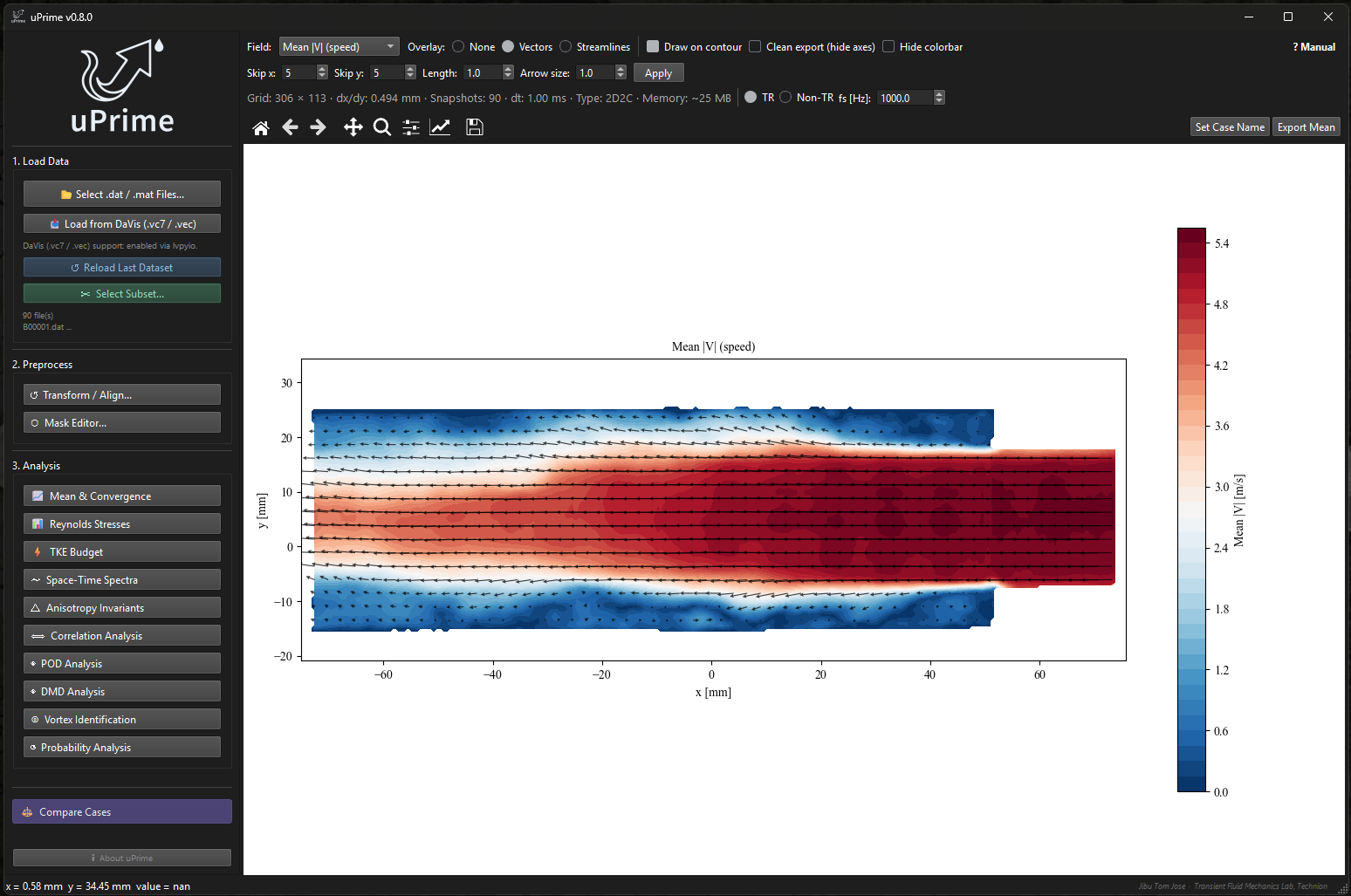
uPrime is a standalone desktop application for post-processing and turbulence analysis of velocity field data from PIV and CFD. It provides a unified graphical interface covering the full range of standard turbulence diagnostics — from Reynolds stresses to DMD — without requiring any scripting or programming knowledge.
Originally developed for Particle Image Velocimetry (PIV), uPrime is equally applicable to CFD and other structured velocity datasets. It is designed to handle large, high-resolution, and time-resolved datasets commonly encountered in modern fluid mechanics research.
Currently supports planar (2D2C) and stereo (2D3C) velocity fields.
🚀 Installation
With pip (Windows, macOS, Linux)
For Python users, install from PyPI and launch with the uprime command:
pip install uprime-piv
uprime
The package name and the command differ: you install uprime-piv but run
uprime. Since v0.9.2, uprime-piv is also installed as an alias command, so
typing either name launches uPrime. The distribution is named uprime-piv
because uprime on PyPI is an unrelated package; the import name is still
uprime. Python 3.10 or newer is required.
For the Spatial E(k) using FFT tab, add the fft extra, which installs
pyFFTW, then run uprime as before:
pip install "uprime-piv[fft]"
uprime
Windows executable (no Python needed)
Download the latest executable from: https://github.com/CmdrRyder/uPrime/releases
No installation required. Double-click to launch.
Windows Defender may flag the
.exeon first run. Click More info → Run anyway.
A standalone executable is not currently available for macOS or Linux. Use pip above, or run directly from source:
macOS — Run from source
git clone https://github.com/CmdrRyder/uPrime.git
cd uPrime
python3 -m venv venv
source venv/bin/activate
pip install -e .
uprime
python main.pystill works too, if you prefer not to use theuprimecommand.
If you see a Qt platform plugin error on first run, try:
pip install PyQt6
Linux (Ubuntu/Debian) — Run from source
sudo apt install python3-dev libgl1-mesa-glx libglib2.0-0
git clone https://github.com/CmdrRyder/uPrime.git
cd uPrime
python3 -m venv venv
source venv/bin/activate
pip install -e .
uprime
python main.pystill works too, if you prefer not to use theuprimecommand.
pyFFTW is optional. Without it, the Spatial E(k) using FFT tab in the Spectra window is disabled; the other spectra tabs are unaffected. Add it with
pip install -e ".[fft]"from source, orpip install "uprime-piv[fft]"and runuprime.
Run from source (Windows)
git clone https://github.com/CmdrRyder/uPrime.git
cd uPrime
pip install -e .
uprime
python main.pystill works too, if you prefer not to use theuprimecommand.
⚡ Quick Start
- Launch uPrime
- Select
.datfiles -- a subsampling dialog appears for large datasets - Set Time-Resolved or Non-TR and enter $f_s$ if TR
- Apply Transform / Align to correct camera tilt and shift origin
- Draw masks in Mask Editor if needed
- Open any analysis module from the sidebar
🔬 Analysis Modules
| Module | Description | TR required |
|---|---|---|
| Mean & Convergence | Mean velocity line profiles; point-wise statistical convergence (Welford, N* detection) | No |
| Reynolds Stresses | All $R_{ij}$ components, 2D maps, line profiles | No |
| TKE Budget | Production, convection, diffusion, residual | No |
| Space-Time Spectra | Spatial E(k), temporal E(f), space-time E(k,f) | Temporal tabs only |
| Anisotropy Invariants | Lumley triangle, barycentric map | No (stereo only) |
| Correlation Analysis | Two-point spatial and temporal correlations, integral scales | Temporal tab only |
| POD Analysis | Energy spectrum, spatial modes, temporal coefficients, reconstruction | No |
| DMD Analysis | Frequency–growth rate spectrum, spatial mode viewer | Yes |
| Vortex Identification | ω, Q, λci, λ2, Γ1/Γ2, per-vortex statistics | No |
| Compare Cases | Standalone viewer: overlay up to 6 datasets (1D profiles + tiled 2D fields) | No |
| Probability Analysis | PDFs of velocity/fluctuations, forward/reverse flow probability maps, binary space-time maps, Lu & Willmarth quadrant analysis | Binary space-time only |
⭐ Key Features
- Standalone executable: no Python or setup required on Windows
- User-friendly GUI: no scripting needed -- point and click
- Non-blocking computation: all heavy analysis runs in the background; the window stays responsive
- Large dataset support: datasets exceeding 4 GB are automatically memory-mapped to disk
- Non-destructive masking: draw masks over wall regions, shadows, or reflections without modifying raw data
- Unit auto-detection: reads mm/m/s units from
.datfile headers automatically - PIV + CFD compatible: any structured velocity data in Tecplot ASCII format
- Compare cases: standalone viewer overlays up to six datasets (1D profiles + tiled 2D fields); per-module CSV overlay inside analysis windows
- Probability and quadrant analysis: velocity PDFs with Gaussian overlay, forward/reverse flow probability maps with detachment-state contours, binary space-time maps, and Lu & Willmarth quadrant decomposition with hole-size sweep
- Manual line-coordinate entry: set profile endpoints numerically (x0, y0, x1, y1) for lines reproduced exactly across datasets
- Publication-ready export: PNG (300 DPI), PDF, SVG with editable text
📊 Example Results
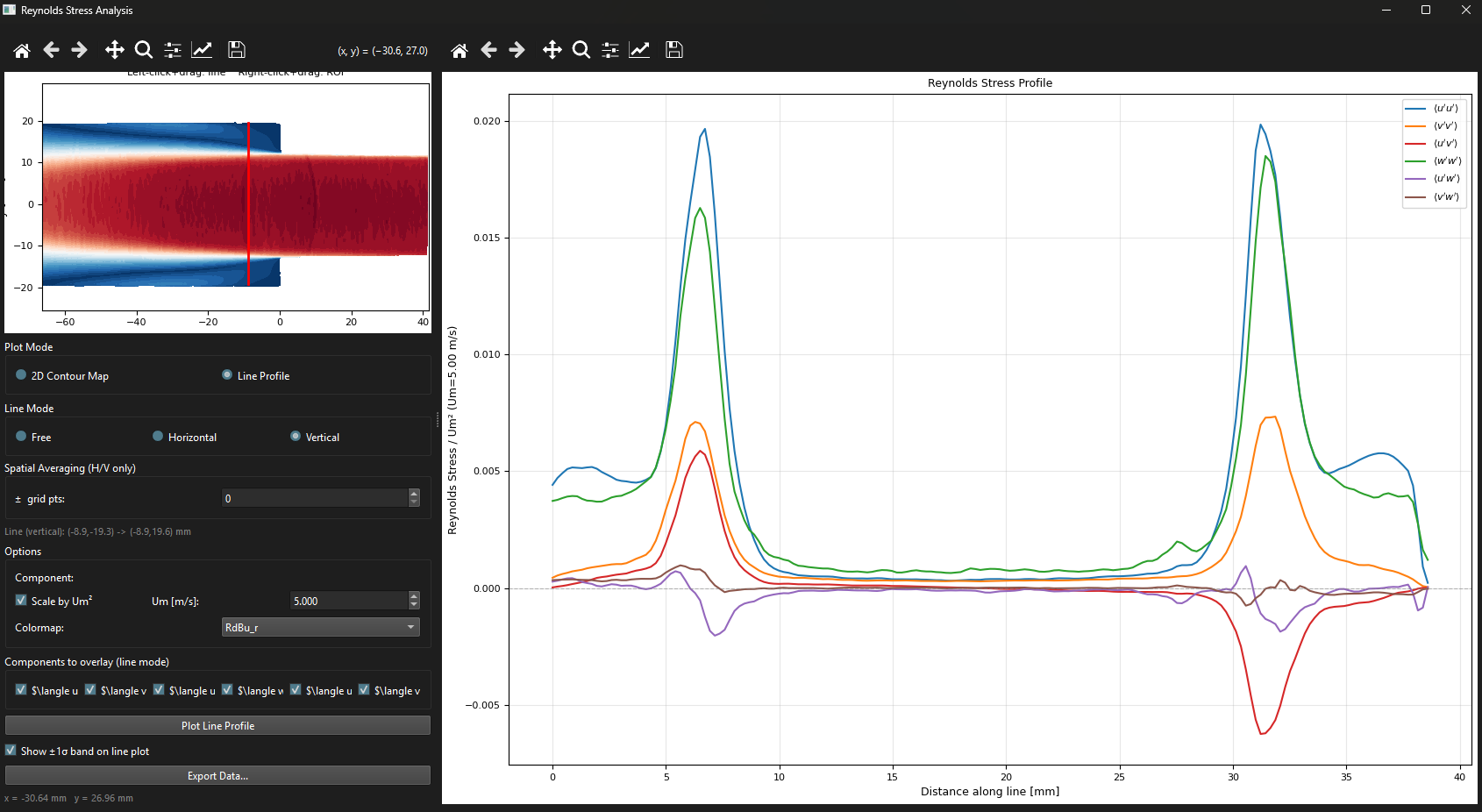
Reynolds Stress
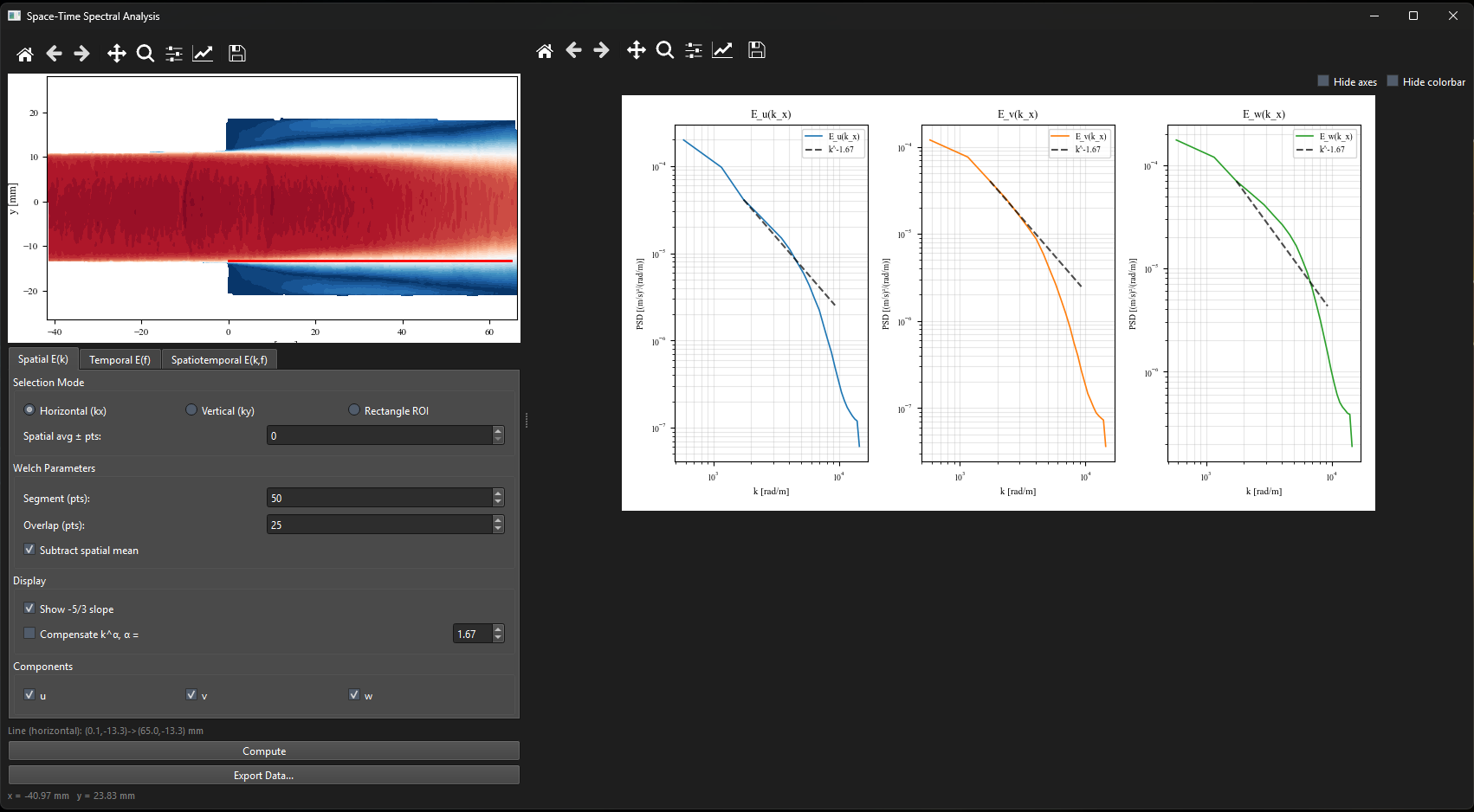
Space-Time Spectra
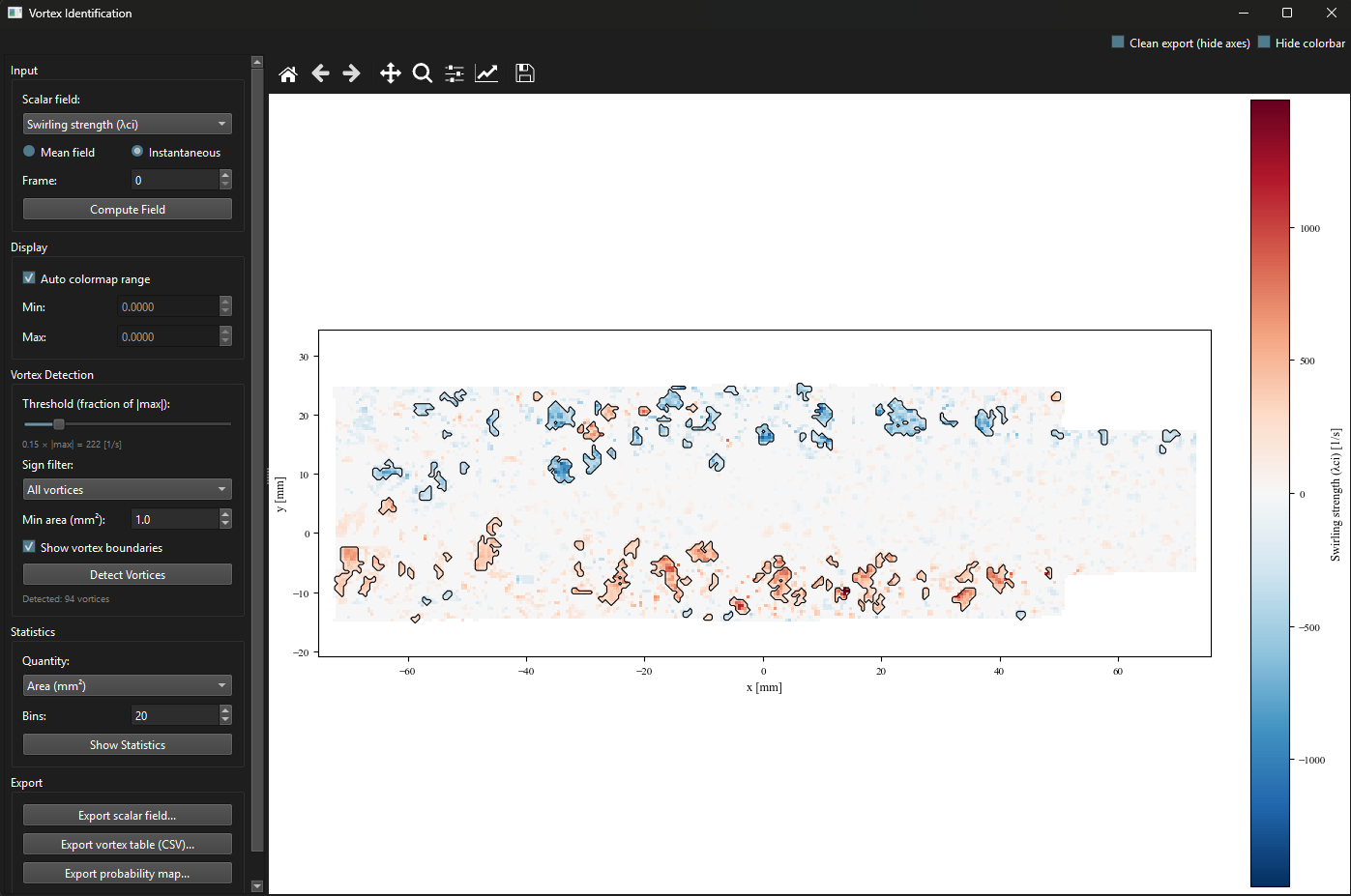
Vortex Identification
📂 Input Format
uPrime reads Tecplot ASCII .dat files in DaVis export format:
TITLE = "filename"
VARIABLES = "x [mm]", "y [mm]", "Velocity u [m/s]", "Velocity v [m/s]", ... "isValid"
ZONE T="Frame 0", I=NX, J=NY, F=POINT
...data...
- One file per snapshot; select multiple files to load a time series
- Variable names and units auto-detected from the header
- Supports 2D2C and 2D3C (stereo) data
- Compatible with DaVis (LaVision) and most CFD post-processors
Note: Each
.datfile should include anisValidcolumn (1 = valid, 0 = invalid). This is the default DaVis export format. If absent, all vectors are treated as valid and a warning is shown.
MATLAB .mat files
uPrime also loads MATLAB .mat files (classic v5/v7 and HDF5-based v7.3):
- Multiple snapshots required. Single-snapshot files are detected from metadata and rejected with a clear error before any data is loaded.
- Variable confirmation dialog is shown on every
.matload. Auto-detected variable names are pre-filled; adjust any dropdown if needed and click Load to confirm. - Coordinate arrays may be 1D vectors
(Nx,)/(Ny,)or 2D meshgrid arrays in either(Ny, Nx)or(Nx, Ny)orientation. Transposed arrays are auto-corrected; square grids use a variance heuristic to determine orientation. A status-bar note is shown when a transpose is applied. - Large file performance: The variable dialog appears immediately (metadata only). For v7.3 (HDF5) files the progress bar advances snapshot-by-snapshot. For classic
.matfiles a busy indicator is shown with the file size, since the read is a single blocking call. - Velocity arrays must have MATLAB shape
(Ny, Nx, N_snap). StereowandisValidare optional. - Storage precision: By default uPrime loads
.matfiles as float32 (single precision), matching the.datloader. For files larger than 5 GB the variable confirmation dialog offers a float16 (half precision) option that halves memory usage, allowing files that would otherwise not fit in RAM to load. Float16 has only ~3 decimal digits of precision, and all subsequent computations (Reynolds stresses, TKE budget, POD, DMD, FFT) run at this reduced precision. Fluctuation-based statistics are particularly vulnerable to catastrophic cancellation. Use float16 only for preliminary inspection or mean-field viewing. For final results, reload with the default float32 mode. - Mask convention: uPrime expects
isValidto follow the "1 = valid, 0 = invalid" convention. If your.matfile uses the opposite convention (e.g. a variable namedMaskwhere 1 means "mask this out"), select "1 = invalid (mask out)" in the Mask convention dropdown next to the isValid selector in the variable confirmation dialog. The loader applies the chosen convention with no auto-detection. After loading, the status bar warns if the resulting masked fraction looks extreme (< 5 % or > 95 %); if this fires unexpectedly, reload with the other convention.
DaVis support (optional)
uPrime can load LaVision DaVis vector data — .vc7 / .vec vector files only (one field per file; select multiple files for a time series) — via the lvpyio library. .set files and DaVis images (.im7 / .imx) are not supported; export or convert a .set to .vc7. This support is optional and off by default, because lvpyio is a separately-licensed LaVision library ("Free To Use But Restricted") and is not GPL — it is never bundled into a public release.
Read this before expecting DaVis loading to work:
- The public release
.exedoes NOT include DaVis loading. The Load from DaVis (.vc7 / .vec) button is present but disabled. - A separately-installed
lvpyiowill NOT be picked up by the public.exe. A frozen PyInstaller executable only sees packages bundled at build time, not your system'spip-installed packages. Sopip install lvpyiowill not enable DaVis in the public exe. - DaVis support is available when you run uPrime from source with
lvpyioinstalled:pip install -r requirements.txt pip install -r requirements-lvpyio.txt # installs lvpyio (restricted licence) python main.py
A pip install is not frozen, sopip install uprime-piv lvpyioalso enables DaVis input; run it withuprime. - DaVis files: select multiple
.vc7/.vecfiles (one per snapshot); they are stacked in natural filename order (B0001, B0002, … B0010). A single file is one snapshot and is rejected, like single-snapshot.matfiles. All files must share the same grid, axes and components (2D2C/2D3C) or the load aborts naming the offending file.
🧪 Sample Dataset
A sample dataset is available for testing and evaluating uPrime workflows.
🔗 Download from Zenodo: https://doi.org/10.5281/zenodo.19539711
Includes:
- One non-time-resolved stereo PIV dataset (2D3C) — 100 snapshots. Suitable for Reynolds stress, TKE budget, correlation, anisotropy, POD, and vortex identification.
- One time-resolved planar PIV dataset (2D2C) — 200 snapshots. Suitable for temporal spectra, temporal correlation, TR-POD, and DMD.
Both datasets load directly into uPrime without any configuration.
⚠️ Dataset Usage Notice: provided strictly for testing and evaluation of uPrime. Must not be used for research, publications, or redistribution without explicit permission from the authors.
📘 Documentation
Covers all modules with governing equations, step-by-step instructions, and references.
For scripting uPrime without the GUI: data conventions, every public function
grouped by task, and what each one returns.
examples/core_api_example.py is a runnable
starting point that checks itself against an analytically known field.
🧪 Running Tests
A pytest suite is included covering all core modules and GUI smoke tests:
py -3.11 -m pytest              # all 68 tests
py -3.11 -m pytest -k "not GUI" # core modules only
py -3.11 -m pytest -k "GUI"     # GUI smoke tests only
Tests run headlessly (Agg backend + offscreen Qt) with no real .dat files required.
🧠 Development Status
uPrime is under active development (v0.9.2). Core analysis modules are stable. Performance and usability improvements ongoing.
🛣️ Roadmap
- Vortex tracking across snapshots
- Phase averaging
- Pressure field reconstruction from PIV
- SPOD
- Virtual probe (point extraction and time series)
- macOS / Linux builds
- Tomographic PIV support
- FTLE / LCS
📖 Citation
If uPrime contributes to your research, please cite:
Jibu Tom Jose, & Ram, O. (2026). uPrime: Open-source software for velocity field and turbulence analysis from PIV and CFD data. TFML, Technion (v0.9.2). Zenodo. https://doi.org/10.5281/zenodo.19376184
📜 License
GNU General Public License v3.0 (GPLv3). https://www.gnu.org/licenses/gpl-3.0.en.html
👤 Author
Jibu Tom Jose Postdoctoral Research Fellow Technion — Israel Institute of Technology
Built with assistance from Claude (Anthropic).
1 maintainer

Metadata
1 maintainer
Release files for uprime-piv 0.9.2
For a detailed explanation of source distributions (sdists) and built distributions (wheels), please see the package formats documentation.
Source distribution (sdist)
| File | Size | Uploaded | Provenance | Actions |
|---|---|---|---|---|
| uprime_piv-0.9.2.tar.gz | 6.2 MB | With provenance | Details for uprime_piv-0.9.2.tar.gz |
Built distribution (wheel)
| File | Interpreter | ABI | Platform | Actions Reset |
|---|---|---|---|---|
| uprime_piv-0.9.2-py3-none-any.whl | Python 3 | none | any | Details for uprime_piv-0.9.2-py3-none-any.whl |
Total release size: 12.3 MB
Release files / uprime_piv-0.9.2.tar.gz
| Download URL | uprime_piv-0.9.2.tar.gz |
|---|---|
| Size | 6.2 MB |
| Tags | Source |
|
SHA-256 checksum How to use checksums |
02d8def2876b0f6a185183615d143b28f80927dd5eee2653bdf843152259fde2
|
|
BLAKE2b-256 checksum How to use checksums |
2fc3af117557cbf26d527ca0f8acb22a4ee77659040367356c8ec490aba064c5
|
| Upload date | |
|
Uploaded using Trusted Publishing? What is trusted publishing? |
Yes |
| Uploaded via |
twine/7.0.0 CPython/3.13.16
|
Provenance
Provenance describes where a file came from. On PyPI, provenance is shared via attestations, which provide a verifiable record of the build or publishing details. View details, limitations and caveats.


PyPI Publish Attestation
PyPI verified that this artifact, at this checksum, originated from the publisher listed below.
Signed by GitHub Actions, verified by PyPI on Nov 11, 2026.
Transparency logRelease files / uprime_piv-0.9.2-py3-none-any.whl
| Download URL | uprime_piv-0.9.2-py3-none-any.whl |
|---|---|
| Size | 6.2 MB |
| Tags | Python 3 |
|
SHA-256 checksum How to use checksums |
403263c3bfa88033fc6f822c0b558eee75e2e2d44e9caf261c23312c1a6d4d5f
|
|
BLAKE2b-256 checksum How to use checksums |
5c21a08fd9bf64e7c01d4dcff55e3e2d83b00f6caff5fa5693052eb6ee532309
|
| Upload date | |
|
Uploaded using Trusted Publishing? What is trusted publishing? |
Yes |
| Uploaded via |
twine/7.0.0 CPython/3.13.16
|
Provenance
Provenance describes where a file came from. On PyPI, provenance is shared via attestations, which provide a verifiable record of the build or publishing details. View details, limitations and caveats.
PyPI Publish Attestation
PyPI verified that this artifact, at this checksum, originated from the publisher listed below.
Signed by GitHub Actions, verified by PyPI on Nov 11, 2026.
Transparency logSecurity for uprime-piv 0.9.2
Provenance
Provenance describes where a file came from. On PyPI, provenance is shared via attestations, which provide a verifiable record of the build or publishing details. View details, limitations and caveats.
Full provenance
Both files in this release have been uploaded with provenance metadata.
Attestation for uprime_piv-0.9.2.tar.gz
PyPI Publish Attestation
PyPI verified that this artifact, at this checksum, originated from the publisher listed below.
Signed by GitHub Actions, verified by PyPI on Nov 11, 2026.
Transparency logA note on package security
PyPI is a repository for distributing packages, not a service for auditing them. While third-party security researchers and our staff do their best to detect and remove malicious packages, PyPI cannot guarantee the quality, security or suitability of any given package.
To learn more about protecting yourself from malicious actors, visit our package security documentation.














