

uproot (originally μproot, for “micro-Python ROOT”) is a reader and a writer of the ROOT file format using only Python and Numpy. Unlike the standard C++ ROOT implementation, uproot is only an I/O library, primarily intended to stream data into machine learning libraries in Python. Unlike PyROOT and root_numpy, uproot does not depend on C++ ROOT. Instead, it uses Numpy to cast blocks of data from the ROOT file as Numpy arrays.
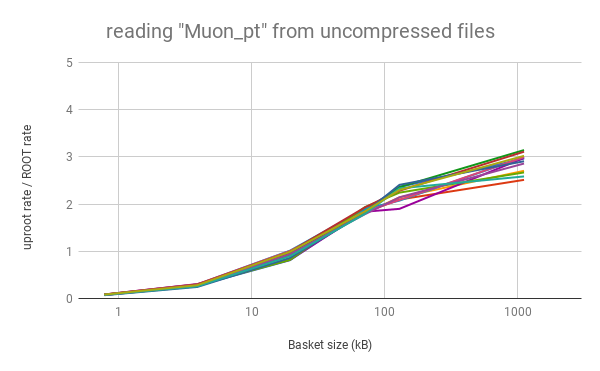
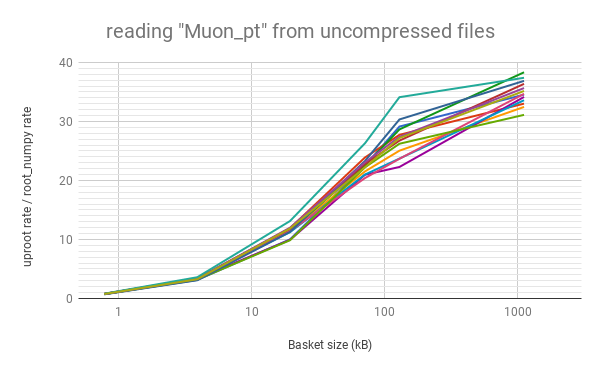
Python does not necessarily mean slow. As long as the data blocks (“baskets”) are large, this “array at a time” approach can even be faster than “event at a time” C++. Below, the rate of reading data into arrays with uproot is shown to be faster than C++ ROOT (left) and root_numpy (right), as long as the baskets are tens of kilobytes or larger (for a variable number of muons per event in an ensemble of different physics samples; higher is better).
uproot is not maintained by the ROOT project team, so post bug reports here as GitHub issues, not on a ROOT forum. Thanks!
Installation
Install uproot like any other Python package:
pip install uproot3 # maybe with sudo or --user, or in virtualenvThe pip installer automatically installs strict dependencies; the conda installer also installs optional dependencies (except for Pandas).
Strict dependencies:
numpy (1.13.1+)
Optional dependencies:
lz4 to read/write lz4-compressed ROOT files
xxhash to read/write lz4-compressed ROOT files
lzma to read/write lzma-compressed ROOT files in Python 2
xrootd to access remote files through XRootD
requests to access remote files through HTTP
pandas to fill Pandas DataFrames instead of Numpy arrays
Reminder: you do not need C++ ROOT to run uproot.
Tutorial
See the project homepage for a tutorial.
Run that tutorial on Binder.
Tutorial contents:
1 maintainer

Metadata
1 maintainer
Release files for uproot3 3.14.4
For a detailed explanation of source distributions (sdists) and built distributions (wheels), please see the package formats documentation.
Source distribution (sdist)
| File | Size | Uploaded | Provenance | Actions |
|---|---|---|---|---|
| uproot3-3.14.4.tar.gz | 142.2 kB | Without provenance | Details for uproot3-3.14.4.tar.gz |
Built distribution (wheel)
| File | Interpreter | ABI | Platform | Actions Reset |
|---|---|---|---|---|
| uproot3-3.14.4-py3-none-any.whl | Python 3 | none | any | Details for uproot3-3.14.4-py3-none-any.whl |
Total release size: 259.7 kB
Release files / uproot3-3.14.4.tar.gz
| Download URL | uproot3-3.14.4.tar.gz |
|---|---|
| Size | 142.2 kB |
| Tags | Source |
|
SHA-256 checksum How to use checksums |
4396746ba5ef9071bb0a9da53294e4613a7f4548218940f86496e79d682d20eb
|
|
BLAKE2b-256 checksum How to use checksums |
da305cf878119f360f831a5c2ba34b6abba52783c2aa75bb215af270a3fe3ab8
|
| Upload date | |
|
Uploaded using Trusted Publishing? What is trusted publishing? |
No |
| Uploaded via |
twine/3.3.0 pkginfo/1.7.0 requests/2.25.1 setuptools/49.6.0.post20210108 requests-toolbelt/0.9.1 tqdm/4.56.0 CPython/3.8.6
|
Release files / uproot3-3.14.4-py3-none-any.whl
| Download URL | uproot3-3.14.4-py3-none-any.whl |
|---|---|
| Size | 117.5 kB |
| Tags | Python 3 |
|
SHA-256 checksum How to use checksums |
d0b513aed4af17278d582a4879eff7037efe0752c7e2154683ac4c4f083c30c0
|
|
BLAKE2b-256 checksum How to use checksums |
9c69d893c6eba0dd0d8f82d841d4b85b6e63c52a1b472aec7cf7ae0efedf5a92
|
| Upload date | |
|
Uploaded using Trusted Publishing? What is trusted publishing? |
No |
| Uploaded via |
twine/3.3.0 pkginfo/1.7.0 requests/2.25.1 setuptools/49.6.0.post20210108 requests-toolbelt/0.9.1 tqdm/4.56.0 CPython/3.8.6
|
Security for uproot3 3.14.4
Provenance
Provenance describes where a file came from. On PyPI, provenance is shared via attestations, which provide a verifiable record of the build or publishing details. View details, limitations and caveats.
No provenance found
None of the files in this release were uploaded with provenance metadata.
A note on package security
PyPI is a repository for distributing packages, not a service for auditing them. While third-party security researchers and our staff do their best to detect and remove malicious packages, PyPI cannot guarantee the quality, security or suitability of any given package.
To learn more about protecting yourself from malicious actors, visit our package security documentation.














