
UpSet.js Jupyter Widget





A Jupyter Widget Library around UpSet.js.
This package is part of the UpSet.js ecosystem located at the main Github Monorepo.
Installation
You can install using pip:
# some ipywidget 8.x.x alpha vesion
pip install ipywidgets upsetjs_jupyter_widget
# for notebooks
jupyter nbextension enable --sys-prefix --py upsetjs_jupyter_widget
# for lab
jupyter labextension install @jupyter-widgets/jupyterlab-manager upsetjs_jupyter_widget
Usage
from ipywidgets import interact
from upsetjs_jupyter_widget import UpSetJSWidget
import pandas as pd
w = UpSetJSWidget[str]()
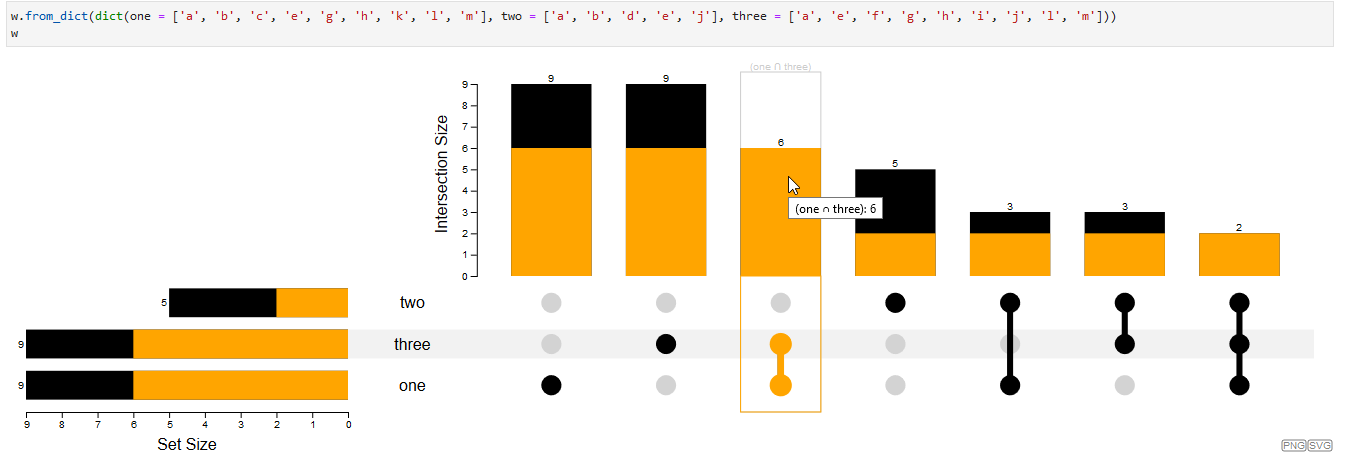
w.from_dict(dict(one = ['a', 'b', 'c', 'e', 'g', 'h', 'k', 'l', 'm'], two = ['a', 'b', 'd', 'e', 'j'], three = ['a', 'e', 'f', 'g', 'h', 'i', 'j', 'l', 'm']))
w
df = pd.DataFrame(dict(
    one=[1, 1, 1, 0, 1, 0, 1, 1, 0, 0, 1, 1, 1],
    two=[1, 1, 0, 1, 1, 0, 0, 0, 0, 1, 0, 0, 0],
    three=[1, 0, 0, 0, 1, 1, 1, 1, 1, 1, 0, 1, 1]
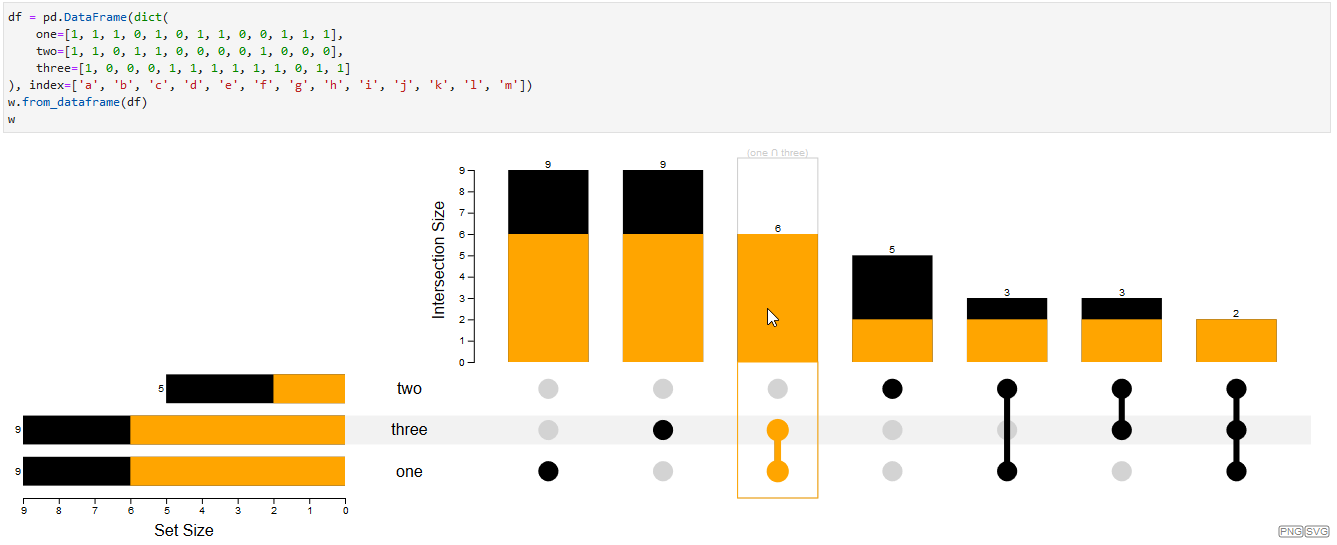
), index=['a', 'b', 'c', 'd', 'e', 'f', 'g', 'h', 'i', 'j', 'k', 'l', 'm'])
w.from_dataframe(df)
w
it support the ipywidget interact method to get notified about the user input
def selection_changed(s):
    return s.name if s else None
interact(selection_changed, s=w)
see also introduction.ipynb
see also
Documentation
the package documentation is located at 
Venn Diagram
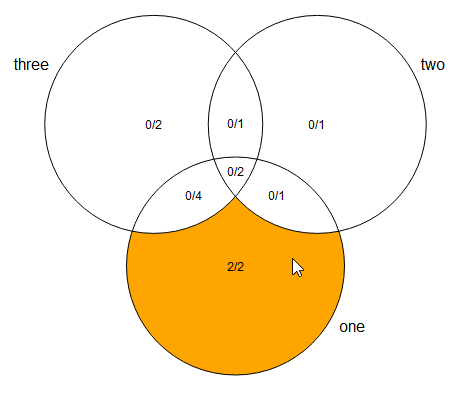
Besides the main UpSet.js plot also Venn Diagrams for up to five sets are supported. It uses the same input formats and has similar functionality in terms of interaction.
from upsetjs_jupyter_widget import UpSetJSVennDiagramWidget
v = UpSetJSVennDiagramWidget[str]()
v.from_dict(dict(one = ['a', 'b', 'c', 'e', 'g', 'h', 'k', 'l', 'm'], two = ['a', 'b', 'd', 'e', 'j'], three = ['a', 'e', 'f', 'g', 'h', 'i', 'j', 'l', 'm']))
v
see also venn.ipynb
Karnaugh Map
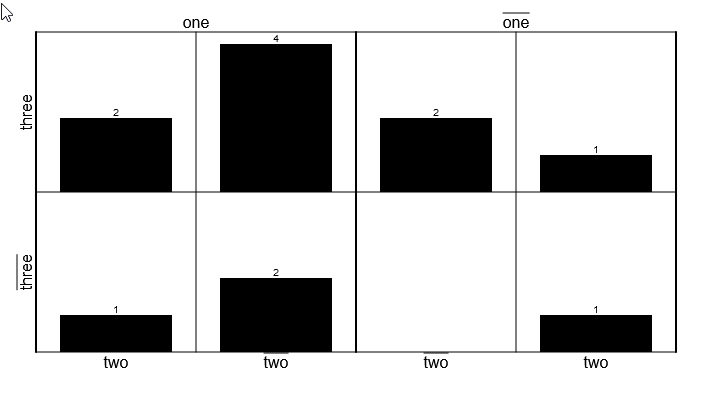
Besides the main UpSet.js plot also a variant of a Karnaugh Map. It uses the same input formats and has similar functionality in terms of interaction.
from upsetjs_jupyter_widget import UpSetJSKarnaughMapWidget
v = UpSetJSKarnaughMapWidget[str]()
v.from_dict(dict(one = ['a', 'b', 'c', 'e', 'g', 'h', 'k', 'l', 'm'], two = ['a', 'b', 'd', 'e', 'j'], three = ['a', 'e', 'f', 'g', 'h', 'i', 'j', 'l', 'm']))
v
see also kmap.ipynb
Dev Environment
npm i -g yarn
yarn set version berry
yarn
yarn pnpify --sdk vscode
conda create -f environment.yml
conda activate upsetjs_jupyter_widget
pip install -e .
jupyter nbextension install --sys-prefix --overwrite --py upsetjs_jupyter_widget
jupyter nbextension enable --sys-prefix --py upsetjs_jupyter_widget
jupyter labextension install @jupyter-widgets/jupyterlab-manager .
Commands
yarn test
yarn lint
yarn build  !! within the pipenv
Privacy Policy
UpSet.js is a client only library. The library or any of its integrations doesn't track you or transfers your data to any server. The uploaded data in the app are stored in your browser only using IndexedDB. The Tableau extension can run in a sandbox environment prohibiting any server requests. However, as soon as you export your session within the app to an external service (e.g., Codepen.io) your data will be transferred.
License / Terms of Service
Commercial license
If you want to use Upset.js for a commercial application the commercial license is the appropriate license. Contact @sgratzl for details.
Open-source license
This library is released under the GNU AGPLv3 version to be used for private and academic purposes. In case of a commercial use, please get in touch regarding a commercial license.
1 maintainer

Metadata
1 maintainer
Release files for upsetjs-jupyter-widget 1.9.0
For a detailed explanation of source distributions (sdists) and built distributions (wheels), please see the package formats documentation.
Source distribution (sdist)
| File | Size | Uploaded | |
|---|---|---|---|
| upsetjs_jupyter_widget-1.9.0.tar.gz | 1.1 MB | Details |
Built distribution (wheel)
| File | Interpreter | ABI | Platform | Reset |
|---|---|---|---|---|
| upsetjs_jupyter_widget-1.9.0-py2.py3-none-any.whl | Python 3, Python 2 | none | any | Details |
Total release size: 1.7 MB
Release files / upsetjs_jupyter_widget-1.9.0.tar.gz
| Download URL | upsetjs_jupyter_widget-1.9.0.tar.gz |
|---|---|
| Size | 1.1 MB |
| Tags | Source |
|
SHA-256 checksum How to use checksums |
8e2dc9cc94f33315c5d4d3ebaf42ac89637ec1400da0c3fec3d51a990d31cfb8
|
|
BLAKE2b-256 checksum How to use checksums |
cc3227197fa1026b5456cd8a8f800caf0a3a5e5b0ffea8e9d0b1f9c91db9c175
|
| Upload date | |
|
Uploaded using Trusted Publishing? What is trusted publishing? |
No |
| Uploaded via |
twine/3.3.0 pkginfo/1.7.0 requests/2.25.1 setuptools/52.0.0.post20210125 requests-toolbelt/0.9.1 tqdm/4.56.2 CPython/3.9.1
|
Release files / upsetjs_jupyter_widget-1.9.0-py2.py3-none-any.whl
| Download URL | upsetjs_jupyter_widget-1.9.0-py2.py3-none-any.whl |
|---|---|
| Size | 543.3 kB |
| Tags | Python 2 Python 3 |
|
SHA-256 checksum How to use checksums |
307771277e7e037f7a0c910c2f90c6bb0ae97dcbd1e3ca9058950ef29597cbc5
|
|
BLAKE2b-256 checksum How to use checksums |
12825eec7270c345872d3d1dbb2ca025e7027f7369c8ef3d85bb011c583c3068
|
| Upload date | |
|
Uploaded using Trusted Publishing? What is trusted publishing? |
No |
| Uploaded via |
twine/3.3.0 pkginfo/1.7.0 requests/2.25.1 setuptools/52.0.0.post20210125 requests-toolbelt/0.9.1 tqdm/4.56.2 CPython/3.9.1
|














