
I. INTRODUCTION
ur_audio_sub made generating captions easy for any audio files & youtube video using OpenAI Whisper. Multiple languages support.




II. REFERENCES
You can skip all of these introductions by viewing the Video demo here. Let's start generating audio transcription effortlessly.
2.1. First thing first
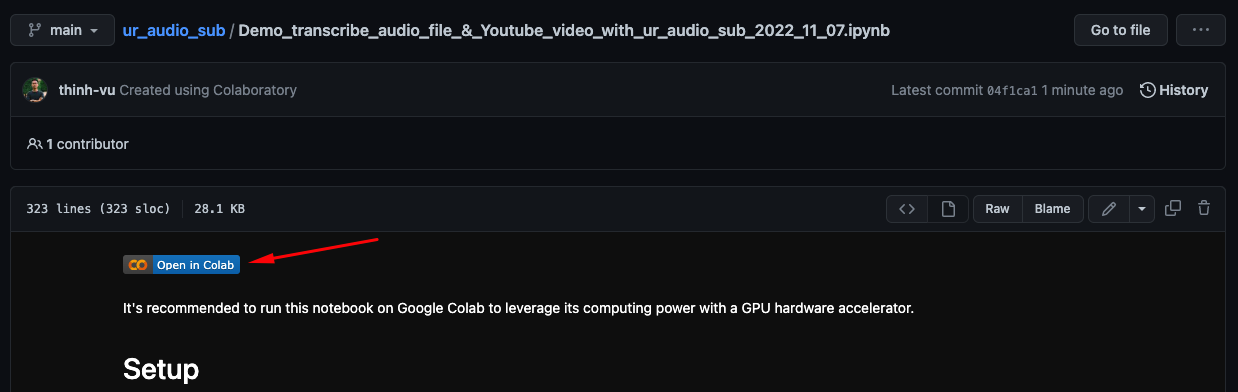
You can find the demo Jupiter notebook here, make a copy and play with this package on Google Colab to generate your first transcription with only 3 steps and 5 lines of code literally.
Demonstration
Install whisper package
You will need to install OpenAI whisper package from source using pip:
Let's runt this command in the terminal fist: !pip install git+https://github.com/openai/whisper.git -q
Install ffmpeg (optional)
Install ffmpeg
In case ffmpeg-python doesn't work, you will need ffmpeg be installed separately to start generating captions:
- on Ubuntu or Debian, or Google Colab:
sudo apt update && sudo apt install ffmpeg - on MacOS using Homebrew:
brew install ffmpeg - on Windows using Chocolatey:
choco install ffmpeg - on Windows using Scoop:
scoop install ffmpeg
Google Colab is highly recommended
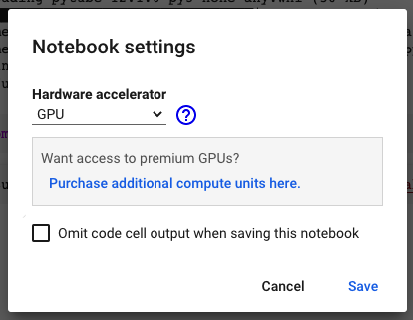
Go to the Google Colab menu: Select Runtime > Change runtime type and make sure that GPU has been chosen. You can run this AI model way faster with GPU on Google Colab than the normal CPU or your personal computer.
2.2. How to install this package?
- Using pip to installed pre-builded package on Pypip
pip install ur_audio_sub - If you want to use the latest pydata_master version instead of the stable one, you can install it from source with the following command:
pip install git+https://github.com/thinh-vu/ur_audio_sub.git@main
(*) You might need to insert a ! before your command when running terminal commands on Google Colab.
2.3. Where can I find the generated caption?
Please find it in the same folder where you store the audio file. On Google Colab, you can find it in the root folder when generating subtitles for Youtube videos.
Function references
-
Run this command first to import the package to your working environment before using any functions below
from ur_audio_sub import * -
ytSub(link='YOUR_YOUTUBE_URL', model='medium', language='', translate=False, lmt=LMT, basepath=ROOT_DIR)orytSub('YOUR_YOUTUBE_URL')in short -
subGen_path(file_path, model='medium', language='', translate=False)orsubGen_path('YOUR_FILE_PATH')in short -
In case of any issue that happens, you can't generate the Youtube Video caption with
ytSubfunction; try thesubGen_pathfunction with the audio file downloaded path to solving that issue. You can also try this terminal command instead!whisper 'PATH_TO_YOUR_AUDIO_FILE' --model medium.
III. APENDICES
- This package has been built on top of pytube and OpenAI Whisper:
- pytube is a genuine, lightweight, dependency-free Python library (and command-line utility) for downloading YouTube videos.
- whisper: Whisper is a general-purpose speech recognition model. It is trained on a large dataset of diverse audio and is also a multi-task model that can perform multilingual speech recognition as well as speech translation and language identification.
IV. 🙋♂️ CONTACT INFORMATION
You can contact me at one of my social network profiles:




If you want to support my open-source projects, you can "buy me a coffee" via Patreon or Momo e-wallet (VN). Your support will help to maintain my blog hosting fee & to develop high-quality content.

1 maintainer

Metadata
1 maintainer
Release files for ur-audio-sub 0.0.6
For a detailed explanation of source distributions (sdists) and built distributions (wheels), please see the package formats documentation.
Source distribution (sdist)
| File | Size | Uploaded | |
|---|---|---|---|
| ur_audio_sub-0.0.6.tar.gz | 5.5 kB | Details |
Built distribution (wheel)
| File | Interpreter | ABI | Platform | Reset |
|---|---|---|---|---|
| ur_audio_sub-0.0.6-py3-none-any.whl | Python 3 | none | any | Details |
Total release size: 11.4 kB
Release files / ur_audio_sub-0.0.6.tar.gz
| Download URL | ur_audio_sub-0.0.6.tar.gz |
|---|---|
| Size | 5.5 kB |
| Tags | Source |
|
SHA-256 checksum How to use checksums |
039f899250eb703f0ff0d29580156ce09cf2050a64390cf8c80766428e78caa1
|
|
BLAKE2b-256 checksum How to use checksums |
17bcfa120ebe46430c4355ac4fc3d295ca70cedefaf53ea04b6764b22866d65c
|
| Upload date | |
|
Uploaded using Trusted Publishing? What is trusted publishing? |
No |
| Uploaded via |
twine/4.0.1 CPython/3.8.8
|
Release files / ur_audio_sub-0.0.6-py3-none-any.whl
| Download URL | ur_audio_sub-0.0.6-py3-none-any.whl |
|---|---|
| Size | 5.9 kB |
| Tags | Python 3 |
|
SHA-256 checksum How to use checksums |
d273af0dde93eb378984421437f64c8273ed564d5b5c632e891df519d65e932b
|
|
BLAKE2b-256 checksum How to use checksums |
58a74c2069fcf2f98242bdd8addc65c83c3339660484f61818c132f6749a428c
|
| Upload date | |
|
Uploaded using Trusted Publishing? What is trusted publishing? |
No |
| Uploaded via |
twine/4.0.1 CPython/3.8.8
|














