
This release is a pre-release and may not be stable for production use.
Uranus IDE
Author: Attila Ghashghaei | آتیلا قشقایی
About the Author :
Attila Ghashghaei (آتیلا قشقایی)
Uranus IDE is a Python IDE developed in Iran,
designed specifically for RTL languages
including Persian, Arabic, Hebrew, Urdu, and others.
🔗 Project Repository: https://github.com/atila-gh/Uranus-IDE
🔗 Personal Site : https://puyeshmashin.ir
🔗LinkedIn : linkedin.com/in/atila-gh
🔗PyPi : pypi.org/user/atila.gh
🇮🇷 National IDE Position
Uranus IDE is designed and developed in Iran as a National Python IDE with full support for Persian and RTL languages.
This project aims to provide a local, independent,
and open-source development environment for Iranian developers,
educators, and industrial users.
About Uranus-IDE
Uranus is a lightweight, extensible Python IDE inspired by Jupyter. It supports interactive coding, markdown documentation, and modular plugin architecture — all built with PyQt5.
🔥 Uranus IDE is the first modular Python IDE with full RTL support across all editing modes.
Uranus IDE Screenshots
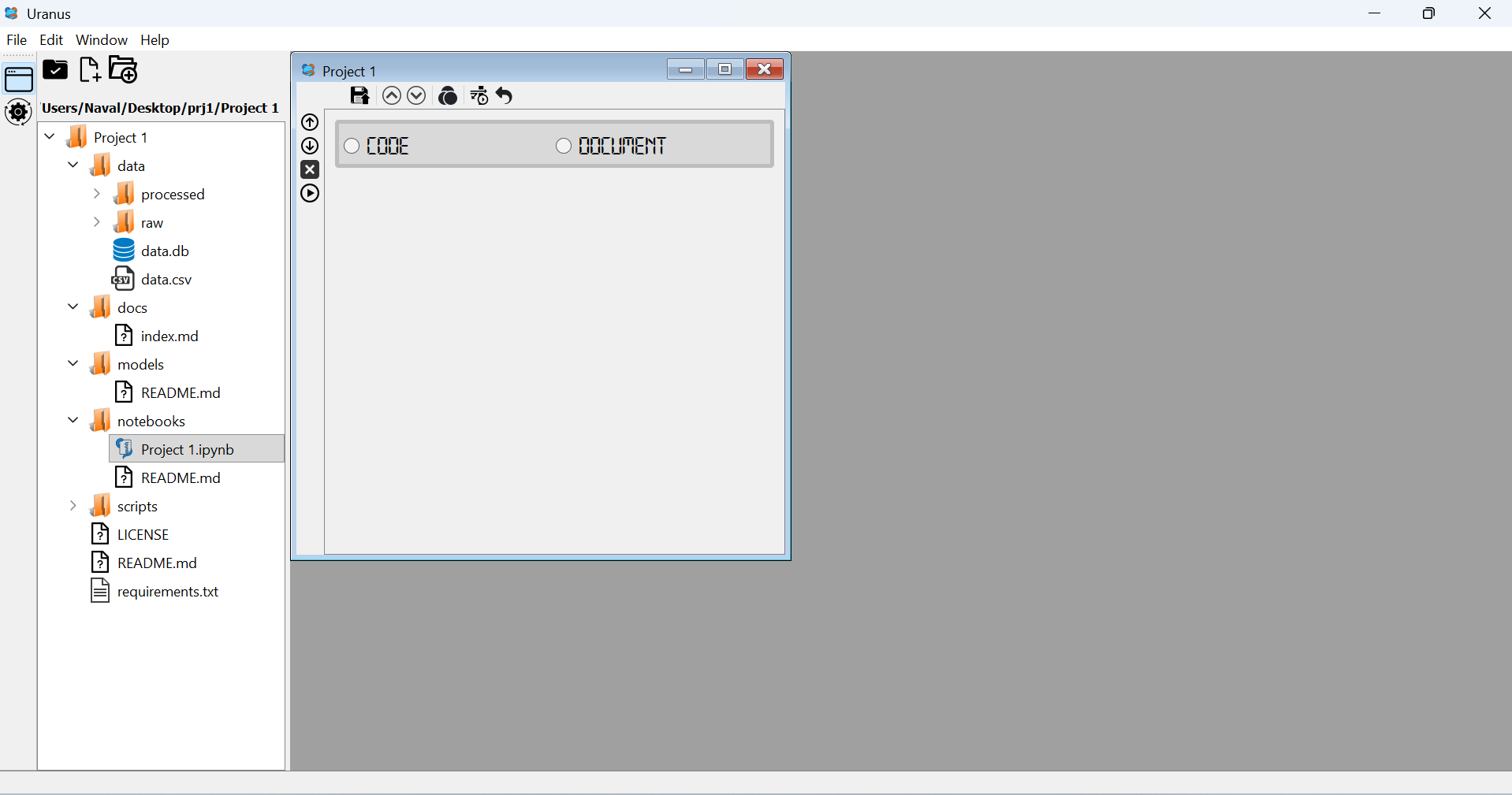 Screenshot 1 |
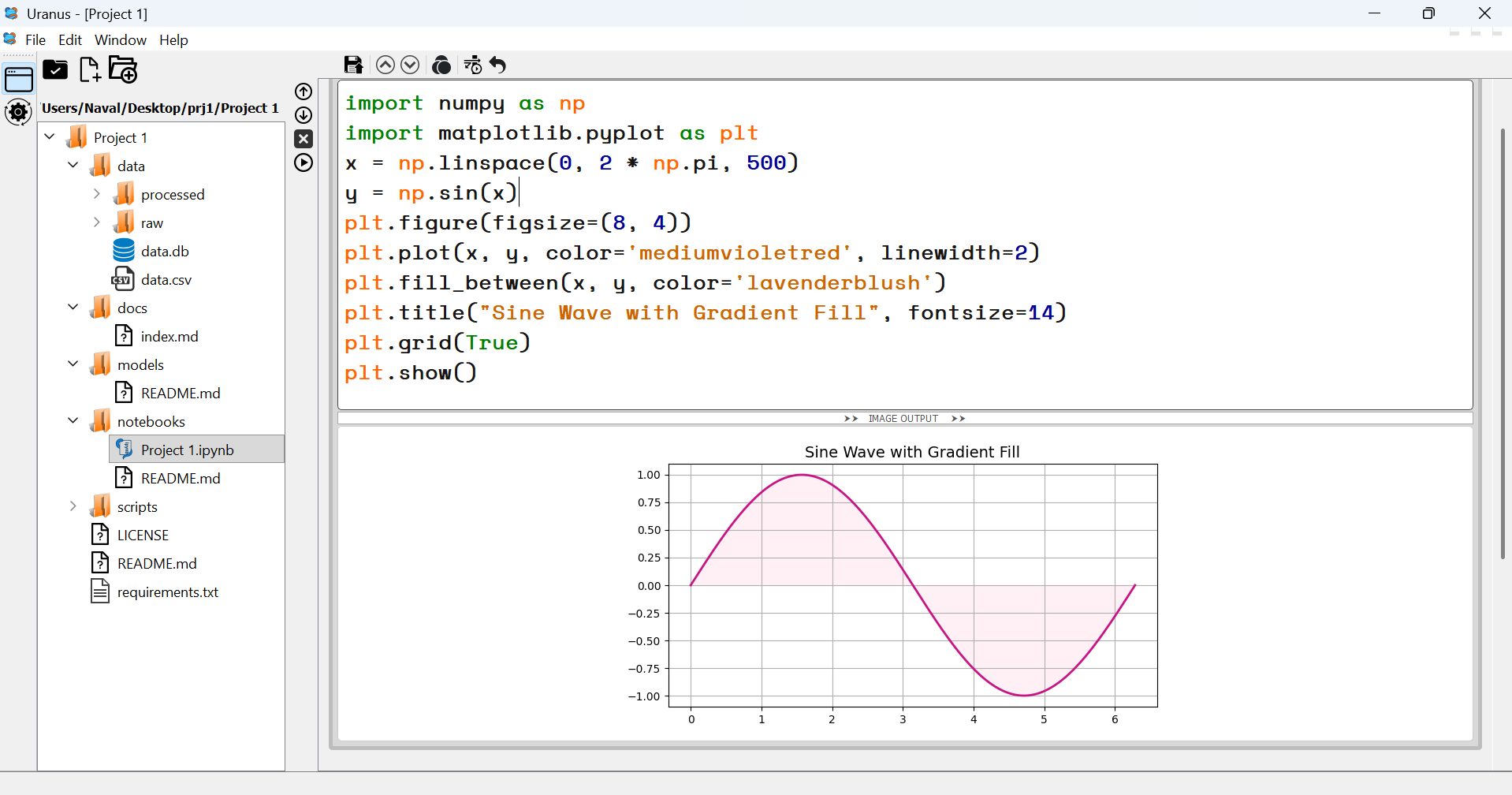 Screenshot 2 |
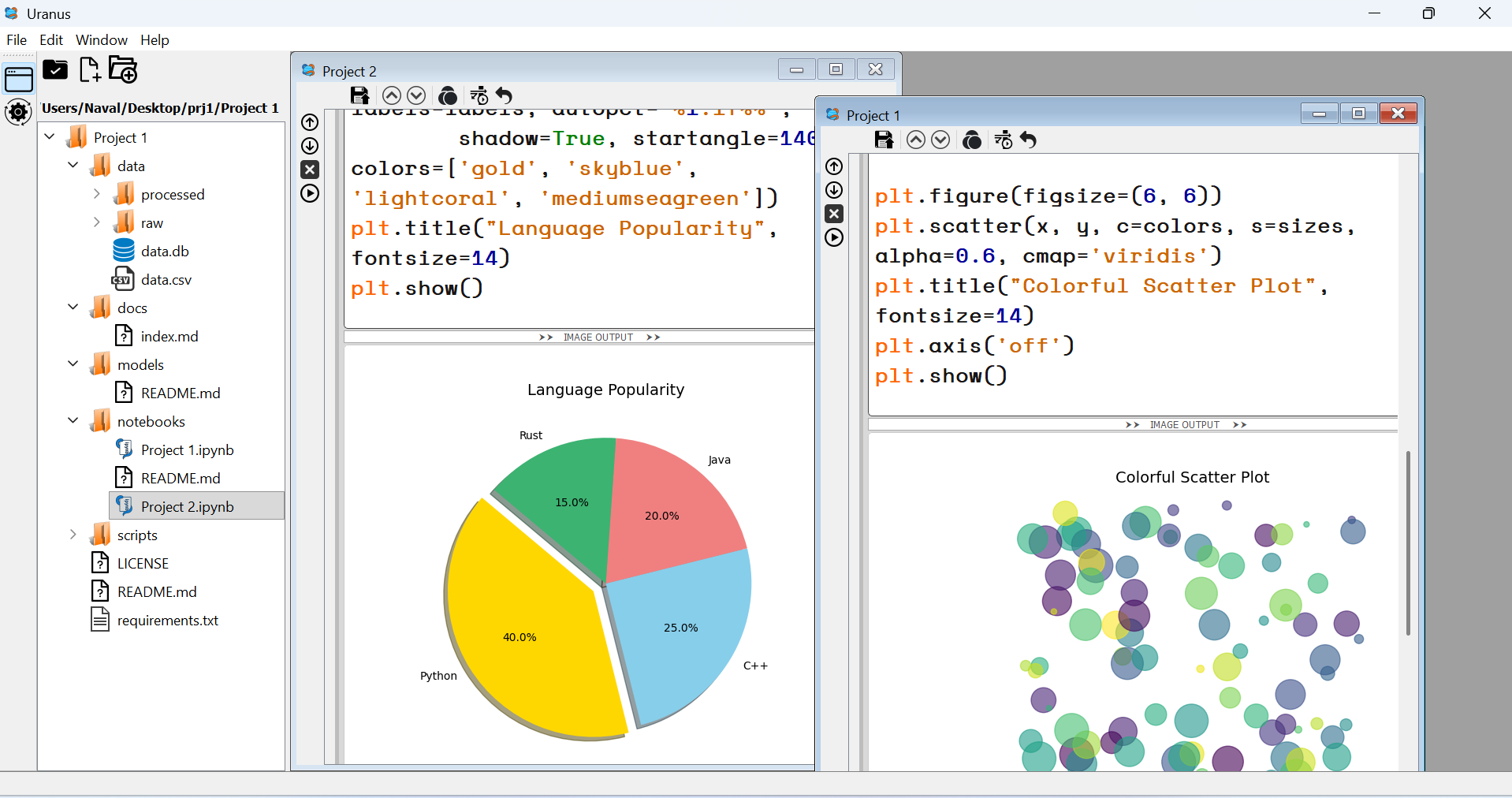 Screenshot 3 |
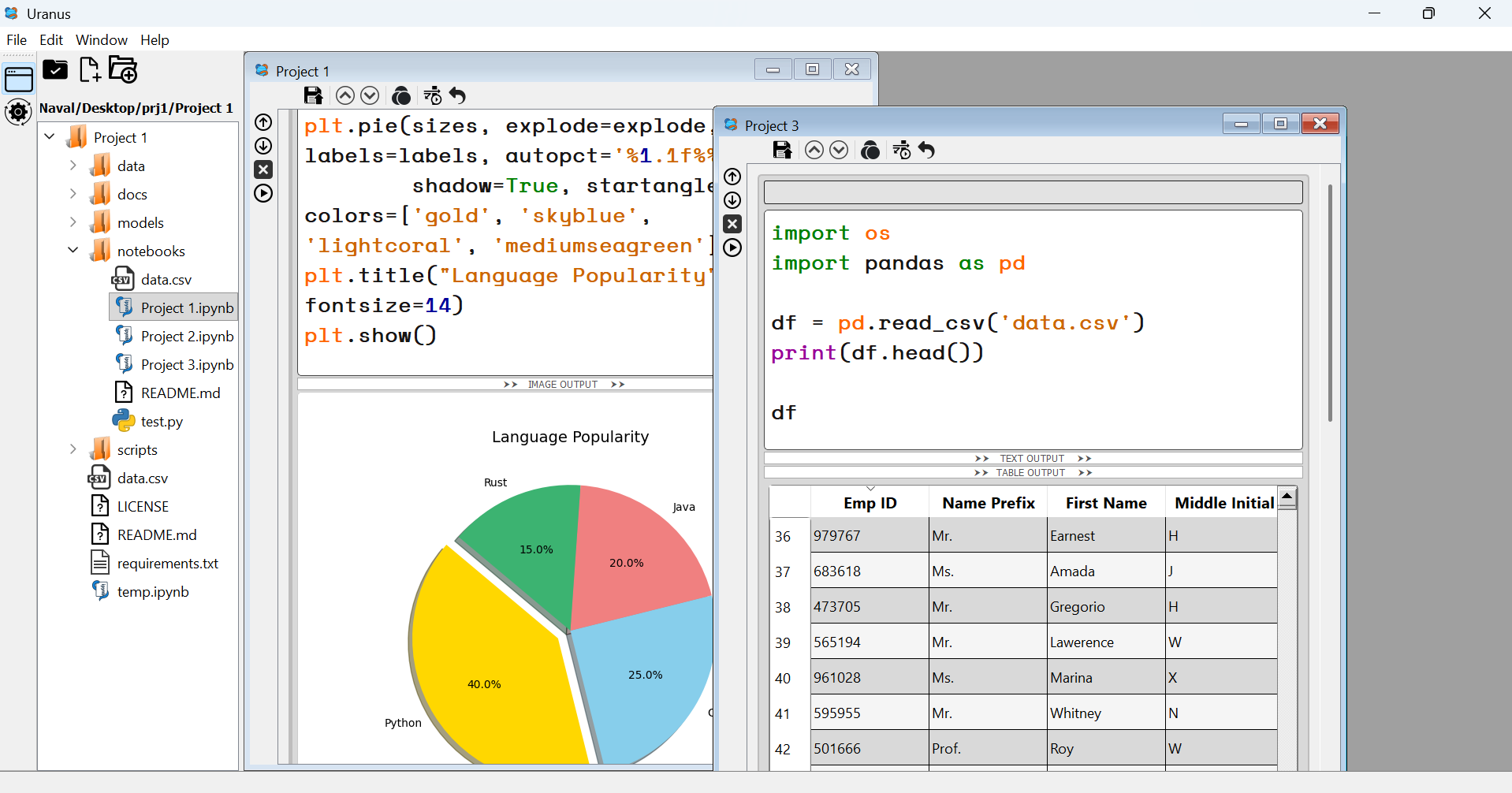 Screenshot 4 |
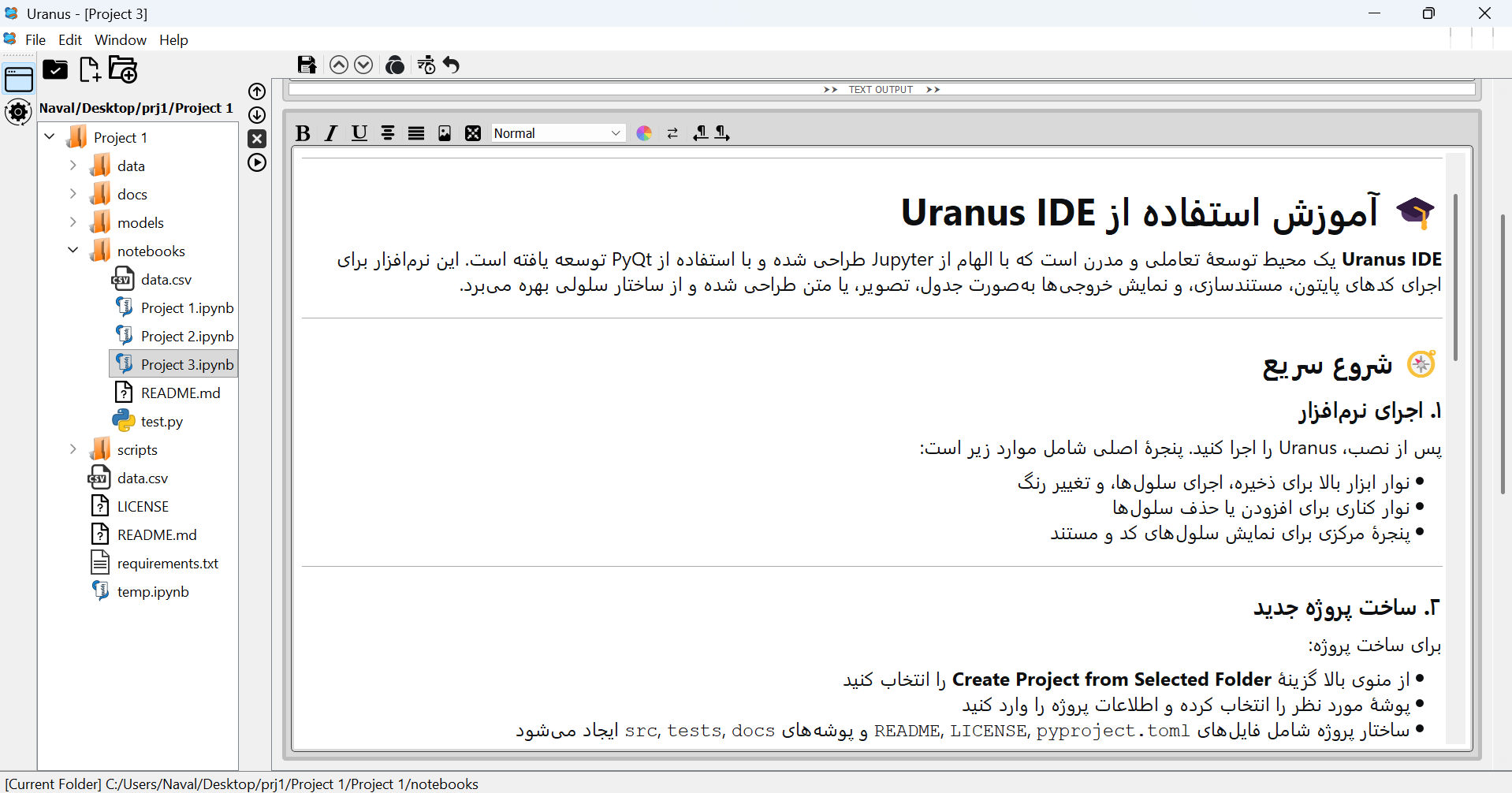 Screenshot 5 |
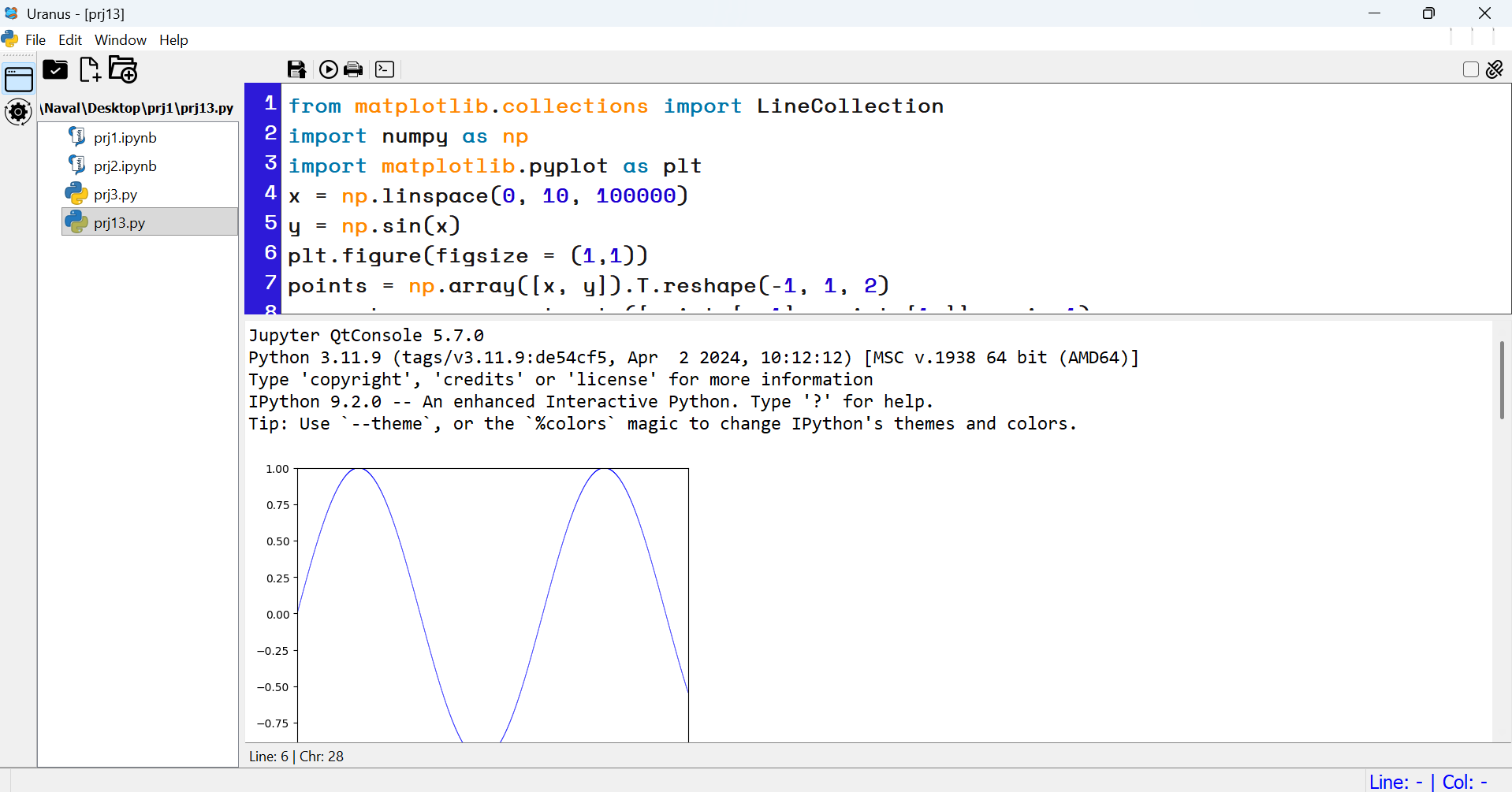 Screenshot 6 |
Screenshots from Uranus IDE — created and developed by Attila Ghashghaei | آتیلا قشقایی .
Overview
- 🧠 Code and Markdown cells with live execution
- 📊 Output viewers for text, tables, and images
- 🧰 Customizable toolbar and editor settings
- 🧾 Project scaffolding with license and metadata
- 🧱 File explorer with context menu and keyboard shortcuts
✨ Detailed
- ✅ Cell-based editing with IPython kernel
- ✅ Modular architecture with PyQt5
- ✅ Full RTL (Right-to-Left) support for Persian, Arabic, and other RTL languages
- ✅ Custom file explorer with inline editing
- ✅ Project creation and metadata management
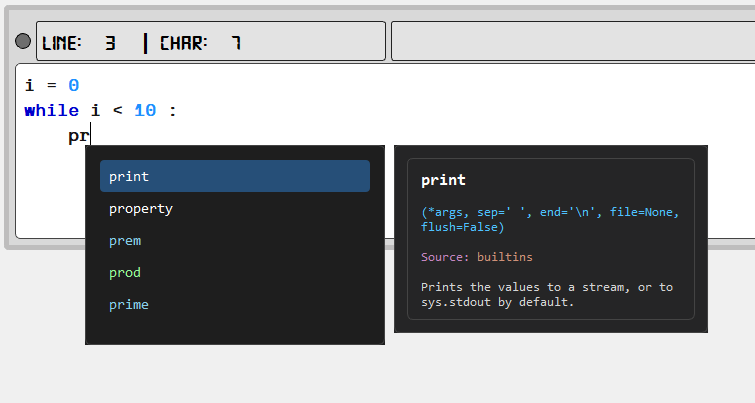
✨ Intelligent AutoComplete System
Uranus IDE features a smart, context-aware auto-completion system that significantly accelerates Python coding. Built directly into the code editor, this system provides intelligent suggestions for:
🔍 Key Features
| Feature | Description |
|---|---|
| 🧠 Context-Aware Suggestions | Detects module contexts (e.g., np. suggests NumPy functions) and global Python keywords, builtins, and user-defined symbols |
| ⚡ On-Demand Activation | Trigger suggestions instantly with Ctrl+Space — just like IDLE and professional IDEs |
| 🎨 Color-Coded Items | Builtins appear in white, Python keywords in orange-red, module-specific items in specialized colors for quick visual identification |
| 📚 Documentation Popup | Each suggestion includes a signature, docstring, and source module displayed in a side popup for immediate reference |
| 🎯 Smart Ranking | Suggestions are intelligently ranked: builtins first → keywords → module items, with shorter and more relevant names prioritized |
| ⌨️ Full Keyboard Navigation | Navigate the list using ↑/↓, PageUp/PageDown, Home/End, and accept with Enter, Tab, or mouse click |
| 🔘 Toggle On/Off | A dedicated toolbar button allows you to enable or disable the auto-completion system at any time |
| 📦 Extensible Database | Auto-completion data is stored in autocomplete_db.json, making it easy to add support for additional modules, libraries, or custom APIs |
🖼️ How It Works
- Type your code — as you type, nothing happens until you need assistance
- Press
Ctrl+Space— the suggestion list appears at the cursor position - Navigate — use arrow keys to browse through suggestions
- View documentation — each selected item shows its signature and docstring
- Accept — press
Enter,Tab, or click to insert the complete word
🐍 Python Error & Lint Testing
Uranus IDE integrates a built‑in error and lint analyzer powered by Ruff.
This feature allows developers to run static analysis directly inside the IDE and instantly detect:
- ❌ Syntax and style errors (indentation, spacing, line length, etc.)
- ⚠️ Warnings for risky or non‑optimal code patterns
- 🧩 Unused imports, undefined names, and logical issues
- 📏 Customizable rule categories with checkboxes for enabling/disabling specific families (e.g.
E,W,F,B,UP) - 🎨 Color‑coded output highlighting for errors, warnings, and success messages
The analyzer window provides a dark‑themed interface with live feedback and a status bar that displays rule descriptions when hovering over checkboxes. Developers can tailor the analysis to their workflow by ignoring selected categories and re‑running checks with a single click.
With this addition, Uranus IDE becomes not only an interactive coding environment but also a powerful linting and error‑testing tool for Python projects.
🔀 Detachable WorkWindows — Seamless Floating Mode
Switch any notebook window between embedded (MDI) and floating mode with a single click — without losing content, focus, or execution state. This feature enables:
- Multi-monitor workflows with independent execution panels
- Persistent cell layout and toolbar state across transitions
- Instant toggling via the "Detach" checkbox in the top toolbar
Built with robust parent migration logic, Uranus ensures that every cell, output, and toolbar remains intact during window transitions.
🧠 Attribute Table — Inspect Your Runtime Like a Pro
Uranus includes a dynamic attribute inspector that visualizes all user-defined variables and objects in a structured table:
| Name | Type | Size (bytes) | Value Preview |
|---|---|---|---|
df |
DataFrame | 2048 | <table> |
img |
Image | 5120 | <image> |
model |
Class | 1024 | <object> |
Features:
- Recursively inspects attributes of user-defined classes and instances
- Filters internal and unsupported types for clarity
- Displays live memory footprint and object type
- Fully integrated with IPython kernel and object store
Whether you're debugging a complex pipeline or teaching data structures, this table gives you full visibility into your runtime environment.
These features are designed and implemented by Attila Ghashghaei | آتیلا قشقایی — bringing modular architecture and deep introspection to the heart of Python development.
Python Script Editor
This module provides a dedicated Python editor and console inside Uranus IDE.
It can display and edit .py files, run them in Python kernel.
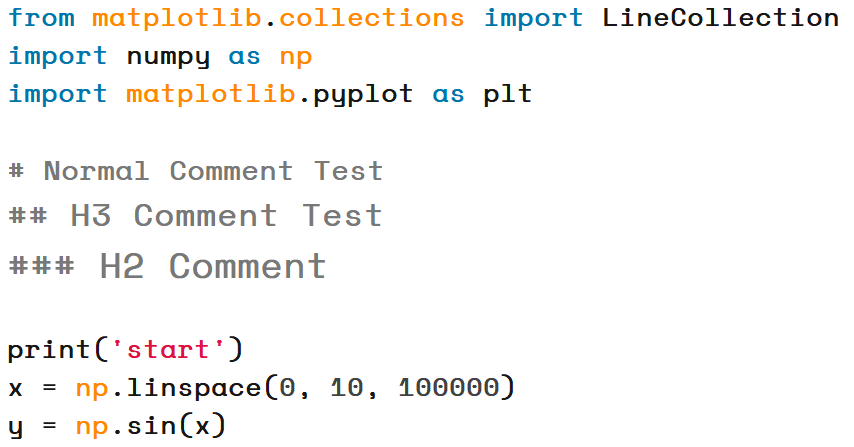
📝 Comment Headings
Uranus IDE now supports special formatting for comments:
##makes the comment font 2 points larger than normal.###makes the comment font 4 points larger and bold.
This allows you to create visual headings inside your code for better readability and teaching.
📝 Independent Markdown Editor
Uranus IDE now includes a dedicated Markdown editor that operates independently from the code environment.
This editor provides a professional space for writing and managing documentation, tutorials, and project notes.
Key benefits include:
- Full support for standard Markdown syntax (headings, lists, tables, images, links)
- A distraction-free environment tailored for documentation
- Ideal for creating technical reports, teaching materials, or project guides
With this addition, Uranus IDE becomes not only a coding platform but also a complete solution for professional documentation workflows.
⏱ Code Cell Execution Timer
Each code cell in Uranus IDE is now equipped with an execution time display.
This feature automatically measures:
- The total runtime of the current cell execution
- The delta (difference) compared to the previous execution of the same cell
This allows developers and educators to:
- Benchmark performance changes between runs
- Identify bottlenecks in code execution
- Gain immediate feedback on optimization efforts
By integrating execution timing directly into the cell interface, Uranus IDE makes performance analysis seamless and intuitive.
Installation and Run Project After GitHub Cloning
1- Go to Project Folder -> Uranus-IDE\
pip install -r requirements.txt
python uranus.py
Installation and Run With pip install from Pypi.org
1 - go to cmd or terminal
pip install Uranus-IDE
2 after finishing just type in termainal or cmd
uranus
Update Project to the Last Version in Pypi.org
1 - go to cmd or terminal
# Recomended Method
pip uninstall uranus-ide
pip install uranus-ide
OR
pip install --upgrade uranus-ide
1 maintainer

Metadata
1 maintainer
Release files for Uranus-IDE 3.3.1a49
For a detailed explanation of source distributions (sdists) and built distributions (wheels), please see the package formats documentation.
Source distribution (sdist)
| File | Size | Uploaded | |
|---|---|---|---|
| uranus_ide-3.3.1a49.tar.gz | 4.2 MB | Details |
Built distribution (wheel)
| File | Interpreter | ABI | Platform | Reset |
|---|---|---|---|---|
| uranus_ide-3.3.1a49-py3-none-any.whl | Python 3 | none | any | Details |
Total release size: 8.4 MB
Release files / uranus_ide-3.3.1a49.tar.gz
| Download URL | uranus_ide-3.3.1a49.tar.gz |
|---|---|
| Size | 4.2 MB |
| Tags | Source |
|
SHA-256 checksum How to use checksums |
88199f497cf5da7f19c9cdd287eab1440c29aa1f3909ae62f83fa0922cdb0fd3
|
|
BLAKE2b-256 checksum How to use checksums |
f6a305a1b0b8592f1a492aac37ebe750c450ba9d2685cd822f6097e0f5c8d16f
|
| Upload date | |
|
Uploaded using Trusted Publishing? What is trusted publishing? |
No |
| Uploaded via |
twine/7.0.0 CPython/3.13.14
|
Release files / uranus_ide-3.3.1a49-py3-none-any.whl
| Download URL | uranus_ide-3.3.1a49-py3-none-any.whl |
|---|---|
| Size | 4.2 MB |
| Tags | Python 3 |
|
SHA-256 checksum How to use checksums |
357afd2aeba7acb0ee3c54d9359b34c55d4b8f451a7b30556b5c71e6b8b24603
|
|
BLAKE2b-256 checksum How to use checksums |
92b80cdeb7f54fa7e09bd6d0feeea63278b57d5f7b2187a87a47cf7d6b219441
|
| Upload date | |
|
Uploaded using Trusted Publishing? What is trusted publishing? |
No |
| Uploaded via |
twine/7.0.0 CPython/3.13.14
|














