
UrbanMapper Community
Enrich Urban Layers Given Urban Datasets
with ease-of-use API and Sklearn-alike Shareable & Reproducible Urban Pipeline







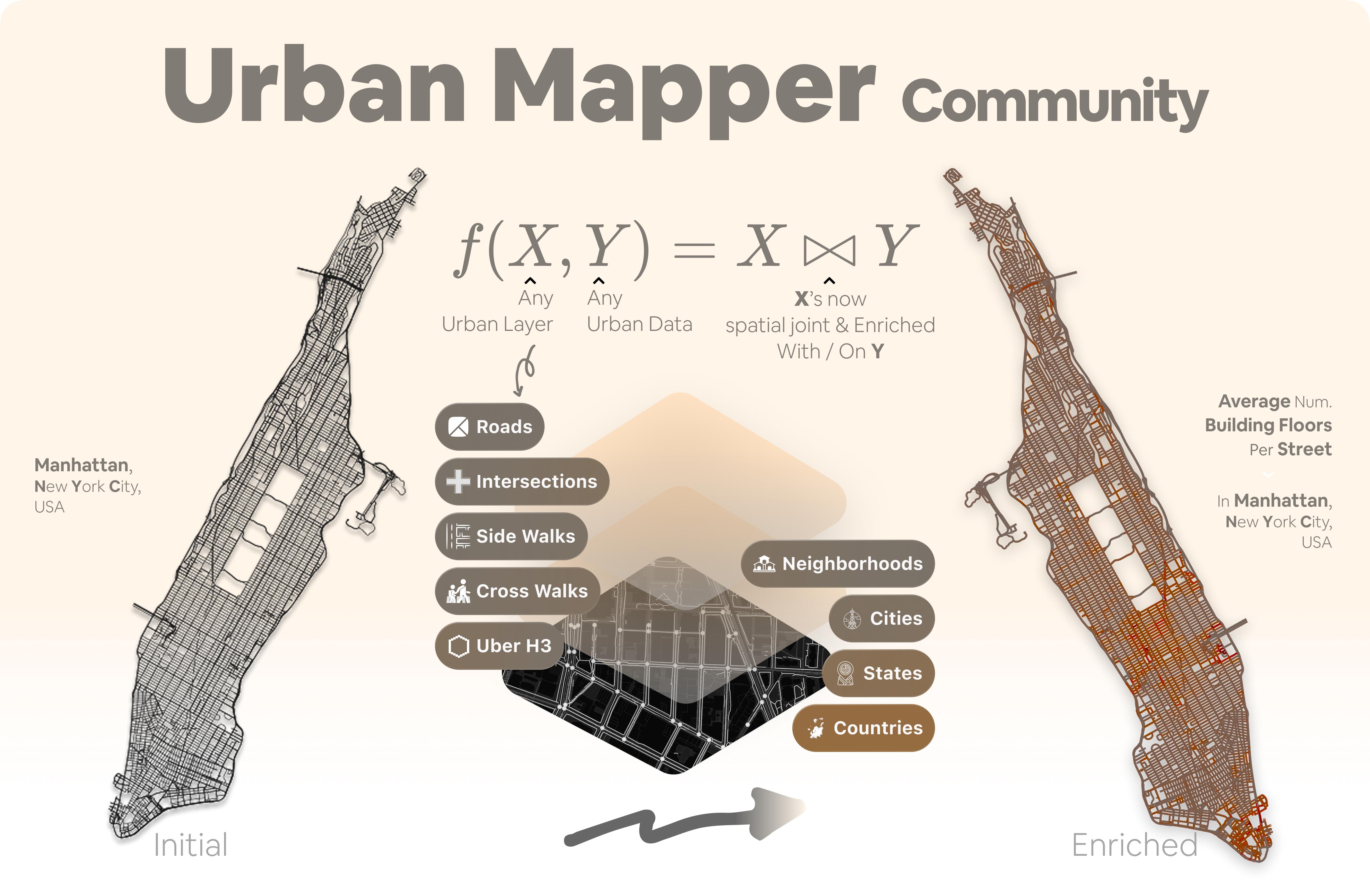
UrbanMapper & Urban Mapper Community, In a Nutshell
UrbanMapper lets you link your data to spatial features—matching, for example, traffic events to streets—to enrich
each location with meaningful, location-based information. Formally, it defines a spatial enrichment
function $f(X, Y) = X \bowtie Y$, where $X$ represents urban layers (e.g., Streets, Sidewalks, Intersections and
more)
and $Y$ is a user-provided dataset (e.g., traffic events, sensor data). The operator $\bowtie$ performs a spatial
join, enriching each feature in $X$ with relevant attributes from $Y$.
In short, UrbanMapper is a Python toolkit that enriches typically plain urban layers with datasets in a reproducible,
shareable, and easily updatable way using minimal code. For example, given traffic accident data and a streets layer
from OpenStreetMap, you can compute accidents per street with
a Scikit-Learn–style pipeline called the Urban Pipeline—in under 15 lines of code.
As your data evolves or team members want new analyses, you can share and update the Urban Pipeline like a trained
model, enabling others to run or extend the same workflow without rewriting code.
About the community-fork: please scroll-down to the #Acknowledgments section below to learn more about the history of the project.
Installation
Install UrbanMapper-Community:
uv add urban-mapper-community
# pip install works too!
Then launch Jupyter Lab to explore UrbanMapper:
uv run jupyter lab
Getting Started with UrbanMapper
We highly recommend exploring the UrbanMapper Documentation, starting with the homepage general information and then the Getting Started section.
Once you have grasped the basics, we recommend exploring the Interactive Examples
or running yourself the notebooks through the examples/ directory.
Licence
UrbanMapper is released under the MIT Licence.
Acknowledgments — Community-Led Continuation
We are grateful to New York University for supporting the early design and development of UrbanMapper, and for
providing an encouraging research environment—especially through the OSCUR funding support (https://oscur.org).
UrbanMapper Community builds on those initial foundations and continues the work as a community-led effort, with a focus on transparent collaboration, reproducible workflows, and open participation as well as public roadmap.
This was unfortunately hardly the case through the first UM repository, questions were hardly answered, issues left,
and contributions difficult to make through.

1 maintainer

Metadata
1 maintainer
Release files for urban-mapper-community 0.0.1
For a detailed explanation of source distributions (sdists) and built distributions (wheels), please see the package formats documentation.
Source distribution (sdist)
| File | Size | Uploaded | |
|---|---|---|---|
| urban_mapper_community-0.0.1.tar.gz | 130.5 kB | Details |
Built distribution (wheel)
| File | Interpreter | ABI | Platform | Reset |
|---|---|---|---|---|
| urban_mapper_community-0.0.1-py3-none-any.whl | Python 3 | none | any | Details |
Total release size: 324.6 kB
Release files / urban_mapper_community-0.0.1.tar.gz
| Download URL | urban_mapper_community-0.0.1.tar.gz |
|---|---|
| Size | 130.5 kB |
| Tags | Source |
|
SHA-256 checksum How to use checksums |
5a367e8cf547cbef48755e637196ae3eaba09732716297e1ed46f3c1ef8c1b3c
|
|
BLAKE2b-256 checksum How to use checksums |
474aa258beef7b08675722bc2e91a51abfe96b936500b07f23c2d4371c7600f4
|
| Upload date | |
|
Uploaded using Trusted Publishing? What is trusted publishing? |
No |
| Uploaded via |
uv/0.5.11
|
Release files / urban_mapper_community-0.0.1-py3-none-any.whl
| Download URL | urban_mapper_community-0.0.1-py3-none-any.whl |
|---|---|
| Size | 194.1 kB |
| Tags | Python 3 |
|
SHA-256 checksum How to use checksums |
0ee72674c234d98946ed0cfe585b7d437c82320f088218521f288931644c1762
|
|
BLAKE2b-256 checksum How to use checksums |
f1e4f92cacbab3407612d68f2bec83b1e33f37c1a8b3cace2175ba2f24279678
|
| Upload date | |
|
Uploaded using Trusted Publishing? What is trusted publishing? |
No |
| Uploaded via |
uv/0.5.11
|













