





UrbIrrad
Source code: arep-dev/urbirrad on GitLab.
Documentation: UrbIrrad user guide.
Have you wrestled with Radiance command-line options, or explored Honeybee, and wished for a focused way to calculate solar exposure in a building or urban scene?
UrbIrrad offers a Python/YAML workflow:
- Provide geometry and weather,
- Choose the analysis,
- Run a case and open the result in ParaView.
You do not need to assemble the Radiance command pipeline yourself. UrbIrrad drives Radiance through PyRadiance and computes, on a triangular sensor mesh:
| Analysis | Result | Example |
|---|---|---|
| Solar irradiance: direct sun, diffuse sky, optional reflected sunlight | W/m², hour by hour | examples/template_case/case.yaml |
| Potential sunshine hours | hours of direct sun | examples/template_case/case_potential_sunshine.yaml |
| Daylight factor (DF), standard overcast sky | % | examples/daylight_factor/case.yaml |
| Daylight autonomy, from a weather file | % of occupied hours | examples/daylight_factor/case_daylight_autonomy.yaml |
Not sure which one you need? See choosing an analysis.
Not just outdoors. The "Urb" in UrbIrrad reflects its urban-study context, not a restriction to exterior sensors: streets, courtyards and public spaces, rooms behind modelled glazing, or semi-open spaces such as covered walkways, terraces and atria. Where you place the sensors and which geometry you model determine the exposure; there is no indoor/outdoor switch.
Installation
Install a released version from PyPI
Python 3.12 or newer is required. With Miniforge or another Conda distribution:
conda create -n rad python=3.12 -y
conda activate rad
python -m pip install urbirrad
If you already have a suitable Python environment, just run
python -m pip install urbirrad. PyRadiance provides the Radiance programs;
no separate Radiance installation is required.
The package does not include the example geometry or weather files. To run the examples, install Git and download the repository, or download and extract the repository archive from GitLab:
git clone https://gitlab.com/arep-dev/urbirrad.git
cd urbirrad
To view results, install ParaView (6.1 tested).
Install from source for development
git clone https://gitlab.com/arep-dev/urbirrad.git
cd urbirrad
conda create -n rad python=3.12 -y
conda activate rad
python -m pip install -e .
Quick start: the Montauban example
The Montauban example contains a weather file, a sensor surface inside a modelled building, walls, two glazing types, ground and the surrounding urban blocks. It covers 1–15 July. From the repository root:
conda activate rad
python -m urbirrad.cli check examples/template_case/case.yaml
python -m urbirrad.cli run examples/template_case/case.yaml --nproc 4
check validates the case without calculating. run computes the direct
sun and the diffuse sky on an upward-facing horizontal plane, without
sunlight reflected by surfaces. It takes about 30 seconds with --nproc 4
the first time; reruns reuse cached sky matrices and are faster.
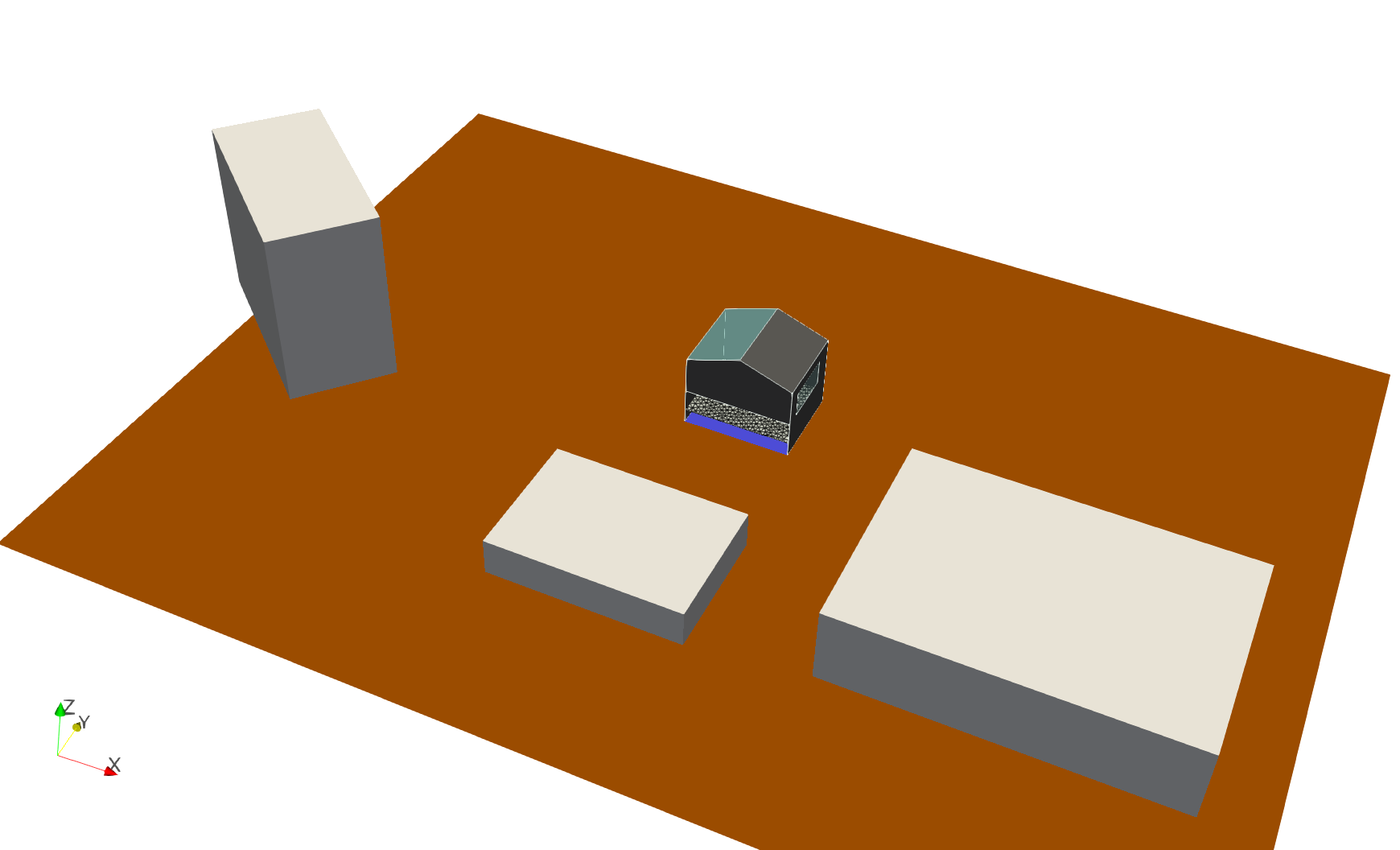
View the result. Open examples/template_case/results/annual_solar.xmf in
ParaView, choose XDMF Reader (not Xdmf3 Reader), click Apply, colour
by solar_direct or solar_diffuse [W/m²] and move through time with the
time controls. See results and ParaView
if only "Solid Color" is offered.
To rerun, add --force, or clean the outputs first (caches are kept):
python -m urbirrad.cli clean examples/template_case/case.yaml
Other analyses and variants
Each line is a complete YAML file: run it with the same check / run
commands.
| Goal | YAML | Guide |
|---|---|---|
| Direct sun only, fastest shadow check | examples/template_case/case_01_direct_only.yaml |
getting started |
| Six receiving faces per point (E, W, N, S, up, down), for comfort studies | examples/template_case/case_02_six_directions.yaml |
methods |
| Add sunlight reflected by walls and ground (slower) | examples/template_case/case_03_reflected_direct.yaml |
methods |
| Potential sunshine hours, clear-sky geometry only | examples/template_case/case_potential_sunshine.yaml |
potential sunshine |
| Direct irradiance plus a sunshine-hours field | examples/template_case/case_direct_sunshine.yaml |
potential sunshine |
| Daylight factor in a room, no weather file | examples/daylight_factor/case.yaml |
daylight factor |
| Daylight autonomy in the same room | examples/daylight_factor/case_daylight_autonomy.yaml |
daylight autonomy |
Effect of a solar-control film on existing windows (compare with case.yaml) |
examples/template_case/case_window_film.yaml |
glazing properties |
| Terrace under a polycarbonate canopy (opal or clear) | examples/polycarbonate_canopy/case.yaml |
diffusing materials |
Material data helpers:
- Glazing and films: prepare the solar transmittance from manufacturer data,
or estimate it from the U-value and solar factor g:
python -m urbirrad.glazing --ug 1.0 --g 0.35 --tl 0.70. See glazing properties, including how to assess a film added to an existing window. - Translucent sheets (opal or multiwall polycarbonate, shade sails) use
materials.diffusing; see diffusing materials.
Your own project
Copy an example folder, replace its geometry and weather file, and edit the YAML. The getting-started guide explains how to prepare geometry from CAD, where to find weather files and how to adapt a case. Key conventions:
- coordinates X = East, Y = North, Z = Up, in metres;
- surfaces and sensors as triangular
STL,VTP,VTK,OBJorPLYmeshes, one file per material; - optical properties are given in the YAML, not taken from file colours;
- results in
W/m²(solar), lux or % (daylight), hours (sunshine).
Scope. UrbIrrad covers shortwave solar radiation and visible daylight. It does not calculate longwave thermal radiation or overall mean radiant temperature (MRT), glare, or regulatory compliance.
Documentation
Read the online documentation, or browse the Markdown files in GitLab.
- Start: getting started, choosing an analysis, results and ParaView.
- Analyses: methods (solar irradiance), potential sunshine, daylight factor, daylight autonomy.
- Inputs: YAML configuration, glazing properties, diffusing materials.
- Background and reference: how Radiance calculations work, Python API, HDF5 reference, validation, documentation maintenance.
To preview the documentation locally:
python -m pip install -r requirements-docs.txt
python -m mkdocs serve
Development status
UrbIrrad is under active development. Configuration, APIs and result formats may evolve as new options are developed and validated. See the roadmap for proposals and the changelog for what changed in each release.
Tests are optional for normal use:
python -m pip install -e ".[test]"
python -m pytest -q
Official resources: Radiance website and source code; PyRadiance documentation and source code.
License
This project is distributed under the MIT License. Dependencies retain their own licenses; see third-party notices.
Repository layout
urbirrad/                 Python package
tests/                    automated tests
examples/template_case/   Montauban solar and sunshine examples (copyable project structure)
examples/daylight_factor/ daylight factor and daylight autonomy room examples
examples/polycarbonate_canopy/ terrace under a translucent canopy (diffusing materials)
docs/                     user guides, reference, validation and image assets
scripts/                  example geometry generators and documentation charts
benchmarks/               validation reports, benchmark scripts and diagnostic experiments
mkdocs.yml                documentation navigation and build configuration
.gitlab-ci.yml            documentation checks and GitLab Pages deployment
requirements-docs.txt     optional documentation builder
roadmap.md                development priorities and future proposals
1 maintainer

Metadata
1 maintainer
Release files for urbirrad 0.2.0
For a detailed explanation of source distributions (sdists) and built distributions (wheels), please see the package formats documentation.
Source distribution (sdist)
| File | Size | Uploaded | Provenance | Actions |
|---|---|---|---|---|
| urbirrad-0.2.0.tar.gz | 103.6 kB | Without provenance | Details for urbirrad-0.2.0.tar.gz |
Built distribution (wheel)
| File | Interpreter | ABI | Platform | Actions Reset |
|---|---|---|---|---|
| urbirrad-0.2.0-py3-none-any.whl | Python 3 | none | any | Details for urbirrad-0.2.0-py3-none-any.whl |
Total release size: 184.1 kB
Release files / urbirrad-0.2.0.tar.gz
| Download URL | urbirrad-0.2.0.tar.gz |
|---|---|
| Size | 103.6 kB |
| Tags | Source |
|
SHA-256 checksum How to use checksums |
1743b379a6d239948cd3177bf6e572f0c57fad47adb927757af5815ab8f17bb2
|
|
BLAKE2b-256 checksum How to use checksums |
6589d7634949b24bdc19e97b365c32bdbc1d1373f84775a90808161d41da8323
|
| Upload date | |
|
Uploaded using Trusted Publishing? What is trusted publishing? |
No |
| Uploaded via |
twine/7.0.0 CPython/3.12.14
|
Release files / urbirrad-0.2.0-py3-none-any.whl
| Download URL | urbirrad-0.2.0-py3-none-any.whl |
|---|---|
| Size | 80.5 kB |
| Tags | Python 3 |
|
SHA-256 checksum How to use checksums |
cc3b850992733060be68c1e6275c5f829eb14eaf3885db4b04e85d19a6d81c83
|
|
BLAKE2b-256 checksum How to use checksums |
86bdd3aa2ad2a0b36cc8ce3e6b3e17ff86589de8576d1fd40f3ede666dc8de9f
|
| Upload date | |
|
Uploaded using Trusted Publishing? What is trusted publishing? |
No |
| Uploaded via |
twine/7.0.0 CPython/3.12.14
|
Security for urbirrad 0.2.0
Provenance
Provenance describes where a file came from. On PyPI, provenance is shared via attestations, which provide a verifiable record of the build or publishing details. View details, limitations and caveats.
No provenance found
None of the files in this release were uploaded with provenance metadata.
A note on package security
PyPI is a repository for distributing packages, not a service for auditing them. While third-party security researchers and our staff do their best to detect and remove malicious packages, PyPI cannot guarantee the quality, security or suitability of any given package.
To learn more about protecting yourself from malicious actors, visit our package security documentation.














