

Uroboros
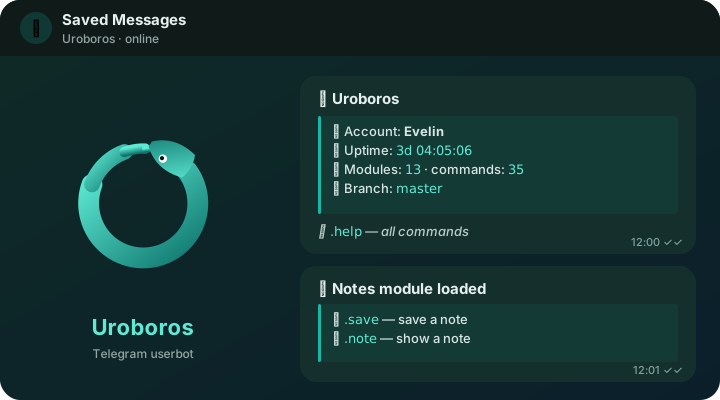
Modular Telegram userbot on Python and Telethon.
One-command modules, inline buttons and forms, account protection from malicious code.





📚 Docs · 🚀 Install · ⌨️ Commands · 🧩 Write modules · 📦 Modules · 🇷🇺 Русский
✨ Features
📦 One-command modules: .dlm notes, .search, your own repos via .addrepo |
🛡 Account protection: code is scanned before install, and modules can't touch the session at runtime |
| 🤖 Buttons and forms: built-in inline bot for settings, help and confirmations | 🔁 Hikka and FTG modules: loaded as-is through an adapter, see what's supported |
🌿 Stable and dev channels: .dev on / .dev off, .update with rollback |
💾 Backups: database and modules in one archive, on a schedule |
🔐 Access levels: owner, sudo, support and per-command permissions |
🐧 Runs anywhere: Linux and VPS, Termux, Docker, Windows, macOS |
🚀 Install
Linux, VPS, Termux, macOS:
curl -fsSL https://raw.githubusercontent.com/asykixd/uroboros/master/install.sh | sh
Or pip install uroboros-userbot. Docker, systemd, Termux autostart and Windows: see
install docs.
On first run Uroboros prints a link to a web login panel: enter api_id/api_hash from
my.telegram.org/apps, phone, code and 2FA password, or scan a QR code. The panel
shuts down after login, and Uroboros creates its inline bot via @BotFather. Console login: --cli.
⌨️ Main commands
| Command | Description |
|---|---|
📖 .help [module] |
modules and help |
📥 .dlm <url | owner/repo/module | module> |
install a module; .dlm owner/repo lists a repo |
🔃 .uplm [module] |
update modules: diff first, then confirm |
🗑 .ulm <module> |
remove a module |
⚙️ .cfg [module] |
module settings, with buttons |
🆕 .update |
update Uroboros: changelog, install, rollback on failure |
🌿 .dev on | off |
switch to dev builds or back to stable master |
🔐 .security |
access, command permissions, flood and module protection |
💾 .backup, ♻️ .restore |
backup and restore |
ℹ️ .info, 📡 .ping, 📝 .logs |
bot status |
Full list with access levels: command reference.
🧩 Write a module
# meta developer: @you
# meta permissions: none
# requires_uroboros: 1.0
from uroboros import Module, command, utils


class Notes(Module):
    """Notes"""

    @command("save", emoji="💾")
    async def save(self, message):
        """<name> <text> — save a note"""
        name, _, text = utils.get_args_raw(message).partition(" ")
        self.set(name, text)
        await utils.answer(
            message,
            utils.card(
                "✅ <b>Note saved</b>",
                [f"🏷 Name: <code>{utils.escape_html(name)}</code>", f"📏 Length: <code>{len(text)}</code>"],
                hint=f"show: <code>.note {utils.escape_html(name)}</code>",
            ),
        )
Modules get self.client (Telethon), storage (self.get/self.set), self.config, command filters, watchers,
@loop tasks, libraries, inline forms (self.inline.form(...)) and utils helpers. See the
module guide; ready-made modules and a repo template:
uroboros-modules.
🛡 Security
Third-party modules run in the bot's process. Uroboros scans their code on install, shows permissions and diffs, pins GitHub modules to a commit and blocks access to the session. It is not a sandbox: install modules you trust. See security.
🛠 Development
dev is the development branch (X.Y.Z-dev), master is stable.
python3 -m venv .venv && .venv/bin/pip install -e '.[dev,docs]'
.venv/bin/python -m pytest
.venv/bin/mkdocs serve
🙏 Credits
The module API and adapter follow Hikka (AGPL-3.0); thanks to its authors. Built on Telethon and aiogram.
📄 License
AGPL-3.0, see LICENSE. Contributing · Security policy
1 maintainer

Metadata
1 maintainer
Release files for uroboros-userbot 1.0.1
For a detailed explanation of source distributions (sdists) and built distributions (wheels), please see the package formats documentation.
Source distribution (sdist)
| File | Size | Uploaded | |
|---|---|---|---|
| uroboros_userbot-1.0.1.tar.gz | 165.1 kB | Details |
Built distribution (wheel)
| File | Interpreter | ABI | Platform | Reset |
|---|---|---|---|---|
| uroboros_userbot-1.0.1-py3-none-any.whl | Python 3 | none | any | Details |
Total release size: 314.4 kB
Release files / uroboros_userbot-1.0.1.tar.gz
| Download URL | uroboros_userbot-1.0.1.tar.gz |
|---|---|
| Size | 165.1 kB |
| Tags | Source |
|
SHA-256 checksum How to use checksums |
6d842741f223f8cb0370694e7db82b1116c2a456342bdcf35a09b8783b3aaa64
|
|
BLAKE2b-256 checksum How to use checksums |
d765905b1815efe6eae37c35e02f1fb004a671ec0f7d50700092085494477e7a
|
| Upload date | |
|
Uploaded using Trusted Publishing? What is trusted publishing? |
Yes |
| Uploaded via |
twine/7.0.0 CPython/3.13.14
|
Provenance
Provenance describes where a file came from. On PyPI, provenance is shared via attestations, which provide a verifiable record of the build or publishing details. View details, limitations and caveats.


PyPI Publish Attestation
PyPI verified that this artifact, at this checksum, originated from the publisher listed below.
Signed by GitHub Actions, verified by PyPI on Oct 8, 2026.
Transparency logRelease files / uroboros_userbot-1.0.1-py3-none-any.whl
| Download URL | uroboros_userbot-1.0.1-py3-none-any.whl |
|---|---|
| Size | 149.2 kB |
| Tags | Python 3 |
|
SHA-256 checksum How to use checksums |
1d0888ed89bac2050994ed212734c84efdc2c07588ae0c51e07ee6e3f30ea25d
|
|
BLAKE2b-256 checksum How to use checksums |
f1b5a8989502eb4adbfb3d536ef42bea520b2b6d41b2e44845ec775401dfd803
|
| Upload date | |
|
Uploaded using Trusted Publishing? What is trusted publishing? |
Yes |
| Uploaded via |
twine/7.0.0 CPython/3.13.14
|
Provenance
Provenance describes where a file came from. On PyPI, provenance is shared via attestations, which provide a verifiable record of the build or publishing details. View details, limitations and caveats.
PyPI Publish Attestation
PyPI verified that this artifact, at this checksum, originated from the publisher listed below.
Signed by GitHub Actions, verified by PyPI on Oct 8, 2026.
Transparency log













