
Visual USB topology and debugging for Linux

Project description

USB Explorer
Visual USB topology and debugging for Linux
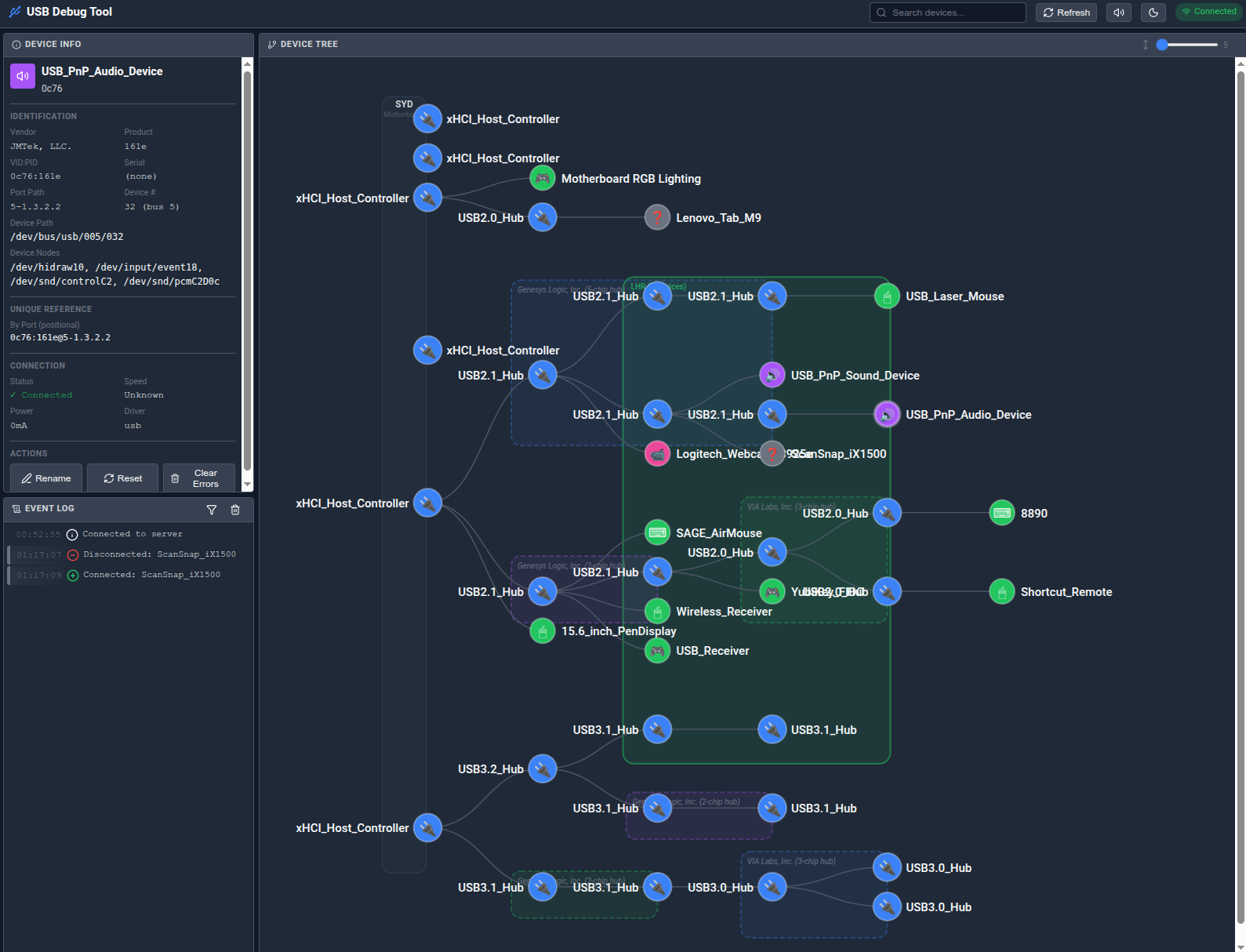
Features
- Live Device Tree: Visual representation of USB topology with hub grouping
- Real-time Updates: Instant notification of device changes via WebSocket
- Error Detection: Automatic parsing of dmesg for USB errors
- Audio Alerts: Sound notifications for plug/unplug events
- Device Reset: Reset problematic devices from the UI
- Custom Names: Label your devices and hub groups for easy identification
- Search: Find devices by name, vendor, product ID, or path
- Device Nodes: Shows /dev paths like /dev/ttyACM0, /dev/sda
Limitations
It's hard to know what physcially makes up a USB hub! The process is heuristic and doesn't always get it right. As such there's a function to discover what the hubs are by switching them on and off and noticing what turns on/off at the same time. This could affect storage devices or other device with state, so we caution the user, but caveat emptor!
Requirements
- Python 3.9+
- Linux with udev
- Root/sudo access (optional, for device reset feature)
Installation
Using pipx (recommended)
# Install system dependency first
# Debian/Ubuntu:
sudo apt install libudev-dev
# Fedora/RHEL:
sudo dnf install systemd-devel

# Install USB Explorer
pipx install usb-explorer
Using pip
# Install system dependency (see above)

pip install usb-explorer
From source
# Clone the repository
git clone https://github.com/appositeit/usb-explorer.git
cd usb-explorer

# Install system dependency (see above)

# Option 1: Install with pip
pip install -e .

# Option 2: Use the install script (creates virtual environment)
./install.sh
Quick Start
# Start USB Explorer (browser opens automatically)
usb-explorer

# Or with root privileges (enables device reset feature)
sudo usb-explorer

# The browser will open automatically to http://localhost:8080
Usage
# With browser auto-open (default)
usb-explorer

# Without browser
USB_EXPLORER_OPEN_BROWSER=0 usb-explorer

# Custom port
USB_EXPLORER_PORT=9000 usb-explorer

# Run as Python module
python -m usb_explorer
Configuration
Copy and edit config/devices.yaml (created automatically on first run):
# Server settings
port: 8080
host: 0.0.0.0
auto_open_browser: true

# Custom device names
devices:
  - vendor_id: "05e3"
    product_id: "0610"
    custom_name: "Main USB Hub"
    notes: "Connected to monitor"

# Hub group labels (displayed on hub boxes in the tree)
hub_labels:
  motherboard: MOBO
  05e3:0610@5-1: DESK
Environment Variables
| Variable | Default | Description |
|---|---|---|
USB_EXPLORER_PORT |
8080 | Server port |
USB_EXPLORER_HOST |
0.0.0.0 | Server bind address |
USB_EXPLORER_OPEN_BROWSER |
1 | Auto-open browser (0 to disable) |
API Endpoints
| Endpoint | Method | Description |
|---|---|---|
/ |
GET | Main UI |
/ws |
WebSocket | Real-time updates |
/api/devices |
GET | Device tree JSON |
/api/device/{path} |
GET | Single device info |
/api/device/{path}/reset |
POST | Reset device |
/api/device/name |
POST | Set custom device name |
/api/hub-labels |
GET/POST | Get/set hub group labels |
/api/errors |
GET | Recent USB errors |
/api/health |
GET | Health check |
/api/shutdown |
POST | Graceful shutdown |
Troubleshooting
"Permission denied" errors
Some features require root access:
sudo usb-explorer
No devices showing
- Ensure libudev is installed:
sudo apt install libudev-dev - Check udev is running:
systemctl status udev
WebSocket disconnects
- Check firewall allows the configured port
- Try a different browser
lsusb shows "unable to initialize usb spec"
This is an AppArmor issue. Create /etc/apparmor.d/local/lsusb:
/etc/udev/hwdb.bin r,
/usr/share/hwdata/usb.ids r,
/var/lib/usbutils/usb.ids r,
Then reload: sudo apparmor_parser -r /etc/apparmor.d/lsusb
Uninstall
./uninstall.sh
License
MIT License - see LICENSE for details.
Release history Release notifications | RSS feed


Download files
Download the file for your platform. If you're not sure which to choose, learn more about installing packages.
Source Distribution
Built Distribution
Filter files by name, interpreter, ABI, and platform.
If you're not sure about the file name format, learn more about wheel file names.
Copy a direct link to the current filters
File details
Details for the file usb_explorer-0.1.1.tar.gz.
File metadata
- Download URL: usb_explorer-0.1.1.tar.gz
- Upload date:
- Size: 382.5 kB
- Tags: Source
- Uploaded using Trusted Publishing? No
- Uploaded via: twine/6.2.0 CPython/3.13.7
File hashes
| Algorithm | Hash digest | |
|---|---|---|
| SHA256 |
c9586f5876898efcdcf3d7b3cfb57b0e4ebec752856001dd2b354621101d9860
|
|
| MD5 |
368944aeda308dbc1b95f0c62e76983b
|
|
| BLAKE2b-256 |
f021b46322c6ab5a04cf7bbb59f3d35ede2cede8b1edeaa23496b7221cfdb416
|
File details
Details for the file usb_explorer-0.1.1-py3-none-any.whl.
File metadata
- Download URL: usb_explorer-0.1.1-py3-none-any.whl
- Upload date:
- Size: 382.8 kB
- Tags: Python 3
- Uploaded using Trusted Publishing? No
- Uploaded via: twine/6.2.0 CPython/3.13.7
File hashes
| Algorithm | Hash digest | |
|---|---|---|
| SHA256 |
5e8f6b8d6a650fabadb455b5cecd3cc8808eca4541f1b6f98374839f8727b917
|
|
| MD5 |
ae1d5ff67a448373301c280913903f31
|
|
| BLAKE2b-256 |
5b88302ce292b8253ec884732565c6a222cb48300f8b11e58b359108298e65da
|






