
Smaller & Faster Single-File Vector Search Engine from Unum

Project description
USearch
Smaller & Faster Single-File
Vector Search Engine





Euclidean • Angular • Jaccard • Hamming • Haversine • User-Defined Metrics
C++11 •
Python •
JavaScript •
Java •
Rust •
Objective-C •
Swift •
GoLang •
Wolfram
Linux • MacOS • Windows
- Industry-leading performance.
- Easily-extendible single C++11 header implementation.
- User-defined and pre-packaged SIMD-accelerated metrics.
- Half-precision
f16and Quarter-precisionf8support on any hardware. - View from disk, without loading into RAM.
- 4B+ sized space efficient point-clouds with
uint40_t. - Variable dimensionality vectors - for obscure use-cases.
- Bring your threads, like OpenMP.
- Multiple vectors per label.
- Thread-safe
reserve. - AI + Vector Search = Semantic Search.
| FAISS | USearch | |
|---|---|---|
| Implementation | 84 K SLOC in faiss/ |
1 K SLOC in usearch/ |
| Supported metrics | 9 fixed metrics | Any User-Defined metrics |
| Supported ID types | uint32_t, uint64_t |
uint32_t, uint40_t, uint64_t |
| Dependencies | BLAS, OpenMP | None |
| Bindings | SWIG | Native |
| Acceleration | Learned Quantization | Downcasting |
FAISS is the industry standard for a high-performance batteries-included vector search engine. Both USearch and FAISS implement the same HNSW algorithm. But they differ in a lot of design decisions. USearch is designed to be compact and broadly compatible without sacrificing performance.
FAISS, f32 |
USearch, f32 |
USearch, f16 |
USearch, f8 |
USearch + Numba, f32 |
|
|---|---|---|---|---|---|
| Insertions | 76 K/s | 89 K/s | 73 K/s | 137 K/s | 99 K/s |
| Queries | 118 K/s | 167 K/s | 140 K/s | 281 K/s | 165 K/s |
| Recall @1 | 99% | 99.2% | 98% | 99.2% | 99.2% |
Dataset: 1M vectors sample of the Deep1B dataset. Hardware:
c7g.metalAWS instance with 64 cores and DDR5 memory. HNSW was configured with identical hyper-parameters: connectivityM=16, expansion @ constructionefConstruction=128, and expansion @ searchef=64. Both libraries were compiled for the target architecture. Jump to the Performance Tuning section to read about the effects of those hyper-parameters.
User-Defined Functions
Most vector-search packages focus on just 2 metrics - "Inner Product distance" and "Euclidean distance". That only partially exhausts the list of possible metrics. A good example would be the rare Haversine distance, used to compute the distance between geo-spatial coordinates, extending Vector Search into the GIS domain. Another example would be designing a custom metric for composite embeddings concatenated from multiple AI models in real-world applications. USearch supports that: Python and C++ examples.
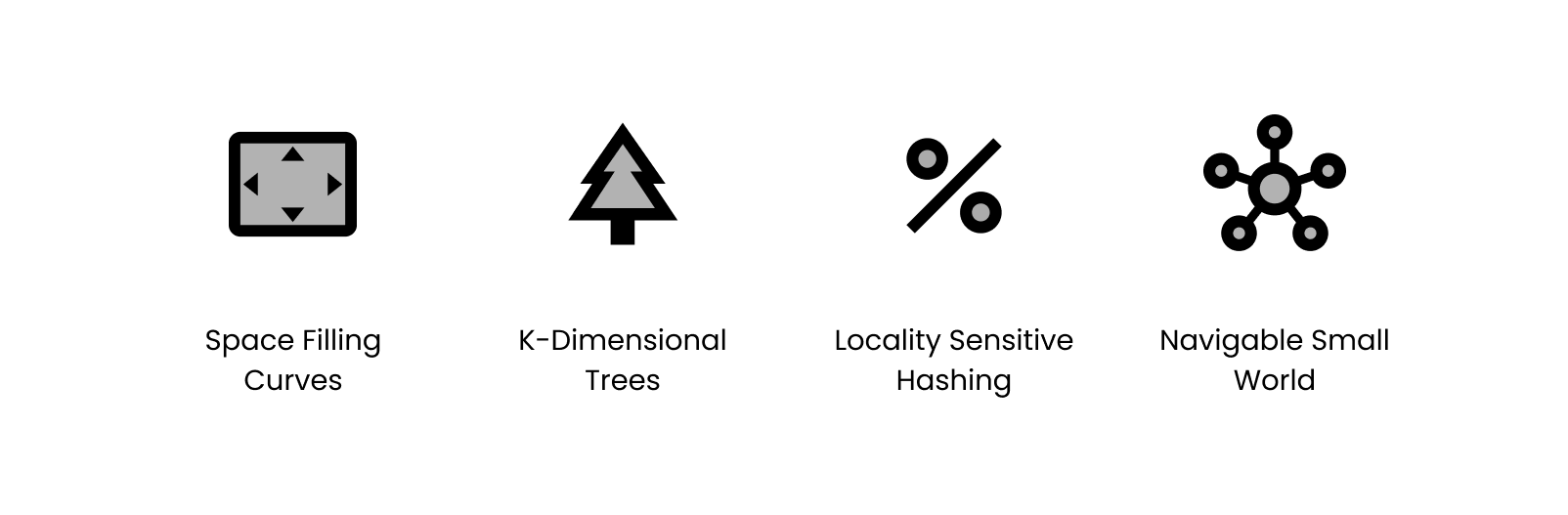
Unlike older approaches indexing high-dimensional spaces, like KD-Trees and Locality Sensitive Hashing, HNSW doesn't require vectors to be identical in length. They only have to be comparable. So you can apply it in obscure applications, like searching for similar sets or fuzzy text matching.
Memory Efficiency, Downcasting, and Quantization
Training a quantization model and dimension-reduction is a common approach to accelerate vector search. Those, however, are only sometimes reliable, can significantly affect the statistical properties of your data, and require regular adjustments if your distribution shifts.
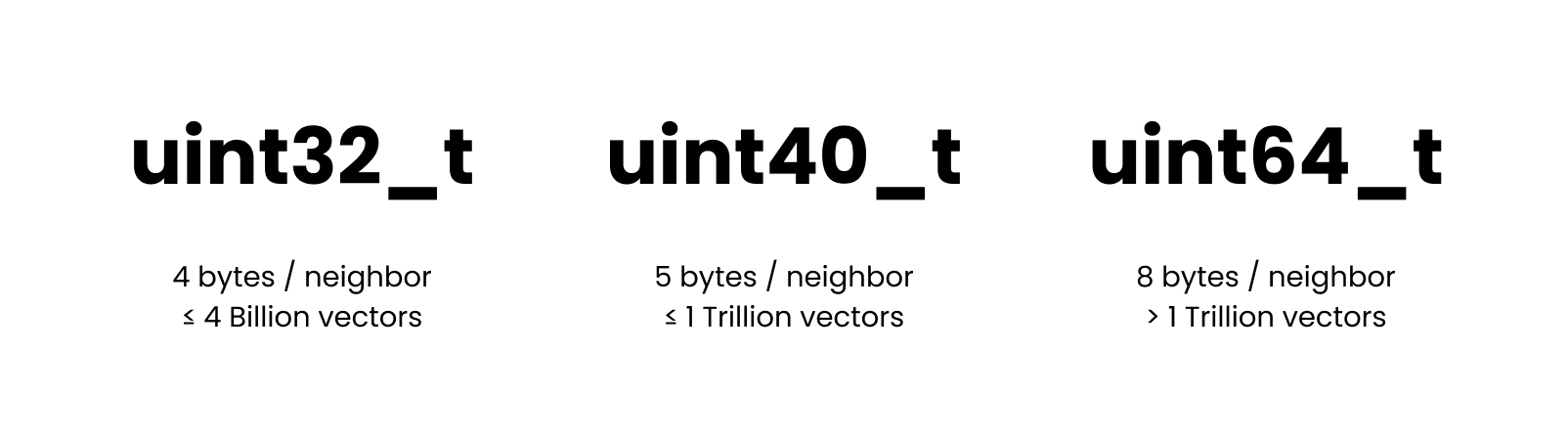
Instead, we have focused on high-precision arithmetic over low-precision downcasted vectors.
The same index, and add and search operations will automatically down-cast or up-cast between f32_t, f16_t, f64_t, and f8_t representations, even if the hardware doesn't natively support it.
Continuing the topic of memory-efficiency, we provide a uint40_t to allow collection with over 4B+ vectors without allocating 8 bytes for every neighbor reference in the proximity graph.
View Larger Indexes from Disk
Modern search systems often suggest using different servers to maximize indexing speed and minimize serving costs. Memory-optimized for the first task, and storage-optimized for the second, if the index can be served from external memory, which USearch can.
| To Build | To Serve | |
|---|---|---|
| Instance | u-24tb1.metal | is4gen.8xlarge |
| Price | ~ $200/h | ~$4.5/h |
| Memory | 24 TB RAM + EBS | 192 GB RAM + 30 TB SSD |
There is a 50x difference between the cost of such instances for identical capacity. Of course, the latency of external memory access will be higher, but it is in part compensated with an excellent prefetching mechanism.
Usage
There are two usage patters:
- Bare-bones with
usearch/usearch.hpp, only available in C++. - Full-fat version with it's own threads, mutexes, type-punning, quantization, that is available both in C++ and is wrapped for higher-level bindings.
C++
Installation
To use in a C++ project simply copy the include/usearch/usearch.hpp header into your project.
Alternatively fetch it with CMake:
FetchContent_Declare(usearch GIT_REPOSITORY https://github.com/unum-cloud/usearch.git)
FetchContent_MakeAvailable(usearch)
Quickstart
Once included, the low-level C++11 interface is as simple as it gets: reserve(), add(), search(), size(), capacity(), save(), load(), view().
This covers 90% of use-cases.
using namespace unum::usearch;

index_gt<cos_gt<float>> index;
float vec[3] = {0.1, 0.3, 0.2};

index.reserve(10);
index.add(/* label: */ 42, /* vector: */ {&vec[0], 3});
auto results = index.search(/* query: */ {&vec[0], 3}, 5 /* neighbors */);

for (std::size_t i = 0; i != results.size(); ++i)
    results[i].member.label, results[i].member.vector, results[i].distance;
The add is thread-safe for concurrent index construction.
Serialization
index.save("index.usearch");
index.load("index.usearch"); // Copying from disk
index.view("index.usearch"); // Memory-mapping from disk
User-Defined Metrics in C++
For advanced users, more compile-time abstractions are available.
template <typename metric_at = ip_gt<float>,            //
          typename label_at = std::size_t,              // `uint32_t`, `uuid_t`...
          typename id_at = std::uint32_t,               // `uint40_t`, `uint64_t`...
          typename scalar_at = float,                   // `double`, `half`, `char`...
          typename allocator_at = std::allocator<char>> //
class index_gt;
You may want to use a custom memory allocator or a rare scalar type, but most often, you would start by defining a custom similarity measure. The function object should have the following signature to support different-length vectors.
struct custom_metric_t {
    T operator()(T const* a, T const* b, std::size_t a_length, std::size_t b_length) const;
};
The following distances are pre-packaged:
cos_gt<scalar_t>for "Cosine" or "Angular" distance.ip_gt<scalar_t>for "Inner Product" or "Dot Product" distance.l2sq_gt<scalar_t>for the squared "L2" or "Euclidean" distance.jaccard_gt<scalar_t>for "Jaccard" distance between two ordered sets of unique elements.bit_hamming_gt<scalar_t>for "Hamming" distance, as the number of shared bits in hashes.pearson_correlation_gt<scalar_t>for "Pearson" correlation between probability distributions.haversine_gt<scalar_t>for "Haversine" or "Great Circle" distance between coordinates.
Multi-Threading
Most AI, HPC, or Big Data packages use some form of a thread pool.
Instead of spawning additional threads within USearch, we focus on the thread safety of add() function, simplifying resource management.
#pragma omp parallel for
    for (std::size_t i = 0; i < n; ++i)
        native.add(label, span_t{vector, dims}, add_config_t { .thread = omp_get_thread_num() });
During initialization, we allocate enough temporary memory for all the cores on the machine. On the call, the user can supply the identifier of the current thread, making this library easy to integrate with OpenMP and similar tools.
Python
Installation
pip install usearch
Quickstart
import numpy as np
from usearch.index import Index

index = Index(
    ndim=3, # Define the number of dimensions in input vectors
    metric='cos', # Choose 'l2sq', 'haversine' or other metric, default = 'ip'
    dtype='f32', # Quantize to 'f16' or 'f8' if needed, default = 'f32'
    connectivity=16, # How frequent should the connections in the graph be, optional
    expansion_add=128, # Control the recall of indexing, optional
    expansion_search=64, # Control the quality of search, optional
)

vector = np.array([0.2, 0.6, 0.4], dtype=np.float32)
index.add(42, vector)
matches, distances, count = index.search(vector, 10)

assert len(index) == 1
assert count == 1
assert matches[0] == 42
assert distances[0] <= 0.001
Python bindings are implemented with pybind/pybind11.
Assuming the presence of Global Interpreter Lock in Python, we spawn threads in the C++ layer on large insertions.
Serialization
index.save('index.usearch')
index.load('index.usearch') # Copy the whole index into memory
index.view('index.usearch') # View from disk without loading in memory
Batch Operations
Adding or querying a batch of entries is identical to adding a single vector. The difference would be in the shape of the tensors.
n = 100
labels = np.array(range(n), dtype=np.longlong)
vectors = np.random.uniform(0, 0.3, (n, index.ndim)).astype(np.float32)

index.add(labels, vectors, threads=..., copy=...)
matches, distances, counts = index.search(vectors, 10, threads=...)

assert matches.shape[0] == vectors.shape[0]
assert counts[0] <= 10
You can also override the default threads and copy arguments in bulk workloads.
The first controls the number of threads spawned for the task.
The second controls whether the vector itself will be persisted inside the index.
If you can preserve the lifetime of the vector somewhere else, you can avoid the copy.
User-Defined Metrics in Python
Assuming the language boundary exists between Python user code and C++ implementation, there are more efficient solutions than passing a Python callable to the engine. Luckily, with the help of Numba, we can JIT compile a function with a matching signature and pass it down to the engine.
from numba import cfunc, types, carray

signature = types.float32(
    types.CPointer(types.float32),
    types.CPointer(types.float32),
    types.size_t, types.size_t)

@cfunc(signature)
def python_dot(a, b, n, m):
    a_array = carray(a, n)
    b_array = carray(b, n)
    c = 0.0
    for i in range(n):
        c += a_array[i] * b_array[i]
    return c

index = Index(ndim=ndim, metric=python_dot.address)
Tooling
from usearch.index import Index
from usearch.io import load_matrix, save_matrix

vectors = load_matrix('deep1B.fbin')
index = Index(ndim=vectors.shape[1])
index.add(labels, vectors)
JavaScript
Installation
npm install usearch
Quickstart
var index = new usearch.Index({ metric: 'cos', connectivity: 16, dimensions: 3 })
index.add(42, new Float32Array([0.2, 0.6, 0.4]))
var results = index.search(new Float32Array([0.2, 0.6, 0.4]), 10)

assert.equal(index.size(), 1)
assert.deepEqual(results.labels, new Uint32Array([42]))
assert.deepEqual(results.distances, new Float32Array([0]))
Serialization
index.save('index.usearch')
index.load('index.usearch')
index.view('index.usearch')
Rust
Installation
cargo add usearch
Quickstart
let quant: &str = "f16";
let index = new_ip(3, &quant, 0, 0, 0).unwrap();

assert!(index.reserve(10).is_ok());
assert!(index.capacity() >= 10);
assert!(index.connectivity() != 0);
assert_eq!(index.dimensions(), 3);
assert_eq!(index.size(), 0);

let first: [f32; 3] = [0.2, 0.1, 0.2];
let second: [f32; 3] = [0.2, 0.1, 0.2];

assert!(index.add(42, &first).is_ok());
assert!(index.add(43, &second).is_ok());
assert_eq!(index.size(), 2);

// Read back the tags
let results = index.search(&first, 10).unwrap();
assert_eq!(results.count, 2);
Multi-Threading
assert!(index.add_in_thread(42, &first, 0).is_ok());
assert!(index.add_in_thread(43, &second, 0).is_ok());
let results = index.search_in_thread(&first, 10, 0).unwrap();
Being a systems-programming language, Rust has better control over memory management and concurrency but lacks function overloading.
Aside from the add and search, USearch Rust binding also provides add_in_thread and search_in_thread, which let users identify the calling thread to use underlying temporary memory more efficiently.
Serialization
assert!(index.save("index.usearch").is_ok());
assert!(index.load("index.usearch").is_ok());
assert!(index.view("index.usearch").is_ok());
Metrics
assert!(new_l2sq(3, &quant, 0, 0, 0).is_ok());
assert!(new_cos(3, &quant, 0, 0, 0).is_ok());
assert!(new_haversine(&quant, 0, 0, 0).is_ok());
Java
Installation
<dependency>
  <groupId>cloud.unum</groupId>
  <artifactId>usearch</artifactId>
  <version>0.2.3</version>
</dependency>
Add that snippet to your pom.xml and hit mvn install.
Quickstart
Index index = new Index.Config().metric("cos").dimensions(2).build();
float vec[] = {10, 20};
index.add(42, vec);
int[] labels = index.search(vec, 5);
Swift
Installation
https://github.com/unum-cloud/usearch
Quickstart
let index = Index.l2sq(dimensions: 3, connectivity: 8)
let vectorA: [Float32] = [0.3, 0.5, 1.2]
let vectorB: [Float32] = [0.4, 0.2, 1.2]
index.add(label: 42, vector: vectorA[...])
index.add(label: 43, vector: vectorB[...])

let results = index.search(vector: vectorA[...], count: 10)
assert(results.0[0] == 42)
GoLang
Wolfram
TODO
- JavaScript: Allow calling from "worker threads".
- Rust: Allow passing a custom thread ID.
- C# .NET bindings.
AI + Vector Search = Semantic Search
AI has a growing number of applications, but one of the coolest classic ideas is to use it for Semantic Search. One can take an encoder model, like the multi-modal UForm, and a web-programming framework, like UCall, and build an image search platform in just 20 lines of Python.
import ucall.rich_posix as ucall
import uform
from usearch.index import Index

import numpy as np
from PIL import Image

server = ucall.Server()
model = uform.get_model('unum-cloud/uform-vl-multilingual')
index = Index(ndim=256)

@server
def add(label: int, photo: Image.Image):
    image = model.preprocess_image(photo)
    vector = model.encode_image(image).detach().numpy()
    index.add(label, vector.flatten(), copy=True)

@server
def search(query: str) -> np.ndarray:
    tokens = model.preprocess_text(query)
    vector = model.encode_text(tokens).detach().numpy()
    neighbors, _, _ = index.search(vector.flatten(), 3)
    return neighbors

server.run()
Release history Release notifications | RSS feed


Download files
Download the file for your platform. If you're not sure which to choose, learn more about installing packages.
Source Distributions
Built Distributions
Filter files by name, interpreter, ABI, and platform.
If you're not sure about the file name format, learn more about wheel file names.
Copy a direct link to the current filters
File details
Details for the file usearch-0.11.1-cp311-cp311-manylinux_2_28_x86_64.whl.
File metadata
- Download URL: usearch-0.11.1-cp311-cp311-manylinux_2_28_x86_64.whl
- Upload date:
- Size: 292.1 kB
- Tags: CPython 3.11, manylinux: glibc 2.28+ x86-64
- Uploaded using Trusted Publishing? Yes
- Uploaded via: twine/4.0.1 CPython/3.11.3
File hashes
| Algorithm | Hash digest | |
|---|---|---|
| SHA256 |
f8f0606574f7928f178ae3bbf457b611ba4dc06aee4f54b9c8bf47be1e1c3ecd
|
|
| MD5 |
d957cf4a262073231fdb2eca3d1dd01e
|
|
| BLAKE2b-256 |
2491884e85296c7014eed0236fb5c08e93a056c7fe5e2467c275cc7a5131b8a5
|
File details
Details for the file usearch-0.11.1-cp311-cp311-manylinux_2_28_aarch64.whl.
File metadata
- Download URL: usearch-0.11.1-cp311-cp311-manylinux_2_28_aarch64.whl
- Upload date:
- Size: 281.2 kB
- Tags: CPython 3.11, manylinux: glibc 2.28+ ARM64
- Uploaded using Trusted Publishing? Yes
- Uploaded via: twine/4.0.1 CPython/3.11.3
File hashes
| Algorithm | Hash digest | |
|---|---|---|
| SHA256 |
1b9e4e773e8a471dc4b598148f3e1b7fdc6e95d7e1cbf2ff1f3aa9fa241e01d7
|
|
| MD5 |
df376aed826ace6550aab3a3c9171b05
|
|
| BLAKE2b-256 |
0df194f80295a494f6de81aff865b6848a5a3542ba0c938cef0f3e09bf639fe4
|
File details
Details for the file usearch-0.11.1-cp311-cp311-macosx_11_0_arm64.whl.
File metadata
- Download URL: usearch-0.11.1-cp311-cp311-macosx_11_0_arm64.whl
- Upload date:
- Size: 167.2 kB
- Tags: CPython 3.11, macOS 11.0+ ARM64
- Uploaded using Trusted Publishing? Yes
- Uploaded via: twine/4.0.1 CPython/3.11.3
File hashes
| Algorithm | Hash digest | |
|---|---|---|
| SHA256 |
299c23c554a590d338e6d0414b1e664f5e08d13a2a85196146c1cb27f67be2cf
|
|
| MD5 |
2bbb7fea668498ddf4fd821ebfaa75f4
|
|
| BLAKE2b-256 |
f0ee2762b215ff17dbc86ef3377b8925fbced7ef09ebbca143bf5e5eedfb81b0
|
File details
Details for the file usearch-0.11.1-cp311-cp311-macosx_10_9_x86_64.whl.
File metadata
- Download URL: usearch-0.11.1-cp311-cp311-macosx_10_9_x86_64.whl
- Upload date:
- Size: 181.9 kB
- Tags: CPython 3.11, macOS 10.9+ x86-64
- Uploaded using Trusted Publishing? Yes
- Uploaded via: twine/4.0.1 CPython/3.11.3
File hashes
| Algorithm | Hash digest | |
|---|---|---|
| SHA256 |
3e9a5499de339e91b7cb031fddf9a2230b929e3835381df2e00e220269ec3e97
|
|
| MD5 |
249265c4ac2f29011b16024924b8ee97
|
|
| BLAKE2b-256 |
00a31455ee07870333d9313b35b1734735c83271bc9aee8fac269630e01a2b40
|
File details
Details for the file usearch-0.11.1-cp311-cp311-macosx_10_9_universal2.whl.
File metadata
- Download URL: usearch-0.11.1-cp311-cp311-macosx_10_9_universal2.whl
- Upload date:
- Size: 329.8 kB
- Tags: CPython 3.11, macOS 10.9+ universal2 (ARM64, x86-64)
- Uploaded using Trusted Publishing? Yes
- Uploaded via: twine/4.0.1 CPython/3.11.3
File hashes
| Algorithm | Hash digest | |
|---|---|---|
| SHA256 |
6265b1d6531d5be212f8c18e9ee6833f8d39027316b655a65760bbeb6fb8bee2
|
|
| MD5 |
ac08661d3dd9e442eb7be856b96d94a6
|
|
| BLAKE2b-256 |
303b2a81206097336e6963d2fc2122896841b13e920393104d1604e314c43d56
|
File details
Details for the file usearch-0.11.1-cp310-cp310-manylinux_2_28_x86_64.whl.
File metadata
- Download URL: usearch-0.11.1-cp310-cp310-manylinux_2_28_x86_64.whl
- Upload date:
- Size: 292.1 kB
- Tags: CPython 3.10, manylinux: glibc 2.28+ x86-64
- Uploaded using Trusted Publishing? Yes
- Uploaded via: twine/4.0.1 CPython/3.11.3
File hashes
| Algorithm | Hash digest | |
|---|---|---|
| SHA256 |
f471cb3543f017bb793554030fcc57157314aba39746be02565fa01b7d984e24
|
|
| MD5 |
e7a4ead3b4799ae6bacdf18e71afcf39
|
|
| BLAKE2b-256 |
1cdd9e883114bc1765f9ecb34a3330d78933cca8aa546d07cd4f4afffb287e2e
|
File details
Details for the file usearch-0.11.1-cp310-cp310-manylinux_2_28_aarch64.whl.
File metadata
- Download URL: usearch-0.11.1-cp310-cp310-manylinux_2_28_aarch64.whl
- Upload date:
- Size: 281.4 kB
- Tags: CPython 3.10, manylinux: glibc 2.28+ ARM64
- Uploaded using Trusted Publishing? Yes
- Uploaded via: twine/4.0.1 CPython/3.11.3
File hashes
| Algorithm | Hash digest | |
|---|---|---|
| SHA256 |
d8b757cb3ce6fd2a1f2228d55df573d353f4d1889f1ccc29449927ca672883a3
|
|
| MD5 |
7db193099dea95c74668e9047941438e
|
|
| BLAKE2b-256 |
164dc9fb57651ab1c3db8093e230ede10daacd64ed7c1506423b791b683ed109
|
File details
Details for the file usearch-0.11.1-cp310-cp310-macosx_11_0_arm64.whl.
File metadata
- Download URL: usearch-0.11.1-cp310-cp310-macosx_11_0_arm64.whl
- Upload date:
- Size: 167.2 kB
- Tags: CPython 3.10, macOS 11.0+ ARM64
- Uploaded using Trusted Publishing? Yes
- Uploaded via: twine/4.0.1 CPython/3.11.3
File hashes
| Algorithm | Hash digest | |
|---|---|---|
| SHA256 |
eb38e3db189048e4cc6d4e3f663050cf2c22ada7acbe5ce10f03e0b518671f73
|
|
| MD5 |
25576d8fdfe7405855d88077862654d4
|
|
| BLAKE2b-256 |
dfefa5dca54f35f29b33a1e61d996e0f0b288fd003567efbdb4d72e51b738c13
|
File details
Details for the file usearch-0.11.1-cp310-cp310-macosx_10_9_x86_64.whl.
File metadata
- Download URL: usearch-0.11.1-cp310-cp310-macosx_10_9_x86_64.whl
- Upload date:
- Size: 181.9 kB
- Tags: CPython 3.10, macOS 10.9+ x86-64
- Uploaded using Trusted Publishing? Yes
- Uploaded via: twine/4.0.1 CPython/3.11.3
File hashes
| Algorithm | Hash digest | |
|---|---|---|
| SHA256 |
b7a9c979cee78171d58840bf442190b8a8e6bc0bf170e649b949db772c621224
|
|
| MD5 |
13e0a1d35aaa751fd3ab317131aee32a
|
|
| BLAKE2b-256 |
f968fd8af9cff7d9f4be1b15e8f49a8db8b6888f5cf637c8cd18e2cf5628384d
|
File details
Details for the file usearch-0.11.1-cp310-cp310-macosx_10_9_universal2.whl.
File metadata
- Download URL: usearch-0.11.1-cp310-cp310-macosx_10_9_universal2.whl
- Upload date:
- Size: 329.8 kB
- Tags: CPython 3.10, macOS 10.9+ universal2 (ARM64, x86-64)
- Uploaded using Trusted Publishing? Yes
- Uploaded via: twine/4.0.1 CPython/3.11.3
File hashes
| Algorithm | Hash digest | |
|---|---|---|
| SHA256 |
847081b7f8c95a9fefb05e2075c917348b09e1324a1fe69ab915dce6e6365c8f
|
|
| MD5 |
1465c951e00ee1454bcc565ccff7aa99
|
|
| BLAKE2b-256 |
76ec9b8230ac553b91b23d0e4a6ec2468e7318ff05fab88e9287d6ff97400a22
|
File details
Details for the file usearch-0.11.1-cp39-cp39-manylinux_2_28_x86_64.whl.
File metadata
- Download URL: usearch-0.11.1-cp39-cp39-manylinux_2_28_x86_64.whl
- Upload date:
- Size: 292.2 kB
- Tags: CPython 3.9, manylinux: glibc 2.28+ x86-64
- Uploaded using Trusted Publishing? Yes
- Uploaded via: twine/4.0.1 CPython/3.11.3
File hashes
| Algorithm | Hash digest | |
|---|---|---|
| SHA256 |
f3a0c8554107c80572cff0977adcb352a61581cefc05f7dbd1c1199dbf2c0c16
|
|
| MD5 |
aedc548f2e062cc8b833685dc2a4d392
|
|
| BLAKE2b-256 |
548595320d05a6de8a62d7b85fd008bd2a6f9c6e58d4d07cc6e1e99a6097fdb3
|
File details
Details for the file usearch-0.11.1-cp39-cp39-manylinux_2_28_aarch64.whl.
File metadata
- Download URL: usearch-0.11.1-cp39-cp39-manylinux_2_28_aarch64.whl
- Upload date:
- Size: 281.6 kB
- Tags: CPython 3.9, manylinux: glibc 2.28+ ARM64
- Uploaded using Trusted Publishing? Yes
- Uploaded via: twine/4.0.1 CPython/3.11.3
File hashes
| Algorithm | Hash digest | |
|---|---|---|
| SHA256 |
54851d5c230586ca9797fff6aa45297ebd8ece867d61d1e1e371a158ee5a2e5c
|
|
| MD5 |
3021461c17d10f7e0131bf91922a5990
|
|
| BLAKE2b-256 |
9df4bc9e939245f2b674a9adf86b85eafc1a6413a480885d84762574de97cfa0
|
File details
Details for the file usearch-0.11.1-cp39-cp39-macosx_11_0_arm64.whl.
File metadata
- Download URL: usearch-0.11.1-cp39-cp39-macosx_11_0_arm64.whl
- Upload date:
- Size: 167.4 kB
- Tags: CPython 3.9, macOS 11.0+ ARM64
- Uploaded using Trusted Publishing? Yes
- Uploaded via: twine/4.0.1 CPython/3.11.3
File hashes
| Algorithm | Hash digest | |
|---|---|---|
| SHA256 |
73ca4bea0672efa39a2f67ddf5cfb0b7955a38f5fab80511ea8a0941f0f6e9fc
|
|
| MD5 |
21b016d2b493dcaea4eccb3845033fd7
|
|
| BLAKE2b-256 |
edbe16edc3a654ea1b16cb915bbd78a2cc853f30d4a136106823b4968829eb5c
|
File details
Details for the file usearch-0.11.1-cp39-cp39-macosx_10_9_x86_64.whl.
File metadata
- Download URL: usearch-0.11.1-cp39-cp39-macosx_10_9_x86_64.whl
- Upload date:
- Size: 182.0 kB
- Tags: CPython 3.9, macOS 10.9+ x86-64
- Uploaded using Trusted Publishing? Yes
- Uploaded via: twine/4.0.1 CPython/3.11.3
File hashes
| Algorithm | Hash digest | |
|---|---|---|
| SHA256 |
78ba69b53455a94aa3b63e15d15e325dac8575dfd51c12a0ec47adabf1a371b1
|
|
| MD5 |
4d411b9a623b863579656ce81d12bebc
|
|
| BLAKE2b-256 |
0f10fb6117fe89e25df579cfd9112f4048046c1be1aa18a9b03ed4fc79c7f875
|
File details
Details for the file usearch-0.11.1-cp39-cp39-macosx_10_9_universal2.whl.
File metadata
- Download URL: usearch-0.11.1-cp39-cp39-macosx_10_9_universal2.whl
- Upload date:
- Size: 330.1 kB
- Tags: CPython 3.9, macOS 10.9+ universal2 (ARM64, x86-64)
- Uploaded using Trusted Publishing? Yes
- Uploaded via: twine/4.0.1 CPython/3.11.3
File hashes
| Algorithm | Hash digest | |
|---|---|---|
| SHA256 |
a419368d318a1e9c52fa2e0f94badce003d81bd2a20268bbb4a0a77e69a747f8
|
|
| MD5 |
5e5bc108959825108d10aed3ac03e4f1
|
|
| BLAKE2b-256 |
5fde31cc9af7df7ae14e3ad5079f7e7e1b03e200a78b562a511c156cf194ac4e
|
File details
Details for the file usearch-0.11.1-cp38-cp38-manylinux_2_28_x86_64.whl.
File metadata
- Download URL: usearch-0.11.1-cp38-cp38-manylinux_2_28_x86_64.whl
- Upload date:
- Size: 291.9 kB
- Tags: CPython 3.8, manylinux: glibc 2.28+ x86-64
- Uploaded using Trusted Publishing? Yes
- Uploaded via: twine/4.0.1 CPython/3.11.3
File hashes
| Algorithm | Hash digest | |
|---|---|---|
| SHA256 |
fea8e9aa4245d4bd0a714fd3847d51e1bc39ae29ae90e56cf64b8c8182684779
|
|
| MD5 |
54a8099703548070eccd82fdc869c78d
|
|
| BLAKE2b-256 |
75073a55bfe7586b8fd7f147d4838d7d5bd37c3e3b52c8e7e94f2cdbf4132452
|
File details
Details for the file usearch-0.11.1-cp38-cp38-manylinux_2_28_aarch64.whl.
File metadata
- Download URL: usearch-0.11.1-cp38-cp38-manylinux_2_28_aarch64.whl
- Upload date:
- Size: 281.3 kB
- Tags: CPython 3.8, manylinux: glibc 2.28+ ARM64
- Uploaded using Trusted Publishing? Yes
- Uploaded via: twine/4.0.1 CPython/3.11.3
File hashes
| Algorithm | Hash digest | |
|---|---|---|
| SHA256 |
e56fa5bd62f0ffda45f4da48e8885a342a3a064661dba50f9f6adbd904a283a7
|
|
| MD5 |
f97b4692e7f67802ff0a5c34406447c5
|
|
| BLAKE2b-256 |
bcde4399e6a4c539cd1095f1890a780e5538bf16090421472bf46fbe2174803f
|
File details
Details for the file usearch-0.11.1-cp38-cp38-macosx_11_0_arm64.whl.
File metadata
- Download URL: usearch-0.11.1-cp38-cp38-macosx_11_0_arm64.whl
- Upload date:
- Size: 167.2 kB
- Tags: CPython 3.8, macOS 11.0+ ARM64
- Uploaded using Trusted Publishing? Yes
- Uploaded via: twine/4.0.1 CPython/3.11.3
File hashes
| Algorithm | Hash digest | |
|---|---|---|
| SHA256 |
0cc611689657149c66200b4f0789fa0a72958da7c77536f40da2ad77eeb62474
|
|
| MD5 |
8b2b25ab4f241b7f33381bfc0c923f60
|
|
| BLAKE2b-256 |
0ecc72c87d0a19191c9ebd874ef9af0d604e25589468b5e988da60bb54128f80
|
File details
Details for the file usearch-0.11.1-cp38-cp38-macosx_10_9_x86_64.whl.
File metadata
- Download URL: usearch-0.11.1-cp38-cp38-macosx_10_9_x86_64.whl
- Upload date:
- Size: 181.8 kB
- Tags: CPython 3.8, macOS 10.9+ x86-64
- Uploaded using Trusted Publishing? Yes
- Uploaded via: twine/4.0.1 CPython/3.11.3
File hashes
| Algorithm | Hash digest | |
|---|---|---|
| SHA256 |
65c12815059c3cadd166e9f5a66bcc1ecaf566fd1e81ccb64a6d55404dd22a24
|
|
| MD5 |
808509bf55e7688974e5e46fd791313f
|
|
| BLAKE2b-256 |
0395f5624596b3762d7abe89f3484e2b5ad5342f6da950f6f63b2b8caa112bf1
|
File details
Details for the file usearch-0.11.1-cp38-cp38-macosx_10_9_universal2.whl.
File metadata
- Download URL: usearch-0.11.1-cp38-cp38-macosx_10_9_universal2.whl
- Upload date:
- Size: 329.7 kB
- Tags: CPython 3.8, macOS 10.9+ universal2 (ARM64, x86-64)
- Uploaded using Trusted Publishing? Yes
- Uploaded via: twine/4.0.1 CPython/3.11.3
File hashes
| Algorithm | Hash digest | |
|---|---|---|
| SHA256 |
54f7e9f3cd9ca1f3a7320ab2f59be8ee67966ea491c6b520d3434a4768a4806a
|
|
| MD5 |
681a4fa2cea82ee5bf65da8088b48f22
|
|
| BLAKE2b-256 |
bf0a14d35e52e4fd4e07e8129240193fd1b17d2219080219fc19a5b01452c734
|
File details
Details for the file usearch-0.11.1-cp37-cp37m-manylinux_2_28_x86_64.whl.
File metadata
- Download URL: usearch-0.11.1-cp37-cp37m-manylinux_2_28_x86_64.whl
- Upload date:
- Size: 297.6 kB
- Tags: CPython 3.7m, manylinux: glibc 2.28+ x86-64
- Uploaded using Trusted Publishing? Yes
- Uploaded via: twine/4.0.1 CPython/3.11.3
File hashes
| Algorithm | Hash digest | |
|---|---|---|
| SHA256 |
73dd660ffe32b140a53e9b24dd7882873fda1de7de0e0c6cd7747b39d3eedf8b
|
|
| MD5 |
8cfcfb553f96f7332baaef0297a0420b
|
|
| BLAKE2b-256 |
3e67c9bd865abfa5b29e47b072f7f4348d1fd167055f3b700e56a1aa49c5716c
|
File details
Details for the file usearch-0.11.1-cp37-cp37m-manylinux_2_28_aarch64.whl.
File metadata
- Download URL: usearch-0.11.1-cp37-cp37m-manylinux_2_28_aarch64.whl
- Upload date:
- Size: 283.9 kB
- Tags: CPython 3.7m, manylinux: glibc 2.28+ ARM64
- Uploaded using Trusted Publishing? Yes
- Uploaded via: twine/4.0.1 CPython/3.11.3
File hashes
| Algorithm | Hash digest | |
|---|---|---|
| SHA256 |
fb1d0ed7fd810c561f46b161d0ce69fda4364826727e199901ba8fb06fe78b98
|
|
| MD5 |
23f572763efc8594ebe35cf0ac577709
|
|
| BLAKE2b-256 |
cca0341e7037a9d295219199900eed45e7372f964a6499cb3b802ff42ee6390a
|
File details
Details for the file usearch-0.11.1-cp37-cp37m-macosx_10_9_x86_64.whl.
File metadata
- Download URL: usearch-0.11.1-cp37-cp37m-macosx_10_9_x86_64.whl
- Upload date:
- Size: 180.2 kB
- Tags: CPython 3.7m, macOS 10.9+ x86-64
- Uploaded using Trusted Publishing? Yes
- Uploaded via: twine/4.0.1 CPython/3.11.3
File hashes
| Algorithm | Hash digest | |
|---|---|---|
| SHA256 |
d980b2435ba303832876a9f0c040900e78c1cd5c13642eb8e46f5c3761b3a1e2
|
|
| MD5 |
f62e16dc1e123b74036974b2c5f8e115
|
|
| BLAKE2b-256 |
cb44ad8d62e393d14c50bc47a44e6b4db7ddbbcd6e0fe988427b98d7ca01bc16
|
File details
Details for the file usearch-0.11.1-cp36-cp36m-manylinux_2_28_x86_64.whl.
File metadata
- Download URL: usearch-0.11.1-cp36-cp36m-manylinux_2_28_x86_64.whl
- Upload date:
- Size: 296.5 kB
- Tags: CPython 3.6m, manylinux: glibc 2.28+ x86-64
- Uploaded using Trusted Publishing? Yes
- Uploaded via: twine/4.0.1 CPython/3.11.3
File hashes
| Algorithm | Hash digest | |
|---|---|---|
| SHA256 |
3b51ceccbecc35b273905b4d49450d56343c9ab221d5f101899860d8753a21f4
|
|
| MD5 |
62de08be31574461639bf0e89af3361b
|
|
| BLAKE2b-256 |
0a5ff0469ad882226159cd5ceacc89fe57ec4f03a08deaa1fbd45a8d1bd27c3a
|
File details
Details for the file usearch-0.11.1-cp36-cp36m-manylinux_2_28_aarch64.whl.
File metadata
- Download URL: usearch-0.11.1-cp36-cp36m-manylinux_2_28_aarch64.whl
- Upload date:
- Size: 283.9 kB
- Tags: CPython 3.6m, manylinux: glibc 2.28+ ARM64
- Uploaded using Trusted Publishing? Yes
- Uploaded via: twine/4.0.1 CPython/3.11.3
File hashes
| Algorithm | Hash digest | |
|---|---|---|
| SHA256 |
0937227c405142db6b4308d90be857bbc571121d99973f177237a01b811ecc69
|
|
| MD5 |
f0e4fd4c9e525eb05ca73724f755791a
|
|
| BLAKE2b-256 |
8190e5deee0823072214ed553cbab6afde9142f735b46a6a757e8b0fffb0da34
|
File details
Details for the file usearch-0.11.1-cp36-cp36m-macosx_10_9_x86_64.whl.
File metadata
- Download URL: usearch-0.11.1-cp36-cp36m-macosx_10_9_x86_64.whl
- Upload date:
- Size: 180.3 kB
- Tags: CPython 3.6m, macOS 10.9+ x86-64
- Uploaded using Trusted Publishing? Yes
- Uploaded via: twine/4.0.1 CPython/3.11.3
File hashes
| Algorithm | Hash digest | |
|---|---|---|
| SHA256 |
49f6290988e67dcfab65af70d6bd6e6cdb7a28674ed1409abbf48d55bd5f12f6
|
|
| MD5 |
18692b515b94f18eed724c7088f96202
|
|
| BLAKE2b-256 |
367db3baa0565bbf1df01a3f210da4d4561eb4e2599a3aafcd3b6e1d365798ff
|






