
test assignment

Project description
userstory8020
Please follow next steps to run the test:
-
Clone the repo, go to the root directory of the repo.
-
Build an image using DockerFile with is located in the root directory of the repo, the image contains a Spark server:
$ docker build -f "Dockerfile" -t userstory8020:latest "." -
Run a container using created above image:
$ docker run -it -p 4040:4040 -p 15002:15002 -v %cd%/source_data:/usr/src/userStory8020/source_data -v %cd%/client_data:/usr/src/userStory8020/client_data userstory8020:latest bashIn the command the default 15002 port is opened for the abalilty to connect to the Spark server outside the container. Two volumes are mounted for source and client data.
-
In the container run the spark connect server:
$ /opt/spark/sbin/start-connect-server.sh --packages org.apache.spark:spark-connect_2.12:3.4.0 -
In the container install package:
$ pip install userstory8020 -
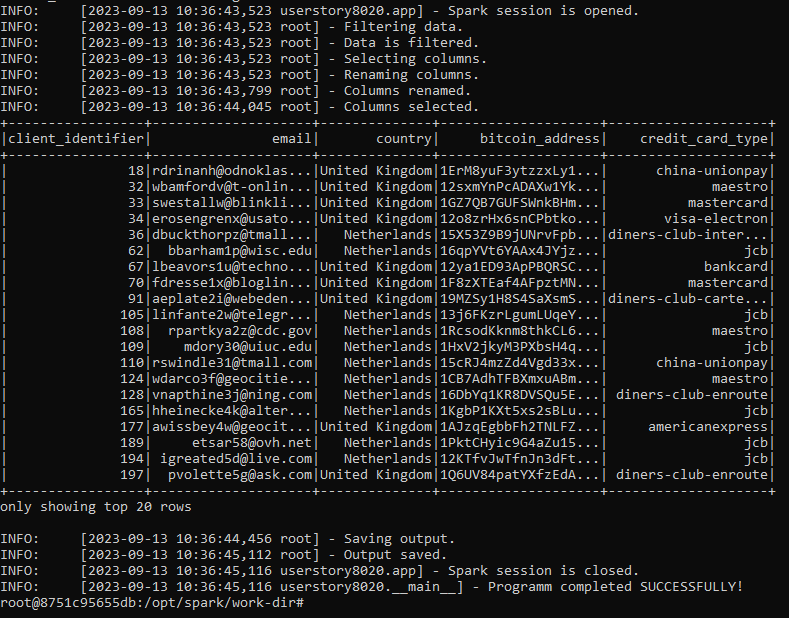
In the container run the app with the following parameters:
$ userstory8020 -sp "sc://localhost:15002" -cli /usr/src/userStory8020/source_data/dataset_one.csv -fin /usr/src/userStory8020/source_data/dataset_two.csv -c "United Kingdom" -c "Netherlands"Output of the command will show you a process of the run, for example:
More detailed info of the process you will find in LOG files which are located in /tmp/userstory8020/logs directory.
Release history Release notifications | RSS feed


Download files
Download the file for your platform. If you're not sure which to choose, learn more about installing packages.
Source Distribution
Built Distribution
Filter files by name, interpreter, ABI, and platform.
If you're not sure about the file name format, learn more about wheel file names.
Copy a direct link to the current filters
File details
Details for the file userstory8020-0.0.42.tar.gz.
File metadata
- Download URL: userstory8020-0.0.42.tar.gz
- Upload date:
- Size: 7.5 kB
- Tags: Source
- Uploaded using Trusted Publishing? No
- Uploaded via: twine/4.0.2 CPython/3.7.9
File hashes
| Algorithm | Hash digest | |
|---|---|---|
| SHA256 |
69d87cb7a4bef817b6b85f89bb197cdb1db7357c8760f562ca488125063b57ee
|
|
| MD5 |
b47eafd20653affcd5d5ec06585e0230
|
|
| BLAKE2b-256 |
a8f71b60ee7da31f1a0bac10d18649eeaa94d3ed188dbdd2fefe3a78c2acf649
|
File details
Details for the file userstory8020-0.0.42-py3-none-any.whl.
File metadata
- Download URL: userstory8020-0.0.42-py3-none-any.whl
- Upload date:
- Size: 8.4 kB
- Tags: Python 3
- Uploaded using Trusted Publishing? No
- Uploaded via: twine/4.0.2 CPython/3.7.9
File hashes
| Algorithm | Hash digest | |
|---|---|---|
| SHA256 |
247c082aca6bbb2badf0f9e358a242aaff3035f702a505795d77b90baba9d785
|
|
| MD5 |
1f812d228e5ba02179471b46d42d2e1e
|
|
| BLAKE2b-256 |
d78dc763b65741d41bf74672981453b3e19cab37493c68a581fd34ab7a796c90
|






