
Search and download data or scenes from USGS API


Project description

Description
The usgsxplore Python package provides an interface to the USGS M2M API to search and download data available from the Earth Explorer platform.
This package is highly inspired by landsatxplore but it supports more datasets and adds new functionalities.
Quick start
Searching for Landsat scenes over the location (5.7074, 45.1611) acquired between 2010-2020.
usgsxplore search landsat_tm_c2_l1 --location 5.7074 45.1611 --interval-date 2010-01-01 2020-01-01
Search for Hexagon KH-9 scenes. Save the result into a geopackage
usgsxplore search declassii --filter "camera=H" --output results.gpkg
Downloading the 10 first images from landsat_tm_c2_l1
usgsxplore search landsat_tm_c2_l1 --limit 10 --output results.txt
usgsxplore download results.txt
Installation
The package can be installed using pip.
pip install usgsxplore

# or with pipx
pipx install usgsxplore
Usage
usgsxplore can be used both through its command-line interface and as a python module.
Command-line interface
usgsxplore --help
Usage: usgsxplore [OPTIONS] COMMAND [ARGS]...

  Command line interface of the usgsxplore. Documentation :
  https://github.com/adehecq/usgs_explorer

Options:
  --help  Show this message and exit.

Commands:
  download         Download scenes with their entity ids provided in the textfile.
  download-browse  Download browse images of a vector data file localy.
  info             Display information on available datasets and filters.
  search           Search scenes in a dataset with filters.
Credentials
Credentials for the Earth Explorer portal can be obtained here. Note that you need to specify specifically all datasets you plan to access through the API.
Either one of the password or token must be provided.
--username and --token or --password can be provided as command-line options or as environment variables:
export USGS_USERNAME=<your_username>
export USGS_TOKEN=<your_token>
export USGS_PASSWORD=<your_password>
Searching
usgsxplore search --help
Usage: usgsxplore search [OPTIONS] DATASET

  Search scenes in a dataset with filters.

Options:
  -u, --username TEXT          EarthExplorer username.  [required]
  -p, --password TEXT          EarthExplorer password.
  -t, --token TEXT             EarthExplorer token.
  -o, --output PATH            Output file : (txt, json, gpkg, shp, geojson)
  -l, --location FLOAT...      Point of interest (longitude, latitude).
  -b, --bbox FLOAT...          Bounding box (xmin, ymin, xmax, ymax).
  -c, --clouds INTEGER         Max. cloud cover (1-100).
  -i, --interval-date TEXT...  Date interval (start, end), (YYYY-MM-DD, YYYY-
                               MM-DD).
  -f, --filter TEXT            String representation of metadata filter
  -m, --limit INTEGER          Max. results returned. Return all by default
  --pbar                       Display a progress bar
  --help                       Show this message and exit.
If the --output is not provided, the command will print the entity ids of scenes found. Else if --output is provided it will save the results in the given file. Five formats are currently supported for the output:
- text file (.txt) : Each line is an entity id and the first line contain the dataset ex:
#dataset=landsat_tm_c2_l1. This file can then be used to download the images. - json file (.json) : json file containing the results of the search.
- vector data (.gpkg, .shp, .geojson) : save the results in a vector file, useful to visualise the geographic location of the results in a GIS.
The search command works with multiple scene-search so there is no limit of results, but you can fixe one with --limit.
If you provide a wrong dataset, a list of 50 datasets with high string similarity will be printed.
The --filter works like this "field1=value1 & field2=value2 | field3=value3". For the field you can put either the filter id, the filter label, or the sql filter. For the value you can put either value or value label. Exemples:
# select scenes from the Hexagon KH-9 satellite
# all of those 4 command will give the same results
usgsxplore search declassii --filter "camera=L"
usgsxplore search declassii --filter "Camera Type=L"
usgsxplore search declassii --filter "5e839ff8cfa94807=L"
usgsxplore search declassii --filter "camera=KH-9 Lower Resolution Mapping Camera"

# select scenes from the Hexagon KH-9 satellites if they are downloadable
usgsxplore search declassii --filter "camera=L & DOWNLOAD_AVAILABLE=Y"
Note: To know which filters are available, check the command usgsxplore info below.
Downloading
usgsxplore download --help
Usage: usgsxplore download [OPTIONS] TEXTFILE

  Download scenes with their entity ids provided in the textfile. The dataset
  can also be provide in the first line of the textfile : #dataset=declassii

Options:
  -u, --username TEXT       EarthExplorer username.
  -p, --password TEXT       EarthExplorer password.
  -t, --token TEXT          EarthExplorer token.
  -d, --dataset TEXT        Dataset
  -o, --output-dir PATH     Output directory
  -b, --pbar INTEGER RANGE  Type of progression displaying (0,1,2)  [0<=x<=2]
  -m, --max-thread INTEGER  Max thread number (default: 5)
  --overwrite               Overwrite existing files
  --help                    Show this message and exit.
This command download scenes from their entity ids in the TEXTFILE and save the results in --output-dir. It can display different type of progression depends on --pbar value:
- 0 : display nothing.
- 1 : display one progress bar for all scenes downloading.
- 2 : display a progress bar for each scenes downloading, with state information.
Downloading browse
usgsxplore download-browse --help
Usage: usgsxplore download-browse [OPTIONS] VECTOR_FILE

  Download browse images of a vector data file localy.

Options:
  -o, --output-dir PATH  Output directory
  --pbar                 Display a progress bar.
  --help                 Show this message and exit.
Info: datasets and filters
Information on available datasets and filters can be printed on screen with the command usgsxplore info
usgsxplore info --help
Usage: usgsxplore info [OPTIONS] COMMAND [ARGS]...

  Display information on available datasets and filters.

Options:
  --help  Show this message and exit.

Commands:
  dataset  Display the list of available datasets in the API.
  filters  Display a list of available filter fields for a dataset.
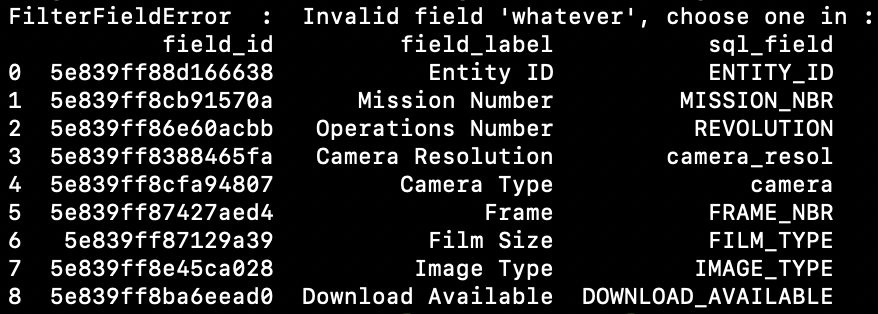
Hints: When using usgsxplore search, filters will be printed to screen when typing any (wrong) value. For example,
usgsxplore search declassii -f "whatever=?"
will print all metadata filters that can be used for the "declassii" dataset.
usgsxplore search declassii -f "camera=?"
will print all possible values for the filter "camera".

Contribute
First step clone the repo or fork it to create a pull request. Next setup the development environnement :
# install poetry if you don't have it
pip install poetry

# you need to be in the usgs_explorer repo
poetry install

# install the pre-commit hooks
poetry run pre-commit install
Before committing make sure to passed all tests:
poetry run pytest --ignore=tests/test_download.py -k "not test_download"
Release history Release notifications | RSS feed


Download files
Download the file for your platform. If you're not sure which to choose, learn more about installing packages.
Source Distribution
Built Distribution
Filter files by name, interpreter, ABI, and platform.
If you're not sure about the file name format, learn more about wheel file names.
Copy a direct link to the current filters
File details
Details for the file usgsxplore-1.0.2.tar.gz.
File metadata
- Download URL: usgsxplore-1.0.2.tar.gz
- Upload date:
- Size: 22.0 kB
- Tags: Source
- Uploaded using Trusted Publishing? No
- Uploaded via: poetry/2.1.1 CPython/3.11.0 Linux/6.8.0-1021-azure
File hashes
| Algorithm | Hash digest | |
|---|---|---|
| SHA256 |
e1a1642d1337a5f6f373a2b780ee5fc7ffdacf92a545a7c7a7b980fac3af4025
|
|
| MD5 |
a6acc6c1fd446228499ebcee330d5d27
|
|
| BLAKE2b-256 |
8957bb303e10a5f714217243ca872df404c8c7132e9e7901f7f46a933dfd929e
|
File details
Details for the file usgsxplore-1.0.2-py3-none-any.whl.
File metadata
- Download URL: usgsxplore-1.0.2-py3-none-any.whl
- Upload date:
- Size: 23.5 kB
- Tags: Python 3
- Uploaded using Trusted Publishing? No
- Uploaded via: poetry/2.1.1 CPython/3.11.0 Linux/6.8.0-1021-azure
File hashes
| Algorithm | Hash digest | |
|---|---|---|
| SHA256 |
db970dae935397e9d08d34dac879e82ddd871fdb9c87a44b6d32f0c48c33656d
|
|
| MD5 |
4ecee0d46228eb67a442bfe8034209e0
|
|
| BLAKE2b-256 |
d391b2076835b6c74c4b599046851c8855b3dc26364d5408726b6063f2c2a4c6
|






