
Remote Unicode keyboard: select UTF characters in a browser and insert them on another device.

Project description

utf-typecase
⚠️ utf-typecase is in early alpha. Use with care in trusted environments.
🌠 Vision: A Practical UTF-Typecase
utf-typecase is a utility for developers and typographers who regularly insert specific Unicode characters into text — without relying on clipboard juggling or obscure keyboard shortcuts.
It acts like a virtual typecase:
- You open a web interface (on a tablet or phone).
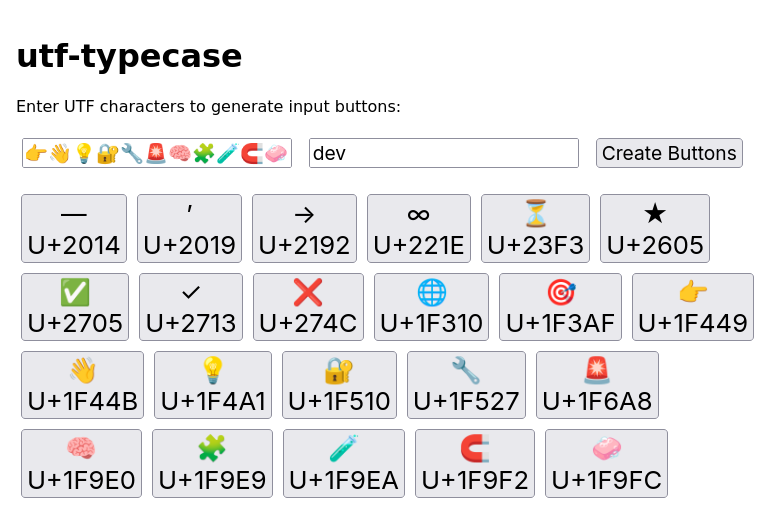
- You set up a grid of your most-used UTF characters.
- Tap a button — the character appears on your main machine.
No revolutionary input method — just a streamlined way to “type” your go-to symbols when everything’s set up correctly.
🚧 This project is under active development. We’re just getting started — and there’s lots of room to grow.
✨ Features
- Customizable symbol grid hosted by the server
- Remote character selection via web browser
- Client polls the server and simulates keystrokes to insert characters
- Works across platforms with Python 3.8+ and modern browsers
📦 Installation
This installs the early alpha release of utf-typecase, which is still in initial development. Features may change, the interface may not be stable, and security has not yet been implemented. Please use this version only in private environments, and avoid deploying it in production or over public networks.
pip install --pre utf-typecase
utf-typecase --install-completion
🧠 Command-Line Completion
To enable tab-completion for the utf-typecase CLI tool, follow the instructions for your operating system:
Linux and Mac
eval "$(_UTF_TYPECASE_COMPLETE=bash_source utf-typecase)"
Windows
python -m click_pwsh install utf-typecase Complete
🔓 Important: Server Port Access Required
To access utf-typecase from other devices (phone, tablet, remote client), you must open the correct port on the server machine.
📖 Full setup instructions are available in the 👉 Opening Ports Guide
Run Application
# Run both client and server
utf-typecase --run-server --run-client --qrcode

# Run server only
utf-typecase --run-server --port 5000 --qrcode

# Run client only
utf-typecase --run-client --host http://192.168.1.100:5000 --token dev
🖥️ Linux Client Setup for PyAutoGUI (X11 Access)
If you're using PyAutoGUI or other GUI automation tools under Linux, you’ll need to grant display access to your user.
Run:
xhost +SI:localuser:$(whoami)
This temporarily allows your user to interact with the X server (graphical display), which is required for simulating keyboard and mouse actions.
🔧 Make sure xhost is installed — it’s part of the x11-xserver-utils package on Debian/Ubuntu or xorg-xhost on Arch-based systems:
sudo apt install x11-xserver-utils     # Debian/Ubuntu
sudo pacman -S xorg-xhost              # Arch
nix-shell -p xorg.xhost                # Nix Temporary Environment
📱 Open Website with Tablet or Smartphone
To access the server from another device, such as a phone or tablet, use the correct IP address of the machine hosting the server.
http://192.168.1.100:5000
🖥️ When you start the server, its address is printed to the terminal
🔢 Alpha Version Summary
| Version | Highlights |
|---|---|
| 0.1.0 | Initial placeholder to reserve the utf-typecase name on PyPI. No features yet. |
| 0.2.0 | CLI application implemented with a proof-of-concept workflow and minimal usable interface. |
📜 License
This project is licensed under the GNU General Public License v3.0 — see LICENSE for full details.
🧠 Reminder: If you modify or distribute utf-typecase, you must also distribute your source code under the same license terms.
🤝 Contributing
Want to help improve utf-typecase? Please read the contribution guidelines first.
Release history Release notifications | RSS feed


Download files
Download the file for your platform. If you're not sure which to choose, learn more about installing packages.
Source Distribution
Built Distribution
Filter files by name, interpreter, ABI, and platform.
If you're not sure about the file name format, learn more about wheel file names.
Copy a direct link to the current filters
File details
Details for the file utf_typecase-0.2.0a1.tar.gz.
File metadata
- Download URL: utf_typecase-0.2.0a1.tar.gz
- Upload date:
- Size: 27.2 kB
- Tags: Source
- Uploaded using Trusted Publishing? No
- Uploaded via: twine/6.1.0 CPython/3.12.10
File hashes
| Algorithm | Hash digest | |
|---|---|---|
| SHA256 |
d099fea0b2329f4c625720d4660e1db25d8807179c01f497b1e795a743710a80
|
|
| MD5 |
dae0f3d3e21a4af4a8dfeaec7f374c79
|
|
| BLAKE2b-256 |
7f761f33650950f284a30fd50205f7cb0951edc6152e383be00cc27164d79647
|
File details
Details for the file utf_typecase-0.2.0a1-py3-none-any.whl.
File metadata
- Download URL: utf_typecase-0.2.0a1-py3-none-any.whl
- Upload date:
- Size: 24.6 kB
- Tags: Python 3
- Uploaded using Trusted Publishing? No
- Uploaded via: twine/6.1.0 CPython/3.12.10
File hashes
| Algorithm | Hash digest | |
|---|---|---|
| SHA256 |
922490710f525f3046fab5e846e922658a2044e2cc8767bd7e0481a3a9b0d1bf
|
|
| MD5 |
928bf5eae1ec6102fe202fd7fc7f6e11
|
|
| BLAKE2b-256 |
cdd77054fdd49ca1a79e3c4ff77649f67f059321c604081e4a18be3d5e92c447
|






