
Utility bill scraper



Download energy usage data and estimate CO2 emissions from utility websites or pdf bills.
What is this?
The science is clear — global temperatures are rising and we need to drastically reduce our use of fossil fuels if we want to keep our planet habitable for future generations. Many governments around the world are declaring climate emergencies and are setting ambitious targets to reduce emissions (e.g., net zero by 2050, 50% reduction by 2030). While broad systemic changes are clearly required, individual action is also important. For those living in the Global North, the majority of fossil-fuel emissions arise from heating/cooling our homes, using electricity, transportation, and the food we eat. It's obvious that we need to rapidly transition off fossil fuels, which will require (1) clear targets, (2) a plan to achieve them, and (3) tools for measuring progress.
There are many existing carbon footprint calculators, but they often require manual data entry, leading most people to try them once to get a static snapshot at a point in time. While useful for gaining a high-level understanding of your personal emission sources, it would be much better if this footprint could be automatically updated over time to provide people with feedback on the impact of their actions. This project aims to do just that — to assist individuals with collecting data from utility companies (e.g., electricity and natural gas) by automatically downloading their data and converting usage into CO2 emissions.
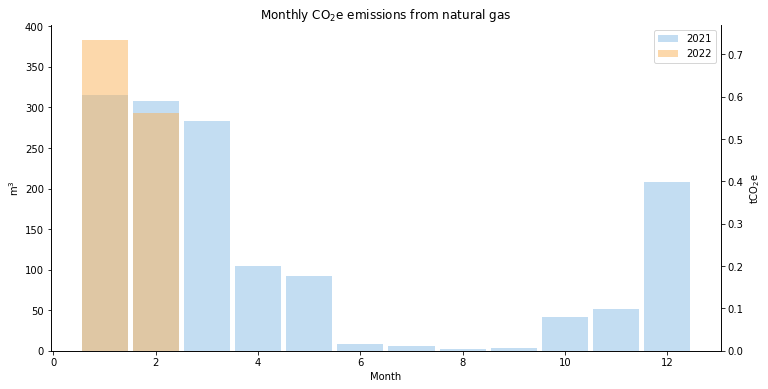
Table of contents
- Supported utilities
- Install
- Data storage
- Getting and plotting data using the Python API
- Command line utilities
- Contributors
Supported utilities
The simplest way to get started is to click on one of the following links, which will open a session on https://mybinder.org where you can try downloading some data. Note: after you click on the link, it will take a couple of minutes to load an interactive Jupyter notebook. Then follow the instructions (e.g., provide your username and password) to run the notebook directly from your browser.
Install
pip install utility-bill-scraper
Data storage
All data is stored in a file located at $DATA_PATH/$UTILITY_NAME/monthly.csv. The path to this file can be set as input argument when initializing an API object via the data_path argument.
└───data
    └───Kitchener Utilities
        └───monthly.csv
        └───statements
            │───2021-10-18 - Kitchener Utilities - $102.30.pdf
            ...
            └───2021-06-15 - Kitchener Utilities - $84.51.pdf
Getting and plotting data using the Python API
Update data
import utility_bill_scraper.canada.on.kitchener_utilities as ku

api = ku.KitchenerUtilitiesAPI(username='username', password='password')

# Get new statements.
updates = api.update()
if updates is not None:
    print(f"{ len(updates) } statements_downloaded")
api.history("monthly").tail()

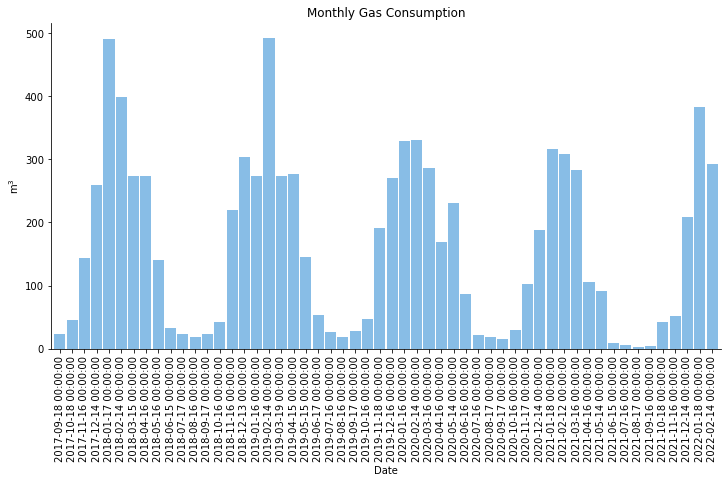
Plot monthly gas consumption
import matplotlib.pyplot as plt

df = ku_api.history("monthly")

plt.figure()
plt.bar(df.index, df["Gas Consumption"], width=0.9, alpha=0.5)
plt.xticks(rotation=90)
plt.title("Monthly Gas Consumption")
plt.ylabel("m$^3$")
Convert gas consumption to CO2 emissions
from utility_bill_scraper import GAS_KGCO2_PER_CUBIC_METER

df["kgCO2"] = df["Gas Consumption"] * GAS_KGCO2_PER_CUBIC_METER
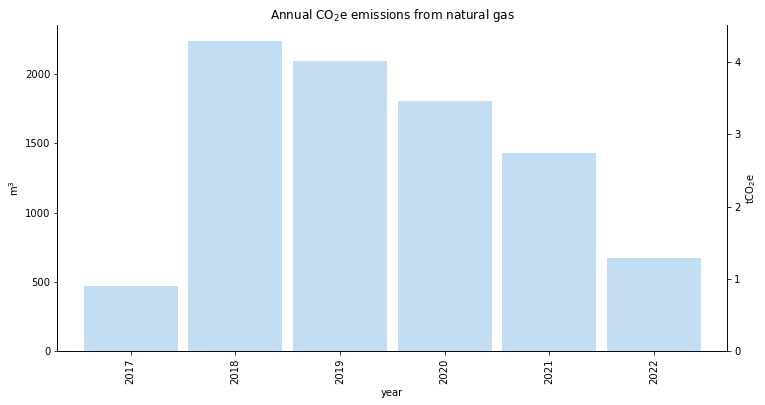
Plot Annual CO2 emissions
from utility_bill_scraper import GAS_KGCO2_PER_CUBIC_METER

df["kgCO2"] = df["Gas Consumption"] * GAS_KGCO2_PER_CUBIC_METER
df["year"] = [int(x[0:4]) for x in df.index]
df["month"] = [int(x[5:7]) for x in df.index]

plt.figure()
df.groupby("year").sum()["Gas Consumption"].plot.bar(width=bin_width, alpha=alpha)
plt.ylabel("m$^3$")
ylim = plt.ylim()
ax = plt.gca()
ax2 = ax.twinx()
plt.ylabel("tCO$_2$e")
plt.ylim([GAS_KGCO2_PER_CUBIC_METER * y / 1e3 for y in ylim])
plt.title("Annual CO$_2$e emissions from natural gas")
Command line utilities
Update and export your utility data from the command line.
Update data
> ubs --utilty-name "Kitchener Utilities" update --user $USER --password $PASSWORD
Export data
> ubs --utilty-name "Kitchener Utilities" export --output monthly.csv
Options
> ubs --help
usage: ubs [-h] [-e ENV] [--data-path DATA_PATH] [--utility-name UTILITY_NAME]
              [--google-sa-credentials GOOGLE_SA_CREDENTIALS]
              {update,export} ...

ubs (Utility bill scraper)

optional arguments:
  -h, --help            show this help message and exit
  -e ENV, --env ENV     path to .env file
  --data-path DATA_PATH
                        folder containing the data file and statements
  --utility-name UTILITY_NAME
                        name of the utility
  --google-sa-credentials GOOGLE_SA_CREDENTIALS
                        google service account credentials

subcommands:
  {update,export}       available sub-commands
Environment variables
Note that many options can be set via environment variables (useful for continuous integration and/or working with containers). The following can be set in your shell or via a .env file passed using the -e option.
DATA_PATH="folder containing the data file and statements"
UTILITY_NAME="name of the utility"
GOOGLE_SA_CREDENTIALS="google service account credentials"
USER="username"
PASSWORD="password"
SAVE_STATEMENTS="save downloaded statements (default=True)"
MAX_DOWNLOADS="maximum number of statements to download"
Contributors
- Ryan Fobel (@ryanfobel)
1 maintainer

Metadata
1 maintainer
Release files for utility-bill-scraper 0.10.3
For a detailed explanation of source distributions (sdists) and built distributions (wheels), please see the package formats documentation.
Source distribution (sdist)
| File | Size | Uploaded | |
|---|---|---|---|
| utility-bill-scraper-0.10.3.tar.gz | 24.7 kB | Details |
Built distribution (wheel)
| File | Interpreter | ABI | Platform | Reset |
|---|---|---|---|---|
| utility_bill_scraper-0.10.3-py3-none-any.whl | Python 3 | none | any | Details |
Total release size: 49.9 kB
Release files / utility-bill-scraper-0.10.3.tar.gz
| Download URL | utility-bill-scraper-0.10.3.tar.gz |
|---|---|
| Size | 24.7 kB |
| Tags | Source |
|
SHA-256 checksum How to use checksums |
135825f63310b0ebd4ae851f460478dfa9f878b583e52d58f89671e1fb342ff9
|
|
BLAKE2b-256 checksum How to use checksums |
837b063cf2c933ee49efc7d3bff3aa22442a68d917957303661e544e6a232ada
|
| Upload date | |
|
Uploaded using Trusted Publishing? What is trusted publishing? |
No |
| Uploaded via |
poetry/1.1.0 CPython/3.9.10 Linux/5.11.0-1028-azure
|
Release files / utility_bill_scraper-0.10.3-py3-none-any.whl
| Download URL | utility_bill_scraper-0.10.3-py3-none-any.whl |
|---|---|
| Size | 25.1 kB |
| Tags | Python 3 |
|
SHA-256 checksum How to use checksums |
b62258fd316f441e5259dd87a8daac4f9f8acee3c4c4a4ed6ad66d6b97d8ea89
|
|
BLAKE2b-256 checksum How to use checksums |
2d1b6e2789067671d73c137ed2be0f4cbe14c651f98b83df69ef437868e9b1c8
|
| Upload date | |
|
Uploaded using Trusted Publishing? What is trusted publishing? |
No |
| Uploaded via |
poetry/1.1.0 CPython/3.9.10 Linux/5.11.0-1028-azure
|














