
This release is a pre-release and may not be stable for production use.





A Python toolkit for producing publication-quality microeconomics diagrams. Define utility functions declaratively, solve for consumer equilibria, and export figures as PNG, PDF, SVG, or pure TikZ, all in a few lines of code.
Installation
pip install utility-viz
Requires Python 3.10 or later. The current release is a pre-release (2.0.0b4); while no stable 2.x
exists, pip install utility-viz picks it up. Once a stable release is published alongside it, use
pip install --pre utility-viz to opt in to pre-releases.
Upgrading from econ-viz 1.x? See Migrating from econ-viz.
Quick Start
from utility_viz import Canvas, Fill, Marker, levels, solve, themes
from utility_viz.models import CobbDouglas

model = CobbDouglas(alpha=0.5, beta=0.5)
eq = solve(model, px=2.0, py=3.0, income=30.0)
lvls = levels.around(eq.utility, n=5)

cvs = Canvas(
    x_max=20,
    y_max=15,
    x_label="x",
    y_label="y",
    title="Cobb-Douglas  $x^{0.5} y^{0.5}$",
    theme=themes.monochrome,  # black/grey only, lines told apart by style
    dpi=120,
)
cvs.add_utility(model, levels=lvls)
cvs.add_budget(2.0, 3.0, 30.0, fill=Fill(color="lightgrey", opacity=0.5))
cvs.add_equilibrium(eq, show_ray=True, marker=Marker(size=8))
cvs.save("cobb_douglas_eq.png")
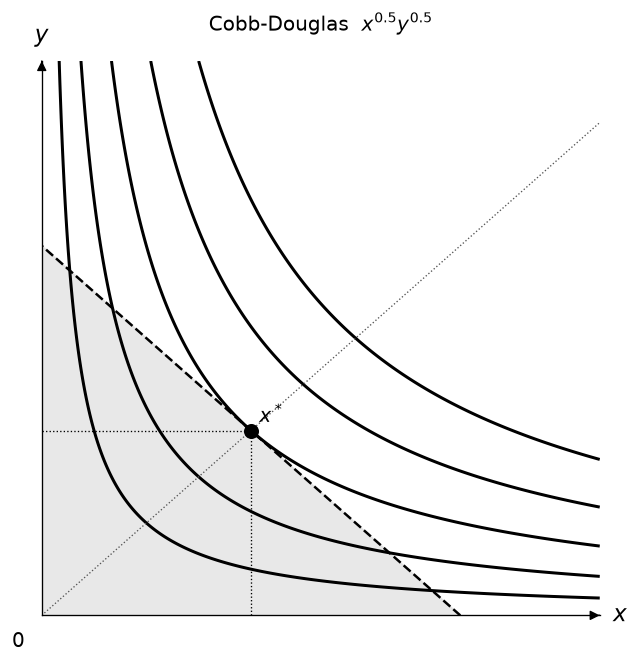
Without theme= the default colour-blind-friendly palette is used.
TikZ export writes a standalone LaTeX document from the same MosaicKit scene and BezierKit paths used for raster and vector output:
cvs.save("cobb_douglas.tex")
Notebook
The project ships with an interactive playground notebook:
notebook/econ-viz Playground.ipynb
The file keeps its historical name. Download it and open it in Jupyter, VS Code, or Colab. The first code cell installs utility-viz[all] (pinned to 2.0.0b4) from PyPI for fresh runtimes.
Highlights
- Built-in models (also listed by
utility-viz models): Cobb-Douglas, Leontief, Perfect Substitutes, CES, Satiation, Quasi-Linear, Stone-Geary, and Translog - Built-in themes, including a black-and-white
themes.monochromefor print - Solver support for interior, kink, boundary, and corner solutions
- Closed-form demand helpers with
solution_tex(...) - Comparative tools including
comparative_statics(...)andslutsky_matrix(...) - Multi-panel
Figurelayouts,PricePath/IncomePath, and linkedDemandDiagram - CLI support for plotting and closed-form demand output
- Color-blind-friendly default palette (
themes.COLORBLIND_CYCLE_RGB) sourced from thriveth/8560036, with related citation at DOI:10.1080/00220485.1996.10844911
Additional Tools
Axis labels can be placed around their arrowheads, and each axis can use its own arrowhead style and line style (solid, dashed, dotted, or dashdot):
from utility_viz import ArrowStyle, Canvas, LabelPosition, LineStyle

canvas = Canvas(
    x_label_pos=LabelPosition.TOP,
    y_label_pos=LabelPosition.RIGHT,
    x_arrow_style=ArrowStyle.SIMPLE,
    y_arrow_style=ArrowStyle.WEDGE,
    x_line_style=LineStyle.DASHED,
)
Every line can be restyled with a Stroke: width, line style, colour, and an
arrowhead at its end. Fields you leave out keep the theme default (see the
*_stroke defaults on Theme, such as theme.budget_stroke):
from utility_viz import ArrowStyle, Stroke

canvas = Canvas(axis_stroke=Stroke(width=1.4, arrow=ArrowStyle.SIMPLE))
canvas.add_budget(2, 3, 30, stroke=Stroke(width=3, style="dashed"))
canvas.add_equilibrium(eq, drop_stroke=Stroke(style="dashdot"))
canvas.add_ray(0.5, stroke=Stroke(arrow=ArrowStyle.TRIANGLE))
add_utility, add_path, add_decomposition, DemandDiagram, and
EdgeworthBox take one *_stroke argument per kind of line they draw.
Stroke is the preferred way to style lines; the separate color,
linewidth, and linestyle arguments still work as shorthand and draw the
same thing.
Point markers work the same way with Marker (colour, size, and shape);
fields you leave out keep the theme default, such as theme.eq_marker:
from utility_viz import Marker

canvas.add_equilibrium(eq, marker=Marker(shape="s", size=8))
canvas.add_point(12, 2, label="A", marker=Marker(color="black", shape="D"))
canvas.add_decomposition(dec, point_marker=Marker(shape="^"))
Point labels take a Label (text, position, offset, colour, size, and
visibility) wherever a plain string worked. A label follows its point's
Marker colour unless it sets its own:
from utility_viz import Label

canvas.add_equilibrium(eq, label=Label(position="bottom-left", offset=8))
canvas.add_point(12, 2, label=Label(text="A", position="left", fontsize=14))
canvas.add_utility(u, levels=3, ic_label=Label(text="U={:.1f}", position="top"))
canvas.add_decomposition(dec, point_label=Label(visible=False))  # hide A, B, C
The same Label styles every other piece of text: axis labels, the origin
0, titles, effect labels, and the Edgeworth box's good names and origins:
from utility_viz import Axis, Canvas, Effect, Label

canvas = Canvas(
    title=Label(text="Hicks decomposition", fontsize=13),
    x_axis=Axis(label=Label(text="x_1", fontsize=16)),
    origin_label=Label(visible=False),
)
canvas.add_decomposition(dec, substitution=Effect(label=Label(text="SE", fontsize=12)))
Shade the budget set with fill=True, or pass a Fill for a colour and
opacity of its own (default theme.budget_fill, coloured like the line):
from utility_viz import Fill

canvas.add_budget(2, 3, 30, color="black", fill=Fill(color="lightgrey", opacity=0.4))
Every style object takes an opacity from 0 to 1, for example to show the
original budget line faintly:
from utility_viz import Effect, Legend, Stroke

canvas.add_budget(2, 3, 30, stroke=Stroke(opacity=0.35))
canvas.add_decomposition(dec, income=Effect(opacity=0.5), legend=Legend(opacity=0.8))
Each axis's label, label position, and stroke fit in one Axis, accepted by
Canvas, Figure, DemandDiagram, and EdgeworthBox. x_label,
x_label_pos, and x_axis_stroke stay as shorthand; an Axis field wins
when both are set:
from utility_viz import Axis, Stroke

canvas = Canvas(
    x_axis=Axis(label="x_1", label_position="bottom", stroke=Stroke(width=1.2)),
    y_axis=Axis(label="x_2"),
)
Legends go where they cover the least of the diagram by default, moving
outside the plot area when every corner is taken. Pass a Legend to choose
an inside corner ("upper left", …) or a side outside ("top", "bottom",
"left", "right"), or to change its font size, frame, and columns:
from utility_viz import Legend

canvas.add_decomposition(dec, legend=Legend(position="bottom"))
canvas.show_legend(legend=Legend(position="upper left", fontsize=10))
Set the fonts of one canvas or a whole multi-panel figure without touching
renderer-global settings. font is "sans" (the default), "serif" or "mono";
fonts replaces any of the three with your font files (the rest keep the
defaults); math_font is the path of an OpenType math font, and without it math
is set by Matplotlib:
from mosaickit import TextFonts

from utility_viz import Canvas, Figure, Layout

canvas = Canvas(font="serif")
figure = Figure(
    Layout.SIDE_BY_SIDE,
    font="serif",
    fonts=TextFonts(serif="fonts/SourceSerif4-Regular.ttf"),
    math_font="fonts/STIXTwoMath.otf",
)
font applies to titles, axis labels, annotations, curve labels, and legends.
A character the font lacks, such as a Chinese character in the default fonts,
raises an error naming the text: give the slot a font file that has it. The same
three settings work in utility-viz.toml ([font] text, [font] math and
[fonts]) and in principle-viz. Installed font family names and the old math
font names ("stix", "cm", ...) are no longer accepted. TikZ output uses the
LaTeX document's fonts, so the three generic fonts are mapped (sans →
\sffamily, serif → \rmfamily, mono → \ttfamily).
Closed-form Marshallian demand in TeX:
from utility_viz import solution_tex
from utility_viz.models import CobbDouglas

tex = solution_tex(CobbDouglas(alpha=0.4, beta=0.6))
Slutsky matrix:
from utility_viz import slutsky_matrix
from utility_viz.models import CobbDouglas

S = slutsky_matrix(CobbDouglas(alpha=0.4, beta=0.6), px=2.0, py=3.0, income=60.0)
# S.s_xx, S.s_xy, S.s_yx, S.s_yy
Settings file
Keep your style in a utility-viz.toml and load it once. Section names match
Theme properties ([stroke.budget] is theme.budget_stroke), fields match the
style objects, and anything left out keeps the default:
[color]
ic = "#2E86AB"

[stroke.budget]
width = 1.5

[label.point]
fontsize = 12

[legend]
position = "bottom"
from utility_viz import Config

Config.load("utility-viz.toml").use()  # diagrams created from now on use it
utility-viz init writes a commented template, and utility-viz plot --config utility-viz.toml ... uses the same file. Arguments passed to a method still win
over the file.
CLI
utility-viz --version
utility-viz help
utility-viz models
utility-viz solve-tex --model cobb-douglas --symbolic-params
Plotting example:
utility-viz plot --model cobb-douglas --alpha 0.5 --beta 0.5 \
              --px 2 --py 3 --income 30 \
              --fill --show-ray \
              --output cobb_douglas.png
Migrating from econ-viz
econ-viz was renamed to utility-viz in 2.0.0.
| 1.x | 2.x | |
|---|---|---|
| Distribution | pip install econ-viz |
pip install utility-viz |
| Import | import econ_viz |
import utility_viz |
| CLI | econ-viz |
utility-viz |
| Config file | econ-viz.toml |
utility-viz.toml (section names unchanged) |
Which package to install. utility-viz ships only utility_viz and the utility-viz command: it has no
econ_viz package and no econ-viz command. econ-viz 2.x (same version number) is a thin compatibility
distribution: pip install econ-viz installs utility-viz of the same version plus the econ_viz package and
the econ-viz command, which warn that they are deprecated. Upgrading an existing 1.x installation with
pip install --upgrade econ-viz therefore keeps working and moves you onto 2.x. Pre-releases need --pre
(for example pip install --pre --upgrade econ-viz). Switch to pip install utility-viz when you are ready
to drop the compatibility layer.
Compatibility layer. Throughout 2.x the econ-viz distribution provides an
econ_viz package and an econ-viz command so documented 1.x code keeps working:
import econ_vizemits one deprecation warning per process.from econ_viz import ...and the documented sub-modules (econ_viz.models,econ_viz.optimizer,econ_viz.themes, ...) resolve to theirutility_vizequivalents. Names that did not change are the very same objects.- Constructing
econ_viz.Canvas,econ_viz.Figureorecon_viz.animation.Animator, or accessingecon_viz.Layout, emits autility_viz.UtilityVizDeprecationWarning(aFutureWarning) stating "deprecated since 2.0.0, removed in 3.0.0" and the replacement.Figure,LayoutandAnimatormap to their current 2.x equivalents; their declarative replacements (CanvasGrid,Animation) are planned and named in the message as such. - Config lookup: explicit path, then
utility-viz.toml, then legacyecon-viz.toml(with a warning), then defaults. If both files exist the new one wins and the legacy one is ignored with a warning.Config.load()with no argument follows the file order and raises if neither file exists (as in 1.x);Config.discover()falls back to defaults;Config.load("file.toml")reads exactly that file.utility-viz plotapplies the same lookup in the current directory when--configis not given. - The
econ-vizcommand prints a deprecation warning and forwards toutility-viz. utility-viz init --migratewritesutility-viz.tomlfromecon-viz.tomland keeps the old file.
Removal boundary (3.0.0). The econ_viz package, the econ-viz command and econ-viz.toml lookup are
removed in 3.0.0, not 2.0.0. Only the documented 1.x public API is covered; undocumented deep module paths
(for example econ_viz.canvas.renderers.*) resolve on a best-effort basis and may disappear at any time.
Internal utility_viz.core.* modules are advanced APIs and not part of the compatibility contract.
Ecosystem
utility-viz is part of the EconViz family of packages:
- mosaickit (PyPI): domain-neutral scenes and rendering, which utility-viz renders through.
- bezierkit (PyPI): Bezier curves, used by utility-viz for curves and TikZ output.
- principle-viz (PyPI): the sibling package for principles-of-economics diagrams.
Documentation
Full documentation lives at econ-viz.org. Source and issues: github.com/EconViz/utility-viz.
License
MIT © Pin Yue Sung
1 maintainer

Metadata
1 maintainer
Release files for utility-viz 2.0.0b6
For a detailed explanation of source distributions (sdists) and built distributions (wheels), please see the package formats documentation.
Source distribution (sdist)
| File | Size | Uploaded | Provenance | |
|---|---|---|---|---|
| utility_viz-2.0.0b6.tar.gz | 106.3 kB | With provenance | Details |
Built distribution (wheel)
| File | Interpreter | ABI | Platform | Reset |
|---|---|---|---|---|
| utility_viz-2.0.0b6-py3-none-any.whl | Python 3 | none | any | Details |
Total release size: 255.4 kB
Release files / utility_viz-2.0.0b6.tar.gz
| Download URL | utility_viz-2.0.0b6.tar.gz |
|---|---|
| Size | 106.3 kB |
| Tags | Source |
|
SHA-256 checksum How to use checksums |
b2245845af449f3bf0986f71986e9687aa31221339edf4ef569dc921a75e5d95
|
|
BLAKE2b-256 checksum How to use checksums |
75bd130d4d09c1623c24ab44d2a16fc9b8ccb3b949c88959e79690cf3aa68e88
|
| Upload date | |
|
Uploaded using Trusted Publishing? What is trusted publishing? |
Yes |
| Uploaded via |
twine/7.0.0 CPython/3.13.16
|
Provenance
Provenance describes where a file came from. On PyPI, provenance is shared via attestations, which provide a verifiable record of the build or publishing details. View details, limitations and caveats.


PyPI Publish Attestation
PyPI verified that this artifact, at this checksum, originated from the publisher listed below.
Signed by GitHub Actions, verified by PyPI on Oct 22, 2026.
Transparency logRelease files / utility_viz-2.0.0b6-py3-none-any.whl
| Download URL | utility_viz-2.0.0b6-py3-none-any.whl |
|---|---|
| Size | 149.1 kB |
| Tags | Python 3 |
|
SHA-256 checksum How to use checksums |
5d0b99d835ad842599222bd73d75cb686e99497b1201f92d333ad364b6598210
|
|
BLAKE2b-256 checksum How to use checksums |
fea76a4e6bdabc8a4fdd22334a9cf11f0ad4c7e45ec352b4f973da9c37754cc0
|
| Upload date | |
|
Uploaded using Trusted Publishing? What is trusted publishing? |
Yes |
| Uploaded via |
twine/7.0.0 CPython/3.13.16
|
Provenance
Provenance describes where a file came from. On PyPI, provenance is shared via attestations, which provide a verifiable record of the build or publishing details. View details, limitations and caveats.
PyPI Publish Attestation
PyPI verified that this artifact, at this checksum, originated from the publisher listed below.
Signed by GitHub Actions, verified by PyPI on Oct 22, 2026.
Transparency logSecurity for utility-viz 2.0.0b6
Provenance
Provenance describes where a file came from. On PyPI, provenance is shared via attestations, which provide a verifiable record of the build or publishing details. View details, limitations and caveats.
Full provenance
All 2 files in this release have been uploaded with provenance metadata.
Attestation for utility_viz-2.0.0b6.tar.gz
PyPI Publish Attestation
PyPI verified that this artifact, at this checksum, originated from the publisher listed below.
Signed by GitHub Actions, verified by PyPI on Oct 22, 2026.
Transparency logA note on package security
PyPI is a repository for distributing packages, not a service for auditing them. While third-party security researchers and our staff do their best to detect and remove malicious packages, PyPI cannot guarantee the quality, security or suitability of any given package.














