
Add your description here

Project description
fetchx
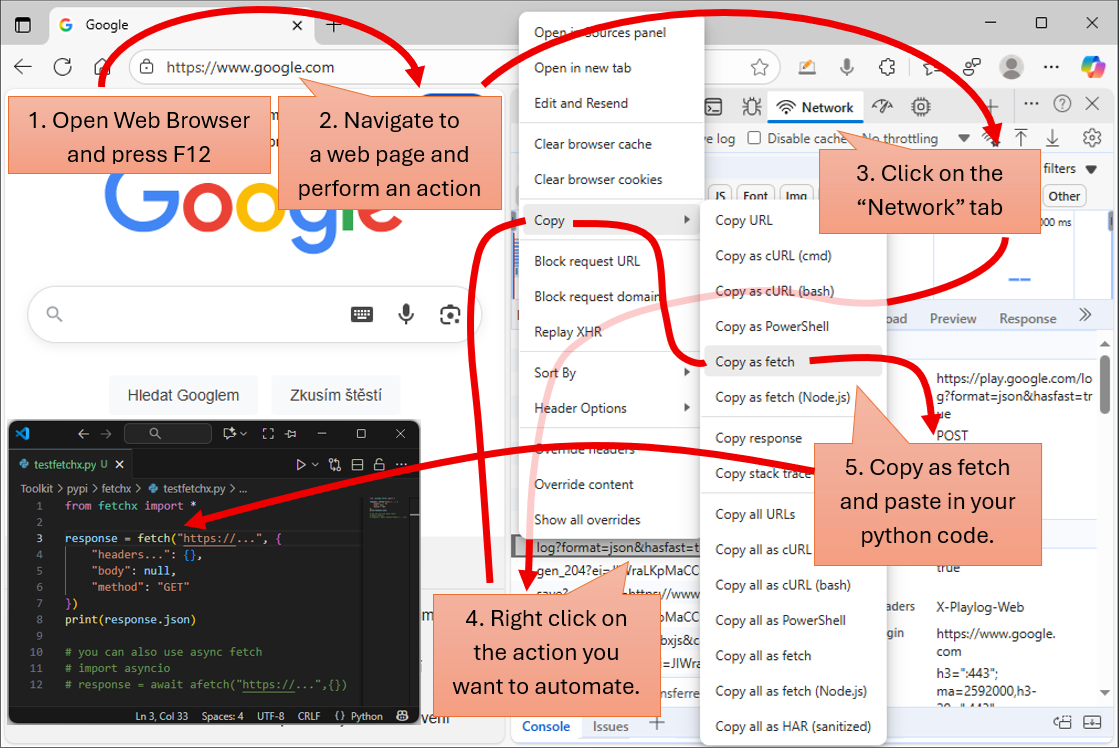
the ultimate Python library for seamless HTTP/HTTPS requests, inspired by the elegance of httpx and the simplicity of browser-native JavaScript fetch. Designed for developers who value speed, clarity, and compatibility, fetchx brings you a clean, intuitive API with powerful functions: fetch and afetch. Whether you're working synchronously or asynchronously, fetchx makes your HTTP workflows effortless. Best of all, it's fully compatible with the fetch-style code generated by Chrome's “Copy as fetch” feature and it is based on HTTP 2.0 protocol.
Installation Windows (one-liner)
- Create an emtpy directory and name it for example "fetchxTest"
- Press the following two keys on the keyboard WIN + R, type "cmd" and navigate to the new directory using "cd C:...\fetchxTest"
- Type the following command and execute it:
powershell -ExecutionPolicy ByPass -c "irm https://astral.sh/uv/install.ps1 | iex" && set Path=C:\Users\User\.local\bin;%Path% && uv init && uv add fetchx && uv run python -c "import fetchx.init"
- Double click on win_02_jupyter.bat to see more examples how to use fetchx.
Installation Windows (using init.bat)
- Create an emtpy directory and name it for example "fetchxTest"
- Create an empty file in the newly created "fetchxTest" directory. Name it "win_01_init.bat".
- Copy the following text into the file "win_01_init.bat":
powershell -ExecutionPolicy ByPass -c "irm https://astral.sh/uv/install.ps1 | iex"
set Path=C:\Users\User\.local\bin;%Path%
uv init
uv add fetchx
uv lock --upgrade
uv run python -c "import fetchx.init"
pause
- Execute a file by double clicking on it
- Double click on win_02_jupyter.bat to see more examples how to use fetchx.
Installation Linux, macOS
- Create an emtpy directory and name it for example "fetchxTest"
- Open newly created directory
- Run the following commands:
curl -LsSf https://astral.sh/uv/install.sh | sh
echo "or use wget if there is a problem with curl"
wget -qO- https://astral.sh/uv/install.sh | sh
uv init
uv add fetchx
uv run python -c "import fetchx.init"
- Run lin_02_jupyter.sh to see more examples how to use fetchx.
How to use the fetchx
Downloading html source from the server
# first we need to import the library
from fetchx import *

# get a link to the fetch setup object and print the setup
setup = fetch_setup()
print(setup)

# Try to download html from the example.com server
response = fetch("http://example.com")

# print html text
print(response.text)
Now lets donwnload a Google logo in SVG and GIF format and save it to the directory:
# first we need to import the library
from fetchx import *

# lets download svg file from wikipedia
response = fetch("https://upload.wikimedia.org/wikipedia/commons/2/2f/Google_2015_logo.svg")

# We can inspect the response status in a greater detail
print(f'response.http_status_code = {response.status_code}')
print(f'response.content_type = {response.content_type}')
print(f'response.data_type = "{response.data_type}"')
print(f'response.content = {response.content}')

# we can save response as a text
response.save_text("./google.svg")
# or use it directly via "text" property
svg = response.text

# lets download the logo in gif format
response = fetch("https://upload.wikimedia.org/wikipedia/commons/b/b9/First-google-logo.gif")
# and save it to google.gif
response.save_binary("./google.gif")
# we can use binary data directly using "binary" property
gif = response.binary
Now lets use the fetch function to play with REST API:
# first we need to import the library
from fetchx import *

# get a link to the fetch setup object and print the setup
setup = fetch_setup()

# lets modify the fetch behavior
# we will set recommended minimal timeout to 10 seconds which should be enough
setup["timeout"] = 10
# set verbose_level to 1. We want the fetch/call to be less descriptive
setup["verbose_level"] = 1
# lets check if the default fetch setup was modified properly
print(fetch_setup())

# Lets download a list of objects from https://api.restful-api.dev/objects
response = fetch("https://api.restful-api.dev/objects", {
    "headers": {
        "accept": "text/html,application/xhtml+xml,application/xml;q=0.9,*/*;q=0.8,application/signed-exchange;v=b3;q=0.7",
        "cache-control": "no-cache",
        "pragma": "no-cache",
        "priority": "u=0, i",
        "sec-fetch-user": "?1",
        "upgrade-insecure-requests": "1"
    },
    "body": null,
    "method": "GET",
    "mode": "cors",
    "credentials": "omit"
})

# and print the very first object:
print(response.json[0])
#{
#    "id": "1",
#    "name": "Google Pixel 6 Pro",
#    "data": {
#        "color": "Cloudy White",
#        "capacity": "128 GB"
#    }
#}

# we can parse json into the json object
json_object = response.json.parse()
print(json_object[0].name)
print(json_object[0].data.color)

# we can translate fetch to the call method which is more intuitive and uses more pythonic approach
t = translate_fetch("https://api.restful-api.dev/objects", {
    "headers": {
        "accept": "text/html,application/xhtml+xml,application/xml;q=0.9,*/*;q=0.8,application/signed-exchange;v=b3;q=0.7",
        "cache-control": "no-cache",
        "pragma": "no-cache",
        "priority": "u=0, i",
        "sec-fetch-user": "?1",
        "upgrade-insecure-requests": "1"
    },
    "body": null,
    "method": "GET",
    "mode": "cors",
    "credentials": "omit"
})
print(t)

# We can use the call function to call REST API using POST method to create a new object
# This can be done using fetch function as well, but call is much more clean
url = "https://api.restful-api.dev/objects"
method = "POST"
body = {
    "name": "Apple MacBook Pro 16",
    "data": {
        "year": 2019,
        "price": 1849.99,
        "CPU model": "Intel Core i9",
        "Hard disk size": "1 TB"
    }
}
new_object = call(url, method, body)

# as soon as the new object is created we can update it using PUT method
url = f"https://api.restful-api.dev/objects/{new_object['id']}"
method = "PUT"
body = {
    "name": "Apple MacBook Pro 16",
    "data": {
        "year": 2019,
        "price": 2049.99,
        "CPU model": "Intel Core i9",
        "Hard disk size": "1 TB",
        "color": "silver"
    }
}
new_object = call(url, method, body)

# we can update the object using PATCH method if available
url = f"https://api.restful-api.dev/objects/{new_object['id']}"
method = "PATCH"
body = {
    "name": "Apple MacBook Pro 16 (Updated Name)"
}
new_object = call(url, method, body)

# and finaly we can delete the object using DELTE method
url = f"https://api.restful-api.dev/objects/{new_object['id']}"
method = "DELETE"
response = call(url, method)
To work with fetch and call asynchronously you can use afetch and acall:
# first we need to import the library
import asyncio
from fetchx import *

response = await afetch(...)
response = await acall(...)
For example if there is a need to download several files at once or call several different REST API endpoints in parallel:
import asyncio
from fetchx import *

# create download tasks
tasks = []
for i in range(0, 10):
    custom_setup = fetch_setup(duplicate=True)
    custom_setup["verbose_level"] = 2
    custom_setup["thread"] = i
    tasks.append(
        afetch(
            "https://upload.wikimedia.org/wikipedia/commons/b/b9/First-google-logo.gif",
            setup=custom_setup
        )
    )

# run download tasks in parallel
await asyncio.gather(*tasks)
Default behavior of the fetch_setup():
# first we need to import the library
from fetchx import *

# get a link to the fetch setup object
setup = fetch_setup()
print(setup)

# lets modify the fetch and call default behavior
# we will set recommended minimal timeout to 10 seconds which should be enough
setup["timeout"] = 10
# in case of http errors please do not throw errors and try to handle it
# possible values:
#    "fail_fast" - raises exception whenever an error is encountered
#    "try_to_compensate" - hides an error. The property "data_type" will be set to an error.
setup["fail_strategy"] = "try_to_compensate"
# set verbose_level to max. We want the fetch/call to explain everything what it is doing
# in the debug mode otherwise we want the fetch/call to be silent
setup["verbose_level"] = 3 if __debug__ else 0
# add a new default http header which will be sent with every request
setup["headers"].update({"X-My-Custom-Header": "value"})
# thread id is useful when using fetch/call in multi-threaded applications
setup["thread"] = 0
# http version is 2.0 by default. It can be switched back to 1.1 if needed
setup["http_version"] = "2.0"

# lets check if default fetch setup was modified properly
print(fetch_setup())
Release history Release notifications | RSS feed


Download files
Download the file for your platform. If you're not sure which to choose, learn more about installing packages.
Source Distribution
Built Distribution
Filter files by name, interpreter, ABI, and platform.
If you're not sure about the file name format, learn more about wheel file names.
Copy a direct link to the current filters
File details
Details for the file uuts-1.0.8.tar.gz.
File metadata
- Download URL: uuts-1.0.8.tar.gz
- Upload date:
- Size: 23.9 kB
- Tags: Source
- Uploaded using Trusted Publishing? No
- Uploaded via: uv/0.9.16 {"installer":{"name":"uv","version":"0.9.16","subcommand":["publish"]},"python":null,"implementation":{"name":null,"version":null},"distro":null,"system":{"name":null,"release":null},"cpu":null,"openssl_version":null,"setuptools_version":null,"rustc_version":null,"ci":null}
File hashes
| Algorithm | Hash digest | |
|---|---|---|
| SHA256 |
0dc7cae1d2bb16d69f86274509c7ebdab3a51117bd04e26fdf8dd493584f62c1
|
|
| MD5 |
cca3801c9c644af0f1b1eaff51704e23
|
|
| BLAKE2b-256 |
22ad5d81d8e9b21a79c795a3703d7b19d1f67d125b2d532cfe4033c4ca22b114
|
File details
Details for the file uuts-1.0.8-py3-none-any.whl.
File metadata
- Download URL: uuts-1.0.8-py3-none-any.whl
- Upload date:
- Size: 25.8 kB
- Tags: Python 3
- Uploaded using Trusted Publishing? No
- Uploaded via: uv/0.9.16 {"installer":{"name":"uv","version":"0.9.16","subcommand":["publish"]},"python":null,"implementation":{"name":null,"version":null},"distro":null,"system":{"name":null,"release":null},"cpu":null,"openssl_version":null,"setuptools_version":null,"rustc_version":null,"ci":null}
File hashes
| Algorithm | Hash digest | |
|---|---|---|
| SHA256 |
89f2a64e837bf80bcb755269c85820a548b529930170fa217d875dd0123f33ee
|
|
| MD5 |
9195e31920c687c9392a673f1551f9d5
|
|
| BLAKE2b-256 |
44e8398ae040393bc16583900c01b2fe7ef46a01b301b815e166d169847c43fd
|






