







uv-align
uv-align is a Rust command-line tool that keeps your Python dependency constraints in sync between pyproject.toml and uv.lock.
When you run uv lock --upgrade, uv resolves and updates uv.lock with the latest compatible versions, but leaves the version constraints in pyproject.toml untouched.
This means your declared constraints can drift from what uv actually resolved - uv-align bridges that gap.
It reads the resolved versions from uv.lock and updates the version numbers in pyproject.toml accordingly, preserving your existing operators (>=, ==, etc.), upper bounds, environment markers, and formatting.
It does not require a virtual environment as it does not install packages, and never modifies uv.lock directly (uv is responsible for that).
Links:
Table of Contents
Installation
As a tool (recommended)
Install uv-align as a global tool:
uv tool install uv-align
If you'd like to run it without installing:
uvx uv-align
As a dev dependency
To pin uv-align to a specific project, add it to your development dependencies in pyproject.toml:
uv add uv-align --optional dev
As a pre-built binary
Pre-built binaries for Linux, macOS, and Windows are available on the GitHub Releases page.
Quick Guide
uv-align -h                        # Show help message
uv-align --check                   # Check for out-of-sync dependencies between `pyproject.toml` and `uv.lock`
uv-align -y                        # Update any out-of-sync version constraints in `pyproject.toml`
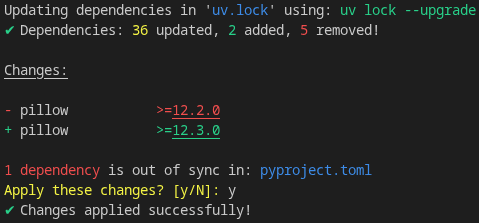
uv-align -yu                       # Upgrade dependencies and update version constraints in `pyproject.toml`
uv-align -y numpy matplotlib       # Update only the specified packages
uv-align -yu numpy matplotlib      # Upgrade and update only the specified packages
Example output:
Usage
Align `pyproject.toml` dependency constraints with versions resolved by `uv`

Usage: uv-align [OPTIONS] [PACKAGES]...

Arguments:
  [PACKAGES]...  Specific packages to check or sync (if none specified, all packages are checked)

Options:
      --path <PATH>  Path to folder containing `pyproject.toml` and `uv.lock` files [default: .]
      --check        Show a diff of dependency updates without applying them
  -y, --yes          Automatically apply all changes without prompting
  -u, --upgrade      Upgrade dependencies in `uv.lock` with `uv lock --upgrade`
  -v, --verbose      Show detailed information about dependency updates
  -h, --help         Print help
How It Works
uv-align is a file transformer - in its default mode it reads two files and writes one, with no network access or environment inspection.
The optional --upgrade flag adds a uv invocation that does require network access to fetch updated package metadata.
Step 1 - Parse pyproject.toml
All dependency entries are read from three locations:
[project.dependencies]- main dependencies[project.optional-dependencies]- extras groups (e.g.dev,docs)[dependency-groups]- PEP 735 groups supported by uv
Each entry is parsed as a PEP 508 string.
The package name, version operator (>=, ==, ~=, etc.), lower-bound version, extras, and any suffix constraints (e.g. ,<1.0) are extracted separately.
Git/URL dependencies (e.g. package @ git+https://...) are included in the parsed output but have no version to compare, so they are naturally skipped during the diff step.
Package names are normalised per PEP 503 (lowercase, runs of [-_.] collapsed to -) to ensure consistent matching.
Step 2 - Parse uv.lock
Every [[package]] entry in the lockfile is read to build a list of resolved package names and versions.
Package names are normalised in the same way as step 1, so that my_package and my-package match correctly.
Packages without a version field (git/URL sources) are skipped naturally by the parser.
Step 3 - Compute the diff
Each dependency from pyproject.toml that has a resolved version is looked up in the lockfile by its normalised name.
If the resolved version differs from the declared version, a change is recorded.
Version strings are compared after normalising trailing .0 components, so 0.25.0 and 0.25 are treated as equal and no spurious change is emitted.
Step 4 - Report or apply
In --check mode, the diff is printed and the tool exits with code 1 if any changes are needed (suitable for CI), or code 0 if everything is already in sync.
Without this flag, the user is prompted to confirm before changes are applied (or -y skips the prompt).
Changes are written back to pyproject.toml using toml_edit - a format-preserving TOML library that modifies only the version numbers, leaving all comments, whitespace, and key ordering intact.
The original operator and any suffix constraints are preserved verbatim.
Step 5 - Upgrade mode (-u)
With --upgrade, uv lock --upgrade runs first to fetch and resolve the latest compatible versions, updating uv.lock accordingly.
If specific packages are provided (e.g. uv-align -u numpy), uv lock --upgrade-package numpy is run instead, restricting the upgrade to only those packages.
Steps 1–4 then run as normal to align pyproject.toml with the newly resolved versions.
The number of updated, added, and removed packages reported by uv is printed as a summary, with full package details available via --verbose.
Issues
If you encounter any issues, please report them on the GitHub Issues page.
Please provide a brief description of how you tried to run the tool, the command you ran, and the output in the terminal.
Also, provide the contents of your pyproject.toml, the expected updated pyproject.toml, and your uv.lock file if possible.
See the integration tests which use these test fixtures to understand how these three files will help reproduce the issue and aid in fixing it.
License
This project is licensed under the MIT License - see the LICENSE file for details.
1 maintainer

Metadata
1 maintainer
Release files for uv-align 0.2.1
For a detailed explanation of source distributions (sdists) and built distributions (wheels), please see the package formats documentation.
Built distributions (wheels)
| File | Reset | |||
|---|---|---|---|---|
| uv_align-0.2.1-py3-none-win_amd64.whl | Python 3 | none | Windows x86-64 | Details |
| uv_align-0.2.1-py3-none-manylinux_2_17_x86_64.manylinux2014_x86_64.whl | Python 3 | none | Linux glibc 2.17+ x86-64 | Details |
| uv_align-0.2.1-py3-none-manylinux_2_17_aarch64.manylinux2014_aarch64.whl | Python 3 | none | Linux glibc 2.17+ ARM64 | Details |
| uv_align-0.2.1-py3-none-macosx_11_0_arm64.whl | Python 3 | none | macOS 11.0+ ARM64 | Details |
| uv_align-0.2.1-py3-none-macosx_10_12_x86_64.whl | Python 3 | none | macOS 10.12+ x86-64 | Details |
Total release size: 3.5 MB
Release files / uv_align-0.2.1-py3-none-win_amd64.whl
| Download URL | uv_align-0.2.1-py3-none-win_amd64.whl |
|---|---|
| Size | 583.4 kB |
| Tags | Python 3 Windows x86-64 |
|
SHA-256 checksum How to use checksums |
c964c91f7698ac4c8b236e95df3a3b811aebb698fbe55953c25bdffa14d671cb
|
|
BLAKE2b-256 checksum How to use checksums |
c158a5b0985b4ec7b93a7d471a6a8ce943c8458b06a9792c0895ba203fc9884e
|
| Upload date | |
|
Uploaded using Trusted Publishing? What is trusted publishing? |
Yes |
| Uploaded via |
twine/7.0.0 CPython/3.13.14
|
Provenance
Provenance describes where a file came from. On PyPI, provenance is shared via attestations, which provide a verifiable record of the build or publishing details. View details, limitations and caveats.


PyPI Publish Attestation
PyPI verified that this artifact, at this checksum, originated from the publisher listed below.
Signed by GitHub Actions, verified by PyPI on Oct 11, 2026.
Transparency logRelease files / uv_align-0.2.1-py3-none-manylinux_2_17_x86_64.manylinux2014_x86_64.whl
| Download URL | uv_align-0.2.1-py3-none-manylinux_2_17_x86_64.manylinux2014_x86_64.whl |
|---|---|
| Size | 768.6 kB |
| Tags | Linux glibc 2.17+ x86-64 Python 3 |
|
SHA-256 checksum How to use checksums |
8affbb6dd46f5f6f3af2752339ffc79aaffe4717b2d9f2ecc0ea05379aa5b46f
|
|
BLAKE2b-256 checksum How to use checksums |
f24e9b8c3edf93a491f82292c0d2a0587ac22cd5e63143f147b38e80a91eddc9
|
| Upload date | |
|
Uploaded using Trusted Publishing? What is trusted publishing? |
Yes |
| Uploaded via |
twine/7.0.0 CPython/3.13.14
|
Provenance
Provenance describes where a file came from. On PyPI, provenance is shared via attestations, which provide a verifiable record of the build or publishing details. View details, limitations and caveats.
PyPI Publish Attestation
PyPI verified that this artifact, at this checksum, originated from the publisher listed below.
Signed by GitHub Actions, verified by PyPI on Oct 11, 2026.
Transparency logRelease files / uv_align-0.2.1-py3-none-manylinux_2_17_aarch64.manylinux2014_aarch64.whl
| Download URL | uv_align-0.2.1-py3-none-manylinux_2_17_aarch64.manylinux2014_aarch64.whl |
|---|---|
| Size | 752.8 kB |
| Tags | Linux glibc 2.17+ ARM64 Python 3 |
|
SHA-256 checksum How to use checksums |
942e414714403a1136830deb8d4efda048e1bb3660f78445237daf570a25483a
|
|
BLAKE2b-256 checksum How to use checksums |
6e1d28dfb9bf2d4759765f63e3294be41e6bb791312437623df54049030ba017
|
| Upload date | |
|
Uploaded using Trusted Publishing? What is trusted publishing? |
Yes |
| Uploaded via |
twine/7.0.0 CPython/3.13.14
|
Provenance
Provenance describes where a file came from. On PyPI, provenance is shared via attestations, which provide a verifiable record of the build or publishing details. View details, limitations and caveats.
PyPI Publish Attestation
PyPI verified that this artifact, at this checksum, originated from the publisher listed below.
Signed by GitHub Actions, verified by PyPI on Oct 11, 2026.
Transparency logRelease files / uv_align-0.2.1-py3-none-macosx_11_0_arm64.whl
| Download URL | uv_align-0.2.1-py3-none-macosx_11_0_arm64.whl |
|---|---|
| Size | 703.5 kB |
| Tags | Python 3 macOS 11.0+ ARM64 |
|
SHA-256 checksum How to use checksums |
c20526a6b6c2f90249d3fe923984eecec11178969504fd7387f3b3ff993a690f
|
|
BLAKE2b-256 checksum How to use checksums |
8d7596b4e38cd2ddb8204543c627c38609dd2308d1529a6c70b546f4e0c2ab6d
|
| Upload date | |
|
Uploaded using Trusted Publishing? What is trusted publishing? |
Yes |
| Uploaded via |
twine/7.0.0 CPython/3.13.14
|
Provenance
Provenance describes where a file came from. On PyPI, provenance is shared via attestations, which provide a verifiable record of the build or publishing details. View details, limitations and caveats.
PyPI Publish Attestation
PyPI verified that this artifact, at this checksum, originated from the publisher listed below.
Signed by GitHub Actions, verified by PyPI on Oct 11, 2026.
Transparency logRelease files / uv_align-0.2.1-py3-none-macosx_10_12_x86_64.whl
| Download URL | uv_align-0.2.1-py3-none-macosx_10_12_x86_64.whl |
|---|---|
| Size | 718.6 kB |
| Tags | Python 3 macOS 10.12+ x86-64 |
|
SHA-256 checksum How to use checksums |
7221699b29da7424ea2794fb7b6d32c1b60d01015f0f9c91c6be9bc05847c433
|
|
BLAKE2b-256 checksum How to use checksums |
d5ddd086c68851338066e06970aea37ed70d12cb979f930f3ab296cbeb4cf35a
|
| Upload date | |
|
Uploaded using Trusted Publishing? What is trusted publishing? |
Yes |
| Uploaded via |
twine/7.0.0 CPython/3.13.14
|
Provenance
Provenance describes where a file came from. On PyPI, provenance is shared via attestations, which provide a verifiable record of the build or publishing details. View details, limitations and caveats.
PyPI Publish Attestation
PyPI verified that this artifact, at this checksum, originated from the publisher listed below.
Signed by GitHub Actions, verified by PyPI on Oct 11, 2026.
Transparency log













