
Upgrade versions of dependencies in pyproject.toml files in uv-managed projects.

Project description
Uv upgrade
Upgrade dependencies in pyproject.toml files with uv.
Install
For end-users.
Note: For developers, see the dev section.
Uv install or update
You need this for both usage and development.
https://docs.astral.sh/uv/getting-started/installation/
On Windows it can be better to use Git Bash terminal.
if ! command -v uv &> /dev/null; then
    curl -LsSf https://astral.sh/uv/install.sh | sh;
else
    uv self update;
fi

uv --version
Install or update a project for system-wide usage
Run it from any directory, except the project directory.
This will install or upgrade the tool.
if ! command -v uv-upx &> /dev/null; then
    uv tool install uv-upx
else
    uv tool upgrade uv-upx
fi

uv-upgrade --version
Or run advanced version with uvx:
uvx uv-upx
Dev installation: see here
Check that project in the list
uv tool list --show-python
Remove the project with all data
If you need to remove the project with all data, run this command from the project directory:
uv tool uninstall uv-upx
Usage
Run the tool in the folder with the pyproject.toml
After installation, you can run the tool from any directory.
uv-upgrade
or
uv-upx upgrade run
It is the same. But uv-upx provides more features.
Get help
You can run commands with the --help flag with more details.
Exported versions:
- for
uv-upgrade: - for
uv-upx:
Install CLI completion (Optional)
This will install completion for the current shell. Available after restarting the shell.
for uv-upgrade:
uv-upgrade --install-completion
for uv-upx:
uv-upx --install-completion
Note: relatively safe to run multiple times. It just adds extra newlines to your shell config when run multiple times.
Notes
Uv as a source of truth
Run uv sync --all-groups --all-extras --all-packages --upgrade.
Get dependencies versions from uv.lock.
Put them in pyproject.toml files in related groups.
So, the main responsibility for dependencies resolution is on uv.
Workspace support
It works with workspaces. At least for some basic cases.
Respects:
- both
membersandexcludesections. - glob-based patterns.
Normalize dependencies names
For example:
TOMLKit->tomlkitPydantic->pydanticpyTEST_BenchMark->pytest-benchmark
Updates simple dependencies
Updates >= dependencies. Like bla>=2.0.0.
Because, in this case, we can simply put the new version instead of the old one.
Update the similar part of the constraint in the multi-constraint.
Skip pinned versions and upper bounds
It doesn't touch pinned versions. Like bla==2.0.0.
It doesn't touch lower bounds. Like:
bla<=2.0.0bla~=2.0.0
Respect simple ranges and some combined constraints
It respects simple dependency ranges. Like bla>=1.0.0,<2.0.0.
It moves the lower bound to the new version.
In fact, it handles any part of the constraint with a supported operator.
Respect extras
It respects extras. Like bla[dev]>=1.0.0;python_version>="3.14".
Fix undefined constraints with lower bound to the new version
It sets undefined lower bounds to the new version.
For example, before:
dependencies = [
    "foo>=1.0.0",
    "bla",
]
After:
dependencies = [
    "foo>=1.0.0",
    "bla>=2.0.0",
]
Skip unhandled constraints
It skips unhandled and complex constraints. Like:
bla<1.0.0
Style preservation
It preserves comments in the pyproject.toml file. Like here:
dependencies = [
    # Better classes and data validation
    "pydantic>=2.12.5",
    # TOML parser and writer with preserved formatting
    "tomlkit>=0.13.3",
    # CLI app framework
    "typer>=0.20.0",
]
Rollback
If something goes wrong, it rolls back the changes to the pyproject.toml and uv.lock files.
Rollback on no-changes
If nothing from pyproject.toml was changed, it rolls back the changes to the uv.lock file.
So, only top-level dependencies changes trigger a uv.lock update.
Upgrade equal/pinned dependencies
Honestly, I think it's insecure to upgrade pinned dependencies automatically. Because they must be pinned for a reason.
For applications that require strict control of dependencies, maybe better to use frozen mode of uv sync.
But for someone it can be useful to upgrade pinned dependencies automatically.
And we can do it.
uv-upgrade --profile with_pinned
It handles only equal (==) and NOT strictly equal (===) operators.
So, even in this mode, it won't change bla===2.0.0.
Under the hood it:
- collect all top-level dependencies information
- changes
==version constraints to>= - runs the standard upgrade process by
uv - upgrade
pyproject.tomlfiles accordingly with returning==constraints back
Note: more upgrade profiles can be added later. Or/and custom verbose features options.
Note: Can be combined with --interactive mode.
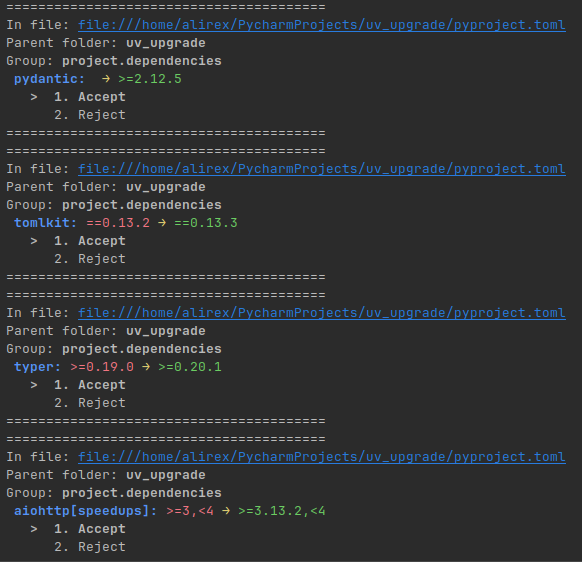
Interactive mode
You can run the tool in interactive mode.
You must Accept or Reject each proposed change.
uv-upgrade --interactive
Demo example:
Get special cases
This allows you to see all the top-level dependencies that have some special constraints. Like:
- ranges (
bla>=1.0.0,<2.0.0) - not defined bounds (
bla) - equal/pinned dependencies (
bla==2.0.0) - unhandled constraints (
bla<1.0.0)
uv-upx helpers collect-top-level-dependencies-from-project --only-special-cases
Why?
I needed this for my own projects.
I know these issues:
- Upgrade dependencies in pyproject.toml (uv upgrade)
- What is the intended workflow for updating dependencies with uv?
But I didn't see enough progress.
So, I implemented this tool for my own usage.
Maybe it will be useful for someone else.
Why not in Rust?
Because it's a temporary Proof-of-Concept.
Maybe it will be replaced by Rust in the future.
It uses type annotations anyway. For simpler migration.
Dev
Other similar tools comparison
Release history Release notifications | RSS feed


Download files
Download the file for your platform. If you're not sure which to choose, learn more about installing packages.
Source Distribution
Built Distribution
Filter files by name, interpreter, ABI, and platform.
If you're not sure about the file name format, learn more about wheel file names.
Copy a direct link to the current filters
File details
Details for the file uv_upx-0.4.3.tar.gz.
File metadata
- Download URL: uv_upx-0.4.3.tar.gz
- Upload date:
- Size: 20.8 kB
- Tags: Source
- Uploaded using Trusted Publishing? No
- Uploaded via: uv/0.9.22 {"installer":{"name":"uv","version":"0.9.22","subcommand":["publish"]},"python":null,"implementation":{"name":null,"version":null},"distro":{"name":"Ubuntu","version":"25.10","id":"questing","libc":null},"system":{"name":null,"release":null},"cpu":null,"openssl_version":null,"setuptools_version":null,"rustc_version":null,"ci":null}
File hashes
| Algorithm | Hash digest | |
|---|---|---|
| SHA256 |
9768e8472f577ca5c6c40da05137bb3df253cf1af12b1a0b28d7068f6e7322fa
|
|
| MD5 |
c9f19c055c7ec35f7b507d878614c2cc
|
|
| BLAKE2b-256 |
ef798fe5ba7b9a1331e398dcb7cb6ccac3b845415ec9f0e202849bdad323ce39
|
File details
Details for the file uv_upx-0.4.3-py3-none-any.whl.
File metadata
- Download URL: uv_upx-0.4.3-py3-none-any.whl
- Upload date:
- Size: 44.1 kB
- Tags: Python 3
- Uploaded using Trusted Publishing? No
- Uploaded via: uv/0.9.22 {"installer":{"name":"uv","version":"0.9.22","subcommand":["publish"]},"python":null,"implementation":{"name":null,"version":null},"distro":{"name":"Ubuntu","version":"25.10","id":"questing","libc":null},"system":{"name":null,"release":null},"cpu":null,"openssl_version":null,"setuptools_version":null,"rustc_version":null,"ci":null}
File hashes
| Algorithm | Hash digest | |
|---|---|---|
| SHA256 |
03aaf37cd889f704dabed35b678578a02aba85afa8d866545b2a53c0ec6ce239
|
|
| MD5 |
dceb3b4cd2690a9d6f3f31ad940936c9
|
|
| BLAKE2b-256 |
915375de2c6c8feb599e11f4053c3cb3f140ef33f688632e5c51b9d42d50e492
|






