
UVITility
A python package with UVIT-related utility functions.
You can install the UVITility Python package using the following command.
pip install uvitility --upgrade
IMPORTANT: Even if you have UVITility already installed, make sure you use the latest version by running the above command. The current version of UVITility is shown on the badge below:

Check for centroid gaps in UVIT Level1 data
The UVIT-Payload Operations Centre (UVIT-POC) has come across (in June 2021) the presence of gaps in the X-centroids and shifts of 3 pixels (~10") in the Level1 (L1) data of UVIT. They are noticed for some orbits of a pointing. However, such gaps are not seen in the data of all OBSIDs. The presence of such gaps will lead to split images (separated by ~10") and shifted positions (by ~10") of sources in part of the field in the L2 images. This was found during the visual examination of L2 images carried out as part of the quality checks done by the POC. It appears that ~20% of OBSIDs have this issue, and of that 20% of the OBSIDs, ~10%% of the orbits are affected. At the moment, the UVIT-POC suggests caution that this problem could be present in any pointing during the whole history of observations, and individual PIs may like to look for it in their L1 data. The check_centroid_gaps function of UVITility can help to identify this defect.
After June 2021, in data sets where this issue is noticed, the POC has adopted the following approach.
- identify the orbit with centroid gaps,
- if gaps are found, remove that particular orbit (hereafter bad orbit),
- create new merged L1 without the bad orbits and
- run L2 on the new L1 and post the data back to ISSDC.
This approach will lead to the loss of L1 data and thus the creation of L2 images with less exposure time than the actual observations. Those OBIDs affected by this problem, among others, will have the following statement in the DISCLAIMER.txt file, which is part of the L2 bundle.
"The data acquired at some orbits of the observation has
 gaps in X-centroids. In the L1 & L2 data downloadable
 from ISSDC, those orbit data will be missing. In effect,
 this has led to X% of loss in the acquired data."
The X% is calculated as follows, X% = (UV_L1 - UV_L1_mod) * 100 / UV_L1
where,
UV_L1 = original L1 file
UV_L1_mod = modified L1 file after removing corrupt data
The checks have NOT been carried out on L1 datasets processed at the UVIT POC and sent to ISSDC before July 1, 2021.
How to check the POC processing date of your L1 dataset:
- Search for your dataset on the AstroBrowse website.
- Download the data quality report XML file (
..._dqr.xml) by clicking on the 'Q' download flag adjacent to the 'L1' and 'L2' flags.- Open the XML file, and check the '
Creation_date' value.
If your data was processed and sent to ISSDC before July 1, 2021, we advise the users of UVIT data to check their L1 data for the defect using the check_centroid_gaps function of UVITility. It can be done as follows.
- Download the L1 dataset of your observation from ISSDC’s AstroBrowse website.
- Extract the compressed L1 dataset into a directory.
- Run the
check_centroid_gapsfunction on a Python command prompt or as a script. - Finally, check the plots produced by the
check_centroid_gapsfunction to determine whether your L1 dataset is affected by the gap problem.
A typical run of the check_centroid_gaps function to check for the problem will be as follows. The function will produce two plots for each orbit present in the L1 directory.
>>> import uvitility
>>> uvitility.check_centroid_gaps('path to the extracted L1 directory')
Note: The function attempts to detect the gaps automatically using an algorithm and prints the output. But the plots should always be checked to confirm whether the problem exists or not.
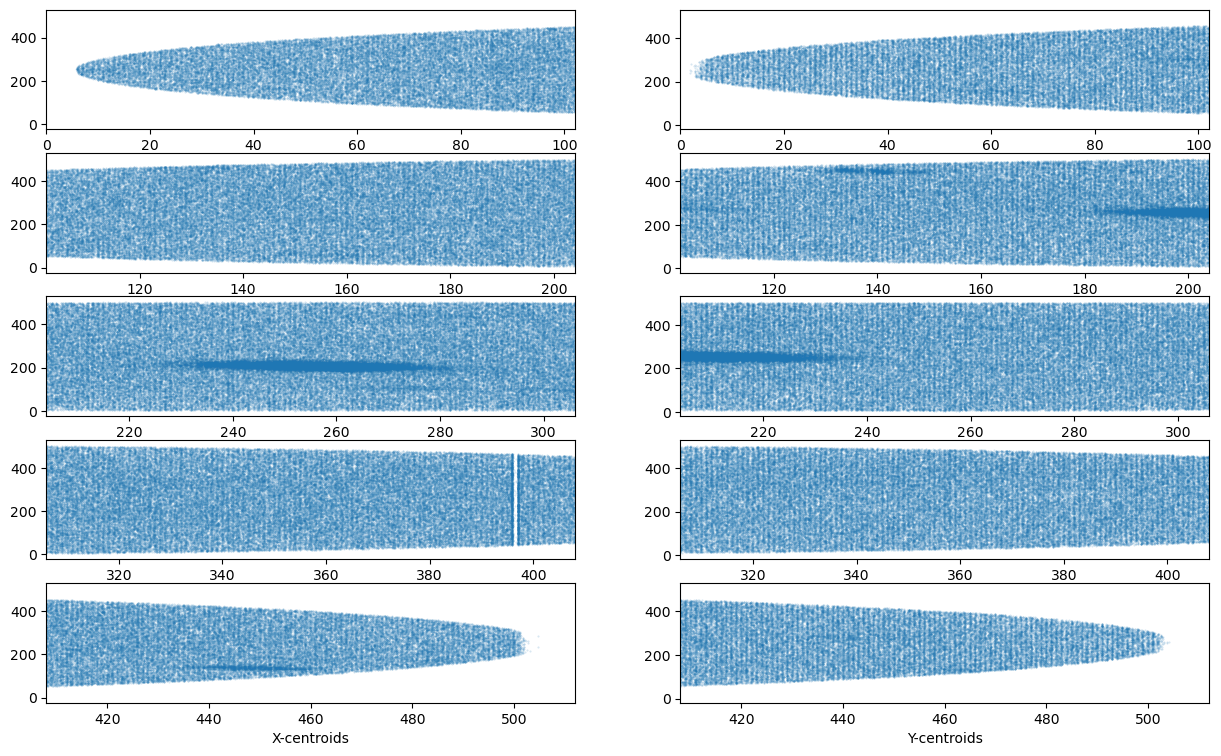
A sample set of plots from an affected orbit is shown below with explanations.
-
The first plot (
..._stretched_data.png) shows a UVIT image stretched along the X and Y axes. The image stretched along the X-axis is shown on the left side of the plot across five panels (see the example figures below). Similarly, the right side of the plot shows the image stretched along Y-axis. Note that these images are without any corrections for the telescope drift. Notice a gap appearing on the left side on the 4th panel. The gap appears as an empty region of 8 subpixel width in the UVIT images. Such gaps may occur at any location in the image. -
The second plot produced (
..._stretched_data_histogram.png) is similar to the first plot. The difference is that it shows the image pixels collapsed along the Y and X-axes on the left and right sides, respectively. Notice the two peaks followed by the dip at the location of the gap.
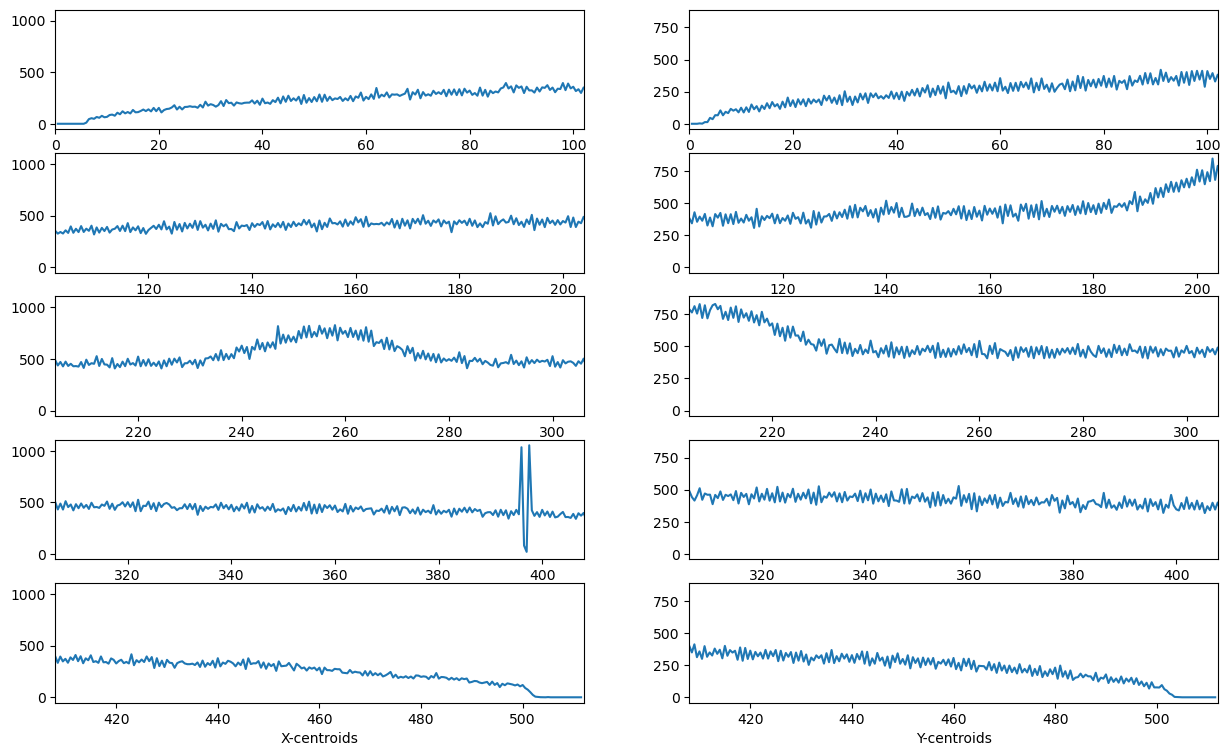
Both plots together help to identify the presence of gaps in the UVIT orbits.
Requirements
UVITility works with Python 3.6 or later. UVITility depends on the following packages:
- astropy
- matplotlib
- numpy
1 maintainer

Release files for uvitility 0.1.4
For a detailed explanation of source distributions (sdists) and built distributions (wheels), please see the package formats documentation.
Source distribution (sdist)
| File | Size | Uploaded | |
|---|---|---|---|
| uvitility-0.1.4.tar.gz | 10.3 kB | Details |
Built distribution (wheel)
| File | Interpreter | ABI | Platform | Reset |
|---|---|---|---|---|
| uvitility-0.1.4-py3-none-any.whl | Python 3 | none | any | Details |
Total release size: 20.7 kB
Release files / uvitility-0.1.4.tar.gz
| Download URL | uvitility-0.1.4.tar.gz |
|---|---|
| Size | 10.3 kB |
| Tags | Source |
|
SHA-256 checksum How to use checksums |
be25f4634bb3f6f84c68547e5a8c242eef4640750276566c5ac6e6d3dbaf7f66
|
|
BLAKE2b-256 checksum How to use checksums |
a0ced8575a520fe83463fbf2d0ccf0e43c47a2ea04a6d89f3a7e72f1b81ac14f
|
| Upload date | |
|
Uploaded using Trusted Publishing? What is trusted publishing? |
No |
| Uploaded via |
twine/6.1.0 CPython/3.12.11
|
Release files / uvitility-0.1.4-py3-none-any.whl
| Download URL | uvitility-0.1.4-py3-none-any.whl |
|---|---|
| Size | 10.4 kB |
| Tags | Python 3 |
|
SHA-256 checksum How to use checksums |
32c7e5ada4e1073347d6a9d365168c09fc6aa69c8641d670a37ca8645320438e
|
|
BLAKE2b-256 checksum How to use checksums |
8d6b8b5958641736582b39ac0c48ed8f47ccd4ca754556dd1befac865e9a82d5
|
| Upload date | |
|
Uploaded using Trusted Publishing? What is trusted publishing? |
No |
| Uploaded via |
twine/6.1.0 CPython/3.12.11
|














