
uvloop-te2: Termux distribution
This is an independently packaged TE2 Termux build of MagicStack uvloop 0.23.0, not an official upstream release. The distribution is uvloop-te2 0.23.0.post1; the Python package remains uvloop and reports upstream version 0.23.0. Do not install it alongside the upstream uvloop distribution in the same venv.
Initial wheel: regular CPython 3.14, Android API 24+, arm64-v8a, built in Termux. Other architectures and free-threaded Python are not covered by this artifact. The wheel uses Termux’s libpython3.14.so, libandroid-support.so and library prefix; it is not a generic Android Python distribution wheel. The bundled libuv is built statically. Upstream source behavior is unchanged; only distribution metadata and this notice are added. Original authorship and MIT/Apache license notices are retained, including libuv’s license notice.
Source: https://github.com/MagicStack/uvloop Build recipe: scripts/release/build_uvloop_te2.sh in https://github.com/mrsurge/framework-shells Source archive SHA256: 28d160f51ab4da3b187063652e643dea6831072add4adc1e6d62afbe73b6be27



uvloop is a fast, drop-in replacement of the built-in asyncio event loop. uvloop is implemented in Cython and uses libuv under the hood.
The project documentation can be found here. Please also check out the wiki.
Performance
uvloop makes asyncio 2-4x faster.
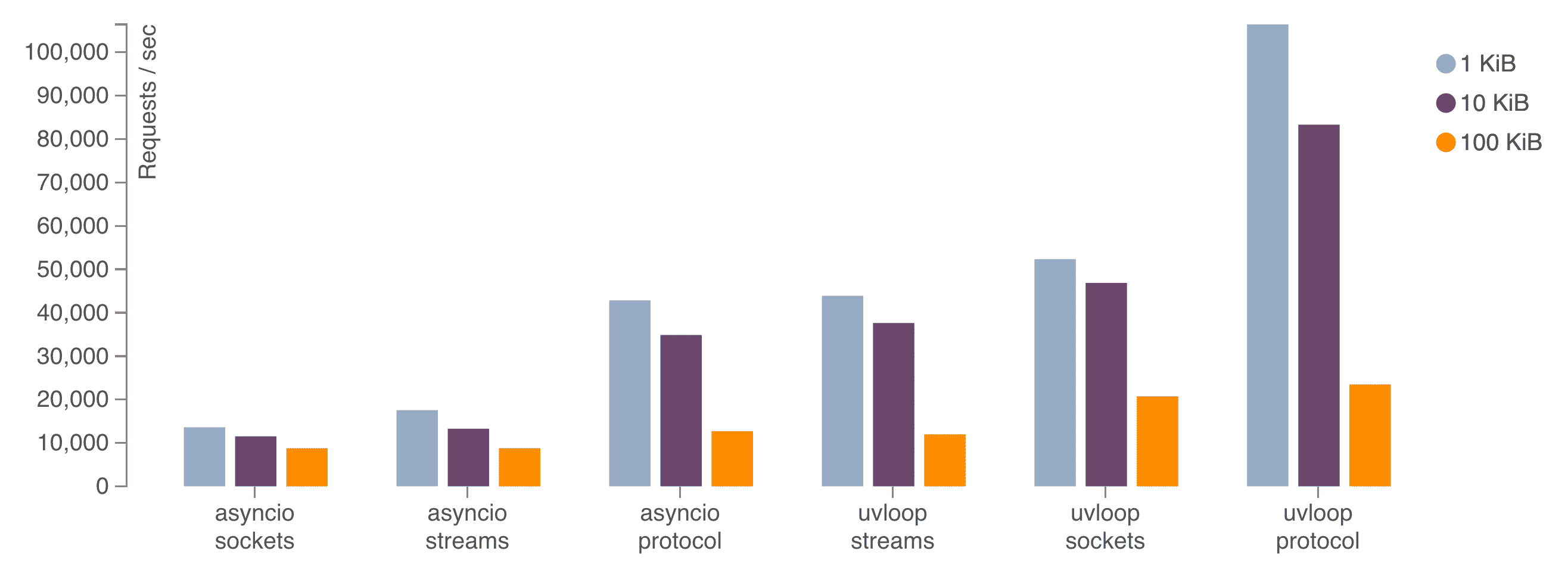
The above chart shows the performance of an echo server with different message sizes. The sockets benchmark uses loop.sock_recv() and loop.sock_sendall() methods; the streams benchmark uses asyncio high-level streams, created by the asyncio.start_server() function; and the protocol benchmark uses loop.create_server() with a simple echo protocol. Read more about uvloop in a blog post about it.
Installation
uvloop requires Python 3.8 or greater and is available on PyPI. Use pip to install it:
$ pip install uvloop
Note that it is highly recommended to upgrade pip before installing uvloop with:
$ pip install -U pip
Using uvloop
As of uvloop 0.18, the preferred way of using it is via the uvloop.run() helper function:
import uvloop

async def main():
    # Main entry-point.
    ...

uvloop.run(main())
uvloop.run() works by simply configuring asyncio.run() to use uvloop, passing all of the arguments to it, such as debug, e.g. uvloop.run(main(), debug=True).
With Python 3.11 and earlier the following alternative snippet can be used:
import asyncio
import sys

import uvloop

async def main():
    # Main entry-point.
    ...

if sys.version_info >= (3, 11):
    with asyncio.Runner(loop_factory=uvloop.new_event_loop) as runner:
        runner.run(main())
else:
    uvloop.install()
    asyncio.run(main())
Building From Source
To build uvloop, you’ll need Python 3.8 or greater:
Clone the repository:
$ git clone --recursive git@github.com:MagicStack/uvloop.git
$ cd uvloop
Create a virtual environment and activate it:
$ python3 -m venv uvloop-dev
$ source uvloop-dev/bin/activate
Install development dependencies:
$ pip install -e .[dev]Build and run tests:
$ make
$ make test
License
uvloop is dual-licensed under MIT and Apache 2.0 licenses.
1 maintainer

Metadata
1 maintainer
Release files for uvloop-te2 0.23.0.post1
For a detailed explanation of source distributions (sdists) and built distributions (wheels), please see the package formats documentation.
Built distribution (wheel)
| File | Interpreter | ABI | Platform | Reset |
|---|---|---|---|---|
| uvloop_te2-0.23.0.post1-cp314-cp314-android_24_arm64_v8a.whl | CPython 3.14 | CPython 3.14 | Android API level 24+ ARM64 v8a | Details |
Release files / uvloop_te2-0.23.0.post1-cp314-cp314-android_24_arm64_v8a.whl
| Download URL | uvloop_te2-0.23.0.post1-cp314-cp314-android_24_arm64_v8a.whl |
|---|---|
| Size | 2.6 MB |
| Tags | Android API level 24+ ARM64 v8a CPython 3.14 |
|
SHA-256 checksum How to use checksums |
c5f7fd97109ce9804bb769a31913b3caafd157d35c207cd633db3081d28dda65
|
|
BLAKE2b-256 checksum How to use checksums |
cc99002d2eac699b76b648b0879eb5942df446c5df54d244bbb2b98d4c4d80c7
|
| Upload date | |
|
Uploaded using Trusted Publishing? What is trusted publishing? |
No |
| Uploaded via |
twine/7.0.0 CPython/3.14.6
|













