
A small tool like pipx using uv behind the scene. Fast, Small ...

Project description
uvpipx

uvpipx is a lightweight tool similar to pipx, using uv behind the scenes, offering enhanced speed and efficiency. It's designed to install and run Python applications in isolated environments, ensuring that your global Python setup remains clean and uncluttered.
🌟 Key Features
- 🚀 Fast and lightweight: Leverages uv for rapid installations
- 📦 Containerization-friendly: Ideal for containers and CI environments
- 🔗 Minimal dependencies: Only requires uv, reducing potential conflicts
- 🌐 Environment preservation: Keeps your global Python setup clean
- 🪟 Cross-platform: Supports Windows and Unix-based systems
🤔 Why use uvpipx?
uvpipx solves the common problem of installing Python applications without affecting your system-wide Python setup. It creates isolated environments for each application, allowing you to:
- Isolation: Install CLI tools without dependency conflicts
- Easy management: Add or remove applications without affecting others
- Experimentation: Test different versions of the same tool safely
- Speed: Significantly faster than traditional methods, especially in CI/CD pipelines
🚀 Getting Started
Installation
To get started with uvpipx, simply install it using pip:
pip install uvpipx
Basic Usage
Install a package
Use the install command to add a new package:
uvpipx install <package_name>
Example:
uvpipx install jc
This command creates a new virtual environment and installs the specified package along with its dependencies.
Check the path
After installation, ensure that the uvpipx bin directory is in your PATH:
uvpipx ensurepath
This command helps you set up your environment correctly to use installed applications.
Run the program directly
You can run the program directly from the command line:
echo "Hello World!" | wc | jc --wc
Return:
[{"filename":null,"lines":1,"words":2,"characters":13}]
🛠️ Advanced Features
Inject a program during installation (since v0.6.0)
You can install additional programs alongside the main package:
uvpipx install <package_name> --inject <program_name>
Example:
uvpipx install jc --inject art
This feature is useful when you need complementary tools in the same environment.
List all installed packages
To see what you've installed with uvpipx:
uvpipx list
This provides an overview of all packages managed by uvpipx.
Uninstall a package
Remove a package and its isolated environment:
uvpipx uninstall <package_name>
This command completely removes the package and its dedicated environment.
Get information about a package
For details about an installed package:
uvpipx info <package_name>
To get the virtual environment path:
uvpipx info <package_name> --get-venv
This is useful for debugging or when you need to interact directly with the virtual environment.
Run a package in its virtual environment
By default programs are exposed (look below for more detail). So you can run them directly from the command line.
But you want advanced control or run side program not exposed by uvpipx. You can execute a command in a package's isolated environment:
uvpipx venv <package_name> -- <command>
Example:
wc README.md | uvpipx venv jc -- jc --wc
This allows you to use the installed tools without activating the virtual environment manually.
Modify exposure rules
Exposure rules determine which programs from the venv are made available in your PATH:
__main__: exposes all programs from the main package__eponym__: exposes only the program with the same name as the package__all__: exposes all programs in the venv (except python and pip)- A list of specific program names
Change the exposure rule:
uvpipx expose <package_name> <rule>
Example:
uvpipx expose jc __main__
📖 Changes since v0.6.0
In previous versions, uvpipx exposed programs by default with the __all__ rule. Now, the default rule is __main__. This is a significant change but is more consistent with pipx behavior. To update all your existing venvs to the new rule:
uvpipx expose-all __main__
You can still install with the __all__ rule if desired:
uvpipx install <package_name> --expose __all__
These exposure options give you fine-grained control over which tools are accessible from each installed package.
🚀 Performance
uvpipx can significantly speed up container builds and CI processes. Here's a comparison of installation times for poetry:
| Tool | Time | Total Time | Difference |
|---|---|---|---|
| Uvpipx | 2.8 (uvpipx) + 1.1 (poetry) | 3.9 seconds | reference |
| Pip | 8.8 | 8.8 seconds | +4.9 seconds |
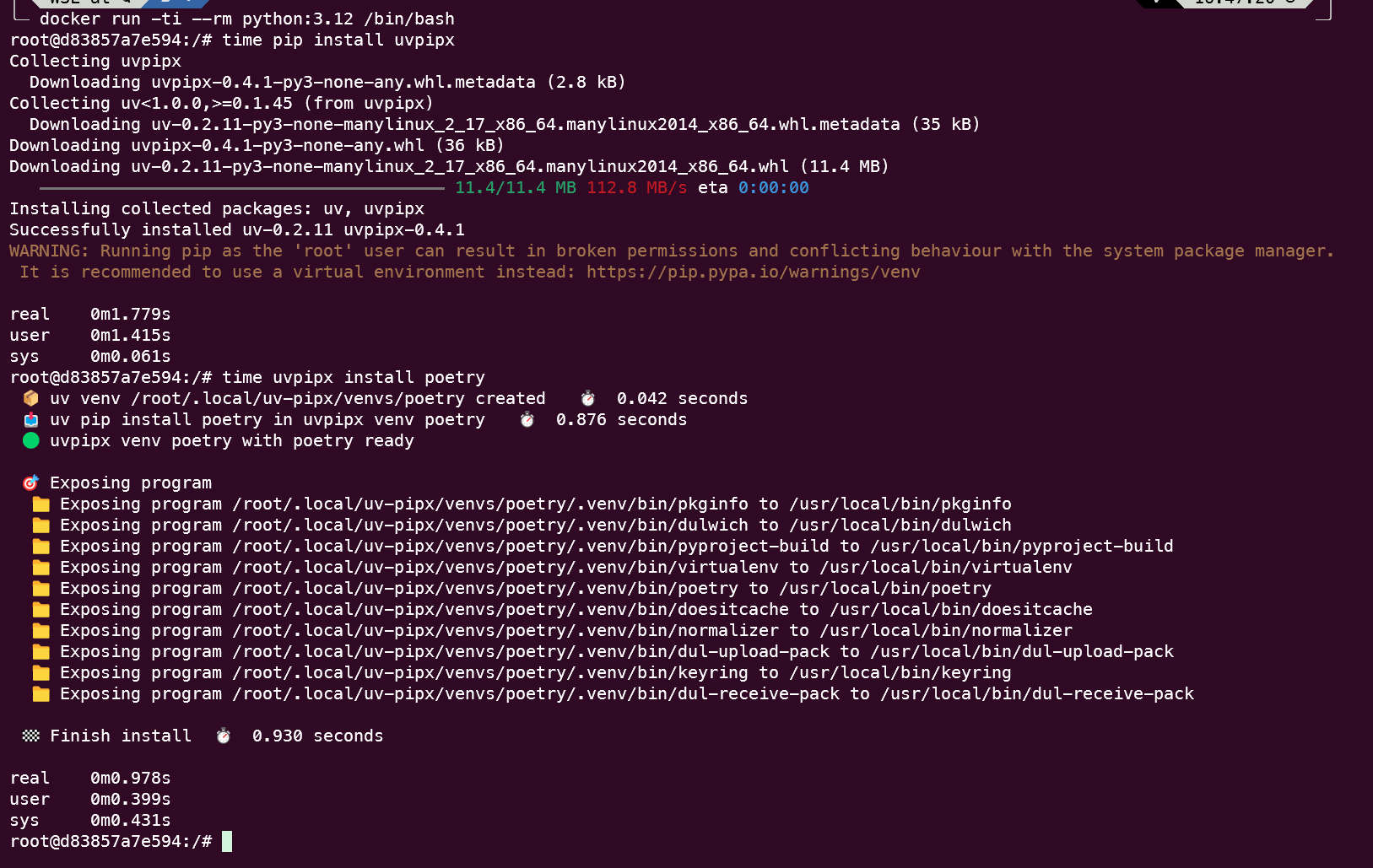
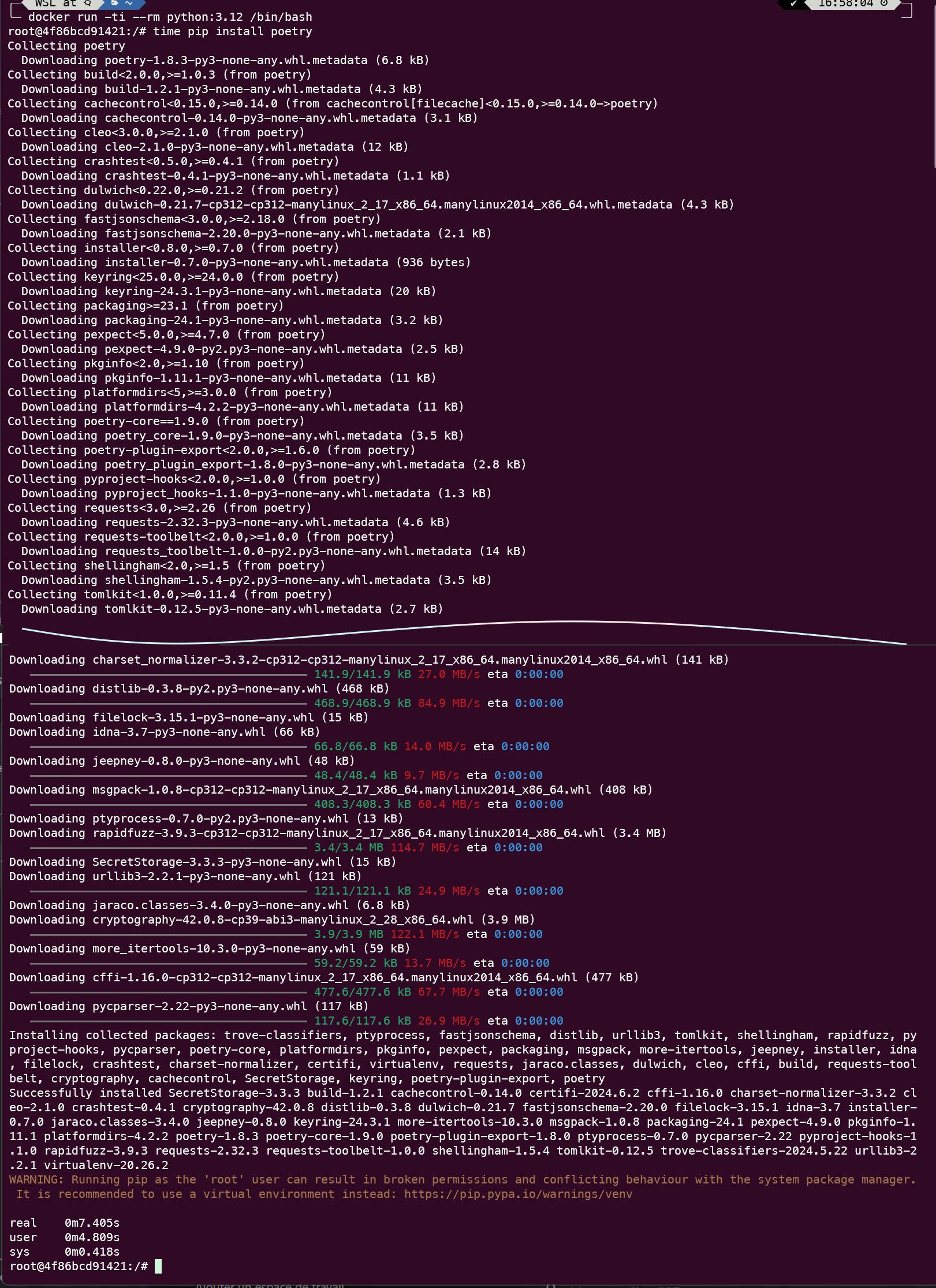
As shown, uvpipx can offer significant time savings, especially in scenarios where multiple tools need to be installed quickly, such as in CI/CD pipelines or container builds.
Additional Documentation
For more detailed information, advanced usage, and troubleshooting, visit the uvpipx GitLab page.
Contributing
Contributions, suggestions, and bug reports are welcome. Please fill an issue on the GitLab repository.
License
uvpipx is open-source software. Please see the LICENSE file in the repository for more details.
OH OH
Release history Release notifications | RSS feed


Download files
Download the file for your platform. If you're not sure which to choose, learn more about installing packages.
Source Distribution
Built Distribution
Filter files by name, interpreter, ABI, and platform.
If you're not sure about the file name format, learn more about wheel file names.
Copy a direct link to the current filters
File details
Details for the file uvpipx-0.9.0.tar.gz.
File metadata
- Download URL: uvpipx-0.9.0.tar.gz
- Upload date:
- Size: 1.8 MB
- Tags: Source
- Uploaded using Trusted Publishing? No
- Uploaded via: uv/0.9.10 {"installer":{"name":"uv","version":"0.9.10"},"python":null,"implementation":{"name":null,"version":null},"distro":{"name":"Debian GNU/Linux","version":"13","id":"trixie","libc":null},"system":{"name":null,"release":null},"cpu":null,"openssl_version":null,"setuptools_version":null,"rustc_version":null,"ci":true}
File hashes
| Algorithm | Hash digest | |
|---|---|---|
| SHA256 |
83bb3657547208826e70137ad8a04273e3bba1ab4f30f31e3735314e9ab0aac6
|
|
| MD5 |
feae7380425570502fdfffcae507bddb
|
|
| BLAKE2b-256 |
7afeb97e312b7ed52ce9be120589e39b55d22d86226d541ce844de37223a335c
|
File details
Details for the file uvpipx-0.9.0-py3-none-any.whl.
File metadata
- Download URL: uvpipx-0.9.0-py3-none-any.whl
- Upload date:
- Size: 55.7 kB
- Tags: Python 3
- Uploaded using Trusted Publishing? No
- Uploaded via: uv/0.9.10 {"installer":{"name":"uv","version":"0.9.10"},"python":null,"implementation":{"name":null,"version":null},"distro":{"name":"Debian GNU/Linux","version":"13","id":"trixie","libc":null},"system":{"name":null,"release":null},"cpu":null,"openssl_version":null,"setuptools_version":null,"rustc_version":null,"ci":true}
File hashes
| Algorithm | Hash digest | |
|---|---|---|
| SHA256 |
26a8469a3f52b9097dd1bb4fcd012550d035b479c36047c7cc0ca56e5607b54e
|
|
| MD5 |
19b6dcc7bd421d0098abcc6f545cd9cd
|
|
| BLAKE2b-256 |
dcbbf5e030412d6df107f6c5b5e43f4ca6786dd47fb4232a8135361feab9a85a
|






