
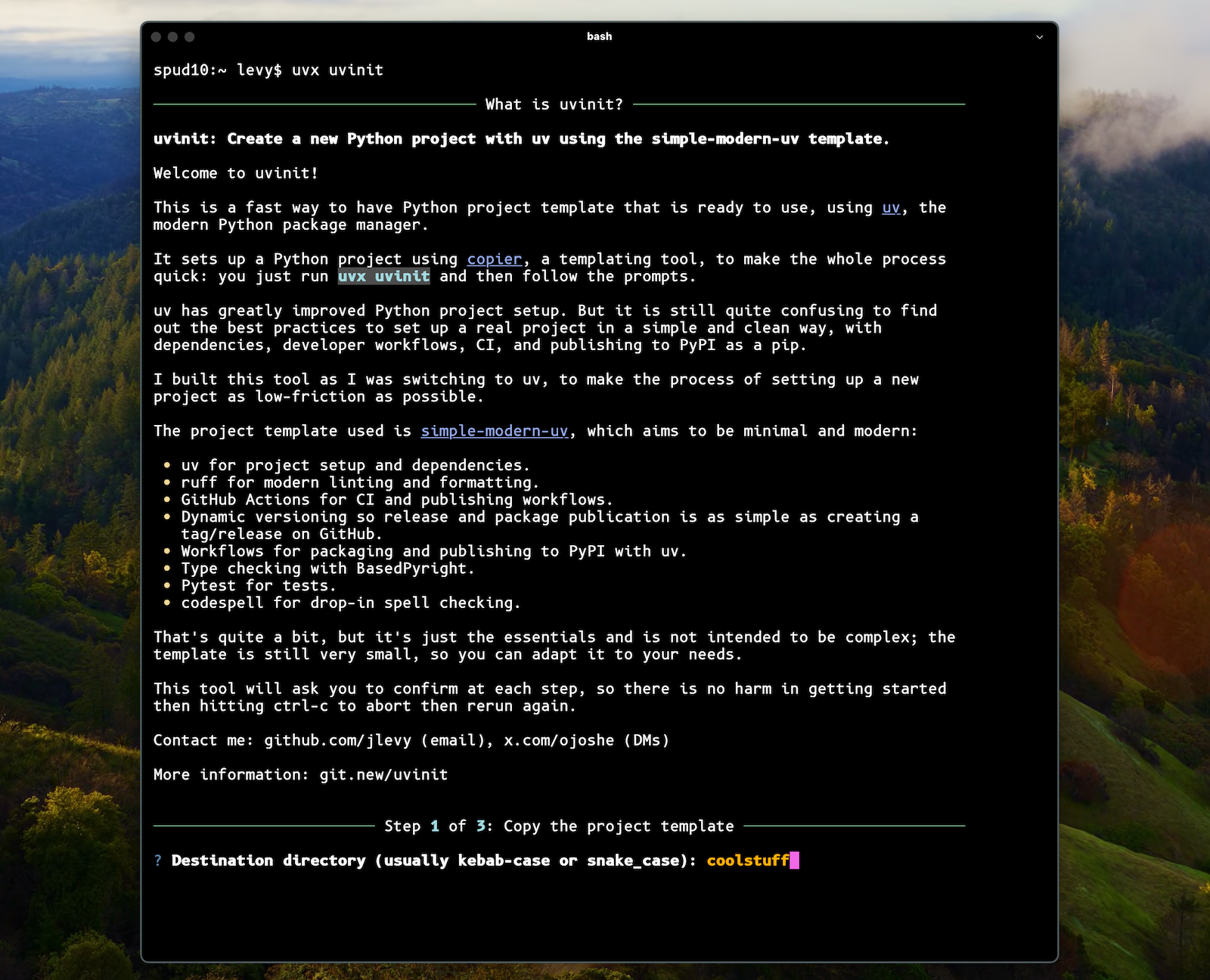
uvtemplate






A time-saving CLI tool to quickly start new Python projects with uv using the simple-modern-uv template.
Quick Start
For Humans (Interactive Mode)
uvx uvtemplate create
This will guide you through creating a new project step by step.
For AI Agents (Non-Interactive Mode)
AI coding agents like Claude Code can create projects programmatically:
uvx uvtemplate --yes --destination my-project \
  --data package_name=my-project \
  --data package_description="My awesome project" \
  --data package_author_name="Your Name" \
  --skip-git
Do I Need uv?
Yes. You will need to have uv installed. Read that page or my template docs for background on why uv is such an improved package manager for Python.
What is uvtemplate?
It’s the tool I wish I’d had when setting up projects with uv.
uvx uvtemplate create will clone a new project template and help you set up your
GitHub repo. The template is tiny and sets up uv, ruff linting and formatting,
GitHub Actions, publishing to PyPI, type checking, and more.
Usage
Commands
| Command | Description |
|---|---|
uvtemplate |
Show help and available options |
uvtemplate create |
Start interactive project creation |
uvtemplate migrate |
Analyze an existing project and show migration recommendations |
uvtemplate update |
Update a template-based project to the latest template version |
uvtemplate readme |
Print this documentation |
Options
| Option | Description |
|---|---|
--destination DIR |
Destination directory for the project |
--data KEY=VALUE |
Set a template value (can be repeated) |
--yes |
Auto-confirm all prompts (non-interactive mode) |
--skip-git |
Skip GitHub repository and git setup |
--template URL |
Use a custom copier template |
--answers-file FILE |
Load defaults from a .copier-answers.yml file |
--no-gh-cli |
Don't use gh CLI to create repo |
--public |
Create a public repository (default: private) |
| `--git-protocol ssh | https` |
Template Values
Use --data KEY=VALUE to set these values:
| Key | Description | Example |
|---|---|---|
package_name |
Package name (kebab-case) | my-project |
package_module |
Python module name (snake_case) | my_project |
package_description |
Short description | "A useful tool" |
package_author_name |
Author's name | "Jane Doe" |
package_author_email |
Author's email | "jane@example.com" |
package_github_org |
GitHub username or org | "janedev" |
Examples
Interactive (Human) Usage
Start the interactive wizard:
uvx uvtemplate create
Skip git setup (just create the project files):
uvx uvtemplate create --skip-git
Non-Interactive (Agent) Usage
Create a complete project without any prompts:
uvx uvtemplate --yes --destination my-cli-tool \
  --data package_name=my-cli-tool \
  --data package_module=my_cli_tool \
  --data package_description="A command-line tool for doing things" \
  --data package_author_name="Claude" \
  --data package_author_email="ai@example.com" \
  --data package_github_org="myorg" \
  --skip-git
Create a project and set up a private GitHub repo:
uvx uvtemplate --yes --destination my-project \
  --data package_name=my-project \
  --data package_description="My project" \
  --data package_github_org="myorg"
Create a project with a public GitHub repo:
uvx uvtemplate --yes --destination my-project \
  --data package_name=my-project \
  --public
Using an Answers File
If you have a .copier-answers.yml from a previous project:
uvx uvtemplate --yes --destination new-project \
  --answers-file /path/to/existing/.copier-answers.yml
For AI Coding Agents
This tool is designed to work well with AI coding agents like Claude Code, Cursor, GitHub Copilot, etc.
Key Points for Agents
-
Use
--yesflag: This auto-confirms all prompts, making the tool fully non-interactive. -
Provide all values via
--data: Set template values upfront to avoid interactive prompts. -
Use
--skip-gitif you want to handle git setup separately or don’t need it. -
The tool uses exit codes:
0for success,1for failure/cancellation. -
Values are derived intelligently: If you provide
--destination my-project, the tool will automatically derivepackage_name=my-projectandpackage_module=my_projectunless you override them.
Minimal Agent Example
The simplest non-interactive usage:
uvx uvtemplate --yes --destination my-project --skip-git
This creates a project with sensible defaults derived from the destination name and your git/GitHub config.
Complete Agent Example
For full control:
uvx uvtemplate --yes --destination my-project \
  --data package_name=my-project \
  --data package_module=my_project \
  --data package_description="Project description here" \
  --data package_author_name="Author Name" \
  --data package_author_email="author@example.com" \
  --data package_github_org="github-org" \
  --skip-git
What Python Project Template Does it Use?
The simple-modern-uv template. See that repo for full docs and this thread for a bit more context.
The template includes:
-
uv for project setup and dependencies
-
ruff for modern linting and formatting
-
GitHub Actions for CI and publishing workflows
-
Dynamic versioning from git tags
-
PyPI publishing workflows
-
BasedPyright for type checking
-
Pytest for tests
-
Codespell for spell checking
If you prefer, you can use that template directly; uvtemplate is just a CLI wrapper.
If you have another copier-format template you want to use, specify it with
--template.
Migrating an Existing Project
Use the migrate command to analyze an existing project and get migration
recommendations:
cd my-existing-project
uvx uvtemplate migrate
This will detect your current build system (Poetry, setuptools, Pipenv, etc.) and provide a step-by-step guide for migrating to uv. It analyzes your project and outputs recommendations—it does not automatically modify any files.
The migrate command works well with AI agents, providing structured recommendations that an agent can follow to perform the migration.
Alternative: Manual Migration
You can also create a fresh template as a reference and manually copy what you need:
uvtemplate create --skip-git --destination .uvtemplate-ref
Then copy the relevant files (pyproject.toml structure, Makefile, workflows, etc.) into your existing project.
Updating a Project
Projects created with uvtemplate can be updated to the latest template version:
cd my-project
uvx uvtemplate update
This uses copier under the hood to apply template updates while preserving your customizations. The command will show you what changed and let you resolve any conflicts.
For non-interactive updates (useful for AI agents):
uvx uvtemplate update --yes
Note: The update command only works on projects that were created with uvtemplate (or
copier directly). If you migrated a project manually, use uvtemplate migrate to see
recommendations.
This project was (of course) built using simple-modern-uv.
1 maintainer

Download files
Download the file for your platform. If you're not sure which to choose, learn more about installing packages.
Source Distribution
Built Distribution
Filter files by name, interpreter, ABI, and platform.
If you're not sure about the file name format, learn more about wheel file names.
Copy a direct link to the current filters
File details
Details for the file uvtemplate-0.1.10.tar.gz.
File metadata
- Download URL: uvtemplate-0.1.10.tar.gz
- Upload date:
- Size: 61.7 kB
- Tags: Source
- Uploaded using Trusted Publishing? Yes
- Uploaded via:
uv/0.9.25 {"installer":{"name":"uv","version":"0.9.25","subcommand":["publish"]},"python":null,"implementation":{"name":null,"version":null},"distro":{"name":"Ubuntu","version":"24.04","id":"noble","libc":null},"system":{"name":null,"release":null},"cpu":null,"openssl_version":null,"setuptools_version":null,"rustc_version":null,"ci":true}
File hashes
| Algorithm | Hash digest | |
|---|---|---|
| SHA256 |
192589252a970664ebb0b72f9fc6b78b8fa991ef1d021a99c5c602f9608ca555
|
|
| MD5 |
6081b8fef87b77e22d672f8dfc4e83ce
|
|
| BLAKE2b-256 |
e4bdf4e4342694351c581a79352eeffd098a591ed6ff040a51552643f8bdb47f
|
File details
Details for the file uvtemplate-0.1.10-py3-none-any.whl.
File metadata
- Download URL: uvtemplate-0.1.10-py3-none-any.whl
- Upload date:
- Size: 28.0 kB
- Tags: Python 3
- Uploaded using Trusted Publishing? Yes
- Uploaded via:
uv/0.9.25 {"installer":{"name":"uv","version":"0.9.25","subcommand":["publish"]},"python":null,"implementation":{"name":null,"version":null},"distro":{"name":"Ubuntu","version":"24.04","id":"noble","libc":null},"system":{"name":null,"release":null},"cpu":null,"openssl_version":null,"setuptools_version":null,"rustc_version":null,"ci":true}
File hashes
| Algorithm | Hash digest | |
|---|---|---|
| SHA256 |
806e237fff779ad0a96d137c0607e5b63ea33900f11f527f8f08955847e3d126
|
|
| MD5 |
942595d090a6517cb4bf336333bfc6b3
|
|
| BLAKE2b-256 |
dbf477aea7e7a7699e427ba3b5d7fdd488a9ff3b34edcc9df8bb4fe7b95a55e4
|














