
UzonCalc
UzonCalc is a tool for writing engineering calculation documents using Python. With it, you can write calculation reports as smoothly as writing Python, and benefit from the full Python ecosystem and AI assistance.
Features
- Write using Python code — no extra syntax to learn
- Benefit from the Python ecosystem and AI support
- Focus on calculations, not layout
- Output beautiful HTML directly; convertible to PDF and Docx
Start
Installation
pip install uzoncalc
Copy Template
# example.py
from uzoncalc import *

@uzon_calc()
def sheet():
    doc_title("uzoncalc example")

    "Hello, UzonCalc!"


if __name__ == "__main__":
    view(sheet)
Execution
python example.py
Example
from numpy import sqrt
from pathlib import Path
import sys

# Ensure project root is on sys.path so `import core` works when running
# this script from the `core` folder.
sys.path.insert(0, str(Path(__file__).resolve().parents[1]))

from uzoncalc import *
from uzoncalc.extension.excel import get_excel_table

@uzon_calc()
async def sheet():
    doc_title("UzonCalc Full Example")
    page_size("A4")

    H1("UzonCalc Full Example")

    "This is a full example demonstrating various features of UzonCalc."

    toc()

    # description:
    # this is a full example of using UzonCalc.

    H2("Auto Table of Contents")
    "You can automatically generate a table of contents for your document."

    H2("Basic Constants")
    # number
    H3("Numbers")
    intNumber = 100
    floatNumber = 3.1415
    scientificNumber = 1.2e3
    complexNumber = 2 + 3j

    H3("Strings")
    helloString = "Hello,"
    uzonCalcString = "UzonCalc!"
    greeting = helloString + uzonCalcString

    H3("String Output")
    # you can output strings directly
    "This is a string output inline."

    """
    This is a string output block.
    It can span multiple lines.
    It will be rendered as paragraph.
    """

    H3("String Formatting")
    name = "Uzon"
    f"Hello, {name}! Welcome to UzonCalc."
    pi = 3.1415926535
    f"Value of pi up to 3 decimal places: {pi:.3f}"

    H3("String Formatting With Equations")
    enable_fstring_equation()
    f"Hello, {name}! Welcome to UzonCalc."
    f"The value of pi is approximately {pi:.3f}, which is useful in calculations."
    disable_fstring_equation()

    H2("Units and Calculations")
    length = 5 * unit.meter
    time = 2 * unit.second
    speed = length / time

    H3("Complex Calculation")

    acceleration = speed / time
    force = 10 * unit.kilogram * acceleration
    stress = force / (length**2)

    H3("Unit Conversion")
    "Original speed in m/s:"
    speed
    hide()
    speedKmh = speed.to(unit.kilometer / unit.hour)
    show()
    f"Speed in km/h: {speedKmh}"

    # use matplotlib to plot a sine wave
    H2("Plotting Example")
    "You can use Matplotlib to create plots within UzonCalc."
    hide()
    import numpy as np
    import matplotlib.pyplot as plt

    x = np.linspace(0, 2 * np.pi, 100)
    y = np.sin(x)
    plt.plot(x, y)
    plt.title("Sine Wave")
    plt.xlabel("x (radians)")
    plt.ylabel("sin(x)")
    plt.legend(["sin(x)"])
    plt.grid(True)
    show()
    Plot(plt)

    # sub
    H2("Variable subscription")

    H3("Default Subscript Rule")

    "if you want to make a word to be subscript, you can use _ after it. For example, H_2 will be rendered as H₂."
    a_x = 10 * unit.meter / unit.second**2
    speed_2 = a_x * 2 * unit.second

    H3("complex Subscript")

    "You can also use other language characters as subscripts, like gamma_混凝土."
    "You can use alias"

    H3("Array Subscript")
    "You can use array subscript like A[i]."

    # 希腊字母
    H2("Greek Letters")
    "You can use Greek letters like 'alpha' (α), 'beta' (β), 'gamma' (γ), 'delta' (δ), etc. in your calculations."
    "When you write 'alpha', it will be rendered as α."
    "Capitalized Greek letters like 'Beta' will be rendered as Β."

    rho_water = 1000 * unit.kilogram / unit.meter**3
    g = 9.81 * unit.meter / unit.second**2
    h = 10 * unit.meter
    pressure = rho_water * g * h
    "Pressure calculated using ρgh:"
    pressure

    H2("Functions Converter")

    "Some functions can automatically convert to math style."

    H3("Square Root")
    "You can use sqrt(x) to represent the square root of x."

    edge1 = 3 * unit.meter
    edge2 = 4 * unit.meter
    diagonal = sqrt(edge1**2 + edge2**2)

    H3("Absolute Value")
    "You can use abs(x) to represent the absolute value of x."
    value = -15 * unit.newton
    absValue = abs(value)

    H2("Tables")

    "You can create tables to organize data."

    Table(
        [
            [
                th("Component", rowspan=3),
                th("Material", rowspan=3),
                th("Elastic Modulus (MPa)", colspan=2),
                th("Design Strength (MPa)", colspan=2),
                th("Standard Strength (MPa)", colspan=2),
            ],
            [
                "Ec/Es",
                "Compressive",
                "Tensile",
                "Compressive",
                "Tensile",
            ],
        ],
        [
            ["Cap Beam", "C60", 3.6e4, 26.5, 1.96, 38.5, 2.85],
            ["Cap Beam 2", "C60", 3.6e4, 26.5, 1.96, 38.5, 2.85],
        ],
        title="Sample Table",
    )

    H2("Call Excel Calculation")

    "You can update values for Excel calculation and get results table back."
    "This is very useful for re-using of existing Excel calculation."

    P(
        get_excel_table(
            excel_path="examples/data/calculation.xlsx",
            values={
                "A3": 6,
                "B3": 10,
                "C3": 2,
            },
            range="A1:D3",
        )
    )

    "Excel table will be cached for faster rendering next time if cache=True and the input values are not changed."

    H2("Saving Document")

    H3("Save as HTML")

    "You can save the document as an HTML file using the save() function."

    H3("Export To Word Document")

    "You can export the html document to a word document by pandoc command."

    from core.utils.doc import save

    save("../output/example.en.html")


if __name__ == "__main__":
    import time

    t0 = time.perf_counter()
    run_async(sheet)
    t1 = time.perf_counter()
    print(f"Execution time: {t1 - t0} seconds")
Preview:
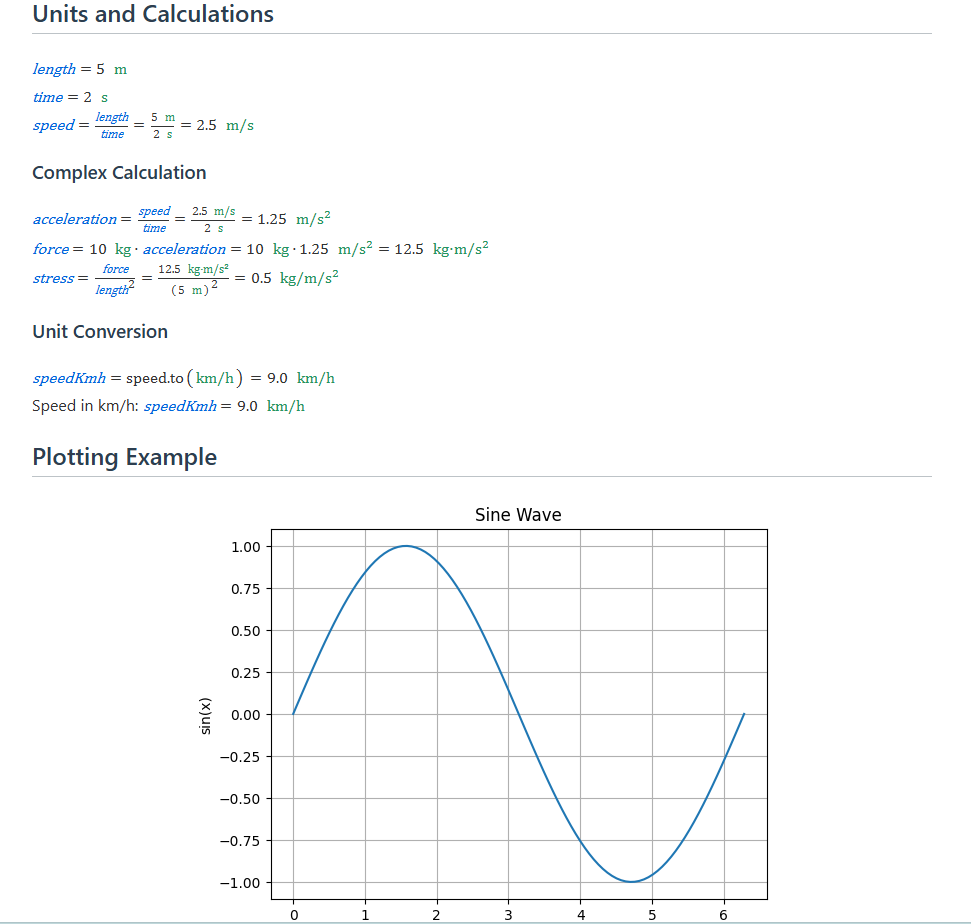
Demo
Source: example.en.py
Compile Result: UzonCalc Full Example
CLI
uzoncalc path/to/your/script.py --output path/to/output.html
Package a report script and its statically imported local Python modules:
uzoncalc zip -p path/to/your/script.py
python path/to/your/script.uzc
The script must contain at least one @uzon_calc entry. If it has no if __name__ == "__main__" block, packaging succeeds only when there is exactly one calculation entry, and the generated archive calls view() for that entry.
The generated .uzc is a 1280×720 PNG thumbnail containing the executable ZIP payload in a private PNG chunk. The thumbnail uses the first calculation entry and resolves its title from H1(...), doc_title(...), the @uzon_calc(...) name, then the script filename. Run it with python script.uzc; PNG-first archives cannot also use a POSIX shebang. Do not resave or optimize a .uzc with an image editor because unknown private chunks may be removed.
1 maintainer

Download files
Download the file for your platform. If you're not sure which to choose, learn more about installing packages.
Source Distribution
Built Distribution
Filter files by name, interpreter, ABI, and platform.
If you're not sure about the file name format, learn more about wheel file names.
Copy a direct link to the current filters
File details
Details for the file uzoncalc-1.5.1.tar.gz.
File metadata
- Download URL: uzoncalc-1.5.1.tar.gz
- Upload date:
- Size: 118.0 kB
- Tags: Source
- Uploaded using Trusted Publishing? No
- Uploaded via:
twine/7.0.0 CPython/3.13.5
File hashes
| Algorithm | Hash digest | |
|---|---|---|
| SHA256 |
b7cbf4e776d770a805d87620491ec35fdf631505b803adc1557d9fda1d83b9b7
|
|
| MD5 |
8b64a8f6e87a43aea4bd5fd97e13c5a0
|
|
| BLAKE2b-256 |
f8c66ec7e908f32c582891b57ba384861edb52da24359b8acb9643ff76cf08d4
|
File details
Details for the file uzoncalc-1.5.1-py3-none-any.whl.
File metadata
- Download URL: uzoncalc-1.5.1-py3-none-any.whl
- Upload date:
- Size: 148.1 kB
- Tags: Python 3
- Uploaded using Trusted Publishing? No
- Uploaded via:
twine/7.0.0 CPython/3.13.5
File hashes
| Algorithm | Hash digest | |
|---|---|---|
| SHA256 |
0a796c3f20eb7331adca0bb94b5bb577dd7c7e6214f3720a9f02ec3e395b728b
|
|
| MD5 |
c9f736ebb246f199a7dd39a625d0ea6e
|
|
| BLAKE2b-256 |
c176f477ad44bc748d9189243cbe816d5cdf112c8614407e2fd7d3fb82b5bd84
|














