
v_ase: a Blender-style browser GUI and editor for ASE Atoms objects.

Project description
v_ase



v_ase was developed for researchers who want the convenience of ASE and the
flexibility of Blender in one atomistic workflow. ASE is convenient because
structures and trajectories can be opened directly from Python or the terminal.
Blender is flexible because objects can be selected, moved, rotated, inspected,
and edited in a real 3D scene. v_ase combines those two strengths: an
ase gui-style entry point for scientific files, plus direct 3D editing for
atomic structures.
It is intended to replace:
ase gui FILE
with:
v_ase gui FILE
For example:
v_ase gui POSCAR
v_ase gui structure.vasp
v_ase gui movie.extxyz
v_ase gui relaxation.traj
The viewer opens locally in your browser. By default, v_ase gui FILE starts in
a lightweight visualization mode for fast inspection, trajectory playback,
bonding, supercell preview, appearance edits, wrapping, and export. Add
--interactive when you want Blender-style atom editing: left click and box
drag select atoms, G moves atoms, R rotates atoms, X/Y/Z lock axes, and
numeric input gives exact transforms. For normal blocking CLI use, closing the
browser tab or window finalizes the current session and returns control to the
terminal.
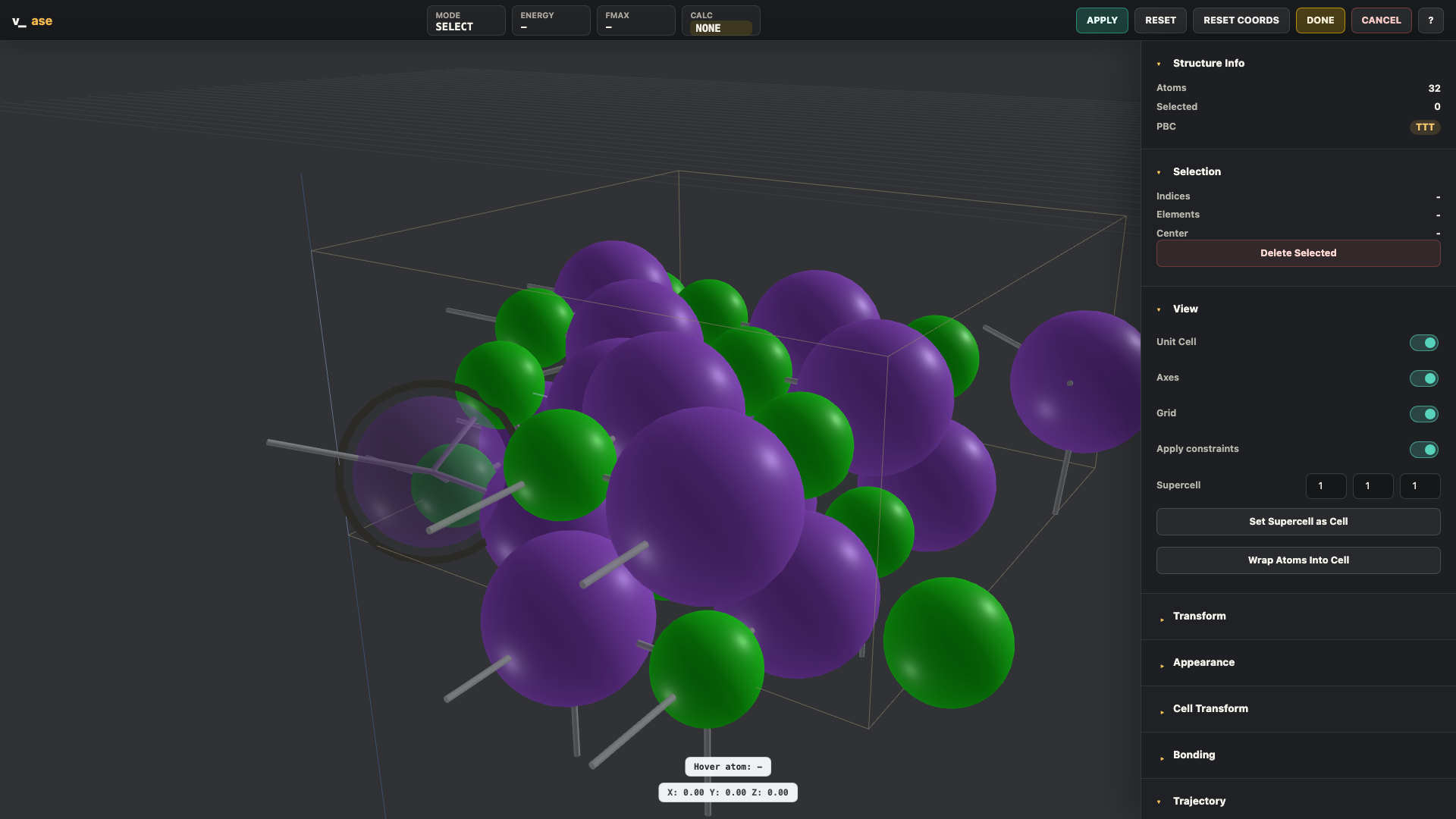
Highlights
v_ase gui FILEcommand-line workflow for POSCAR, VASP, extxyz, traj, and other ASE-readable files.- Blocking CLI sessions behave like
ase gui: the terminal waits while the browser tab is open, then continues after the tab/window is closed. - Python API for notebooks and scripts:
from v_ase.visualize import view. - Lightweight OVITO-style inspection is the default CLI mode, keeping bonds, supercell, appearance, visual type labels, measurements, projection, wrapping, and export controls responsive for large structures.
- Orthographic projection is the default view, with perspective available from the View panel.
- Add
--interactivefor Blender-like atom editing: middle-mouse orbit, shift-middle pan, wheel zoom, click/box selection,Gmove,Rrotate, axis locking, numeric transforms,Enter,Esc, copy/paste/undo/delete. - Selection measurements: two selected atoms show distance, and three selected atoms show two distances plus the central angle.
- Calculator handling preserves existing ASE calculators, including
SinglePointCalculator. The default lightweight visualization mode does not attach a fallback calculator;--interactiveenables the soft repulsion fallback used for built-in relaxation. - Torch is optional, not a package dependency. When torch is installed, the default repulsion calculator can use torch CPU or CUDA; otherwise it falls back to NumPy.
- ASE constraint-aware editing and visualization:
FixAtoms,FixCartesian,FixedLine,FixedPlane,FixScaled, andHookean.FixAtomsare rendered with a faceted, micro-etched material so they remain distinguishable without changing the element color. VASP selective-dynamicsFixScaledmasks are interpreted in fractional coordinates and displayed as cell-awareFixedPlaneorFixedLineguides. - Interactive constraint editing for selected atoms: apply or clear
FixAtoms,FixedLine, andFixedPlanefrom the Constraints panel. - Hookean constraints are visualized as threshold-aware hook/latch springs.
- Trajectory playback with live frame slider, FPS control, frame skip, image export, and video export.
- Interactive relaxation streams an optimization trajectory into the bottom timeline. Static single-structure sessions stay uncluttered until relaxation creates frames; loaded trajectory files keep their own movie timeline while a separate Relax row exposes the latest optimization path.
- Periodic bonds, element-pair cutoff tables, manual bond pairs, supercell
preview,
make_supercell(P)cell transform, and wrap atoms into cell. Auto and element-cutoff bonds are re-inferred for each trajectory frame. - Custom extxyz atom type labels such as
H_type5are preserved for GUI type settings even when ASE cannot parse them as real elements. - LAMMPS
lammpstrjand.datainteger types stay visible as labels. Valid integer type ids are also used as atomic numbers for color/radius distinction; out-of-range ids fall back to ASE-validHwhile preserving the raw label. - Appearance label edits keep row order stable. Labels with element prefixes
such as
O_bridgeautomatically update the TYPE dropdown and default radius. - Export POSCAR, pickle, PNG image, WebM video, and Blender Python scene script. Blender export includes viewport camera, unit cell, bonds, and smooth atoms.
Installation
From PyPI
python -m pip install v_ase-gui
From GitHub
git clone https://github.com/lgyEthan/v_ase.git
cd v_ase
python -m pip install --upgrade pip
python -m pip install -e .
No conda and no Node.js are required. Three.js is vendored inside the package.
If pip reports ERROR: Error while checking for conflicts after saying
Requirement already satisfied: v_ase-gui, the package is already installed;
the failure is usually caused by a different installed package with broken
metadata (version=None) in that Python environment. Use:
python -m pip install --upgrade pip
python -m pip install --upgrade --force-reinstall --no-deps v_ase-gui
python -m pip check
If pip check still crashes, create a clean virtual environment or repair the
package with invalid metadata before installing scientific packages into that
environment.
Quick Start
Open a structure file:
v_ase gui POSCAR
v_ase gui structure.vasp
v_ase gui trajectory.extxyz
v_ase gui relaxation.traj
The direct file form also works:
v_ase POSCAR
Use from Python:
from ase.build import molecule
from v_ase.visualize import view

atoms = molecule("H2O")
edited = view(atoms)
print(edited.positions)
Useful CLI options:
v_ase gui structure.vasp --show-bonds
v_ase gui trajectory.extxyz --index :
v_ase gui trajectory.extxyz --index -1
v_ase gui ABCD --format POSCAR
v_ase gui ABCD --format XDATCAR
v_ase gui ABCD --format vasprun.xml
v_ase gui ABCD --format lammpstrj
v_ase gui ABCD --format data
v_ase gui POSCAR --interactive
v_ase gui POSCAR --output edited.vasp
v_ase gui POSCAR --no-block
--format forces the input reader when the filename is ambiguous. It accepts
common aliases such as POSCAR, XDATCAR, vasprun.xml, lammpstrj, traj,
xyz, extxyz, and data, plus raw ASE format names.
Example Structures
The README and demo structures can be regenerated from source:
python examples/readme_scenes.py
This writes single-structure .traj files under examples/readme_scene_assets/.
Open them with normal v_ase commands:
v_ase gui examples/readme_scene_assets/fixedline.traj --show-bonds
v_ase gui examples/readme_scene_assets/fixedplane.traj --show-bonds
v_ase gui examples/readme_scene_assets/hookean.traj --show-bonds
v_ase gui examples/readme_scene_assets/ferrocene.traj --show-bonds
v_ase gui examples/readme_scene_assets/showcase.traj --show-bonds
Constraint guide design variants can be inspected without starting the app by
opening docs/design/constraint_guides_preview.html in a browser. It compares
five always-visible FixedLine marker candidates and five FixedPlane marker
candidates on one constrained structure.
Case 1: Selection, FixedLine, and FixedPlane
Selected atoms get yellow Blender-style outlines. FixAtoms entries keep their
atom color but switch to a faceted, micro-etched material, so they read as
immobile without looking selected. FixedLine and FixedPlane guides stay
hidden until the constrained atom is selected, then appear as a thin fading axis
or a translucent CAD-style plane. When multiple FixedPlane atoms are selected,
each atom keeps its own compact local plane marker so the constraint never looks
anchored at the selection COM. Show Overlays can hide all of these guides for
a clean structure view.
FixedLine is shown as a Li ion moving along a carbon nanotube channel. The ion
can slide parallel to the tube axis, but not leave the channel direction:

FixedPlane is shown as a Li ion moving over a Cu(111) surface. The guide is an
unbounded plane field through the selected atom, not a finite patch, so the
surface-parallel XY constraint reads as diffusion over the surface rather than
rotation:

Example:
from ase.build import molecule
from ase.constraints import FixAtoms, FixedLine, FixedPlane
from v_ase.visualize import view

atoms = molecule("H2O")
atoms.set_constraint([
    FixAtoms(indices=[0]),
    FixedLine(1, [1, 0, 0]),
    FixedPlane(2, [0, 0, 1]),
])

view(atoms)
When Apply constraints is enabled, move and rotate previews are projected onto
the allowed line or plane and the backend commit uses
atoms.set_positions(..., apply_constraint=True).
Case 2: Hookean Constraints
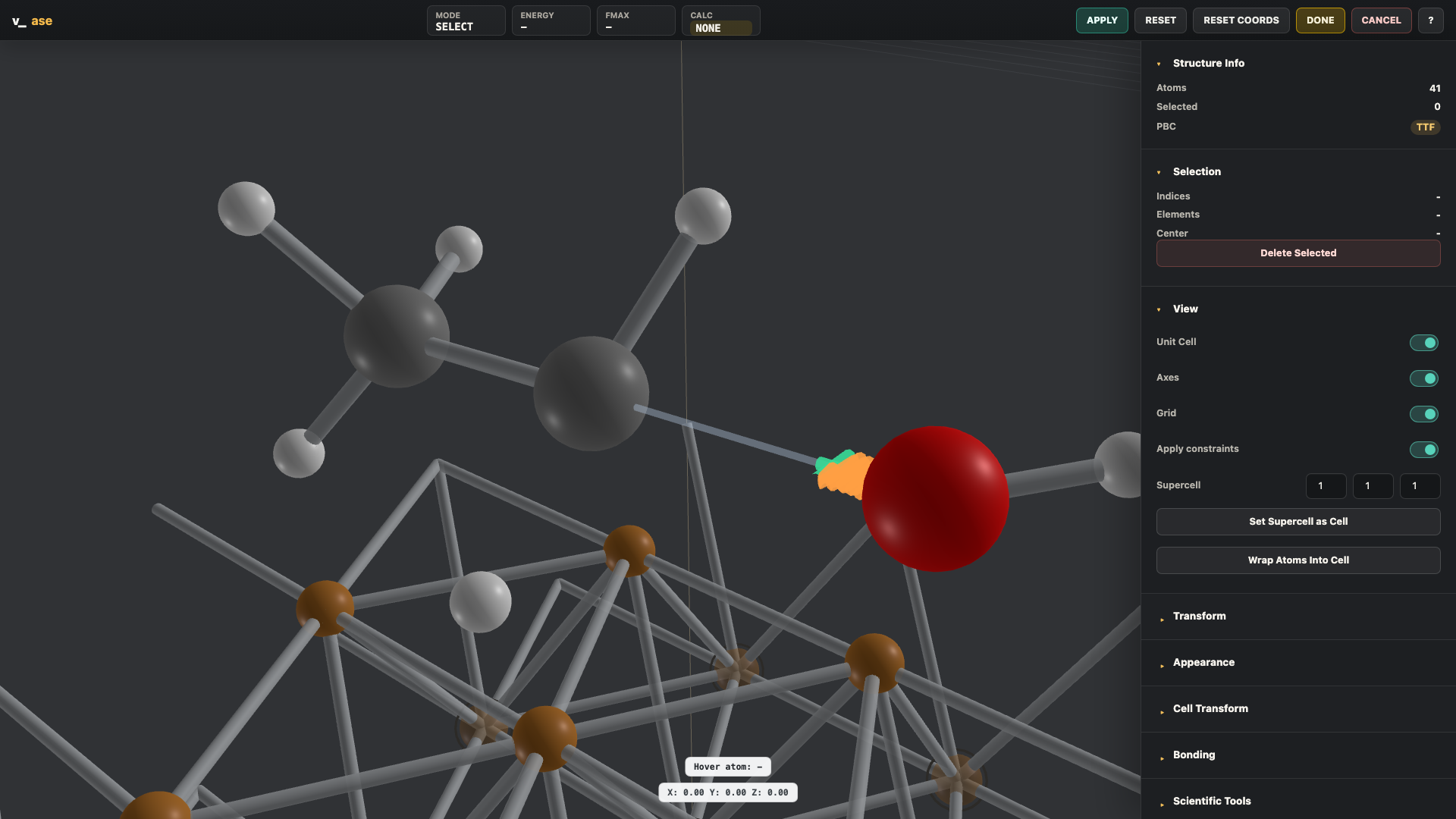
Hookean constraints are drawn with physical meaning. The rt threshold is
placed in Angstroms along the constrained direction. Below the threshold the
spring is inactive and shows slack. Beyond the threshold the latch engages and
the spring becomes active. The example below uses a 9-atom ethanol-like
adsorbate on Cu(111). The O-H group moves with oxygen while the C-O bond is
pulled, so the graphic reads as a bond-retention constraint rather than an
arbitrary long-range tether.
Example:
from ase.build import molecule
from ase.constraints import Hookean
from v_ase.visualize import view

atoms = molecule("H2O")
atoms.set_constraint(Hookean(0, 1, rt=1.15, k=5.0))
view(atoms)
For trajectories, the Hookean graphic updates frame by frame, so inactive, near-threshold, and active states can be inspected as a movie.

Case 3: Rotate and Move
Transforms follow Blender-style keyboard flow:
G X 1.2 Enter
R Z 30 Enter
Supported behavior:
G: move selected atoms.R: rotate selected atoms.X,Y,Z: lock transform axis in transform mode.- Numeric input: exact displacement or angle.
- Left click or
Enter: confirm. Esc: cancel.- Optional move increment in Angstrom.
- Optional rotate increment in degrees.
- Rotate pivots: selection center, global origin, or unit-cell center.
- Optional bond-strain guard for rejecting excessive periodic bond distortion.
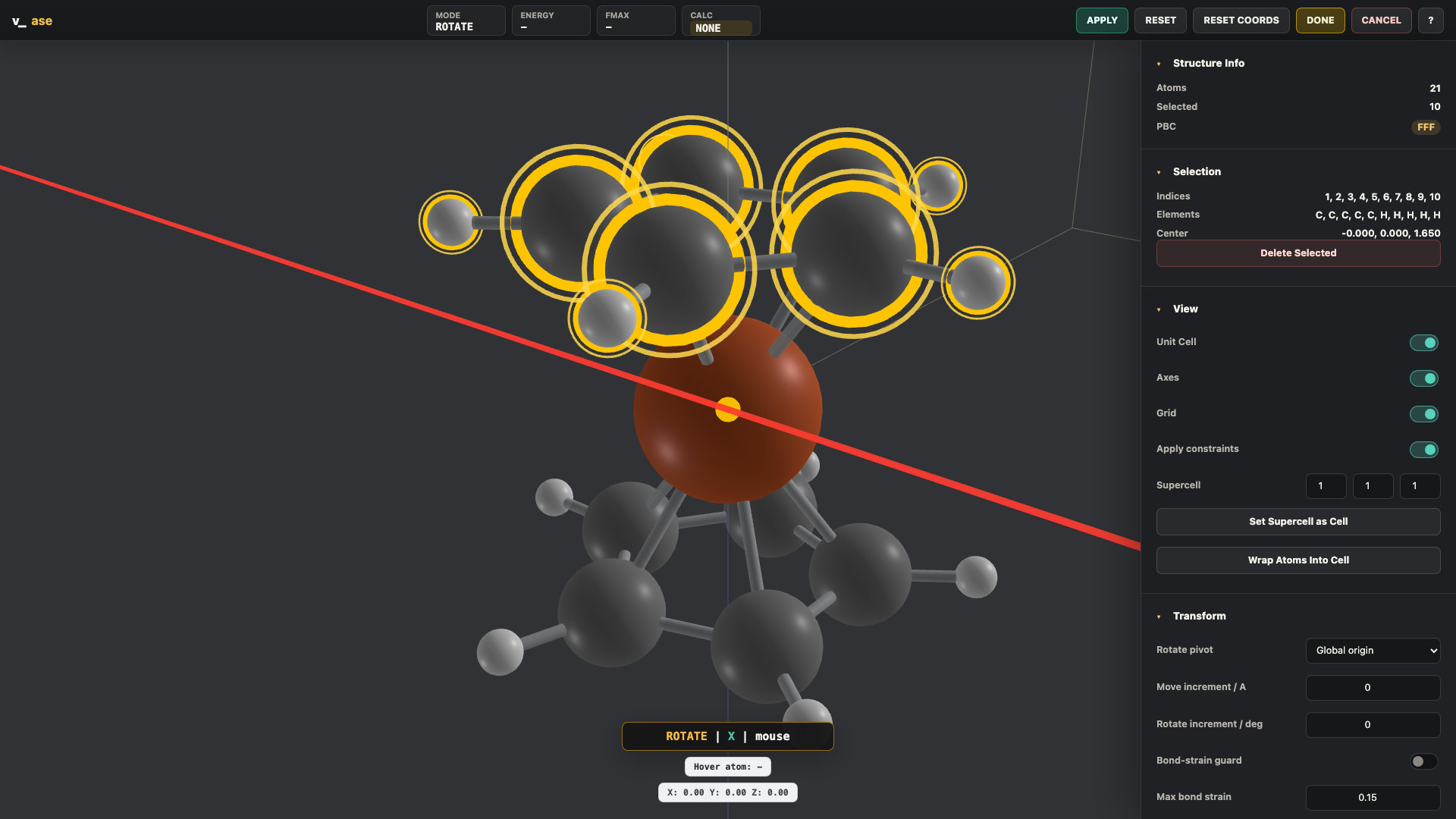
Here a ferrocene molecule is used to show a selected cyclopentadienyl ring rotating about the X axis while the rest of the molecule remains in place:

For axis-locked rotation, the colored axis guide is drawn through the active pivot. If the pivot is the origin, the axis passes through the origin; if the pivot is the selection center of mass, it passes through that COM.
Case 4: Bonds, Periodicity, and Supercells
Bonding can be automatic, element-pair based, or manually specified.
- Auto cutoff uses covalent radii and respects periodic minimum-image distances.
- Element-pair mode exposes pair-specific
rcutrows. - Manual mode accepts pair strings such as
Na-Cl: 3.2or0-1, 1-2. - Supercell preview shows repeated atoms and repeated unit-cell lines.
Set Supercell as Cellconverts the preview into real editable atoms.Cell Transformaccepts a full integermake_supercell(P)matrix.
For 2D periodic supercell/twist workflows, the cell transform applies:
H' = P H
to every trajectory frame. Non-periodic axes are protected from accidental mixing, tilting, or repetition.
Case 5: Trajectories
Multi-frame Atoms lists and ASE-readable trajectory files can be played as a
movie.
v_ase gui relaxation.traj
v_ase gui movie.extxyz --index :
Controls:
- frame slider updates live while dragging
- play/pause button
Space: play or pause- FPS control updates immediately while playback is running
- Skip control advances by
skip + 1frames per playback tick while preserving the selected FPS - export image and export video
Case 6: Custom Atom Types in extxyz and LAMMPS
Some workflows store type labels such as H_type5, O_type2, or Si_type1
inside the species column. ASE itself cannot treat these strings as chemical
elements, so v_ase reads them as GUI atom types while mapping them internally to
valid ASE base elements.
Example extxyz line:
H_type5 82.30128 7.97802 11.47478
In v_ase:
- ASE backend uses base element
H. - GUI labels remain
H_type5. - type-specific color variants are generated.
- Appearance radius controls are grouped by
H_type5,O_type2, etc. - Bond cutoff pair tables also use the preserved type labels.
For LAMMPS dump/data files, integer type ids are kept as GUI labels. If the type id is a valid atomic number, v_ase uses that element internally for default colors and radii:
type=1-> backendH, GUI label1type=8-> backendO, GUI label8type=14-> backendSi, GUI label14
If a type id is outside the periodic table range, v_ase keeps the raw label and
uses ASE-valid H internally so the structure can still be opened.
Case 7: Default Repulsion Calculator
If an input Atoms object already has a calculator, v_ase preserves and uses
that calculator. This includes SinglePointCalculator results loaded from
trajectory-style files and any calculator attached by the user before calling
view().
In the default lightweight visualization mode, v_ase does not attach a fallback calculator and does not show calculator device controls. This keeps large-file inspection focused on rendering, bonding, supercell preview, wrapping, and export.
In --interactive, if no calculator is attached, v_ase installs a default soft
repulsion calculator. The model applies harmonic pair repulsion below
covalent-radius contact thresholds, so Relax can remove close contacts without
requiring an external calculator. The top-right calculator controls are enabled
only for this default calculator:
DEVICE:CPUby default;CUDAis available when torch and CUDA are available in the current Python environment.CPU: number of CPU threads for torch CPU execution. The default is 4, capped by the machine CPU count.
Torch is intentionally not listed as a required dependency. If torch is absent, the repulsion calculator uses a NumPy implementation. Installing torch can make the default repulsion model faster, especially with CUDA hardware, but other ASE calculators remain fully user-defined and are not affected by these controls.
The repulsion calculator is also available as a normal ASE calculator from the public Python API:
from v_ase.calculators import RepulsionCalculator

atoms.calc = RepulsionCalculator(device="cpu", cpu_threads=4)
Convenience aliases are also provided for scripts that prefer shorter or compatibility-oriented imports:
from v_ase import RepulsionCalculator
from v_ase.calculator import RepulsionCalculator
from v_ase.repulsion import RepulsionCalculator
Conditioner is kept as an alias for the same calculator class, matching the
reference model naming while still behaving like an ASE Calculator.
During relaxation, structure updates stream to the browser. In --interactive,
if atoms are moved while relaxation is running, the current relaxation is stopped
and restarted from the edited coordinates. The default visualization mode keeps
atom editing and repulsion-calculator controls out of the UI.
Case 8: Export
From the right panel:
Export POSCARExport PickleExport BlenderExport ImageExport Video
Blender export downloads v_ase_blender_scene.py:
blender --python v_ase_blender_scene.py
The generated scene keeps atoms and constraint graphics as editable Blender objects where practical. Atom objects reuse shared sphere meshes by radius/color so large exports avoid duplicating mesh geometry for every atom.
Python API
from v_ase import view_edit, view_file

edited_atoms = view_edit(
    atoms,
    notebook=False,
    block=True,
    show_cell=True,
    show_axes=True,
    show_bonds=False,
    respect_constraints=True,
    allow_relax=True,
    return_mode="atoms",
)

view_file("trajectory.extxyz")
return_mode can be:
"atoms": edited ASEAtoms"positions": editedNx3positions array"none": no return value
Controls
| Input | Action |
|---|---|
| Left click | Select atom or confirm transform |
| Shift + left click | Add/remove selection |
| Left drag | Box select |
| Middle drag | Orbit viewport |
| Shift + middle drag | Pan viewport |
| Mouse wheel | Zoom |
G |
Move selected atoms |
R |
Rotate selected atoms |
X, Y, Z |
Align view in select mode, lock axis in transform mode |
| Number keys | Numeric transform input |
Enter |
Confirm transform |
Esc |
Cancel transform |
Ctrl+C / Ctrl+V |
Copy / paste atoms |
Ctrl+Z / Ctrl+Shift+Z |
Undo / redo |
Delete / Backspace |
Delete selected atoms |
Space |
Play/pause trajectory |
Notes
- The local editor server binds to
127.0.0.1. - Relaxation uses the calculator already attached to the
Atomsobject. If no calculator is attached, v_ase uses its default soft repulsion calculator. - Torch is optional. It is never required by
pip install v_ase-gui, but when available it can accelerate the default repulsion calculator on CPU or CUDA. - POSCAR export stores structural data. Pickle export can include the ASE object; calculators may not always be pickleable.
- The bundled browser UI is local-first; no Node.js build step is required.
Release history Release notifications | RSS feed


Download files
Download the file for your platform. If you're not sure which to choose, learn more about installing packages.
Source Distribution
Built Distribution
Filter files by name, interpreter, ABI, and platform.
If you're not sure about the file name format, learn more about wheel file names.
Copy a direct link to the current filters
File details
Details for the file v_ase_gui-0.0.44.tar.gz.
File metadata
- Download URL: v_ase_gui-0.0.44.tar.gz
- Upload date:
- Size: 41.6 MB
- Tags: Source
- Uploaded using Trusted Publishing? No
- Uploaded via: twine/6.2.0 CPython/3.13.5
File hashes
| Algorithm | Hash digest | |
|---|---|---|
| SHA256 |
713093edb54955d25867913d18a7c0846ad9336619c065b18d8d0afc8041f4b5
|
|
| MD5 |
0d081a91152939f05288c2f18498a64c
|
|
| BLAKE2b-256 |
e5d0201a6d49b7364347ad3435ae518419eb8cdac8ffbc50312d02a9925c5341
|
File details
Details for the file v_ase_gui-0.0.44-py3-none-any.whl.
File metadata
- Download URL: v_ase_gui-0.0.44-py3-none-any.whl
- Upload date:
- Size: 389.1 kB
- Tags: Python 3
- Uploaded using Trusted Publishing? No
- Uploaded via: twine/6.2.0 CPython/3.13.5
File hashes
| Algorithm | Hash digest | |
|---|---|---|
| SHA256 |
d6571c9747068dfa78e362a2d7eeaba73008f9fcfb3d85a1e0383fced57fcbe6
|
|
| MD5 |
5410ca5d8ab62d2c0e1f6a698efdce67
|
|
| BLAKE2b-256 |
b4e2e31e1fa52ef92cfd8a090fe17b3c0b366b4b73e5b6cec406f0ef0ecba0c3
|






