

VaeZip is the simple and efficient way to store latent tensors. It brings in low-bit quantization codecs, built around PyTorch and safetensors and exploits how VAEs store there latents.
The codecs were selected from the results of the LatentStorageBenchmark, which compares many latent storage schemes by reconstruction quality, size and I/O time.
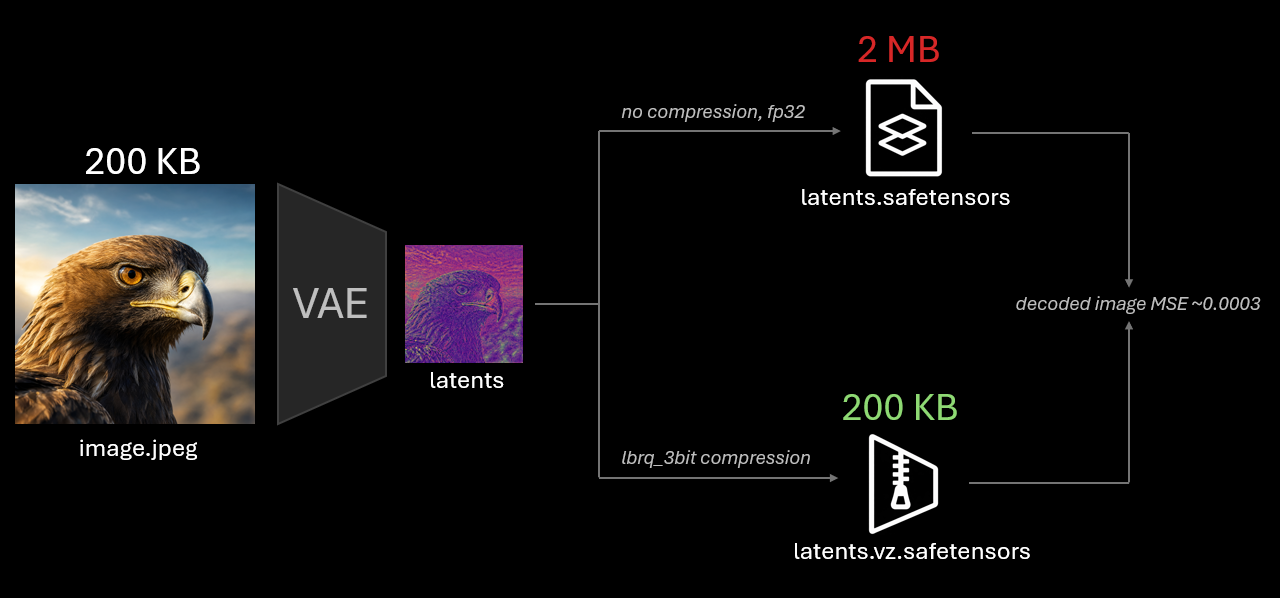
10x file size reduction with almost no quality loss. reproduce these results.
Use cases:
- Storage of large-scale encoded datasets for pretraining.
- Network transfer of latents in efficient inference pipelines, where VAE and generative transformer/VLM are on different nodes.
- Pipeline parallelism: Transfer activations/latents between pipeline stages over slow interconnects (PCIe, Ethernet, cross-datacenter).
Installation
pip install vaezip
Requires Python 3.10+ and PyTorch 2.2+. Install PyTorch for your platform first if you need a specific build.
Quick start
import torch
import vaezip

latents = torch.randn([4, 32, 128, 128], device="cuda")

vaezip.save(latents, "latents.vz.safetensors", codec="lbrq_4bit")
restored = vaezip.load("latents.vz.safetensors", device="cuda")
The codec config is stored in the file metadata, so load() needs no codec.
Pass save_metadata=False to drop it, then load() requires an explicit codec=.
Key concepts
Codec is a compression algorithm configured at construction.
encode() returns an EncodedTensor, decode() returns a float32 tensor of the original shape
(or another floating dtype via decode(encoded, dtype=...)).
from vaezip.codecs import BlockRangeQuantCodec

codec = BlockRangeQuantCodec(
    value_bits=4, range_bits=4, channel_dim=1, block_size=(8, 8)
)
encoded = codec.encode(latents)
restored = codec.decode(encoded)
EncodedTensor holds named tensors plus string metadata with the codec config.
It serializes to .safetensors (default) or .pth:
data = encoded.serialize()  # or vaezip.serialize(encoded)
encoded = vaezip.deserialize(data)
data = encoded.serialize(save_metadata=False, format="pth")
Configs are diffusers-style JSON files and can be created from files, shortcut names or dicts. Keyword arguments override config values:
from vaezip.codecs import AutoCodec

codec.save_config("codec.json")
codec = AutoCodec.from_config("codec.json")
codec = AutoCodec.from_config("brq_8bit", block_size=(4, 4, 4))
Codecs
| Codec | Description |
|---|---|
CastCodec(cast_dtype) |
Cast to a floating dtype, e.g. torch.float16, torch.float8_e4m3fn. |
RangeQuantCodec(bits, channel_dim) |
Per-channel min/max normalization, bits-bit integers. |
BlockRangeQuantCodec(value_bits, range_bits, channel_dim, block_size) |
Min/max per block of a channel, value_bits inside the block range, block ranges stored with range_bits. |
LloydBlockRangeQuantCodec(..., lloyd_fast, cache_table) |
Same with Lloyd-Max level tables instead of uniform levels. |
The first tensor dimension is always the batch. Block codecs take one more dimension as the channel
(channel_dim, negative values count from the end) and treat the rest as spatial, block_size has one entry per spatial dimension:
# [B, C, H, W]
BlockRangeQuantCodec(value_bits=4, range_bits=4, channel_dim=1, block_size=(8, 8))
# [B, C, T, H, W], no temporal blocks
BlockRangeQuantCodec(value_bits=4, range_bits=4, channel_dim=1, block_size=(1, 8, 8))
# [B, T, C, H, W]
BlockRangeQuantCodec(value_bits=4, range_bits=4, channel_dim=2, block_size=(4, 8, 8))
Sizes that are not divisible by the block size are padded internally, decoded tensors keep the original shape. Low-bit values are bit-packed, so the size follows the number of bits. Quantization ranges are computed per sample, samples in a batch are encoded independently.
LloydBlockRangeQuantCodec always stores its level table in the encoded tensor.
cache_table=True fits the table once on the first batch and reuses it to speed up encoding,
codec.flush_cache() resets it.
Shortcuts
| Name | Codec | Approx. bits per value |
|---|---|---|
cast_fp32 (default), cast_fp16, cast_bf16, cast_fp8_e4m3 |
CastCodec |
32, 16, 16, 8 |
rq_8bit, rq_6bit, rq_4bit |
RangeQuantCodec |
8, 6, 4 |
brq_8bit, brq_6bit, brq_5bit, brq_4bit, brq_3bit, brq_2bit |
BlockRangeQuantCodec |
8.1, 6.1, 5.1, 4.1, 3.1, 2.1 |
lbrq_8bit, lbrq_6bit, lbrq_5bit, lbrq_4bit, lbrq_3bit, lbrq_2bit |
LloydBlockRangeQuantCodec |
8.1, 6.1, 5.1, 4.1, 3.1, 2.1 |
The block shortcuts use value_bits from the name, range_bits=4, block_size=(8, 8) and channel_dim=1.
These settings are the points of the MSE Pareto front on FLUX.2 latents (benchmark run 1.2) closest to the target bit count.
vaezip.codecs.list_shortcuts() lists all names.
Development
uv sync
uv run pytest
uv run ruff check . && uv run ruff format --check . && uv run mypy
License
1 maintainer

Metadata
1 maintainer
Release files for vaezip 0.1.0
For a detailed explanation of source distributions (sdists) and built distributions (wheels), please see the package formats documentation.
Source distribution (sdist)
| File | Size | Uploaded | |
|---|---|---|---|
| vaezip-0.1.0.tar.gz | 27.0 kB | Details |
Built distribution (wheel)
| File | Interpreter | ABI | Platform | Reset |
|---|---|---|---|---|
| vaezip-0.1.0-py3-none-any.whl | Python 3 | none | any | Details |
Total release size: 50.2 kB
Release files / vaezip-0.1.0.tar.gz
| Download URL | vaezip-0.1.0.tar.gz |
|---|---|
| Size | 27.0 kB |
| Tags | Source |
|
SHA-256 checksum How to use checksums |
8c4d8eb2580a4c4e42ea468596da1aaf2b51299f62aac85ac96b1d7081ee0449
|
|
BLAKE2b-256 checksum How to use checksums |
d7bc49ce4f105f92baf0c698e0dc55390f8c1d0941faa8b36b6b316c23df19ba
|
| Upload date | |
|
Uploaded using Trusted Publishing? What is trusted publishing? |
No |
| Uploaded via |
twine/7.0.0 CPython/3.12.14
|
Release files / vaezip-0.1.0-py3-none-any.whl
| Download URL | vaezip-0.1.0-py3-none-any.whl |
|---|---|
| Size | 23.3 kB |
| Tags | Python 3 |
|
SHA-256 checksum How to use checksums |
26af51ead4f552c7b4066b6a1ec3e4bff4422f1480067081b1490269ee9a5e5c
|
|
BLAKE2b-256 checksum How to use checksums |
d43df7ae60fd5c5f0fa3b5c347afd438fb27924eba552256db31c35a17efe36a
|
| Upload date | |
|
Uploaded using Trusted Publishing? What is trusted publishing? |
No |
| Uploaded via |
twine/7.0.0 CPython/3.12.14
|














