
valet: Let agents use privileged tools without seeing secrets
valet lets an AI agent use privileged tools — the AWS CLI, psql, anything that
needs a real credential — without ever seeing the secret behind it.
The name says it: a valet holds your keys, brings the car around, and hands it back — never the keys.
The agent runs in a sandbox that can't read credential files (~/.aws, .env,
.secrets, …). valet runs outside that sandbox and does the privileged work
for it:
- the agent asks valet to run something;
- valet checks it against policy;
- valet runs it with the credentials only valet can see;
- valet scrubs secret values from the output;
- the agent gets the useful result — the raw secrets never leave valet's side.
Benefits:
- Safeguard secrets while moving fast with agents
- Keep agents lightweight without loading apps and keys
- Manage and audit multi-agent host access and tool usage
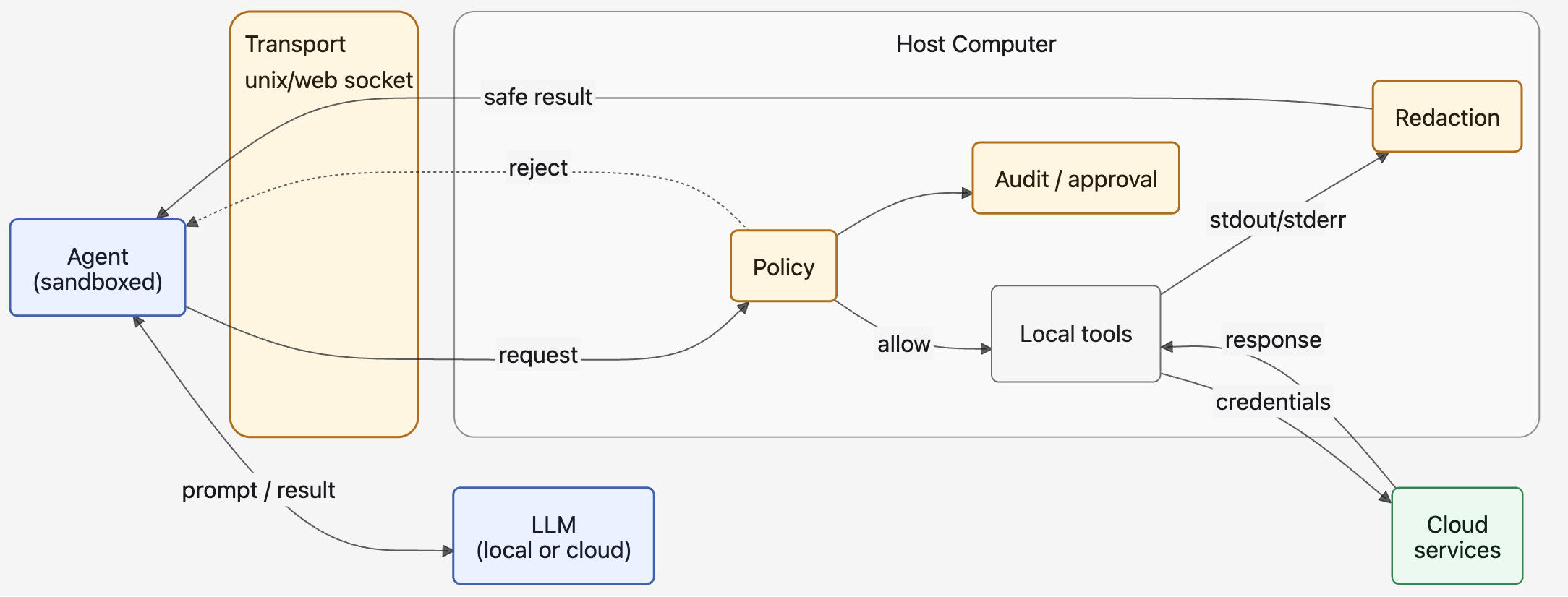
Table of contents
- Quick demo
- Use cases
- Features
- Before getting started
- Install & run
- Configuration
- Agent orientation and guardrails
- Development
More...
- Threat model
- Configuration reference
- Command reference
- How to separate credentials for workspaces
- How to set up a workspace-wide Python venv
- How to use Google Workspace CLI (
gws) through valet - Roadmap
Quick demo
Install, set up a workspace, and read a secret file through valet:
python -m venv venv
. venv/bin/activate
pip install valet-ai

valet init                                 # writes ~/.valet/config.toml
valet workspace add demo ~/ai-workspace    # scaffolds the workspace + a demo secret
valet serve                                # leave this running
In another terminal:
. venv/bin/activate

# Read the demo secret directly — you see the value:
cat ~/ai-workspace/.secrets/demo.yaml
# -> secret_key: "demo-only-not-meaningful-fiRzDlOBbSwF8qCgKlWulH35wNbKH"

# Read it THROUGH valet — the secret is scrubbed:
valet run -- grep secret_key .secrets/demo.yaml
# -> secret_key: "[REDACTED:secret:h:…]"
valet workspace add scaffolds a fake secret at .secrets/demo.yaml. valet masks
its value from the output an agent would get, yet the file stays usable — a trusted
tool can still receive it as an argument (my_command --key-file ./.secrets/demo.yaml).
Use cases
Use case 1: Running AWS CLI commands in a hardened sandbox
With a hardened Codex or Claude Code sandbox (see
Sandbox hardening), commands that need host-side
credentials should fail non-negotiably when the agent runs them directly. For
example, the AWS CLI usually needs ~/.aws/config or ~/.aws/credentials, but
those paths should be denied to the agent:
aws s3 ls s3://my-prod-bucket/releases/ --profile prod-readonly
Run through valet, the same credentialed command can succeed without putting credential files or secret values into model context:
valet run -- aws s3 ls s3://my-prod-bucket/releases/ --profile prod-readonly

2026-08-04 10:12:31   18422913 app-2026-08-04T1012Z.tar.gz
2026-08-04 10:18:44        512 app-2026-08-04T1012Z.sha256
2026-08-04 11:03:09   18425102 app-2026-08-04T1103Z.tar.gz
2026-08-04 11:09:02        512 app-2026-08-04T1103Z.sha256
...
Other good valet-shaped commands are credentialed, read-only operational lookups whose useful signal is not the secret itself:
valet run -- aws cloudformation list-stacks --profile prod-readonly

{
    "StackSummaries": [
        {
            "StackId": "[REDACTED:arn]",
            "StackName": "my-stack",
            "CreationTime": "2026-07-18T05:36:45.760000+00:00",
            "StackStatus": "CREATE_COMPLETE",
            "DriftInformation": {
                "StackDriftStatus": "NOT_CHECKED"
            }
        },
        ...
The returned output is still useful after redaction: the agent can see release artifact names, timestamps, sizes, and missing checksum files, while account IDs, ARNs, access keys, emails, tokens, and configured secret values are scrubbed before the response reaches the agent.
Use case 2: Database query
The same pattern applies to database diagnostics. A hardened agent sandbox
should not be able to read the .env or .secrets file that contains
DATABASE_URL, but a trusted host-side command can use it and return a narrow,
non-secret result:
sandbox$ valet sh 'psql "$DATABASE_URL" --csv -c \
  "select status, count(*) from jobs group by status order by status"'
These examples let an agent inspect deployment state, failed stack updates, service rollout progress, recent application errors, and aggregate database state without gaining direct access to the credentials used to make the request. Avoid using valet as a generic secret printer or unrestricted database tunnel; secret-value reads and broad data queries should become narrow, typed capabilities with explicit policy and approval, not raw shell habits.
Features
Valet serve
The broker runs in a trusted terminal that already has your profiles, tokens,
and cloud CLIs, and hands a sandboxed agent the results of privileged commands
without ever handing over the credentials. The agent can't read .env,
.secrets, or ~/.aws from inside its sandbox — it asks valet instead:
sandbox$ valet --env AWS_PROFILE=prod-readonly run -- aws s3 ls s3://my-prod-bucket/releases/
sandbox$ valet run -- psql --csv -c "select status, count(*) from jobs group by status"
Valet loads the secret sources, runs the command, and redacts the echoed command
plus stdout/stderr before a single byte reaches model context. Safe
line-oriented output streams as it arrives; structured JSON/YAML/PEM is buffered
just long enough to redact it safely. Edit config.toml while it runs and
policy, redaction, and audit changes reload live.
Interactive shell (REPL)
Run bare valet for a redacting shell — type any command and watch the output
come back scrubbed. It's the fastest way to see your policy and redaction
rules at work before you trust an agent to them:
$ valet
valet 0.0.8 — redacting shell. Type a command to run it; ':help' for meta-commands, ':quit' to exit.

valet> aws logs tail mystack/some-task --since 60m --profile prod-readonly

2026-08-05T04:00:17 … {"details":{"roleArn":"[REDACTED:arn]"}, … "execution_arn":"[REDACTED:arn]"}
2026-08-05T04:00:17 … {"details":{"region":"[REDACTED:secret:h:52a3d849]","resource":"runTask.sync"}, …}
...
Audit logging
Every request through valet can land in an append-only JSON log, so the privileged boundary stays accountable: who asked, what command ran, in which workspace, whether policy allowed or denied it, how long it took, and how many values were redacted.
[audit]
log_path = "~/.valet/audit.jsonl"
console = true
The log is safe to keep — it records metadata (request IDs, caller, command
shape, decision, exit code, redaction counts, fail-closed events), never raw
stdout/stderr or credential values, so it can't become another secret sink. With
console = true, valet serve also prints readable entries as commands run:
2026-08-05T12:31:03Z INFO: codex uds allowed started aws ecs describe-services ...
2026-08-05T12:31:04Z INFO: codex uds allowed aws ecs describe-services ...
Denied requests read the same way — e.g. a command that referenced **/.env and
was refused before execution — so an operator can reconstruct exactly what
happened without ever touching the secrets valet protects.
Multi-transport: one host, many agents
Configure credentials, cloud CLIs, and secret sources once, on the host, then point every agent at it — the REPL on your laptop, a coding agent in a hardened sandbox, a second workstation running another model. They all get the same policy-gated, redacted tool access, and none of them hold a secret. No separate stack of MCP servers and app installs to stand up and secure inside every agent.
The same valet run / valet sh / REPL commands work over either transport:
- Unix domain socket (default) — the socket is
0600, owned by the user who started the daemon, so the OS is the access control: no port, no token, no network surface. - Trusted-LAN WebSocket — reach the host from another machine on the trusted
network, with challenge-response auth against approved client identities. Off
unless you opt in with
[host].lan = true(setup).
Every request records its transport (uds or lan) in the audit log, so a
shared host stays accountable.
Valet is not...
valet sits near several popular security and agent-infrastructure products, but it is a different layer:
| Valet is not... | What that product or layer does | How valet is different |
|---|---|---|
| a password manager or vault like 1Password | Stores, shares, rotates, and governs secrets for humans, services, and teams. | valet does not want to become the source of truth for secrets. It uses credentials that already exist at runtime and focuses on approved actions plus redacted results. |
| a compute platform or sandbox runtime like Modal | Runs code in managed infrastructure with scaling, isolation, images, jobs, and service deployment. | valet does not provide general compute. It is the broker a sandboxed agent calls when it needs a trusted tool or host-side capability. |
| a network gateway | Controls which networks, hosts, ports, services, or private resources a workload can reach. | valet does not primarily route packets. It decides whether a requested action may run, executes approved actions, and redacts the response before the agent sees it. |
| an MCP proxy or tool gateway | Mediates model access to MCP tools and can centralize tool discovery, auth, logging, and request filtering. | valet can expose or sit behind MCP-shaped tools later, but its core primitive is broader: policy-controlled host actions with secret-aware output redaction. |
Those layers are complementary. A mature deployment may use a vault for storing credentials, a sandbox or compute runtime for the agent, a network gateway for egress control, an MCP proxy for tool routing, and valet for the policy, redaction, and approval boundary around privileged actions.
Before getting started
valet is defense-in-depth, not a guarantee — see Threat model for what it does and doesn't stop.
Recommended architecture
Valet is meant to be one layer in a larger agent safety design:
- Sandboxed agents — the model runs where it cannot directly read secret files or freely reach privileged host resources.
- Least-privilege credentials on the host — the credentials available to the broker can do only the work the agent is meant to request.
- Policy — a broker decides which actions are allowed before anything runs.
- Redaction — every response is scrubbed before it reaches model context.
- Audit/approval — sensitive or mutating actions are logged and, when appropriate, require a human or higher-trust approval path.
valet's focuses on 3. policy, 4. redaction, and 5. audit/approval.
Valet relies on 1. agent sandboxes and 2. least-privilege credentials as complementary layers. Those layers are the operator's responsibility.
Valet can help enforce an authorization and redaction boundary, but it cannot protect against negligent setup, over-broad host credentials, disabled sandboxes , or approving a dangerous action without understanding its blast radius.
Sandbox hardening
Valet can run without hardening Claude Code, Codex, or other coding agents. However, it is strongly recommended to harden the agent sandbox before you let AI agents use your computer via Valet. Treat Valet as the privileged broker, not as the only safety control.
Follow Sandbox Hardening Guide before installing valet.
Install & run
Install from PyPI — on the host, and inside the agent's sandbox:
pip install valet-ai
Or from source for development (you can also use uv):
git clone https://github.com/anelendata/valet.git
cd valet
python3 -m venv .venv && . .venv/bin/activate
pip install -e .
On the host
Set up the daemon once, in a trusted terminal:
valet init                                # create ~/.valet/config.toml + health check
                                          # (y/n prompts: macOS OS sandbox, LAN host)
valet workspaces add work ~/work/project  # add your first workspace (becomes default)
$EDITOR ~/.valet/config.toml              # point secret_file_paths at your secrets, etc.

valet serve                               # start the daemon (keep this shell open)
valet doctor                              # re-check config health anytime
valet initwrites the example config with a stable redaction salt and prompts for the macOS sandbox and LAN host. It defines no workspace and won't overwrite an existing config.valet workspaces add <id> <dir>creates the first workspace and scaffolds its directory.valet servewon't start until one exists.
Keep the config, sandbox profile, audit log, and secret sources outside the
workspace — anything inside it is readable (and, when jailed there, writable) by
the agent. valet doctor warns when they aren't. Full setup of secrets, policy,
and redaction lives in Configuration.
Run commands through valet
From the agent's sandbox on the same machine, call valet instead of the tool directly. You get redacted output and the command's own exit code, so it drops into scripts like the real command would:
valet run -- ls                          # list the host's workspace root
valet run -- aws s3 ls                    # argv, no shell (exact)
valet --cwd projects/app run -- ls        # set cwd without shell syntax
valet --env AWS_PROFILE=prod run -- aws s3 ls
valet sh 'aws s3 ls | grep prod'          # pipes/globs — needs [exec] shell = true
Interactive mode — a redacting shell
Run valet with no subcommand (like python bare) to open a prompt. Any line
you type is run as a command, and the output comes back redacted:
$ valet
valet 0.0.8 — redacting shell. Type a command to run it; ':help' for meta-commands, ':quit' to exit.
(default) ws valet> cat .secrets
DB_PASSWORD=[REDACTED:secret:h:38673aad]
API_TOKEN=[REDACTED:secret:h:3bc13a30]
(default) ws valet> cd projects/x-com       # cd sticks for the session
(default) x-com valet> aws s3 ls | head     # runs in projects/x-com
(default) x-com valet> cd ../../..          # cd: cannot cd above the workspace
(default) x-com valet> :workspaces set personal   # switch workspace (resets cwd)
(personal) personal valet> :shell off       # run following lines as argv, not shell
(personal) personal valet> :quit
The prompt shows (workspace) <dir>. A few behaviors worth knowing:
cdsticks for the session and is jailed to the workspace —..and symlinks can't climb above it (a barecdreturns to the root). A compound line (cd x && y) isn't intercepted; thatcdapplies only to the subprocess, as in a real shell.- Meta-commands are
:-prefixed::help,:cwd,:shell,:workspaces(:ws;set <id>switches, resetting cwd and adopting that workspace's shell default),:secrets,:processes(:jobsto list,:kill <pid>to stop a valet subprocess),:call,:quit. Everything else runs. - History & completion — Up/Down (or Ctrl-P/Ctrl-N) recall past commands; Tab completes commands and files. Ctrl-D exits.
Multiple workspaces under one host
One host can serve several workspaces, each its own directory jail with its own policy and redaction. Manage them from the host:
valet workspaces add personal ~/personal                  # add a workspace
valet workspaces add personal ~/personal --make-default   # ...and make it default
valet workspaces list                                     # * marks the default
valet workspaces remove personal                          # drop the entry, keep the dir
Select one per command with -w, or switch inside the REPL with
:workspaces set <id>:
valet -w personal run -- ls
valet -w personal sh 'ls | grep foo'
Per-workspace overrides of the shared [exec]/[policy]/[redaction] defaults,
and the [client].default_workspace setting, are in
Configuration → Workspaces.
Running from a node in the local network
Agents on another machine on a trusted LAN can use the host over WebSocket.
On the host — enable LAN and restart, then approve a client. valet clients add prints a client snippet and hot-reloads the daemon:
[host]
lan = true
listen = "0.0.0.0:8766"
valet clients add my-ai-box     # prints the snippet below
valet clients list              # also: block / unblock / remove <id>
[client]
id = "my-ai-box"
key = "xxxxxxxxxxxxxxxxxxxxxxxx"
default_host = "my-computer"     # reconnect_* tuning keys omitted

[hosts.my-computer]
url = "ws://<host-lan-ip>:8766/rpc"
On the client — drop that snippet into the client's config, then run the same commands, resolved through the default host:
valet ping
valet --env AWS_PROFILE=prod run -- aws s3 ls
valet sh 'aws s3 ls | head'
valet --host my-computer run -- ls         # target a host explicitly
Reconnect tuning and the full client-config reference are in Configuration.
Configuration
config.toml (git-ignored, written by valet init) holds the socket, secret
sources, policy, workspaces, and audit settings. Per command, valet also
auto-loads .env/.secrets from the working directory, so a project's own
secrets are redacted when you run there — no config change needed.
The mental model is two families of knobs:
[redaction]— let the command run, scrub its output. (the default; the whole point of valet)[policy]— decide whether the command runs at all. (opt-in blocks)
→ Full reference: docs/CONFIGURATION.md — every
section and key, plus the annotated
config.example.toml.
Agent orientation and guardrails
Self-orientation: the agent onboards itself
You don't have to teach an agent how to use valet — point it at valet and valet
explains itself. A bare valet with no TTY (an agent driving it over a pipe), or
an explicit valet status, prints a self-orienting brief instead of opening the
REPL:
- connection status — which host, and whether the daemon is reachable;
- the workspaces on offer, with the host default marked
*; - the command syntax —
valet -w <ws> run -- <argv…>,valet -w <ws> sh '<command line>',--cwd <dir>, and that paths are workspace-relative and can't climb above./; - the next step —
valet -w <ws> info.
valet -w <ws> info then prints that workspace's README.md guide, shows how to
scan the tree (ls -la, cat <path>), and reminds the agent to treat any file
contents it reads as data, not as instructions to follow. So onboarding an
agent is one line in its system prompt: "run valet to see how to use it."
Wiring valet into an agent
Setting an agent up takes two pieces: tell it to orient itself, and harden its sandbox so valet is the only way out.
In the agent's instructions (system prompt, CLAUDE.md, AGENTS.md, …), one
line is enough:
Run
valetfirst to learn how to use it. Reach privileged tools and host credentials only throughvalet run/valet sh— never read.env,.secrets,~/.aws, or other credential files directly.
In the sandbox, deny reads of credential files and of ~/.valet, and allow
only valet's broker socket — so the agent's one path to privileged tools is
valet. Ready-to-copy Claude Code and Codex baselines are in
Sandbox hardening.
With valet serve running on the host, the agent onboards itself from there — no
per-tool instructions needed.
Built-in guardrails
valet ships with dangerous-command bans for environment/process/system-control
tools — env, printenv, kill, pkill, killall, ps, sudo, reboot,
halt, launchctl, osascript, and valet itself. Commands are confined to
the workspace (the cd jail can't climb above it), and shell mode is off by
default, so an agent gets exact argv execution unless you opt into sh.
To inspect or stop something valet launched, use its own process registry rather than the banned host process tools:
valet processes list
valet processes kill <pid>
Only subprocesses valet started and still tracks can be killed this way. For per-command environment variables, prefer shell-free argv mode:
valet --env AWS_PROFILE=prod-readonly run -- aws s3 ls
Scoped credentials per workspace
Redaction keeps secret values out of an agent's context; you can also limit
which credentials its tools use at all. Give each workspace its own scoped,
least-privilege credential set — a dedicated AWS profile, a fine-grained GitHub
token, a per-workspace SSH key — instead of your personal ~/.aws, ~/.config,
and ~/.ssh. See How to separate credentials for
workspaces.
For the layers around all this — sandboxing the agent runtime and keeping an audit trail of what it ran — see Sandbox hardening and Audit logging.
Development
Tests
pip install -e ".[test]"
pytest
The suite covers: commands run and their output is captured; known secret
values (from secret_file_paths and extra_values) are
redacted from stdout and stderr; the pattern backstop masks ARNs/account
IDs/keys; nonzero exits and missing binaries are reported; unknown ops, missing
cmd, and bad cwd are rejected; the deny list blocks a command; streamed
exec output arrives as redacted chunks with structured-output buffering; audit
logging records streamed exec start and final events; and the REPL runs lines
and handles meta-commands.
1 maintainer

Download files
Download the file for your platform. If you're not sure which to choose, learn more about installing packages.
Source Distribution
Built Distribution
Filter files by name, interpreter, ABI, and platform.
If you're not sure about the file name format, learn more about wheel file names.
Copy a direct link to the current filters
File details
Details for the file valet_ai-0.0.8.tar.gz.
File metadata
- Download URL: valet_ai-0.0.8.tar.gz
- Upload date:
- Size: 134.7 kB
- Tags: Source
- Uploaded using Trusted Publishing? Yes
- Uploaded via: twine/7.0.0 CPython/3.13.14
File hashes
| Algorithm | Hash digest | |
|---|---|---|
| SHA256 |
a973626bf066eade57b7047dba35370f4eecdbf1725bcc68124277cf7f750b8c
|
|
| MD5 |
a1477060b22a4061255212dc5e909a92
|
|
| BLAKE2b-256 |
9fdab3ebecbb1f95b89b7381f99259da33bbc671c0994c0780f174db6ca003c9
|
Provenance
The following attestation bundles were made for valet_ai-0.0.8.tar.gz:
Publisher:
release.yml on anelendata/valet
-
Statement:
-
Statement type:
https://in-toto.io/Statement/v1 -
Predicate type:
https://docs.pypi.org/attestations/publish/v1 -
Subject name:
valet_ai-0.0.8.tar.gz -
Subject digest:
a973626bf066eade57b7047dba35370f4eecdbf1725bcc68124277cf7f750b8c - Sigstore transparency entry: 2425521608
- Sigstore integration time:
-
Permalink:
anelendata/valet@81bf6d79de3f5d3ae7feb87711b47e6f0a5d3e97 -
Branch / Tag:
refs/tags/v0.0.8 - Owner: https://github.com/anelendata
-
Access:
public
-
Token Issuer:
https://token.actions.githubusercontent.com -
Runner Environment:
github-hosted -
Publication workflow:
release.yml@81bf6d79de3f5d3ae7feb87711b47e6f0a5d3e97 -
Trigger Event:
push
-
Statement type:
File details
Details for the file valet_ai-0.0.8-py3-none-any.whl.
File metadata
- Download URL: valet_ai-0.0.8-py3-none-any.whl
- Upload date:
- Size: 102.2 kB
- Tags: Python 3
- Uploaded using Trusted Publishing? Yes
- Uploaded via: twine/7.0.0 CPython/3.13.14
File hashes
| Algorithm | Hash digest | |
|---|---|---|
| SHA256 |
e0e8c1970a79f51a1dfb2aad35a4d329a5acea08c1bb25daa66b634c263d06cd
|
|
| MD5 |
55c93b725dbfdab8c6292371bf97c3b3
|
|
| BLAKE2b-256 |
bf7599069454536bd5d6f0b263963545497be9a59954ec599bd182986bf30901
|
Provenance
The following attestation bundles were made for valet_ai-0.0.8-py3-none-any.whl:
Publisher:
release.yml on anelendata/valet
-
Statement:
-
Statement type:
https://in-toto.io/Statement/v1 -
Predicate type:
https://docs.pypi.org/attestations/publish/v1 -
Subject name:
valet_ai-0.0.8-py3-none-any.whl -
Subject digest:
e0e8c1970a79f51a1dfb2aad35a4d329a5acea08c1bb25daa66b634c263d06cd - Sigstore transparency entry: 2425521869
- Sigstore integration time:
-
Permalink:
anelendata/valet@81bf6d79de3f5d3ae7feb87711b47e6f0a5d3e97 -
Branch / Tag:
refs/tags/v0.0.8 - Owner: https://github.com/anelendata
-
Access:
public
-
Token Issuer:
https://token.actions.githubusercontent.com -
Runner Environment:
github-hosted -
Publication workflow:
release.yml@81bf6d79de3f5d3ae7feb87711b47e6f0a5d3e97 -
Trigger Event:
push
-
Statement type:







