
validate-aws-policies




Validate AWS IAM policies from the command line or a CI/CD pipeline. The tool sends your policy JSON files to IAM Access Analyzer, optionally runs Access Analyzer custom policy checks, and writes the results as JSON, text, HTML, Markdown, JUnit XML or SARIF.
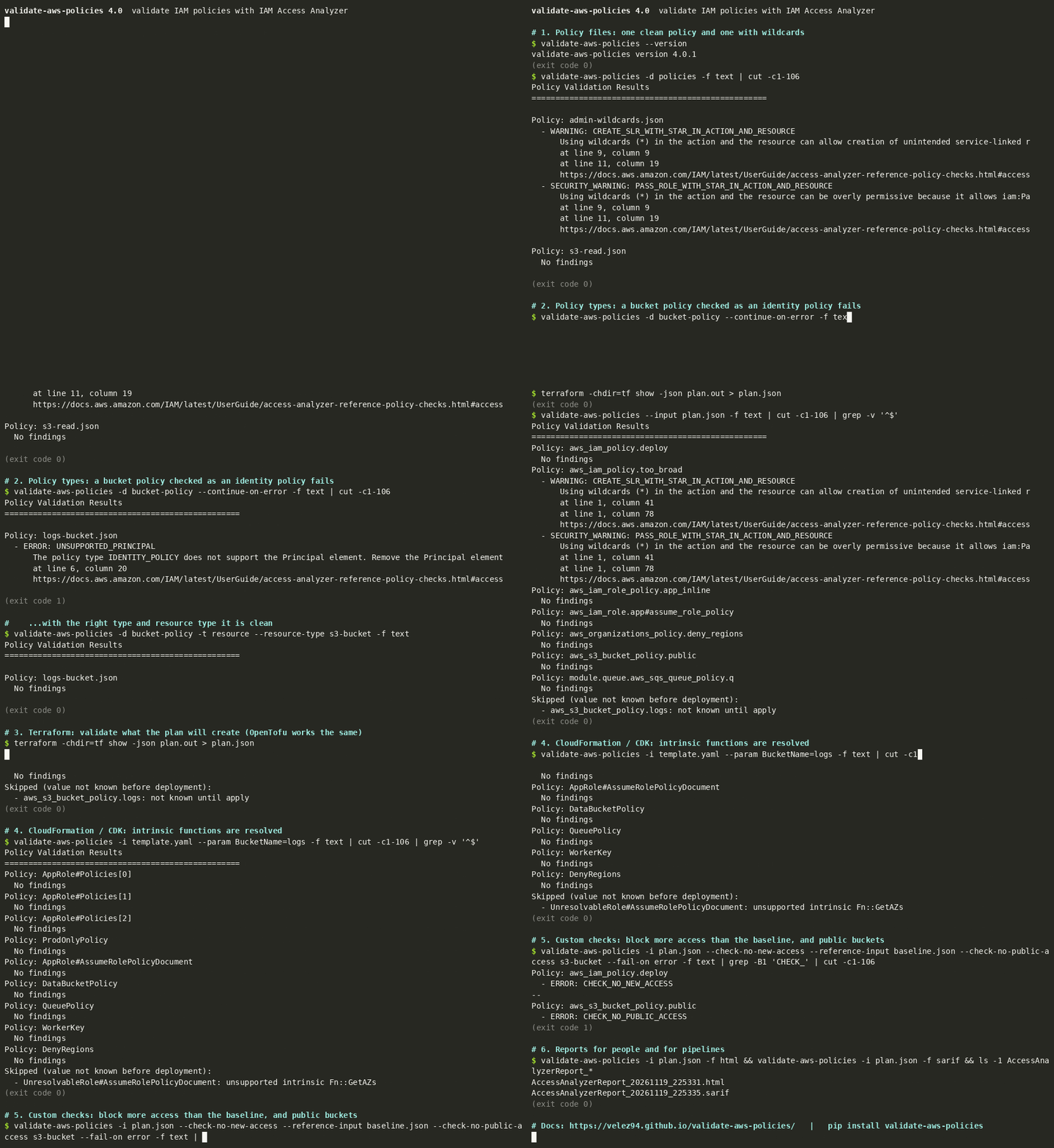
Demo of version 4.0 on a real AWS account. Play it on asciinema.org to pause and copy text.
Documentation: https://velez94.github.io/validate-aws-policies/ · Sample HTML report
Features
- Policy types: identity, resource, service control (SCP) and resource control (RCP) policies, with resource-specific checks for S3 buckets, access points, role trust policies and DynamoDB tables.
- Infrastructure as code: validate the policies in a Terraform or OpenTofu plan, a CloudFormation or CDK template, or Pulumi output before you deploy.
- Custom policy checks: fail a build when a policy grants new access compared to a baseline, grants actions or resources you have forbidden, or can be public.
- Reports: JSON, text, a self-contained HTML report, Markdown, JUnit XML (CodeBuild, Azure Pipelines, Jenkins, GitLab) and SARIF (GitHub code scanning).
- Built for pipelines: specific exit codes,
--fail-onseverity thresholds,--dry-run, JSON logs, S3 upload and ZIP archives. - Configuration: command line, YAML or TOML file, and environment variables, with a documented precedence.
- Compatible: upgrading within a major version never removes a flag, config key or exit code. Newer API features are used only when your installed boto3 supports them.
Install
Requires Python 3.9 or newer.
pip install --upgrade validate-aws-policies
# or, isolated:
pipx install validate-aws-policies
From a private repository (AWS CodeArtifact or Azure Artifacts), see the installation guide.
AWS access
Use any AWS credentials the SDK supports, for example an IAM Identity Center (SSO) profile:
aws configure sso
aws sso login --profile my-profile
The credentials need access-analyzer:ValidatePolicy. Custom checks need
access-analyzer:CheckNoNewAccess, CheckAccessNotGranted and CheckNoPublicAccess, and
--upload needs s3:PutObject. Policy validation is free. Custom checks are billed per API
call, see the pricing page.
Quick start
# Validate every *.json file in a directory (JSON on stdout)
validate-aws-policies --policies-path ./policies --profile my-profile

# Human readable output
validate-aws-policies -d ./policies -f text

# Self-contained HTML report: AccessAnalyzerReport_<YYYYMMDD_HHMMSS>.html
validate-aws-policies -d ./policies -f html

# Service control policies, failing the build on any warning
validate-aws-policies -d ./scps --policy-type scp --fail-on warning

# JUnit XML for a CI test report
validate-aws-policies -d ./policies -f xml -o reports/policies.xml

# Block changes that grant more access than the approved baseline
validate-aws-policies -d ./policies --check-no-new-access --reference-path ./baseline

# SARIF for GitHub code scanning
validate-aws-policies -d ./policies --recursive -f sarif -o results.sarif
Text output shows each finding with its message, line, column and a link to the AWS explanation:
Policy: my-policy.json
  - SECURITY_WARNING: PASS_ROLE_WITH_STAR_IN_ACTION_AND_RESOURCE
      Using wildcards (*) in the action and the resource can be overly permissive because it allows iam:PassRole ...
      at line 9, column 9
      https://docs.aws.amazon.com/IAM/latest/UserGuide/access-analyzer-reference-policy-checks.html#...
Validate infrastructure as code
Skip the policy files and validate what your IaC is about to deploy:
# Terraform / OpenTofu
terraform show -json tfplan > plan.json
validate-aws-policies --input plan.json --only-changed --fail-on error

# CloudFormation / CDK (cdk synth writes cdk.out)
validate-aws-policies --input template.yaml --param Environment=prod
validate-aws-policies --input cdk.out

# Pulumi
pulumi preview --json > preview.json
validate-aws-policies --input preview.json

# Fail when a policy grants more access than on the main branch
validate-aws-policies --input plan.json --check-no-new-access --reference-input baseline.json
Policies are found by resource type (IAM policies, role trust policies, S3, SQS, SNS, KMS, ECR,
Secrets Manager and Organizations policies, and more), validated with the matching policy type,
and reported under the resource address, for example module.queue.aws_sqs_queue_policy.q.
Policies that depend on values unknown before deployment are skipped and listed. See the
infrastructure as code guide.
Options
-d, --policies-path PATH   Directory with policy *.json files
-i, --input PATH [PATH]    Terraform/OpenTofu plan JSON, CloudFormation/CDK template or
                           directory, Pulumi JSON (replaces --policies-path)
    --reference-input PATH Baseline input for --check-no-new-access
    --param KEY=VALUE      CloudFormation parameter (repeatable)
    --unknown-values MODE  skip (default) or fail for policies unknown before deployment
    --only-changed         Terraform/Pulumi: only created or updated resources
-r, --recursive            Also read sub-directories
-t, --policy-type TYPE     identity (default), resource, scp, rcp
    --resource-type TYPE   For resource policies: s3-bucket, s3-access-point, s3-mrap,
                           s3-object-lambda, trust-policy, dynamodb-table
-p, --profile NAME         AWS profile
-f, --format FORMAT        json (default), text, html, md, xml, junit, sarif, all
-o, --output FILE          Output file for single-file formats
-z, --zip                  ZIP the generated reports
-u, --upload -b BUCKET     Upload reports to s3://BUCKET/AccessAnalyzer/YYYY/MM/DD/
    --dry-run              Validate without writing reports or uploading
    --continue-on-error    Validate everything, report, then exit 1 on any ERROR
    --fail-on LEVEL        error, security-warning, warning, suggestion, none
    --locale LOCALE        Language of the finding messages (default EN)
    --max-findings N       Collect at most N findings per policy
    --config FILE          YAML or TOML configuration file
    --verbose | --quiet    DEBUG or ERROR-only logs (logs go to stderr)
    --log-format FORMAT    text or json
-v, --version

Custom policy checks (identity and resource policies):
    --check-no-new-access  with --reference-path DIR [--strict-references]
    --check-access-not-granted  with --deny-actions A,B and/or --deny-resources ARN,ARN
    --check-no-public-access RESOURCE_TYPE   for example s3-bucket
Run validate-aws-policies --help for the complete list.
Exit codes
| Code | Meaning |
|---|---|
| 0 | Success (warnings and suggestions do not fail the run by default) |
| 1 | An ERROR finding, a failed custom check, or a finding at or above --fail-on |
| 2 | Configuration error, or a boto3 version too old for a requested feature |
| 3 | AWS API error or failed S3 upload |
| 4 | Policy file or directory not found or unreadable |
By default the run stops at the first ERROR finding. With --continue-on-error or
--fail-on it validates every policy and writes the reports before exiting.
Configuration file
# config.yaml
profile: my-profile
policy_type: identity
policies_path: ./policies
format: html
fail_on: error

# Several policy types in one run
# policy_sets:
#   - {path: ./scps,   policy_type: scp}
#   - {path: ./trust,  policy_type: resource, resource_type: trust-policy}
validate-aws-policies --config config.yaml
Precedence, lowest to highest: defaults, config file, environment variables (AWS_PROFILE,
POLICIES_PATH, REPORTS_BUCKET, LOG_LEVEL), command-line arguments. See
config.example.yaml and config.example.toml, and the
configuration guide.
CI/CD
GitHub Actions, uploading SARIF results to code scanning:
- run: pip install validate-aws-policies
- run: validate-aws-policies -d policies --recursive --fail-on error -f sarif -o results.sarif
- if: always()
  uses: github/codeql-action/upload-sarif@v3
  with: {sarif_file: results.sarif}
AWS CodeBuild, publishing a test report:
phases:
  build:
    commands:
      - validate-aws-policies -d policies -f xml -o reports/policies.xml
reports:
  policy-validation:
    files: ['reports/policies.xml']
    file-format: JUNITXML
More pipelines (GitLab, Jenkins, Azure) and baseline comparisons are in the examples.
Shell completion
activate-global-python-argcomplete
echo 'eval "$(register-python-argcomplete validate-aws-policies)"' >> ~/.bashrc   # or ~/.zshrc
Contributing
git clone https://github.com/velez94/validate-aws-policies.git
cd validate-aws-policies
pip install -e ".[dev,docs]"
pytest && ruff check src && mkdocs build --strict
See the development guide for the compatibility rules and the release process. Report problems in GitHub Issues. Changes are listed in CHANGELOG.md.
License
Apache License 2.0, see LICENSE.
1 maintainer

Metadata
1 maintainer
Release files for validate-aws-policies 4.0.1
For a detailed explanation of source distributions (sdists) and built distributions (wheels), please see the package formats documentation.
Source distribution (sdist)
| File | Size | Uploaded | Provenance | Actions |
|---|---|---|---|---|
| validate_aws_policies-4.0.1.tar.gz | 1.4 MB | With provenance | Details for validate_aws_policies-4.0.1.tar.gz |
Built distribution (wheel)
| File | Interpreter | ABI | Platform | Actions Reset |
|---|---|---|---|---|
| validate_aws_policies-4.0.1-py3-none-any.whl | Python 3 | none | any | Details for validate_aws_policies-4.0.1-py3-none-any.whl |
Total release size: 1.5 MB
Release files / validate_aws_policies-4.0.1.tar.gz
| Download URL | validate_aws_policies-4.0.1.tar.gz |
|---|---|
| Size | 1.4 MB |
| Tags | Source |
|
SHA-256 checksum How to use checksums |
905acbfc24446c419b98c494f77e3fde3bfaa8e3d26fc20a5df3e3008d84e047
|
|
BLAKE2b-256 checksum How to use checksums |
da981f39dfa3a2c99de4d622f60706557d188d318da40ffd8cebe71eda58e45e
|
| Upload date | |
|
Uploaded using Trusted Publishing? What is trusted publishing? |
Yes |
| Uploaded via |
twine/7.0.0 CPython/3.13.16
|
Provenance
Provenance describes where a file came from. On PyPI, provenance is shared via attestations, which provide a verifiable record of the build or publishing details. View details, limitations and caveats.


PyPI Publish Attestation
PyPI verified that this artifact, at this checksum, originated from the publisher listed below.
Signed by GitHub Actions, verified by PyPI on Nov 20, 2026.
Transparency logRelease files / validate_aws_policies-4.0.1-py3-none-any.whl
| Download URL | validate_aws_policies-4.0.1-py3-none-any.whl |
|---|---|
| Size | 72.4 kB |
| Tags | Python 3 |
|
SHA-256 checksum How to use checksums |
daecfee3c7de132f593bf131c9f5cb5b2a2d91a807c40dcb3e885f9ac47eef2b
|
|
BLAKE2b-256 checksum How to use checksums |
13ae8f3ce169ca5323b96cea703b2c2f54e80ab70ef218ea198266100e8486d2
|
| Upload date | |
|
Uploaded using Trusted Publishing? What is trusted publishing? |
Yes |
| Uploaded via |
twine/7.0.0 CPython/3.13.16
|
Provenance
Provenance describes where a file came from. On PyPI, provenance is shared via attestations, which provide a verifiable record of the build or publishing details. View details, limitations and caveats.
PyPI Publish Attestation
PyPI verified that this artifact, at this checksum, originated from the publisher listed below.
Signed by GitHub Actions, verified by PyPI on Nov 20, 2026.
Transparency logSecurity for validate-aws-policies 4.0.1
Provenance
Provenance describes where a file came from. On PyPI, provenance is shared via attestations, which provide a verifiable record of the build or publishing details. View details, limitations and caveats.
Full provenance
Both files in this release have been uploaded with provenance metadata.
Attestation for validate_aws_policies-4.0.1.tar.gz
PyPI Publish Attestation
PyPI verified that this artifact, at this checksum, originated from the publisher listed below.
Signed by GitHub Actions, verified by PyPI on Nov 20, 2026.
Transparency logA note on package security
PyPI is a repository for distributing packages, not a service for auditing them. While third-party security researchers and our staff do their best to detect and remove malicious packages, PyPI cannot guarantee the quality, security or suitability of any given package.
To learn more about protecting yourself from malicious actors, visit our package security documentation.














