
An interactive TUI for managing Virt-A-Mate .var packages

Project description
VarLens
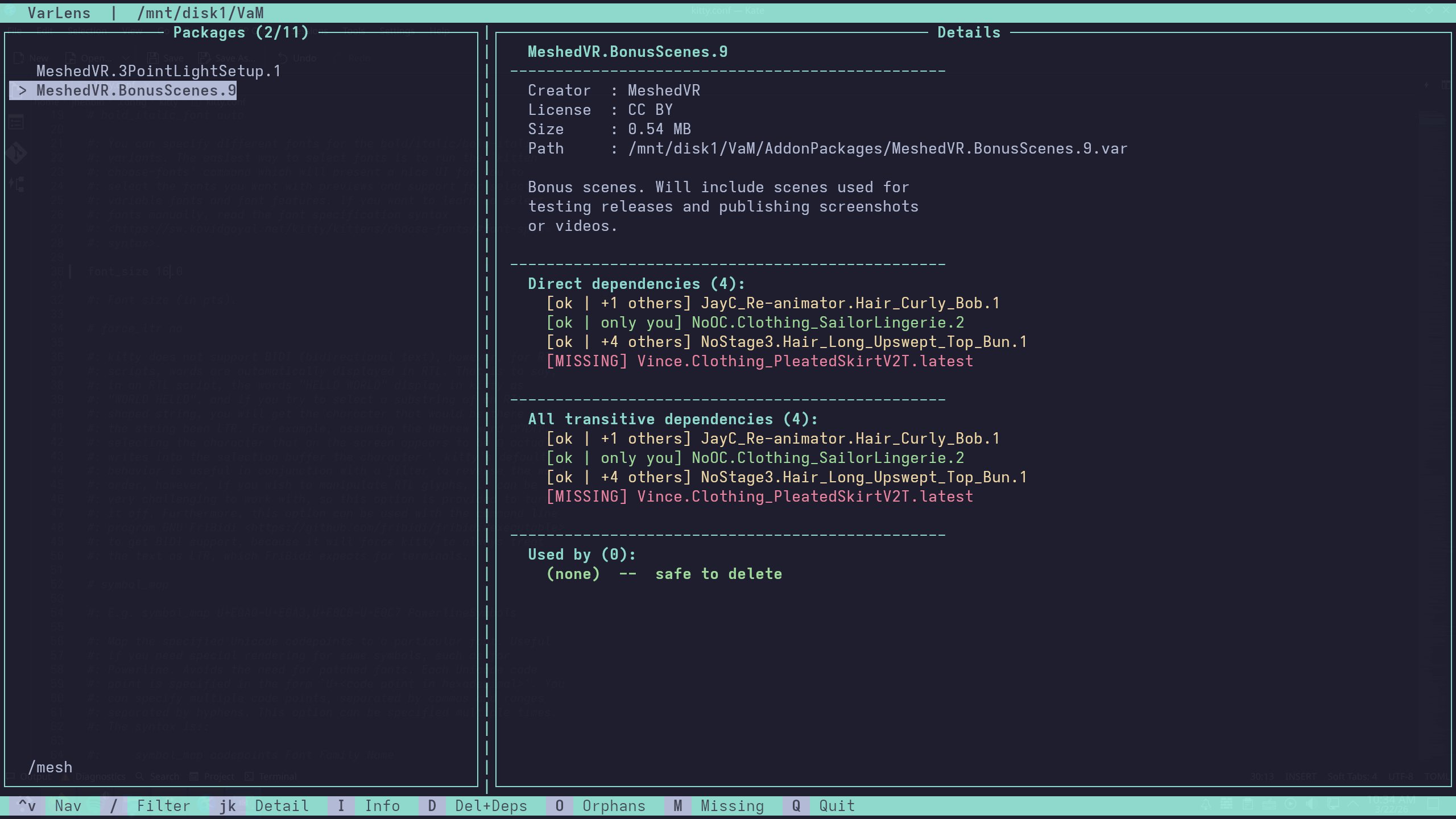
An interactive terminal UI for managing Virt-A-Mate .var packages — browse your library, inspect dependencies, find unused packages, and safely delete them.


Features
- Browse and filter your package library
- Inspect dependencies for any package
- Safely delete packages and their exclusive dependencies
- Orphan finder — Identify packages not used by anything else
- Missing Packages — Identify missing packages needed by others
- SQLite cache — Only re-scans packages that have changed, keeping startup fast on large libraries
Installation
From PyPI (Recommended)
If you have pipx installed:
pipx install varlens-tui
or just using pip:
pip install varlens-tui
From Source (Run without installing)
git clone https://github.com/y2kaug27th/VarLens.git
cd VarLens
python -m varlens
[!IMPORTANT] Windows Users: If running from source, you must manually install the curses library:
pip install windows-curses
Usage
If installed via PyPI:
varlens                     # Launches the app
varlens /path/to/VaM        # Launches with a specific path
If running from Source:
python -m varlens           # Launches the app from the project root
python -m varlens /path/to/VaM
Controls
| Key | Action |
|---|---|
↑ / ↓ |
Navigate |
/ |
Filter |
j / k |
Scroll detail panel |
I |
Package info |
D |
Delete package + dependencies |
O |
Orphan finder |
M |
Missing Packages |
Q |
Quit |
Detail Panel
- Creator, license, size, and file path
- Direct dependencies — packages this
.varexplicitly requires to work, each tagged with a status:[ok | only you]— safe to remove alongside this package[ok | +N others]— shared with N other packages, will be kept[MISSING]— referenced but not installed
- All transitive dependencies — packages pulled in indirectly through direct dependencies
- Used by — which packages depend on this one, none means it's safe to delete
Release history Release notifications | RSS feed


Download files
Download the file for your platform. If you're not sure which to choose, learn more about installing packages.
Source Distribution
Built Distribution
Filter files by name, interpreter, ABI, and platform.
If you're not sure about the file name format, learn more about wheel file names.
Copy a direct link to the current filters
File details
Details for the file varlens_tui-0.1.1.tar.gz.
File metadata
- Download URL: varlens_tui-0.1.1.tar.gz
- Upload date:
- Size: 17.8 kB
- Tags: Source
- Uploaded using Trusted Publishing? No
- Uploaded via: twine/6.2.0 CPython/3.14.4
File hashes
| Algorithm | Hash digest | |
|---|---|---|
| SHA256 |
5c97d667707bd0ace6c5d33b9342ebc84c68824554cbac226c044d352e99120d
|
|
| MD5 |
1c7dad16fe243ddf28a83297c891678c
|
|
| BLAKE2b-256 |
b3dcd026e1290d654894a7e900da5a3e3d5724f1a4e5b8abb33a0e42b2b411b4
|
File details
Details for the file varlens_tui-0.1.1-py3-none-any.whl.
File metadata
- Download URL: varlens_tui-0.1.1-py3-none-any.whl
- Upload date:
- Size: 18.2 kB
- Tags: Python 3
- Uploaded using Trusted Publishing? No
- Uploaded via: twine/6.2.0 CPython/3.14.4
File hashes
| Algorithm | Hash digest | |
|---|---|---|
| SHA256 |
4531c5b53ced56f3b5566b6f1f1af68b45bf87694b283942feef8ebce969ce18
|
|
| MD5 |
5c88eaff8c8bd258ce21cc0a74810f4b
|
|
| BLAKE2b-256 |
9f3eef657477023cf4467f1f97b5c73544f0f6508edc880a1cc3f33dee5614d7
|






