
varseek



varseek is a free, open-source command-line tool and Python package that enables variant calling and genotyping of DNA-seq, bulk RNA-seq, and single-cell RNA-seq data using k-mer-based alignment against a reference of variant sequences.
Why is k-mer-based alignment advantageous?
- It's way faster than traditional alignment-based variant calling methods, especially for large datasets - varseek runs in minutes, while traditional methods can take hours or days.
- It's more sensitive than traditional alignment-based methods, especially for low-frequency variants and variants in repetitive regions.
- It can be used for both DNA-seq and RNA-seq data, including single-cell RNA-seq data.
- It allows for fast and easy screening against established variant databases (e.g., COSMIC, ClinVar, dbSNP) or custom variant sets.
Installation
PyPI installation is sufficient for the basic pipeline (screening against a variant database).
PyPI:
pip install varseek
For additional use cases involving FASTQ preprocessing or the de novo variant calling workflow, we recommend using a conda environment.
GitHub:
pip install git+https://github.com/pachterlab/varseek.git
cd varseek
conda env create -f environment.yml  # includes pip install .
🪄 Quick start guide
1. Acquire a Reference
Follow one of the below options:
a. Download a pre-built variant reference
- (optional) View all downloadable references:
vk ref --list_downloadable_references vk ref --download --variants VARIANTS --sequences SEQUENCES# downloads INDEX, T2G
b. Make custom variant reference from a VARIANTS database
vk ref --variants VARIANTS --sequences SEQUENCES ...# creates INDEX, T2G
c. Make custom variant reference for de novo variant calling
vk denovo --sequences SEQUENCES ... FASTQ1 FASTQ2 ...# creates VARIANTSvk ref --variants VARIANTS --sequences SEQUENCES ...# creates INDEX, T2G
2. Screen for variants
vk count --index INDEX --t2g T2G ... --fastqs FASTQ1 FASTQ2 ...
Workflow Overview
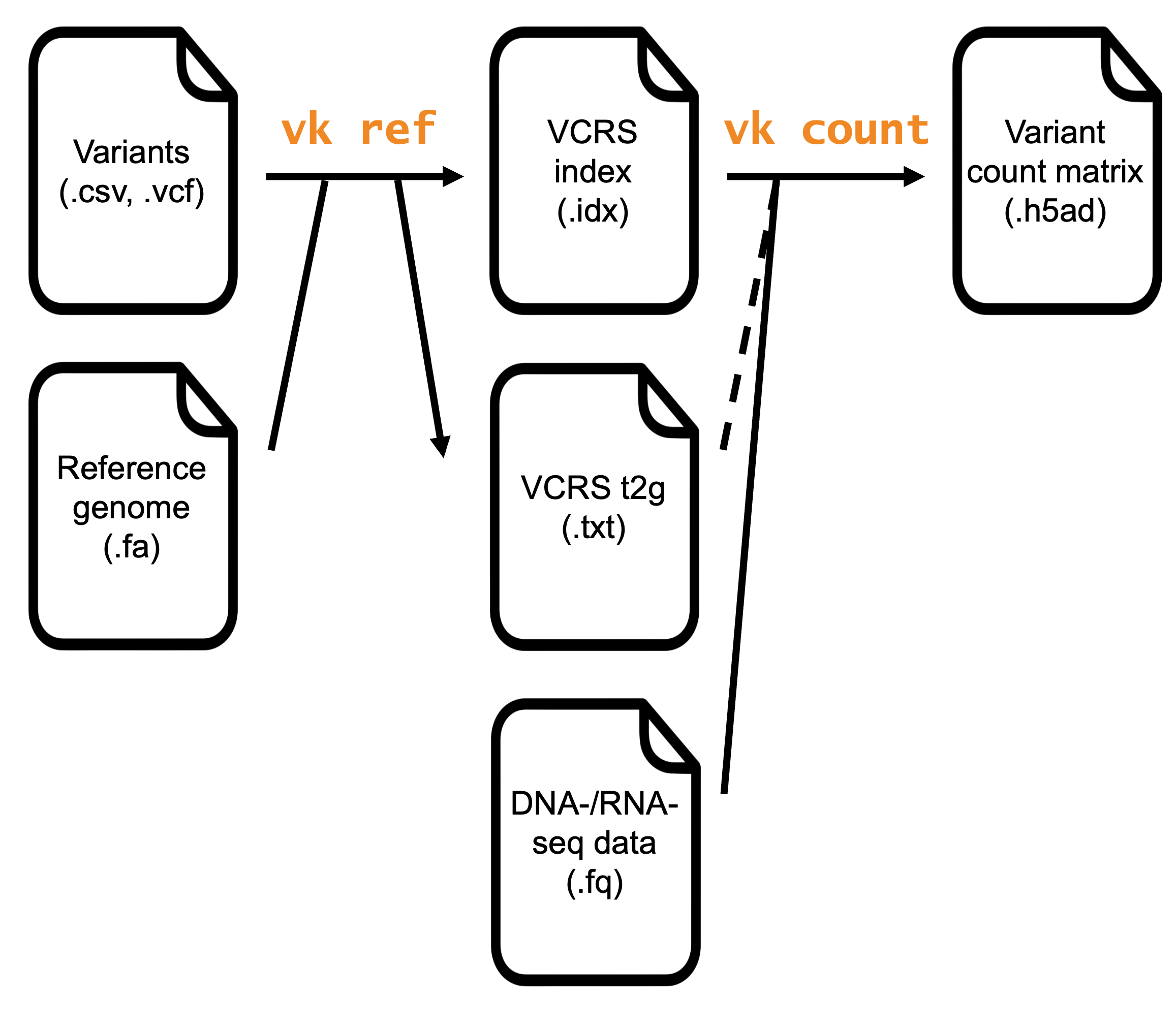
The two commands used in a standard workflow are varseek ref and varseek count. varseek ref takes as input (1) a database of variants (e.g., COSMIC, ClinVar, dbSNP, custom) and (2) the reference genome/transcriptome upon which the variants are annotated. varseek ref outputs a variant-containing reference sequence (VCRS) index that serves as the basis for variant calling in varseek count. varseek count takes as input (1) the VCRS index generated by varseek ref and (2) sequencing read data in FASTQ format. varseek count outputs a variant count matrix in Anndata format with samples/cells (rows) x variants (columns).
varseek utilizes the pseudoalignment algorithm implement by the kb-python package. varseek ref creates the VCRS index by taking short sequences flanking each variant, in which each k-mer of the VCRS contains the variant nucleotide(s). varseek ref wraps kb ref to create the VCRS index. varseek count uses the VCRS index to pseudoalign sequencing reads and count the number of reads that map to each variant. The variant count matrix can be used for downstream analysis, such as clustering, differential expression, and pathway analysis. varseek count wraps varseek fastqpp, kb count, varseek clean, and varseek summarize to generate the variant count matrix.
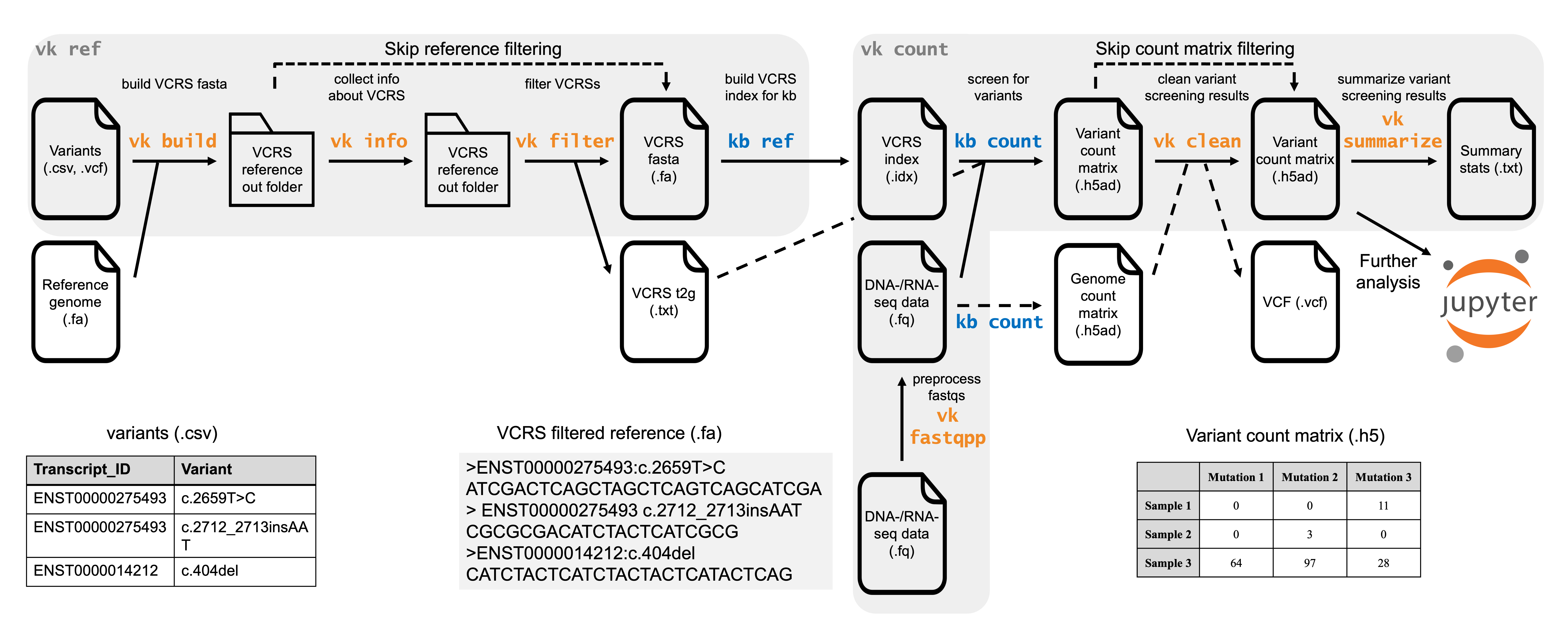
The functions of varseek are described in the table below.
| Description | Bash | Python (with import varseek as vk) |
|---|---|---|
| Build a variant-containing reference sequence (VCRS) index | vk ref ... |
vk.ref(...) |
| Preprocess the FASTQ files before pseudoalignment | vk fastqpp ... |
vk.fastqpp(...) |
| Process the variant count matrix | vk clean ... |
vk.clean(...) |
| Analyze the variant count matrix results | vk summarize ... |
vk.summarize(...) |
| Wrap vk fastqpp, kb count, vk clean, and vk summarize | vk count ... |
vk.count(...) |
Additional examples and citation
Examples for getting started: GitHub - pachterlab/varseek-examples
Repository for manuscript figures: GitHub - pachterlab/RLSRP_2025
If you use varseek in a publication, please cite the following study:
Rich JM, Luebbert L, Sullivan DK, Rosa R, Pachter L. Reference-based variant detection with varseek. bioRxiv. 2025 September 3. Available from: https://doi.org/10.1101/2025.09.03.674039
1 maintainer

Metadata
1 maintainer
Release files for varseek 0.2.1
For a detailed explanation of source distributions (sdists) and built distributions (wheels), please see the package formats documentation.
Source distribution (sdist)
| File | Size | Uploaded | |
|---|---|---|---|
| varseek-0.2.1.tar.gz | 300.8 kB | Details |
Built distribution (wheel)
| File | Interpreter | ABI | Platform | Reset |
|---|---|---|---|---|
| varseek-0.2.1-py3-none-any.whl | Python 3 | none | any | Details |
Total release size: 607.2 kB
Release files / varseek-0.2.1.tar.gz
| Download URL | varseek-0.2.1.tar.gz |
|---|---|
| Size | 300.8 kB |
| Tags | Source |
|
SHA-256 checksum How to use checksums |
a3bfd8935c5b932f2047f883bf266a34ed50e68d862019540e6efa4c2c52e153
|
|
BLAKE2b-256 checksum How to use checksums |
6df7932ef23160cbf110276dc168b946ae5c76220ec6f0c8c4dda5d18f06703d
|
| Upload date | |
|
Uploaded using Trusted Publishing? What is trusted publishing? |
No |
| Uploaded via |
twine/6.2.0 CPython/3.10.20
|
Release files / varseek-0.2.1-py3-none-any.whl
| Download URL | varseek-0.2.1-py3-none-any.whl |
|---|---|
| Size | 306.5 kB |
| Tags | Python 3 |
|
SHA-256 checksum How to use checksums |
f9f5e7333b702c798047ecd04f68672e34f10508b2e31727097445845ed5bb63
|
|
BLAKE2b-256 checksum How to use checksums |
11d5c7a13f0e7c4b0efd7de35f383b2208720d2950dd60ca5e75074984c1ea89
|
| Upload date | |
|
Uploaded using Trusted Publishing? What is trusted publishing? |
No |
| Uploaded via |
twine/6.2.0 CPython/3.10.20
|














