
VAST Admin MCP Server - MCP server for VAST Data administration tasks

Project description
VAST Admin MCP Server



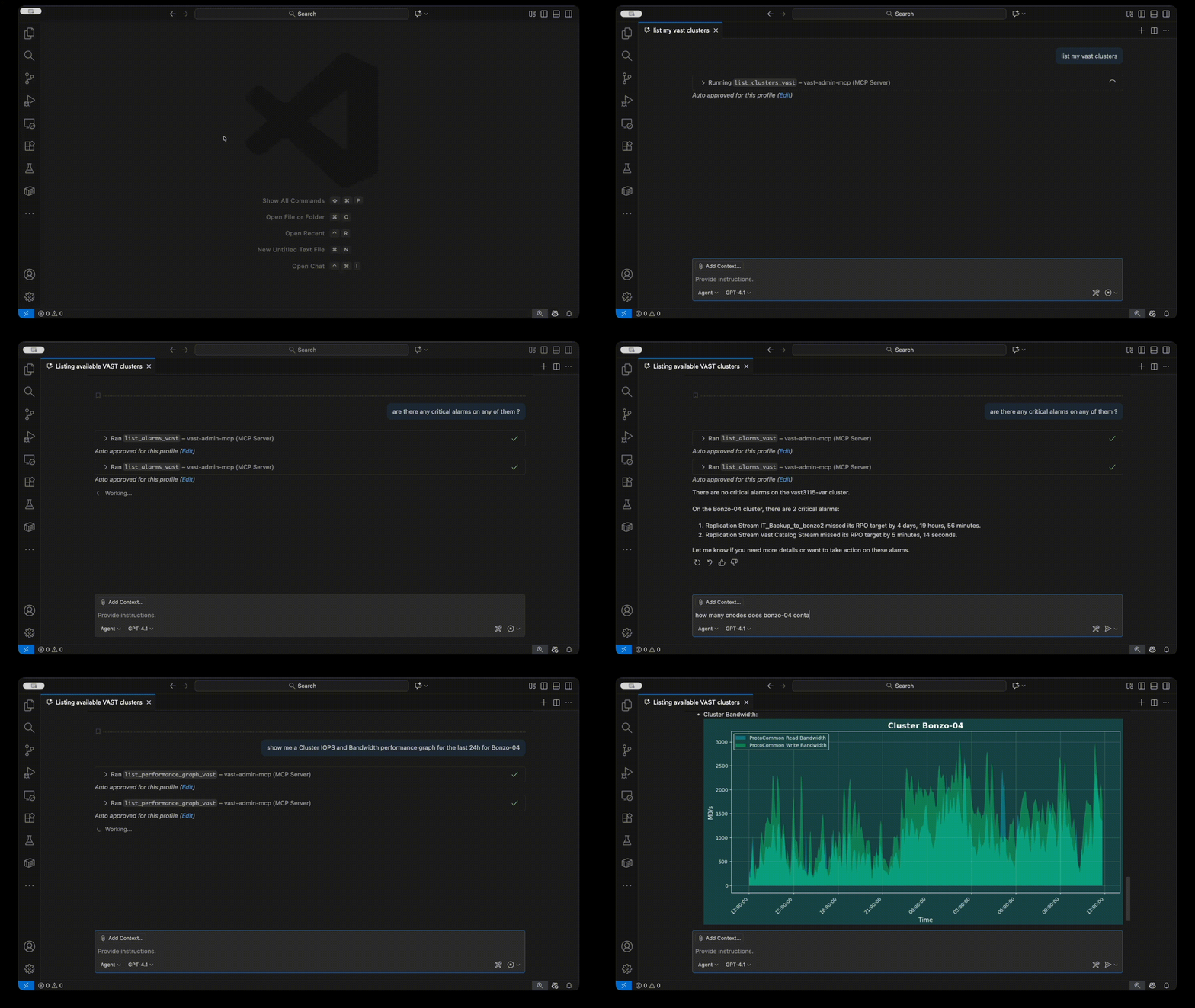
A Model Context Protocol (MCP) server for VAST Data administration. Enables AI assistants to interact with VAST clusters for monitoring, management, and data protection operations.
Features
- 🤖 Full MCP Integration - Native support for Claude Desktop, Cursor, VSCode, and other MCP clients
- 🔧 Cluster Management - List and monitor VAST clusters, views, tenants, quotas, and more
- 📊 Performance Metrics - Real-time performance data and graph generation
- 🔐 Secure Credentials - Encrypted password storage using system keyring
- 🛡️ API Whitelist - Security through endpoint and method restrictions
- ✏️ Read-Write Mode - Optional write access for create operations (views, snapshots, quotas)
- 🎨 Customizable - YAML-based templates for adding custom list functions
Installation
pip install vast-admin-mcp
Requirements:
- Python 3.10+
jqcommand-line tool (for JSON transformations)
Installing jq
macOS:
brew install jq
Linux (Ubuntu/Debian):
sudo apt-get install jq
Linux (RHEL/CentOS):
sudo yum install jq
Quick Start
1. Configure VAST Cluster Connection
vast-admin-mcp setup
This will prompt you for:
- Cluster address (IP, FQDN, or URL)
- Username and password
- Tenant name (if applicable)
2. Configure Your AI Assistant
Get setup instructions for your AI tool:
# For Cursor
vast-admin-mcp mcpsetup cursor

# For Claude Desktop
vast-admin-mcp mcpsetup claude-desktop

# For VSCode
vast-admin-mcp mcpsetup vscode

# For Windsurf
vast-admin-mcp mcpsetup windsurf
Note: Add --read-write as an argument in the config to enable create operations.
3. Start Using with Your AI Assistant
Example prompts:
List all VAST clusters
Show me all views on cluster1 with capacity information
Create a bandwidth and IOPS graph for cluster1 over the last hour
List all snapshots for view path /data/app1
Show me any critical alarms that haven't been acknowledged
CLI Usage
Test functions directly from the command line:
# List available commands
vast-admin-mcp list

# List clusters
vast-admin-mcp clusters

# List views with filters
vast-admin-mcp list views --cluster cluster1 --tenant mytenant
Read-Only vs Read-Write Mode
By default, the MCP server runs in read-only mode for safety:
- ✅ All list/query operations
- ✅ Performance monitoring
- ✅ Viewing configurations
- ❌ Create operations disabled
Enable read-write mode to allow:
- ✅ Creating views
- ✅ Creating snapshots and clones
- ✅ Setting quotas
- ✅ Creating view templates
Add --read-write to the MCP server configuration to enable write operations.
Available MCP Tools
List Tools
list_clusters_vast- Cluster information and statuslist_views_vast- Views with capacity and protocolslist_tenants_vast- Tenant information and capacitylist_volumes_vast- NVMe volumes/namespaceslist_quotas_vast- Quota configurationslist_snapshots_vast- Snapshot informationlist_alarms_vast- Active alarms and alertslist_performance_vast- Performance metrics- And many more...
Create Tools (read-write mode only)
create_view_vast- Create new viewscreate_view_from_template_vast- Create from templatescreate_snapshot_vast- Create snapshotscreate_clone_vast- Clone from snapshotscreate_quota_vast- Set quotas
Docker Support
Docker images are available for easy deployment:
# Using helper script
./vast-admin-mcp-docker.sh setup
./vast-admin-mcp-docker.sh list clusters

# Or with docker directly
docker run --rm -it \
  -v ~/.vast-admin-mcp:/root/.vast-admin-mcp \
  vast-admin-mcp:latest \
  vast-admin-mcp list clusters
See the full documentation for complete Docker setup instructions.
Configuration Files
- Cluster Config:
~/.vast-admin-mcp/config.json - Template Customizations:
~/.vast-admin-mcp/mcp_list_template_modifications.yaml - View Templates:
~/.vast-admin-mcp/view_templates.json - Logs:
~/.vast-admin-mcp/vast_admin_mcp.log
Documentation
For comprehensive documentation, including:
- Detailed installation instructions
- Template customization guide
- API whitelist configuration
- Advanced Docker usage
- Security best practices
- Full prompt examples
Visit: https://github.com/vast-data/vast-admin-mcp#readme
Platform Support
- ✅ macOS
- ✅ Linux
- ❌ Windows (not supported)
Community & Support
VAST Admin MCP Server welcomes questions, feedback, and feature requests. Join the conversation on https://community.vastdata.com/
License
Apache License 2.0 - See LICENSE for details.
Author
Haim Marko <haim.marko@vastdata.com>
Links


Download files
Download the file for your platform. If you're not sure which to choose, learn more about installing packages.
Source Distribution
Built Distribution
Filter files by name, interpreter, ABI, and platform.
If you're not sure about the file name format, learn more about wheel file names.
Copy a direct link to the current filters
File details
Details for the file vast_admin_mcp-0.2.1.tar.gz.
File metadata
- Download URL: vast_admin_mcp-0.2.1.tar.gz
- Upload date:
- Size: 5.7 MB
- Tags: Source
- Uploaded using Trusted Publishing? No
- Uploaded via: twine/6.2.0 CPython/3.9.21
File hashes
| Algorithm | Hash digest | |
|---|---|---|
| SHA256 |
20cace6416e99feb1e27e5d722a408cf52408f79a1b2f3fc18a982ba09320008
|
|
| MD5 |
9e54ba3a3baa595f64ef3c82e10e7238
|
|
| BLAKE2b-256 |
d4c6ed1f7d8cfe861167ea4472127c8ad6aa48d70b8a2231f1f924acc42b8af8
|
File details
Details for the file vast_admin_mcp-0.2.1-py3-none-any.whl.
File metadata
- Download URL: vast_admin_mcp-0.2.1-py3-none-any.whl
- Upload date:
- Size: 186.4 kB
- Tags: Python 3
- Uploaded using Trusted Publishing? No
- Uploaded via: twine/6.2.0 CPython/3.9.21
File hashes
| Algorithm | Hash digest | |
|---|---|---|
| SHA256 |
750f7d23fc7af76843fa82b98e87ee90f60ec696d59cdf7fb76706b15d7f04e6
|
|
| MD5 |
329315eb52a1d05d0427c6560aa2421b
|
|
| BLAKE2b-256 |
aac9fb1fc73400efbcb0d7c18772f49980ac201e4078497f019ed8bac5038201
|






