
This release is a pre-release and may not be stable for production use.

Beta: VAST Orbit
0.1.xis the first beta release series. The API and features will change as we work toward a stable1.0.0. See Project Status & Roadmap.
VAST Orbit








Trailer Video

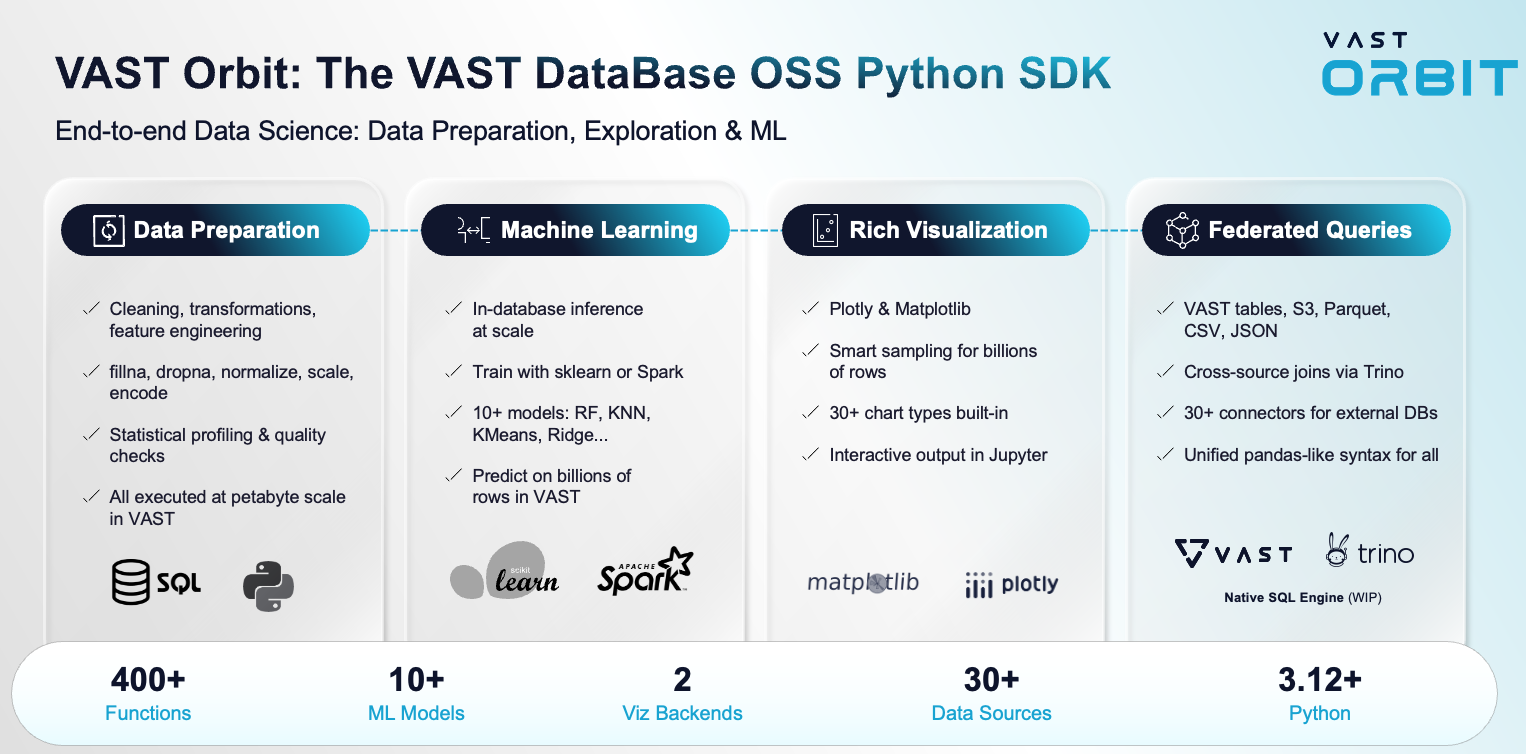
VAST Orbit is a Python library with scikit-learn-like functionality for conducting data science projects on data stored in the VAST DataBase. Train models using familiar scikit-learn syntax and deploy them directly in the database, leveraging VAST's high-performance analytics capabilities. VAST Orbit offers robust support for the entire data science life cycle, uses a 'pipeline' mechanism to sequentialize data transformation operations, and provides beautiful graphical options.
Table of Contents
- Introduction
- Project Status & Roadmap
- Installation
- Connecting to the Database
- Documentation
- Highlighted Features
- Quickstart
- Help and Support
Introduction
VAST DataBase combines enterprise-grade storage with powerful analytics capabilities. Today, VAST Orbit leverages Trino as the SQL engine to deliver exceptional performance for data science workloads at scale. Soon, we will support the VAST SQL Engine (currently in development), which will provide even greater speed through VAST's columnar-optimized format. However, SQL alone isn't flexible enough to meet the evolving needs of modern data scientists.
Python has become the lingua franca of data science, offering unparalleled flexibility through its high-level abstraction and an extensive ecosystem of libraries. The accessibility of Python has led to the development of powerful APIs like pandas and scikit-learn, supported by a vibrant community of data scientists worldwide. Unfortunately, traditional Python tools operate in-memory as single-node processes, creating fundamental limitations when working with large-scale data. While distributed computing frameworks attempt to address these constraints, they still require moving data for processing—an approach that is prohibitively expensive and increasingly impractical in the modern data landscape. On top of these challenges, data scientists face additional complexity in deploying and operationalizing their models. The entire workflow is time-consuming and inefficient.
VAST Orbit solves these problems. The concept is elegant: instead of moving data to compute, VAST Orbit brings the compute logic to where the data lives—in the VAST DataBase. Train your models using familiar scikit-learn syntax in Python, then deploy them directly in the database for high-performance predictions at scale.
Main Advantages
- Easy Data Exploration: Interactive exploration of massive datasets without memory constraints
- Fast Data Preparation: Leverage Trino's distributed processing for rapid data transformation
- Familiar Scikit-learn API: Train models using the
scikit-learninterface you already know - In-Database Deployment: Deploy trained models directly in the VAST DataBase for production workloads (with some current limitations — see Project Status & Roadmap)
- Easy Model Evaluation: Comprehensive model evaluation tools with visual insights
- Seamless SQL Integration: Use Python or SQL interchangeably based on your preference and use case
Project Status & Roadmap
VAST Orbit is beta software (the 0.1.x series). It is evolving quickly, and we expect multiple iterations before a stable 1.0.0 — including occasional breaking changes to the API, defaults, and behavior as the library matures.
A few things to keep in mind at this stage:
- Training back-end. As of now, most machine-learning models are trained with scikit-learn (in-memory). Trained models can then be deployed in-database for prediction — though in-database deployment currently has some limitations for certain algorithms. Native in-database training is on the roadmap.
- In-database ML maturity. Some of the in-database ML capabilities are still beta and under active validation; their coverage and behavior will keep improving across releases.
- Indicative roadmap. Priorities and timelines are indicative and may change based on user feedback and incoming requests.
- Toward 1.0.0. Expect the API surface, defaults, and feature set to keep maturing until the
1.0.0milestone.
Your feedback directly shapes what we build next — see Help and Support.
Installation
To install VAST Orbit with pip:
# Latest release (beta): --pre is required until 1.0.0 is published
pip3 install --pre vastorbit[all]

# Latest commit on main branch
pip3 install git+https://github.com/vast-data/Orbit.git@main
To install VAST Orbit from source, run the following command from the root directory:
pip install .
Connecting to the Database
VAST Orbit currently connects to the VAST DataBase through Trino. Ensure you have Trino set up and configured to access your VAST DataBase instance.
Connection example:
import vastorbit as vo

vo.new_connection({
    "host": "your-trino-host",
    "port": "8080",
    "database": "your_database",
    "user": "your_username"},
    name="VAST_Connection")
Use the connection:
vo.connect("VAST_Connection")
For more details on connection configuration, refer to the documentation.
Documentation
The easiest and most accurate way to find documentation for a particular function is to use the help function:
import vastorbit as vo

help(vo.VastFrame)
Documentation can be generated locally. Refer to the documentation generation guide in the docs/ directory.
Full documentation, API reference, and examples are available at vast-data.github.io/Orbit.
Highlighted Features
Themes - Dark | Light
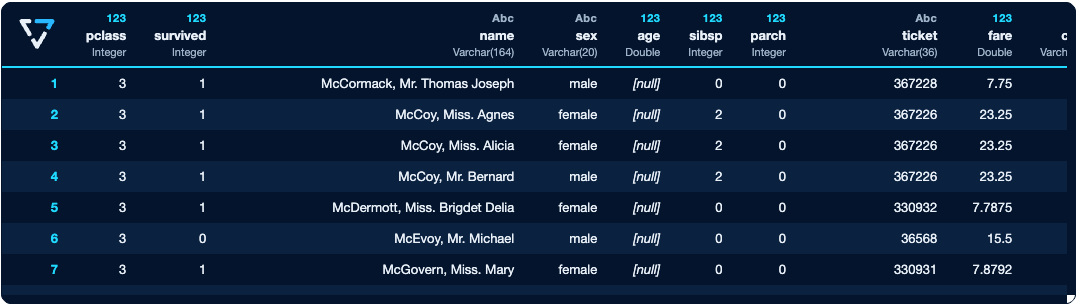
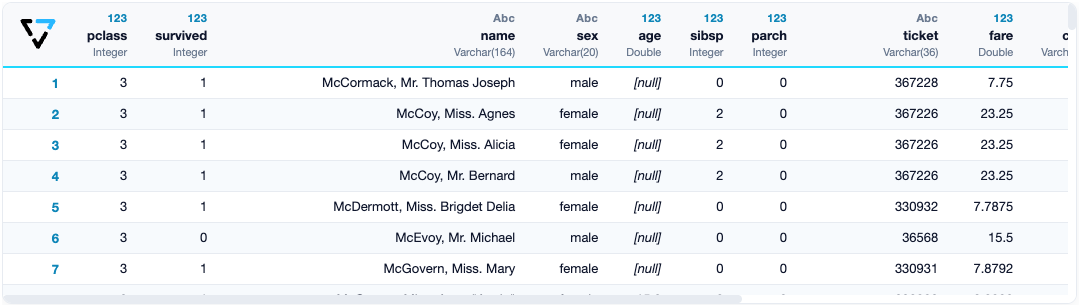
VAST Orbit offers users the flexibility to customize their coding experience with two visually appealing themes: Dark and Light.
Dark mode, ideal for extended coding sessions, features a sleek and stylish dark color scheme, providing a comfortable and eye-friendly environment.
On the other hand, Light mode serves as the default theme, offering a clean and bright interface for users who prefer a traditional coding ambiance.
Theme can be easily switched by:
import vastorbit as vo

vo.set_option("theme", "dark")  # can be switched to 'light'
VAST Orbit's theme-switching option ensures that users can tailor their experience to their preferences, making data exploration and analysis a more personalized and enjoyable journey.
SQL Magic
You can use VAST Orbit to execute SQL queries directly from a Jupyter notebook.
Example
Load the SQL extension:
%load_ext vastorbit.sql
Execute your SQL queries:
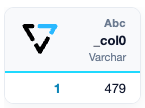
%%sql
SELECT version();
SQL Plots
You can create interactive, professional plots directly from SQL.
To create plots, simply provide the type of plot along with the SQL command.
Example
%load_ext vastorbit.jupyter.extensions.chart_magic
%chart -k pie -c "SELECT pclass, AVG(age) AS avg_age FROM titanic GROUP BY 1;"

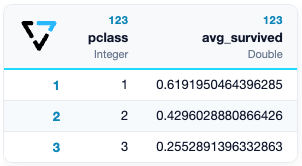
Python and SQL Combo
VAST Orbit has a unique place in the market because it allows users to use Python and SQL in the same environment.
Example
import vastorbit as vo

selected_titanic = vo.VastFrame(
    "SELECT pclass, embarked, survived FROM titanic"
)
selected_titanic.groupby(columns=["pclass"], expr=["AVG(survived) AS avg_survived"])
Charts
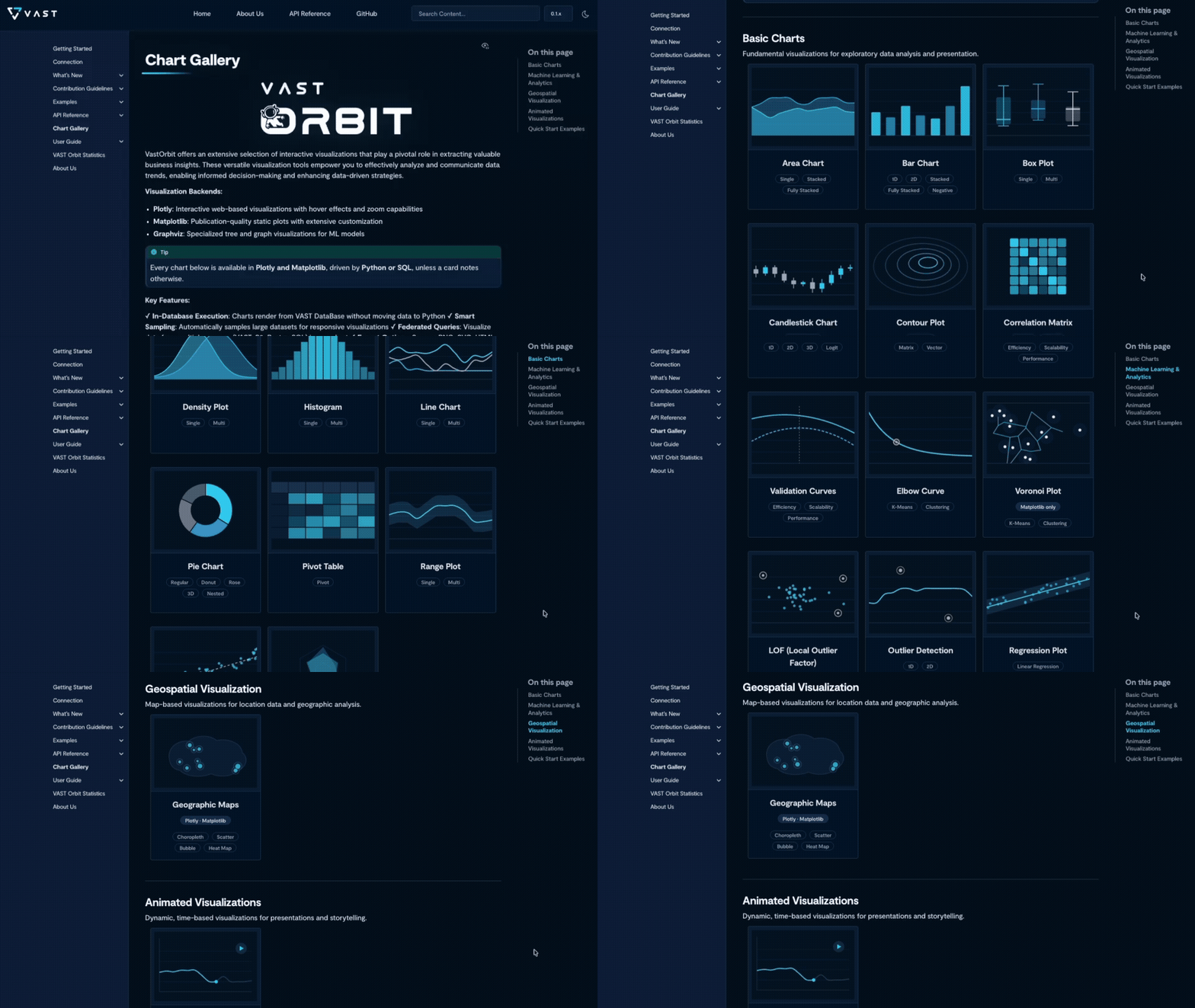
VAST Orbit comes integrated with two popular plotting libraries: matplotlib and Plotly. A gallery of VAST Orbit-generated charts is available in the documentation.
Complete Machine Learning Pipeline
Data Ingestion
VAST Orbit allows users to ingest data from a diverse range of file formats including CSV, JSON, and more formats coming in the future. VAST Orbit automatically infers data types during ingestion, though the inferred types may not always be optimal for your specific use case.
CSV Example:
import vastorbit as vo

vo.read_csv(
    "/path/to/your/data.csv",
    table_name="my_table",
)
JSON Example:
import vastorbit as vo

vo.read_json(
    "/path/to/your/data.json",
    table_name="my_table",
)
Note: VAST Orbit performs automatic type inference during data ingestion. However, the automatically inferred data types may not always be optimal for your specific use case. You can explicitly specify data types if needed.
Data Exploration
VAST Orbit provides extensive options for descriptive and visual exploration.
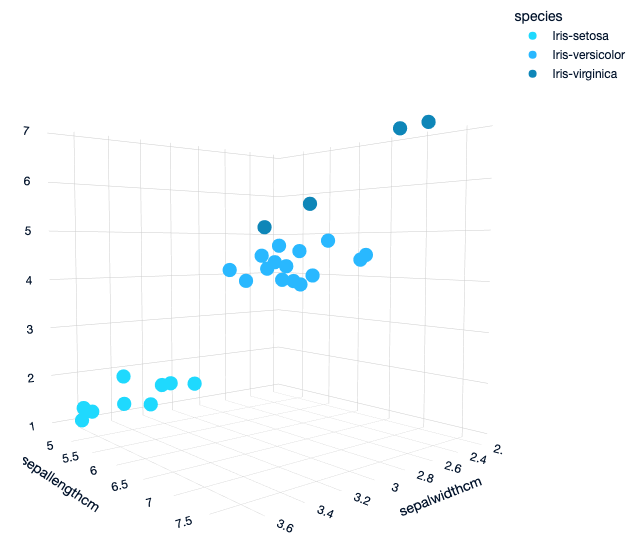
Scatter Plot Example:
from vastorbit.datasets import load_iris

iris_data = load_iris()
iris_data.scatter(
    ["SepalWidthCm", "SepalLengthCm", "PetalLengthCm"],
    by="Species",
    max_nb_points=30
)
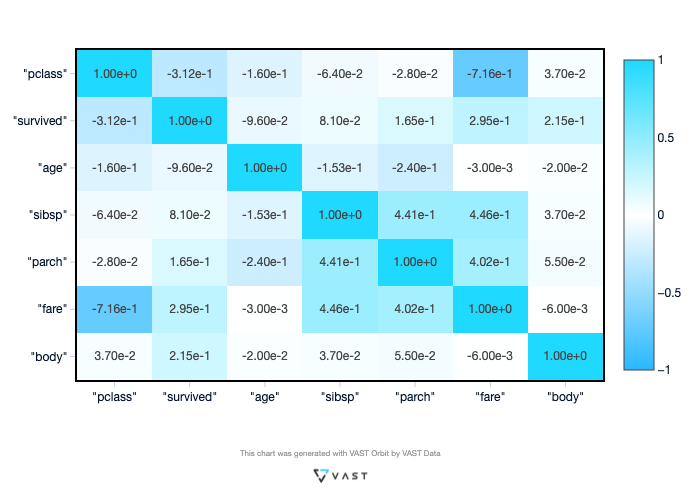
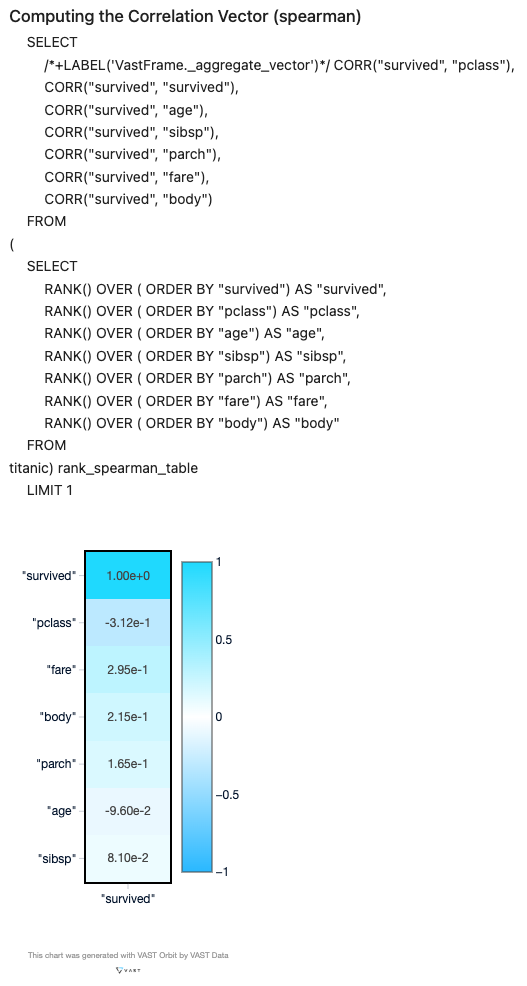
The Correlation Matrix is fast and convenient to compute. Users can choose from a wide variety of correlations, including Cramer, Spearman, Pearson, etc.
from vastorbit.datasets import load_titanic

titanic = load_titanic()
titanic.corr(method="spearman")
By turning on the SQL print option, users can see and copy SQL queries:
from vastorbit import set_option

set_option("sql_on", True)
VAST Orbit allows users to calculate a focused correlation using the "focus" parameter:
titanic.corr(method="spearman", focus="survived")
Data Preparation
VAST Orbit provides comprehensive data preparation capabilities including joining tables, encoding categorical variables, and filling missing values. Refer to the documentation for detailed examples.
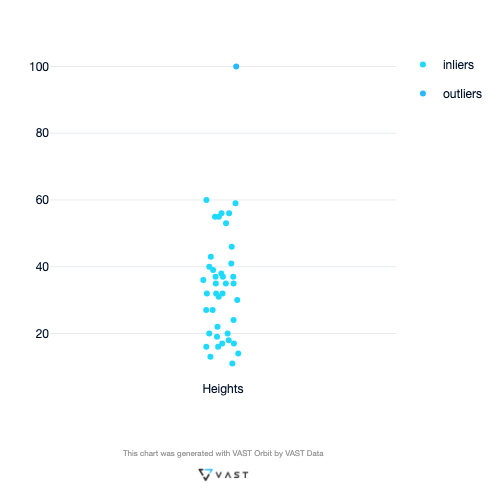
Outlier Detection Example:
import random
import vastorbit as vo

data = vo.VastFrame({"Heights": [random.randint(10, 60) for _ in range(40)] + [100]})
data.outliers_plot(columns="Heights")
Machine Learning
VAST Orbit's machine learning capabilities let you build models using the familiar scikit-learn API and evaluate them with rich, visual tooling. VAST Orbit supports a wide array of algorithms including time series forecasting, clustering, regression, and classification.
Key idea: build with scikit-learn syntax, then deploy in-database for predictions.
Note (beta): As of now, most models are trained using scikit-learn (in-memory) and can then be deployed in-database for prediction. In-database deployment is available for many algorithms but carries some limitations depending on the model, and a number of in-database ML features are still beta. Native in-database training is planned. See Project Status & Roadmap.
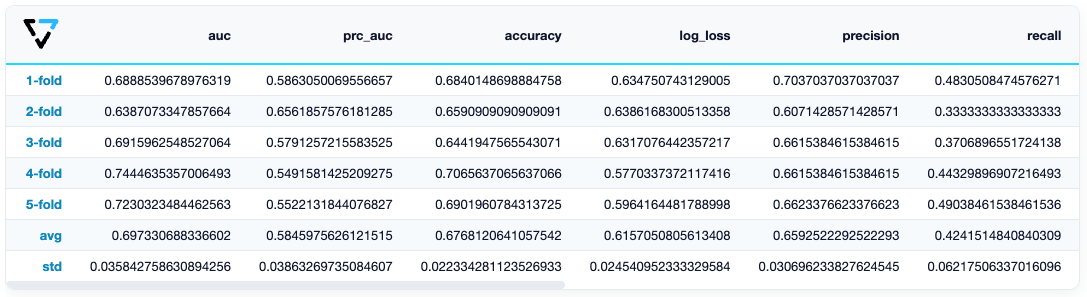
Example with Logistic Regression:
from vastorbit.machine_learning.model_selection.model_validation import cross_validate
from vastorbit.machine_learning.vast import LogisticRegression

# Imputing missing values
titanic_vd.fillna()

# Create and evaluate model
model = LogisticRegression()

cross_validate(
    model,
    titanic_vd,
    X=["age", "fare", "parch", "pclass"],
    y="survived",
    cv=5,
)
Loading Predefined Datasets
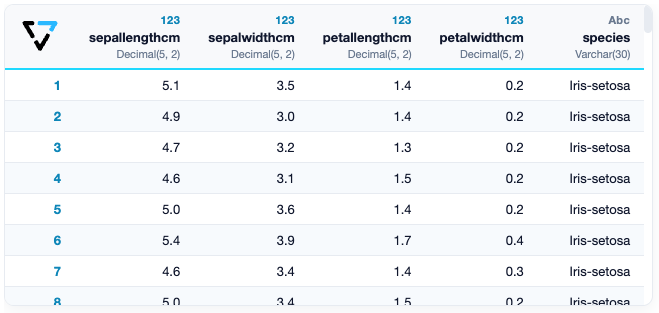
VAST Orbit provides some predefined datasets that can be easily loaded for testing and learning. These datasets include the iris dataset, titanic dataset, and more.
There are two ways to access the provided datasets:
(1) Use the standard Python method:
from vastorbit.datasets import load_iris

iris_data = load_iris()
(2) Use the standard name of the dataset from the schema:
import vastorbit as vo

iris_data = vo.VastFrame(input_relation="public.iris")
Quickstart
Install the library with pip:
# beta: --pre required until 1.0.0
pip3 install --pre vastorbit[all]
Create a new VAST connection through Trino:
import vastorbit as vo

vo.new_connection({
    "host": "your-trino-host",
    "port": "8080",
    "database": "your_database",
    "user": "your_username"},
    name="VAST_Connection")
Use the newly created connection:
vo.connect("VAST_Connection")
Create a VastFrame from your data:
from vastorbit import VastFrame

vdf = VastFrame("database.schema.my_table")
Load a sample dataset:
from vastorbit.datasets import load_titanic

vdf = load_titanic()
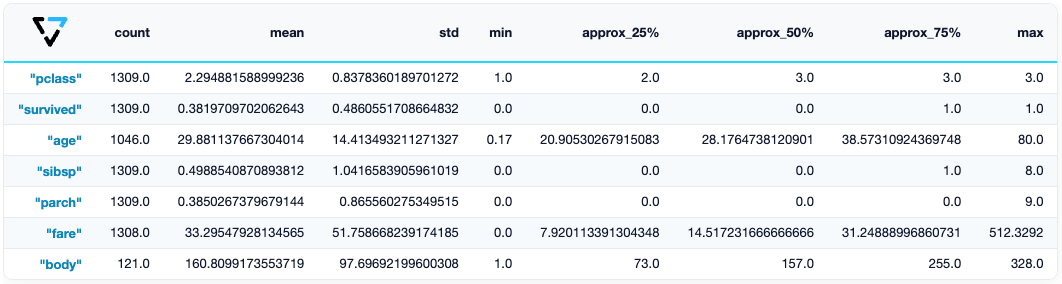
Examine your data:
vdf.describe()
Print the SQL query with set_option:
from vastorbit import set_option

set_option("sql_on", True)
vdf.describe()

# Output
# SELECT
#   COUNT(*) AS count,
#   AVG(pclass) AS avg_pclass,
#   AVG(survived) AS avg_survived,
#   AVG(age) AS avg_age,
#   ...
# FROM titanic
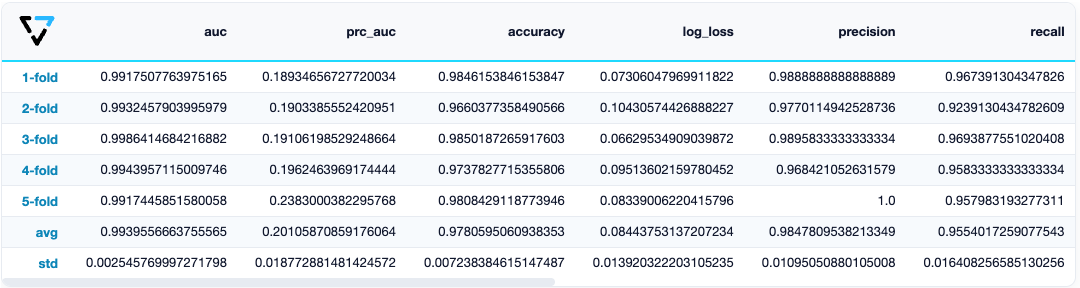
With VAST Orbit, you can solve ML problems with few lines of code:
from vastorbit.machine_learning.vast import LogisticRegression
from vastorbit.machine_learning.model_selection.model_validation import cross_validate

# Data Preparation
vdf["sex"].label_encode()["boat"].fillna(method="0ifnull")["name"].str_extract(
    r" ([A-Za-z]+)\."
).eval("family_size", expr="parch + sibsp + 1").drop(
    columns=["cabin", "body", "ticket", "home.dest"]
)[
    "fare"
].fill_outliers().fillna()

# Model Training and Evaluation
model = LogisticRegression()

cross_validate(
    model,
    vdf,
    X=["age", "family_size", "sex", "pclass", "fare", "boat"],
    y="survived",
    cv=5,
)
Train and deploy the model:
# Train the model
model.fit(
    vdf,
    X=["age", "family_size", "sex", "pclass", "fare", "boat"],
    y="survived"
)

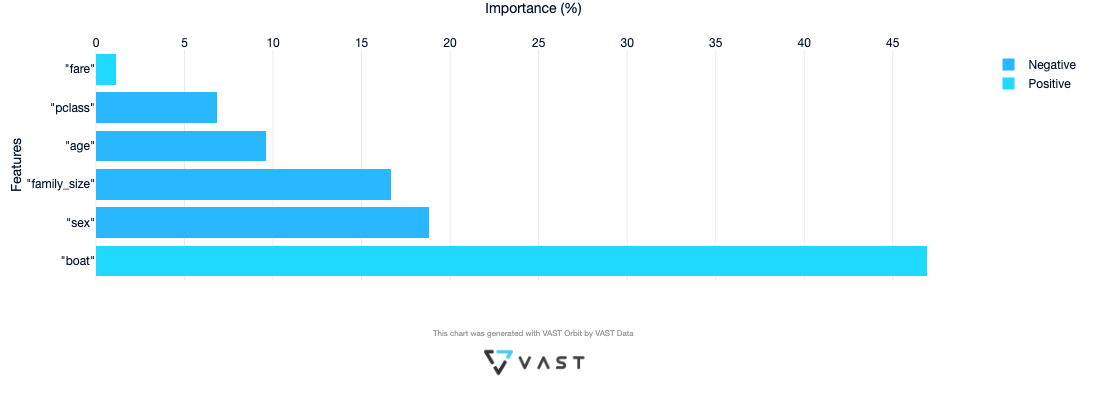
# Feature importance
model.features_importance()
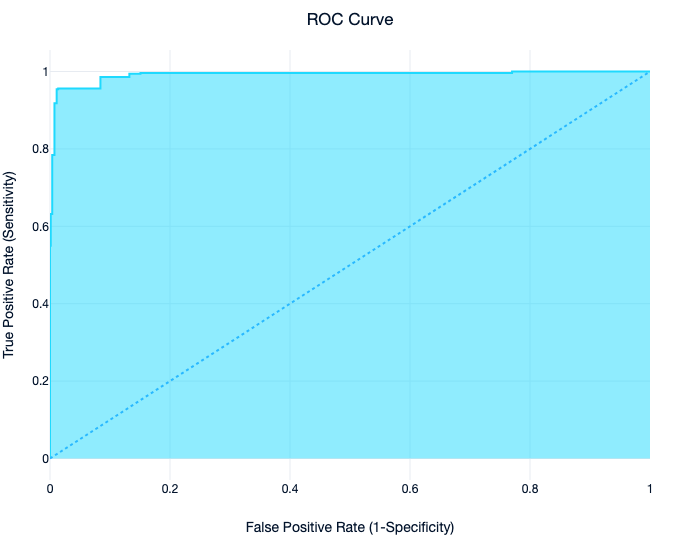
ROC Curve:
# ROC Curve
model.roc_curve()
Once trained, the model can be deployed in the database for high-performance predictions (in-database deployment availability and limitations vary by algorithm — see Project Status & Roadmap).
Enjoy!
Help and Support
- Contributing: see the contribution guidelines.
- Documentation: vast-data.github.io/Orbit.
- Community: join our Slack channel at vastsupport.slack.com.
1 maintainer

Download files
Download the file for your platform. If you're not sure which to choose, learn more about installing packages.
Source Distribution
Built Distribution
Filter files by name, interpreter, ABI, and platform.
If you're not sure about the file name format, learn more about wheel file names.
Copy a direct link to the current filters
File details
Details for the file vastorbit-0.1.0b2.tar.gz.
File metadata
- Download URL: vastorbit-0.1.0b2.tar.gz
- Upload date:
- Size: 2.0 MB
- Tags: Source
- Uploaded using Trusted Publishing? No
- Uploaded via:
twine/6.1.0 CPython/3.13.12
File hashes
| Algorithm | Hash digest | |
|---|---|---|
| SHA256 |
886abd0c70a8f7d0f6e7c5df75c0a56f9f58f5b72232d1bec983119aab71d978
|
|
| MD5 |
e315fa0056178ef68b4b93f208a6b1f0
|
|
| BLAKE2b-256 |
43aa2ee8f284d28efc37adf3f13d610518d52d800b35d8e3f5342653ffe94a98
|
File details
Details for the file vastorbit-0.1.0b2-py3-none-any.whl.
File metadata
- Download URL: vastorbit-0.1.0b2-py3-none-any.whl
- Upload date:
- Size: 2.2 MB
- Tags: Python 3
- Uploaded using Trusted Publishing? No
- Uploaded via:
twine/6.1.0 CPython/3.13.12
File hashes
| Algorithm | Hash digest | |
|---|---|---|
| SHA256 |
820d9a19fa3b872f7563b5b75ea25d6783686d7e56ce6ae583f07b0802e0904c
|
|
| MD5 |
190e542a78e5d8481ae3fd2337160e02
|
|
| BLAKE2b-256 |
54bfa248abba2e607a1de3459288d47d4a61e9ac463fe17c8495ea485cb63ffd
|







