

vaultspec-rag: Semantic search for vault and code
vaultspec-rag is the companion search toolkit for vaultspec-core: a semantic retrieval engine for codebases and the architecture decisions behind them, and the retrieval half of retrieval-augmented generation (RAG) for coding agents. It indexes source code, decision records, and documents on your own hardware, and answers each query with hybrid retrieval: dense semantic embeddings fused with sparse exact-term matching, reranked by a cross-encoder over each candidate's full content and, optionally, by Typesafe's hosted relevance judgments. A single GPU-resident service serves every repository on the machine, keeps its indexes current, and exposes search to the command line and to AI agents over the Model Context Protocol (MCP). It's in beta.





Install · Search · AI assistants · Commands · Configuration · How it works · Documentation · Support
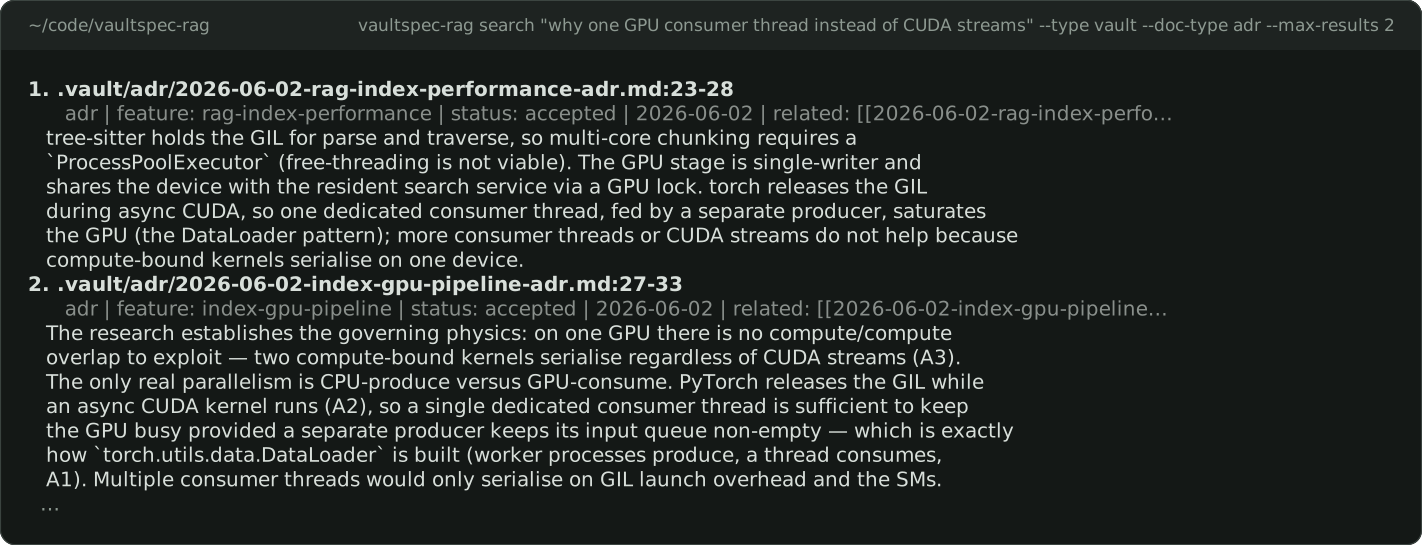
Ask why, and the answer comes back as the decision record's own passage.
Install
vaultspec-rag has two parts. A background service runs the search models on your GPU.
The vaultspec-rag command and your AI assistant send it requests. One service serves
every repository on the machine.
- Install the host once per machine. It carries the service and its GPU packages.
- Set up each repository you want to search, then start the service.
- Index and search.
Already running a host, and a Python project needs vaultspec-rag as a dependency? Add a client instead. A client has no GPU packages and sends every request to the host's service.
What you need
- An NVIDIA GPU with CUDA on Windows or Linux, or Apple silicon on macOS. vaultspec-rag doesn't run on a CPU or on AMD GPUs.
- 16 GiB of system memory and 12 GiB of free GPU memory for the default profile. The
smaller
embedded-localprofile needs 8 GiB and 6 GiB; see Configuration. - uv. vaultspec-rag supports Python 3.13 and 3.14, and uv downloads an interpreter if needed.
- A few gigabytes of disk for a one-time model download.
Install the host
On Windows x64, or Linux x86_64 or aarch64 with glibc 2.28 or newer:
uv tool install --python 3.13 "vaultspec-rag[gpu,mcp]" --index https://download.pytorch.org/whl/cu130 --index-strategy unsafe-first-match
On Apple silicon:
uv tool install --python 3.13 "vaultspec-rag[gpu,mcp]"
The two extras do different jobs:
[gpu]adds PyTorch and the model libraries. The service needs them.[mcp]adds the adapter your AI assistant launches. Installing it here means the assistant runs the same release as the service.
The two --index options keep the CUDA build of PyTorch on every later
uv tool upgrade. If uv says its tool directory isn't on your PATH, run
uv tool update-shell and open a new terminal.
Download public models
Search uses three public models from Hugging Face. The sparse encoder,
Linkup-Platform/linkup-sparseup-embed-v1,
uses ModernBERT SPARSEUP to match terms such as function names. Model acquisition
needs no account setup. The first repository setup downloads the model files;
later repositories reuse the cache.
Existing indexes created before version 0.6.0 need a full rebuild after upgrading the host and restarting its service:
vaultspec-rag --target <repository> index --rebuild --type all
Run this for every indexed repository; the changed sparse vocabulary cannot mix with previously stored vectors.
Set up each repository
From the root of each repository you want to search:
vaultspec-rag install --no-torch-config
Setup connects your AI assistant and creates the .vault/ folder for decision records.
The first run also downloads the models and Qdrant, the index server; later
repositories reuse them. If either is still missing when you start the service,
server start downloads it then. --no-torch-config leaves the repository's own PyTorch
settings alone, because the host carries its own.
Start the service and check it:
vaultspec-rag server start
vaultspec-rag server doctor
server start also launches the local browser monitor and prints its Monitor:
URL. Open that URL on the service's machine. The compiled vaultspec-rag-monitor
command must be installed; see browser monitor setup.
vaultspec-rag server stop stops the service and its monitor together.
server start returns once the models are loaded. The service doesn't come back by
itself after a reboot, so start it again then. server doctor should report your GPU,
every model, and the Qdrant binary as ready:
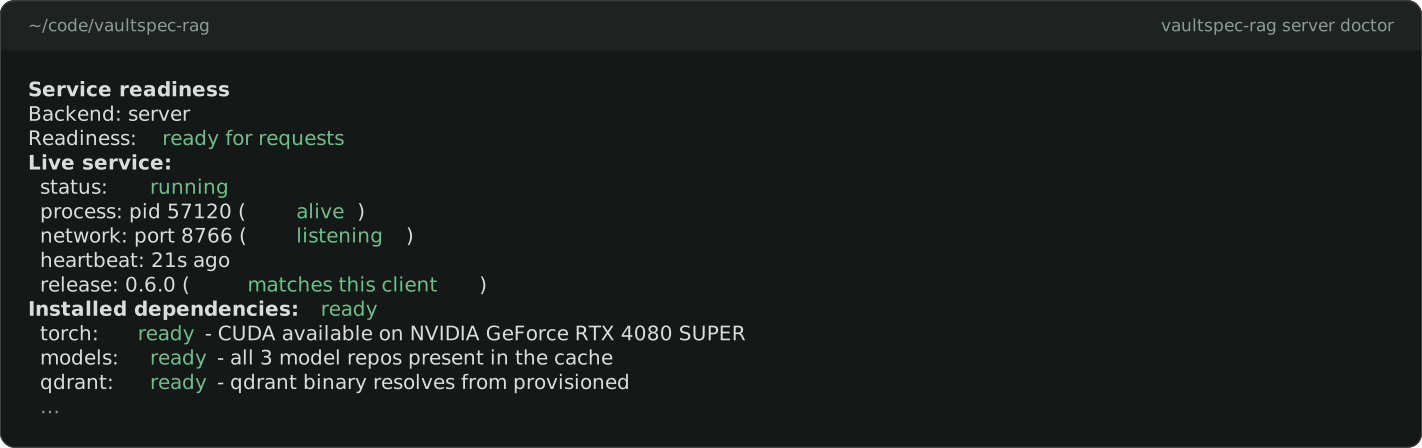
If it reports a problem, the troubleshooting guide explains each finding.
Add a client to a Python project
A client puts vaultspec-rag in a project's own environment, so collaborators get it with
uv sync. It has no GPU packages. Each collaborator still needs a host on their own
machine at the release the project pins, because a client refuses a service from
another release.
-
On the host, read the release from the
Service release:line:vaultspec-rag server status --verbose
-
From the project root, add the client at that release. With
[mcp], your AI assistant can search too:uv add --dev "vaultspec-rag[mcp]==<release>" uv run vaultspec-rag install --mode dev
For the command line alone, leave out the extra and add
--no-mcp:uv add --dev "vaultspec-rag==<release>" uv run vaultspec-rag install --mode dev --no-mcp
-
Check it with
uv run vaultspec-rag server doctor. Its release line should end in(matches this client).
Prefix client commands with uv run. Start and stop the service from the host.
Search
From the root of the repository, index it:
vaultspec-rag index
This queues indexing jobs for the code, the decision records, and any documents, and
prints their IDs. Follow them with vaultspec-rag server jobs --watch. The first run
takes a while. After that, the service watches for file changes and keeps the index
current by itself.
When no search type is specified (no --type), search defaults to source code
and architecture decision records (ADRs), ranked together:
vaultspec-rag search "accelerator selection and its rationale"
Use --type code for source code only, --type vault for all vault record types,
or --type combined for all three indexes, including extracted documents.
To find code, describe what it does. The words don't have to appear in the code:
vaultspec-rag search "pick CUDA before Apple MPS and never fall back to the CPU" --type code
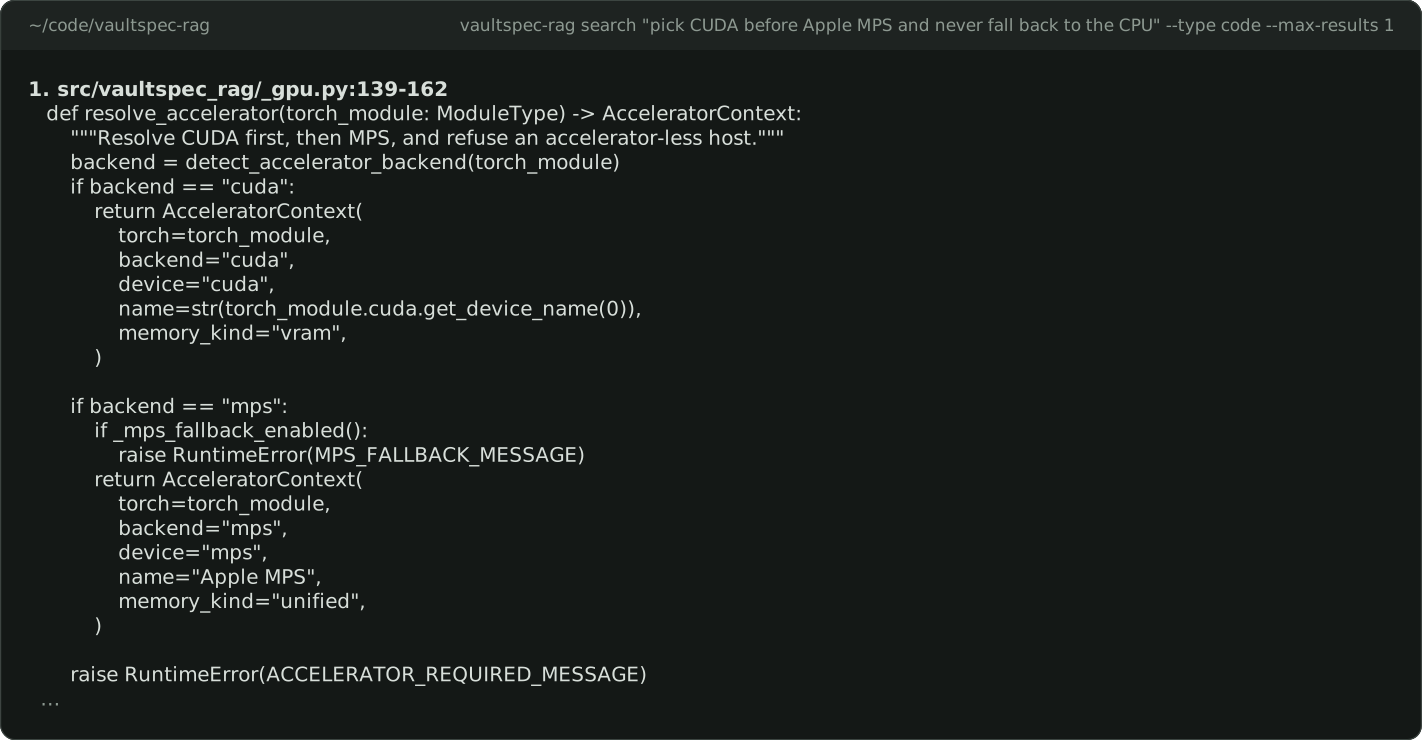
To find out why, ask the decision records with --type vault, as in the capture at the
top of this page. Add --doc-type adr for architecture decision records (ADRs) only.
Each result names the record's type, feature, status, and date, then shows the passage
that matches.
Code search ranks production code first. It demotes tests, docs, translations, and vendored code, and hides generated files and worktree copies. Filters narrow further:
only:prodorexclude:testsin the query keeps or drops a kind of file.--include-path "src/**"and--language pythonnarrow by place and language.--doc-type adr,planpicks record types in a vault search.
Locale variants with similar relevance scores collapse into one representative
result by default. Use --no-dedup-locales to inspect every variant, or --dedup-locales to
enable collapse for a search. Use --prefer production, --prefer tests, or
--prefer documentation to favor that kind of code in the ranking while keeping
other results:
vaultspec-rag search "translation lookup" --type code --no-dedup-locales
vaultspec-rag search "encode batch" --type code --prefer tests
Writing queries explains how to phrase a query and every filter.
To index PDFs and other formats, add a
converter.
Converters run without a sandbox, with your account's permissions, so a
repository's .vaultragpreprocess.toml runs nothing until you approve it with
vaultspec-rag preprocess approve, and any change to it needs approval again.
vaultspec-rag preprocess list shows the rules without running them.
Use it from an AI assistant
vaultspec-rag install registers vaultspec-rag as a Model Context Protocol (MCP) server
in the repository's assistant configuration. Your assistant can then call these tools:
search_codebase,search_vault,search_documents, andsearch_combinedsearch by meaning.get_code_filereads an indexable source file, andget_index_statusreports index health.- Four
reindex_*tools rebuild indexes, andclean_documentsandclean_alldelete them.
To give the assistant search without the tools that change or delete indexes, see withholding the mutating tools. The MCP guide covers configuration by hand and troubleshooting.
vaultspec-rag pairs with
vaultspec-core, which has your agent write
its research, decisions, and plans into .vault/. vaultspec-rag makes them searchable.
It works without vaultspec-core too, on any Markdown you keep in .vault/.
Everyday commands
A client runs each of these with the uv run prefix.
| Command | What it does |
|---|---|
vaultspec-rag server start |
Starts the service and waits until the models are loaded. |
vaultspec-rag server status |
Shows whether the service is running, what it's working on, and what to do next. |
vaultspec-rag server doctor |
Checks the GPU, models, Qdrant, and service. Exits 0 when ready, 1 on warnings, and 2 on errors. |
vaultspec-rag index |
Queues indexing of the current repository. Add --type code, vault, or document for one kind. |
vaultspec-rag server jobs --watch |
Opens a live view of indexing jobs. Without --watch, it prints a bounded list. |
vaultspec-rag search "<query>" --type code |
Searches by meaning. Use --type vault for decision records, and --json for scripts. |
vaultspec-rag server stop |
Stops the service. |
uv tool upgrade vaultspec-rag |
Upgrades the host. Stop and start the service afterwards so it runs the new release. |
vaultspec-rag uninstall --dry-run |
Previews removing the setup from this repository. Run it with --force to remove it. |
For every command and flag, see the CLI reference. For JSON output and exit codes, see scripting and automation.
Configuration
vaultspec-rag works without configuration. Environment variables change its behaviour.
Most of them configure the service, so set them where the service starts: in your user
environment, or in the shell that runs vaultspec-rag server start. Then stop and start
the service. Setting them in another shell doesn't change a running service.
| Variable | Default | What it does |
|---|---|---|
VAULTSPEC_RAG_SPARSE_ENABLED |
1 |
0 searches on meaning alone and never downloads the sparse model. Reindex after changing it. |
HF_HOME |
~/.cache/huggingface |
Where the models are downloaded and cached. |
VAULTSPEC_RAG_INDEX_SUPPORT_PROFILE |
managed-service |
embedded-local for machines with 8 GiB of memory and 6 GiB of free GPU memory. |
VAULTSPEC_RAG_TYPESAFE_API_KEY |
unset | Turns on optional hosted ranking from Typesafe, a paid service. See below. |
VAULTSPEC_RAG_PORT |
8766 |
The service's port. Commands and assistants find the service without it. |
VAULTSPEC_RAG_STATUS_DIR |
~/.vaultspec-rag |
Where the service keeps its status, logs, and the address that commands read. |
A project's .env file supplies the Typesafe key only when vaultspec-rag
runs from that project's environment, never for a host installed as a uv tool. The
configuration reference
lists every variable.
By default the index lives in a managed Qdrant server shared by every repository. To keep
each repository's index on disk in its .vault/ folder instead, set the
embedded-local profile and follow
backend setup.
With a valid, funded VAULTSPEC_RAG_TYPESAFE_API_KEY, Typesafe interprets each query
and reranks the results on their full content; How it works describes
both steps. vaultspec-rag server status shows whether it's on. Without a usable key, search keeps
its local ranking. The GPU and local models are still required either way.
How it works
You don't need this section to use vaultspec-rag. It's here for when you want to know why a result ranked where it did.
- Indexing. Source code is split into function- and class-sized chunks, and records
into sections. Each chunk is encoded twice: by
Qwen/Qwen3-Embedding-0.6Bfor meaning, and byLinkup-Platform/linkup-sparseup-embed-v1for exact terms. The vectors go into Qdrant, one namespace per repository. - Search. The query is encoded the same two ways, and the two candidate lists are
merged by rank. A cross-encoder,
BAAI/bge-reranker-v2-m3, then reads the query beside each candidate's full content and reorders them. - Hosted ranking, when enabled. With a Typesafe key, two steps join the search. First, Typesafe reads the query and names what it's after: code or a decision, production code or tests. Where you didn't say, that sets the defaults. Then, after the local reranker, it judges up to 64 of the top candidates on their full content, one clause at a time for a compound question. Its judgment replaces the local score. It drops a result only when every clause rates it confidently not useful, so uncertainty never removes anything. If Typesafe fails or runs out of time, that search keeps its local ranking.
- Results. Code results are demoted or hidden by kind of file, as Search describes. Vault results are grouped per record, and each shows the passage that best answers the query.
- The service. The models load once, on the GPU, and stay loaded for every repository and assistant on the machine. They're too slow to be useful on a CPU. A file watcher queues reindexing when files change.
Architecture and indexing internals go deeper.
Documentation
| Guide | Purpose |
|---|---|
| Getting started | Install, index, and run a first search, step by step. |
| Installation | Every install route, upgrades, removal, and fixes. |
| Provisioning | What is downloaded, how it is checked, and offline use. |
| Writing queries | Phrase a query, and narrow the results with filters. |
| Worked searches | Real queries and what they return. |
| Search and index | Every search option, and rebuilding or cleaning indexes. |
| Checking the index | Find out why a result is missing. |
| Running the service | Observe, pause, and control the service and its jobs. |
| MCP guide | Connect an AI assistant and choose its tools. |
| Configuration reference | Every environment variable and its default. |
| CLI reference | Look up commands and flags. |
| Glossary | The terms these guides use. |
Support and license
vaultspec-rag is in beta. Report bugs, ask questions, or propose changes on the issue tracker. Include your version, operating system, GPU, the command, and its output, with credentials and private content removed. Release notes are in the changelog.
Released under the MIT License.
1 maintainer

Metadata
1 maintainer
Release files for vaultspec-rag 0.6.0
For a detailed explanation of source distributions (sdists) and built distributions (wheels), please see the package formats documentation.
Source distribution (sdist)
| File | Size | Uploaded | |
|---|---|---|---|
| vaultspec_rag-0.6.0.tar.gz | 7.5 MB | Details |
Built distribution (wheel)
| File | Interpreter | ABI | Platform | Reset |
|---|---|---|---|---|
| vaultspec_rag-0.6.0-py3-none-any.whl | Python 3 | none | any | Details |
Total release size: 9.3 MB
Release files / vaultspec_rag-0.6.0.tar.gz
| Download URL | vaultspec_rag-0.6.0.tar.gz |
|---|---|
| Size | 7.5 MB |
| Tags | Source |
|
SHA-256 checksum How to use checksums |
8c201841eb46c85fe599ff6f1f4431c75cdf4dd70d9b1be9995067ea906a4c72
|
|
BLAKE2b-256 checksum How to use checksums |
6202a8ba4340660cdc5faac63f6db00eb432ba0fdd5aec1efaeb7d7c88c83d23
|
| Upload date | |
|
Uploaded using Trusted Publishing? What is trusted publishing? |
Yes |
| Uploaded via |
uv/0.12.23 {"installer":{"name":"uv","version":"0.12.23","subcommand":["publish"]},"python":null,"implementation":{"name":null,"version":null},"distro":{"name":"Ubuntu","version":"24.04","id":"noble","libc":null},"system":{"name":null,"release":null},"cpu":null,"openssl_version":null,"setuptools_version":null,"rustc_version":null,"ci":true}
|
Release files / vaultspec_rag-0.6.0-py3-none-any.whl
| Download URL | vaultspec_rag-0.6.0-py3-none-any.whl |
|---|---|
| Size | 1.8 MB |
| Tags | Python 3 |
|
SHA-256 checksum How to use checksums |
a339a70a99aede4ecb0567a8beb3460854bd18f792df88429a79c20e4c146a36
|
|
BLAKE2b-256 checksum How to use checksums |
4070b1d32688a8d38f3c3f7df5397308672c71b0f26858e49ce679d31c1435d3
|
| Upload date | |
|
Uploaded using Trusted Publishing? What is trusted publishing? |
Yes |
| Uploaded via |
uv/0.12.23 {"installer":{"name":"uv","version":"0.12.23","subcommand":["publish"]},"python":null,"implementation":{"name":null,"version":null},"distro":{"name":"Ubuntu","version":"24.04","id":"noble","libc":null},"system":{"name":null,"release":null},"cpu":null,"openssl_version":null,"setuptools_version":null,"rustc_version":null,"ci":true}
|














