

VisiLens
Excel for Developers
Open 1M+ rows in seconds. Local, fast, simple.
A high-performance, local-first web GUI for exploring datasets. Instantly view and filter CSV, Parquet, Excel, and JSON files using the power of VisiData.







English • 简体中文 • Español • 日本語 • Русский
Features • Installation • Usage • Architecture • Contributing
📦 Package Name Notice
The PyPI package name isvdweb(install withpip install vdweb), but you can use eithervisilensorvdwebas the command-line tool after installation. We recommend usingvisilensfor consistency with the project name.
🚀 Why VisiLens?
Data exploration shouldn't require writing boilerplate Pandas code or waiting for heavy spreadsheet software like Excel to load. VisiLens is a modern CSV viewer and Parquet explorer that combines the raw speed of VisiData with a lightweight web interface.
- ⚡️ Load 1M rows in under 2 seconds: Powered by VisiData's highly optimized engine.
- 🔒 All local: Your data never leaves your machine. No cloud uploads.
- 🛠 Zero config: CLI-first workflow. Pipe data in, explore, and get back to coding.
- 🔌 Universal Support: Open CSV, TSV, JSON, Parquet, Excel, SQLite, and 50+ other formats.
✨ Features
- Instant Data Visualization: Just run
visilens data.csvto visualize large datasets instantly. - Backend-powered Sorting & Filtering: Perform complex queries on millions of rows using the VisiData engine.
- Column Manipulation: Change column types, rename columns, and edit data with an intuitive context menu.
- Advanced Filtering: Apply multiple filter conditions with support for regex pattern matching.
- Lightweight Data Grid: A virtualized React-based table view for smooth scrolling.
- Zero Config: No database setup required. Works as a standalone CSV/Parquet viewer.
📂 Supported Formats
VisiLens leverages VisiData's loaders to support a wide range of formats out of the box:
- Tabular:
.csv,.tsv,.xlsx(Excel),.parquet - Structured:
.json,.jsonl,.yaml - Database:
.sqlite,.db - Code:
.pcap(Wireshark),.xml,.htmltables
📊 Benchmarks
We take performance seriously. Here is how VisiLens compares when opening a 1,000,000 row CSV dataset on a standard MacBook Air (M2).
| Tool | Load Time (1M Rows) | Memory Footprint | Interactive Sorting |
|---|---|---|---|
| VisiLens | ~1.7s | Minimal (< 50MB Total) | Instant (Backend: < 0.4s) |
| Excel | > 30s (Often Fails) | High (Blocking RAM) | Slow/Unresponsive |
| Pandas-based GUI | > 15s (Cold Start) | High (Entire DF in RAM) | Sluggish (Non-Virtualized) |
| Jupyter (print df) | Fast | Medium | Static Text |
Test Data: 1M rows, 3 columns (Mixed types). Numbers are from my MacBook Air M2 during real development use.
📦 Installation
VisiLens is available as a Python package.
pip install visilens
Note: VisiLens requires Python 3.10 or higher.
💻 Usage
Command Line Interface
The primary way to use VisiLens is via the command line.
# Open a CSV file
visilens data.csv

# Open a Parquet file
visilens large-dataset.parquet

# Open an Excel file
visilens spreadsheet.xlsx

# Launch without opening the browser automatically
visilens data.json --no-browser

# Specify a custom port
visilens data.csv --port 9000
Web Interface
Once launched, VisiLens opens in your default browser (usually http://localhost:8000).
- View Data: Scroll through your dataset efficiently.
- Sort: Click column headers to sort ascending/descending.
- Filter: Use the power filter bar to apply complex queries with multiple conditions.
- Column Operations: Right-click column headers to change types, rename columns, or access advanced options.
- Load New Data: (Coming Soon) Drag and drop files directly into the window.
🏗 Architecture
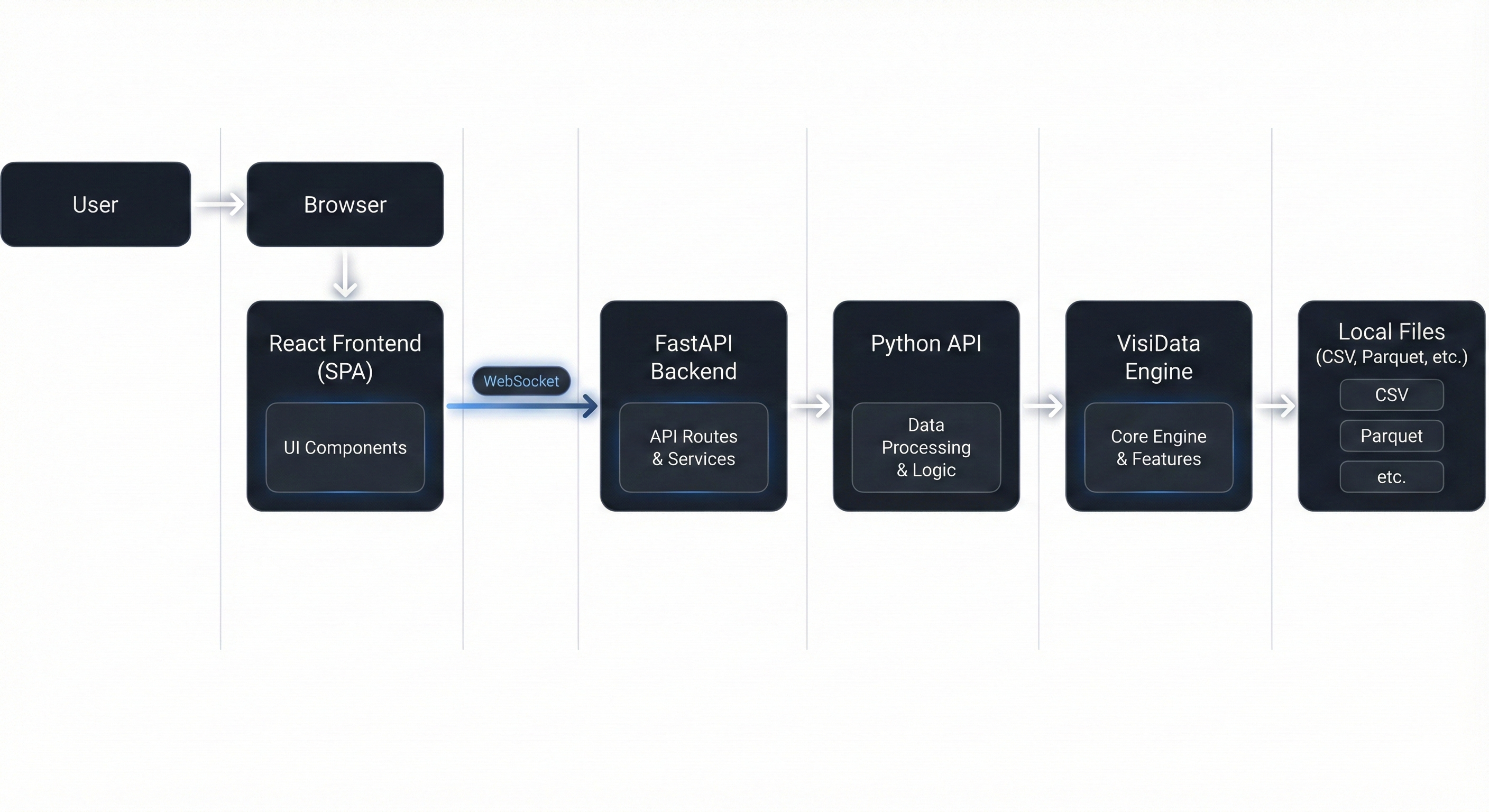
VisiLens is built on a robust modern stack designed for performance:
- Backend: FastAPI server bridges VisiData and the browser.
- Communication: WebSockets stream slices on demand.
- Frontend: React grid renders only what you see.
🗺 Roadmap
We are actively working on making VisiLens the ultimate local data companion.
For a detailed breakdown of our feature strategy and technical implementation plan, please see ROADMAP.md.
- v0.1: Core Engine, Virtual Scrolling, Sorting, Filtering.
- v0.2: Column Type Conversion, Column Renaming, Advanced Filtering, Context Menu.
- Jupyter Integration: Launch VisiLens directly from a notebook cell (
visilens.view(df)). - Drag-and-drop file loading
- Plotting: Quick histograms and scatter plots via Vega-Lite.
- Cell Editing: Edit cells and save changes back to CSV/Parquet.
- SQL Support: Connect directly to SQLite/Postgres/DuckDB.
🛠 Development
Want to contribute? Great! Here's how to set up the development environment.
Prerequisites
- Python 3.10+
- Node.js 18+
- npm or pnpm
Setup
-
Clone the repository
git clone https://github.com/PStarH/VisiLens.git
cd VisiLens
-
Backend Setup
# Create virtual environment
python -m venv .venv
source .venv/bin/activate  # or .venv\Scripts\activate on Windows

# Install dependencies
pip install -e ".[dev]"
-
Frontend Setup
cd frontend
npm install
-
Run Locally
Terminal 1 (Backend):
uvicorn backend.main:app --reload --port 8000
Terminal 2 (Frontend):
cd frontend
npm run dev
- Build frontend assets (optional)
If you prefer to run only the Python CLI (without a separate Vite dev server), you can build the frontend once:
cd frontend
npm run build
This produces a production bundle under frontend/dist/ which is copied into vdweb/static/ for releases. End users then just run:
visilens path/to/data.csv
🤝 Contributing
For more details, please see CONTRIBUTING.md.
For Contributors: where things live
- Python package (
vdweb/): This is the installable package published to PyPI asvdweb. The CLI entrypointsvisilensandvdwebboth resolve tovdweb.cli:mainas configured inpyproject.toml. - Dev backend (
backend/): A separate FastAPI app used only for local development (uvicorn backend.main:app). It mirrors the behavior of the packaged backend but is not what users import when they installvisilens. - Core logic: The VisiData-powered data access layer lives in
vdweb/core.py(and is mirrored inbackend/core.pyfor the dev app). If you want to change how data is loaded/sorted/filtered, start here.
Typical contributor workflow
- Edit backend / core logic in
vdweb/(and updatebackend/if needed for dev parity). - Run the dev backend + frontend locally as described in Development.
- If you change the React app and want those changes to ship, run
npm run buildinfrontend/so the bundle that will be copied intovdweb/static/is up to date.
📄 License
This project is licensed under the MIT License - see the LICENSE file for details.
1 maintainer

Metadata
1 maintainer
Release files for vdweb 0.2.0
For a detailed explanation of source distributions (sdists) and built distributions (wheels), please see the package formats documentation.
Source distribution (sdist)
| File | Size | Uploaded | |
|---|---|---|---|
| vdweb-0.2.0.tar.gz | 201.7 kB | Details |
Built distribution (wheel)
| File | Interpreter | ABI | Platform | Reset |
|---|---|---|---|---|
| vdweb-0.2.0-py3-none-any.whl | Python 3 | none | any | Details |
Total release size: 400.6 kB
Release files / vdweb-0.2.0.tar.gz
| Download URL | vdweb-0.2.0.tar.gz |
|---|---|
| Size | 201.7 kB |
| Tags | Source |
|
SHA-256 checksum How to use checksums |
dc223dbc0289ba3384b64bbc89a71509172049e2590e8301f32f5682d64513e6
|
|
BLAKE2b-256 checksum How to use checksums |
2a6444dae9d2d92a02eb8ad6a0d0c8d06e6c227bb66e1be0010dc4424e379bec
|
| Upload date | |
|
Uploaded using Trusted Publishing? What is trusted publishing? |
No |
| Uploaded via |
twine/6.2.0 CPython/3.12.2
|
Release files / vdweb-0.2.0-py3-none-any.whl
| Download URL | vdweb-0.2.0-py3-none-any.whl |
|---|---|
| Size | 198.8 kB |
| Tags | Python 3 |
|
SHA-256 checksum How to use checksums |
70d03cd24635ccc878524fc7f610e03f0625bb73de1835a7209d51ebbbe756ac
|
|
BLAKE2b-256 checksum How to use checksums |
83a0420307afe151a57647ead2c0562ad63202622bdfdf91aeb2cba82f65a085
|
| Upload date | |
|
Uploaded using Trusted Publishing? What is trusted publishing? |
No |
| Uploaded via |
twine/6.2.0 CPython/3.12.2
|














