
Cursor-style vector search MCP plugin for Claude Code

Project description
VecGrep



Cursor-style semantic code search as an MCP plugin for Claude Code.
Instead of grepping 50 files and sending 30,000 tokens to Claude, VecGrep returns the top 8 semantically relevant code chunks (~1,600 tokens). That's a ~95% token reduction for codebase queries.
Benchmarks
Measured on the VecGrep codebase itself (5 source files, ~26k tokens raw).
Token usage per query
| Mode | Avg tokens returned | vs raw read | Savings |
|---|---|---|---|
| Raw file read (baseline) | 26,009 | — | — |
search_code (top_k=8) |
~3,007 | 11.6% | 88% |
hybrid_search (top_k=8) |
~3,324 | 12.8% | 87% |
search_graph (limit=8) |
~47 | 0.2% | >99% |
search_graph returns structured node metadata only (name, kind, file, line range) — no source code — so it's ultra-cheap for structural questions ("where is X defined?", "what calls Y?").
Query latency (median, 5 runs)
| Mode | Latency |
|---|---|
search_graph |
~3ms |
hybrid_search |
~76ms |
search_code |
~83ms |
search_graph is ~30× faster than vector search — pure in-memory graph traversal, no embedding model call.
Result correctness (structural queries)
For name-based structural queries, pure vector search can rank documentation (CHANGELOG, README) above source code. The graph index fixes this:
| Query | search_code #1 |
hybrid_search #1 |
|---|---|---|
| "VectorStore search method" | [WRONG] CHANGELOG.md | [OK] store.py |
| "GraphStore build" | [WRONG] CHANGELOG.md | [OK] server.py |
| "embedding provider factory" | [OK] embedder.py | [OK] embedder.py |
| "AST chunking tree-sitter" | [OK] chunker.py | [OK] chunker.py |
The graph score (graph_score: 1.00) overrides a misleading vector match whenever the query directly names a known symbol.
Rule of thumb: use
search_codefor semantic/behaviour queries,search_graphfor structural/navigation queries,hybrid_searchwhen you need both.
How it works
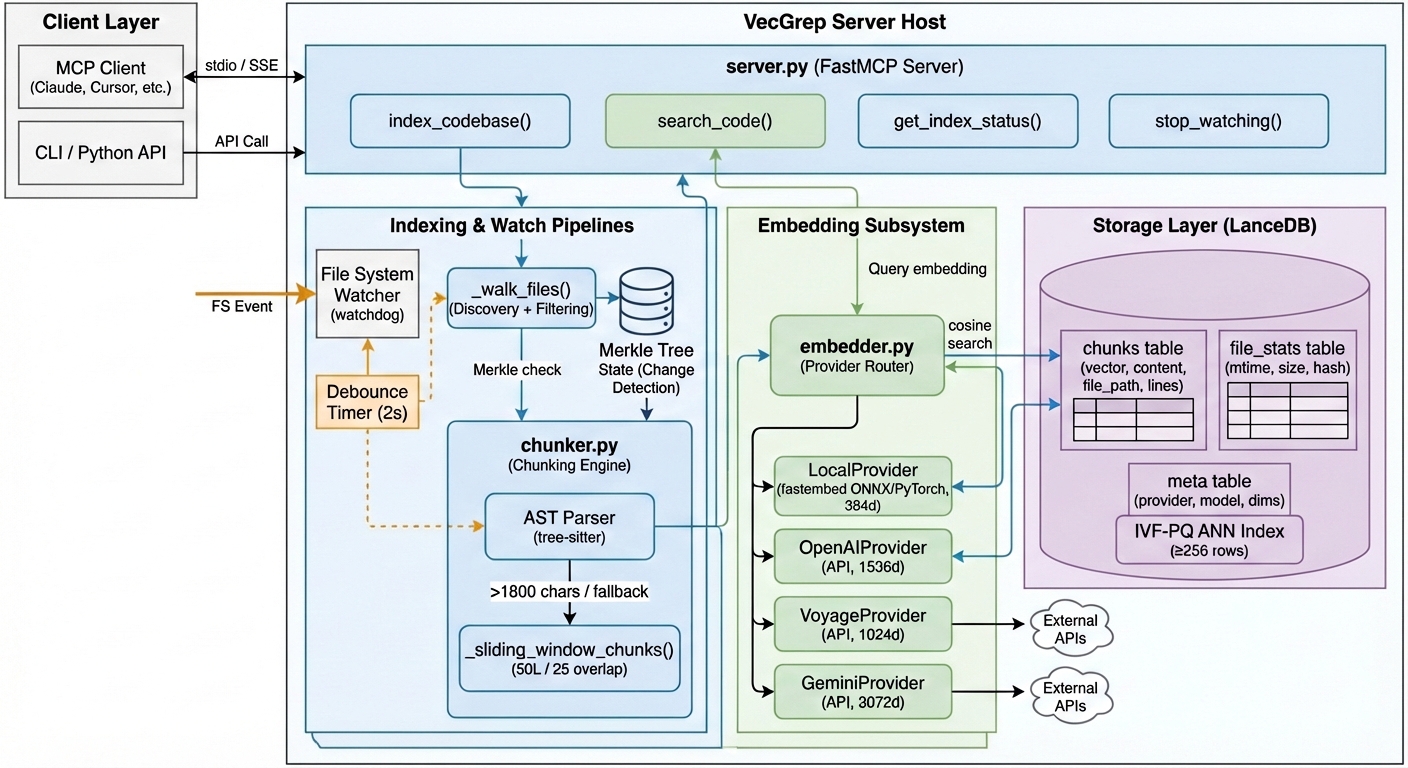
- Chunk — Parses source files with tree-sitter to extract semantic units (functions, classes, methods)
- Embed — Encodes each chunk using the configured embedding provider:
- Local (default) —
all-MiniLM-L6-v2-code-search-512via fastembed ONNX (~100ms startup, no API key) or PyTorch, with auto device detection (Apple Silicon, CUDA, CPU) - Cloud (BYOK) — OpenAI, Voyage AI, or Google Gemini via your own API key (higher-quality embeddings, optional)
- Local (default) —
- Store — Saves embeddings + metadata in LanceDB under
~/.vecgrep/<project_hash>/; vector dimensions adapt automatically to the chosen provider - Search — ANN index (IVF-PQ) for fast approximate search on large codebases
Incremental re-indexing via mtime/size checks skips unchanged files.
Architecture
Installation
Requires Python 3.12 and uv.
Note: Python 3.12 is required —
tree-sitter-languagesdoes not yet have wheels for Python 3.13+.
pip install vecgrep                        # standard pip
uv tool install --python 3.12 vecgrep     # uv tool (recommended)
Claude Code integration
Run once — works for every project:
claude mcp add --scope user vecgrep -- vecgrep
This installs VecGrep as a persistent binary and registers it in your user config (~/.claude.json) so it's available globally across all projects. Starts instantly — no download delay on Claude Code launch.
Usage with Claude
You don't trigger VecGrep manually - Claude decides when to call the tools based on what you ask.
| What you say to Claude | Tool invoked |
|---|---|
| "Index my project at /Users/me/myapp" | index_codebase |
| "How does authentication work in this codebase?" | search_code |
| "Find where database connections are set up" | search_code |
| "How many files are indexed?" | get_index_status |
| "Build a knowledge graph of my project" | index_graph |
| "What calls the VectorStore.search method?" | search_graph + graph_neighbors |
| "Find code structurally related to authentication" | hybrid_search |
Typical first-time flow:
You:    "Search for how payments are handled in /Users/me/myapp"
Claude: [calls index_codebase automatically since no index exists]
Claude: [calls search_code with your query]
Claude: "Here's how payments work — in src/payments.py:42..."
After the first index, subsequent searches skip unchanged files automatically — no re-indexing needed unless your code changes.
Tools
index_codebase(path, force=False, watch=False, provider=None)
Index a project directory. Skips unchanged files on subsequent calls.
index_codebase("/path/to/myproject")
# → "Indexed 142 file(s), 1847 chunk(s) added (0 file(s) skipped, unchanged)"

# Use OpenAI embeddings instead of local
index_codebase("/path/to/myproject", provider="openai")
Provider lock: once a project is indexed with a provider, re-indexing with a different provider requires force=True (this rebuilds the vector table with the new embedding dimensions).
Note: watch=True is only supported with the local provider — live sync with cloud providers would incur unbounded API costs.
search_code(query, path, top_k=8)
Semantic search. Auto-indexes if no index exists.
search_code("how does user authentication work", "/path/to/myproject")
Returns formatted snippets with file paths, line numbers, and similarity scores:
[1] src/auth.py:45-72 (score: 0.87)
def authenticate_user(token: str) -> User:
    ...

[2] src/middleware.py:12-28 (score: 0.81)
...
get_index_status(path)
Check index statistics, including the embedding provider used.
Index status for: /path/to/myproject
  Files indexed:  142
  Total chunks:   1847
  Last indexed:   2026-02-22T07:20:31+00:00
  Index size:     28.4 MB
  Provider:       local
  Model:          isuruwijesiri/all-MiniLM-L6-v2-code-search-512
  Dimensions:     384
index_graph(path, force=False)
Build a structural knowledge graph from the codebase using tree-sitter AST extraction. No LLM required — extracts files, functions, classes, and methods as nodes; contains, calls, imports, and inherits as directed edges. Independent of the vector index.
index_graph("/path/to/myproject")
# → "Graph built: 496 nodes, 1251 edges, 35 files processed."
search_graph(query, path, limit=20)
Keyword search over node labels (function names, class names, file names). Returns structural nodes with source location and connectivity degree. Ultra-cheap: ~47 tokens average, ~3ms latency.
search_graph("VectorStore", "/path/to/myproject")
# → [1] CLASS  VectorStore  (score: 1.00, degree: 39)
#       src/vecgrep/store.py:49-352
graph_neighbors(node_id, path, depth=1)
Return the structural neighbourhood of any node — callers, callees, imports, contained methods, and inheritance edges. Use search_graph first to find the node ID.
graph_neighbors("VectorStore", "/path/to/myproject", depth=1)
# → Callers (18): _get_store, migrate_project, test fixtures...
#   Contains (18): search, add_chunks, replace_file_chunks...
hybrid_search(query, path, top_k=8, alpha=0.6, min_score=0.0)
Vector similarity search re-ranked by graph proximity. Final score = alpha * vector_score + (1 - alpha) * graph_score. Fixes cases where documentation ranks above source code on pure embedding similarity.
hybrid_search("VectorStore search method", "/path/to/myproject", alpha=0.6)
# → [1] src/vecgrep/store.py:292-320 (blended: 0.70, vec: 0.49, graph: 1.00)
Requires both index_codebase and index_graph to have been run. Degrades gracefully to pure vector search if the graph index is absent.
Configuration
VecGrep can be tuned via environment variables:
Local provider
| Variable | Default | Description |
|---|---|---|
VECGREP_BACKEND |
onnx |
Local backend: onnx (fastembed, fast startup) or torch (sentence-transformers, any HF model) |
VECGREP_MODEL |
isuruwijesiri/all-MiniLM-L6-v2-code-search-512 |
HuggingFace model ID (local provider only) |
Backend comparison:
| Backend | Startup | PyTorch required | Custom HF models |
|---|---|---|---|
onnx (default) |
~100ms | No | ONNX-exported models only |
torch |
~2–3s | Yes | Any HuggingFace model |
Cloud providers (BYOK — Bring Your Own Key)
VecGrep supports three cloud embedding providers. Each requires an API key environment variable and the corresponding optional dependency.
| Provider | Env var | Model | Dims | Install extra |
|---|---|---|---|---|
openai |
VECGREP_OPENAI_KEY |
text-embedding-3-small |
1536 | vecgrep[openai] |
voyage |
VECGREP_VOYAGE_KEY |
voyage-code-3 |
1024 | vecgrep[voyage] |
gemini |
VECGREP_GEMINI_KEY |
gemini-embedding-exp-03-07 |
3072 | vecgrep[gemini] |
Install cloud extras:
# Single provider
uv tool install --python 3.12 'vecgrep[openai]'
pip install 'vecgrep[openai]'

# All cloud providers at once
pip install 'vecgrep[cloud]'
Use a cloud provider:
# Set your API key
export VECGREP_OPENAI_KEY=sk-...

# Index with OpenAI embeddings
index_codebase("/path/to/myproject", provider="openai")

# Or tell Claude to use it:
# "Index my project at /path/to/myproject using openai embeddings"
Switch providers (requires force re-index to rebuild the vector table):
index_codebase("/path/to/myproject", provider="voyage", force=True)
Local backend examples:
# Use a different model with the torch backend
VECGREP_BACKEND=torch VECGREP_MODEL=sentence-transformers/all-MiniLM-L6-v2 vecgrep

# Use a custom ONNX model
VECGREP_MODEL=my-org/my-onnx-model vecgrep
Supported languages
Python, JavaScript/TypeScript, Rust, Go, Java, C/C++, Ruby, Swift, Kotlin, C#
All other text files fall back to sliding-window line chunks.
Index location
~/.vecgrep/<sha256-of-project-path>/index.db
Each project gets its own isolated index. Delete the directory to wipe the index.
Acknowledgements
The embedding model used by VecGrep is all-MiniLM-L6-v2-code-search-512, a model fine-tuned specifically for semantic code search by @isuruwijesiri.
@misc{all_MiniLM_L6_v2_code_search_512,
  author    = {isuruwijesiri},
  title     = {all-MiniLM-L6-v2-code-search-512},
  year      = {2026},
  publisher = {Hugging Face},
  url       = {https://huggingface.co/isuruwijesiri/all-MiniLM-L6-v2-code-search-512}
}
Community
| ? Questions | Start a Q&A discussion |
| + Ideas | Share an idea |
| > Show & Tell | Share how you use VecGrep |
| ! Bugs | Open an issue |


Download files
Download the file for your platform. If you're not sure which to choose, learn more about installing packages.
Source Distribution
Built Distribution
Filter files by name, interpreter, ABI, and platform.
If you're not sure about the file name format, learn more about wheel file names.
Copy a direct link to the current filters
File details
Details for the file vecgrep-2.0.0.tar.gz.
File metadata
- Download URL: vecgrep-2.0.0.tar.gz
- Upload date:
- Size: 144.6 kB
- Tags: Source
- Uploaded using Trusted Publishing? No
- Uploaded via: uv/0.10.2 {"installer":{"name":"uv","version":"0.10.2","subcommand":["publish"]},"python":null,"implementation":{"name":null,"version":null},"distro":{"name":"macOS","version":null,"id":null,"libc":null},"system":{"name":null,"release":null},"cpu":null,"openssl_version":null,"setuptools_version":null,"rustc_version":null,"ci":null}
File hashes
| Algorithm | Hash digest | |
|---|---|---|
| SHA256 |
1e9cef6f0fcb7004f33a45ca2dd0b92972ba70f1bf451748f677fef82a06192e
|
|
| MD5 |
b9051d4c5a54329b08495400663e4257
|
|
| BLAKE2b-256 |
e725758bf83bd3a7a9cc716fe2469547730108ce09f65244e686bc4a648a2bf1
|
File details
Details for the file vecgrep-2.0.0-py3-none-any.whl.
File metadata
- Download URL: vecgrep-2.0.0-py3-none-any.whl
- Upload date:
- Size: 34.2 kB
- Tags: Python 3
- Uploaded using Trusted Publishing? No
- Uploaded via: uv/0.10.2 {"installer":{"name":"uv","version":"0.10.2","subcommand":["publish"]},"python":null,"implementation":{"name":null,"version":null},"distro":{"name":"macOS","version":null,"id":null,"libc":null},"system":{"name":null,"release":null},"cpu":null,"openssl_version":null,"setuptools_version":null,"rustc_version":null,"ci":null}
File hashes
| Algorithm | Hash digest | |
|---|---|---|
| SHA256 |
daca9a703f3b285cba7e1daf7ede1e36a5809cd589541ff8c6fc1ebe9c56597f
|
|
| MD5 |
4df6562e48743e618c9f783e32645142
|
|
| BLAKE2b-256 |
526b96782568e84ae40c17c2845967974bde2afea15bc3b8c42f362d60627c05
|






