
A Python package for creating AI Assistants and AI Agents with Vectara

Project description
 vectara-agentic
Documentation · Examples · Discord



✨ Overview
vectara-agentic is a Python library for developing powerful AI assistants and agents using Vectara and Agentic-RAG. It leverages the LlamaIndex Agent framework and provides helper functions to quickly create tools that connect to Vectara corpora.
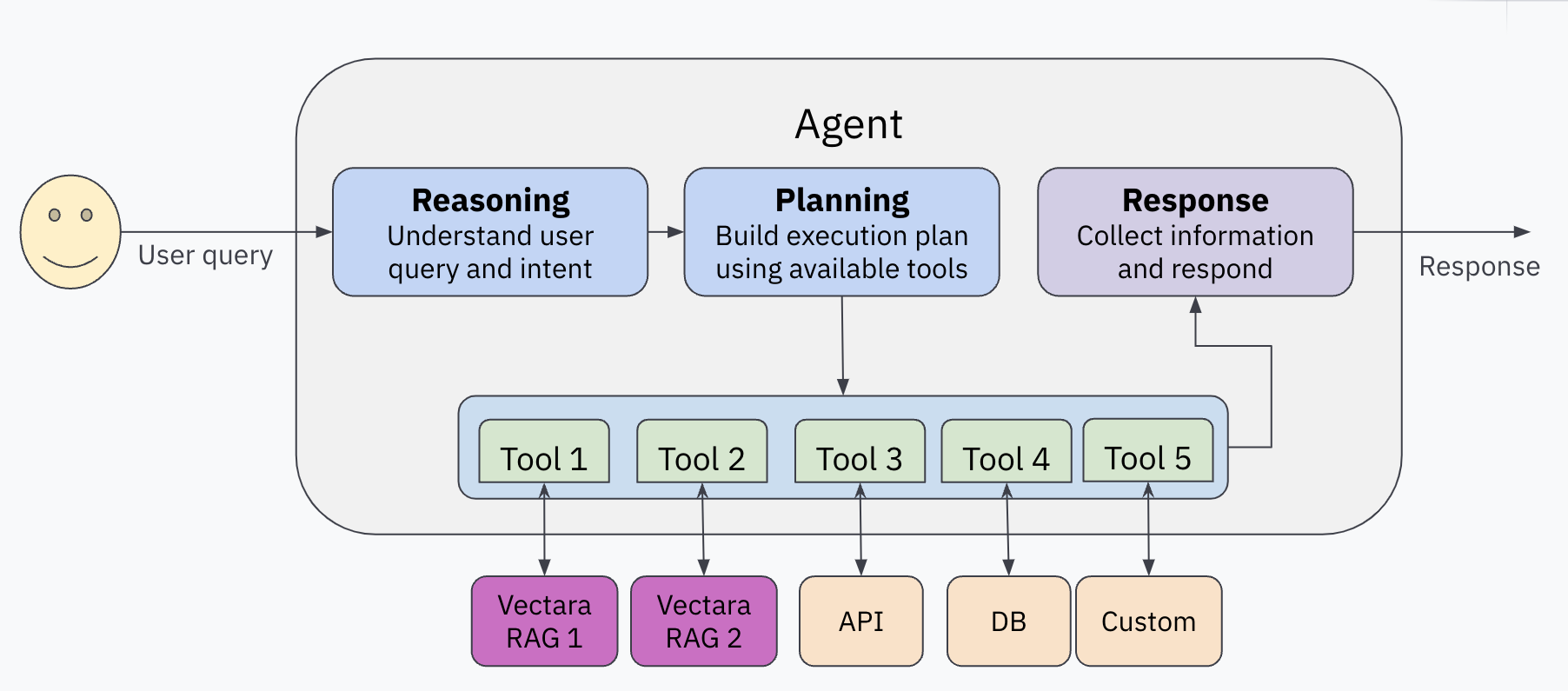
Features
- Enables easy creation of custom AI assistants and agents.
- Create a Vectara RAG tool or search tool with a single line of code.
- Supports
ReAct,OpenAIAgent,LATSandLLMCompileragent types. - Includes pre-built tools for various domains (e.g., finance, legal).
- Integrates with various LLM inference services like OpenAI, Anthropic, Gemini, GROQ, Together.AI, Cohere, Bedrock and Fireworks
- Built-in support for observability with Arize Phoenix
📚 Example AI Assistants
Check out our example AI assistants:
Prerequisites
- Vectara account
- A Vectara corpus with an API key
- Python 3.10 or higher
- OpenAI API key (or API keys for Anthropic, TOGETHER.AI, Fireworks AI, Bedrock, Cohere, GEMINI or GROQ, if you choose to use them)
Installation
pip install vectara-agentic
🚀 Quick Start
1. Initialize the Vectara tool factory
import os
from vectara_agentic.tools import VectaraToolFactory

vec_factory = VectaraToolFactory(
    vectara_api_key=os.environ['VECTARA_API_KEY'],
    vectara_customer_id=os.environ['VECTARA_CUSTOMER_ID'],
    vectara_corpus_key=os.environ['VECTARA_CORPUS_KEY']
)
2. Create a Vectara RAG Tool
A RAG tool calls the full Vectara RAG pipeline to provide summarized responses to queries grounded in data.
from pydantic import BaseModel, Field

years = list(range(2020, 2024))
tickers = {
    "AAPL": "Apple Computer",
    "GOOG": "Google",
    "AMZN": "Amazon",
    "SNOW": "Snowflake",
}

class QueryFinancialReportsArgs(BaseModel):
    query: str = Field(..., description="The user query.")
    year: int | str = Field(..., description=f"The year this query relates to. An integer between {min(years)} and {max(years)} or a string specifying a condition on the year (example: '>2020').")
    ticker: str = Field(..., description=f"The company ticker. Must be a valid ticket symbol from the list {tickers.keys()}.")

query_financial_reports_tool = vec_factory.create_rag_tool(
    tool_name="query_financial_reports",
    tool_description="Query financial reports for a company and year",
    tool_args_schema=QueryFinancialReportsArgs,
    lambda_val=0.005,
    summary_num_results=7,
    # Additional arguments
)
See the docs for additional arguments to customize your Vectara RAG tool.
3. Create other tools (optional)
In addition to RAG tools, you can generate a lot of other types of tools the agent can use. These could be mathematical tools, tools that call other APIs to get more information, or any other type of tool.
See Agent Tools for more information.
4. Create your agent
from vectara_agentic import Agent

agent = Agent(
    tools=[query_financial_reports_tool],
    topic="10-K financial reports",
    custom_instructions="""
        - You are a helpful financial assistant in conversation with a user. Use your financial expertise when crafting a query to the tool, to ensure you get the most accurate information.
        - You can answer questions, provide insights, or summarize any information from financial reports.
        - A user may refer to a company's ticker instead of its full name - consider those the same when a user is asking about a company.
        - When calculating a financial metric, make sure you have all the information from tools to complete the calculation.
        - In many cases you may need to query tools on each sub-metric separately before computing the final metric.
        - When using a tool to obtain financial data, consider the fact that information for a certain year may be reported in the following year's report.
        - Report financial data in a consistent manner. For example if you report revenue in thousands, always report revenue in thousands.
    """
)
See the docs for additional arguments, including agent_progress_callback and query_logging_callback.
5. Run your agent
res = agent.chat("What was the revenue for Apple in 2021?")
print(res.response)
Note that:
vectara-agenticalso supportsachat()and two streaming variantsstream_chat()andastream_chat().- The response types from
chat()andachat()are of typeAgentResponse. If you just need the actual string response it's available as theresponsevariable, or just usestr(). For advanced use-cases you can look at otherAgentResponsevariables such assources.
🧰 Vectara tools
vectara-agentic provides two helper functions to connect with Vectara RAG
create_rag_tool()to create an agent tool that connects with a Vectara corpus for querying.create_search_tool()to create a tool to search a Vectara corpus and return a list of matching documents.
See the documentation for the full list of arguments for create_rag_tool() and create_search_tool(),
to understand how to configure Vectara query performed by those tools.
Creating a Vectara RAG tool
A Vectara RAG tool is often the main workhorse for any Agentic RAG application, and enables the agent to query one or more Vectara RAG corpora.
The tool generated always includes the query argument, followed by 1 or more optional arguments used for
metadata filtering, defined by tool_args_schema.
For example, in the quickstart example the schema is:
class QueryFinancialReportsArgs(BaseModel):
    query: str = Field(..., description="The user query.")
    year: int | str = Field(..., description=f"The year this query relates to. An integer between {min(years)} and {max(years)} or a string specifying a condition on the year (example: '>2020').")
    ticker: str = Field(..., description=f"The company ticker. Must be a valid ticket symbol from the list {tickers.keys()}.")
The query is required and is always the query string.
The other arguments are optional and will be interpreted as Vectara metadata filters.
For example, in the example above, the agent may call the query_financial_reports_tool tool with
query='what is the revenue?', year=2022 and ticker='AAPL'. Subsequently the RAG tool will issue
a Vectara RAG query with the same query, but with metadata filtering (doc.year=2022 and doc.ticker='AAPL').
There are also additional cool features supported here:
- An argument can be a condition, for example year='>2022' translates to the correct metadata filtering condition doc.year>2022
- if
fixed_filteris defined in the RAG tool, it provides a constant metadata filtering that is always applied. For example, if fixed_filter=doc.filing_type='10K'then a query with query='what is the reveue', year=2022 and ticker='AAPL' would translate into query='what is the revenue' with metadata filtering condition of "doc.year=2022 AND doc.ticker='AAPL' and doc.filing_type='10K'"
Note that tool_args_type is an optional dictionary that indicates the level at which metadata filtering
is applied for each argument (doc or part)
Creating a Vectara search tool
The Vectara search tool allows the agent to list documents that match a query. This can be helpful to the agent to answer queries like "how many documents discuss the iPhone?" or other similar queries that require a response in terms of a list of matching documents.
🛠️ Agent Tools at a Glance
vectara-agentic provides a few tools out of the box (see ToolsCatalog for details):
- Standard tools:
summarize_text: a tool to summarize a long text into a shorter summary (uses LLM)rephrase_text: a tool to rephrase a given text, given a set of rephrase instructions (uses LLM) These tools use an LLM and so would use theToolsLLM specified in yourAgentConfig. To instantiate them:
from vectara_agentic.tools_catalog import ToolsCatalog
summarize_text = ToolsCatalog(agent_config).summarize_text
This ensures the summarize_text tool is configured with the proper LLM provider and model as specified in the Agent configuration.
- Legal tools: a set of tools for the legal vertical, such as:
summarize_legal_text: summarize legal text with a certain point of viewcritique_as_judge: critique a legal text as a judge, providing their perspective
- Financial tools: based on tools from Yahoo! Finance:
- tools to understand the financials of a public company like:
balance_sheet,income_statement,cash_flow stock_news: provides news about a companystock_analyst_recommendations: provides stock analyst recommendations for a company.
- Database tools: providing tools to inspect and query a database
list_tables: list all tables in the databasedescribe_tables: describe the schema of tables in the databaseload_data: returns data based on a SQL queryload_sample_data: returns the first 25 rows of a tableload_unique_values: returns the top unique values for a given column
In addition, we include various other tools from LlamaIndex ToolSpecs:
- Tavily search and EXA.AI
- arxiv
- neo4j & Kuzu for Graph DB integration
- Google tools (including gmail, calendar, and search)
- Slack
Note that some of these tools may require API keys as environment variables
You can create your own tool directly from a Python function using the create_tool() method of the ToolsFactory class:
def mult_func(x, y):
    return x * y

mult_tool = ToolsFactory().create_tool(mult_func)
Note: When you define your own Python functions as tools, implement them at the top module level, and not as nested functions. Nested functions are not supported if you use serialization (dumps/loads or from_dict/to_dict).
🛠️ Configuration
Configuring Vectara-agentic
The main way to control the behavior of vectara-agentic is by passing an AgentConfig object to your Agent when creating it.
For example:
agent_config = AgentConfig(
    agent_type = AgentType.REACT,
    main_llm_provider = ModelProvider.ANTHROPIC,
    main_llm_model_name = 'claude-3-5-sonnet-20241022',
    tool_llm_provider = ModelProvider.TOGETHER,
    tool_llm_model_name = 'meta-llama/Llama-3.3-70B-Instruct-Turbo'
)

agent = Agent(
    tools=[query_financial_reports_tool],
    topic="10-K financial reports",
    custom_instructions="You are a helpful financial assistant in conversation with a user.",
    agent_config=agent_config
)
The AgentConfig object may include the following items:
agent_type: the agent type. Valid values areREACT,LLMCOMPILER,LATSorOPENAI(default:OPENAI).main_llm_providerandtool_llm_provider: the LLM provider for main agent and for the tools. Valid values areOPENAI,ANTHROPIC,TOGETHER,GROQ,COHERE,BEDROCK,GEMINIorFIREWORKS(default:OPENAI).main_llm_model_nameandtool_llm_model_name: agent model name for agent and tools (default depends on provider).observer: the observer type; should beARIZE_PHOENIXor if undefined no observation framework will be used.endpoint_api_key: a secret key if using the API endpoint option (defaults todev-api-key)
If any of these are not provided, AgentConfig first tries to read the values from the OS environment.
Configuring Vectara RAG or search tools
When creating a VectaraToolFactory, you can pass in a vectara_api_key, vectara_customer_id, and vectara_corpus_id to the factory.
If not passed in, it will be taken from the environment variables (VECTARA_API_KEY and VECTARA_CORPUS_KEY). Note that VECTARA_CORPUS_KEY can be a single KEY or a comma-separated list of KEYs (if you want to query multiple corpora).
These values will be used as credentials when creating Vectara tools - in create_rag_tool() and create_search_tool().
Setting up a privately hosted LLM
If you want to setup vectara-agentic to use your own self-hosted LLM endpoint, follow the example below
        config = AgentConfig(
            agent_type=AgentType.REACT,
            main_llm_provider=ModelProvider.PRIVATE,
            main_llm_model_name="meta-llama/Meta-Llama-3.1-8B-Instruct",
            private_llm_api_base="http://vllm-server.company.com/v1",
            private_llm_api_key="TEST_API_KEY",
        )
        agent = Agent(agent_config=config, tools=tools, topic=topic,
                      custom_instructions=custom_instructions)
In this case we specify the Main LLM provider to be privately hosted with Llama-3.1-8B as the model.
- The
ModelProvider.PRIVATEspecifies a privately hosted LLM. - The
private_llm_api_basespecifies the api endpoint to use, and theprivate_llm_api_keyspecifies the private API key requires to use this service.
ℹ️ Additional Information
About Custom Instructions for your Agent
The custom instructions you provide to the agent guide its behavior. Here are some guidelines when creating your instructions:
- Write precise and clear instructions, without overcomplicating.
- Consider edge cases and unusual or atypical scenarios.
- Be cautious to not over-specify behavior based on your primary use-case, as it may limit the agent's ability to behave properly in others.
Diagnostics
The Agent class defines a few helpful methods to help you understand the internals of your application.
- The
report()method prints out the agent object’s type, the tools, and the LLMs used for the main agent and tool calling. - The
token_counts()method tells you how many tokens you have used in the current session for both the main agent and tool calling LLMs. This can be helpful if you want to track spend by token.
Serialization
The Agent class supports serialization. Use the dumps() to serialize and loads() to read back from a serialized stream.
Note: due to cloudpickle limitations, if a tool contains Python weakref objects, serialization won't work and an exception will be raised.
Observability
vectara-agentic supports observability via the existing integration of LlamaIndex and Arize Phoenix.
First, set VECTARA_AGENTIC_OBSERVER_TYPE to ARIZE_PHOENIX in AgentConfig (or env variable).
Then you can use Arize Phoenix in three ways:
- Locally.
- If you have a local phoenix server that you've run using e.g.
python -m phoenix.server.main serve, vectara-agentic will send all traces to it. - If not, vectara-agentic will run a local instance during the agent's lifecycle, and will close it when finished.
- In both cases, traces will be sent to the local instance, and you can see the dashboard at
http://localhost:6006
- If you have a local phoenix server that you've run using e.g.
- Hosted Instance. In this case the traces are sent to the Phoenix instances hosted on Arize.
- Go to
https://app.phoenix.arize.com, setup an account if you don't have one. - create an API key and put it in the
PHOENIX_API_KEYenvironment variable - this indicates you want to use the hosted version. - To view the traces go to
https://app.phoenix.arize.com.
- Go to
Now when you run your agent, all call traces are sent to Phoenix and recorded.
In addition, vectara-agentic also records FCS (factual consistency score, aka HHEM) values into Arize for every Vectara RAG call. You can see those results in the Feedback column of the arize UI.
🌐 API Endpoint
vectara-agentic can be easily hosted locally or on a remote machine behind an API endpoint, by following theses steps:
Step 1: Setup your API key
Ensure that you have your API key set up as an environment variable:
export VECTARA_AGENTIC_API_KEY=<YOUR-ENDPOINT-API-KEY>
if you don't specify an Endpoint API key it uses the default "dev-api-key".
Step 2: Start the API Server
Initialize the agent and start the FastAPI server by following this example:
from vectara_agentic.agent import Agent
from vectara_agentic.agent_endpoint import start_app
agent = Agent(...)            # Initialize your agent with appropriate parameters
start_app(agent)
You can customize the host and port by passing them as arguments to start_app():
- Default: host="0.0.0.0" and port=8000. For example:
start_app(agent, host="0.0.0.0", port=8000)
Step 3: Access the API Endpoint
Once the server is running, you can interact with it using curl or any HTTP client. For example:
curl -G "http://<remote-server-ip>:8000/chat" \
--data-urlencode "message=What is Vectara?" \
-H "X-API-Key: <YOUR-ENDPOINT-API-KEY>"
🤝 Contributing
We welcome contributions! Please see our contributing guide for more information.
📝 License
This project is licensed under the Apache 2.0 License. See the LICENSE file for details.
📞 Contact
- Website: vectara.com
- Twitter: @vectara
- GitHub: @vectara
- LinkedIn: @vectara
- Discord: Join our community
Release history Release notifications | RSS feed


Download files
Download the file for your platform. If you're not sure which to choose, learn more about installing packages.
Source Distribution
Built Distribution
Filter files by name, interpreter, ABI, and platform.
If you're not sure about the file name format, learn more about wheel file names.
Copy a direct link to the current filters
File details
Details for the file vectara_agentic-0.2.1.tar.gz.
File metadata
- Download URL: vectara_agentic-0.2.1.tar.gz
- Upload date:
- Size: 50.3 kB
- Tags: Source
- Uploaded using Trusted Publishing? No
- Uploaded via: twine/6.1.0 CPython/3.13.2
File hashes
| Algorithm | Hash digest | |
|---|---|---|
| SHA256 |
b8578a2d25ea1c295938aad7e86a898e636c5897be5565aa76d61683f9bb2131
|
|
| MD5 |
5b7c324404446285e5727b66ec16cbec
|
|
| BLAKE2b-256 |
220e206f7201b6a44e8ff228fb775c21c3752118ebb792fdcb11cd71c75fd98f
|
File details
Details for the file vectara_agentic-0.2.1-py3-none-any.whl.
File metadata
- Download URL: vectara_agentic-0.2.1-py3-none-any.whl
- Upload date:
- Size: 47.9 kB
- Tags: Python 3
- Uploaded using Trusted Publishing? No
- Uploaded via: twine/6.1.0 CPython/3.13.2
File hashes
| Algorithm | Hash digest | |
|---|---|---|
| SHA256 |
27ab29927ffcc00f14b46930df5dcb033077f14240743f9be72c36520a444a49
|
|
| MD5 |
26f667fc0844ed38056c89f4139d55bf
|
|
| BLAKE2b-256 |
78068fc05d809af9ceb3fbe0ea588aa4338b2020eeba06aebfceb18cc7688ccc
|






