
Vector Graph RAG
Graph RAG with pure vector search — no graph database needed.






💡 Encode entities and relations as vectors in Milvus, retrieve multi-hop evidence with single-pass generative reranking or two-stage Jev scoring, without an iterative search loop.
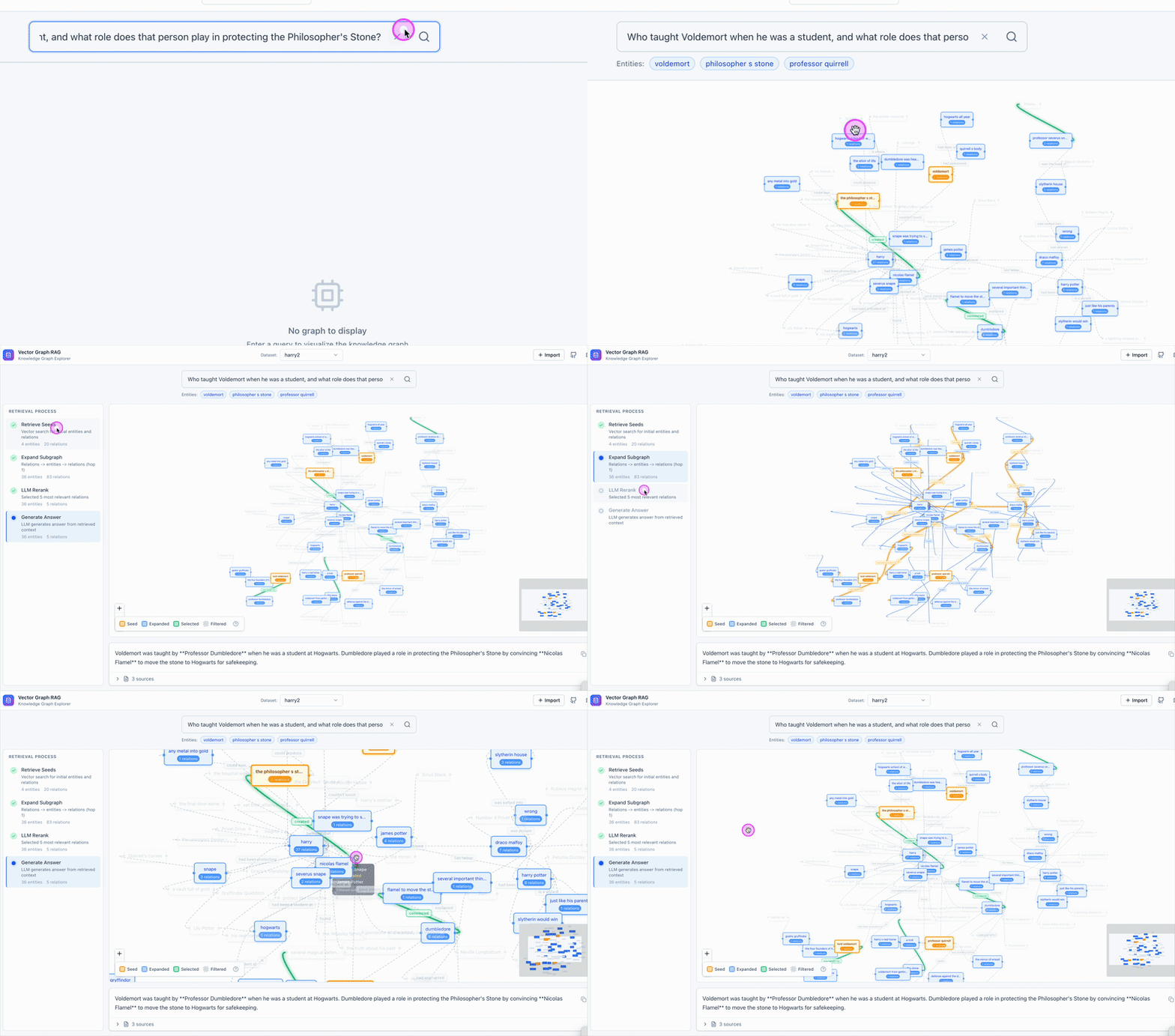
What’s New
- Two-stage Jev retrieval reaches the quality–latency Pareto frontier. See the evaluation results.
✨ Features
- No Graph Database Required — Pure vector search with Milvus, no Neo4j or other graph databases needed
- Configurable Reranking — Single-pass generative reranking or two-stage Jev relation and passage scoring
- Knowledge-Intensive Friendly — Optimized for domains with dense factual content: legal, finance, medical, literature, etc.
- Zero Configuration — Uses Milvus Lite by default, works out of the box with a single file
- Multi-hop Reasoning — Subgraph expansion enables complex multi-hop question answering
- State-of-the-Art Performance — Two-stage Jev leads the compared baselines on MuSiQue and 2Wiki and reaches the quality–latency Pareto frontier. See the latest results and historical three-dataset evaluation.
📦 Installation
pip install vector-graph-rag
# or
uv add vector-graph-rag
With document loaders (PDF, DOCX, web pages)
pip install "vector-graph-rag[loaders]"
# or
uv add "vector-graph-rag[loaders]"
With additional embedding providers
pip install "vector-graph-rag[hf]"       # HuggingFace transformers
pip install "vector-graph-rag[ollama]"   # Ollama
pip install "vector-graph-rag[jina]"     # Jina AI
pip install "vector-graph-rag[all]"      # all optional providers
# or
uv add "vector-graph-rag[all]"
With OpenTelemetry tracing
pip install "vector-graph-rag[observability]"
# or
uv add "vector-graph-rag[observability]"
🚀 Quick Start
from vector_graph_rag import VectorGraphRAG

rag = VectorGraphRAG()  # reads OPENAI_API_KEY from environment

rag.rebuild_texts([
    "Albert Einstein developed the theory of relativity.",
    "The theory of relativity revolutionized our understanding of space and time.",
])

result = rag.query("What did Einstein develop?")
print(result.answer)
Note: Set
OPENAI_API_KEYenvironment variable before running.
📄 With pre-extracted triplets — click to expand
Skip LLM extraction if you already have knowledge graph triplets:
rag.rebuild_documents_with_triplets([
    {
        "passage": "Einstein developed relativity at Princeton.",
        "triplets": [
            ["Einstein", "developed", "relativity"],
            ["Einstein", "worked at", "Princeton"],
        ],
    },
])
🔄 Incremental document updates — click to expand
Use upsert_documents_by_source() when a source file, message, or page is
created or modified. In Vector Graph RAG, a Document is a passage/chunk; the
source object is identified by metadata["source"] or the explicit source
argument. The method replaces only that source's chunks and graph references.
Source-level writes are not transactionally atomic, but the same upsert/delete
operation can be retried after an interruption to converge the source back to a
consistent state.
See the Incremental Updates guide for parser
integration, source key design, and retry recommendations.
from langchain_core.documents import Document

rag.upsert_documents_by_source(
    documents=[
        Document(
            page_content="Einstein developed relativity at Princeton.",
            metadata={
                "source": "file:file-123",
                "triplets": [
                    ["Einstein", "developed", "relativity"],
                    ["Einstein", "worked at", "Princeton"],
                ],
            },
        ),
    ],
    extract_triplets=False,
)

rag.delete_documents_by_source("file:file-123")
Migration note: v0.1.5 exposed
upsert_documents(document_id=...)anddelete_documents(document_id). These names were removed in v0.2.0 becauseDocumentmeans passage/chunk in this project. Use the*_by_source()APIs shown above.
The legacy add_* ingestion helpers rebuild the full knowledge base and are planned
for removal in v1.0.0. For explicit full refreshes, use rebuild_texts(),
rebuild_documents(), or rebuild_documents_with_triplets().
📈 OpenTelemetry tracing — click to expand
Vector Graph RAG can emit OpenTelemetry spans for ingestion, loaders, embeddings, Milvus operations, retrieval, and generation. Configure the OpenTelemetry SDK/exporter in your application, then attach request context around RAG calls:
from vector_graph_rag import VectorGraphRAG, observability_context

rag = VectorGraphRAG(collection_prefix="my_project")

with observability_context(
    request_id="req-123",
    tenant_id="tenant-a",
    graph_name="my_project",
    source="file-123",
):
    rag.upsert_documents_by_source(chunks, source="file-123")
The built-in spans avoid document text, prompts, query text, generated answers, filters, and full URLs by default. See the Observability guide for setup details.
🌐 Import from URLs and files — click to expand
from vector_graph_rag import VectorGraphRAG
from vector_graph_rag.loaders import DocumentImporter

# Import from URLs, PDFs, DOCX, etc. (with automatic chunking)
importer = DocumentImporter(chunk_size=1000, chunk_overlap=200)
result = importer.import_sources([
    "https://en.wikipedia.org/wiki/Albert_Einstein",
    "/path/to/document.pdf",
    "/path/to/report.docx",
])

rag = VectorGraphRAG(milvus_uri="./my_graph.db")
rag.rebuild_documents(result.documents, extract_triplets=True)

result = rag.query("What did Einstein discover?")
print(result.answer)
⚙️ Custom configuration — click to expand
rag = VectorGraphRAG(
    milvus_uri="./my_data.db",          # or remote Milvus / Zilliz Cloud
    llm_model="gpt-4o",
    embedding_provider="openai",
    embedding_model="text-embedding-3-large",
    collection_prefix="my_project",     # isolate multiple datasets
)
All settings can also be configured via environment variables with VGRAG_ prefix or a .env file:
VGRAG_LLM_MODEL=gpt-4o
VGRAG_EMBEDDING_PROVIDER=openai
VGRAG_EMBEDDING_MODEL=text-embedding-3-large
VGRAG_MILVUS_URI=http://localhost:19530
📖 Full Python API reference → Python API docs
🔬 How It Works
Indexing:
Documents → Triplet Extraction (LLM) → Entities + Relations → Embedding → Milvus
Query:
Question → Entity Extraction → Vector Search → Subgraph Expansion → LLM Reranking → Answer
Example: "What did Einstein develop?"
- Extract entity:
Einstein - Vector search finds similar entities and relations in Milvus
- Subgraph expansion collects neighboring relations
- Single-pass LLM reranking selects the most relevant passages
- Generate answer from selected passages
📖 Detailed pipeline walkthrough with diagrams → How It Works · Design Philosophy
📊 Evaluation Results
Historical evaluation — before September 2026
Before introducing Jev, we evaluated Vector Graph RAG on three multi-hop QA benchmarks (Recall@5):
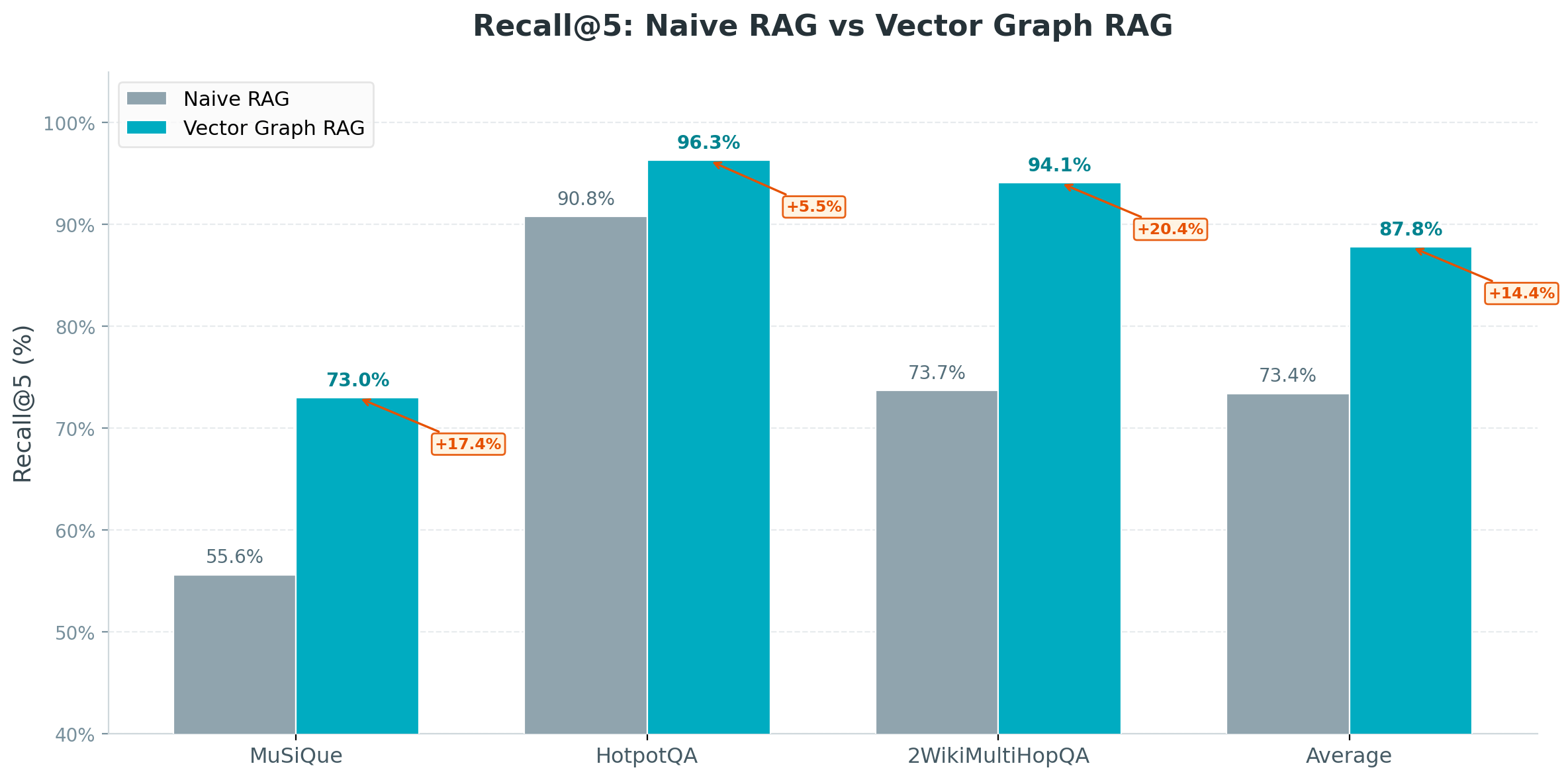
| Method | MuSiQue | HotpotQA | 2WikiMultiHopQA | Average |
|---|---|---|---|---|
| Naive RAG | 55.6% | 90.8% | 73.7% | 73.4% |
| IRCoT + HippoRAG¹ | 57.6% | 83.0% | 93.9% | 78.2% |
| HippoRAG 2² | 74.7% | 96.3% | 90.4% | 87.1% |
| Vector Graph RAG | 73.0% | 96.3% | 94.1% | 87.8% |
¹ HippoRAG (NeurIPS 2024) ² HippoRAG 2 (2025)
📖 Detailed analysis and reproduction steps → Evaluation
Latest evaluation — October 2026: two-stage Jev
Two-stage Jev reaches the quality–latency Pareto frontier.
86.07% average Recall@5, the highest among the compared methods, with 3.13 seconds of additional model-call latency. On MuSiQue and 2Wiki (1,000 questions each), two-stage Jev reaches the Pareto frontier under the reference latency estimates. This two-dataset result is separate from the historical three-dataset average above.

See Evaluation Results for the gains over relation-only Jev and other baselines, timing details and reproduction instructions.
🗄️ Milvus Backend
Just change milvus_uri to switch between deployment modes:
Milvus Lite (default) — zero config, single-process, data stored in a local file. Great for prototyping and small datasets:
rag = VectorGraphRAG(milvus_uri="./my_graph.db") # just works
⭐ Zilliz Cloud — fully managed, free tier available — sign up 👇:
rag = VectorGraphRAG(
    milvus_uri="https://in03-xxx.api.gcp-us-west1.zillizcloud.com",
    milvus_token="your-api-key",
)
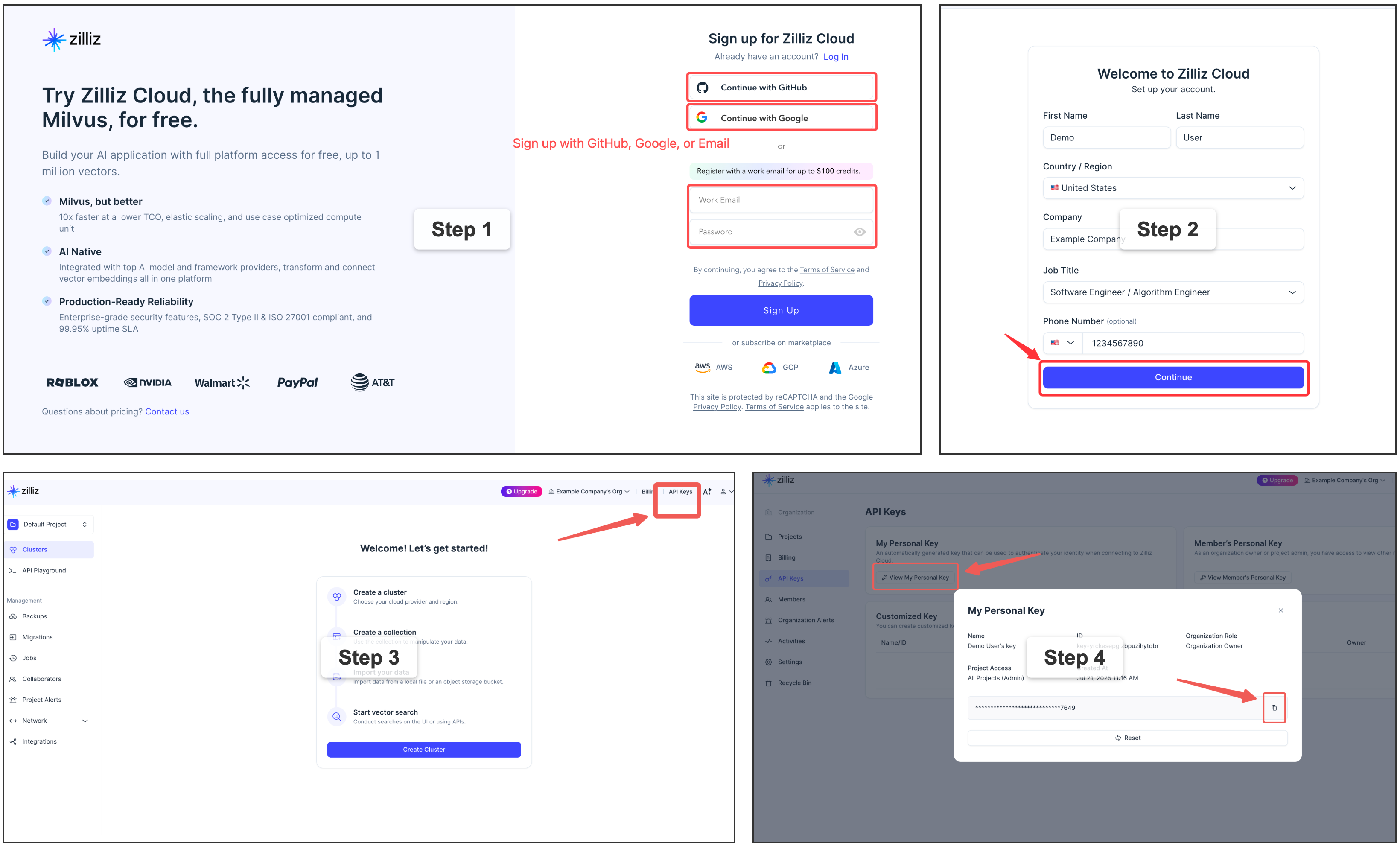
⭐ Sign up for a free Zilliz Cloud cluster
You can sign up on Zilliz Cloud to get a free cluster and API key.
Self-hosted Milvus Server (Docker) — for advanced users
If you need a dedicated Milvus instance for multi-user or team environments, you can deploy Milvus standalone with Docker Compose. This requires Docker and some infrastructure knowledge. See the official installation guide for detailed steps.
rag = VectorGraphRAG(milvus_uri="http://localhost:19530")
🖥️ Frontend & REST API
Vector Graph RAG includes a React-based frontend for interactive graph visualization and a FastAPI backend.
# Backend
uv sync --extra api
uv run uvicorn vector_graph_rag.api.app:app --host 0.0.0.0 --port 8000

# Frontend
cd frontend && npm install && npm run dev
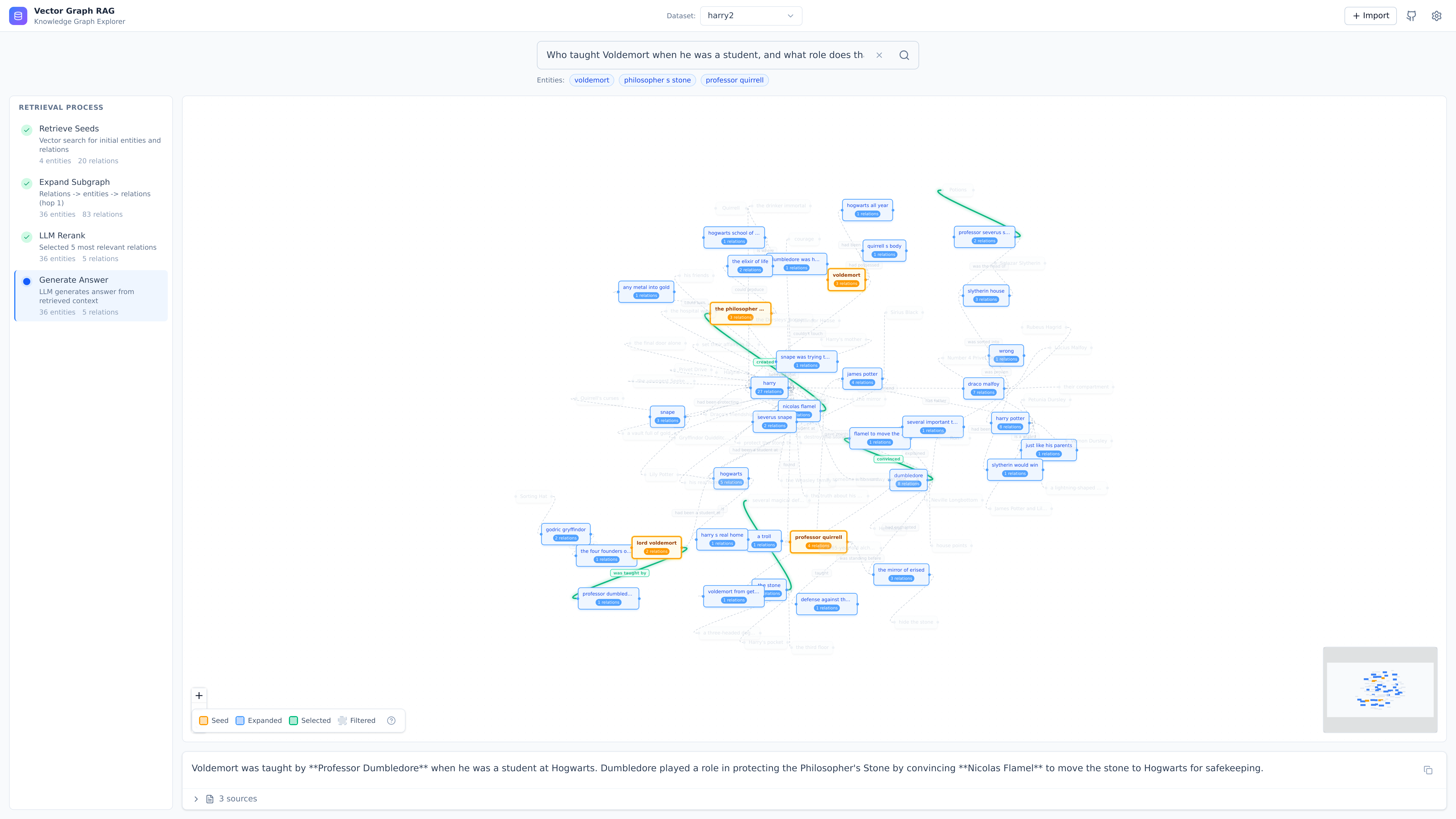
| Endpoint | Method | Description |
|---|---|---|
/api/health |
GET | Health check |
/api/graphs |
GET | List available graphs |
/api/graph/{name}/stats |
GET | Get graph statistics |
/api/query |
POST | Query the knowledge graph |
/api/documents |
POST | Add documents |
/api/import |
POST | Import from URLs/paths |
/api/upload |
POST | Upload files |
See API docs at http://localhost:8000/docs after starting the server.
📖 Full endpoint reference → REST API docs · Frontend guide
📚 Links
- Documentation — full guides, API reference, and architecture details
- How It Works — pipeline walkthrough with diagrams
- Design Philosophy — why pure vector search, no graph DB
- Milvus — the vector database powering Vector Graph RAG
- FAQ — common questions and troubleshooting
Contributing
Bug reports, feature requests, and pull requests are welcome! For questions and discussions, join us on Discord.
📄 License
1 maintainer

Metadata
1 maintainer
Release files for vector-graph-rag 0.3.0
For a detailed explanation of source distributions (sdists) and built distributions (wheels), please see the package formats documentation.
Source distribution (sdist)
| File | Size | Uploaded | |
|---|---|---|---|
| vector_graph_rag-0.3.0.tar.gz | 34.9 MB | Details |
Built distribution (wheel)
| File | Interpreter | ABI | Platform | Reset |
|---|---|---|---|---|
| vector_graph_rag-0.3.0-py3-none-any.whl | Python 3 | none | any | Details |
Total release size: 35.0 MB
Release files / vector_graph_rag-0.3.0.tar.gz
| Download URL | vector_graph_rag-0.3.0.tar.gz |
|---|---|
| Size | 34.9 MB |
| Tags | Source |
|
SHA-256 checksum How to use checksums |
55b4639fdd1b1cc5da2e8dfa4cb427241c4deab3c03401e0899fc2967be4bcc3
|
|
BLAKE2b-256 checksum How to use checksums |
51350976c4c73b58a217526b73b54eb314c62e1d9a97690e64cb2a845b0f282a
|
| Upload date | |
|
Uploaded using Trusted Publishing? What is trusted publishing? |
Yes |
| Uploaded via |
twine/7.0.0 CPython/3.13.14
|
Provenance
Provenance describes where a file came from. On PyPI, provenance is shared via attestations, which provide a verifiable record of the build or publishing details. View details, limitations and caveats.


PyPI Publish Attestation
PyPI verified that this artifact, at this checksum, originated from the publisher listed below.
Signed by GitHub Actions, verified by PyPI on Oct 9, 2026.
Transparency logRelease files / vector_graph_rag-0.3.0-py3-none-any.whl
| Download URL | vector_graph_rag-0.3.0-py3-none-any.whl |
|---|---|
| Size | 104.1 kB |
| Tags | Python 3 |
|
SHA-256 checksum How to use checksums |
fd01ee204c8073f4e336a00a24c23f9b702ccd24cc2ce349341b48c1e088cd1e
|
|
BLAKE2b-256 checksum How to use checksums |
caa6f17222f9c2d769ae1cd7727dfaf1124ec813fe99b44fa6135734eb876486
|
| Upload date | |
|
Uploaded using Trusted Publishing? What is trusted publishing? |
Yes |
| Uploaded via |
twine/7.0.0 CPython/3.13.14
|
Provenance
Provenance describes where a file came from. On PyPI, provenance is shared via attestations, which provide a verifiable record of the build or publishing details. View details, limitations and caveats.
PyPI Publish Attestation
PyPI verified that this artifact, at this checksum, originated from the publisher listed below.
Signed by GitHub Actions, verified by PyPI on Oct 9, 2026.
Transparency log













