





Vector Hub is a library for publication, discovery, and consumption of State-of-the-art models to turn data into vectors. (Text2Vec, Image2Vec, Video2Vec, Face2Vec, Bert2Vec, Inception2Vec, Code2Vec, LegalBert2Vec, etc)
There are many ways to extract vectors from data. This library aims to bring in all the state of the art models in a simple manner to vectorise your data easily.
Vector Hub provides:
- A low barrier of entry for practitioners (using common methods)
- Vectorise rich and complex data types like: text, image, audio, etc in 3 lines of code
- Retrieve and find information about a model
- An easy way to handle dependencies easily for different models
- Universal format of installation and encoding (using a simple
encodemethod).
In order to provide an easy way for practitioners to quickly experiment, research and build new models and feature vectors, we provide a streamlined way to obtain vectors through our encode method.
There are thousands of _____2Vec models across different use cases/domains. Vectorhub allows people to aggregate their work and share it with the community.
Think transformers for NLP, Sci-kit Learn for data scientists.
Quickstart:
Intro to Vectors | Model Hub | Google Colab Quickstart | Python Documentation
Installation:
To get started quickly install vectorhub:
pip install vectorhub
Alternatively if you require more up-to-date models/features and are okay if it is not fully stable, you can install the nightly version of VectorHub using:
pip install vectorhub-nightly
After this, our built-in dependency manager will tell you what to install when you instantiate a model. The main types of installation options can be found here: https://hub.getvectorai.com/
To install different types of models:
# To install transformer requirements
pip install vectorhub[text-encoder-transformers]
To install all models at once (note: this can take a while! We recommend searching for an interesting model on the website such as USE2Vec or BitMedium2Vec and following the installation line or see examples below.)
pip install vectorhub[all]
We recommend activating a new virtual environment and then installing using the following:
python3 -m pip install virtualenv
python3 -m virtualenv env
source env/bin/activate
python3 -m pip install --upgrade pip
python3 -m pip install vectorhub[all]
Leverage Tensorflow Hub's powerful models to create vectors
Vectorise your image in 3 lines of code using Google's Big Image Transfer model:
from vectorhub.encoders.image.tfhub import BitSmall2Vec
image_encoder = BitSmall2Vec()
image_encoder.encode('https://www.google.com/images/branding/googlelogo/2x/googlelogo_color_92x30dp.png')
[0.47, 0.83, 0.148, ...]
Vectorise your text in 3 lines of code using Google's BERT model:
from vectorhub.encoders.text.tfhub import Bert2Vec
text_encoder = Bert2Vec()
text_encoder.encode('This is sparta!')
[0.47, 0.83, 0.148, ...]
Vectorise your question and answer in 3 lines of code using Google's USE QA model:
from vectorhub.bi_encoders.text.tfhub import UseQA2Vec
text_encoder = UseQA2Vec()
text_encoder.encode_question('Who is sparta!')
[0.47, 0.83, 0.148, ...]
text_encoder.encode_answer('Sparta!')
[0.47, 0.83, 0.148, ...]
Leverage HuggingFace Transformer's Albert
from vectorhub.encoders.text import Transformer2Vec
text_encoder = Transformer2Vec('albert-base-v2')
text_encoder.encode('This is sparta!')
[0.47, 0.83, 0.148, ...]
Leverage Facebook Dense Passage Retrieval
from vectorhub.bi_encoders.qa.torch_transformers import DPR2Vec
text_encoder = DPR2Vec()
text_encoder.encode_question('Who is sparta!')
[0.47, 0.83, 0.148, ...]
text_encoder.encode_answer('Sparta!')
[0.47, 0.83, 0.148, ...]
Index and search your vectors easily on the cloud using 1 line of code!
#pip install vectorhub[encoders-text-tfhub]
from vectorhub.encoders.text.tfhub import USE2VEc
encoder = USE2Vec()

# You can request an api_key simply by using your username and email.
username = '<your username>'
email = '<your email>'
api_key = encoder.request_api_key(username, email)

# Index in 1 line of code
items = ['dogs', 'toilet', 'paper', 'enjoy walking']
encoder.add_documents(user, api_key, items)

# Search in 1 line of code and get the most similar results.
encoder.search('basin')
Add metadata to your search (information about your vectors)
# Add the number of letters of each word
metadata = [7, 6, 5, 12]
encoder.add_documents(user, api_key, items=items, metadata=metadata)
Using a document-orientated-approach instead:
from vectorhub.encoders.text import Transformer2Vec
encoder = Transformer2Vec('bert-base-uncased')

from vectorai import ViClient
vi_client = ViClient(username, api_key)
docs = vi_client.create_sample_documents(10)
vi_client.insert_documents('collection_name_here', docs, models={'color': encoder.encode})

# Now we can search through our collection
vi_client.search('collection_name_here', field='color_vector_', vector=encoder.encode('purple'))
Easily access information with your model!
# If you want to additional information about the model, you can access the information below:
text_encoder.definition.repo
text_encoder.definition.description
# If you want all the information in a dictionary, you can call:
text_encoder.definition.create_dict() # returns a dictionary with model id, description, paper, etc.
Turn Off Error-Catching
By default, if encoding errors, it returns a vector filled with 1e-7 so that if you are encoding and then inserting then it errors out. However, if you want to turn off automatic error-catching in VectorHub, simply run:
import vectorhub
vectorhub.options.set_option('catch_vector_errors', False)
If you want to turn it back on again, run:
vectorhub.options.set_option('catch_vector_errors', True)
Instantiate our auto_encoder class as such and use any of the models!
from vectorhub.auto_encoder import AutoEncoder
encoder = AutoEncoder.from_model('text/bert')
encoder.encode("Hello vectorhub!")
[0.47, 0.83, 0.148, ...]
You can choose from our list of models:
['text/albert', 'text/bert', 'text/labse', 'text/use', 'text/use-multi', 'text/use-lite', 'text/legal-bert', 'audio/fairseq', 'audio/speech-embedding', 'audio/trill', 'audio/trill-distilled', 'audio/vggish', 'audio/yamnet', 'audio/wav2vec', 'image/bit', 'image/bit-medium', 'image/inception', 'image/inception-v2', 'image/inception-v3', 'image/inception-resnet', 'image/mobilenet', 'image/mobilenet-v2', 'image/resnet', 'image/resnet-v2', 'qa/use-multi-qa', 'qa/use-qa', 'qa/dpr', 'qa/lareqa-qa']
What are Vectors?
Common Terminologys when operating with Vectors:
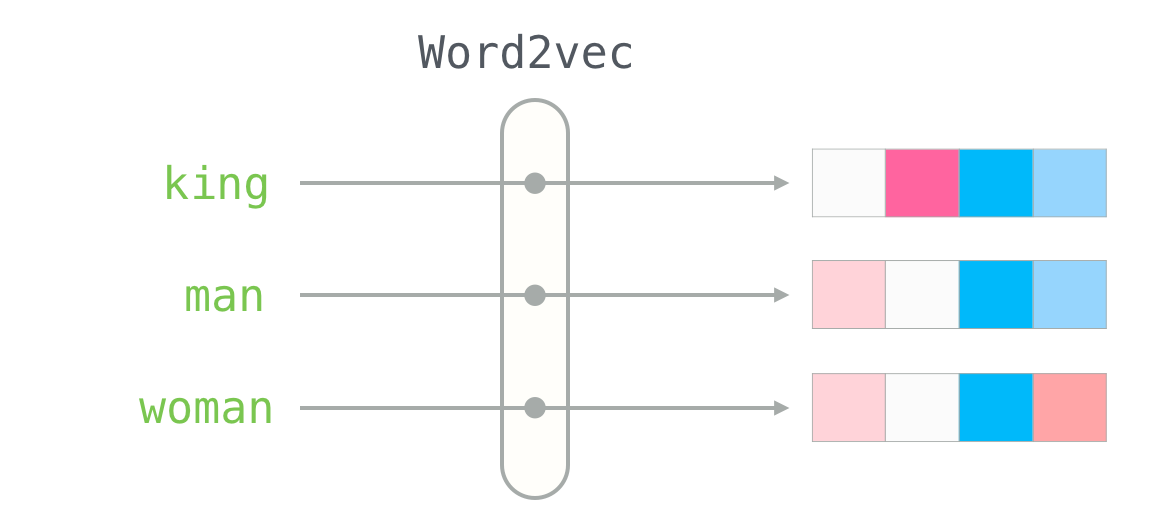
- Vectors (aka. Embeddings, Encodings, Neural Representation) ~ It is a list of numbers to represent a piece of data. E.g. the vector for the word "king" using a Word2Vec model is [0.47, 0.83, 0.148, ...]
- ____2Vec (aka. Models, Encoders, Embedders) ~ Turns data into vectors e.g. Word2Vec turns words into vector
How can I use vectors?
Vectors have a broad range of applications. The most common use case is to perform semantic vector search and analysing the topics/clusters using vector analytics.
If you are interested in these applications, take a look at Vector AI.
How can I obtain vectors?
- Taking the outputs of layers from deep learning models
- Data cleaning, such as one hot encoding labels
- Converting graph representations to vectors
How To Upload Your 2Vec Model
Read here if you would like to contribute your model!
Philosophy
The goal of VectorHub is to provide a flexible yet comprehensive framework that allows people to easily be able to turn their data into vectors in whatever form the data can be in. While our focus is largely on simplicity, customisation should always be an option and the level of abstraction is always up model-uploader as long as the reason is justified. For example - with text, we chose to keep the encoding at the text level as opposed to the token level because selection of text should not be applied at the token level so practitioners are aware of what texts go into the actual vectors (i.e. instead of ignoring a '[next][SEP][wo][##rd]', we are choosing to ignore 'next word' explicitly. We think this will allow practitioners to focus better on what should matter when it comes to encoding.
Similarly, when we are turning data into vectors, we convert to native Python objects. The decision for this is to attempt to remove as many dependencies as possible once the vectors are created - specifically those of deep learning frameworks such as Tensorflow/PyTorch. This is to allow other frameworks to be built on top of it.
Team
This library is maintained by the Vector AI - your go-to solution for Production-Ready AI development. If you are interested in using our API for vector search, visit https://vctr.ai or if you are interested in using Vector AI API, check out https://api.vctr.ai or our Github package https://gh.vctr.ai
Credit:
This library wouldn't exist if it weren't for the following libraries and the incredible machine learning community that releases their state-of-the-art models:
- https://github.com/huggingface/transformers
- https://github.com/tensorflow/hub
- https://github.com/pytorch/pytorch
- Word2Vec image - Alammar, Jay (2018). The Illustrated Transformer [Blog post]. Retrieved from https://jalammar.github.io/illustrated-transformer/
- https://github.com/UKPLab/sentence-transformers
2 maintainers


Metadata
2 maintainers
Release files for vectorhub-nightly 1.1.6.2021.3.3.0.9.4.768459
For a detailed explanation of source distributions (sdists) and built distributions (wheels), please see the package formats documentation.
Source distribution (sdist)
| File | Size | Uploaded | Provenance | |
|---|---|---|---|---|
| vectorhub-nightly-1.1.6.2021.3.3.0.9.4.768459.tar.gz | 72.3 kB | Without provenance | Details |
Built distribution (wheel)
| File | Interpreter | ABI | Platform | Reset |
|---|---|---|---|---|
| vectorhub_nightly-1.1.6.2021.3.3.0.9.4.768459-py3-none-any.whl | Python 3 | none | any | Details |
Total release size: 217.0 kB
Release files / vectorhub-nightly-1.1.6.2021.3.3.0.9.4.768459.tar.gz
| Download URL | vectorhub-nightly-1.1.6.2021.3.3.0.9.4.768459.tar.gz |
|---|---|
| Size | 72.3 kB |
| Tags | Source |
|
SHA-256 checksum How to use checksums |
687edd72b8ceef0766266c0eda355fc704fb4411117e81a2d4e238a1b4b081f8
|
|
BLAKE2b-256 checksum How to use checksums |
e4680a44d69b2170e21cac33bcfb237b0aecf3e742b7ab5cd981f16970d13871
|
| Upload date | |
|
Uploaded using Trusted Publishing? What is trusted publishing? |
No |
| Uploaded via |
twine/3.3.0 pkginfo/1.7.0 requests/2.25.1 setuptools/49.2.1 requests-toolbelt/0.9.1 tqdm/4.58.0 CPython/3.9.1
|
Release files / vectorhub_nightly-1.1.6.2021.3.3.0.9.4.768459-py3-none-any.whl
| Download URL | vectorhub_nightly-1.1.6.2021.3.3.0.9.4.768459-py3-none-any.whl |
|---|---|
| Size | 144.7 kB |
| Tags | Python 3 |
|
SHA-256 checksum How to use checksums |
c48aca2447ec3079a02ca3791c9080e201b7ec793daf9a87d00ee1ddc9352df5
|
|
BLAKE2b-256 checksum How to use checksums |
5be796d416c3ef9e5f21587bc1e8b1bdd87f38882d643db0aa3bd5513d0db96f
|
| Upload date | |
|
Uploaded using Trusted Publishing? What is trusted publishing? |
No |
| Uploaded via |
twine/3.3.0 pkginfo/1.7.0 requests/2.25.1 setuptools/49.2.1 requests-toolbelt/0.9.1 tqdm/4.58.0 CPython/3.9.1
|
Security for vectorhub-nightly 1.1.6.2021.3.3.0.9.4.768459
Provenance
Provenance describes where a file came from. On PyPI, provenance is shared via attestations, which provide a verifiable record of the build or publishing details. View details, limitations and caveats.
No provenance found
None of the files in this release were uploaded with provenance metadata.
A note on package security
PyPI is a repository for distributing packages, not a service for auditing them. While third-party security researchers and our staff do their best to detect and remove malicious packages, PyPI cannot guarantee the quality, security or suitability of any given package.














